Problems? See this thread at archive.org.
I only use it for going out not at home much very little, i only paid like 50 bucks for it lol My Asus had heatsink problems and over heated so best buy gave me a gift card for the machine 1,192.11 cents, i only paid the difference of 50 dollars so whatever. It's pretty good for gaming, hard to find a machine with 512Vram in this size besdies the xps 1340, and some Asus machines.
-
You can't adjust settings for washed out colors when viewed at a slightly different angel. My point is that even a Dell SXPS 13, which can be had for way less @ dell outlet, has a screen light years ahead of the SR. You seriously have to see the WLED to actually believe it. It's that good. At first I thought my 22inch LCD screen was good, but man...the SXPS 13's WLED blew it out the water. The only advantage I can see with the SR is that it's rather light weight, rather silent, and has a decent GPU. The battery life is only slightly better than my old SXPS. I mainly bought this lapy just for the GPU and weight.
But seriously tho, has ANYONE found a fix for the battery wobble? I thought about buying some gray Playdo to cushion out the gaps lol -
Gray play-do sounds like a good idea lol.
As for the screen, I really dont know what ppl are complaining about (maybe they have older series) but the newest panels on the 4xx series are absolutely great. Now They're not the best (in my eyes that goes to the Z series). As for whoever said LG panels are nice? Every LG panel i've come near looks like crap in comparison to anything... as for Dell's on the SXPS 13, its nice, but overall i prefer the SR. -
I like the weight but my friend has a LG LED Latitude E6400 and it is amazingly white! The xps 1340 has now the 210 GPU 512VRAM, but the machine does really have a decent graphics card.
-
ok, the wobbling is no more! I stuck two small pieces of paper on both sides of the battery
 I don't see how making the round thingy on both sides of the battery slot larger could kill Sony's profit. Oh, and my SR is the SR430, so it's not archaic. The sxps 13's WLED is one of those screens that you have to see it to believe it.
-
My 3 week old VGN SR490 does the exact same thing. I have the high-capacity battery and it bangs around like $10 kids toy. For $1500 I expected a lot more from my first VAIO.
My two complaints are the really poor built-in speakers, the "loose" battery and the cheap feeling case. -
freedom16 thats personal preference, u dont like the way the screen looks, but it is far one of the better ones, according to most ppl who purchased one, me including, and most reviews. 13 inch screens just do not compare to this one unless its a Z, again a sony, and only difference between Z would really be 2 led lights instead of one for back light and sr having a smaller resolution, which most ppl for this type of screen size is a good thing.
-
Funny4life It is a marvelous screen for it's size no doubt at all, i guess i will have to get use it. One thing this machine needs is a backlit keyboard this is why i won't buy Sony as a main machine. The Z series screen is really difference in size but with the resolution people might have problems seeing the fonts and when writing papers or notes. Yes most LED's have one light.
-
No problems with the battery although i still can't seem to find the high capacity battery (via search on ebay for vaio sr extended battery). I second that poor built in speakers seriously ? -
Bought the extended battery when I purchased the computer from sonystyle.com. It was discounted about $50 or $100 when I built my own cofig.
I did not get the standard battery with the order so I ordered one of those on eBay for about $85 delivered! More than $100 savings compared to the $199 price on sonystyle.com
Keep checking eBay for the extended battery. It'll show up soon -
anyone know how to troubleshoot an SD card not working, i pop it in and it doesnt show up in my computer
in computer disk management it shows up as unallocated -
Is your notebook on battery? (It could be because of power setting- to shut off memory card readers)
Try to look for it in Device Manager. (uninstall&reinstall) -
tried....nothing
the driver worked fine out of the windows 7 install. its after using the sony driver that things got messed up
i use a mouse mostly, but when im at school during a lecture i have to use the pad and its annoying that i can't scroll
how do i delete the driver and just let windows do a search to replace it?
the biggest issue this is giving me is sensitivity. when i'm typing sometimes my left hand comes into contact with the thing and it screws up my whole paragraph -
Damn it Sony!
Whenever I try to install driver from Sony (BIOS. notebook untilities) it says
"This update is not intended is to use with your model"
Please fix it. Everything else is fine, fine. -
Wow, if I had bought my Vaio today, I could've saved around 260$... ah, nevermind
-
How long before a new Vaio SR refresh?
The 4570 card is still very good, so an update would be CPU bound if it were to happen? -
The 5-series Vaio SR has 1 difference - It comes with gigabit ethernet now!
That's convient... but meh, I have my docking station for gigabit ethernet. -
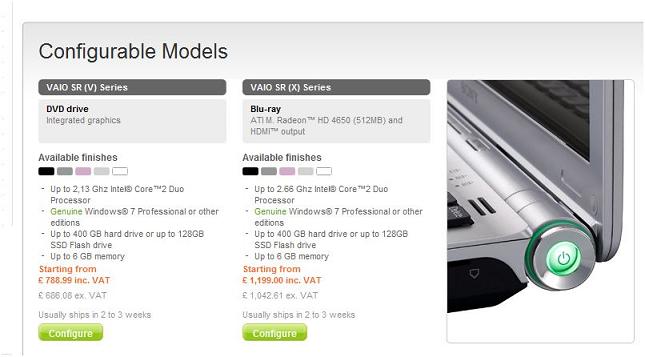
So i was looking at the Sony.co.uk website today and i see now that this laptop can be configured with a blu ray drive....finally. Sony also state that this laptop can be configured with a ATI 4650 graphics card. I'm thinking that might be an error though like there was before. If not though this would now be the most powerful 13" laptop out there.
https://www.sonystyle-europe.com/So...00002BC29B8F/4874D28E03EA0180E10080002BC29B86Attached Files:
-
-
*DROOL*
4650 in SR.... -
When you actually try to configure it, it changes to 4550; typo for sure.
-
It most likely is, this same error is repeated on other conifg to you stores in the EU.
-
my god it pisses me off so much that we cant be allowed to configure it in Denmark.. danish sonystyle store is horrible. goddamit.
-
new bios out for my 420, date 10/13/2009
-
Which graphics drivers are u guys using on the 4570?
I'm on W7 64bit, and recently windows update had an update to an ATI one, but I couldnt run WC3 with it? where as if I rolled back to the WDDM 1.1 one, it worked
? -
Has anyone put a 7200 rpm HD in a SR420? If so, did you notice any improvements in speed? What about any drive noise/heat?
-
for a sec i was like, omfg fml, no way it got so cheap, should have waited a month, but for same options, price is same, and the rebate is no longer available so i still got a better deal
-
Yeah me too, It's still better deal.
-
External Display question:
I tried searching this thread but it's hard to find stuff in such a huge thread.
I saw a review of the SR on Sonystyle which complained about not being able to support an external monitor above 1280x1024. My monitor is 1920x1200, and it's the only reason I'd consider a laptop with such a small screen. Will the SR be able to support it? Will it be able to support the monitor plus any other graphics software??? I do professional graphic and web design, and this laptop will replace my desktop. Can it handle it? -
Hi there.
I bought a VAIO VGN-SR36GNB 8 months ago, the other day i had it lying in my car for a couple of hours(on a cold Danish evning) when I got home the battery was totally discharged and now I cant recharge it!! Its pretty f***** since I called Sony and was told that the battery is only covered ½ a year and therefor I now have to get a new one for around 340$!! have anybody else had this problem and found som solution to it?
The battery is a VGP-BPS13A/B. -
I have one in mine from the factory. Cannot even hear the drive. Lightening fast, but perhaps it's just the dual T8800s
-
Ditto what howardru said. Factory installed and I can never hear it.
What's a dual T8800s ??? -
hello guys. How should store my extra battery when not in use?
-
tevih,
i dont have a 1920x1200, but thru HDMI, i have it hooked up to a BenQ E2200HD @ 1920*1080 just fine. -
Hey guys, I finally spotted the new BIOS update for SR290 on eSupport - http://esupport.sony.com/US/perl/swu-download.pl?mdl=VGNSR290&upd_id=4966&os_id=36
The link is for Vista x64, but anyway, the page lists the changes for the BIOS update, but further down the page it mentions that VT setting can be changed by the user. No time to try it out right now, maybe later in the week. -
It's a typo!
-
Hey everyone! Does anyone have experience of using Windows Seven on SR290C? I've had it for a month now, with standard windows drivers (which work fine). But I want to install original drivers, and sony hasn't yet released any yet.
Today, i decided to install some sr590 drivers, which work just fine. The only thing I am still looking for is sony utilities though... You know, power manager app and stuff... The one from sr590 doesn't work with sr290... -
eli2k, thx for the link. I was able to update it!
-
Great to know it worked! Can you let us know if you can change VT settings in the BIOS when you boot up?
For Sony Utilities, I went and extracted the software from the x64 Vista files, but only installed what I needed from there (don't install the battery checker because it doesn't work well with Win7). Any of the Win7 install guides on here shows you how to unpack the EXE file to get the software you need. I'm still waiting out on Sony to release driver updates, but if they don't have them out by the end of the week, I'll have to try the SR590 drivers, too. -
Hi,
I have been thinking about buying a laptop with around 2 kg, but with good processing power. I don't need to run games on it (but I do this, once in a while, but just RPG games and Diablo, nothing very demanding), but I prefer a good graphics card over an Intel GMA, since I use the HDMI output a lot. I have discarded the macbook because I have to run a lot of Windows software (I am a PhD student, I intend to use the notebook to work. I do a lot of programming on Visual Studio, and I use other softwares that does not work on mac. Since I don't think that buying a mac to install Windows is a very good idea, I have ruled it out).
I really liked the Vaio Z series, but I think they are really overpriced (at least for me ). So, I am inclined to get a Vaio SR, but I have a few questions that you may help me with. There are three models with little differences (at least that I could see), but the prices are very different:
- Vaio SR41M - As far as I can tell, this is the old model that is going to be replaced for the SR51M. However, the differences from it to the SR51M are just the processor and the battery. But, since this is the old model, the price is really good (£800 in Sony website in the UK, which is a good price here). My questions on this model are:
- How long is the battery life? Sony claims 260 min, and from some website reviews, I have seen that it got around 4h, so Sony numbers are ok. But in real world case, how long would it be?
- The processor is a Intel Core2 Duo T6400. It is a good one, but not the best. My question here is: Can this processor run in 64 bits? This laptop still comes with Vista (no mention if it is 32 or 64 bits on Sony's website), and I would use the free upgrade to Windows 7. Does anyone know if I could go for a 64 bits version?
- For the new models, there is the SR51M and SR59VG. From the old model, the difference is basically the battery life (Sony claims 330 min, but since they have not been released yet, I don't know if I can trust this number), the processor (in this case, both are 64 bits), the HD (it is nice, but I would not pay more just to have it), and the Windows releases (SR51M uses a Windows 7 Home Premium, while SR59VG uses Windows 7 Professional). I don't know how much they would really cost, but I could find the SR51M for around £1000 and the SR59VG for £1100 on LaptopsDirect (or £1300 on Amazon).
- So, apart from the processor, the HD and (supposedly) the battery (SR51M and SR59VG uses VGP-BPS13A, while SR41M uses VGP-BPS13A/Q . I don't know if they are really different), is there any other difference that I did not see between these three models? The price difference can be up to £500, and I would not pay this much just for a better processor and more HD space.
Finally, if anyone could point me to another laptop with this specs I would be grateful.
Sorry for the long message, and thank you very much,
Eduardo. -
Kinda what i thought but figured I wuld ask anyway.
-
My right mouse click is placed slightly lower than main notebook body. (Left one is OK- in exact same level as main body)
Will Sony fix it under warranty?
Here's the pic.
![[IMG]](images/storyImages/2ldbp6q.jpg)
-
Hi everybody!
Does anybody knows if is there any win7 64-bit drivers-utility set for VGN-SR39VN?!
I founded something for the similar VGN-SR29 in the vaio unofficial ftp (in effect they are 64-bit Vista drivers)...
http://www.vaio-link.com/os/vista/64bit/
http://vcl.vaio.sony.co.jp/download/unofficial/64/001.html
I have got an academy license for win7 pro 64-bit but I still don't know if my Vaio will properly run.. help me guys!
-------
>Sony Vaio VGN-SR39VN<
Core2Duo P8600 2.4 GHz
4Gb DDR2
ATI Mobility Radeon HD3470 256Mb
400Gb HD seagate -
official drivers are up for windows 7 and the SR too bad when i click run none of them run unless i save them and i sitll cant get my SD card reader drivers to install right....is there a temp directory that drivers are extracted too when i double click the EXE file so i can try to install the SD card reader that way?
-
Is it clearly cosmetic? If it doesn't click right or makes strange noises, yes Sony will switch it out for you. I am not sure if it's a minor detail like that, though, let us know if you manage to get them to fix that!
-
eli2k
Yes, I just checked it. The virtualization technology has two options in the BIOS - enabled and disabled.
Thanks for advice on sony software. I will try installing it the way you described.
Regarding the sr590 drivers... Most seem to work all right so far. I guess its a good alternative if sony doesn't release win seven drivers for sr290, which I actually think they won't, because sr290 is discontinued.
By the way, what CPU temperatures do you normally get? Mine can go as high as 60 - 65 degrees, and it doesn't seem that the fan starts spinning any faster..
eduardopfs
I normally get a maximum of 3 hours of battery life with mine. Maybe a little bit more, but not by much. However, I have the 7200 hard drive, so it contributes to a lower battery life. Though, the numbers they mention on the website (like up to 6hr battery life) are completely random... imho
What I can tell you about the sr is that I really like it. It feels very solid, has a pretty fast processor and an awesome keyboard... T6500 is pretty fast, and it is gotta be 64bit. I mean Intel had support for 64bit since prescott... Though, if you wanna get a config that will last, I would suggest to get one of the newer models... -
I don't think they will replace it, since its very minor... My laptop has a cosmetic flaw s well: the cap that is supposed to close the Ethernet connector doesn't hold well in place... But screw it, I managed to crack the tube by the hinge already =(
-
i downloaded most of the win 7 drivers that came out today, dont see any real differences if any
-
lol I should've waited for an extra day... :/
now i'll need to reinstall the drivers! -
Hey, thanks for checking it. I just updated my BIOS, too, VT working fine with VMWare, so I'm happy with that. I'll give Sony a few more days or a week before going with the SR390 or SR590 drivers. I figure the SR390 is more similar to the SR290.
I used CoreTemp to check my temperature, CPU at idle is 38-40C on both cores. This is on "performance mode" in Vaio Control Center, to control the fan speed. If I put it on silent mode, it'll go up higher, since I think it adjusts the temperature tolerance. Have you checked this setting on your laptop? Mine does go to 60ish when it's under full load, but that's pretty normal. If the fan doesn't spin faster, and it stays at 60C, I think that's perfectly fine. My desktop Core2 machines under load hit 55-60 all the time. I don't think it's effective to try and lower the temperature to 40C when the computer is running under load like that. -
Yea, it is prob fine. the good part is that the laptop remains silent =).
By the way, now you can select windows seven for sr290 under driver download. The page only has picture motion browser, but hey that could be just the beginning =)
http://esupport.sony.com/CA/perl/swu-list.pl?mdl=VGNSR290C&SelectOS=49
Official VAIO SR Series Owners Thread
Discussion in 'VAIO / Sony Owners' Lounge Forum' started by Duke2007, Jul 15, 2008.