Problems? See this thread at archive.org.
Nah, I was considering it but decided it wasn't worth it for me. It might be neat to have a BluRay drive in the laptop, but for $500 it's unnecessary [for me] - especially given I've honestly yet to even watch a BluRay movie. LOL. Had they offered it for a much cheaper upgrade, maybe.
-
-
Was wondering if Z owners could comment on the quality of the keyboard. After examining one I noticed that the finish was quite rough and to me this means it will quickly get worn down and end up being "shiny" where you place your fingers most. The one in the store was already starting to show signs of becoming shiny on the spacebar. Any comments?
-
Doesn't that happen with any keyboard? I'm using an Apple keyboard when the Z is docked and that's going shiny too.
Anyway, I think the Z keyboard is fantastic.
S -
Most, yes. However, I have an HP 2133 Mini-Note (a netbook with a large 7200 RPM HDD [barely] running Vista Business) and that keyboard has a clear coating on it that is supposed to protect it from that sort of wear. As far as the keys themselves go, it has one of - if not the very - best keyboards I've seen on a laptop/netbook.
-
8 Gig RAM on Vaio Z. I recently purchased the VGN-Z37GD the equivalent of the Z590 from the USA, in Australia. The unit ships with 4 Gig RAM.
On Kingston's site it quotes the Z series as being able to utilise up to 8Gig Ram. On testing 2 x 4 GB DDR3 Ram pieces the system doesn't boot. Using 1x2GB piece and 1 x 4GB piece works and give me 6GB RAM free.
I have the latest Bios update installed. Any ideas how I can get the 2nd 4GB Ram piece to work to give me a total of 8GB Ram? I can inter change both 4GB pieces with each other and they each work, thus no errors with the 2x4GB Ram pieces. They just won't work together. -
I called today about the student discount on my Outlet Refurb purchase and the rep told me it doesn't apply. I don't think this is expressly stated anywhere. Has anyone had any luck with this?
-
I've heard the same story. Essentially, the Campus discount only applies to NEW items, not refurbished. I don't remember reading that anywhere on their website, but it's not like the student discount is a contractual agreement, so they can do whatever they want with it. That said, as much as I would have loved to double up on the savings, it makes sense that they wouldn't be able to afford giving an additional discount on top of the deeply discounted price of the refurbished item - for which they had to pay a technician to go through a multi-step process to re-image the HDD and test the rest of the hardware. Once equipment lands in Refurbished Land, the company is just trying to recoup as much of their costs as they can.
-
yes, after significant use. However, I feel that the finish on the sony may wear off quite quickly ie: a computer thats been in the store for less than a month already shows signs of it. And despite there being quite a few people who play with it, thats nothing compared to even a full day of typing and having your fingers wear down a certain spot..
-
Just a quick question (and apologies in advance if it's a silly one), but:
Can anyone confirm that the Z37 (Australian model) has a white LED backlit screen?
I was just reading through a thread on this site that stated- "Note that when a manufacturer doesn't say LED nor CCFL, it's most likely to be CCFL."
If you take a look at the Z36 and 37 specs on the Sony Australia website, it actually doesn't specify. It simply says this: 13.1" wide (WXGA++: 1600 x 900) TFT colour display Clear Tough LCD [Rich Colour].
http://www.sony.com.au/vaio/vaio/catalog/product.jsp?id=VGNZ37GDX§ion=prod&term=Z37
I emailed a Sony rep last week, questioning this, and why the use of white LED in the US and Japanese Z models was clearly stipulated on their websites and not on the Australian site, her response was this: "I am unable to comment on products available through Sony USA as models and specifications vary throughout regions". Helpful..
If anyone could shed some light, I'd be very appreciative.. -
All Vaio Zs come with LED screens as standard, no matter where you buy it.
-
I notice that the $300 bundle for the z is now available again. It seemed that they just begin to change the web page, it is not appeared as a title yet, it just appeared when you reach the final step (add to cart)
-
Uh, I've already bought my VAIO Z690 without this 300$ bundle. I've just used the 10% student discount on my Z and the 20% ("VAIOREG20") discount on the VGP-CKZ2 case and large capacity battery. Sadly.
And now my Z is already on the way to Europe (with a little help from my US friends). -
Does anyone else feel the sensitivity is too low -- even on the highest setting?
Is there no external way to improve it -
Uh...the sensitivity of what, exactly? The G-Force HDD protection? The trackpad? Sorry, but I'm not sure what you're looking for feedback on.
-
Thanks for the reply.
Any idea why they wouldn't mention such a key feature..? Seems kinda silly to me..
-
Trackpad, thought that was obvious lol. Apparently it wasn't. 'Sensitivity of G-Force HDD Protection being too low even on the highest setting(?)' doesn't make any sense to me.
-
In that case, I would tend to agree with you. It's as if the density (is that even the right word) of the electro-static sensor(s) is not high enough to keep up with the super high pixel density of the 1600 x 900 display. I would be curious to know if those with the lower resolution (1300 x 768) have the same issue.
I have my trackpad set to the maximum speed and sensitivity and still have to make 2-3 trips across the pad to get the cursor from one side of the widescreen display to the other side. -
Quick question for those in the know: I'm receiving my refurb Z in a couple days and it was pre-configured with a 5400rpm drive (320GB). Is this drive a good deal slower than the 7200rpm alternatives Sony offers in every day usage (opening programs, switching applications, etc) or will it only really be apparent when moving large files from folder to folder and in boot times and the like?
I guess the real question is should I look to upgrade out of the box or is it all hype when it comes to spindle speed? -
There's no simple answer to that question. It depends on how you're going to use it. The only time that you'll see a significant difference would be on disc-intensive tasks like loading large files or when you're running lots of programs that require Windows to use the swap file a lot. If you don't think that you'll be doing a lot of disk-intensive tasks, the 5400 RPM drive provides good battery power savings over the faster 7200 RPM drive.
-
VISTA startup and shutdown are disk-intensive tasks, and the 7200 will make a substantial difference. I previously had a Thinkpad T series that came with a 5400rpm, and when I upgraded it to 7200rpm, the difference was like night and day. Everything is just much snappier. Some of the 7200rpm models are more "battery friendly". I would happily give up 20 minutes of battery for a faster drive.
I have a Z590 and want to upgrade the drive, but am not comfortable doing it myself. If anyone is in the Austin, Texas area and can help with a hard drive swap, please PM me. I will, of course be happy to compensate you for the assistance! -
Can anyone make the trackpad's web assist feature to work on other internet browsers say like chrome or safari? I can only get it to work in IE7, which is annoying.. because I never actually use it.
I use chrome most of the time. May use the new safari occasionally. Firefox works well too. With all that, I never actually use IE7. -
Just wanted to give anyone using the student discount on the Z series a heads up. It is currently only 5% instead of 10%. Not sure if this is a mistake or an update as it was 10% last week.
-
Hi,
Please can you tell me the real display size? I mean not diagonal 13.1" but lenght and width. Thanks a lot. I am comparing with 13.3" 1440x990 on my Lenovo Laptop and looking for change to SONNY. -
simple math. 256 * sqr(k) + 81 * sqr(k) = sqr(13.1)
k = sqrt ( 171.61 / 337 ) then k = 0.7136024710207
16 * k = 11.41764 and 9 * k = 6.4224.
thus;
the screen is 11.41764 by 6.4224 inches -
Exactly wrong. Loading (reading) large files is when you'll see the least difference, and depending on the drive density, sometimes no difference at all.
You'll see the most difference in access time -- no matter how fast a drive spins, it takes on average half a rotation for the data on the platter that you want to read to be under the drive head. For a 7200 rpm drive, this will happen 33% faster than for a 5400 rpm drive, no matter what kind of 7200 rpm and 4500 rpm drives you compare. So small reads is what benefits the most. Like, for instance, Windows startup, or redrawing the icons on the desktop or in a folder. Or other small reads that don't come rapidly enough that the drive can shuffle them around and take advantage of Native Command Queueing.
A quick rule of thumb for what matters the most:
Sustained/large r/w speed: Drive density, fragmentation and utilization.
Random/small read speed: RPM
Random/small write speed: Cache size -
Thanks for the information. That's useful information. So, was I right about the disk-intensive tasks part, but just not about the large files? This level of technical detail always facinates me - how the machine does what it does.
Thanks again! -
Oh no, please, 10% again! I was about to buy it and then it dropped to 5%
-
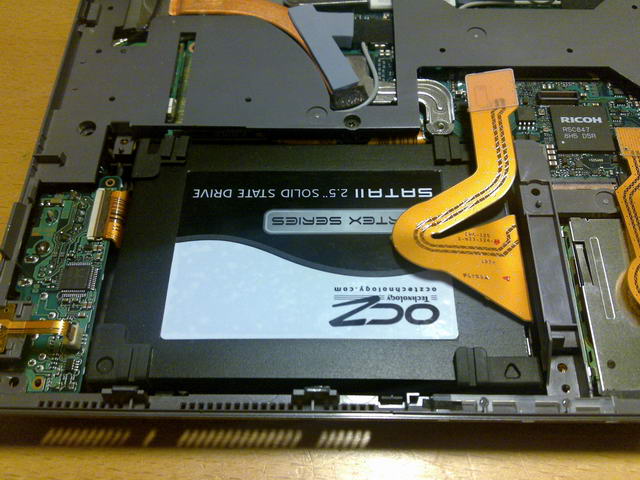
Just installed a Vertex in my Z as well. Vertex is upgraded with latest firmware (1275). Seems to work great.
Attached Files:
-
-
So does this mean I'd be better off looking into the better SSDs regardless? These seem to have the battery advantage of a 5400rpm with the speed of the 7200rpm no?
-
I just ordered the Vertex SSD to install in my Z690... How hard was it to install?
-
No, all it means is the 7200 RPM is noticeably faster than the 5400 RPM drives. This has been discussed a lot early on in this very thread if you want to read up on it.
Imo, if you want a noticeable speed advantage over a 7200 RPM, you'd probably want to go for the expensive SSDs that cost half as much as the computer itself. -
Yes I have the 1366 x 768 screen. It doesn't take me 2-3 swipes to get across the screen, since the resolution isn't as large, but regardless I would still wish it was a bit more sensitive in relation to micro-controlling the mouse pointer between icons.
If anyone finds a way to increase the sensitivity, would be nice. -
Once you'll open the case, it's not difficult at all
-
Just defraged my harddrive. Took me around 8 hours to fully defrag my 320 gb 7200 rpm HDD! Everything does feel slightly snapper after it was done.
Somehow, I ended up with 40 gigs more of free space on my harddrive.
can anyone explain to me how did this happen? I didn't know a simple defragment can free up this much storage space. -
I've never heard of recovering that much space from a defrag, either. 8 hours is an awful long time. That's almost enough time to do a surface scan on drive that size (well, not really). Did you use the Windows Defragmenter tool or a 3rd party tool? I've noticed that the Windows tool takes much longer to complete than third party tools like Auslogics. Am I the only one who thinks (or has noticed) that the Windows Defragmenter is the slowest defrag tool around?
-
No, I used Quicksys diskDefrag. I have given up hope on the defragmenter that's build into vista...
Yes.. 8 hours is an awfully long time. Also, note that I've used half of my HDD storage already, that may also contributed to the really long defrag time (this was my first defragment on this machine.) -
Its not very hard to install for someone used to replace parts in computers, just follow the instructions from the service manual available earlier in this thread. Its not as easy on the Vaio Z as it is on other laptops with easy access to the harddrive.
-
What about the noise of the 7200rpm? I heard that it's much louder than the 5400rpm one, isn't it?
-
The 7200 RPM drive is silent. If you put your ear physically on top of the keyboard, you can hear a slight buzzing. But I can't hear anything, even 2 inches away. So it's silent, but that doesn't even matter because the fan is audible at all times regardless. I'm not sure about the 5400 RPM drive or whether or not you can hear a buzzing sound if you put your ear on top of the actual device, so it may or may not be the same. But as I said, it doesn't make a sound, the fan does though.
-
Bad defragmenters can achieve this by zapping recovery data and by reducing the MFT zones to a minimum (which has a rather bad speed penalty once you start adding stuff again).
Get a decent defragmenter instead -- there are really only two worth using for Windows: Execsoft Diskeeper and Raxco Perfectdisk. I prefer the latter, because the company doesn't spam their customers to hell. -
It probably depends on user or drive...my 7200 RPM Hitachi drive in Z was so noisy, that I couldn't stand it for more than one month...
-
Is your hard drive the one on the Vaio Z customize page?
-
IME, the noisiness of a drive depends as much on how well it was put in as anything else. Yes, some drives are noisier than others, but the really noisy drives invariably been because of bad assembly, with either a part of the drive being allowed to vibrate against another part (including cables), missing rubber seals, or missing screws.
A well mounted drive will be far more silent than an ill mounted one. -
Can anyone make a brief review about the Z's blu ray drive, is it worth $500 or not? And, is this drive sold separately or anyhow,will it possible to upgrade the DVD drive to blu ray later?
-
I don't have the blu ray drive, but as others have mentioned on this thread, getting the blu ray later on costs $1000 from the sony parts store.
Also, the blu ray drive can't burn dual layer dvds. It can read them, and write to normal dvd's, but not dual layer. -
Yep...japanese CTO.
There was no problem with how it was mounted...the notebook is made perfectly...I'm able to believe that some drive is noisier that other one (even from the same series)...as this drive was not just noisy but I could feel vibrating as well. All and all I woudn't go for a 7200 drive for notebook anymore...good 5400 one or preferably SSD...
As Lt.Glare already said. I have the Blu-Ray drive...and it's worth it if you want a Blu-Ray drive in notebook...what to review about it...if I'm right, it's the only one of it's kind (slim one) I love to watch Blu-Ray movies on my Z or hook it in a projector and watch it on the wall
-
You may be right! I just checked and it says my MFT reserved area is only 481 MB on a 320 GB harddrive. Isn't MFT area be around 12.5% of the totally size on default?
Can you check for me how much MFT area you have on your harddrive?
I did some search, and people are saying that Vista can automatically change the size of MFT depending on the usage.. So hopefully this won't be a problem in the long run.
Thanks! -
I have been using the Wi-Fi connection up to today without incident or issue (since I received my Z690 CTO a week ago). Today I tried to connect the ethernet wire to the same network (with the wireless radio off to avoid confusion - both on my and Vista's part), my Linksys WRT54GS Wireless G broadband Router in one of its 2 available Ethernet wired connection.
The problem that I am having is that the wired connection is constantly - and when I say that I mean every 30-60 seconds - disconnecting and reconnecting. I searched the forum and found a similar issue with the Wire
less connection, but not for the wired gigabit. Has anyone else seen this issue?
I have tried uninstalling the version of the Ethernet controller driver (which is the current version), rebooting and reinstalling the driver as downloaded from Sony's support website. No difference. I tried chatting with Sony Support, but I'm not sure they can do more than read the script they were provided. So I figured I'd query the more expert members of the forum.
As background:
- the Ethernet driver version is 9.52.9.0
- I'm running Windows Vista Ultimate 64
- I have a Z690 CTO with 4 GB of RAM
- the HDD is a 7200 RPM (not sure why that would matter)
- the Wi-Fi connection is very stable and issue-free
UPDATE: I forgot to mention that I AM able to connect other laptops to the network via the CAT5 Ethernet cable to the router (like my son's G50 laptop and my HP Mini-Note 2133). It is just this laptop that has the issue. -
It works perfectly for me. I'm testing it right now and typing it on a wired ethernet, exact same router as you. Using the VGN-Z610Y/B with Vista 64 Ultimate. 4 GB RAM, 320GB 7200 blah blah. I can check anything for you but other than the driver, you may have a defective ethernet port or something of that nature.
-
Well, that just make me more fustrated. Hmm...I wonder if power cycling the router might help? Does anyone think that would help?
Official VAIO Z Core 2 Duo Series Owners Thread
Discussion in 'VAIO / Sony Owners' Lounge Forum' started by DiscCollector, Jul 15, 2008.