 Problems? See this thread at archive.org.
You should isolate whether it's the router or the ethernet that is the problem, first. Test the ethernet with other ethernet lines on other routers if you can. Maybe a neighbor or a good friend? If you go to some University libraries, the very big 4-5 story ones, they have hundreds of desks with ethernet lines on each of them. Depending on where you're from. Just some suggestions. That's what I'd do anyway.
-
-
Hey guys,
Long time not on this forum--midterms and such. Anyway, just wanted to say that my friend accidentally dropped my Z on the floor 3 feet down while it was still running, and it ran after without a hitch! There were also no scratches or cracks. I have the SSD so it wasn't affected obviously but I thought I'd see some damage. This thing is built like a brick .
.
I exchanged it with another one, however, because I didn't want to deal with anything in the longterm haha. -
How did you get it exchanged? I thought even the ADH doesn't cover drops.. or at least that what it says in the fine print.
-
Will the projector affects the bluray quality?
-
Depends on what kind of projector you have...but if you want quality 1080p DLP projector, you should be ready to pay around $10k
-
$10K? Sounds cheap, huh Anyway, what's your projector and how's its bluray quality, is there a huge decrease or sth like that?
-
I do have a CAT5 "crossover" cable that I could direct connect to one of the desktop computers that has dual gigabit ethernet ports. Would that be an effective test? In other words, if the laptop doesn't maintain a connection with a direct crossover connection, can I say with certainty that the problem is with the Ethernet controller of the laptop?
Also, I forgot to mention that I don't think it's the router, since I have 2 desktops that are successfully (and always) connected to it via wired Ethernet CAT5 cables. I have also temporarily connected 2 other HP laptops at different times via wired connections without this problem surfacing. It only happens with my Z. -
I was still within the return policy for Best Buy. At the same time, through some act of fate, my power cord stopped working, so I told them that and they exchanged it haha.
-
Were you the one that held off opening the Z610 from BB. That had to have been over a month ago. I thought BB return policy was only 15days. That's great you were able to exchange.
Anyway, what do you all think of the new Dell Adamo as an alternative to the Z? Just curious.


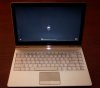
1.4GHz Intel Core 2 Duo Processor with Centrino technology
Genuine Windows Vista® Home Premium Service Pack 1 64-Bit
4GB 800MHz DDR3 dual-channel memory3
128GB3 solid state drive
Mobile Broadband2
Starting Price $2,699 -
Thankfully, not an alternative for me. I far prefer the processing power of the Z, and I am not at all liking the super glossy look of the Dell screen - or the starting price. Of course, I do like the slim profile quite a bit - but that alone can't sell me (or else I'd have gotten a painted HP Voodoo Envy).
-
I agree. I don't think Vista runs very briskly with on any processor slower than 2.0 GHz. Especially if you're going to run the Aero interface with all the bells and whistles. Processors slower than 2 GHz are more for netbooks, IMO.
-
I just installed the SSD last night and installed Windows 7 build 7048. It wasn't too difficult...
-
You could probably just direct connect your laptop to your cable modem temporarily (or whatever you use) without relaying it through your router. That should do it. By your description though, it seems like it probably is the ethernet controller, but I'd check just to make sure.
As far as I'm concerned, there are no pros to the Dell Adamo, over any laptop anywhere. The fact that it is 4 pounds is quite shocking and destroys the "ultra-mobile" factor. Weak processor, non-removable battery that sticks out off the butt, and that price tag is a slap in the face. It uses a ULV processor but doesn't have improved battery life, so that's quite baffling. No DVD drive too. I think the price should have been slightly above netbook pricing, around 7-800$, since they obviously did not cut costs by making it lighter. Through the woodworks of all the cons, the only pro is that it is arbitrarily thinner than other laptops.. we're talking about 1 centimeter thinner. But I can't find a situation where being a little bit thinner is useful or noticeable anywhere, weight is the actual important factor in a thin device. -
Mine is old Fujitsu Siemens XP60...I bought it mainly for presentations for it's small size it was great for travelling. The Blu-Ray movies on it look great, even though I believe with new quality projector it would be even better. uUt believe or not, I love to watch Blu-ray movies in Z's 13' screen as well...and it makes difference from DVDs
Happy to know that. I'm running on Vista, as it's my main computer...but I believe that experience with Z + SSD + Win7 has to be very nice ) -
Not really, plenty of notebooks come with processors with less power than 2GHz. And Vista runs fine on a netbook and computers with processors less than 2GHz.
-
1 cm is very significant at the scales we're talking about (16.39 mm). An additional centimeter means 61% thicker.
As for a situation where how thin it is is important, try carrying a laptop in a pocket. Yes, there are clothes with pockets large enough for laptops (Scott eVest jackets, for example).
Or an attaché briefcase, if you want to fit other things in there too.
Or, and this can be important if you're in an executive position, how impressive it looks.
Is it the only thing that matters? Surely not. But thickness matters too. -
I'm a premier silver member so 45 day return policy =). As for Adamo, it's a mistake on Dell's part to charge so much for it. It weighs more than the Z with even less power! No thanks...
-
My Z690 is only 8 days old and I have gone out of my way to be extra careful with it (part of my OCD). It has always and only traveled in my leather soft-sided briefcase in the special padded slot for laptops. It has never been dropped nor suffered any other impacts of any kind. Yet, today as I look at it there are about 10-15 small, shallow scratches on my lid. A couple of them are as long a 4mm. There is no discernable pattern and they are not limited to only one quadrant or area on the lid. If I didn't know better (since it has always been under my supervision), I'd say that it looks like it was dropped upside down onto asphalt. How can this happen? I thought that Carbon Fiber was supposed to be stronger than steel (but as light a plastic)?
Has this happened to anyone else who bought the Premium Carbon Fiber lid?
Ironically, the bottom of the laptop, which is always in contact with one surface or another - unlike the lid that is NEVER in contact with another surface other than the inside of my briefcase that is lined with nylon - doesn't have a single scratch on it.
Those of you that have the Premium Carbon Fiber lid, can you examine your lid under a light at different angles to see if you have any small scratches? I need to know if my lid is just defective somehow or if this is just the way the lid is (design flaw).
Right now it seems like the Premium Carbon Fiber lid is a trade-off of looks at the expense of some strength, but I'll wthhold my final opinion pending your replies. -
![[IMG]](images/storyImages/vaio-p-pocket-740384.jpg)
Lol I had to do it. Nah, but I really think you are exaggerating this. Anywhere a thin -1cm laptop can fit, a +1cm laptop can fit, for lack of a better description. In the end, 1cm is still 1cm, regardless of the scales you are using. And I would never carry a 4 pound laptop over a 2.8 pound laptop in a jacket all day, which is why I say again, thinness is not the important factor it's the weight.
With the battery sticking off the butt, I doubt your executive friends will be impressed. Especially after looking at the 1.2GHz stats on it. -
I received my refurb'd Z590 today and so far it's been amazing. It's my first laptop after having been building my own desktops for years now and I am quite impressed.
I do have one quick question though: On the underside, an inch or two below the battery lock slider, there's a hole with some type of connection port. Since this came with little documentation, I was wondering if someone can tell me what it is and if it should have a cover I didn't receive? -
It's for the docking station that costs like 199$.
-
Should it have a cover or is it always exposed?
-
It should have a built-in sliding cover.
-
Thanks, one other question since I'm in the middle of it. Did making the 3 recovery disks take a really long time or is something wrong with my hard drive/burner? It's been about 30 minutes and the first disk just finished.
-
It seems that the campus saving for CTO of all series comes to 5%, whereas discount for quickships is still 10%
-
Thanks guys for your input on the Dell Adamo. I agree. That starting price blew me away. I wonder how they decided to price point it at $2699; especially with no optical drive and having lower specs than the Z?
-
The Direct Connect to the cable modem couldn't sustain a connection either (as we both expected), so it's definately not the router. I'm currently chatting with Sony Support (which is like watching grass grow in a desert). In case you're interested, I'll post the outcome of that conversation.
-
It's marketed towards business executives. There are enough businesses where the only choice is Dell, with execs who aren't going to do more than look at a powerpoint presentations. That's why it comes with Vista Home too, and not the far more useful Vista Business. A suit wouldn't know how to take advantage of the extra features of Vista Business.
-
Sorry everyone, posting like a maniac here but I'm running into weird things with my new Z590 I received today.
1. I can't seem to set my resolution to 1600x900, the slider bar maxes out at 1366x768. When I check the device manager, the monitor is listed as generic PnP device. What am I missing?
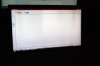
2. The screen seems to have areas on it with some darker patches (hard to explain, almost like you'd expect to see if the monitor got water behind the screen in some places. Should I return it at this point? -
After 90 minutes of chatting, I eventually convinced the Support rep that the problem is with the ethernet card in the laptop. He tried to tell me it might be my ISP, but I set him straight on that since I'm using that ISP on the same laptop via the wireless connection without issue.
Anyway, now I have to call some toll-free number to arrange for service...on my 8-day-old laptop. That's like having a baby and finding out he/she has a heart murmur after the first week (well, not really, but you know what I mean).
Supposedly, the Express 3 Year Warranty I bought is supposed to get me faster service and less time without the laptop (according to the support rep). Does anyone have any experience with that?
I'm SO bummed...I love the laptop otherwise.
-
1. You may not have a Z590, or atleast it doesn't have the right screen in it. Does this happen in both Stamina and Speed mode? If so, definitely what i said above.
2. Probably. -
I did It's good than they said that it's just a mistake since the difference between 5% and 10% is quite big for me. Can anyone please inform me when they fix it? Thanks :X
-
You're probably missing a Z590 -- 1344x768 is the max resolution of the Z540.
Where did you buy it from? -
I just got my Z, recovery discs in process now.
Any best advice with what to do with a fresh Z? I'm a little torn on doing a fresh or even semi-fresh Vista install, I don't have a Vista disc. So I may start by removing stuff the simple way ... perhaps I'll order a disc and do a semi-clean or something.
I've followed this thread for so long ... I can't recall some of the best advice with what to do initially. I already want to take off the Vista/Intel/nVidia stickers though ... although I'm nervous about potentially scratching the palm wrest. And at least whoever put mine on spaced them real nice and have them on the same horizontal line. Yes, the picky part of me totally appreciates that. LOL.
Oh, and I did make a backup DVD first thing. Well, two, just in case. And I did Vista updates. -
Can you do a Prt Sc (Print Screen) to show us what you see and attach the file to your next post.
-
The screenshot method didn't work, I'm assuming because the graphics card isn't displaying darker areas, it's in the screen itself. I took a picture of it instead. The most noticeable patch is in the upper right (although there are others).
-
It was a refurbished unit from sonystyle's outlet webstore. The plate in the lower right of the screen says Z590 and the box label that it came in does as well (even specifically mentions 1600x900 resolution). I was hoping it was a driver issue when I saw the generic PnP device in the manager but I guess not. It looks like I got a junker.
-
If you bought it refurbished, someone might have scammed Sony (e.g. ordered a Z590 and Z540, then switched the bezel and bottom, and returned the 540 as a 590), or someone doing repairs might have put in the wrong display.
Either way, you should return it.
You also appear to have a broken LED in the display backlight, which is another reason to return it. -
Can you tell me some of the cards that I can replace with the 9300 of the Z? Thanks!
-
None. It's not a discrete card, but a mobile chipset on the mainboard; like with almost all laptops, the only upgradeable parts are the HD, RAM and CPU.
-
Hi ductrung,
after some days of calling I finally managed to know that, unfortunately, as of now the student discont is only 5%. If you read the ad you see that the VAIO notebook discount is UP TO 10% and it can vary without any notice.
Edit: mistyped correction. -
Has anyone successfully installed windows 7 on a separate partition so you can dual boot vista and win 7? Can you post the procedures?
I have separated out a partition while my main vista 64 bit partition remains intact. But I'm having trouble installing win 7.
Thanks! -
I apologize in advance if this seems like a stupid question - it may indeed be pretty dumb. I plugged in a new Microsoft Arc mouse (btw, the coolest portable mouse I've ever seen), and notice that when Vista gets done installing the driver for it, that the scroll wheel doesn't work nor the button on the side.
Do I have to install the Microsoft Intellipoint mouse driver in order for something other than the 2 basic buttons to work? I'd like to make sure that installing the Intellipoint software/driver won't interfere with the trackpad driver before I go that route.
Advice? -
I thought that I'd add an update to this post to indicate that my space bar (which I only ever hit with my right thumb - and always in the exact same place) already has a shiny spot developing after only only a week or so of steady, daily use (I received it on 3/17).
Of course that's just cosmetic and not really a concern for me. Since I touch-type, every single key could be worn so badly that no characters are visible (which, I'm quick to point out, has NOT happened) and I'd still be able to use it.
Anyway, I figured I'd let the prospective buyers know how quickly the matte finish can turn shiny. -
mine did the same thing, except it was after about 4 hours of typing. Not a huge deal, just would have thought the finish would have held up at least one day... Computer had a host of other issues though and was returned today anyway.
-
Hey J, I used EASEUS free partition manager to create a simple NTFS partition and installed W7 no probs. Tried shrink volume in Windows but no dice as it wouldn't let me install.
I can now dual boot w7 to c with Vista as B or vice versa. -
Thanks for the reply. Then I hope that 4gb of ram will be able to cover some work of this weak graphic card in games
-
Got my Z a couple days ago. A few thoughts...
1. I have an SZ120P also, and honestly, I think the build quality of both of these computers are similar. At least so far...
2. I got the 320 gb 7200 rpm harddrive and it definitely does vibrate in comparsion to the 5400 in my sz. However, it really doesnt bother me at all, its just noticeable.
3. The fan is on all the time, but this is not any different than when compared to my sz. The fan on that one is always on also, but its low enough that its barely audible. Same on the Z.
4. The 1600 x 900 screen is FANTASTIC! I like the antiglare screen
5. The premium carbon fiber lid is nice, great looking, however, i am scared because of its smooth finish, it might get scratched more easily than the standard black one, which is textured. I dont know if its a risk worth taking, I personally like the look and plan to take good care of it.
6. So far the battery life is around 3.5 - 4 hours, not the 5-6 they originally claimed. Maybe I have to make some changes to my power settings in order to get those numbers?
Those are my initial thoughts. -
integra891, congrats on getting your new Vaio Z.
-
I just purchased a vaio Z610 and was wondering if it is normal for this comp to make an odd loud spinning sound when shutting down. I know what normal shutdown noises are and this sounds like a high pitch spinning. I think its the hard drive, i hope not, but I guess it could be the insane fan. Which is always on. The noise is the very last sound before the comp goes cold. If anyone has any idea what it is or if this is normal and info would be appreciated. Thanks
Official VAIO Z Core 2 Duo Series Owners Thread
Discussion in 'VAIO / Sony Owners' Lounge Forum' started by DiscCollector, Jul 15, 2008.


