Problems? See this thread at archive.org.
Just curious...
I know the Z5xx series came out in August/Sept 2008 (that's when I got mine)
when did the Z6xx come out, and when did the Z7xx come out?
I just ordered another Z laptop (Z790CTO)
And I just realized this model might be due for another refresh! Shucks.
-
Hello everyone!
I own wonderful Vaio VGN-Z690 laptop bought on 13-April-2009.
I'm travelling now and I wasn't very good handling with my laptop and I've got those nasty spots on the screen
I want to initiate repair procedure and change the screen and I have some questions:
1) Is it possible to change the screen by 1-year standard warranty?
2) I have accidental damage protection, is it possible to change the screen with that type of warranty?
3) I go to the sony website for support, but there is only phone call option to initiate repair procedure. Is there any e-mail or online options for disabled people?
4) I have 128GB SSD drive and I want to change this one to 512GB one. What's the best money saving way to do it? Should I do ask it for Sony to do? Or I can by 512 SSD by myself and ask some third-party company to do that? What type of SSD drive I can buy now, can you give me a link? And what company (if any) I can ask for change my SSD drive.
5) I need hard-protection metal case for my laptop, which one is the best?
Thanks. -
Dear all,
My company have just acquired Sony Vaio Z48GD with Vista Business, but unfortunately our ERP program couldn't run on it. I have planned to downgrade it to XP and I have find the drivers. Have anyone ever tried to downgrade Vaio Z to XP and would you share it here? Thanks -
costco offsr is no more avaiable. =(
and all prices are a bit more then last week...
if there's any interesting offers now about z? -
I have not tried to downgrade but you could try an alternative solution.
One option is to install either vmware or Microsoft Virtual PC. You can then install a virtual version of XP or another operating system that will run your ERP. That is what I did for a program that did not work under Vista Business 64 bit and it works well.
I hope this shelps. -
I just checked COSTCO and they still have them. I called CS and they told me that once the last Z590UBB sells out, the Z would no longer show as available for purchase on their site. It would automatically be taken off.
-
I don't see any problems. You prob don't even require the drivers. My Z46GD came with Windows XP Downgrade disk. I'm guessing if they give it to you then it should run fine. However you wont be able to use 6GB of ram, it will only use about ~3GB of your ram. Other than that, there should be no problems.
You can wait or get Windows 7 off MSDN, and run Windows XP Virtual Mode off it. Can hack the laptop's bios to support visualization, which will make Virtual Machines run a lot faster. -
I just got my Z21ZN/X with 128GB SSD and BluRay and the notebook feels absolutely great
I am wondering though, does anyone know if and where I can find a possible firmware upgrade for my SSD (MMCQE28GFMUP)? It seems a lot of new features for SSD drives have been developed and implemented in new drives through firmware updates but I can't find a single upgrade for this SSD?
The SSD performance is rather lacking and I hope to have it perform at least a bit better with the newest firmware. Any help would be appreciated. -
Z21ZN use Samsung SSD first generation (old controller). So, you can't do anything to improve the performance, and Samsung never releases a firmware
-
Thanks for the reply. Guess I'll use this SSD for now and perhaps install a new one when my Windows 7 copy expires march 2010. I'm guessing SSD prices will probably have dropped even more by then.
-
what is the US equivalent for the Z21n?
I just got the Z790 with the 256 (2x128gb) raid configuration.
Just curious...
I know the Z5xx series came out in August/Sept 2008 (that's when I got mine)
when did the Z6xx come out, and when did the Z7xx come out?
I just ordered another Z laptop (Z790CTO)
And I just realized this model might be due for another refresh! Shucks. -
Z6xx models were released in February 2009.
Z7xx models were released in June 2009. -
Z6xx.
Z21zn comes with Bluray rewriter and SSD Single 128GB -
Z8xx series will probably be out in weeks featuring Windows 7. Probably the last series before a replacement model with Arrandale arrives next year.
-
Is it just me or has the (Europe) Sony support site been down for the past day or two?
Any other location to get the (latest) Sony certified drivers & software? Maybe a legal(?) torrent or a Z Owner who uploaded the 64bit downloads somewhere?
I just got my Z a day ago, formatted, installed Windows 7 but now I am stuck because I can't get the required drivers... -
Thanks for the help. Now, after downloading this package I noticed something which I hope isn't true. If you look at my attached image you can see me unzipping/copying the Nvidia drivers. Somehow, the speed was extremely slow. At max it copied the file with a speed of 3MB/s.
This doesn't seem at all like SSD speeds to me, even if it's a "First generation" SSD (what was Sony thinking, asking me to pay the big bucks and providing crappy SSD's) it should at least be faster than normal HDD's, right?
Attached Files:
-
-
With a normal HDD, if you copy the same thing, you'll have 1MB or 2MB/s
-
I've attempted to discover what supplier and what model Sony currently is using for its Z series SSD 2X128=256GB Raid O -- from calling Sony directly at support as well as sales, to searching every blog in sight. The critical word is "currently" since my buying decision depends on their current part.
Can MegaMan or someone else, with a very recent Z, search Bios or Devices and thereby determine the supplier and the model?
Many, many thanks. -
I believe that Sony is using specially customized Samsung Raid SSDs in the Vaio Z notebooks. Unfortunately, I do not know the part/model number.
I'm really sorry that I cannot be of much help.
Hope Vaio Z owners with those SSDs can help you out. Good luck.
-
I recently just ordered mine, expecting it to arrive to my house 09/09/09
will update when I get it. -
hi, all.
what average read/write speed does 128(64x2) SSD drive shows in Z?
what will make more effect: Changing P8800 to P9600 or 320/7200 drive to SSD 128(64x2)? -
I would say SSD
-
I also think that one will see a more "significant" speed increase with the SSD upgrade than the CPU upgrade. Good luck.
-
Well I was going to go for the SR490, but a couple people have encouraged me to go for the more expensive Z series. I'm a senior in college and don't want to have to buy another laptop for a while so I guess my question is, is it worth it? Is it really that superior of a system? The price difference is $600 for the specs I want on each system.
Battery life is a must, but I'd be lieing if I said I didn't want a dedicated graphics card which makes me love the Z series with its ability to switch between gpus. The fact that it is around a full pound lighter also makes me like it better.
One last question, how does carbon fiber work on a laptop? I know that it is lighter and sturdier but are their any issues with it over heating as opposed to the magnesium alloy?
So basically battery life and longevity are my primary concerns. Followed by portability and functionality (I can see where having a dedicated graphics card and an hdmi port would be helpful).
For reference the specs I have listed for each system are
SR:
CPU - P7350
Memory - 4GB
HDD - 320gb (7200rpm)
GPU - integrated
Z:
CPU - P8400
Memory - 4gb
HDD: 320gb (7200rpm) -
The "carbon fibre" in the Z can for all practical purposes be treated like plastic, because it is plastic with a small amount of ground up (milled) carbon fibres added. So yes, it does have an insulating effect, and won't radiate heat all that well. The majority of the heat dissipation will be through the fan vent, and to a smaller degree the metal of the keyboard tray (try to play 3D games for a while, and the metal around the WASD keys becomes too hot for comfort).
That said, the lightness of the Z is one of its strongest points, and I'm glad it's not metal, like the Dell Adamo. That extra pound makes a difference. -
Today I noticed that hyperthreading isn't enabled on my VAIO Z. Is it possible to enable this somehow? I have the P9500 CPU and it should support HT, and I can't imagining the intel chipset not supporting it. Is it the VAIO BIOS that blocks any HT functionality?
-
When did the Core 2 Duo support HT? (You don't need it for the C2D)
http://ark.intel.com/ProductCollection.aspx?familyID=26548 -
That explains a lot. Thanks!
-
I am not familiar with the SR series but I can speak a little about the Z series.
Four days ago I received my Z-790CTO.
I am impressed by the gorgeous display .
I am impressed by the weight even with a large capacity battery .
I like very much the option "Fresh Start" .
I am very pleased so far with the battery: no noticeable leakage as mentioned several time in this Forum.
The noise level of the fan is more than acceptable: it is discretly loud
I am not impressed by the heat level: it is hot and I hope that I am not bound to a big surprise
Too early for a definite opinion but the way I use it makes me very happy with this unit. One will hope so....................for this price
-
And how fast sony raided ssd in comparsion to something like Crucial CT128M225??
what's better, get one with drive and put there ssd later or get with sony raid 0 ssd? -
zukiki, it's great to read that you love your Vaio Z notebook. Congrats on your purchase & enjoy your new notebook.
-
Thanks for the info. Would I be better off going with the non carbon fiber option then since I assume it handles heat better than the plastic/carbon fiber? Isn't it a very small weight difference on the Z anyway between the two materials?
-
I'm not sure about the speed increase between each of those SSDs as I do not have them & have never used them. Hopefully, the SSD experts in this forum can give you an answer. I'm really sorry about not being able to provide any help on this matter.
-
They both named carbon, but one is premium. However, there's no carbon at all. and that's all about display case. it doesn't make sense to heat from lap. Choose the one you like more.
-
anyone want to try whether their Realtek sound better after installing this driver?
http://forums.hardwarezone.com.sg/showthread.php?t=2300219
i've tried it, and it does seem better...
or is that placebo effect -_-?! -
Should the z21 (z6xx) have the "Fan speed" option when the power management software is installed? I'm not seeing any fan speed settings, not even in the VAIO power management panel.
I noticed my VAIO makes quite the sound when the fan is active (which I think is about 2/3rd of the time) so I was hoping to reduce the sound a bit by "underclocking" the CPU speed and at the same time the FAN speed.
I've seen screenshots with these settings, could it be a limitation in Windows 7? Or is there perhaps something I forgot to install? -
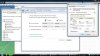
GO TO :
Vaio Control Center >
Power Options >
Change Plan Settings >
Change Advanced Power Settings >
Vaio Power Management.
-
Thanks for the reply. It seems however that I am using an older version of the Vaio Control Center as mine looks different (and more outdated). On top of that, I do have the Vaio Power Management tab in the Advanced Power Settings window, I just don't have the system options, only the LCD and "Other devices" options.
I'm guessing this could be because of the outdated Control Center. I'll be updating it later today, thanks for the help! -
There is carbon in both, just not what we think of as carbon fibres. The recycled and chopped/milled carbon fibres embedded in the plastic aren't really parallel fibres anymore, but small flecks of carbon.
It does make the case and lid slightly lighter weight, but at the expense of tensile strength (which admittedly isn't too useful in a laptop -- when was the last time you tried to stretch one?)
And yes, the only difference between the "regular" lid and the "premium carbon" lid is the finish. The "premium" one has a brushed finish, and catches the light better. -
Well that sucks. It hardly seems worth it to spend upwards of $2000 or more on a laptop that doesn't do a good job dealing with heat.
The dual video card function is awesome, but I've had a couple bad experiences with desktops/laptops running hot and blowing stuff out so that concerns me a bit. -
Well, I can tell you from my perspective and experience with my Z690 (essentially the same thing as the Z790 with a different colored palmrest) that I have used daily for work and medium gaming since March of this year (about a little over 5 months), that I have not had a single issue with overheating nor with heat issues of any kind. From a usability perspective, it is actually a good thing that the carbon fiber doesn't transfer heat well; if it did, like, say an aluminum shell would, the entire outer shell would become a heat sink. I have an HP Mini-Note computer that is like that. It keeps the insides cool(er), but that's at the expense of my comfort as it makes the exterior of the laptop uncomfortably hot. So, from my perspective, it is actually a GOOD thing that the carbon fiber doesn't do that.
And while we're on the subject of comfort, let me also say that I've played several games (like Bioshock, Doom 3, Serioius Sam - medium demand 3D games) for several hours at a time, without any noticeable discomfort as a result of heat transfer to any of the contact surfaces. Of course, the fan exhaust port turns into a hair dryer (that's an exaggeration, of course) while playing the games, but that's to be expected; any computer will do the same thing when it is placed under load.
Granted, you should definately note the processor that I'm running with (see my signature) as higher speed processors will generate more heat. However, I can tell you that after almost 6 months of constant use that heat has never once been an issue. -
FrinkTL
Sorry I'm a little confused. Are you saying that there aren't any heat problems on yours or just that it doesn't transfer heat to the user? -
That is correct. I neither have any overheating issues with my configuration nor have any issues with any heat that does exist transferring to me, the user.
-
I agree about the heat. My 710D is the the coolest running laptop I have owned and I have had top end Lenovo, Toshiba, and Compaq notebooks. You will be happy with the Z series.
-
What is the make/connection type of the Z790 and Z690 optical drives? Bluray and DVD?
-
I haven't popped open mine yet, because i dont want to void my warranty. However i read that it uses Mini-SATA.
I've had my Z laptop (Z46GD) for about 1 month, when its on intel mode, the air coming out of the computer is barely even warm. When using the nvidia graphics to play games, the air comming out of the vent is hot, but abut 50% cooler than a hair dryer. I have had 0 overheating issues, the computer has yet to BSOD me due to heat issues, nor has it turned itself off because of it.
The entire computer feels cool, and none of the heat gets transferred other places other than the fan vent. Which means you don't your classic hot thighs which you get on other laptops. -
Anyone who recently purchased a Z790 can identify the supplier and firmware of the SSD easily by following the following instructions from a spectacular series of articles at http://www.anandtech.com/storage/showdoc.aspx?i=3631&p=19. Specifically --
"How can you tell [who the supplier is and the firmware is]? [Click Start, click Control Panel, Click Hardware, Click] Device Manager, go to your SSD properties, then Details, then select Hardware Ids from the dropdown list. Your firmware version will be listed at the end of your hardware id string:"
Could I talk some kind soul into doing this with a very, very recent Z SSD? You can email me at [email protected].
Thanks! -
Thanks. We finally have downgraded the units to Windows XP.... everthing is OK, all devices are recognized and the drivers provided on the site work well.
-
My 590 with a P9500 is quite a bit hotter than my old Compaq, my work Dell and IBMs, or my wife's Sony and HPs.
If running heavy 3D jobs, it becomes too hot to touch in the top left corner after a while, and if running heavy CPU (large compile jobs or huge multi-core compression jobs), the fan works overtime, and eventually it either throttles down the CPU or freezes up.
If I avoid the real heavy CPU and GPU use, it stays pretty cool. But then I would have been better served with a TT.
Sorry, for me, the Z is a "love it, will not buy again".
Official VAIO Z Core 2 Duo Series Owners Thread
Discussion in 'VAIO / Sony Owners' Lounge Forum' started by DiscCollector, Jul 15, 2008.