Problems? See this thread at archive.org.
Hi guys,
i am looking at getting a z790 - but was wondering when the new model will be release - don't want to spend $$$ then have a new model come out next week/month.
Also, the 2.8 processor is on backorder - but i have found a 3.06 extreme - does anyone have any feedback on these?
Thanks in advance for the help.
Many Thanks
-
-
Avoid this one. Downthrottles way too much and way too often (runs too hot)
-
I bet the fan will work forever with a 3.06
-
Perhaps the difference of opinion is really a difference in CPU. This is why I emphasized the CPU in my 690. The CPU matters (of course), the higher the number in an Intel CPU series the hotter they run. My P8600 runs fast (2.4Ghz with 3MB cache) and cool (for my productivity, email and medium-range 3D gaming). Apparently the P9500 runs quite a bit hotter (for only .13Ghz additional clock speed - and 6MB cache). Another thing to consider is that there might be structural/design changes between the 5xx series and the 6xx series that result in better heat dissipation. Certainly possible.
Either way, for me, the difference just supports my argument that the fastest CPU isn't always the best choice. If a slower processor will do what you need, choose it. Don't get the faster processor just because it has better specs. My P8600 has handled everything I've thrown at it with flying colors - so why would I pay more for a processor I don't even need and would probably run too hot anyway?
I love the Z series too much to back it into a corner with a too fast, too hot CPU. The laptop is a great compromise. No laptop can be everything to everyone. The Z shoots for the "small, but great" category and succeeds grandly - as long as you don't asking it to be more that its design allows.
My recommendation: If you want the latest, fastest CPU, buy a bigger form factor laptop with more room inside to "breathe." -
I think I agree with this.
I'm no "hard-core" notebook user but my Z690 with the P9600 CPU does run a bit hotter than some of my previous notebooks, including my SZ791 that I've just listed in this forum for sale. The fan runs a lot more & is louder than the fan on my SZ791 as far as I can tell.
However, this is what I've observed & maybe I'm wrong with my observations.
Anyway, I definitely cannot say the same for others mainly because of the fact that no 2 notebooks are made equal.
The fan runs a lot more & is louder than the fan on my SZ791 as far as I can tell.
However, this is what I've observed & maybe I'm wrong with my observations.
Anyway, I definitely cannot say the same for others mainly because of the fact that no 2 notebooks are made equal.
What I would suggest to potential Vaio Z (or any other notebook models) buyers is to purchase your notebook from an authorized seller with a fabulous return policy. SonyStyle is one excellent retailer (if you're buying it in the U.S.) with their 30 day return policy. I humbly advise buyers to go buy the notebook & try/test it out in their normal working conditions for at least 1-2 weeks to see for themselves if it really meet their expectations.
IMHO, this is the only way to know if a notebook is "good" enough. Good luck.
-
Wow, Sony Style stores let you take home a laptop and try it out for up to 30 days and still let you return it no questions asked? Sounds good.
I was in a Sony Style store last night comparing the Z and the SR and while I love the key layout on both I was a little disappointed with the how small and slippery the keys felt on the Z compared to the SR. Have any Z owners had issues with them? I tried typing random things on both and I don't think I lost any speed typing on the Z, but I seemed to be concentrating more. -
I'm not too sure about the SonyStyle " physical" stores, but the 30 day return policy applies to SonyStyle online store purchases. One exception is on notebooks with custom engraving. They may however charge restocking fees but I've read that fellow NBR members have had success returning their Vaio notebooks without restocking fees being charged. Good luck.
-
I agree, my computer is running the P8700 and it seems to be the right balance of performance and operating temp. I cannot tell when the fan comes on and usually have to put my hand to the vent to determine if it is running hot or cool.
-
I'm just wondering. Have anyone with an Intel P9x00 CPU in their Vaio Z notebook run the PC Wizard 2009 program to check on their CPU?
The reason I'm asking is because I just did so & PC Wizard 2009 is telling me that my Intel P9600 CPU in my Vaio Z notebook is an Intel T9550 CPU! Maybe that explains why owners with the Intel
P9x00 CPUs are running hotter because they are actually
T9xx0 CPUs with some minor "modifications" to meet their released specs' TPD?
Please forgive my stupidity. I kindly urge the experts to please correct/enlighten me on my observations.
-
That's very, very intersting and would explain what seems to me to be a rather dramatic temperature jump for such a small clock speed increase. I would never expect a .13 Ghz speed increase to jump from a laptop that is cool to the touch to a laptop that is too hot to touch - not in the same CPU series under similar loads. However, it is already well publicized the temperature difference between CPU series (with the T series running quite a bit hotter than the P series). That makes this explanation a likely candidate, especially since I'm sure that both parties are telling the truth when relating their experience and there has to be a logical explanation for such differing temperature results.
Call in the experts!! We need an answer!!!! -
hi everyone,
i'm on z11wn, wotever. I just wonder how to enable WWAN function, because when I inserted the sim card in the slot, enable WWAN function, it asked me to install Wireless WAN Connection Utility, which I can't find.
my aim is to use the mobile broadband (everywair)
P/S : is it possible to make fone call when we insert the sim card in the Z?
Help me please
many thanks -
Isn't that false advertising on Sony's part? People are expecting a P CPU, based on what that P provides, instead are purchasing a Z with a T CPU.
-
Have you checked your findings with a reliable program like cpu-z?
TDO -
Well, it's quite interesting info.
actually, P9xxx is not .13 ghz faster, it got another core, which has +3mb L2. and AFAIK P8600, 8700, 8800 got the same TDP=25W. So the diff is voltage it works on highest speed.
Want to hear cooments on noise lever from P9xxx users. extra 3mb is very sweet, but if it makes very hot and noisy.. =(
BTW, how about undervolting P9xxx series? it should make sense on such a hot models. -
I think the point that SPEEDwithJJ was making is not so much about anything that Sony did, but more what Intel did. I thought the point was that it appeared that the underlying architecture of the P9x00 processors and the P8x00 appears to be different - which would match with their very different heat characteristics. Perhaps the P8x00 uses an entirely new architecture whereas the P9x00 uses a tweaked version of the T9xx0 processor. It wouldn't be a big surprise to me if Intel did something like that.
-
PC Wizard might not have the new CPU-ID for that chip, which then if it was an intelligent program, it would take the speed and some of the other "specs" then make an intelligent guess. Which would explain why it shows T9550. I have seen this happening with other CPU Checking software.
Spec wise, there is exactly the same specs in between the T and P equivalents. Only differences are the TDP. Which is probably why there was that mix up.
The Z Series laptop i have uses a P9700.
According to CPU-Z which reguarly updates their application when new cpu's come out. It properly detects P9700.
I get about 35C-37C when simply surfing web, word processing, and watching some videos. This is using the intel graphics.
When switching to nvidia graphics, it gets upto about 50c, since the nvidia graphics is heating up the cpu on the same heatsink.
Overall sound wise though, when on intel graphics, cant really hear the fan. On nvidia graphics, you can slightly hear the fan, but not THAT loud.
Heat wise it shouldn't be that much worse than the P8000 series, as the P9000 series is only 3watts higher in TDP.
Its not a false advertising in Sony's part, To them it is a P chip. Rebadged hardware has been quite a common practice in the industry lately. For example, Nvidia rebadges their GPU's, eg Geforce 9800 = Geforce 8800. -
To "fix" that, I just bought a TPO/Silcone keyboard protector off of ebay (there's a link about 50-75 pages back in this forum). That serves the dual function of providing the keys with more tack and keeping the lettering from wearing off of the keys. It also tends to keep extra dust, etc. for wedging itself into the tiny gaps around the keys.
-
did you tried to load it at max? either hard work in a program, or games, even benchmaks? may be you can try comethin for a check? Somesay it's getting too hot..
-
Just maxed out the CPU Usage using a prototype mutli core version of Super-Pi.
Runs at about 70c doesnt go over 71c. -
my cpu is P8600, and temp is usually at 36 ~ 38. the lower it go is at 34 which i believe when its idle. gaming (fallout 3) usually will go up to 65 and gpu up to 84.
if given a chance, i would opt for P9700, than the T variant seeing the engineer saying that they sacrifice almost half the cooling part than the SZ... -
That's numbers. and how does it feel? I're read someone sold his Z, cause of noise and hot.
-
Installed and fired up Mirror's Edge on it.
Nvidia GPU is about 80-90c as expected, and CPU is at 75c or so.
Lags quite a bit, but figured that game would stress the system out quite a bit.
It doesn't sound that loud overall, not as loud as hair dryer. Its about 10db or so i'd say. (... Don't have a sound meter, however was just comparing it to the noise coming out a fan that i know the decibels of)
Heat wise, there is some warm part towards the top left of the base. the other parts of the base are not even warm. Sony did well when they designed the casing to prevent it becoming a giant plastic "heatsink", like most laptop chassis are.
There is no discomfort when typing, as Sony did a good design when it came to the keyboard and arm rests, since Virtually none of the heat below gets transferred to it.
The base/bottom isn't extremely hot (more like just slightly warm), as i experienced before on my T7200 Asus laptop which the base felt like a hot plate (very close to burning you).
I'm not too sure if there is a T Variant, but I'm pretty sure the P9700 i got is a P chip. -
Does anyone know the latest nvidia drivers that support the hybrid mode on the vaio Z? Are the only drivers that support this released by Sony? Because right now I am running 174.49 which are almost a year old now. Are they ever going to update their drivers or are we stuck with old drivers?
(Reason I'm asking is that my HDMI output sound isn't working right now, and it *could* be related to the nvidia drivers) -
Yep. That's what I'm trying to say.
-
That's very cool IMHO. Doing the same thing as you do, I get about 48C-54C (CPU) when using the Intel GPU & 52C-59C (CPU) when using the Nvidia GPU. So basically the switchable GPU function is "useless" to me as I just run my Vaio Z690 on Nvidia GPU because the CPU temp is about the same & I'm not getting a cooler machine running the Intel GPU.
I think that you're totally correct. I've just downloaded CPU-Z to check & it does report my CPU as an Intel P9600. I'm using the latest version of both PC Wizard 2009 & CPU-Z to check & the following screenshots are the results:
![[IMG]](images/storyImages/cpupcwizard20091.th.jpg)
![[IMG]](images/storyImages/cpupcwizard20092.th.jpg)
![[IMG]](images/storyImages/cpucpuz.th.jpg)
PC Wizard 2009 is showing that my CPU is an Intel T9550.
CPU-Z is showing that my CPU is an Intel P9600. -
caudex thanks for reply, think it'd interesting to lots of Z buyers.
Well, maybe P9700is remarked T9550. On Sony website you can find info about CPUs, and TDP for P9700 is not 28W, but 35W. The same is in T9550 specs on intel web-site.
And does it matter? You get a fast CPU, and cooling system can handle 35W from it.(hope it can).
and here's one more argument: You can get a Z with 3.06 Ghz processor, it's marked as T9900 on a sony japan here, so the sony use T9xxx proc in Z -
Correct me if I'm wrong. I think you're saying the Intel T9600 CPU instead of the Intel T9550 CPU right because the Intel T9600 CPU is 2.8GHz while the Intel T9550 CPU is 2.66GHz.
-
You might be using different power plans and other advanced power plan settings that could result in you both having different results.
It is really at full load that these P series processors are meant to excel.
-
I think you have underestimated the noise quite a bit. You wouldn't be able to hear a 10 dB fan -- the ambient noise of a normal room without anyone talking nor air conditioning running is around 30-40 dB, or similar to being outdoor in light rain.
10 dB is the ambient noise in a recording studio, or the sound of quiet unforced breathing, i.e. completely inaudible unless the environment is very quiet and you place your ear next to the person's mouth.
"Quiet" fans, after mounting, are usually in the 25-30 dB range, and noisy ones can be 50 or even 60 dB. If they have lower measured figures, they have been tested without mounting and an unrestricted air flow. This is never the case in a PC or laptop, and especially not for small fans that run at a higher RPM. -
Certanly yes.
Caudex got P9700 i was thinkin about it )
P9700 looks like T9600, and P9600 like T9550.
The idea i want to say, that sony use T-series processors in toplevel Z in Japan. So i can be P9700 or T9600 or whatever.
Anyway i don't think if it really matters. They both are Penryn, they got the same cache. and the name doesn't matter for me. -
It does not change much when I tried all of the different power plans. Unfortunately, those temperature I listed are based on the "VAIO Maximum Battery" power plan that I'm currently using.
-
If it is a T-series CPU, then it may matter IMHO because I believe that the Vaio Z notebooks which contain the Intel T9900 (3.06GHz) CPUs are using a different "more cooling efficient" CPU fan.
-
Well, Sony posted the same TDP for P9700 and T9900. It's reasonable to write 35W for P9700, if it is almost the same as T9600. May be Intel did so. May be program is old and checked it as T9 proc.
I don't think the cooling system in T9900 difers a lot. There's no space to change it. The body and cooling system planned together, and noone would make individual body and cooling design for T9900.
I think, there's Z with T9900 reviews, especially in japan, with case opened, so you can see if it differs.
Sone can change Aluminum to copper, but i think copper used in all Z. They can do something on headpipes, but do that for only one model? Very unlikely.
I sure, you can try toimprove your cooling system. But it's hard to take it off, polish, put a better thermal grease and back again.
I've searched Z disassemble, abd found this one:
photo
So you can see, cpu holds in socket and can be changed.
on ebay i found spare P9700 CPU, so it seems you can upgrade CPU in Z.
and.... on Yahoo Japan is SU9400 (1.4 Ghz,3MB cache, 10W(!!!!)) which can be put insted of Pxxxx CPU. TDP is 5 time lower, so it'd be interesting to see it in work.
PS. On ebay lot, there's screen shows up CPU-Z 1.50 with Intel Mobile Core 2 Duo P9700 T9600. 1 more argument. -
hey guys, just wanna know,
is your ethernet protector caps shut tight (mine somehow not properly tight in, and abit loose at the lower part of the cap)? mine somehow loose... i know its minor prob but lol i just cant ignore lol
i guess i use too much lan :z -
Are you sure? Sony use 2 different types of heat sink. One for the 25W CPUs & the other for the 35W CPUs. Check out the following threads:
http://forum.notebookreview.com/showthread.php?t=398645
http://forum.notebookreview.com/showthread.php?t=362929
http://forum.notebookreview.com/showthread.php?t=325682 -
Not sure,that was just a suppose. Anyway, if you buy a lap, cooling system shoud be designed for CPU it comes with. But i still see no reason to use less effective cooling system, even with 25W cpus.
there's interesting info about upgrades and cooling system, thanks for links. -
hi guys just wondering how many hard drives can this z series accomodate? specifically the Z46 series
-
My LAN port cap is secure - and somewhat annoying to pry open, actually. I only occasionally use the LAN port, however, favoring a WiFi connection. (I guess that means I'm lazy ).
-
i see,
i guess its depend on how regular you use the LAN, and as long it doesn't open automatically i guess just live with it. *stupid cap hehe :x* -
I can confirm this on my Z21WN/B P9500. I am running with 'Vaio Optimized settings', and using the intel card and web browsing etc the temps are in the 35-40 deg C area and the laptop is very silent. Gaming (Settlers VI Rise of an empire) using nvidia gives GPU temp of in the 80-90 deg C are and CPU temp 70-75 deg C. There is no uncomfortable heat, and the fan is running at high speed, but noise level is quite acceptable in my opinion.
-
I know this has been answered everywhere & a lot of times.
I still want to ask again though. What exactly do you guys do to get a consistent 35C-40C CPU temp?
It seems that everyone can get that kind of temperature, except me.
I could never, for the heck of my life, get my Vaio Z690 notebook with an Intel P9600 to run at that temperature range.
-
I do have the same temperature when the system is idle. See the screenshot below (after 3hrs uptime). I didnt even undervolt the cpu (2.8Ghz).
Attached Files:
-
-
Hum... I have my Z docked, running a 24 in monitor through DVI in speed mode right now. Today's pretty cool and rainy, typical New England weather. My bedside clock shows the room temperature around 67.8 F, and an outside temperature of 61 F with 97% humidity and a steady 29.99 in pressure . My Z has been turned on for around 2 hours at the start of this informal test (I only used it to check this forum, engadget, gizmode, multiple emails, and itunes), RM Clock shows a CPU (P9600) temp of 37 C idle, and maybe a degree or two hotter while I browse the web with 6+ tabs in chrome.
I have the fan set to Balance mode, and power plan to Maximum Battery, while running RM Clock at the following voltages:
6.0x 0.8750V
7.0x 0.9000V
8.0x 0.9250V
9.0x 0.950V
10.0x 0.9750V
For testing purposes, I let itunes to generate a genius playlist (I have a 80GB itunes library). During this test, the CPU load consistently stays within a range from 91-100% (@ 10.0x - 0.9750V), while it's around 93-95% to +/-1 standard deviation of the time. while the temperature stays very stable around 57-57.2 C with no signs of increasing.
For the sake of recording a temperature under max CPU load in Speed Mode. I then ran Orthos, and observed the temperature stopped increase at 69.0 C. I have also tried switching the fan profile to Performance Mode. However, I saw no difference in max temperature whatsoever. Just for comparison,when under Stamina Mode (with Geforce 9300 disabled, my external screen disconnected), I recorded a max temperature of 63.5 C. My explanation for the difference in max temp is that the cooling system cannot effectively cool both the CPU and the GPU like it does when only the CPU is under stress. With that, I am more than satisfied with the small max temperature margin because I know for a fact that the Nvidia card runs hot, with the factory installed driver.
Within a minute of stopping all stress tests, my CPU temp went back to 39.0 C @ 0.798 GHz, 6.0x - 0.875V with no temperature fluctuation in short intervals that I can see of. Within 10 minutes, the temperature started to decrease again to around 37.6 C with 0.2 C margin of fluctuation. At the end of this series of test, my room temperature has raised 0.2 F to 68.0 F now(I'm sure it's not due to the stress test. My room is very well ventilated).
For reference, all the tests results mentioned above are readings taken from RM Clock with 3 significant digits, while running my voltage profile as shown above. During the test, my Z is under Maximum Bttery mode + Balance mode for the fan, while being docked and running the 1600x900 screen + a 1920x1200 monitor through DVI in Speed Mode, unless I said otherwise. If I understood RM Clock correctly, it overtakes the CPU step cap that is build into Vaio's Maximum Battery mode. In other words, RM Clock can release the full potential of your processor, while still being able to go back to the SuperLFM state while idling.
I'm writing this post while doing all the tests mentioned above on the same machine. The whole event has taken me around half an hour give or take a few minutes. Some may argue that I should have ran Orthos for at least 2 hours to get an accurate temp reading. I do agree with that. However, when I ran Orthos for 4 hours straight testing my under-volting profile a couple weeks ago, I did not see any temperature change after the initial spike. Running Orthos for an extended period is more for testing the stability of the system, as opposed to testing how much stress the cooling system can take.
Again, this is by no means a formal, strict stress test. I just happened to have the rest of the afternoon to myself, and wanted to help out our fellow Z owners. I tried to be as detailed as possible in this little rainy Saturday afternoon testing, in case you guys want to check something.
Just let me know if any of you have questions about any of the readings or my method of testing.
@SPEEDwithJJ,
Thanks for staying with this forum. This thread is the perfect example of collaboration and ingenuity of people in different specialties around the globe. I hope this helps in determining your overheating problem. I was surprised to see our thread excessed 1 million view, and almost 10 thousand posts. To think that we created this thread just last Fall...
Thanks.
PS, I received my Z in later March. I have a feeling that it's already all dusty inside. I did the test in Windows 7 RC, all Vaio drivers installed, with 78 Processes running. For more specs, check under my signature.
Wow, nice temperatures. I've never seen my Z gotten that kind of temperatures before. At least not in room temperature, not under Speed Mode. If I want to get low 30s and high 20s, I would have to wait till the Winter and run it under Stamina, with heaters turned off in my room .
-
Anyone, especially those with experiences on free hardware monitoring software, have any suggestions on what freeware I can download to monitor my notebook? I'll prefer that free software to be able to not only reliably track my CPU temp but also my GPU temp, if possible.
I thank all of you in advance.
-
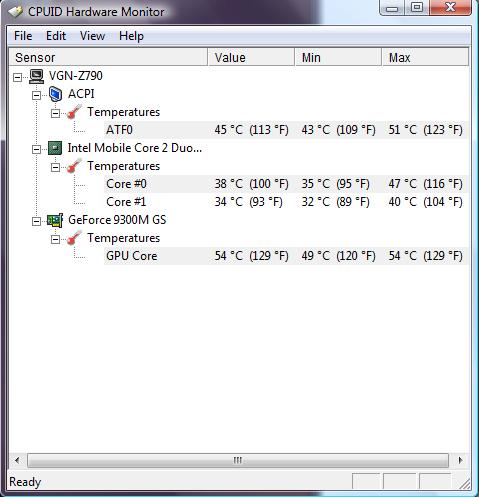
HWmonitor: http://www.cpuid.com/hwmonitor.php (have all monitoring, from cpu to gpu).
cpu-z: http://www.cpuid.com/cpuz.php (gpu monitoring only)
and yes, 35 ~ 40 is common range for Z with P8*** class cpu i guess.
![[IMG]](images/storyImages/94484561.jpg)
ps: peak temp for cpu is when gaming bloodrayne2 loL. -
I have slightly higher temp values then what you guys have, but I'm also running a P9700 processor at 2.8ghz
Attached Files:
-
-
Just be aware that for CPU cores HWMonitor shows about 5 degrees C lower temperatures than any of CoreTemp, RealTemp, HWInfo32, SIW. That tells me that HWMonitor is wrong. At least that's how it is on my Z690. System (ACPI), GPU, and HD temperatures seem to be correct in HWMonitor.
-
I wasn't aware of this until you mentioned it. So which free & reliable software do you suggest for use to monitor the CPU, GPU temp?
Thanks in advance.
-
You can still use HWMonitor, it's the only one that just shows temperatures and from all meaningful components at that. Just run several other utilities that I mentioned to compare CPU core temperatures and then make mental adjustment while using HWMonitor.
It would be interesting to find out why HWMonitor shows different values. Isn't thermal sensor a part of a CPU these days?
Official VAIO Z Core 2 Duo Series Owners Thread
Discussion in 'VAIO / Sony Owners' Lounge Forum' started by DiscCollector, Jul 15, 2008.


![[IMG]](http://img132.imageshack.us/i/cpupcwizard20091.jpg/)
![[IMG]](http://img198.imageshack.us/i/cpupcwizard20092.jpg/)
![[IMG]](http://img17.imageshack.us/i/cpucpuz.jpg/)