Problems? See this thread at archive.org.
any takers to my question above.??
-
dual ssd. as for hd, perhaps need to remove the dvd drive ? *cross finger* :x
-
oh so it can take dual SSD.?? are they both the 2.5 " variety or 1.8".??
-
They are 1.8" ><
-
ahh ok. thanks guys.!!
-
Hi everyone,
I'm looking at potentially getting a new laptop, after several HP Probook 4310s proved to be incredibly bad (poor QC, defective parts...) and had to be returned. I'm looking at either the Vaio Z790DGB or the SR490DEB. The critical specs look similar across the two, except for the better resolution on the Z series. From what I can tell from reviews, the SR unit has better vertical viewing angles than the Z, though I'd appreciate confirmation from anyone who's actually looked at both.
Can anyone help me determine whether the Z-series unit is really worth the extra $450? The SR is selling for ~$1300 at Provantage and has a 7200RPM 320GB hard disk, while the Z is ~$1750 and has a 400GB hard disk, but I think it's only 5400RPM. The ATI chip in the SR is slightly better than the nVidia in the Z, but after that (and after the screen resolution), I'm having trouble telling the difference in value between the two.
Thanks to anyone who can offer an informed perspective!
...Jay -
I'd be surprised if they do one at all. It will be on the web, and depend on what model you have.
SLast edited by a moderator: May 6, 2015 -
Anyone have any more info on this yet? Are the early Z's going to be supported?
Thanks,
S -
Great - thanks Visioneer.
S -
I think the answer to whether it's worth the extra $450 is something only you can answer. I don't mean to sound unhelpful but that really is the truth IMHO.
Are there any SonyStyle, Best Buy, Fry's Electronics, &/or MicroCenter near where you live? If there are, my best suggestion is to kindly urge you to go visit one or more of those stores & actually see & feel for yourself on which series (Z or SR) you like best.
Once you've made your decision on which series to go with, I'll also encourage you to buy your notebook from an authorized seller that has a fantastic return policy so that you have ample time to try/test it out at your regular working environment to be sure you're happy & satisfied with your purchase. I recommend buying the Vaio notebooks from the SonyStyle online store mainly because of their 30 day return policy. Good luck.
-
Believe me, if I could check them out for myself, I'd do it. The nearest SonyStyle store to Pittsburgh is in Cleveland, which is two hours away. Best Buy doesn't seem to carry the Z series, and their SR laptop is an older model. Unless someone has some perspective to offer on what really differentiates the two lines from a user standpoint, I guess I'll just have to wait until I travel to somewhere with a SonyStyle store before I can check them out for myself.
-
Oh, I see. I wasn't aware of that previously & I apologize for that. Hopefully, someone here who have owned both can help you out a bit from their experiences with both the Vaio Z & SR notebooks.
However, I still kindly encourage you to check both out yourself when the opportunity arises because that is, IMHO, just the best way to gauge as we all have different tastes, views, perspectives, etc. Good luck.
-
I have a Vaio Z530n/b and i am happy with it, although the laptop feels like a piece of junk in my hand compared to my previous Thinkpad x200, but still good.
infact i am trying to sell my z530 to get the x200 again, after having the Z for 2 months i think the thinkpad was much better and since the only game i play is Company Of Heroes , it will run great on both.
It is quite annoying but i had Windows 7 RC7100 32x for many months, with no driver issues at all.
3 days ago i installed RTM 32x MOST of the drivers no longer work. I have no idea why. I can only switch graphics by restarting, i cant get the hard drive protection working, and infact i had to reformat because i tried so many things windows was litteraly screwed up. My company of heroes patch would not even (jsut crash)
i reformated, didnt install half of the drivers and everything works well, the Patch in COH loads and ... (i have no active protection systems and drivers, basically the only driver i have installed is the video card drivers for which i have to restart to switch.
i kinda dont even want to both installing the other stuff cuz im more worried about it screwing everything up again.
Man everything worked GREAT! in windows 7 on x200 why the hell did i ever sell that thing.
sony drivers are such a pain in the neck, ive always hated sony for their poor quality but this time i somehow decided to give them a shot..
overall im happy...but i just have this feeling like this laptop is just gona BREAK like at any time. It just feels, not right.
I currently have the 1 year limited warranty and i am either
1- selling and buying a thinkpad x200 (which i know wont break, and if it does is super easy to take appart and repair by myself)
2- buying the 3 year extended warranty for my vaio since Sony makes stuff specifically to make it annoying to take things out/appart, which just plain pisses me off. -
I apologize if this has been noted already but Sony Canada has dropped the price of the Z710D, $300 since last week. I just got my price adjustment, a good deal made even better.
-
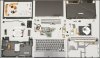
Hi all! Does anyone know how to disassemble the z31 and to change the harddisk? Many thanks in advance
-
Thank you, but that guide is for a diffrent model.
I own a Sony Vaio VGN-Z31WN/B.
Does anyone know how to disassemble the VGN-Z31WN/B???
Please help....
-
LOLOL
FAIL.
That is for the old Z-series,
Download this from my server
Extract Everything into a single folder, open up the "top" folder, and open up "top.htm" in your web browser -
hey everyone i have a vaio z with the red top. i hate it. does anyone know where to find a different one, where i can buy one or if anyone wants to trade. Is this piece even easy to take off and if it is how do you take it off?
-
COOL
That's exactly what I needed
-
8 days ago I reported my very first impressions of the Z-790D (CTO) I just received.
I was worrying about the heat. I got in touch with the Customer Service which requested me to send the unit back for repair due to a hardware failure (to be determined accurately at the time of the repair).
Knowing that the temperatures were as follows:
Intel core1: 116 to 143 F
Intel core 2: 116 to 141 F
Ge Force 9300: 145 to 147 F
HDD: 104 to 105 F
It's really hot!,
I decided to avoid any risk and disappointment in the way it will be repaired and after the end of the warranty. I have decided to return this Unit for a refund.
It's unfortunate because I like this computer very much.
I do not know yet what will be the replacement. I have to start thinking about it. -
Intel core1: 116 to 143 F
Intel core 2: 116 to 141 F
Ge Force 9300: 145 to 147 F
HDD: 104 to 105 F
It's really hot!,
Honestly, I don't think it's hot enough to be concerned. I'm writing this on a 2.5 yo Macbook Pro; and it's currently registering a temperature of 131 F...
131 is pretty common; and I've seen it up in the 170s...and yet I've not had any issues with it. -
I concur. Since my body temperature is about 99 F, and the boiling point of water is 212 F, 145 F is only about as hot as a bowl of soup (which has to be heated to 140 F as per the most Departments of Health).
Bottom line (IMHO): If the laptop isn't getting the BSOD, nor "random" shutdowns (2 common effects of overheating) and the CPU isn't automatically lowering it's clock speed to keep from overheating - nor consistently running a temp of 170+ F - returning the laptop for overheating is unfounded. -
Any news about new z on octomber?
thanks -
hi guys.. just wondering if anyone has physically installed a SSD into a VGNZ46 Series. looking at the internals it seems it takes a 2.5 Inch Sata HDD. i want to swap this out in mine and install a 2.5" SSD.
is it difficult to do.?? -
You can do it. There's Z disassemble manual, and there's steps to go. However, to get you hands on HDD you should take keyboard off.
-
Thanks for your contribution.
But as you know my Z-790 is not a MacBook Pro.
Sony Customer service has decided, after I explained the symptoms and then the temperatures, that I must shut down the computer immediately (I repeat what the representative said to me) and send it back for repair.
Maybe Sony is playing it safe. So do I. -
is there any drain with windows seven and updated drivers? fixed my z drain with HD audio and lan disabled in device manager, 0% drain overnight. With activated device always drain from 80% (battery care enabled) to 70-65% overnight
-
whoa! the holy grail?!!??!?!?
(have you posted this in the special thread regarding this issue?)
S -
recently me and other users posted their experience about drain issue researches.
Only with disable few devices ,my battery remained the same, saddly after unpluged on vista my battery dropped 4% in 10 minutes and stabilized at 76% ( i ve the battery care enabled).
So i decided to update the HD audio drivers today before apply the microsoft fix for HD audio issue...
I ve enabled all my device and ll see what happen tomorrow -
before apply the microsoft fix for HD audio issue
What's the microsoft fix? Do you have a link to the issue on their website, or a knowledge base number? -
I have now had my 590 Z for a little over a year. I have not had bothersone "battery drain" issues, but I can report that the capacity of my extended battery has declined over this period. The "maximum battery" setting on my original battery shows 4 hrs & 20 minutes of life when fully charged, while the new extended battery I just purchased shows 7 hrs and 10 minutes of life when fully charged. -
http://support.microsoft.com/kb/970030/en-us
Doitashimas h i t e!
BTW:
Is there anyone here from the US with a STEAM account who might do me a favour? Please PM me
-
I have the 2nd gen Z with the standard battery. Funnily enough, I can get just over 6 hours (off a 100% charge) with a slightly edited VAIO Optimized setting with that (the slightly edited meaning I set the display brightness to 40%.). That is when I type up word documents while on wifi (with MSN). Just note that this is on STAMINA. My VAIO is over 9 months old... I do suffer from the battery drain though, but I just leave my battery off the lappie when it is charged to 80% (batterycare) - I get about 4% loss a day when it is connected.
I have a few bugs to report regarding that batt. feature.
When I charge my battery up to 80% (via battery care) and disconnect it off the lappie, and at a later date I put it back onto the lappie and connect the AC adapter to it, it will charge the battery over the 80% limit until I log into windows (when I assume all the settings are loaded) - can anybody confirm if they experience this issue? In case this matters, I do NOT get any batt drain when the batt is off the lappie
Also, in some cases (though this happens randomly sometimes), the settings that I set in VAIO CONTROL CENTRE are reset to the system default - it mainly happens when I attach the AC adapter when the VAIO is running - gets annoying since I have to go and set the settings again (eg hard-drive sensor to max performance and 'don't display balloon when shortcut pressed' etc etc).
I can say that this is a bug because I have experienced this with older installations of Vista (that is, with the previous Sony-installed Vista OEM windows and apps).
Again, has anybody experienced this? Just was hoping Sony would release bug fix for this...
Cheers in advance -
HD audio driver updated today this is last week release , rm2.33 successfully updated but no change in drain amount today... just that sound seems more clear no more hatch.
But i am quite sure this device is culprit, when disabled in device manager i get no drain. i repeated twice to shut off device in manager and get no drain from startup.
- Yesterday i attached the ac power after one day in hibernation and the charging light was still off.. and 80% remained because i use the battery care 80.
- same procedure 3 days ago without disabled devices and just attached the ac adaptor and the charging light was on from the begining that is a result of battery drain.
there is no doubt that there is something wrong in power management, i hardly believe that japanese engineer designed a such battery leak.
Other point, there is a buzzing sound from the battery unit when laptop is off, you can hear that sound if you press your ear. -
That is a high-pitched sound you are talking about, yes? I have that as well. But the sound in my case comes when the Vaio is shut down with the batt attached (regardless of whether it is shut down on AC power or with battery). Also, the high-pitch sound comes from the CPU (near the left-side vent).
If I disconnect the battery and reconnect it, the sound is NOT there.
My desktop pc has an ASUS mobo light which remains on when the entire system is shut down (and when it is running), provided it is connected to the AC mains. I am kinda guessing the Z has something similar (thus the battery drain) - if that is the case, a simple firmware can do the trick.
Just wondering if other users have the high-pitched-sound-when-Z-is-off syndrome? Or has it been fixed on the new models? -
I can't reproduce these findings. You said when you turn off your Wake on Lan and the HD Audio you are seeing no batter leakage.
I tried that today -- I put my computer in hibernate at 39% battery to come back about 12h later to see it had drained to 30%.
There have been 2 issues plaguing the Z community -- 1 is battery drain, 2- is virtualization.
it seems 2 has been fixed but I doubt we'll ever find a solution to #1. I even had this problem with my previous SZ. If only sony wasn't so arrogant as to fess up and try to fix it. -
Yes the high-pitched sound is located under the laptop, but cannot localize with precision since this sound is very diffuse, but you re right if disconnect the battery for secondes the sounds stop, i ve to trie this with the battery drain amount. May the short time of battery remove tip can stop device to drain.
I ve disabled the hd audio in the the "computer device " in power management, i tried to disable first in the "multimedia or sound device" where the bluetooth is located and get no result.
Just disabled the HD audio controller, the lan controlle, finger print and get the same 80% battery level after 10 hours.
users on battery drain post get the same result with different device enabled, it seems that a combinaison these settings stop the drain on hibernation.
If you can try to disable audio, finger print, and webcam you may notice that the battery level wont drain after resume from hibernation with ac plugged.
In my last reports after i unplugged ac my battery stabilized to 76% after 10 minutes thats is normal regarding the startup drain. -
-
Hey guys, just thought would let people know im selling my Sony Vaio Z555 DN/B laptop. If your in Toronto, give me a shout on here and we can talk. I got layed off a few months back, so I really don't need it now.
Cheers! -
Why not post your sale in the MarketPlace section of the forum?
-
OMG! Aren't you a DJ? I can't believe your industry is affected by the economy. I hear that people are partying a lot more these days. Unbelievable. All that research on your Z. Maybe, there are Z foster parents you can have take care of it until you get yourself back to work again - that's your baby!
-
Lollz, Sup GEEEE! Yea I used to be a DJ, but that was part time. I was an IT consultant full time. I know, can you believe iv'e been so on to this laptop before it even came out, and now selling my baby. Good times! However, im not desperate by any means on selling it. But its just sitting there now, and id rather get the money for it while the value of it is still good, and I got another 2 year warrenty on it still. When I get a job, ill probably buy another Z though, or the new X series coming out soon, IF I get a job!.
Talk to ya soon! -
Good call, will do! Thanks bro.
-
The X Series will be Sony's 3rd netbook. P, W and now the X. It's more a replacement of the TT w/o dvd-drive. I hope its as cool looking as the X505. IMO Sony should have made the X Series a 13.3 to really compete with the MB Air and Dell Adamo.
-
You can check this video link out. Replacement for the Vaio TT series apperently.
http://www.youtube.com/watch?v=F1eVitUAGx4 -
Today the windows 7 ultimate packet for microsoft partners arrived. I´m thinking about an update from 32bit business tu 32bit ultimate on my z. Hope there are no problems...
-
Migrated from vista to 7. most run fine but one problem, the memory stick device is missing? what can i do?
-
Quick question: I am considering getting a Z with an SSD, but can't find any information on who makes the SSD -- I want to know if it supports the TRIM command that Win7 supports. Does anyone know?
Official VAIO Z Core 2 Duo Series Owners Thread
Discussion in 'VAIO / Sony Owners' Lounge Forum' started by DiscCollector, Jul 15, 2008.