Problems? See this thread at archive.org.
Hi everyone
I have had a Sony Vaio model VGN-NW21JF for some three weeks now and I can't understand why it keeps shutting down. There seems to be no irregularities when the computer is running and the programmes work as they should. When it shuts down, the computer is showing a blue screen and posting a message saying that the shutdown is related to protection. But when trying to let Windows find the cause of the problem, it comes up with no explanation.
Does anybody have a logic explanation to this problem?
-
Jorlin --
I have the same issue with mine. I used some of my Zymol Japon car wax i use on my NSX. It's a very high quality carnuba wax. Use the absolute softest 100% old cotton rag you can find and put it all over the screen. Put an extra amount where the line is. Rub it gently in, then buff it off with a cleaner part of the rag. It knocked out about 98% of the line. No kidding.
Be careful using an inferior wax as i don't know if it will have the same effect. -
Hi all,
I have VGN-Z540 and my ForceWare version is 174.49.
Can I update it to 190.xx? and how can I do that?
-
Morning guys, I have a Sony Z31WN and very happy however I took advantage of the free upgrade to W7 and so far all is fine except:
The fingerprint reader doesn't work and it seems my Vodafone Connect software for the my sim card doesn't find the device.
Any ideas? I need that internal modem to work with my SIM card. It always dfid before!
Any suggestions greatly appreciated. -
You will find all needed Driver at the Sony Homepage..
One question i have to the community. Buying the new VaioZ with backlit keyboard and Quad SSD Raid0:
Are the both Dual-SSDs "normal" in the market? Will i find bigger ones, after a year, and could i use quad Raid0 again?
I will go for the 512 GB Space, 4*128GB... But is there a way to buy 4*256 GB, in one or two years?? -
Some time ago someone posted a color profile calibrated by Spyder 3 for our Z in here. Another shop just canceled my order, because they don't deliver to Prague...so till I'll buy my Spyder3 in Japan, can anybody post that profile? Can't find it via NBR search...
-
Use the drivers from the Sony website rather than install any Vodafone software. Should work fine.
S -
hey everybody, i have disassembled and reassembled my z a few times, i did it pretty well. nothing strange happened except to the optical disk drive.
the first time, it seemed to work occasionally when it wasn't spinning at full speed or when i smacked it. but when it did run at full spin, it made that horrible noise where i think the laser motor tries to go farther than it should or something, a sort of repetitive series of 12 mechanical clicks.
now it doesn't work at all.
has anyone had any experiences like this? i think its due to the overall chassis or something.
would you guess its the cable?
i dunno, please give me somewhere to go from here... -
I also have this problem. I can't feel the line but I can see it against light. When the screen is lit you really can't see it, but it annoys me to know it is there. I keep the cloth between the keyboard and the screen ALL the time too!
Sony should do somethign about it shouldn't they? -
i dont understand why the same product would have such pricing differences between 2 similar counttries..
Hongkong Vaio Z 117GG HK$19,980 = AU$2,840 = US$2,570
Singapore Vaio Z 117GG SG$4,499 = AU$3,540 = US$3,200
Australia Vaio Z 117GG AU$3,999 = AU$3,999 = US$3,550 -
hi;
I talked to a representative today, asked about which SSD options are QUAD.
Response is:
"None of them are QUAD"
So unless we go and verify at a sonystyle store when they hit the stores, I would say ppl should not pre-order. They might end up with dual raids, whilst waitin for QUAD ones. -
hedehode I think you're in the wrong thread. This is for the 'old' Z.
S -
Deletededed
-
Hopeing someone can help me out. I am looking at getting the VGN-Z820 ( http://www.sonystyle.ca/commerce/se...1&catalogId=10001&langId=-1&productId=1007069) and i need to know if there is an internal slot for the WWAN and attenans
-
Hi Guys,
I'm going to replace my superb HP nc8430 with such Vaio VGN-Z720D/B
and really would appreciate any help/info about it concerning build quality/known defects/possible problems.
The specs of choosed model is:
13.1 " HD+ (1600x900)//Intel Core 2 Duo P8700 2.53 ГГц//Intel GM45 Express//DDRIII 4096 Мб//HDD 320 Гб 7200 rpm//DVD±RW Super Multi//nVidia GeForce 9300M GS (256MB)//VGA/HDMI/WiFi 802.11b/g/n/BT/IEEE 1394/Fingerprint sensor/USB 2/F/M 56k/LAN 10/100/1000/Express Card/SD/MS//High Definition Audio//Li-Ion/Win Vista Business + XP Pro (Downgrade)//31.49 x 21.08 x 2.54/3.3 cm/1.5 кг//+ GPS // 3G
Price is 2200 $ US
Thanks,
Anton -
Something is wrong in here:
I ordered my Z 4 months ago (See my Signature for Specs) for $1650, plus I got the Productivity Pack free of Charge.
this is not a good deal
Will -
Hi Will,
I know that its not good deal, but this is actual price on my domestic market, cannot do anything with it.
51MRG costs more than 3000 $ USD -
Why don't you get the New Z for that price? If you can handle less HD @ 128 ssd - even cheaper, at $1899
-
Ahhh.. how many upgrades has the Z had since z590 lmao......I am in SHOCK and AWE after trying to follow up on the list of models out LOL
-
For the U.S. market, Sony released 4 refreshes (all minor IMHO):
VGN-Z5...
VGN-Z6...
VGN-Z7...
VGN-Z8...
It has now been replaced by a whole new model, called the VAIO Z series as well with the following model numbers:
VPC-Z1... -
Something which helps the Singapore Z is that it comes with the extended battery as well.
The HK Z is still a better deal. -
anyone that has a ssd in their Z... is it me or does the intel g2 ssd take a longer time to bootup/shutdown than compared to other laptops (hp, acer, asus)?
-
It feels pretty swift to me, expec moving from a 5400rpm drive. It does seem to go slightly faster in a lower spec HP that I have though. It also scores a much higher Windows Experience score in that machine than in the Sony. Both drives are identical and running identical formware. Having said that, the benchmark scores in the Sony, and the day-to-day speed are great.
S -
I had my Z series repaired, but unfortunately removing it from the packaging, one of the feet on either side of the battery came off. I have lost the foot, anyone know where to get another?
-
You can buy them from Sony. Search for the parts and build manual that has a link floating around somewhere here on the forum, get the part number for the "foot", and contact Sony. Then do like I did, and superglue it on.
You can also get the part from 3rd party repair shops, but they usually charge a premium. Where Sony charges about $8 for the tiny piece of plastic, the spare parts center that someone here hawks wanted $14 for the same, plus a week's wait (which tells me they simply buy it from Sony and sends it on for a small profit). -
I just have to share my lucky day with you...today I went to the local electronic shop to take a closer look at EB series for my wife and I found out they have docking station for my Z on sale - for less than $20!! They said they wouldn't be able to sell it, as everyone is buying the new Z now. It's a pity they had just one, if they would have more I would resell them on eBay
-
Problems with SSD on my Z21 under Win 7 x64:
I put my Intel X18-M SSD drive in there (with adapter, obviously). Previously I had the drive in my Sony TT, where I had a WEI score of 7.7 for Primary Hard Disk. Now I only get 5.9. I even installed the Intel drivers for "Rapid Storage Technology" for Mobile Intel 4 Series chipset, which reports the drive ok, with no problems. Yet, the score remains the same. It should be much higher, although the system performs wonderfully fast. I can't help to feel that something is holding it back though.
Any ideas? -
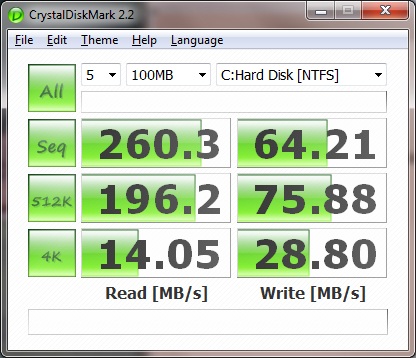
I wouldn't care about WEI, try some benchmarks like CrystalDiskMark and you'll see if something is holding you back.
-
CrystalMark values attached.
I guess I should shut up lolAttached Files:
-
-
Yep I think your results are quite fine...just don't care about crippled WEI
Here are my results to compare:
![[IMG]](images/storyImages/74853253.gif)
-
Hmmm it's your higher write speeds that make me think I could get some more out of this after all... I don't think the fact that I'm using the 1.8" SSD with an adapter to bring it up to 2.5" size has anything to do with it. I wonder though if it's because I used Acronis Disk Image to clone the old 2.5" SSD I had in my Z on to the Intel drive... Ah well.
-
naujoks, you might want to take note that for the Intel X25-M SSDs, the 160GB versions have higher write speeds than the 80GB versions.
-
Oh right. Also, mine's a G1...
-
I get a WEI of 5.9 on a G2 160GB in my Z11. Another laptop with the same drive gives 7.x and also feels faster, although it is a slightly lower spec machine overall, a HP5310m.
Not quite right, but still very fast.
S -
That's a bit odd, even though I don't trust WEI, I do get 7.7 on my Z with the same SSD...
-
Hmmmm. I might try a later BIOS then. What version are you on?
I got everything working first time in Win 7 x64 with BIOS 2170 so didn't take it any further. I have the 4143 too though so could try that.
S -
What's this 4143 BIOS? I thought the 2170 is the latest?
-
I'm on R5031M3A with advanced menu right now...
-
Jeez, where are you getting all these BIOSes from, pray?
I've got the Z21VN/X, latest official European BIOS for me only.... -
Everything is available on this board or from Sony Update..the R5 series is from the latest Z refresh, but works on any other anyway. As my 1st gen Z is not officially supported for W7 I couldn't download that bios directly from Vaio Update.
-
OK, I've seen what you've guys done, so I installed that said BIOS (always so nervous installing a BIOS anyway, let alone one that's not directly for my machine! But it worked.) However, WEI still reports 5.9 for my X18-M. Well, at least I tried.
-
Do you use that Intel Rapid drivers for your chipset? And do you have the latest fw for your SSD?
-
Yes, and yes.
And since, I discovered that the touchpad would freeze with that other R5 BIOS, so I had to go back to the original one. -
Thanks metsn. May give it a try.....
S -
HI guys, well I posted a while ago about my Z series and had also seen some owners complain about the scrath mark in the screen. It would be interesting to know how many of you have this problem. I have it now and Sony's reply to me is nothing short of insulting!
I could understand if their tactic was to say that it exists as a problem but they don't want to fix it in guarantee but to say that they "have never heard of the problem ever" is a little irritating.
Look here: http://getsatisfaction.com/sony/topics/manufacturing_defect_in_sony_vaio_vgn_z_laptop
Now I am unsure of what to do.
Also could someone post a link to the up to date drivers? My Vaio Update says it can not find my model in the server!!! I have aVGN-Z31WN.
Thanks. -
Surely the screen issue is not a manufacturing issue.
You can get these lines even if you just carry the laptop around in your bag.
For that reason I always put the the foam piece that came with the laptop originally on the keyboard before I move the laptop.
If you had this happen to your laptop once, you'll have learned that lesson. It happens to virtually all laptops, so it's a bit unfair to blame Sony for it. Although they probably don't want to acknowledge the
problem as they would admit liability.
Onwards and upwards. All will be different with your next laptop! -
I recently purchased a Sony Vaio Z (VGN-Z710DD) off a friend, and I am quite happy with its performance so far. My question is, does the Z series come with different palm rests depending on the exact model? I was really hoping to get a model with the carbon fiber aluminum, but the model I have is more like glossy plastic with a brushed metal appearance...it is definitely plastic though.
I thought all Z series laptops had the carbon fiber palm rest (and around the keyboard area)...am I wrong? -
You're wrong...all Z come with aluminum palmrest (it's not plastic), silver or black.
-
Thanks for the quick response...
How come my palm rest looks like glossy plastic though? It does not have that brushed aluminum metal look or feel like the ones at the sony store. Any ideas? Strange...maybe it's just worn out? -
Post some picture
Or open it up and see by yourself. Doesn't it have much calmer feeling than other parts? It doesn't wear out so easily... Just if I knock the palmrest I could hear the metal sound...
Official VAIO Z Core 2 Duo Series Owners Thread
Discussion in 'VAIO / Sony Owners' Lounge Forum' started by DiscCollector, Jul 15, 2008.