Problems? See this thread at archive.org.
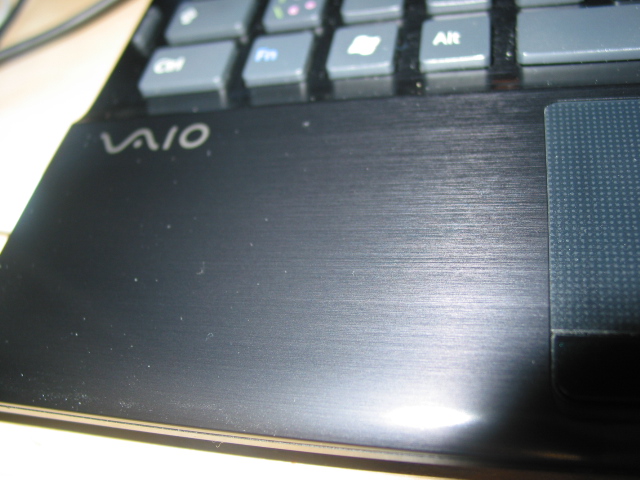
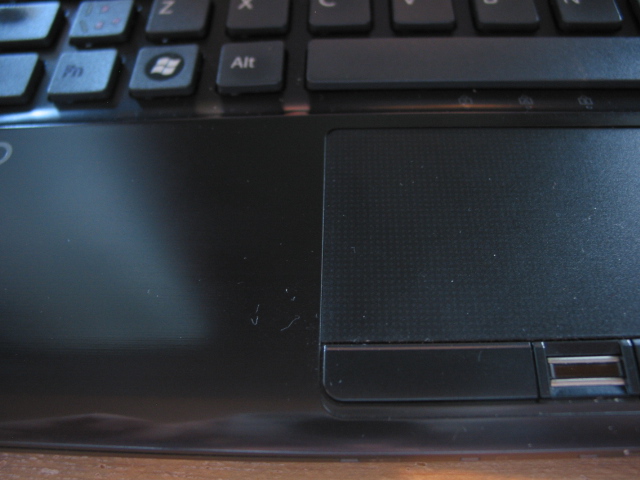
Here's a couple pictures. With flash on, you can see the brushed metal appearance, but in the second photo you can tell the palm rest just looks like glossy plastic...the second photo is much more accurate. When I visited the sony store a few months ago, the Z series looked and felt like a real brushed "metal". Does your Sony Vaio Z look the same?
The reason I ask this is because I bought this laptop used, and I was thinking of upgrading the palm rest to the REAL aluminum one, if there is even a difference...now I'm not so sure. Thoughts??
ALSO...I just want to mention that my palmrest leaves fingerprints and palm prints like crazy. Every single time I type, there is leftover residue on the palmrest, no matter how clean my hands are. Do you guys have the same prob?
-
Attached Files:
-
-
I believe it is aluminum, but the black version doesn't really look great. Don't get me wrong, when I was buying my 1st gen Z I was preying they would make black version, as I don't like silver on notebooks...but when the black version came out, it felt somehow cheap. And that's why you're probably getting that feeling. If you want more metal look, switch for the silver palmrest.
-
Having own/owned the VAIO Z notebooks with both silver (Z690) & black (Z790) palmrests, I would humbly say that the brushed metal appearance on the silver one is more "obvious" to the eye than the black one.

-
Leave the laptop in a cold environment (air conditioned) - the palmrest will become cold.
-
Alright so I have a problem with my keyboard, and I need some help/advice.
I was cleaning out my keyboard a few weeks ago by removing the keys one at a time and trying to blast the dust out with canned air (as it had become quite excessive, and I'm a bit obsessive-compulsive about keeping my Z clean). However, as I moved across the keyboard, I noticed that some of the brackets from one letter to the next varied. One was a more sturdy-looking, thicker, light gray/beige colored bracket, and the other was black, thinner, and weaker looking. Sure enough, as I tried to put the "J" key back in place, I realized one of the tiny, wimpy peg things from the piece that attached directly to the key had broken off, and the key wouldn't stay.
I ordered some brackets/keys from individualkeys.com, but all I got were the beige brackets, which does me no good. I tried to talk to them, but they claimed not to have the other kind of bracket, so now I don't know what to do. I can't seem to find a reliable seller where I can buy our keys, let alone the other kind.
So now I have the tan colored brackets which don't fit to the one currently on my keyboard, the J key, and a broken black bracket. What should I do? Anybody know if this variation in brackets is just something they do with pretty much all our Z's or if only mine is this way, perhaps because it was refurbished? Are there any good supplier websites I'm missing? I'd rather not risk removing the current bracket on the keyboard and trying to replace it myself. That and sending it into Sony (also not really an option) are the only solutions that immediately come to mind. -
I didn't even know it was possible to remove individual keys in the first place!
Knowing that it's usually a disaster if a key comes off any keyboard and it's pure luck if one can put it back in place, I'm surprised you took the risk to remove every one...
You might have to consider buying a new keyboard altogether. -
Yeah, I've seen the being referenced here numerous times, so it's probably a little more common than you think. That would really suck to have to replace my entire keyboard because of one tiny little piece of plastic that's meant to detach from the keyboard.
Anyone have any input regarding why they were use two different designs on this? -
The M Key on my keyboard just caught in my sleeve and snaped out. It has a grey springy thing on the backside of the key and a blue clear cone shaped object in the socket. Is there anyway I can replace or fix it?
I am obviously clueless about repairing keyboards.
-
I am sorry if those questions have been already asked, I searched the thread but wasn't able to find definite answers:
1. My SONY Vaio Z540 (CTO, US-built) is presumably SATA-150. Has anyone been able to enable SATA-300 somehow?
2. I would like to upgrade CPU from P8400 to P9700. Will the hardware recognize it? Has anybody done it already?
3. What's the newest BIOS version I could upgrade to w/o any issues? -
OK, an OLD question I'm sure. However, with over 1000 pages, I can't look through all of them. I did a search and read what I could find on this forum but still did not find an answer.
New Z890 coming, Purchased a 4 year Sony Extended warranty for it. I am however, very concerned with the screen being scratched and bruised by the flexible lid. Just a bad design as widely acknowledged. So my question:
1. Has there been a definitive answer as to the best way to protect that screen when it is packed inside a bag with other items?
Is the supplied microfiber cloth the best way?
What about a silicone sheet instead?
What about putting after market feet on the market so that the screen sits 1/4" further AWAY from the keyboard, PLUS the microfiber cloth?
2. I read also with alarm that Sony seem to deny warranty claims and states that it is user error. There is conflicting reports as some report Sony replacing the screen under warranty while others report that Sony does not. I'm in the USA.
Appreciate any help even though this is an OLD issue and I'm sure, discussed to death somewhere in this thread.
Thanks,
UL
2. -
First off, I think you made the right choice in your selection. I also had these concerns with the keyboard markings appearing onto the screen. I think what is vital is that a case is used in which the fit is of utmost importance, one that is secure but not too tight. I can say that using the microfiber cloth that comes with it is enough protection when used with the correct sized case and that this cloth is used EVERYTIME the Z is closed. As for the case, my recommendation is the following.
Brenthaven Slim I Shoulder Case- eBags.com
It's a great case and the best I have ever used. You might be able to find this case on Amazon for a bit cheaper but this is a good reference point to start. I carry my Z with me so much, about 20 days a month, several times each day, and into environments that would be considered rough and have not had any screen markings occur. I'm very dilligent about placing the cloth between the keyboard and screen everytime I close it, even when I'm not putting it into the case. This has been a routine for me now for 5 months and it is working well. I have not added any additional rubber feet type adhesives to the bezel and have not felt the need to.
As for your warranty and screen replacement, I have read that Sony will replace the screen only if you have the Extended Warranty with ADH, not the basic quick ship plan but I could be wrong on that. Good luck in your solution. -
Thanks! Very helpful.
The ADH makes sense as then they can't back off and say that user error is not covered. I do have Sony's 4 year ADH for the Z, and I have no problem putting a cloth in between each time. I'll just rig the cloth so that it flips out of the way during use, and flip back when closing.
Thanks again.
UL -
I wouldn't do the latter. The sensor for whether the lid is open or closed might be affected, and the cloth might slide. And it might not have much of an effect either -- the screen bends, and will continue to do so even when the feet are bigger.
As for what's "best", I would not use a silicone sheet. The reason is that it would drag dust particles against the screen and scratch it. A chamois leather works best for avoiding dust scratches, in that it absorbs particles. A microfiber cloth is good too, but dust can statically cling to the surface, and it also doesn't absorb moisture like the shammy does. But it's much cheaper and easier to find in stores. -
Hi, wanted to know if my VAIO Z with the Nvidia 9300M GS is far beyond in competition from the new VAIO Z with the Nvidia GT 330M GPU..? I bought it like 6 months ago and paid a lot for it. My only complaint then was the 256MB dedicated 9300M GS GPU, now that they have this new one with the new chip 1GB..What can I say..!!! Is the difference really vast??
-
Does anyone know where to get the replacement Keys for the Z keyboard. I ordered 2 differnt site, neither has the correct spring mechanism.
-
Sony service centre?
S -
bonbooni,
The difference is quite significant. If I remember correctly, it's the new one is 3 times faster than the old one in terms of graphics chip. However, unless you are playing games or editing video, the practical difference may not be that vast in day to day use.
UL -
I have a question about:
Memory Stick Duo PRO-HG, I understand its high speed comes
from 8bits, which is mostly used in sony cameras and camcorders.
And vaio z-series ms reader can read these, but do they read and write in 8bits?
or the slower 4bits? -
is there any competitors to the sony Z 13.3 inch laptop where you can get 1920X1080 res? if you can tell me i would appreciate it . thanks!
-
There is none, and frankly I don't see who will try to. Also, the 1920x1080 is on the Core i Z, not C2D Z.
-
I haven't seen that screen, but if the ppi is anything like the Vaio P screens then I think that might be a step too far.
S -
Alright so I have a problem with my keyboard, and I need some help/advice.
I was cleaning out my keyboard a few weeks ago by removing the keys one at a time and trying to blast the dust out with canned air (as it had become quite excessive, and I'm a bit obsessive-compulsive about keeping my Z clean). However, as I moved across the keyboard, I noticed that some of the brackets from one letter to the next varied. One was a more sturdy-looking, thicker, light gray/beige colored bracket, and the other was black, thinner, and weaker looking. Sure enough, as I tried to put the "J" key back in place, I realized one of the tiny, wimpy peg things from the piece that attached directly to the key had broken off, and the key wouldn't stay.
I ordered some brackets/keys from individualkeys.com, but all I got were the beige brackets, which does me no good. I tried to talk to them, but they claimed not to have the other kind of bracket, so now I don't know what to do. I can't seem to find a reliable seller where I can buy our keys, let alone the other kind.
So now I have the tan colored brackets which don't fit to the one currently on my keyboard, the J key, and a broken black bracket. What should I do? Anybody know if this variation in brackets is just something they do with pretty much all our Z's or if only mine is this way, perhaps because it was refurbished? Are there any good supplier websites I'm missing? I'd rather not risk removing the current bracket on the keyboard and trying to replace it myself. That and sending it into Sony (also not really an option) are the only solutions that immediately come to mind. -
Hey all.
I've been having intermittent problems with the touchpad - it seems that it flakes out from time to time - it becomes jumpy (often simultaneous w/a lot of HD access), and sometimes returns to a stable state - or it just times out/becomes unresponsive completely. I've done an OS reinstall (to Win7 from Vista) and upgraded the driver (that gives some of the scroll/touch control) and had the touchpad itself replaced.
Any ideas? -
What problems did you have w/the touchpad? Mine seems to get unstable from time to time...
-
It's been discussed before, in this very thread. But I guess it's too much to ask for people to read over 10,000 posts before asking a question...
Anyhow, someone here posted a .vbs script you can place in your Startup folder, which bumps up the priority (modified slightly by yours truly)
Save with a .vbs extension, e.g. fix-apoint-priority.vbs, and place it in your Start menu's Startup folder. Then reboot.Code:'Const PRI_REALTIME = 128 'Const PRI_HIGH = 256 Const PRI_ABOVE_NORMAL = 32768 Const PRI_NORMAL = 32 'Const PRI_BELOW_NORMAL = 16384 'Const PRI_LOW = 64 Set objWMIService = GetObject("winmgmts:\\.\root\cimv2") Set colProcesses = objWMIService.ExecQuery _ ("Select * from Win32_Process Where Name = 'Apoint.exe' or Name = 'ApntEx.exe'") For Each objProcess in colProcesses objProcess.SetPriority(PRI_ABOVE_NORMAL) Next Set colProcesses = objWMIService.ExecQuery _ ("Select * from Win32_Process Where Name = 'ApMsgFwd.exe'") For Each objProcess in colProcesses objProcess.SetPriority(PRI_NORMAL) Next -
Thx. Did a search for touchpoint crash and didn't find anything.
-
I've just got one of the i5/330M VAIO Zs, having previously had the 9300M/2.55GHZ Z21VM/X version.
I must say, I can't believe how much faster the new machine is.
I'm an avid gamer and every game that I threw at it it ate for breakfast (Dirt 2, Resident Evil 5, Crysis). I can play them all at 1280x800 resolution (the screen does a great job at upscaling) at medium to high resolutions, with framerates between 25 to 40.
Totally amazed! -
I've installed a clean image of Windows and feel a aesthetic need to fill up the OEM info in system properties. Can somebody please post a regfile with following contents from original OS?
Code:[HKEY_LOCAL_MACHINE\SOFTWARE\Microsoft\Windows\CurrentVersion\OEMInformation]
-
Has anyone sent in their laptop to Sony using the extended warranty? How long does it usually take them to fix it if there's some physical damage? My laptop won't be delivered to the repair center until Tuesday, and I leave for Japan Friday after (not in that week, the week after).
-
Does anyone know if the Z790 built-in pro duo card reader can read/write 32gb pro duo's? I don't want to buy this overpriced media only to find out it doesn't work! I'm already using my SD slot and need more memory (I have the 128GB SSD).
I already tried those pro duo adapters that can take 2 microsd's as memory. Worked in every device except the reader built into my Z790. I suspect Sony firmware locked the Z from reading non-official media. Pisses me off to no end. -
Not sure. You'd need the OS update though. There definitely one for Windows 7. Not sure if that's enough though, or if a new driver for the device itself is also needed.
S -
Thx Stevod. I ended up calling the local svc ctr and they confirmed that the Z37 (Z790) does indeed support the 32gb pro duo. So I went out and bought a Sandisk and it works fine on Vista without any driver update. Nice to have another boost of memory without having to swap a usb in/out. Still thoroughly miffed though that the microsdhc adapter doesn't work. Another strike against Sony in my books.
-
hello, I'm thinking in upgrading my notebook for a long time now (6 months), and when I was decided on the acer 3820TG i've changed my plans and decided I don't need a desktop replacement (3d POWER) so I'm back in the market. I'm again with some thoughts of going otherwise the 3820TG. so weight is again a key factor. I've come to 2 options, one is an used vaio z (I will be delivering to brazil, used ones are easier to import here):
Sony Z Series VAIO Notebook VGN-Z570N
(2.53ghz C2D 6mb cache)
$700 in upgrades
4GB RAM ($125)
120GB SSD OCZ Vertex 64GB Cache & Trim ($400)
Windows 7 Ultimate Genuine Registered copy ($175)
Office 2007 (outlook, word, excel)
has a 10/10 user rating:
http://reviews.cnet.com/laptops/sony...-33198612.html
the other one is the new toshiba R700 line, with full power core i5 520m, 13.3 screen and 3.2lbs weight.
What do you say? -
Hey everyone,
Just wondering, is it alright that I use rubbing alcohol (70% isopropyl) to clean the palmrest on my Z 690?
I read it somewhere that the alcohol would peal off the coating on the aluminum palmrest, but so far, I haven't seen any visible damage done.
Thanks. -
Selling my Z if anyone is interested.
http://forum.notebookreview.com/not...fs-sony-vaio-z690-2-56ghz-4gb-accesories.html -
How well do these laptops run Adobe CS and multitask? I'm used to having Google Chrome w/ 5+ tabs, itunes, and Adobe Photoshop or Dreamweaver open at once. Just want to make sure this laptop could do this smoothly.
Also, how well does it play games? I'm aware of that it has a somewhat old nVidia 256mb GPU, but if it can run games such as Mass Effect, Assassin's Creed, and maybe Call of Duty MW2 at preferably medium settings, that will do. -
Multitasking no prob at all, 5 or even 10 tabs on Chrome AND CS5.
Games like a dream, I'm playing Batman on full settings (though most games at 1366x768 resolution, but the screen does a great job at upscaling), Assassins Creed 1 (2 is a bit too demanding), Gears of War, Just Cause 2.... It plays literally every game I threw at it, even Crysis. It's a killer machine. -
I see in your sig that you have one of the new Z11's; I'm asking about the last generation of Z's (590, 690, 790) which have a worse graphics card (256mb vs 1GB). Or maybe I'm mistaken and you're talking about gaming on the older model Z's. Just need to confirm...
-
This is list of games i play with Z:
1. Left 4 Dead at Native Resolution, Medium setting.
2. Dead Space 800x600 , Low
3. The Last Remnant , 800x600 aspect at 16:9, Low settings.
4. Street Fighter 4 on Intel HD4500 , 800x600 High Bg and Charac, Low other setting. *can actually set to better setting if running on NVIDIA*
5. Race Driver GRID, 800x600 aspect at 16:9, Ultra Low with Custom setting.
6. Call of Duty : Modern Warfare 800x600 aspect at 16:9, Low settings.
7. Call of Duty 5 : World at War 800x600, Low settings.
8. Burnout Paradise, 800x600 aspect at 16:9, Low to Standard settings.
9. Pro Evo Soccer (Winning Eleven) 2009 on Intel HD4500, 1024x760 aspect at 16:9, Medium settings
10 HAWX on Intel HD4500, Native Resolution, Low setting.
11.Dirt 2, 800x600, Low setting.
12.Mass Effect 2, 800x600, Low setting with some tweak (its somehow better than Mass Effect 1)
New game..i think its not really playable. Better go with new VAIO Z (VPC-Z) -
My another sony VGN-Z850G
experiences wifi problems a lot. When streaming videos or using voice/video chat messengers the wifi gets disconnected and the wifi icon has the yellow cross symbol. and when i disconnect and reconnect it works properly- this happens frequently while streamin/chat. My roommate has a dell and it is connected to the net even when I am facing the problem.
Can anyone please recommend a solution? is there any drivers i should download? Please give the specific link to d/l from.
VGN- Z850G with a Win 7. -
I have, took me >1 week to get it back - 8 or 9 days as I recall.
-
mani234 - You need to enter your laptop details in the Vaio support centre on the web and it will show you the latest drivers. There may be other drivers you can try from the wifi card maker that are newer than those distributed by Sony.
S -
Need help from people who has changed thermal interface on MB chips on Z-series.
My nvidia chip got over 100C in speed mode on my Z520 so I need to disassemble the laptop and change thermal interface on nvidia and likely on the other chips.
The Service Manual for Z-series has a number of Thermal Sheet (GPU-KBD, Power, VRAM, GMCH etc) objects those are "non-reusable" according to the document. What kind of objects are they and is it possible to relace them by something else?
Could anybody who changed the thermal interface on MB on VGN-Z provide some additional information about the whole procedure. I have an experience in changing the thermal compound on VGN-S series but Z looks much more difficult so I decided to ask for some advice.
in addition to my previous post - a question how to avoid damaging the chip during disassembly of the cooling system. -
Wouldn't this be better handled by a proper service centre?
S -
2 stevod
There are some reasons to change the thermal interface by myself. The first is the price. It is unreasonable high if I do it in Sony service center. Next is the thermal interface service center will use for this. They likely use the same GUM as the original one in Sony PC's - I use MX-2 which I'm sure much better then the original Sony GUM. And finally, I have good results of changing the original thermal interface on a number of desktop and notebook MB's including ASUS, Dell, Compaq and Sony VGN-S.
Service manual for Z-series looks the most difficult in my experience. It has some "unusual" things like the Thermal Sheets "non-reusabe" those I don't fully understand so this is the reason why did I decide to ask for advice the people who did that sucessfully. -
Hi! pleae please please help me
( i just cracked m lcd screen and need the part no. of the LCD of my Vaio Z VGN-56GG Asian model number. But i don't know the correspoding model of this in the western region. Does anyone know the LCD part number for this model? or just the correspoding model in the western region? thank you!
(
-
Fair enough.
S -
Is the VGN-Z55 still a decent buy if I get one at a heavily reduced price?
3.06 C2D & 256SSD, 9300 -
Is the VGN-Z55 still a decent buy if I get one at a heavily reduced price?
3.06 C2D & 256SSD, 9300 -
If you mean this one:
https://www.sonystyle.co.uk/shop/VAIO-CLEARANCE/Z-Series-13-1/VGNZ55V051R.CEK
Then I just bought it. Sorry
Hope I didn't make a mistake - it may a couple of refreshes old, but the spec is very close to what I was looking for in the newer Z series - just missing the WWAN and the 1920x1080 screen, but even the colour was the right one
PS Anyone know if a WWAN module can be (easily) retrofitted ? If so, where can I get one ? Thanks!
Official VAIO Z Core 2 Duo Series Owners Thread
Discussion in 'VAIO / Sony Owners' Lounge Forum' started by DiscCollector, Jul 15, 2008.