Problems? See this thread at archive.org.
I think you won't as several people on teh internetz say they have already done it.
-
I can't find a way to message you so here goes: I get "bash: syntax error near unexpected token 'do'". Not sure what Iḿ doing wrong, not really familiar with scripting.
Edit: I got it done by first doing "sudo su". But it won show GRUB I followed
http://www.slideshare.net/slideshow/embed_code/27418512. Boot-repair gave the following output:
http://paste.ubuntu.com/6302687/
I followed
http://www.slideshare.net/slideshow/embed_code/27418512. Boot-repair gave the following output:
http://paste.ubuntu.com/6302687/
Edit 2: got GRUB through running boot-repair. But now I cant login to Kubuntu I get into a loop in Kubuntu when trying to login. With the right password the screen fades away as if it's continuing to the desktop but I arrive back at the login screen. Revocery and root is also weird; when I try to change my password it says that it won't change the password since it's the same as the previous one....it does this with all new passwords!
Edit 3: deleted and reinstalled Kubuntu, then ran boot-repair again and all was fixed! Now need to find how I can make Kubuntu hibernate. And decide wether I want Kubuntu or Xubuntu; Kubuntu is not making a very stable impression on me. -
Hi Guys,
New member here. I want to upgrade the hard drive on my computer and I came across this:
Toshiba 512GB PCIe SATA M 2 SSD Solid State Drive NGFF CSSD HG5D | eBay.
What's a good price to pay?
Thank you -
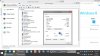
100% It works. I did it and am using the 7260-AC card!
I included a screenshot with my Vaio pro 13 model # with the wifi card listed under device manager!
http://s11.postimg.org/noq0xmc7n/7260_AC.jpg
 dkb194 likes this.
 -
Hi all,
my first post in this forum
I'm Indonesian and purchased this Sony Vaio Pro 13 when I go to US 2 months ago, and yes the fan si very loud (tried all the advice from this thread; upgrade driver, setting fan, but not solved the sound), and one of usb port is not working
so I tear up my Vaio
and find out why the fan is so loud, because the fan is not attached well to the board, the glue is loose.

The fan position should be like this
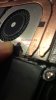
so I just use cotton-bud stick to press and close the casing
now the fan is very quiet
Now Q: can I replace the broken usb port? if yes, where to order? and what part-type and model?
Many Thanks -
Can you test your connection in the 2,4GHz band?!
I think this is most important for us when thinking about changing the card.
We can change the wifi card however we can not change the wifi router (when not at home).
The question is: Is the connection quality with the new AC card better or the same under the same conditions as before with the old card.
Comparing the 300Mbit "N" with the 1GBit "AC" connection is not fair.
-
My problem with SVP13 fan is that it produces annoying, high-pitch sound (like whinning, or whistling) even if revs are low. Did you have similar problem and was it fixed?
Also, I don't quite understand the cotton-bud stick idea. Did you put it inside the casing so that it presses down the fan? -
Thanks, just seen your question but looks like you've solved it - that's good. I'm going to follow those instructions myself. Did you find anything that you had to do differently than the instructions? I see the key bit seems to be creating the new partition in Windows.
-
I have now finally solved my problems after sleep mode bug/hangup both when closing lid and going into sleep mode manually.
I found this tip on the Sony community forums.
1.Launch Task Manager
2.Terminate two tasks
esrv.exe
esrv_svc.exe)
3.Delete sony_acpi_battery_input.dll Under C:\Program Files\Sony\VAIO Care\ESRV\sony_acpi_battery_input.dll
4.Restart PC
original thread:
Vaio Pro 13 Sleep problem - Page 2 - Sony Communitydkb194 likes this. -
Maybe it would be better to rename the dll instead of deleting it so you still have it in case you ever need it again.
I had to run bootrepair to get GRUB after I did everything. Edit 1 was solved by running boot-repair, edit 2 was solved by reinstalling Kubuntu and running boot-repair again.Note that by doing "powercfg /h off" in W8 you'll lose the option to hibernate. After installation I switched it on again in W8 and in power management I enabled hibernating and disabled fast-restart. Works fine, only have to find a way to hibernate in Kubuntu. Are you going to install Kubuntu? Will you let me know what you think of it stability/bug-wise? -
Hi guys,
I'm new here, and writing because I'm experiencing a CPU throttling problem. Every time I'm doing something GPU intensive, my CPU throttles to 0.78 GHz, but when I'm doing something CPU intensive, it does not throttle at all. Does anyone else have this issue? -
Yes, I took a video of that, http://www.youtube.com/watch?v=VCdss_9Ek-4
Yes.
And Yes, but actually it presses up the fan, as the fan position is under the keyboard. Sorry I forgot to took a photo.calzone123 likes this. -
So it seems Skype is crashing a lot more than before for me, it does it a lot sometimes, and other times none, mostly when I am in a convo, not video chat. quite annoying.
-
it's not just skype. a lot of the win 8 apps are crashing in 8.1. maybe they just need an update for compatibility.
-
anyone experiencing distorted/crackling sound when increasing volume after 8.1 upgrade? Upgrading was the biggest mistake i've done!
bluetooth also stops working after restart. i always need to uninstall and do a scan for hardware changes everytime i restart. really sucks! -
Can you check what driver version do you have?
The older version Intel 3.1.1306.346 was giving me the same problems plus bluescreen during Windows 8.0 stage that I had to uninstall and used Microsoft Generic driver to resolve the issue.
But the latest Intel driver 3.1.1307.360 works flawlessly under Windows 8.1 environment. -
where I can download this version ?? I can't find in intel website ??
-
From Canada/US support:
Sony eSupport - SVP132190S - Drivers & Softwaredkb194 likes this. -
thanks will try it now :d
do you have problem with auto brightness jump to 100% after win 8.1 update ? -
No. I only have brightness Fn key not functioning after resume from sleep if I sleep the machine by closing the Lid. But this problem already existed in Windows 8.0.
Have you updated the BIOS version R1040V7 prior to upgrading to Windows 8.1?
Sony eSupport - SVP132190S - Drivers & Software
I have seen few reported your issue because they did not do the BIOS update prior to upgrading.hamud likes this. -
No one else notices the touchpad being jumpy and not as precise on 8.1?
-
I did the bios update before updating to 8.1
-
I want to keep the Vaio Care so I did not uninstall it. I just set "Close Lid - Do nothing instead of sleep" and this serves me well. Anyway, Sony moderator has suggested the following to resolve the Sleep/Brightness issue:
1.Launch Task Manager
2.Terminate two tasks
esrv.exe
esrv_svc.exe
3.Delete sony_acpi_battery_input.dll Under C:\Program Files\Sony\VAIO Care\ESRV\sony_acpi_battery_input.dll
4.Restart PC
You may want to try and still keep your Vaio Care.
As for brightness, I always disable the auto-brightness to prevent flickering issue and so it's in off position. I will test it later on to see if I will have the same issue when the auto-brightness turned on. Will let you know.hamud and calzone123 like this. -
It works with one exception: opening the lid does not wake up laptop anymore.
-
hamud, I think you are right, if I turn on the auto-brightness, it will go 100% brightness on resume. Even after I turned down the brightness, it would automatically turn up to full brightness at some point. Anyway, I don't like this auto-brightness stuff and so I will turn it off permanently.
calzone - "Open lid - Resume from sleep" is the Power option only available from Vaio Control Center; I guess when you disable the services as advised by Sony Moderator, you are disabling the Open Lid function as well. By the look of this, the best option right now is to set "Close Lid - Do Nothing" and wait for Sony Engineer to come up with a fix.hamud likes this. -
thanks man , now i'm sure it's not a problem with my drivers , I appreciate that and waiting for Sony engineering to fix these issues .
-
Hi there,
I found that Intel ( Intel® Driver Update Utility) has Newer Graphics Driver # 15.31.17.64.3257 which should update the available version# 9.18.10.3165 in our system. did any body mange to install this new driver? has it solved the "brightness Fn key not functioning" after Sony Vaio SVP132 goes in sleep mode?
I tried to install it but if gave me the following message: " The driver being installed is not validated for this computer. Please obtain the appropriate driver from the computer manufacturer. Setup will exit"!!! -
So I reset my laptop to windows 8 with new bios update. Now I would to upgrade to 8.1, I must do what now?
Install pilote and utility for 8.1 before I upgrade my laptop ? -
I hvve 8.1, installed new BIOS after upgrading. I do not have any other issue now besides the autobrightness not possible to turn off, and I had this on 8.0 too.
-
Can someone tell me if there are substantial differences between the standard warranty of two years and the others, apart from the additional years?
-
Here in the Netherlands it's not...they advertise it as some premium thing but here you only get the extra years, no extra services.
-
Hi, having a similar problem here as everyone else.
Laptop recently updated to windows 8.1 and after update, bunch of problems came up. Biggest problem has been after a couple minutes, the computers display turns off, but it won't turn back on, even though the keyboard is responsive (lights turn on).
I'll install that driver someone mentioned but another problem that happens is after the display turns off and it goes to sleep, upon waking up from sleep, all applications have closed! Everything that was opened. Any solutions? I feel this is unrelated to display drivers, but hopefully it fixes everything... -
Finally I decided to buy it, but I still need some clarifications:
1) I read something about the total absence of glass on the display in the non-touch version...really? So I must think this is why the touch version doesn't have the problem with glue on the frame?
2) Is the protective cover useful (cost €40...a lot)? Would you recommend me it or not?
3) In the sata 128gb ssd, how much free space is available except windows 8 and the pre-installed programs? (pretending that the recovery partition doesn't exist)
4) Does removing and then merging the recovery partition into the primary one void the warranty?
If someone could asnwer me these questions I would really really appreciate. Thanks for the patience
-
i just noticed this new problem i have recently. it seems that my laptop won't go to sleep whenever the lid is open. the screen turns off and that's it. sleep/resume works fine when you close/open the lid though
-
- Check if you have set Power option on "Put computer to sleep" correctly.
- Check if the Intel Smart Technology has been turned on. (Vaio Control Center/Power & Battery/Intel Smart Connect Technology)
This is what Intel Smart Connect Technology supposed to work. It wakes up your Vaio from sleep periodically to check email and messages like smartphone or tablet so that they are already on your machine when you resume from sleep the next time. Especially when there are large files to download, it may kick off the fan.
If you don't like this feature, turn it off. Check your task window and see if there is an Intel Smart Connect Technology icon running. If so, right click to Exit the program. Then go to Task Manager, 'Startup’ Tab, highlight 'ISCT SysTray' and click Disable.
If your issue is not related to above, check your wireless adapter in device Manager, right click to Properties/Power Management and make sure "Allow the device to wake the computer" is unchecked.dkb194 likes this. -
yeah all of those options were already done. this happened after the 8.1 update. i just don't have the other sleep problems that other people describe with the screen/lid.
-
This thing is so light that 12% more weight reduction is hardly anything . However what you need to look at is the difference between matt (non touch) or glossy screens (touch). Although the touch screen is gorgeous , it still is a bit of pain to use under bright light.
-
Partial Answers
- Protective cover is very ideal, this thing is too slim plus quite a no of sharp edges so YES. Even screen protector is a must .
- 128 SSD- cant remember now but around 80GB i think but including recovery partition
- merging - shouldn't be an issue as long as you have recovery partition back up (or else now easy way to re install ?) -
Bump, having the same problem and it is very annoying to force shutdown and restart the laptop again, can somebody kindly help ?
-
I guess we need to know more
ie: has it actually crashed or is it just the display that has turned off?
have you tried disabling all power management stuff to test whether it is trying to standby but failing?
Anything in the event logs?
drivers all updated? -
Two new driver updates but the size is incorrect so possibly corrupt uploads by Sony
Graphics:
What does it fix?
Fix the sandstorm problem which occurs when uninstalling WDDM1.3 graphics driver manually.
Firmware Extension Parser
What does it fix?
Install SFEP (Sony Firmware Extension Parser) driver to fix graphics bug.
Both seem to be 1.17mb which is hugely off. It does download but does nothing during install -
Thanks for helping aj84 !
- I don't think it has crashed, there is slight fan noise, keyboard lights are ON but the screen wouldn't turn on
- I have disabled all power management stuff - only thing is turn display off on battery after 5 mins - which turns back ON fine many times, but many times it just won't come back and gets stuck with the screen off.
- Sorry, I don't have a good understanding of the Events Log - if you can kindly tell me what to look for, I can provide that. Currently, in the System Event log, it is showing 4 errors from "Service Control Manager" about the time when the screen got stuck.
Thank you again for helping out ! -
No probs
In terms of events log - you're on the right one - can you paste the message it gives you in the detailed section. Might just give us information to fix the issue
And are all the sony drivers/applications up to date? Especially the sony vaio control centre and the likes as they've been known to cause issues in the earlier versions -
I can confirm that they fixed the "not waking from sleep" (which actually is not the sleep, but when the screen dims itself after x minutes).
Dont know which one of them, installed them both, but no problem now with sleep or automatic screen dimming.ranjankant likes this. -
Glad it helped - I retract my statement about size - turns out they're both patches so they would be small -
Where are you seeing these drivers? I don't see them on the Sony support site or in the Vaio Update software.
-
ranjankant likes this.
-
I have a problem with this because EP0000313012.exe (Sony Firmware Extension Parser) doesn't install anything and after I ran it cmd.exe made busy my cpu. Can somebody who successfully applied it or update it through Vaio update make a backup of this Sony Firmware Extension Parser Driver with Double Driver or things like that?
Note: I made a clean install of Windows 8.1 and I lost Vaio Update functionality
Official Vaio Pro 13 Owners Lounge (SVP13 2013)
Discussion in 'VAIO / Sony Owners' Lounge Forum' started by oled, Jun 5, 2013.