Problems? See this thread at archive.org.
It does, thank you very much! I'm actually a film major so I do have to do some HD editing, especially next year. I also run a large Pokemon website (pokebeach.com) and do some video editing occasionally, though the majority of my intensive work is just regular picture editing.
EDIT: The GeekMontage people said they're about to put up their review! Yay! For those who don't know, we asked them a bunch of questions a week or so ago when they got their three Z models. Hopefully they catered the review to those questions.
-
Actually - you don't need a lot of CPU power for HD playback. Both the speed and stamina settings support dxva acceleration, so HD content will usually take 5% of CPU at most.
There are differences in video editing programs in this (I only know Vegas supports dxva as well). Also, the difference in speed between i5 and i7 won't really be noticeable in image editing, unless you're doing really large batches. A batch conversion that would take a minute on i5 might take about 50-55 seconds on i7. -
lol i5 is better then C2D and C2D was good enough for HD playback. The tiny bit of better performance with the i7 doesn't make a difference with HD playback. They both will do fine.
-
GeekMontage review is up!
http://www.geekmontage.com/texts/sony-vaio-vpcz1190x-review-vpcz114gxs-vpcz11z9e/
Notable excerpt:
-
My HWInfo hardware profile in .xls format is attached, for those who wanted. If there's anything interesting, let me know!
Attached Files:
-
-
Man, 20,000yen is lot of money (from 4 to 8GB), at least so I thought... but if you say it's a good deal I'll go for it.

-
Scanned the review and.. heck, 4.5h of battery life for IntelHD is low! AFAIK the previous Z was capable of about 7h in Stamina, and iX were supposed to deliver similar power draw.. Should I be looking at the new Z (w/ 1600x900) if I'm aiming at decent performance AND battery life of 7h with standard battery? My on-the-go usage is primarily indoor web, i.e. WiFi on, BT off, 30% brightness
-
The battery life differences were interesting. I would have expected more than 8 mins. Though both were with the 1600x900 screen, so expect even shorter times with the 1920x1080 display...
I wonder if bloatware (extra cr@p running in the background) can affect battery life..?
EDIT: And as for the SSD degradation; if the SSD is almost full don't they suffer from degradation anyway, whether they use TRIM/GC or not...?? -
Well, when they reviewed the previous generation Z (VGN-Z890) their results using the same testbed were 4 hours 2 minutes w/ discrete graphics, and 4 hours 55 minutes w/ integrated graphics. So take that for what it's worth.
-
One con of the laptop is: "Much cheaper alternatives" and yet they don't mention one. We all know this laptop is one of its kind at this moment.
Also about i5 vs i7, it really sucks that the upgrade costs so much otherwise I would've taken it. They mention a small difference in battery life which surprises me. -
Here are the cheapest prices NewEgg has for a single 4GB chip. Usually it costs much more to add extra RAM at the factory, but in this case it was cheaper! Also, the factory memory is under the Sony warranty.
-
PCPRO reported almost 7 hours of battery life on full HD screen if you lower display’s refresh rate to 40hz.
http://www.pcpro.co.uk/reviews/laptops/355384/sony-vaio-z11/3
@dimension6 can you please test this for us. Also I wonder if 40hz refresh rate will make display harder to use. -
For a lot of people who are most interested in size and build quality, the cheaper alternative is going to be a 13-inch MacBook Pro (presumably post-refresh). For a lot of other people who are interested in resolution, the cheaper alternative is going to be one of the 15.6" Dell 2010 laptops with Core i5 and a 1080p screen.
You're absolutely right though, nobody else is even close to offering a 13-inch laptop with 1080p. Just makes this ridiculous SSD situation all the more frustrating because it's a big fat blemish on an otherwise flawless machine.
There's a joke about Sony and proprietary versions of perfectly good technlogy in here somewhere. -
So the i7 has longer battery life than the i5? Whaaa?
-
Looked up the previous review.. Indeed, those guys at geekmontage have some demanding tests out there. Probably not so much of a decrease as I thought
-
Probably a typo
-
wow... i7 battery life is better than i5... whaaa?
-
???
Pardon my ignorance, but if the cost to go from 4GB -> 8GB at Sony Japan was 20,000 yen (about US$223), and your NewEgg link shows a 4GB module for US$170 (about 15,256 yen), how is it cheaper to buy from factory?
By the way, on the Sony USA site, the CTO 4->8GB upgrade cost is US$300.... sigh. So in our case, it definitely is less expensive to buy a 4GB CTO (assuming they use a single 4GB module as they say) and upgrade later. -
wow, no noticeable difference in Gamingspeed between i5 and i7.. interessting.. No noticeable difference in running hot... But 8 min less Battery live..
Now nobody wants the i7 ;-) -
The refresh rate was set to 40Hz by default, but I moved it to 60Hz. I will move it back and see if there's an improvement.
-
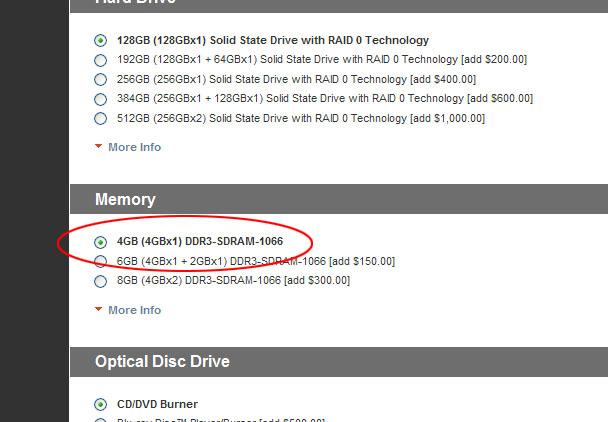
The 4GB model is 2x2GB, so you'd have to buy two 4GB sticks to get 8GB.
-
Well, that's the big question mark over here on the USA side. USA CTO page shows 4GB x 1. (See attached.) Although, as one other poster here has already alluded, it wouldn't be surprising if that were untrue.
Attached Files:
-
-
I could never imagine US selling 1x4Gb ram. For sure it's 2x2Gb. If not... congratulations.
And 40Hz.... sounds.... flickery... no?
I'm still pondering wether to get the standard or extended battery....
And W-T-F (What the f*ck - why aren't I allowed to write that?) is Apple doing? If they don't release MBP refresh soon, there is no question in my mind what I will pick. -
The geekmontage review is extremely suspicious.
Here's the link again: http://www.geekmontage.com/texts/sony-vaio-vpcz1190x-review-vpcz114gxs-vpcz11z9e/
The problem should be clear at first glance. This is their first picture of the new Z:
![[IMG]](images/storyImages/VPCZ1190X-1.jpg)
That is clearly the old Z.
Also suspicious are their profile views of the new Z
![[IMG]](images/storyImages/VPCZ1190X-2.jpg)
Notice the cylinder area. That's not what the new Z looks like. Also notice how the bottom of the laptop has a weird notch near the exhaust area. Almost as if the picture was badly photoshopped. For comparison, here's the profile view from another review of the new Z:
![[IMG]](images/storyImages/sonyvaiovpcz114gxs-16g.jpg)
What's going on here? I think the answer becomes clear when we look at the images from geekmontage's review of the old Z:
![[IMG]](images/storyImages/vgn-z890-connections2.jpg)
It appears that they just took their picture of the old Z and photoshopped it to look like the new Z.
Similarly, take a look at their profile view of the other side of the new Z:
![[IMG]](images/storyImages/VPCZ1190X-3.jpg)
Once again the cylinder area is all wrong, and the bottom looks badly photoshopped.
Here's what it should look like:
![[IMG]](images/storyImages/sonyvaiovpcz114gxs-6g.jpg)
And here's geekmontage's picture of the old Z:
![[IMG]](images/storyImages/vgn-z890-display.jpg)
Once again it looks like they just photoshopped their picture of the old Z. Weirder still, their picture of the old Z looks photoshopped too.
More suspicious still, these are their only original pictures of the new Z. All their other images are taken from other sources like Engadget and Sonystyle. Why are they using fake images? The only conclusion we can draw is that they don't have the new Z to review at all. It's all fake. I would not trust the numbers from their review of either the new or the old Z. -
If that's true, then it would be a first for any maker I'm aware of. But, I think it might be possible; Sony seems to have a deal with Samsung for inexpensive 4GB chips.
-
Assuming it's an error, I wonder if I were to place my pre-order today and take a screenshot of the order page (before Sony wises up to their mistake), take delivery in a few weeks, open it up and find 2 x 2GB modules, if I would have some sort of recourse with them on the grounds that they did not ship what was advertised.
100% with you on Apple. If they had released an MBP refresh last month as rumors had suggested, they would likely have had a new customer in me (I had not yet known about the new Z). In fact, go to any of the Apple forums and you will see that the Z is stealing away many would-be MBP-refresh buyers. -
Totally agree Chirality. Really poor review.
The one picture of a real Z11 they have was borrowed from Engadget.
Also...
Uh, last time I checked you can't add members to a RAID0 set. Breaking the array would also completely destroy the volume. -
Yep, noticed..
Too bad for Mac, good for Sony - they finished first in this race. I really really want Apple to at least show me what they got before I decide. I will come home only by the end of April, but by then the new computer will be ready. Be it Apple, be it Sony. -
Thanks for doing this. Here's what I've gathered from it.
- Bluetooth - Broadcom/Foxconn BCM2070 - Decent chip
- Sound - RealTek ALC889 - Also decent
- Display - Sony part, made in Feb. (anyone know if Sony manufactures their own LCD's?)
- Color depth - 8bits
- Memory - Samsung, 7-7-7-20 - Did you upgrade to this or was it included?
- 3xPCI Express x1, 1xPCI Express x16 - Not sure if this helps the folks asking about the ExpressCard slot
-
It should be mentioned that many websites/blogs/magazines (yes, even legitimate ones) do not shoot their own product photos, but instead re-use photos distributed by the manufacturer's media relations teams. Good product photography is actually very time consuming even if you have the right equipment.
Having said that, despite an aversion to conspiracy theories, I have to say your observations have merit. There are distinct differences between their product photos of the new Z and those commonly available in other reviews.
I think they've got some 'splainin to do.... -
Anyone? I don't want to fork out the money for full HD & glossy and then have to deal with annoying bloatware.
-
Nothing to see here. Move along.
-
hello from germany guys,
just received a mail from sony that my new z is in production now. dispatch will be between the 12th and 16th...i hope maybe earlier. tomorrow or something. the production shouldn`t take too long, several hours....
anyways, got 2 questions @dimension.
1. so how are the 40hz compared to the 60 hz. any difference??
2. and i read something about "problems" on installing the video drivers from scratch. what procedure did work for you, cause im planing on putting in a ssd and therefore install win7 from the scratch with all new drivers.
did you use the drivers from the sony ftp or the one from the recovery cd??
Dave -
Nothing to see here either. Move along citizen.
-
oh. I'll delete.
-
Sony should be ashamed of themselves.....
http://www.geekmontage.com/texts/sony-vaio-vpcz1190x-review-vpcz114gxs-vpcz11z9e/
"Obviously these drives do not have TRIM support, which helps combat SSD degradation. Samsung’s drives and controllers are more resistant to degradation too. Don’t get me wrong though, we were able to experience SSD degradation ".
"I want to state it right here that these drives are proprietary and cannot be upgraded to other company’s hard drives. They use a special system that is unique to the Sony Z Series and its special power saving design ".
Degrading SSD performance
No way I will purchase this notebook -
Well, it depends on the definition of "break". If they mean disabling it in the post-BIOS setup, yes, that would remove the RAID markers from the drive, and ruin ALL the drives.
And, yes, you can't add and rebuild a RAID 0.
If this had been a RAID 01 or 10, you could boot into linux, security erase one of the drives from there, and then have the RAID rebuild with the empty drive. That would be a viable workaround for the lack of TRIM problem.
But using RAID 0? No way. And by doing a raw dump? No, that won't work, because then you write the entire disk back and will actually trigger the saturation problem, even if it wasn't there already.
These guys talk out of the wrong orifice. -
I think it's pretty clear what they did. For more proof I superimposed their picture of the new Z over their picture of the old Z. As you can see everything matches up exactly except for the bottom part with the ports. It's clearly a photoshop job.
![[IMG]](images/storyImages/vgnz890displaysuperimpo.jpg)
I don't have a problem with them lifting pictures from other sources if they don't have the resources to do their own shots. But it's another matter when they create fake images to make it look like they have original pictures. Presumably they did that to bolster their own credibility. Ironically it did just the opposite. -
Beware that if you upgrade later, and don't get a module that's 100% identical from a JEDEC point of view, you'll lose the ability to run the modules in symmetric mode, and thus lose speed.
It's usually much safer to buy a new set of matched modules, and either sell the old one or keep it as a spare for emergencies.
Also, the i5-520M, i5-540M and i7-620M CPUs are limited to 2xDDR3-1066 by the on-chip memory controller, and the Z won't let you turn on Intel XM [*] in the BIOS, so there's little point in buying DDR3-1333 unless you do it to bring down the CAS/RAS latencies. But if that's the case, you're better off buying a pair of DDR3-1066 5-5-5-15.
[*]: Dynamic memory overclocking, up to the rate the memory modules are rated for. -
Ayup. Only complexity to imaging a RAID setup would be adding the RAID drivers to the recovery CD. Intel's drivers have become pretty ubiquitous, so even this may not be necessary.
In this vein, I'm going to talk with the storage folks at my office. We just received an EMC SSD shelf. I'd be interested how degradation is managed on enterprise-level kit. -
Wow - an EMC SSD shelf? Don't those things run like $200K?
-
Yeah, give or take. When you need insane I/O for MS SQL or Oracle, you have to pay. It's just a drop in the bucket for some setups.
We also have SSD shelves from Netapp and 3Par. -
The memory was included. Thank you for picking out some of the important information. I haven't had the time to go through the whole file. Japanese companies are not transparent in the least when it comes to their supply chains, so it's difficult to know exactly where this display comes from. Sony seems to have some tight control over the production though, since this panel is not available on any other brand. Partially because of the custom hi-res screen, the new Z is in a class of its own (just as the old one was).
1. There is no difference as far as I can tell. LCDs don't pulse like CRTs do, so a 40hz frame rate on an LCD screen is not straining on the eyes. I haven't tested much video yet, however. I would like to get someone else's impression on the refresh rates, so let us all know what you think about the difference. It does seem to make a difference in battery life (an anecdotal additional 30-45 minutes or so, bringing the total to around 4:45-5:00 with light usage in Stamina).
2. Installing the drivers finally worked for me when the switch was set to Auto mode. However, you may have to install once or twice and force reboot. The installation takes quite a while, and the screen may go blank for up to a minute or so. I didn't use any drivers from ftp, as there aren't any available in Japan. All software/utilities were copied from the recovery partition and all drivers copied from C:\Windows\drivers (the "EXE" and "inf" folders are necessary!). Read some threads on this forum to find the procedure for retrieving the recovery partition data; it's the same on the new Z (hint: you need the data inside the .MOD files). In particular, you have to install all the base Sony utilities before things like the backlit keyboard and screen brightness/volume controls work. Oh, and the noise-canceling headphones require the modified Realtek drivers that are included with the system. -
Thx for the quick answer, this helps me alot!
will try it when i receive my z and the ssd and then write a little review on the laptop as well as on the change from hdd->ssd with the reinstalation of win7
-
Agreed. This is a sore point with me too and precisely why I am not buying a Z.
I have no interest in paying top dollar for the $4500 signature series model, especially since I definitely want Win 7 pro with Fresh start (and not Win 7 ultimate) and don't want the built-in Verizon mobile card and might want to save some money by going with a 256GB SSD than the 512GB that the Signature model comes with.....bottomline, without Full-HD, I am not interested at all in the US version of the Z.
In case of the F-series too, they denied the Matte Full-HD screen that Japan and the EU gets (with Full Adobe RGB Color Gamut coverage), and only provided the glossy Full-HD screen. -
"Fresh Start" as an option is ONLY available if you choose Win 7 Pro. In other words, if you choose Win 7 Home Edition or Win 7 Ultimate, you cannot choose "Fresh Start".
The $4.5K Signature series comes with Win 7 Ultimate. So that answers your question.
-
That sucks.
-
Agreed, that with the Full-HD 13.1" screen, the Z-series is in a class of its own. Unfortunately, it is not available to US customers, unless one forks out $4.5K for a "full featured" version.
Off-topic....but was wondering if you have any thoughts on a Japanese vendor called jzool.com. Are they a reliable vendor to source things from ? I intend to buy the new Sony MDR-NC600D headphones from them, since it is not yet available in the US (almost a year after it got released in Japan, obviously ) but needed some corroboration on the vendor's reliability. Thanks.
-
To be quite candid, I think you just have to spend some additional time in getting rid of the bloatware that comes with it, even if you don't get to choose "fresh start" when you place the order. You would be able to get it to a fairly pristine state, if you spend a couple of hours on it, after you get your laptop (without Fresh start).
-
Hi Joseph,
Thanks for answering the question I've been asking.
My fears are finally confirmed.
The SSD is screwed. No TRIM...
Oh well, gotta wait for Z22 now...after the mobs of angry quad SSD guys complain about the computers stuttering. [No TRIM even in 2010? Ouch...]
Sony Vaio Z i5/i7 Official Owners Thread
Discussion in 'VAIO / Sony Owners' Lounge Forum' started by SurferJon, Feb 6, 2010.