Problems? See this thread at archive.org.
-
-
Even though you hate Nvidia, the thing is that the notebook companies love Nvidia. Why? Because IMO, this will mean that most people will be "forced" to buy a new replacement earlier than it normally used to be! This means more money to be made by the notebook companies & Nvidia.

-
I have nothing against Nvidia except reliability from them...
I wished every manufacturer used ATI, this is one reason why I like lenovo notebooks. -
Is ATI totally without problems? Didn't the ATI used in the previous Vaio S (the one before the Vaio SZ) also have a series of problems (GPUs "melting" after a year or so of use)? That was part of the reason why Sony change the use of ATI GPUs in the Vaio S series to the Nvidia GPUs back then. Maybe I read about those stories wrongly or something. Someone kindly correct me if I'm wrong.
-
No, there was no GPU melting problem due to ATI's part. Sony under-clocked the Radeon 9700 on S to control the heat, but a lot of people, including me, turn it back to the normal clock speed. 9700 was the most powerful laptop video chip (for about a couple months before 9800 came out) at that time and S was the smallest laptop that offers it so there are a bunch of us that are not going to let a little heat deter us.
The motherboard of S did have some manufacturing defect on the earlier batches that could break the GPU or motherboard though. -
Thanks for the correction. At least, now I understand the actual causes of the breakdown in those early Vaio S notebooks a little bit more.
-
The S360 (ATI, dedicated graphics memory) was my previous notebook. It ran like a champ and I consider it one of the better Vaios I've ever owned. Having said that, it *did* get so warm that the product sticker underneath melted away until it was unreadable. It lasted 3+ years however and was still running strong when I sold it. The fan's motor died and was replaced but there was never actually any damage to the motherboard.
My buddy on the other hand had the S5xx (I forget which model exactly) and that had a Nvidia chipset with shared graphics memory. Plagued with stuttering from the (shared) memory bottleneck but he could actually run more games than I could (S360 only had 64MB graphics memory) I always believed Sony's move to Nvidia (for this particular series) was solely based on production costs. I was actually pleased to see that the SR came with the option of the ATI graphics.
For my next notebook I will most likely return to an ATI chipset. Neither company is saintly but the finger pointing (between Nvidia and the OEMs) and lack of empathy (towards the consumer) has really made turned this into a terrible experience. Sony shoulders some of this responsibility as well and I may even consider competitor products as a result. -
Well, my FZ-190 (8400GT) crapped out last night. I wasn't even doing anything GPU intensive, just watching some videos online. It shuts off and I can feel it's really hot. Now it won't turn back on at all. Only had it for 16 months and of course Sony won't do anything. Now to save my HDD and get a new laptop.
-
Hi all--
I recently posted this on a separate thread (HP DV9000, same nVidia chip vertical striping/dead bootup issue), but wanted to add it here as well. Keep in mind that I have a Dell XPS m1710 with a removable nVidia 7900 GS, but the same symptoms and batch manufacturing issues apply. I also note that someone on this thread mentioned awhile back that the "heat gun" approach worked, and I can concur. Anyway, here is my original post for those who are tech savvy:
***************
After doing a lot of searching online, I was able to come up with a reflow solution that saved my nVidia chip and got my laptop video working again. I have had no issues with my video card for a month now, so if you are out of warranty and want a DIY, you might want to give this repair a shot. Many of you may be familiar with this and might be able to add some details. I also know there is a cool mod for the xps1330 on this site that bears looking for heat dissipation issues.
1. I recommend you watch the youtube video that shows how to reflow using a common heat gun....it's a good visual aide ( http://www.youtube.com/watch?v=CgTbkTK2iwk).
2. Next, review the following information to grasp the science behind the technique ( http://www.altera.com/literature/an/an081.pdf) and use the reflow profile given.
3. Grab the tools: I used an ordinary heat gun, a digital timer, and old-fashioned bulb oven thermometer.
4. Remove the motherboard and cover everything but the chip (heat sink and paste removed from the chip surface) you want to reflow in aluminum foil to deflect the heat from damaging any sensitive surface mounted parts.
5. Place a small coin (dime) on the chip surface to help the solder of the ball-grid array flow properly. Place the oven thermometer in close proximity to the chip (but not touching!). It is important that once the heating process begins that the GPU chip does not move to avoid shorting any circuitry on reflow.
6. Start the timer and heat the chip area using the Altera profile above, holding the gun about 6" from the chip surface. I used a slow, steady circular motion.
7. While cooling, be sure to avoid any contact with the board/chip. Let cool to ambient temperature.
8. Reassemble the chip's heat sink with appropriate thermal compound. Some people also add a 2 mm plate of copper between the chip and heat sink (sandwiched with thermal paste) for additional thermal dissipation. I merely added fresh paste between my chip and heat sink.
Couple of comments to consider:
i) This is NOT a cure-all. Chances are the chip will fail again...although it's debatable how long this will take. I've seen success stories range from days to months online, most likely correlating to the number of on/off cycles. (My card is still going after a month.) This is merely to prevent you from having an expensive paperweight in your possession as well as buying an expensive GPU/mobo replacement for older laptop models out of warranty.
ii) Do not let anything bump the chip during heating as a precaution against shorting the ball-grid array below.
iii) I now monitor my GPU with a temperature program and make sure my fans are always running.
iv) The obvious caveats apply: try at own risk and realize any remaining warranty is void (but you knew that already!).
**********
Best of luck. I'll let you know if my nVidia chip dies again after this mod. My guess is that there are a lot of "repaired/refurbished" chips on the market already, in light of the fact that this simple repair works so well. -
BTW, I'm ***NOT*** at all happy it came to this "heat gun" fix in the first place.
I'm still ticked that nVidia designed chips with a limited timeframe of use, and should be class-actioned.
Needless to say, I will think thrice about buying anymore nVidia video cards. -
I know.. i came from a Dell laptop that lasted for so long, and their warranty was so awesome that I expected the same from Sony. How they can get away with this, I can't even tell... maybe because a lot of folks (like myself) are not very savvy in terms of legal stuff.
Hard thing is finding a laptop that can run my stuff that uses ATI instead of Nvidia.. i can never trust nvidia again. -
I do understand your liking of Dell & its warranties.
I used to own quite a number of Dells myself & always bought them with 4 year At-Home warranty + Complete Care! Dell is definitely awesome with this warranty thingy. I had experience myself using it & in many cases, they'll try to fix any problems you have as best as they can without making you go through all sorts of loops around different departments & stuff. A lot of times, they'll attempt to fix your problems, no questions asked.
IMO, their warranty services are the best in the industry.
This is also the reason why I bought 4 year warranties with ADH protection for all my Vaios but reading what you've gone through, I really don't feel too good with my decision at all right now.
-
Yes. the funny thing is that my original Dell Setup (it was an inspiron 8600) came with an NVIDIA card...and i cant remember quite well but i know that it failed a couple of times and in the end Dell upgraded me to a better ATI model, cant remember which.. but that card held its own. never gave me any problems.
I feel so cheated by this warranty and Sony. I was very upset on my phone call with these people and im supposed to let them know (The warranty folks) whether ill accept that model they offered (mentioned on my previous post) or the 700 dollars.
Im thinking the 700 dollars in order to get another laptop. Problem is , ATI powered laptops are slim pickings... theres that Alienware but its a lot to pay to play Final fantasy xi mostly... and then theres the dell studio xps that comes with an ATI as well. Ill probably get that.
Bothers me that i can't go for a better laptop because everything seems to have nvidia now =( . I havent even used the Bluray burner from my sony once..and it is now useless.
Once again, im shocked at how nvidia and sony get away with this
-
Yeah, Dell is generally very good with offering replacements. Their replacements, when they had to issue due to problems with the lemon laptop are usually of better configurations that what one had originally bought. I know many people say Dell laptops just s**k, but once one has got a replacement from them, they'll in fact know how good Dell really are when compared to some other companies.
-
I suggest you just take the $700 & buy something else.
I also personally suggest that if you want to still get a Nvidia GPU, go with a Dell. They'll fix (& replace) your laptop if it fails. You know how Dell works so I don't have to explain further. Once again, I'm really sorry to hear your problems with your laptop. Good luck. -
I hope I never have to undertake this but having a $1500 brick on my desk isn't such a great prospect either. Definitely will file this away as a possible course of action. Thanks for the info!
-
Is Nvidia really spending any money on this issue? It doesn't seem like that. I am really scared to use my Laptop now.
-
The isssue is not with Nvidia. They owned up to the problem and in partnership with Dell, HP and Apple are offering extended rebates, board swaps etc.
Our issue is with Sony who still refuses to admit that there is an issue even if the cause is with Nvidia.
Gary -
yes; yes it is. I am writing letters and emails. if anyone wants to collaborate and team up on this thing it couldnt hurt.
sony-fz190 -
i'm all for teaming up. What's the plan ?
-
IMO, the main thing you should set out to accomplish is to find as many Vaio users with this Nvidia 8000 series failure as possible because "Sony is stressing the fact that there are just not enough cases of such GPU failures to warrant a free replacement/repair program" or something. Good luck.
-
I bought an XPS Studio 13 to replace my FZ-190. Should I part out my Vaio and try to sell the screen, keyboard, etc? I'm gonna check eBay but if anyone is interested in parts, let me know.
-
Heh. I just completed my order for an XPS studio 16 to replace my Fz-180e .
oh well. -
hey, i own an FZ and i haven't had any issues with my chipset yet. my warranty will be up in a few weeks [1 year warranty]. is it worth it to pay for a one year extension or should i get out of this beforehand and just sell my laptop? :[
-
I like my XPS 13, it looks nice and the backlit keyboard is nicer.
-
Congrats on your purchase. That Dell looks like a very good notebook.
-
Thanks, I sure hope it lasts longer than 1 year and 8 months. It's actually nice and the price was nice also. I rarely buy things from Best Buy, but at $899.99 it was hard to beat. Cheaper than the FZ190 which I paid $1700. Oh well, I guess it was time for an upgrade. =)
-
I'm not sure if Dell themselves offer the option to buy extended warranty from them since your purchase is from BestBuy. However, if Dell allows that, I highly recommend that you purchase one. It is not because Dells break down easily or anything. In fact, Dell notebooks are not as bad as most people make them out to be. Furthermore, IMO, Dell probably has the best repair service in the industry because in the event that you really need it, you can often get your problems fixed fast & easily, often without questions asked.
-
Men! this is so serious is not even funny. I have had my Sony VGN-FZ180E just over a year and just finished paying for it and it cost a lot too and my graphics is gone bad, I have these lines,color,blur etc too and U can barely see anything at all. My video is Nvidia Geforce 8500M GT. checking from the web it looks like it is happening a lot and there is no solution. Men! This is happening when I needed my laptop most for school as the semester ends.Sony will have to do something about this!
-
For the ones that had their FZ fail, anyone try to replace the MB? Is it worth it to get a used one from eBay and replace it?
-
A used motherboard will have some wear to it already - it'll fail too - unless you get a very good price - no, not worth it I fear
-
Or unless you can find one with the Intel chip instead of the Nvidia one. Those appear to be rock solid.
Gary -
True - but isn't the heatsink different? Or ist that integrated into the moherboard? I don't think so...
-
That would be even better. Any ideas if they are the same and if it would fit?
-
I don't know. It would fit the case, I am pretty sure. But, the issue DetlevCM brought up is in play, would it fit the heat sink? Without seeing two of them opened up side by side, who knows.
Gary -
You're too fast Gary, I was just editing my reply to add a link from eBay. This is what I found:
http://cgi.ebay.com/SONY-VAIO-Lapto...5|66:2|65:12|39:1|240:1318|301:1|293:1|294:50
How do tell if it's Nvidia or not? Maybe I'll take mine apart tonight to see if it looks the same. -
This is an integrated intel X3100 motherboard.
Source: http://www.docs.sony.com/release/specs/VGNFZ240EB_mksp.pdf -
And this one is an Nvidia chipped version:
FZ motherboard with Nvidia chip
Look at the image of the two side by side (scroll down on both pages for large views) and you can see that the first one has some chips missing (the Nvidia stuff). But then WHERE is the Intel video? Must be part of the chipset, which I beleive is just to the right of the memory slots. So that does beg the question. Would the heatsink/heat pipe assembly from the Nvidia version actually work on the Intel version? Hmmmmmm.
Gary -
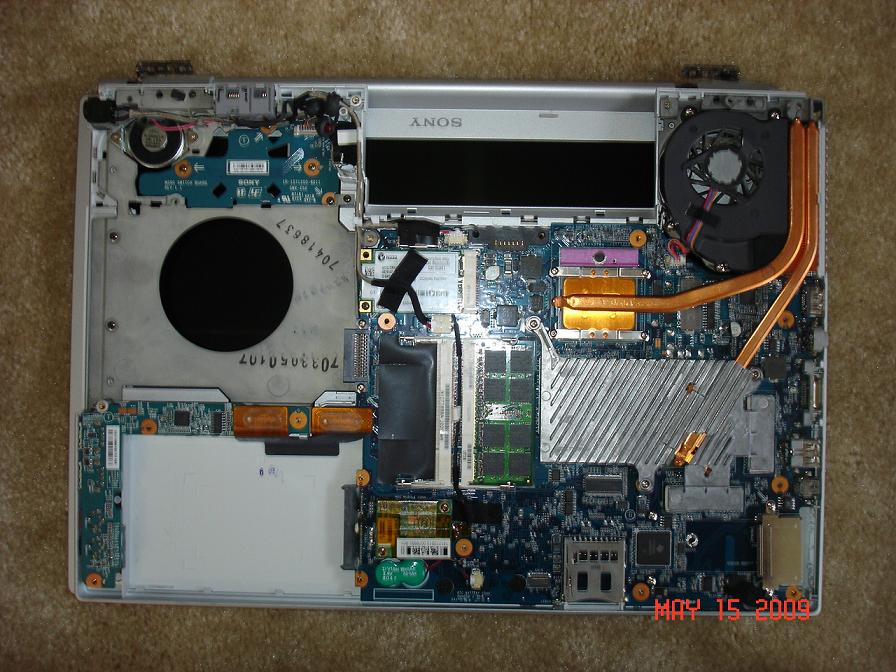
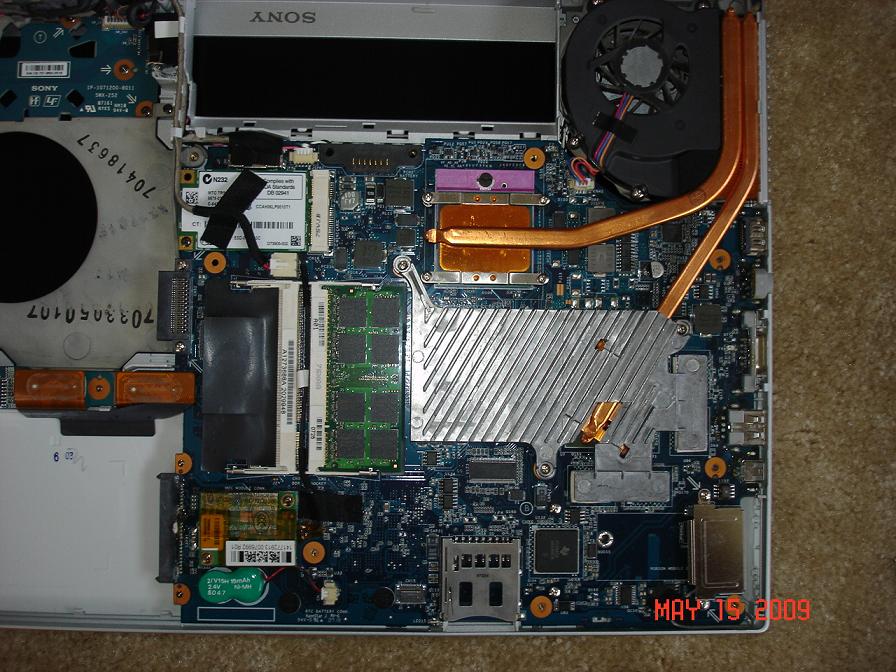
I took it apart and here are some pics. Like you said, missing some chips but aside from that looks the same. It looks like the heatsink/pipe assembly should fit and work as the connector for the fan is there. Is that correct to assume or is that too easy.
Attached Files:
-
-
Again, without seeing an Intel version opened up with the heatsink/heatpipe in place. It's hard to say for sure. If we could convince someone with such a model to provide similar photos we'd be able to make a better judgment.
Gary -
Any volunteers who would like to open up their Intel version of the FZ to see if the heatsink/heatpipe is the same as the Nvidia version???? Pleaseeeeee.
-
There is an FZ unscrewed thread as well. You might want to ask there as well.
FZ Unscrewed thread
Gary -
I'll do that, thanks Gary.
-
I am not so sure but i may have some good news, at least for linux users:
my 8400m gt on my vaio fz190e has failed too. I have been using linux along with windows on that computer since I bought it. At first, I thought Linux might have been responsible for the failure but then I found out that my chipset was defective and almost all of the people affected were using windows.
I had been using the original nvidia drivers in both linux and windows until the failure. When my card failed, I thought I won't be able to use my laptop again since the screen was full of stripes, dots and green areas. the computer wouldn't even boot fully sometimes (it can't boot in windows at the moment either) and it was hanging and restarting itself.
then, i thought maybe vesa driver could help. and i chose vesa driver in my xorg confuration file in linux and the display was back, at least in 800x600 resolution. for those who doesn't know linux, "vesa is an Xorg driver for generic VESA video cards. It can drive most VESA-compatible video cards, but only makes use of the basic standard VESA core that is common to these cards. The driver supports depths 8, 15 16 and 24. " unfortunately, vesa doesn't support 3d graphics, it works 2d. and naturally, it doesn't support things like opengl.
I checked available vesa modes but 1280x800 wasn't listed as a standard (my display's native resolution is 1280x800). i thought at least this is something, I could use 800x600 for some time because i really needed my pc at the time because of my homeworks and stuff at the university.
Then while trying to figure out a way to use 1280x800, i checked Xorg log file and it was complaining about "hsync" and "vrefresh" ranges. i decided to define these ranges in xorg.conf and give it a try. and voila!!! my display is back fully functional (at leat in 2d) without any stripes or dots.
So, now i am using vesa driver in linux and it works just fine. it doesn't provide 3d accelation but it works like charm as long as you use 2d. you don't have to use 3d anyway unless you need use programs like google earth.
I think the reason why vesa driver works without any problems is that it's not utilizing the full potential of your graphics card and it may not be using the defective part of the card. it's just a guess though, i don't know much about graphics cards or the nvidia problem. and I hope this solution won't fail in time either.
i know this is not a great solution, the real solution would be making sony or nvidia replace the card for free, but it is a very feasible one especially for people like me, who don't want to pay for a new computer or card.
I have question:
is 8400m gt on vaio fz190 replaceble? can it be replaced with a spare 8400m gt (not that i would use nvidia again though) or another card? if so how much does it cost?Attached Files:
-
-
The card can't be replaced as its soldered to the motherboard.
I am curious, are you sure you are using the NVidia card?
Some laptops have another "basic card" on the motherboard... or your CPU could be rendering the image... -
^ bekirserifoglu, you could uninstall (if you can boot your FZ) the Nvidia driver in Windows and use your FZ with the standard VGA adapter which supports 1200x800 screen resolution.
-
The FZ190e does NOT come with a second video adapater like some other Sony models. So if the Nvidia chip has died and producing the dots and stripes, what is now producing the video output in 2d for bekirerifoglu???
Very interesting, indeed.
Gary -
as far as I know vesa driver can only drive a graphics card to produce what's on screen.
and as ScuderiaConchiglia says too, i don't think FZ 190e has another vga adapter ( can anyone clarify this?) . here is a list of my pci devices and there is only one vga adapter:
vaio@vaio:~$ lspci
00:00.0 Host bridge: Intel Corporation Mobile PM965/GM965/GL960 Memory Controller Hub (rev 0c)
00:01.0 PCI bridge: Intel Corporation Mobile PM965/GM965/GL960 PCI Express Root Port (rev 0c)
00:1a.0 USB Controller: Intel Corporation 82801H (ICH8 Family) USB UHCI Controller #4 (rev 03)
00:1a.1 USB Controller: Intel Corporation 82801H (ICH8 Family) USB UHCI Controller #5 (rev 03)
00:1a.7 USB Controller: Intel Corporation 82801H (ICH8 Family) USB2 EHCI Controller #2 (rev 03)
00:1b.0 Audio device: Intel Corporation 82801H (ICH8 Family) HD Audio Controller (rev 03)
00:1c.0 PCI bridge: Intel Corporation 82801H (ICH8 Family) PCI Express Port 1 (rev 03)
00:1c.1 PCI bridge: Intel Corporation 82801H (ICH8 Family) PCI Express Port 2 (rev 03)
00:1c.2 PCI bridge: Intel Corporation 82801H (ICH8 Family) PCI Express Port 3 (rev 03)
00:1c.4 PCI bridge: Intel Corporation 82801H (ICH8 Family) PCI Express Port 5 (rev 03)
00:1d.0 USB Controller: Intel Corporation 82801H (ICH8 Family) USB UHCI Controller #1 (rev 03)
00:1d.1 USB Controller: Intel Corporation 82801H (ICH8 Family) USB UHCI Controller #2 (rev 03)
00:1d.2 USB Controller: Intel Corporation 82801H (ICH8 Family) USB UHCI Controller #3 (rev 03)
00:1d.7 USB Controller: Intel Corporation 82801H (ICH8 Family) USB2 EHCI Controller #1 (rev 03)
00:1e.0 PCI bridge: Intel Corporation 82801 Mobile PCI Bridge (rev f3)
00:1f.0 ISA bridge: Intel Corporation 82801HEM (ICH8M) LPC Interface Controller (rev 03)
00:1f.1 IDE interface: Intel Corporation 82801HBM/HEM (ICH8M/ICH8M-E) IDE Controller (rev 03)
00:1f.2 SATA controller: Intel Corporation 82801HBM/HEM (ICH8M/ICH8M-E) SATA AHCI Controller (rev 03)
00:1f.3 SMBus: Intel Corporation 82801H (ICH8 Family) SMBus Controller (rev 03)
01:00.0 VGA compatible controller: nVidia Corporation G86M [GeForce 8400M GT] (rev a1)
06:00.0 Network controller: Intel Corporation PRO/Wireless 4965 AG or AGN [Kedron] Network Connection (rev 61)
08:00.0 Ethernet controller: Marvell Technology Group Ltd. 88E8036 PCI-E Fast Ethernet Controller (rev 16)
09:03.0 CardBus bridge: Texas Instruments PCIxx12 Cardbus Controller
09:03.1 FireWire (IEEE 1394): Texas Instruments PCIxx12 OHCI Compliant IEEE 1394 Host Controller
09:03.2 Mass storage controller: Texas Instruments 5-in-1 Multimedia Card Reader (SD/MMC/MS/MS PRO/xD)
by the way,coolguy, windows doesn't even boot in safe mode so that i can use standard vga compatible driver.
and i'm sure my laptop has an nvidia 8400m gt, as sure as this output on the console:
vaio@vaio:~$ lspci | grep VGA
01:00.0 VGA compatible controller: nVidia Corporation G86M [GeForce 8400M GT] (rev a1)
we need someone who knows more about vesa and how it works. -
Hi All. My FZ21Z has the same problem. I'm still emailing and calling Sony a month later and they seem as disinterested as they were initially. Has anyone had a positive response from Sony out of warranty?
The petition on ipetitions now has 104 signatures, surely Sony have to admit that this issue effects VAIO at some point?!
I'm going to continue drawing attention to this issue so if anyone wants to post their sony case number, it may help if I can get enough.
Cheers. -
Can anyone tell me if i have the symptoms of a defective Nvidia GeForce 8600M GT graphics card, my Sony Vaio VGN-AR51SU has just come back from a repair done by Sony under warranty where they replaced the main board.
The new issues i now have were not there before it went away to be repaired, the previous issue is till their as well that it went away to be repaired for.
Read the problems ive been experiencing here:
http://forum.notebookreview.com/showthread.php?t=386857
Defective Nvidia chipsets in your current Vaio?
Discussion in 'VAIO / Sony' started by iisdev, Jul 3, 2008.