Problems? See this thread at archive.org.
Ok yeah that helped. But I am having problems installing the windows update of the "Display - Mobile Chipset Family. It fails when trying to install that. Could it be because I installed the chipset from the website you were getting all the drivers from?
Thanks for the help.
-
Second one is the I/O Control Device. It also installs UPEK driver and Intel display driver.
As sigma957 said, it's important to do the Win Update before installing any drivers. -
Got a question here...
Does you have all listed drivers and utilites istalled in x64 mode??
I have much of them listed at Program files x82 folder + marked as x32 in process manager...
For example event service, settings utility etc...
Almost only utillites installed in x64 was Smart network.
I found it unpleasant, coz every listed drivers marked as x64
Or it's normal? -
It's normal. All the drivers aren't 64-bit, they are just compatible with 64-bit os.
Nothing to worry about -
No, they are just 32bits utilities, not drivers.
-
I have gotten everything working on my Z540 with w7 ulitmate x64. But seems like my battery life is one hour shorter than when I had with vista. Does anyone have the same issue? Or it's just me? ~-~
-
I had on the beginning, but it seems it went to normal after a few days of use。Now I'm getting up to 7 hours on standard battery again, which is great
 It seems that the battery time checker is not that responsive as in Vista.
-
sigma957
NHT
Oh...Thx!
just my nervs can't getting me a sleep ))))))
Got also a question about win 7...
There are note on video drivers taht they're compatible only with win7 home edition and professional, not with Ultimate...I think mainly this is bullsh*t, but wonder if there any known probs on win7 ultimate? -
Thx. That's great to hear. I hope it will happen to me very soon too
-
And does anyone know how to get rid of this flick on boot?
I mean screen off for few sec...It's very annoying, almost feeling like bsod everytime
-
The R2 BIOS available for download from SONY for my Z570N/B is currently R2171M3, not R2170M3. BTW, it is the only download that they have posted for Windows 7 for my model. I am currently running R4 without issues, so I don't have any real reason to "update" it.
-
R2171M3 has been out recently, same time as R4044M3
-
Hi NHT, where can I find the R4044M3 BIOS? I think the latest for Sony Asia was R4043M3?
-
Hi, robohgedhang. You can find it here:
http://forum.notebookreview.com/showthread.php?t=438767 -
Oh, thank you very much!
-
I followed the list step by step but the Speed/Stamina switch isn't working and neither is brightness.
I "installed important updates only" through windows and perhaps that's the reason the parser wasn't installed.
I installed it at the end after reading this thread but to no avail.
Any suggestions? Can I reset by installing process by uninstalling everything or do I have to install the entire windows 7? -
You may want to just start again. You could try uninstalling the event service and graphic drivers in speed mode and then re-installing them after a reboot. I'm guessing really as I've never been in your position, but it's worth a try.
-
Thanks for this extensive guide sigma957! Going to give doing a clean install of Windows 7 Ultimate a second try...first time there were just too many issues that's making me uncomfortable with my current install.
Quick question...have you installed other dirvers, like the Sony HDD driver, TPM Package, ME Driver, PIC, and Intel Matrix? Or were these of no use for you?
Thanks again! -
HDD protection: no need for me since I have a SSD
TPM Package: yes
ME: No, because I really don't know anything about it
SPIC: Yes
Intel Matrix: Yes -
HDD protection: It's included in the ones I installed. It no longer needs to be installed individually
TPM Package: I haven't yet as I don't really need the security
ME: No
SPIC: Installed by windows update
Intel Matrix: Find it annoying, and I think it's only really useful for RAID configurations.
* I run windows update and install the firmware parser, upek stuff and SPIC prior to installing other drivers. This needs a few reboots. It's important that the Parser and SPIC are installed early. -
Thanks NHT & sigma957! Started a fresh install and did notice the Parser, Upek, and SPIC in the priority Windows Update. =)
-
This has been invaluable to my Z590E - upgraded without a hitch.
My only remaining issues:
My system starts with WWAN turned on by default; when I turn it off, it resets to on when I reboot.
Also where I can find the Sprint WWAN driver/client?
Neither make me regret upgrading to Win7 Pro. So much faster boot (plus removes the crap from Sony's OS install). -
I also had problems the first time I tried upgrading to W7 with the Display - Mobile Intel(R) 4 Series Express Chipset Family. I was doing the upgrade with 'SPEED' selected as I tried to install this update. Just completed a clean install again but this time I had 'STAMINA' selected throughout the installation process, with updating the Windows 7 files (critical updates first, rebooted, then optional updates including this Display Mobile patch) before I started installing the Sony software as outlined by sigma957. It installed without issues this time.
On another note, sigma957 or NHT, are you using the audio driver installed under Windows 7 or did you reinstall the original drivers by Sony? Thanks again! -
I just use the Windows 7 installed sound drivers. I find the sony stuff just installs more crapola that I don't want. Now, bare in mind that I only use HDMI for video (external display). I don't require special surround sound over hdmi.
So, for me, the default drivers are perfect. -
Great, thanks for the explanation. 2nd clean install went flawlessly thanks to your tips. Very much appreciated!!!
-
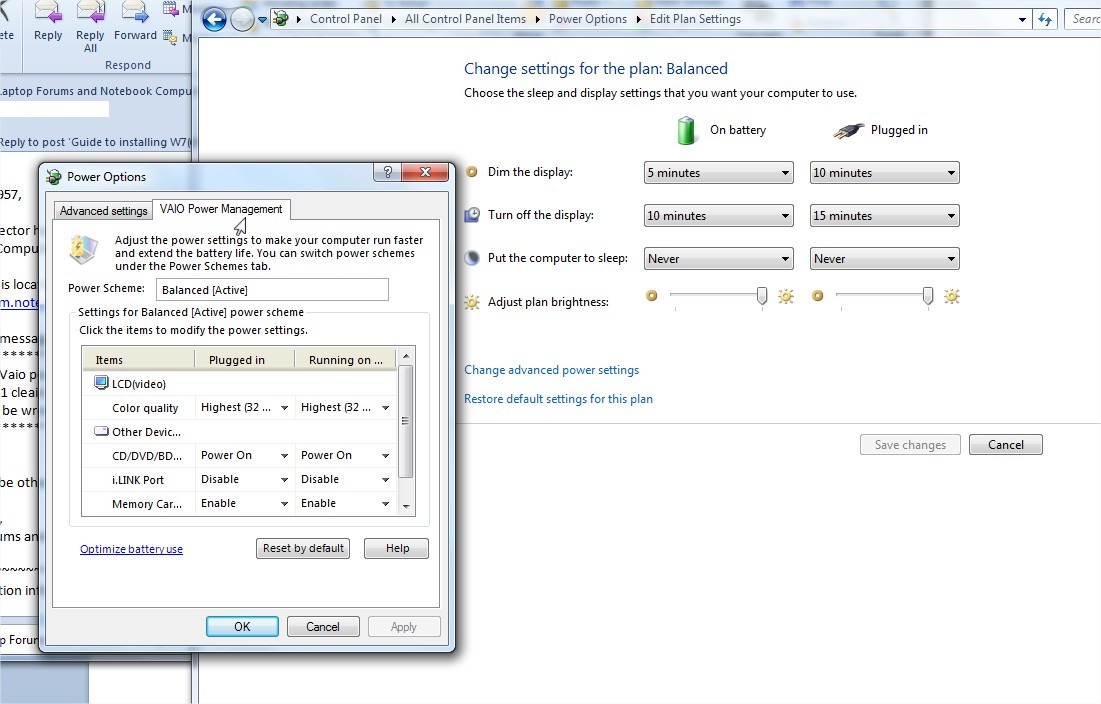
Do you got Vaio power management 4.0 working?
I got vaio z11 cleain install x2, doesn't have any additions by sony power managment in win7 battery settings...
What could be wrong? -
Yep, I have no problems with the power management, though I don't see it is essential. See the attached screenshot. It shows the extra tab it adds to power options.
Attached Files:
-
-
Same here...no problems with installing the Power Management software and the tab shows up on the power setting.
-
Oh, it looks like this!))
I've just remember that power manager adds also some additional power-politics in vista...
sorry
Glad it's ok at least)) -
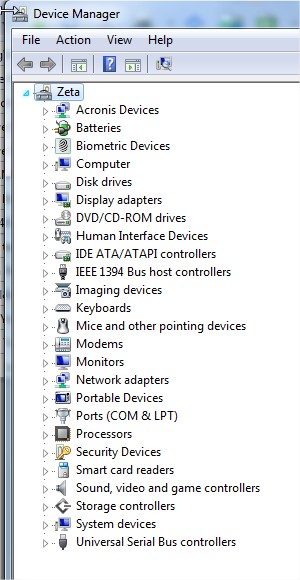
Can anyone tell me what the Data Interface exclamation points in DevMan are for?
-
You shouldn't have any of those. Attached is my devman.
Is everything working? If you send a screenshot it may help us work out what the problem is.Attached Files:
-
-
Hi
you need driver for wwan card.What kind a card u have?If you have sprint data card I can help you. -
Thanks Sigma!
these posts gave me the courage to jump in and do this...Works perfect, all features... Very pleased with the speed, and memory that has been freed by a clean install....Thanks! -
firsly, thank you very much Sigma for posting this guide.
Ive used this to install my Win7 - 32bit (of course, wif a lightly different wif yours for those drivers using for win 32bit).
However, there is a problem that I dont know how to solve. My external mouse does not function correctly. It can be used 4 click or scroll but CANNOT move at all ! That is really annoying !
And still another 4 devices havent been recognized yet based on my Devices Manager ! Any help ?
-
Your wwan card need correct driver.
-
How could I check if my WWAN card driver is installed correct? Ive downloaded the driver for 32-bit and install it ( the thing wif QUALCOME or sth like that ).
Ive reinstalled it and my mouse still cannot move .Anyone has got the same problem wif me?
Here is my Devices Managers:
![[IMG]](images/storyImages/DevMan.png) SSDVaio likes this.
SSDVaio likes this. -
Strangely enough it's not there now. I think it was during installation of drivers for the ExpressCard... So far, so good.
-
Sprint. I have the internal one AND an ExpressCard one. I usually turn the internal one off, but was thinking of activating it.
Thanks! -
I have a Z790 with 64bit Vista Business SP2. It seems everyone here is going with the Win 7 CLEAN INSTALL.
I'd like to try the UPGRADE path first even though a clean install is preferred. I'm just NOT looking forward to re-installing all apps and settings. Any pros/cons to going this route via Sony instructions on their site. Anyone have any experience doing the UPGRADE? Thanks in advance!! -
Can someone tell me the boot-up, shutdown and hibernation times with a cleanly installed Win7. Interested to know if anyone can boot up in <30 sec (w HDD or SSD.)
-
Hi.
I got a same problem like you as well.After I install driver for my sprint card those marks go away.those marks present for somes port of data card.
Briant -
Whilst everything works on my VGN-Z570N thanks to the instructions in this thread, I can't get HDMI to output audio to an external display. In Vista I use dto have to manually select it in Control Panel/Sound but in 7 x64, HDMI audio in sound is greyed out...is this really a case of the nVidia driver just not handling it? For a moment and during the installation (upgrade from Vista 32), HDMI connection automatically selected the audio..but not any more....
-
Sigma
I tried to follow the reg settings:
Workaround 1 – Fixing the Dell-supplied touchpad driver:
To correct the issues with the animated cursors:
1. Click on Start, and in the Start Search field type “regedit.exe” and then hit Enter on your keyboard.
2. If User Account Control prompts you for consent, click on Continue or provide the appropriate credentials.
3. Navigate to HKEY_CURRENT_USER\Software\Alps\Apoint.
4. Locate the CursorChangeType DWORD entry, double click on it and change its value to 0.
5. Navigate to HKEY_LOCAL_MACHINE\Software\Alps\Apoint.
6. Locate the CursorChangeType DWORD entry, double click on it and change its value to 0.
7. Navigate to HKEY_LOCAL_MACHINE\Software\Alps\Apoint_Default.
8. Locate the CursorChangeType DWORD entry, double click on it and change its value to 0.
But I found no Apoint_Default entry in the registry...
Did you?
I dont find the circular motion working but the cursor animates. Downloaded the version you mentioned. Did anyone else find this? -
I dont know where to download this driver. Can U plz share me the links?
-
Hi.
I very happy to help you with that.Make sure you had Novatel card (sprint network).If yes here the link:
LINK
Just update those marks by pointing to this folder.
Hope it will help.
Briant -
oops...it works like charm
...thank U alot lamtutu
-
Hi.
I'm very happy for you.Enjoy your new windows.
Briant -
I have one problem. Everything is working but when I have the laptop on battery power and then plug it in the laptop locks up completely. I usually have the video mode on standby. Any ideas what driver I should look at changing?
-
I have Z21xn/b. Everything work fine under Win 7 x64 but I have problem with only one device in device manager. Other devices / Base system device - could someone help ?
Attached Files:
-
-
Hi. Sorry for the late reply. I can't remember exactly what I found at the time, but I've had a look now and I do NOT have Apoint_Default. I do have the other registry entries and I have both animated cursors and circular scrolling.
My guess is that you've not got the latest version on the touch pad drivers installed which enables circular scrolling and disables animated cursors. Install this first, get the scrolling working, confirm the cursors don't animate and then apply the registry entries.
This is the version I have installed:
POINTING_DRIVER_ALPS_7.202B_64_7.202.505.108.ZIP
Guide to installing W7(64) on Vaio VGN Z
Discussion in 'VAIO / Sony' started by sigma957, Nov 3, 2009.