Problems? See this thread at archive.org.
When you say 'video mode on standby' do you mean stamina?
If so, does the problem occur also in speed mode?
-
Is it your 3G modem?
Have a look at my device manager picture included. I've highlighted a few entries for you to check.Attached Files:
-
-
No, i dont have 3G modem
-
Other devices / Base system device = MS Controller
ftp://ftp.vaio-link.com/PUB/VAIO/OR..._WRITER_DRIVER_RICOH_MS_6.3X64_H_6.3.0.61.ZIP
SDA = SD controller
ftp://ftp.vaio-link.com/PUB/VAIO/OR..._WRITER_DRIVER_RICOH_SD_6.3X64_J_6.3.2.28.ZIP -
Thx, that was a problem

-
OK - did you uninstall prior version before this one? Circular scrolling means you make circles on trackpad and it scrolls?
I installed this but dont have circular scrolling.
-
Yes, that's right
Hmm. Yes I did uninstall.
Once you've got the new drivers you have to enable circular scrolling in the mouse control panel. If you've already done that I'm not sure what to suggest. I've not got my Z with me just now as I'm at work. If you are still having problems post back and I'll post a screen shot of my mouse control panel and driver version number from the device manager when I'm next at my Vaio. -
It's working, Sig... thanks. I uninstalled, ran CCleaner, reinstalled, and now have it working. Just did reg hack, we'll see if that fixees the anim cursor thing (no big deal without it but would be nice).
Thx for the guide, this has been invaluable and really helps the Z590 startup time.
-
Can anyone explain what is meant by this extract from the first post?
I have an early UK model VGN-Z11Wn and would like to know how to get the 3G modem working.
Thanks so much to the original poster and all of the subsequent people who have assisted! -
Hi, I have read many topic but not found :
- nvidia 64bits driver for Z21WN
- my touchpad won't scroll up/down
- FN touch for brightness -/+ doesn't work
Can you tell me where can I found this please ?
Thx for you help. -
I followed the first post and the touch pad and brightness work fine. Links to the drivers are all in the first post.
I have not been able to find the driver for the 3g modem either.
The links to the memory card reader drivers have no exe files in them, I tried copying the files to the windows folder but no luck. Could anyone tell me how to install them?
Other than that the laptop seems to be working perfectly.
-
1. Go to option website
2. Enter your IMEI number from the bottom of your Vaio
3. You will be able to download the driver. It will be called something like:
153_Driver-4_0_17_0-Installer.zip
4. Extract the zip and you'll find 2 folders. One is called tcpschema 0 and the other tcpschema 2.
5. Go in the tcpschema 0 folder. Then go in the 'without service' folder. Then go in the x64 folder and run the installer.
This will install the drivers for the modem without the option software. That way you can just use the integrated Win7 networking and the Vaio Smart Network software to connect. You'll need to create a dial up network entry to connect. I use this string in the phone number to connect
*99***1#
Your alternative it to use the globetrotter connect software from the file
83_GTConnect_AllCards_EN_2.3.0.630.exe
Or you can do both.
Also, to install the SD and MS drivers:
Extract the zips I've linked to in the original post.
Go to device manager and find the entries for the SD/MS. Choose update driver and navigate to where you have extracted the files. Repeat the process for the other driver.
I hope this all helps -
Follow the guide with a clean install and it will all work. The guide in the first post links to the nvidia 64 bit driver and all the other drivers you need. They are the same for the Z21.
One very important step is to run the windows update several times and reboot after each cycle. Over a few cycles several essential drivers will be installed. Do this at the appropriate place, early in the install process or there will be issues with the brightness not working.
If your touchpad scroll doesn't work, you've not installed the correct version of the alps touchpad software - see the first post. -
Thanks Sigma!
All sorted, the sony memory stick driver was hidden under "other" or something so it took a while to find but all is working well.
If only my battery life hadn't dropped from 5-6 hours to 3 hours I would be truly happy! -
Hi,
I decided performing a clean install (Win 7, 64bit) and I placed a great afford following all of the contained info in this thread.
FN, S1, S2, Eject and most other things , work perfectly from the beginning.
BUT I have a problem that nobody talked about.
I can't swap between the 2 graphic cards (The light indication does not work, at either case)
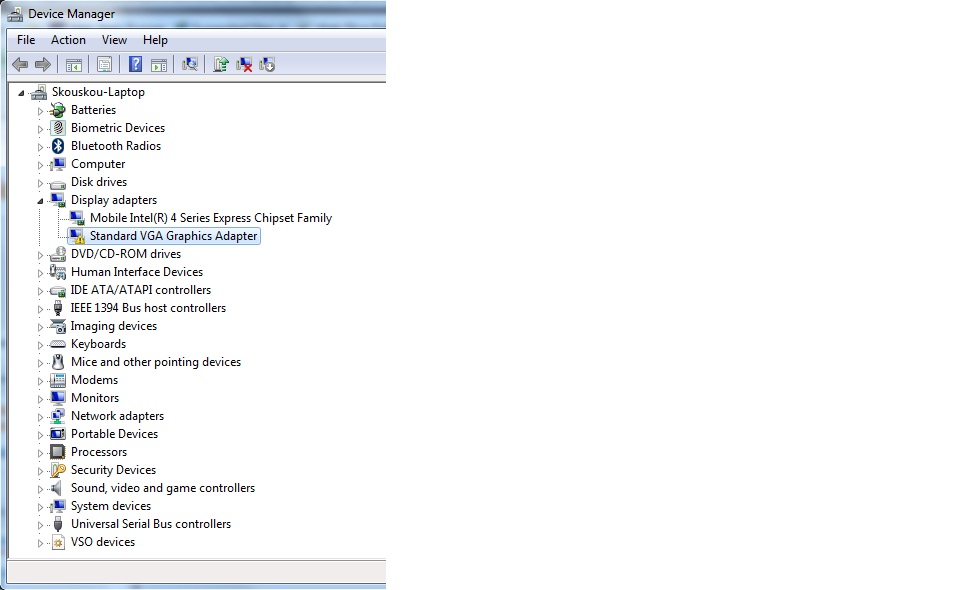
You can see at the attached jpeg, a screenshot from the Device Manager , where the only device NOT recognized is a Standard VGA Graphic Adapter. (It is the same no matter if I move the selector at any direction)
Could this be the 9300m gs card?
Can anyone understand what might have gone wrong?
Thank youAttached Files:
-
-
For your information
I managed to install the latest nVidia driver, and everything is working properly.
The whole process is pretty accurate.
Thanks
PS. I haven't tried out the HDMI yet -
Glad it worked out
Regarding the HDMI.
Mine works but the sound stays with the Vaio. That maybe bacause I'm just plugging it into a DVI enabled monitor with no speakers.
I've not tested on a TV with sound. -
Hi Wingnut. I never saw a change in battery life from vista to win7 32, but actually I think I have seen a drop from win 32 to win 64. This could be because I'm using Speed mode a lot at present.
You could try un-installing the Sony power management as there are some that say they reduce battery performance. I've never been convinced there is any detriment to the sony power management and I like the features they add.
Also, if you're using the European 3G modem with Smart Network version 3, then the modem is enabled after a restart. You have to disable it after each restart from smart network to reduce battery consumption. -
Hi Sigma,
Thinking about it I have been using speed more than previously as th enew eye candy seems to benifit a lot more from the GFX card where Vista wasn't too bothered. Maybe that is more the cause...
I will try using stamina more to try to see.
Alex -
Succesfully installed W7U(64) to my Z11XN/B with help of first page list and everything went like it should, exellent thread!
Only problem is that now i´m missing all the preinstalled softwares, adobe standard and photoshop mostly.
Installing from recovery discs does not work
Someone had same problem in earlier pages, find any solution? -
I have a general question about doing a clean install of W7. Why would one want to do a clean install rather than upgrade using the discs I got from Sony? The reason I ask is that I bought my Z with "Fresh Start," so I don't need to remove any bloatware. If removing bloatware is the main reason, I'll probably do the upgrade (I did it once before, and it was reasonably straightforward). If, on the other hand, there are other benefits to the clean install, then I'll probably give it a try.
FWIW, my unit is a Z790D, has a Blu-ray disc, SSD, Verizon mobile broadband (which I don't use), Alps trackpad, and Vista 64 Business. Any drivers I would need in addition to what's discussed in this guide and thread? I would want to reinstall most of the software that came with the machine.
Thanks. -
Well the nice thing on clean install is, that you can actually control what's installed. The newest drivers and just the utilities you really want. E.g. I didn't install Vaio Update and I installed SmartWi instead of Smart Network, because it doesn't have the bluetooth-ON issue.
You can use this guide and download the newest drivers you can find. Easiest way is to check Sony support pages. -
When I did the upgrade before, I still had to go back to the Sony support pages and update the drivers. However, there were so many of them, and I didn't pay much attention to the order in which they were installed, so I had a few things that didn't work right (which is one reason I decided to start over). This guide is a good starting point, but it's not specific to my particular model of Z, and several of the drivers have been updated since it was written. I'm just concerned that some of the software that I do want will not be available with a clean install. For example, Microsoft Streets & Trips 2009 came with my machine, and works with the built-in GPS (even without a Verizon account). I would not want to give that up.
Do you know whether all the Sony-provided programs are available to be loaded after a clean install, either from the Sony support website or from Disk 2 of the Upgrade package (or from the Vista recovery disks for that matter)? -
No I don't. My Z didn't come with any useful software. But I'm quite sure you'll not be able to use your Vista recovery disks for that. I would try to contact Sony support to ask, if you'll be somehow able to get that software again after the clean install.
I believe that guide is good enough for you as it was good enough for my machine and that's Japanese Z with similar config as yours.
You could always do a complete backup of your disk and try the clean install. If everything will not be how do you need, you can always put that backup back easily and do the upgrade. Personally, I would always choose the upgrade as the last step. -
I guess I can also go back to square one and recover back to the original Vista configuration if I need to.
So if I do a clean install, wouldn't it still be better to use drivers from Sony's site if they are newer than the drivers in this guide? For example, Sony now has a new display driver that they claim addresses the brightness issue: http://esupport.sony.com/US/perl/swu-download.pl?mdl=VGNZ790D&upd_id=5394&os_id=47. The Vaio Event Service on the U.S. website is newer than the one in the guide. And my machine uses SmartWi, not SmartNetwork -- I think SmartWi is needed to control the Verizon/Qualcom WLAN/GPS. So I don't think I should follow this guide completely, do you?SSDVaio likes this. -
No you should not. What I did was, that I downloaded drivers from three sources. The US Vaio Support, the European Vaio support and from this thread and I compared them and chose the newest versions. This way was good, although not the best, because even after doing this, this site found newer Intel drivers for me. The important thing is, don't forget to upgrade to the latest BIOS first.
edit: That graphic driver doesn't look so new to me, as I upgraded to W7 on the beginning of December and I have version 8.16.11.8735. No Brightness problem whatsoever. -
Thanks, Metsn. I'll give it a try today.
One thing I just noticed, however, is that my upgrade disk doesn't seem to have a "Clean Install" option. When I run "autorun" I get menu choices to upgrade, read the readme, or exit. I haven't clicked through to see whether there is a "Custom" install option because it looks like the next click will start the upgrade.
I'll do a search on this forum to see what I'm missing, but if you are still monitoring this forum, I'd appreciate any advice. -
I thought you have a separate DVD with W7, not just upgrade one. I didn't get the upgrade DVD, so I'm not sure if there's "clean install" option, but I'm sure, there is a guide on NBR how to make it.
edit: Found it - it's here
-
That's great, Metsn, thanks! I looked, but didn't find the thread. I did find the setup.exe file in the WIN7OS64 directory, and was about to click it when your post appeared. I don't know whether that would have worked, but a bootable DVD is much nicer.
-
Just to follow up, I did make a bootable W7 DVD from the upgrade package sent to me by Sony, and then performed a clean install. I used this guide to install drivers, etc., but made appropriate adjustments for my machine (e.g., Qualcom modem drivers) and used newer software if it was available.
Everything worked fine. The only problem was that the clean install did not have Microsoft Streets and Trips, and the "companion disk" that came with the upgrade package does not support selective installation of apps and drivers. So I decided to go ahead and run the entire companion disk to see what happens. It's not quite a clean install, since you end up with some Sony software you might not want (I had purchased my Z with "Fresh Start," so I had less bloatware), but at least you get to reformat your hard drive before installing the new OS.
What I found was that a few of the drivers did not install because I already had newer drivers installed. A window popped up giving me a choice. In other cases, however, older drivers were installed over the newer ones, with no opportunity to leave the newer driver in. Most disconcerting was that Microsoft Streets and Trips was not installed by the companion disk. I guess they just count on the original Vista installation being preserved in the upgrade. I do have the program on a recovery disk I had made before upgrading, but extracting it from the .MOD file would be quite difficult.
So I may go back and perform the clean install again. It shouldn't be difficult, since I already have created the bootable OS disk. I also noticed that there is a nice .INI file in my Win7Upgrade folder that lists all the files that are installed by the upgrade, including the file name, a description, the order in which they are installed, and whether a reboot is required. That is 49 files in my case, tailored for my particular machine. That will allow me to pick and choose exactly which files I want.
If I go all the way back to my original Vista installation, there may also be a way to recover Streets and Trips. I read that someone was able to copy the contents of the \Programs\MSS&T directory and get it to work. Although the program doesn't run properly, it may be possible to download and reinstall a trial version over the old version, and then use my existing product key to activate it. Of course I could also just spend $25 and buy another copy.
-
I wanted to thank sigma957 and everyone for all the info posted here. Without it, I would be sobbing in a corner cradling my dead laptop. I called Sony to see if they had an upgrade guide for my model and their useless rep pointed me here. It didn't have any info for my model (Z590), but it had all the drivers for the Z690. Thanks for nothing, Sony.
I did a clean install from Vista 32-bit to Win7 64-bit on a Sony Z590. Before upgrading, I upgraded the BIOS with the version provided for Vista (R2169M3) so I could get Intel VT support. Then I did a clean install to Win7 64. I installed the nVidia driver posted here and got that garbled half screen that others complained about. It turns out I needed BIOS version R2171M3 which is listed under Win7. Once I upgraded the BIOS again, the graphics worked in both modes. I've installed all the other drivers and everything appears to be working just fine.
Now, why couldn't Sony publish the same guide posted here? And why can't they package all their drivers in a big installer that does everything for you automatically? If I didn't love my Z so much, I would jump to Lenovo for their superior support. -
Another update:
I figured out how to get MS Streets & Trips loaded after a clean upgrade. First, I did have to roll back to the original Vista configuration using Vaio recovery. Then, using the built-in recovery utility, I reinstalled Streets & Trips. As the program is being installed, it copies all needed files into a \Temp directory under \users\name\AppData\local. I simply copied those files onto the desktop, using the same directory structure as that created by the install program. You have to work fast, as some of the directories and files are removed shortly after they are installed, and you may have to do it a couple of times to get all the files. Test the installation by going to Control Panel\Remove Programs, and try to "Change" the program. If you've missed some files, you will get an error. Once the files on the desktop can be used to "Change" the program without error, simply burn them to a DVD. You now have a Streets & Trips installation DVD which matches the product code that came with the Vaio.
I also compared the files listed in the .INI file in the Win7Upgrade folder created when I did the first upgrade. Of the 49 files installed by the upgrade, the vast majority are the same as those on Sony's esupport site for my machine. Most of these are also the newest available. In a few cases, Sony's esupport site had newer files. In a few other cases, the files listed by Sigma957 are the newest. One file, Vaio Power Management, was listed by Sigma957 but was not on either the upgrade disk or Sony's site for my machine. There were also a couple of files (e.g., a battery checker) which were on the upgrade disk but not on Sony's site or this guide. I was able to find them elsewhere.
The decision whether to load files one by one or to simply use the "companion" disk after a clean W7 install depends on how much of Sony's software you want. The guide in the first post of this thread assumes you want very little of what Sony offers. My machine did not come with any trial programs or other obvious bloatware because it was configured as "Fresh Start." However, there were quite a number of drivers, utilities and apps that I might want to use -- the webcam companion, winDVD for Blu-ray, the SATA RAID driver, etc. There were others where I have no idea of what they do, but I wouldn't want to find out later that something doesn't work (e.g., sound out of HDMI). Finally, there are some programs that simply don't work properly (e.g., Vaio Update) and I know I don't want them.
In light of the effort required and the programs I want to keep, I decided to do a clean install of Windows 7, but then load the drivers and programs using the companion DVD. I then deleted the programs I didn't want and upgraded the drivers that needed it. And of course I reinstalled Streets & Trips from my newly created DVD. Call it a semi-clean install, because it does entail reformatting the drive.
Everything works -- at least everything I could test. I learned a lot, and couldn't have done it without this thread. Thanks Sigma957 and everyone else who contributed. -
Great to hear from you
I'm happy you could achieve everything you wanted from your upgrade
-
In case anyone is following the thread and has a Blu-Ray drive like I do, I realized today that the files downloadable from Sony's support site do NOT include the WinDVD BD program. The WinDVD files on that site are upgrades only, and doing a clean W7 install like I did will erase the program from your system.
I suspect that this program can be copied from the recovery partition if you roll back to Vista -- much the way I was able to recover MS Streets & Trips. Also, someone has posted a link to it here: http://anebg.net/. I downloaded it, and it appears to work fine for regular DVDs in W7, but I do not have a Blu-Ray disc to test it with. Once that program is installed, the updates on Sony's site appear to work as intended (at least the program was changed to the latest Sony version).
A clean install has a lot of benefits. But people need to be careful that it doesn't delete programs that they might want. -
Hey mate, did you end up finding out how to install photoshop? I'm in the same position as you. Just did a clean install of windows 7 x64 Pro on my 2nd gen Oceania model and would love to get photoshop back.
-
Hi all. I see there have been some comments of late about some of the software/drivers posted in the guide being superseded by later releases.
If any of you can state which they are and give version numbers and URLs I will happily update the first post with the new information (as well as potentially install them myself).
Further, if any of you are willing to post links for model specific software (like the qualcom stuff) I'd be equally happy to tie them all together in the first post with a few model specific sections.
Cheers Guys (and gals?, but I doubt it
-
Hi sigma957,
Thanks for the very helpful guide. A new video driver has been posted at http://esupport.sony.com/US/perl/swu-download.pl?mdl=VGNZ790D&upd_id=5394&os_id=47. Here is the info:
Filename: NVDVID-00212739-1042.EXE
Version: 8.15.11.8684
Last Modified: 01/05/2010
Size: 107.23 MB
I don't know whether it is newer than the one you posted. It has a more recent date, but a lower version number. The download page expressly states that this driver addresses the brightness issue in Speed mode. Note also that the download page states that a bios update is required, and an uninstall utility may be necessary for the old driver. Links to both are included. This page is for the 790D.
Other software is available here: http://esupport.sony.com/US/perl/swu-list.pl?mdl=VGNZ790D&SelectOS=47, including a link to the Qualcom stuff and the SmartWi connection utility, which I believe is newer than the one on your post. When I compared that page to your post, it looked like your post had newer drivers for the following software (although it was sometimes hard to tell):
Setting Utility Series
Memory Stick Driver
SD Card Driver
Upek Protector Suite
This doesn't mean that the other software is newer on Sony's site, just that you appear to have the newest links to the above programs. You should check it out yourself before modifying your guide, however, since I often had a hard time telling which was the best driver. I can only say that I used both Sony's site and your links, and my install went fine. Everything seems to work (I haven't tried any Blu-Ray discs, however, nor have I tried hdmi).
Finally, as I mentioned in an earlier post, doing a clean install may wipe out certain third party programs that the user may want to keep (e.g., Microsoft Streets & Trips 2009 and WinDVD for Blu-Ray). This problem probably exists only for certain models, but the user may want to take precautions before beginning the install. I described that process in a couple of posts above. -
I installed win 7 on Vaio Z520N and follow the guide. Works perfectly, now I can get more than 3 hours for the machine (2 hours without libraries and proper drivers.)
Thanks. -
I am getting 4 hours under stamina mode, is this normal? mid brightness btw.
-
i also have z520n, but didnt work., arghh., any help pls!!
-
Can you be more specific, and did you install the windows in the orders of the guide?
-
its all good now, i forgot the windows update before installing all the drivers., thank you so much
-
Hi there I have the same problem on c190, before I see your help, I solved the the texas instrument card reader and Fn keys problem but the display brightness still doesn’t work. My display adapter is intel945 express family. I tested windows update, the latest version from intel site and other version from vaio link. Sony esupport didn’t help chating with analist about 2hours as I realized they don’t know more than me. First they your model is out date and isnt compatible. The second way was to find a new vaio with the same diplay adapter but this also didn’t work as the analist said I hve to use 32-bit one.
So any body has any idea on this,
please help me. -
i Registered in this site just to say thanks!!!!! to the author of this topic, you donto know how many troubles do i have to past trought to make my vaio works but now it estable and working, not all the buttons are working but at least i dont see the damn blue screen again
again thanks man!!!!!
update! every button works now! im really happy -
I have the IDENTICAL problem to skouskou (Post #115 on page 12) -- the "stamina/Speed" switch doesn't work and neither the Stamina nor Speed light is on. Is this a symptom of a bad Graphics driver?
Which graphics driver have people used successfully on Z540 (or similar Z520/Z5xx) hardware? Any tips on how to install??
I thought I followed the instructions accurately. May have to try again. -
hi here is a screenshot with the driver version on my video card, everithing works fine on my z-590f
i tried to update the driver to the last version but it dosnt work properly
![[IMG]](images/storyImages/sshot4t.png)
-
Aarrrrghh!
If there is one machine I wish I had never seen it is this VGN-Z11VN - the dual display driver has been a pain since day one , and considering the premium cost the support from SONY appalling...
It took weeks for me to get my original triple boot system working XP/Vista/Ubuntu but that was some time ago and pain dulls with age.
So this weekend I decided to give the Win 7 thing a go , deleting UBUNTU/Vista so that I could start again by dual booting XP/Win 7....
Having got a single XP OS working I upleveled the BIOS to R2170M3 , result no meaningful video on re-boot , just lots of vertical lines no Hydra BIOS logo (but XP carrys on booting regardless).....
After reading the entire thread I switched to Stamina and was able to reboot in low res no video driver VGA and drop BIOS back to R2169M3 , then reboot and install XP Intel GMA.
This evening tried the same again with the same results , R2170M3 = vertical lines , R2169M3 and I have managed to get back to NVIDIA graphics (Sony do not support hot graphics switching in XP).
So either my machine is faulty , or is too early a model = same thing (the Serial No is less than 200) , or the R2170M3 code has timing/setup issues on early models (which of course are not supported..)
So some questions for the world...
[1] Anyone else had the same problem , or can point me at a solution ?
[2] Is R4043M3 worth trying ? I see from the thread that this did not work for one person. So probably not...
[3] R2169M3 added VT support to Z11 , so it is intended to support Win7 , so can I get away without the R2170M3 upgrade or am I wasting my time ?
[4] If I stick to Win 7 -32 bit would R2169M3 be good enough ?
cheers
Bob.C -
@valgarf: you can't update your video card with a normal Intel driver because the Z need Nvidia/Intel driver (the one that Sony makes)
@bcarteruk:
[1][4] When Seven was out, we all had the same problem but updating to R2170M3 did resolve the problem (with Windows 7's Nvidia/intel driver from Sony). R2169M3 will not work.
[2]R4043M3 is worth trying, you won't lose anything after all.
[3]You are wasting your time. -
Thanks NHT....
When you say we all had the same problem I am thinking that you did not mean vertical bars on boot with R2170M3 if the graphics switch is in the "Speed" setting....
My 9300GM is not being initialised correctly with R2170M3 as I can not see sensible output to get in to BIOS when in speed seting. Or is this normal and the graphics get sorted on the OS boot sequence ?
I think I am stuffed !
-
Do you have vertical bars on BIOS in speed?
Guide to installing W7(64) on Vaio VGN Z
Discussion in 'VAIO / Sony' started by sigma957, Nov 3, 2009.