 Problems? See this thread at archive.org.
From the info that I am getting here, this guide/method does not apply to VPCZ21? Really need to upgrade the storage and memory capacity on my VPCZ21AGX. Thanks for any type of confirmation or info. Thanks.
-
-
I don't believe this method applies to the Z2.
-
Hey guys,
I need your help.
1. First of all I would like to install a 2,5" SSD SATA3 (either 128Gb Samsung, Intel, C4 or else) into my Sony Vaio VPC-Z12C5E model next to my Harddisk (it's one without optical drive and a common 320Gb HDD).
Can anyone tell me which size SSDs would fit into my laptop and do I need an adapter or can I just buy any 2,5" SSD without a caddy?
2. Next question would be how to open the case without voiding the warranty, any ideas?
Thanks a lot in advance for your useful contributions.
Cheers Mo -
1) The model which doesn't have an SSD drive in it has the hard disk in the optical drive bay. Easiest thing you can do is to remove the 320GB drive and install the 2.5" SATA SSD in it's place.
2) Sorry, not sure if that will void your warranty or not. -
sorry to inform but you can't do this.
in your Z12 you may have only
1) ONE 2.5" SSD or
2) ONE 2.5" HDD or
3) ONE proprietary SSD + DVD
you can NOT install standard 2.5" SSD + 2.5" HDD , as there is only one connector on the motherboard available, so sony provides you with "OR" only and not and "AND".
you will lose your warranty for sure if you do any upgrade yourself.
my suggest is just upgrade it with any 600GB SSD like Intel's SSD 320-series, or something more cheap.
-
Thanks a lot for your replies.
Do I need a caddy or extra cable or something else to replace the HDD with the SSD in my Vaio? -
^ No. Just swap the original HDD with your 2,5" SATA SSD. It is plug and play. If you are careful opening your laptop (take extra care with the keyboard ribbon cable that breaks easily!!!) and swap back in case you want to send it to Sony, they will not notice that you fiddled with your laptop. If they don't know, why would they consider your warranty is void?
Other option that you have is to get a ribbon cable for the original SSD models (see this thread, it contains all info) and a 1,8" SSD that you take out of its case (warranty will be most likely void as SSDs usually come with warranty seals that break if you take the casing off). Then you have a SSD + HDD setup. -
no, ssd + hdd is not possible as the ssd cable should be plugged into the same motherboard connector as hdd
so it is impossible to have ssd + hdd. there is no cable with both SSD(propietary) and HDD(sata) connectors
sony has not left us the chance to upgrade in this way. -
It's possible if you purchase the SSD cable on the first page in the thread for 1.8" drives and then purchase another cable for a DVD/blu-ray drive and then purchase a hard disk caddy for the optical bay... Possible, but costly.
-
Is it possible to pull out the original SSD's and use them in an enclosure? I'm getting ready to retire my Z12 (it has MB issues), and I'd love to be able to use the SSD's in an external enclosure!
-
First you would have to erase them and get them out of RAID. You have a Z12 so you should be able to find something to connect the microSATA interface of the drives.
-
I thought the existing Z12 drives were msata not microsata?
If it's microSATA, would this work? - Amazon.com: USB 3.0 Case for 1.8 Inch Micro SATA Drives - BLACK: Electronics -
Not sure. Maybe you can get something cheaper on eBay.
Pretty sure that they are microSATA as it's possible to. See the first page of this thread. You can use uncased 1.8" drives. -
You could buy a RAID enclosure and then buy 2 of these adapters:
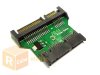
Pretty sure thats what you need if its possible to actually read the data on the RAID volume. I am using 1 of these adapters on a THNSNC128GAMJ right now and it works like a normal HDD.
Does anybody know where that clean install guide went?? I'm going to switch the newer SSDs in from my SA series.
-
I have meant that this is not possible to install SSD + HDD using ORIGINAL SONY parts. of course you may use chinese ODD -> HDD metal caddy converter,
but for ultralite Vaio Z?? this is real ugly choice... will not recommend it to anybody.
as for me - more adequate solution is to install original SONY HDD caddy, and then use regular 2.5" SSD , of course you will lose speed of 4x RAID0 but will earn true TRIM support + AHCI + this days it is possible to find 1TB SSD in 2.5" case, so if the hdd space mean a lot for you, this is right choice, and not so difficult to realize - just use the original parts and small screwdriver
-
Hey, this thread helped me a lot to try and find a upgrade replacement but i really wanted 1.8 " caseless SSD cards exactly the same size as the factory ones in the SONY Z dual metal housing.
Anyway, i looked for the caseless SSD ones (THNSNCxxxGMMJ) but couldn't find a reasonable price.
Found "Toshiba 1.8 mSATA micro SATA 128GB SSD THNSNC128GAMJ" (Metal Cased, seems a bit easier to find as its used in IBM/Leveno Laptops) mentioned here at a good price and wondered if it would actually fit like the caseless ones found in my factory Sony VAIO Z12AVJ.
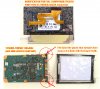
Almost, you will have to remove the casing and have to modify the plastic mSATA end connector. Either by filing or professionally grinding it back really carefully. But screw holes line up perfectly with the dual metal housing so i guess same board.
Picture here i modified from another site to show what i cut since my two THNSNC128GAMJ are already installed. (Otherwise i would have to disassemble my Z again)
I admit kinda a dodgy replacement method but working fine so far with dual boot XP/WIN7 as separate drives (No Raid). Spent around $300 total.
-
Is it possible for someone to help me find that cable for the hard disk caddy? I've got the model which only has HDD and no optical drive. I'm already well past warranty, so I've got nothing to lose by installing an SSD with that cable listed in the first post. All I need is a cable to interface the mobo with the original HDD.
-
What exactly do you want to do? If you want to install an SSD, it's most practical to remove the 2.5" HDD and replace it with a 2.5" SATA SSD drive. If you search the part number of the cable, it might cost you $100 just for the cable itself.
-
I'm actually wanting to do the expensive route, simply because I have so much data I need on the go. It'd be cheaper to keep my 750GB HDD, buy the necessary cables and get an mSATA SSD than to go get a 512GB 2.5" SSD. Are there any places which source the SSD cable cheaper though...? I've looked around and the only place thus far has been Ebay which is at a good $120 or so. Sadly I can't use the link provided by the OP since it doesn't ship outside of the US
-
You can try google the part number and some sites come up. Not sure which online shop would be the cheapest.
-
Hello Willy with my Vaio SA4 (begginning 2012) I've got a Crystal Mark scoer of 220mbs/ reading, 180mb/s writing score ... What is the number model of your Toshiba SSD ?
-
Well, I've stepped in it deep. I went too quick, and made 2 mistakes. I bought 2 SSD's, they are actually for the Z2xx, and I can't use them because they don't match the LIF on the Z1 SSD. Does anyone know of an adapter for these, to some version of SATA, even to USB? Mistake number 2, I pulled the mobo SSD connector clean off! Can anyone tell me if the MBX-206 is the right mobo? Is there any chance that the mobo has additional SATA ports on it? I haven't decided whether I should pony up the $250 for a used mobo, or just put the caddy in the optical bay and sell it cheap.
-
Hi!
Can someone clarify which configurations of SSDs are built into the Z1 models, please!
There are 64, 128 and 256 GB versions of SSD modules. 128GB can be double sided consisting internally of two 64GB modules and 256 GB modules are always double sided.
If a Vaio comes with 256GB, does it always come with one double sided module or could it be also two double sided 128GB modules (4x64GB) or two single sided 128GB?
Reason I'm asking is I want to get a used VPCZ1. But I need 512GB and only in the first case there would be room for upgrading. In the latter cases both spaces for SSD modules would be occupied and therefore had to be discarded.
Thanks! -
It appears that you are looking for something like this: http://forum.notebookreview.com/sony/471811-definitive-vaio-z11-series-ssd-drive-configurations.html
-
Hi, thanks for the link. I have as well a 256 GB SSD European Z1 model and I am really satisfied with it.
Was looking to the new Tablet (or convertibles from other vendors), but will stay with Z1, Reason:
- good / reasonable CPU (i7)
- good 13" Display, do not want to go back to 11"
- Fingerprintreader, the tablet does not have such security feature
So if I want to expand from current 256 to 512 I need to buy 2 x 256 GB DS as stated in the thread.
What exactly I need to buy
- any new cable or can I use the existing ones
- would this model be the correct one: Toshiba THNSNC256GMMJ (see here)
Thanks for any clarification... -
Which Vaio Z1 is it? Is it a Z11, Z12, or Z13? Also, what brand and model SSD is in at the moment and how many?
-
Sorry, I already put the model, etc. in the Profile, but I can't find the menu option for a signature, maybe you can point me to the right URL...
Regarding your questions:
Sony VPCZ11Z9E/B
with 256 GB SATA Flash SSD (Toshiba)
amount of SSD's: no idea, I believe 4 (is it possible to check without opening again?) -
You should be able to check the number of SSDs on the first BIOS page.
Toshiba SSD in a Z11? What model comes up for them in CrystalDiskInfo? It's weird because I thought that the Toshiba SSDs were microSATA which might make things easier for you, though my Z11 uses LIF ssds which would require a different cable if I wanted to upgrade to the more common 1.8" microSATA drives.
The option to add a signature will come up a few hours after you have 5 posts - you have 6 at the moment, so it's only a matter of time until your account privileges are updated by the forum. -
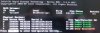
I wanted to have a look at the first page of the bios as I saw this before; so
a) you can see, I was wrong (= Samsung SSD's)
b) I have to check what this error is...
-
I don't recall how, but I think there was a way to bypass that error message. Can you still get into Windows?
-
...puh, yes I am able to start Win8 and can use all partititions.
Was as well searching for the RST-GUI for Win8, but I am not able to find.
Intel ( see here) has currently only the GUI for WIN7, so trying to install (maybe in Compatibility mode) and going to see what happens... (I am a little bit nervous, hopefully there will no big issue which will break the RAID - in this case the data are lost - of course I have a full backup - luckily yesterday done)
>>> fyi: checked the RAID with the Intel Tool and all is fine (there was only a missing activation of one SSD)... -
Hi! After almost 3 years my Z11 got the BSOD. One of the two 64Gb Samsung SSD drives failed. There is a new Samsung SSD MMDOE28GXMSP on sale to replace it, but is the LIF port the same as on the failed MMCRE28GQDXP-MVB and will there be any compatibilty issues?
-
It's not the same LIF connector. That one is wider and seems to be for a Macbook Air.
-
Thanks, namaiki! So now I need a Sony SATA connector and an appropriate micro SATA SSD, like Intel 320 or Crucial C300.
-
Yup, if you want to go that route you need the cable at the start of this thread and also the 1.8" drives you mentioned. If you aren't afraid of losing your DVD drive, you could replace that with a standard 2.5" SSD with a caddy that replaces the DVD drive.
-
I have a VPCZ13 (specifically VPCZ13C5E). Does the method described here work for that model? The OEM SSD I have fitted is MMCRE28GXDXP. The MOBO end of the cable looks similar to that in the picture at the beginning of this thread, but the SSD card end looks very different. I was wondering if there was any way to install e.g. the MZRPA256HMDR. . .
Or should I be following up in this thread ( http://forum.notebookreview.com/sony/677936-new-crucial-ssd-drive-vaio-z-fit.html)?
Thanks for any advice, I've spent a lot of time searching/browsing without seeing a clear answer. -
What are you trying to do by replacing the drives? Is it that you need more disk space or something else?
-
More disk space, yes, and also I had an "Error Occurred(0)" last week, after 2.5 years of heavy use, so I got a bit nervous. . .
-
Could you take a photo of the drives & cable? Also, download and check in Hard Disk Sentinel trial for bad sectors on your SSD drives.
-
Picture will take a few days -- need to use laptop today, no time to open/close it
HDS reports no bad sectors, but health as low as 77% on the third of my 3 units, the MMCRE64GD [the installed configuration is two MMCRE28GQ -- a single card with twin drives? and one MMCRE64GD, showing as 3 x 59.6GB]
Thanks -
183,Runtime Bad Block is on zero?
Anyway, since you have the Samsung drives, I'm guessing if you recall that yours probably look like this: link
These SSD boards seem to be harder to find recently, so you can't locate any, you will probably need to purchase the microSATA cable on the first page of this thread. After that, you need to purchase the appropriate 1.8" SATA SSD drives which you then need to remove the casing (and warranty of) to use them.
If not that, then you can remove your DVD drive, install a hard disk caddy/optibay (9.5mm height) and chuck in a standard 2.5" SATA SSD drive in there. This would be your cheapest option, but you lose the DVD drive. -
Not sure how to interpret this info (for the 77% health drive):
............................................Thresh...Value...Worst..Status....Data
183 Runtime Bad Block (total)...10.........97.......97.......OK.........2E
but I guess it's not zero -- 46 is what shows up in the graph (==2E hex).
Yes, that looks right IIRC.
Right -- I thought this might work?
Not quite ready to give up the DVD, but it may come to that.
Thanks for taking the time to help me -
Yeah, that's a 46.
The mSATA drive you linked will not work. You need a 1.8" microSATA drive (and specific cable linked page one) which is different from a mSATA card. Probably safer to search specifically for a 1.8" drive.
Look here and note how the connector looks: http://www.newegg.com/Product/Produ...SpeTabStoreType=&AdvancedSearch=1&srchInDesc=
Cheaper alternatives on eBay and probably other sites as well. -
hi,
to state what is possible and what is not, i just want to say that it is possible to use msata ssd's like the CT256M4SSD3 with this adapter:
mSATA to Micro SATA Adapter - mSATA - Adapters & Converters
i did it and can confirm it:
http://forum.notebookreview.com/sony/677936-new-crucial-ssd-drive-vaio-z-fit.html#post8825726 -
So I have a Vaio VPCZ12 which has the original two 64GB SSDs in RAID, which I assume are 1.8" SSDs. If I want to upgrade them and keep the optical drive do I need to buy two 1.8" SSDs and a SATA to microSATA cable?
Would two of these SSDs work: Amazon.com: Crucial SSD CTFDDAA128MAG-1G1 128GB C300 1.8inch SATA Retail Industry-Standard Storage Interface New: Computers & Accessories ?
With this SATA to microSATA cable: Amazon.com: Micro SATA Cables- SATA to Micro SATA adapter for 1.8 inch SSD 3.3V or 5V Drives: Electronics ?
Cheers
Simon -
...anyone?
-
The SSDs are okay as far as I know. You will be required to void the warranty and remove the outer casing of the SSDs to get them to fit in the laptop. As for the cable, if you have Toshiba SSDs you might already have the required A1781464A cable (see page one of this thread). Not the one you linked on Amazon.
-
also whichever 1.8" SSD you get might be slightly larger/wider physically and requires some coaxing to fit... but it will eventually fit.
-
Thanks namaiki. That's v helpful. I'll see if I have Toshiba SSDs in it already for the correct cable.
Cheers
Simon -
Thanks Phil - I've read that some SSDs take a little persuasion to squeeze them in there. Just have to be careful and take my time.
Cheers
Simon
How to replace the SSD in Vaio VPCZ11 and VPCZ12 with non-Sony SSD
Discussion in 'VAIO / Sony' started by Enny02, Aug 21, 2010.


