Problems? See this thread at archive.org.
I remember having trouble with hdmi audio out on win 8.1 I'm seeming to have same problem on windows 10... anyone else? my only possible playback device in windows is: Speakers High Definitiion Audio Device. I also selected show disabled devices, and still only one device... on my stationary normal desktop I can always see other device if I connect the hdmi.
when i boot ubuntu I can get hdmi out with audio working just fine. so there is definitely something wrong with my windows 10 installation somewhere...
-
Yes @Elrinth I had the same problem on Windows 10. I reinstalled the Realtek audio driver original from SONY to fix it. It created a service "Realtek Audio Service", which checks if an audio capable device is connected to the HDMI port - and if so activates the second Sound device called "HDMI Output".
I haven't tested under Win10 TH2, yet.Last edited: Nov 28, 2015 -
thanks a lot CC,
patched NVIDIA 341.92 driver this weekend, although patcher program didn't work for me it helped me find the places to insert my Hardware ID PCI\VEN_10DE&DEV_06E5&SUBSYS_9025104D&REV_A1 and then the install worked perfectly.
I do have small funny issues like blurry text depending on using the laptop screen or HDMI monitor, and depending on the app (e.g. Device Manager blurry on VAIO screen, Chrome blurry on HDMI monitor). Another issue is when I have Explorer on the HDMI monitor and copy a file to/from there, the copy popup refused to popup although I can see it in the peek feature in the taskbar, yet. -
@galaxyge check your display settings for each screen. Windows 10 (possibly 8?) chooses your text size based on monitor resolution/ppi and some apps are scaled up/down to accommodate, which will cause the blurriness. Just set each screen to 100% and that should fix it.
Sent from my iPhone using Tapatalkgalaxyge likes this. -
OK figured it out:
Windows 10 has a display setting "Change the size of text, apps, and other items". This is set to 125% by default - and many things are displayed blurry with this!
Turned it off and everything is fine!
The explorer copy over multiple displays issue, might well be a Windows 10 bug... I'll stay on laptop monitor to copy large files for now -
I just noticed Nvidia updated us to 341.92. Attached is the nvszci.inf patched for VGA.
I still can't get the the patcher to run in Windows 10, so this is for all those that don't want to go back to a previous Windows to run the patcher.Attached Files:
anytimer likes this. -
-
Hi all,
Since three days I'm trying but don't get HD audio via HDMI fixed.
Same as @Elrinth described above, the Realtek HDMI audio device doesn't appear anymore in "audio output and input devices", although Realtek audio service is running. This issue wasn't there before, when I used standard sony drivers and Windows update install, but now I have:
- Windows 10 clean installed
- Latest Nvidia driver on BIOS static display.
The standard Windows HDMI sound device isn't helpful as it misses things like DTS HD master and is limited to 16bit / 48khz.
Anybody got this fixed??? Issue of Non-Sony Nvidia gfx drivers?
PS: I have VGNZ-58 with Azalia bus, if this means anything -
I have a vpcz13m9e with a GT 930M
I can't apply the patch, i'm not sure if is this one:
http://us.download.nvidia.com/Windows/341.74/341.74-notebook-win10-64bit-international.exe
I have hacked bios very good but i can`t patch the driver, i can`t do it, help me please from spain, -
1. GT330M
2. NuShrike has kindly posted his inf for driver version 341.92. Download it, extract it - you want the nvszci.inf inside.
3. Download driver version 341.92. If you wish to just use 341.74, let me know and I'll upload my patched inf. Don't mix up patched infs; only use the inf for the driver version that you are installing.
4. Run the driver installer. It will fail, as expected, but it will leave the extracted files behind in c:\nvidia\
5. Browse to the extracted driver location. C:\NVIDIA\DisplayDriver\341.74 or C:\NVIDIA\DisplayDriver\341.92, etc.
6. Browse to the displaydriver folder. E.g. C:\NVIDIA\DisplayDriver\341.92\Win8_WinVista_Win7_64\International\Display.Driver
7. Replace the nvszci.inf there with the patched inf downloaded from above.
8. You should now be able to install the driver from the patcher control panel. You can also do it on your own - disable driver signature enforcement first.
-
I just downloaded and patched and installed 341.92. Can't figure out why some people are saying the patcher didn't work. I downloaded version 4.8 and just ran it - worked as advertised. No problems. You can check that the patcher has worked by checking the 'modified on' date for the inf files in the displaydriver folder. I'm running Windows 10 Professional x64. Build 10240. Perhaps people running the Home version are having trouble?
The button to launch the installer started installing 341.74, so I cancelled and launched the installer manually. ComputerCowboy, perhaps you could get your excellent patcher to enumerate the driver version folders and pick the one with the highest version number. This will give some forward compatibility as well as the backward compatibility already built in.
Happy camper. -
I'm already running nvida and HD intel on windows 10, the solution was de patch file of of NuShrike, thank you very much.
Do you know any software for use fingerprint, not driver.
I have read you can open programs with fingerprint but i don't know how to do it.
I only know hello on windows 10 for sign sesion -
How can I sign the patched nvidia drivers so I don't need to disable driver signature enforcement on Windows 7 or 10?
-
JUst installed nVidia Drivers. No Problem whatsoever. I will be using INtel HD for most of the time, but wanted to have a fully working W10! Awesamoe Job Computer Cowboy!
TimiboyPaloseco likes this. -
I successfully patched and installed latest driver on VPCZ1 with Windows 10!!!!. Thanks a lot for great work.
The only issue is that I can't use my monitor plugged in to laptop via HDMI. Monitor gets detected and laptop screen goes dark and nothing happens. No hdml signal. Unplugging monitor turns laptop screen back on.
Any help would be appreciated. -
Could you check if with the original driver (8.16.11.9024) the HDMI works perfectly?
-
It worked fine with the original driver in 8.1, after I upgraded to 10 and installed patched 341.74 driver, it stopped working.
-
I guess it's a known issue with non-stock drivers.
-
Big surprise to me that VGA is working fine
I'm all good.
Paloseco likes this. -
But the VGA and HDMI outputs are different ports aren't they?
-
1. Change additional display mode from clone to extended. These screens will go dark if they are being driven with a signal that they cannot display. That means supported resolutions and refresh rates for each screen. In clone mode both screens try to work at the same resulotion, and that doesn't always happen, unless you have a 1920 x 1080 laptop screen.
2. Be aware that media protection does weird things to HDMI. The system basically tries to figure out if the attached display is capable of video recording, and if so, whether the media being played is allowed to be copied. Even when everything works, playing a BluRay might blank the HDMI connected display for up to a minute. Drove me nuts some 5 years ago, but displays are better nowadays and things aren't so bad. However, if you have an older monitor or TV, .... -
Manually repatched to 341.95
Attached Files:
-
-
I'm replacing the Sony Z1 OEM Nvidia driver v 8.16.11.8880 on Win7, all in preparation for a Win10 upgrade. I've got an australasian Z128GG.
The BIOS is already flashed thanks to ComputerCowboy's / paul3000h generous help.
I have installed latest Nvidia 341.95 driver and used NuShrike's above inf file. Many thanks!
(The patcher v4.8 did not work because it freezes the screen on the Nvidia splash screen logo.)
The setup ran fine, and my system looks good so far: Func+F5/F6 working fine, Func+F7 works fine (though in Speed Mode only), HDMI, primary and secondary monitor all great.
I assume it is best to leave it in speed mode at all times now.
Many thanks to ComputerCowboy, NuShrike, Paul3000h and Galaxyge. You guys rock!!!Last edited: Apr 17, 2016 -
Using Stamina mode is still possible (flip the switch, then reboot) and I use it when travelling, when on battery to save power.
The Intel driver gets updated by Windows update if you enable it for device drivers (just temporary to be on the safe side)
Regarding Windows 10, I would recommend go for clean install directly. There is another thread on here how to do that..
Congrats and good luckJuerg likes this. -
Thank you Galaxyge for explaining, now I can understand how this works.
I will attempt a clean install over the coming weeks. I found the other thread, very good too indeed!
Before finding these threads I started to believe that I will be stuck on Win7 forever with Sony's abandoned hardware/drivers. Many thanks!galaxyge likes this. -
I am trying to update my W7 (not w10) driver to 341.95 latest driver but cannot. message says 'data is invalid'
I have used v7 and v8 of the patcher and also NuShrike's substitute inf file above with same result, please help. I have often updated in the past with no problems. -
@paul3000h
I recommend editing the nvcti.inf file manually in that case. Just insert your gfx card hardware id for the according card found in the strings section. It's easy and explained here in the forum.
Sent from my E6653 using TapatalkPaloseco likes this. -
I spent hours looking but can't find an exact instructions.
All for W7 NOT W10
What is the edit for my card id do I substitute this
VEN_10DE&DEV_0A29&SUBSYS_9067104D
with this VEN_10DE&DEV_ 0A2B&SUBSYS_ 905A104D ?
What is the edit for VGA?
What is the edit for brightness control?
Any other edits?
NuShrike could you please tell me all the edits needed then in future I can mod all the new drivers myself. Maybe the edits for both W7 and W10 then they will help others.Last edited: Jul 23, 2016 -
This is the W7 x64 V341.95 file I modified but it won't work 'data is invalid' message.
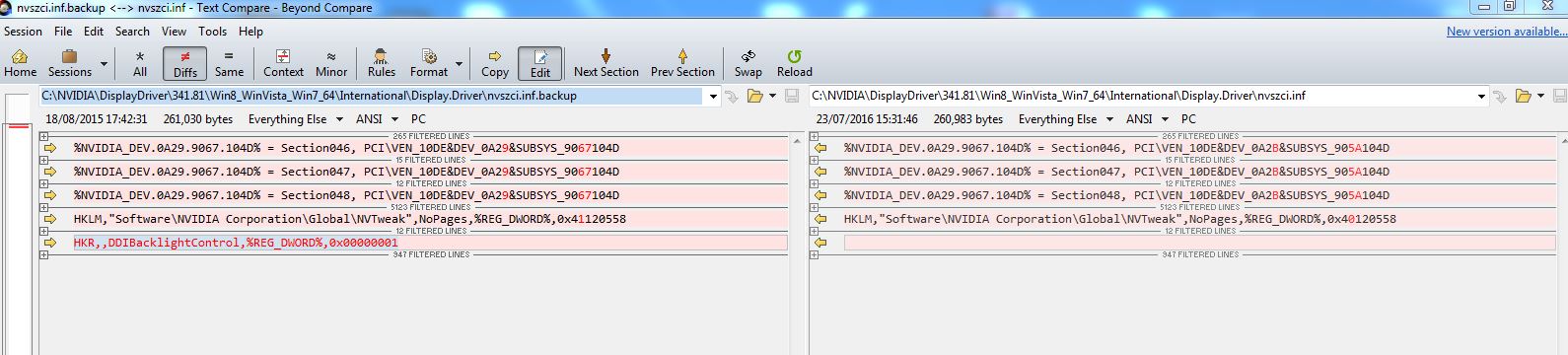
attached file is my modified file and a pic of what I changed using previous V341.81 places to make changes.Attached Files:
-
-
Look into device manager, properties of your gfx card. Details ->hardware-Id. It's enough if you insert the code until PCI\VEN_10DE&DEV_xxxx
Sorry, I have a different card so unfortunately cannot tell you yours.
Sent from my E6653 using Tapatalk -
I do have my correct hardware ID as above and I am thinking that my modded files are ok and something else is causing this.
I re- patched my exixting older version using the patch tool from post 1 Computer Cowboy which I did originally but this time the same patched file gives 'data is invalid' message as well as the latest version one.. -
hi,
wanted to download CCs patcher but his link/domain does not work anymore? Anybody has the 4.8 patcher for download please? -
Here it is:
VAIO_Z1_330M_INF_Patcher.exe.v4.8.zip mirrorgalaxyge likes this. -
Hi I have the same problem with CC's website. I'm trying to update my US sourced Z13.
Does anybody have the bios hack files/zip somewhere I can download it? -
What do you need exactly?
-
Hi. I have a vaio Z13 US model with the OEM windows 7 and final OEM bios.
I presume I need the relevant flash tools and hacked bios for the Vaio Z13 US to enable me to apply the fixed video modes and subsequent inf files. Problem is that CC's website seems to have some kind of error (Azure....). Cant get access to anything there. -
Thank you
-
@paul3000h
Did you get your issue solved? Others who get the same issue might benefit from your solution..
Sent from my E6653 using TapatalkPaloseco likes this. -
hi paul thanks for guide..can you send me NVidia patching ? the cowboy side is down..
y -
hi paul can toy send form me NVidia patcher thr cowboy site not work...thanks [email protected]
-
hi master cc thanks for you..your site don't work..can you send mi your patcher gt330 ..please [email protected]
-
hi master cc thanks for you..your site don't work..can you send mi your patcher gt330 ..please [email protected]
-
I have consolidated everything need to do here
http://forum.notebookreview.com/thr...n-install-to-window-10-with-bios-hack.797999/ -
Hey guys I am going to relaunch my site soon
next couple of days
and I'll do some new builds on this code if need be -
hi master cc// please active youe site soon....
-
Hi master cc Thanks for your guides .....
My model is VPCZ 138GG with Gt330m and I tested your VAIO_Z1_330M_INF_Patcher.exe.v4.8 with hacked bios in Win 10
Downloaded 342.00-notebook-win8-win7-64bit-international for my gt330m
In 3D patch the result is good and work with no error only I have problem to connect a Secound Monitor by VGA Port ...Is a way to resolve it?
In VGA patch this error occur this driver not Compatible is way to resolve?galaxyge likes this. -
Sorry, I didn't know Nvidia actually made another update for something they said they've stopped updating. ^_^
Also, had to recover my Z11 rig after Win10 boot "chkdsk" basically orphaned all 300+GB of my files. Must be a bug in "compact ...". Windows 7 backup and recover to the rescue.
I'm now also starting to look at updating beyond this laptop. I've maxed out all the upgrades I could at this point with my Samsung mSATA 850 EVO upgrade.
Anyways, posting my 342.01's nvszci.inf patched for VGA. I'm now running the patcher in a Win7 VM, as that's still the last OS it's compatible with. Diff of the file changes included if you want to manually replay it.
I do only post what I personally use.Attached Files:
galaxyge likes this. -
-
The BIOS hack & Nvidia GT330M are working fine with Windows 10 Creators Update. Brightness keys and HDMI port work fine too.
What I am not sure of is if I should be able to flip between GPUs on the fly by using the Hybrid Switch - does anyone know ? A reboot is the only way I can switch between GPUs.
VPCZ115CE -
= works as designed. The switching is now (in STATIC setting) solely controlled by the BIOS. To use dynamic switching, you would have to install the old hybrid drivers in Windows instead.
Sent from my E6653 using Tapatalkanytimer likes this.
Latest VPC-Z1/330M Drivers for the BIOS Hack People
Discussion in 'VAIO / Sony' started by ComputerCowboy, Aug 10, 2011.