Problems? See this thread at archive.org.
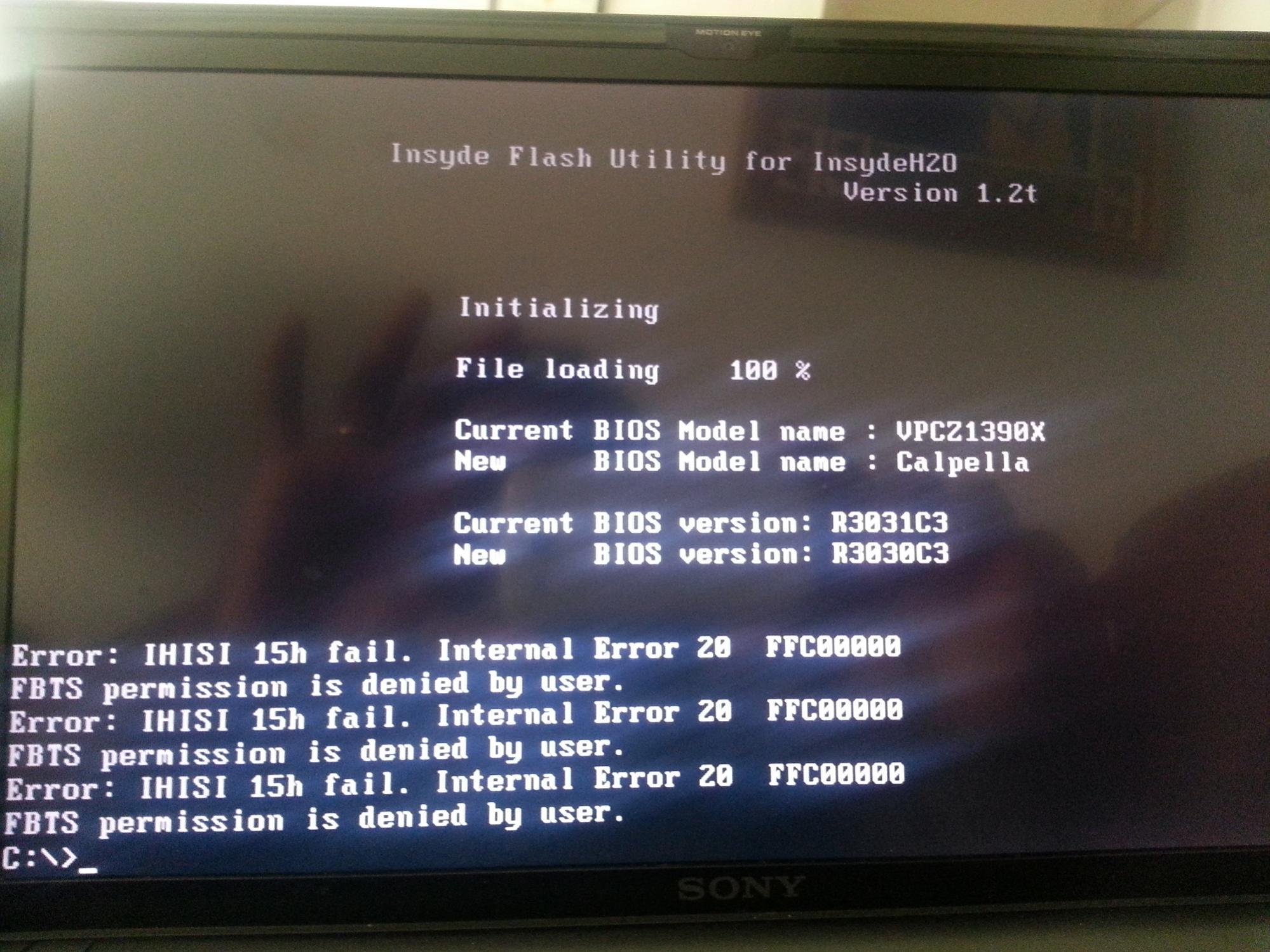
Quick question when trying to flash the bios hack on my z1390x I get ERROR: IHISI 15h fail. iNTERNAL error 20 FFC00000 FBTS permission is denied by user. It say this message 3 times and then takes me back to command prompt C:, but I backed up the bios successfully and when trying to flash the hacked bios it loaded 100%. Any help is well appreciated!
-
Hi Computer Cowboy! Thanks for the great job you guys are doing with the graphics. Everything seems to work without crashes, so Kudos to you! Just a quick question: When using the nVidia 330M Version 280.26 WHQL Latest WHQL driver from the first post I lose my ability to control screen brightness. Is there any way around that?
Thanks very much again for all the efforts!!
EDIT: Never Mind, did the inf file change and it solved the issue. Thanks again for the hard work, guys!! -
So I installed the new 306.02 beta drivers and found that they work well, except for two glaring issues. The brightness adjustment and fingerprint reader do not function at all on SPEED MODE. I haven't tried STAMINA as of yet. Has anyone else tested these drivers out? I hope these problems are temporary, as the drivers work wonderfully in game (GW2).
-
Can anyone help me with the error I'm having up above in my previous post? Would really like to try out the bios hack and updated drivers for my laptop.
-
fingerprint reader is unrelated, brightness is an issue with the INF hack that enables 3D, if you use my VGA hack the brightness should work
Post it in the BIOS hack thread, you will get more action on it, You also need MORE details, and MORE pictures
Glad to hear it, I love having the Z1 unlocked for us to use how we please. I have the huge WQXGA monitor and a 3D projector... so much hacking needed to be done in order to get everything working right.
Most props go to the peeps that actually made the BIOS hack... I just hack around with INFs a little bit -
After a long reading in various topics about the Z1 series BIOS hacking i decided to give it a try. I was trying this tutorial "http://forum.notebookreview.com/sony/473226-insyde-hacking-new-vaio-z-advanced-menu-bios-44.html#post7932873" and then i noticed that with the DOS that is used in this tutorial that after 1 keystroke, my Vaio hangs and becomes unresponsive. So it is impossible for me to replace the BIOS with a hacked one.
Has anyone encountered here the same problem? Or does someone have an idea how to fix this? Because i need to upgrade my Nvidia drivers for some apps i am using. -
Hello,
Thanks ComputerCowboy for the job you did on graphics. I'm running 302.80 on windows8 64bit (VGA hacks) and everything works fine.
But my computer just shutdown sometimes while playing games for example. I think this is due to the heat. It didn't do that before and I don't know if it's a result of the Bios hack or the new driver.
Sony Vaio VPCZ13A7E / Windows 8 / Bios hack / 302.80 -
I also have the same problem Ovv. It happens when I start up a game or begin rendering in Premiere Pro. However, when I'm plugged in the shutdown doesn't occur. I'm running with 301.42 drivers.
-
Most likely yes, for example every game based on the last Unreal Engine will make the computer overheat if the resolution is not lowered (720p should be fine, worked for Mass Effect 2 and 3).
-
Cowboy here's the screenshot of the error I get after following the instructions.
Attached Files:
-
-
The 306.23 drivers work great with VGA hack.
Also, if someone experienced some issues with 301 (I had some problems with Photoshop) they are now resolved.
Brigthness controls work just fine with the usual adjustment in the .inf file. -
Hi Mesenzio, can you please provide more informations about the "usual adjustment in the .inf file?" I have a VPCZ11Z9E (GT 330), and i need help!
Thanks in advance -
Sure, acutally someone should put them on top of the topic, otherwise they're hard to find.
So, in order to restore brightness control with nVidia card:
1) Unpack the driver
2) Apply ComputerCowboy patch.
3) before installing the driver, just remove
this string from [nv_miscBase_addreg__14] section in nvszc.inf file:
HKR,,DDIBacklightControl,%REG_DWORD%,0x00000001
Actually the section could be different, just remove the first string of that kind you find, it worked for me.
There is also a quick way to restore automatic brightness control with Intel driver (will still not work with the nVidia card):
1) Open the registry editor (START -> regedit).
2) Search for FeatureTestControl.
3) Change the value from f800 to fb60.
Et voilà! -
I've got the 285.38 driver running on my Windows 8 machine. It's the real windows 8 that I got through dreamspark. What I did:
Used Paul3000h's method of hacking the bios, set it to static
Rebooted windows 8 into advanced mode and disabled driver signature enforcement
Attempted Nvidia install, failed.
Used VGA computercowboy patch
Changed the nvszc.inf file according to mesenzio's method
Installed the 285.38 driver
I tried this with NVidia's 306.23 driver that is made for W8 first, but it failed. It had the "could not find compatible hardware" error when installing after patch. Gives same error after having 285.38 installed.
Mesenzio, how did you get 306.23 to work? -
I used the same method as you did with the 285.38.
It's strange that it works for the 285.38 and not for the 306.23, did you use driver sweeper before installing the new one?
Also, I am using Windows 7, maybe something changes with 8. -
Hi Mesenzio ,
I am confused right now With the number of methods I have seen in this forum.
I have a Vaio VPCZ1366GG Laptop from ASia (India) , with Nvidia 330 M .
I wanted to do the Nvidia driver Update.
Is there a way to do it without any Bios Hack?
If I have to do the Bios Hack , which set of instructions should I follow ??
Also I noticed that I don't have any nvscz.inf File when I extract Nvidia 306.23 Verde drivers.
Should I just try to install the 285 drivers ??
How do I mod the inf file ?
Thanks in advance, I bought FifA 13 and really wanted to play but I think it needs a graphic card update , because its crashing always .
Regards -
Unfortunately no. If you want to keep the hybrid functionality take a look at the thread linked by anytimer.
The one in the first post of this topic works fine for me.
It must be somewhere, just type the name in the search box.
The notepad will be more than enough. -
Tried again to install the 306.23 driver today. My method was:
Uninstall previous driver
Driversweep all NVidia display stuff
Restart into disabled driver signature enforcement
unpack the 306.23 driver
VGA patch
Remove first instance of HKR,,DDIBacklightControl,%REG_DWORD%,0x00000001 in the nvszc.inf file, for me this was section 13
Install driver
This didn't work several times. Each time it failed I would driversweep everything and reboot again into disable driver enforcement mode and try again. I got anything from the "no compatible hardware error" to it almost finishing the install then failing. Then one time it just went through and worked, I have no idea what I did differently that time. Automatic brightness doesn't work though, but that's not a big issue for me. The Windows 8 Music and Video apps work correctly now, because non-windows 8 drivers can cause them to crash. I was having this problem on the 295 driver. Everything seems to be working great other than the brightness now though. -
Automatic brightness works only with the Intel card.
-
Thanks Mesenzio! I've got the nvidia driver version 306.23 working by following your steps. But I can't restore the auto brightness control. I've applied ComputerCowboy patch. I've deleted that string in nvszc.inf file. The screen is still at the brightest level.
In the stamina mode, I've just installed new intel driver without touching the registry yet. You said automatic brightness works only with the Intel card. Does it mean the brightness problem left in the nvidia side is not solvable?
Thank you for your great effort anyway. -
By deleting the string in the nvszc.inf file you should be able to manually control the brightness with nVidia card (with the Fn+F5/F6 buttons), but the automatic brightness will not work (I think it's somehow linked to the Intel card).
By modifying the registry key you will have manual AND automatic brightness control ONLY with the Intel card.
So it's not possible to have automatic brightness control with the nVidia card, only manual. Everything should work fine with the Intel one. -
After 150+ pages read I took my chances and preformed the procedure
I hacked BIOS successfully (took my a while but figured it out)
And installed new drivers for my vpcz13 and I can recommend it to everyone who has a little bit of guts and a lot of will.
I'm sending out a big thx to Computer Cowboy and Paul for all of their hard work and manuals that turned my life from "extremely hard" to just "I'll might brick the pc"
Thx guys and please keep helping "unexperienced" users taking full advantage of their hardware! -
hy
please
some one can post news drivers for windows 8 64 bits
for VPC Z13.
apologyse for my bad english
many thanks -
hello, what software do you use for overclocking?
Thanks ! -
hello everybody,
the URL of the patch is broken
Site Suspended - This site has stepped out for a bit
would anyone kind enough to make available? or send it to me?
thank you very much !
(sorry for my bad english) -
I would also be happy if someone could be so nice to send me the patcher as the links from side one are no longer working... THX
-
Does anyone have Windows 8 running on these custom drivers? It seems like quite a headache in order to do so!
-
I installed Windows 8 yesterday and the 306.97 nVidia drivers and everything seems working fine for now.
Actually it's simpler than on 7, since disabling the driver signature is now a Windows option and you don't need any external program anymore.
The workflow is the same: unpack the drivers, use ComputerCowboy patch, disable driver signature ("PC settings -> General -> Advanced startup -> Troubleshoot -> Advanced Options -> Startup Settings") and then install.
EDIT: Seems like I spoke too early.
The brightness control buttons don't work anymore on nVidia. The brighntess can still be controlled from the windows settings, but the Vaio controls change only the first square and nothing happens. Does someone have the same problem?
The automatic brightness on Intel works fine. -
The issue that you are reporting is a known BIOS Hack issue. Nothing to do with Windows 8, AFAIK.
-
Weird, because I never encountered it before installing Windows 8.
-
Can you explain this a bit better? Thanks.
-
Whenever I press the Fn+F5/F6 buttons, appears the usual symbol with the brightness levels, but it's set on the first level and by pressing the buttons I can only change between 0 and the first level, with no change in brightness whatsoever.
-
Well that's disappointing.
-
hey guys, quick question. i was reading this thread and i would like to know if when i use the static switching policy from the bios, after i install nvidia driver, can i install the intel driver when i switch to stamina mode? provided that i restart the computer first of course. Or is it only available if i install optimus driver? i'm kind of confused so i'll need help on this. thanks!
Update: nevermind i found ut myself it was working. I was initially afraid to try as with hybrid graphic i just had an episode where the Nvidia seemed to disappear completely on my system and even hardware scan could not find it so i didn't wanna try anything that makes me loose Nvidia again -
Hello !
I need to reinstall the original bios on my vaio but I get an error "This FD file can not open"
I use the dump before flash my bios !
Can you help me ?! -
Oups it's my fault I put the "/f" before the rom !
-
Well, after much trial and mostly error, i finally settled with the latest 306.97 driver, using the vga patch instead of 3D. the trade of of course is that the brightness control won't work. Another problem with Windows 8 is that even with the bios hack, and static graphic, there will be problem mostly when you restart the computer after installing updates or something. If you just shut down and then boot, there will be no problem, but after restart i always get a black screen..only the mouse will show up if you move it. Anyone has an idea on how to fix that?
Since i'm on windows 8, i've also come to find that when the brightness key is working, some Windows Metro apps will not work anymore, tried it with 295.73 , 296.10 and 301.42. mostly all apps that wil use flash to display content like movie trailer or direct stream. so that's why i'd rather use the one without brightness control.
Ultimately a solution would be that someone finds a way to override Sony Fn key driver and let Windows manage the Fn functions. I tried to uninstall Vaio event Service and the Fn with Volume buttons works fine but not brightness.
i hope some of the bright minds here could find a solution for that, but if not, i'm okay with it. and big thanks to CC and other contributors to allows us to us the latest driver -
Very interesting topic, but after reading all the replies I've still a problem with my sony VPCZ13M9E/B (european version, bios hack with static vga switching policy) and windows 8 (x64)
Despite having followed all the instructions given by the various users the FN keys still do not work, so I cant' adjust the brightness of the LCD.
This is the sequence of installation:
1. Windows 8 x64
2. Audio (Realtek_Audio_Driver_6.0.1.6028_x64.zip)
3. Bluetooth (BroadcomBluetoothDriver_6.3.0.5600_x64.zip) - INSTALLATION FAILED
4. Ethernet (Intel_Ethernet_Driver_11.5.10.0_x64) - INSTALLATION FAILED
5. SD CPRM (Ricoh SD CPRM Memory Card Reader-Writer Driver RIDFMC-00227838-0042.EXE)
6. SD Card (Ricoh PCIe SD Bus Host Adapter Driver RIDFMC-00227837-0042.EXE)
7. MS Card (Ricoh PCIe Memory Stick RIDMSC-00203446-764.EXE)
8. Intel Chipset (Intel_Chipset_Driver_9.1.1.1025.zip)
9. Turbo Boost (Intel_TurboBoost_Technology_Driver_1.0.1.1002.zip)
10. RAID (iata_cd_10.8.0.1003.exe)
11. Trackpad (Synaptics_Touchpad_Driver_14.0.16.0_x64.zip)
12. Intel Wireless (Intel6200_WLAN_Driver_13.2.1.5_x64.zip) - INSTALLATION FAILED
13. Sony Firmware Extension (Sony Firmware Extension Parser Device SODOTH-00212580-0042.EXE)
14. Setting Utility Series (Setting_Utility_Series_5.3.0.07231.zip)
15. Sony Shared Library (Sony_Shared_Library_5.7.0.06070.zip)
16. VAIO Control Centre (VAIO_Control_Center_4.3.0.05310.exe)
17. VAIO Event Services (VAIO_Event_Service_5.3.0.05310.exe)
18. Intel ME Driver (Intel_Management_Engine_Interface_Driver_6.0.0.1179_x64.zip)
19. Nvidia Graphics Driver (driver NVIDIA 306.97 x64) patched (vga, no 3d) with ComputerCowboy "VAIO_Z1_330M_INF_Patcher.exe Version 3", thanks guy!
20. Protector Suite (Protector Suite_WBF2012Build7256-64bit.zip)
21. Fingerprint software (Upek_Fingerprint_Software_5.9.3.6321_x64.zip) - INSTALLATION FAILED
22. TPM Professional Package (Infineon_TPM_Package_3.60.2071.1_x64.exe) - INSTALLATION FAILED
23. driver intel (Win7Vista_64_152257.exe)
24. driver wan (Gobi2000_WWAN_Driver_1.1.80.zip)
25. wan software (OneClickInternet_WWAN_Software_1.0.0.1.zip)
After that, I've also 2 unknown devices in device management, one of which I think it's the ms card (the windows operation center always ask me to download the latest driver, althoug already installed...)
Of course I've followed the instruction of the other users:
Ambroos
Jpcony (not sure about that, it's quite complex!)
imbariv
Mesenzio
The strange thing is that the brightness adjustment (FN keys and automatic) does not work even with the intel video card, although I have not heard any complain about that.
What could it be?
Thanks for the help!
p.s. There is any way to set the keyboard backlight? With the default windows 7 driver it can be turn always on, but in windows 8... :-( -
you can try this one. it's the one i followed for clean install and i have everything working.
http://forum.notebookreview.com/sony/467565-vaio-z-vpcz1-clean-install.html
these are the drivers
Sony eSupport - VPCZ112GX - Support
Also, i didn't install bluetooth, ethernet and fingerprint, but this post seems to solve the problem with the fingerprint software:
http://forum.notebookreview.com/sony/693885-vpc-z1-windows-8-a.html#post8910545
At last, it's well know problem that brightness control doesn't work with the latest driver, and i found out that if the brightness control from sony is working, all the metro apps requiring flash would not work (e.g: movie guide: trailer will not load), and some won't even load.
so this is the solution i've found from searching for the last 3 days
Screen Brightness Tool v2.1: Projects « Patrick Bader's Blog
just load this one, put it in your startup folder (C:\Users\*Your Name*\AppData\Roaming\Microsoft\Windows\Start Menu\Programs\Startup) and instead of Fn + F5/F6 you can use Win key + F5/F6.
Initially win8 will display the software as not safe (unknown punlisher) to run but I run it anyway, i scanned with nod 32 and there's no problem.
I hope it helps for anyone looking for shortcut for brightness -
Thank you very much for the quick reply!
Sadly, I've already read (and followed) the discussions you've posted.
Rather, the Screen Brightness Tool v2.1 it's a nice solution, despite not the perfect one.
But the combination FN keys and the intel card works for you?
Waiting for a good man with the solution for the keyboard backlight too. -
oh sorry it doesn't work for you. for what it's worth, fyi i installed the original driver instead of the updated one. and even though my one is singapore version i used the driver for a US version i guess and it's working good
As for the brightness control, yes, it does work when using the intel card but for auto brightness you will have to change something in the registry. i think it's mentionned in a previous page -
Anyone able to get brightness control working in a recent driver? No luck here with 310.70, even after deleting all instances of HKR,,DDIBacklightControl,%REG_DWORD%,0x00000001 in the nvszc.inf file.
Works fine with 296.10. -
nope, doesn't work for me. currently working fine with 306.97 with a VGA patch, but on 310.70 it's the whole brightness control in Windows that is messed up, not even the sony one
-
The Windows brightness controls work with the 306.97 and VGA patch on Windows 8, now I'm about to try the 310.70.
I'll keep you posted. -
Yes, seems like the brightness controls don't work anymore with 310.70.
-
I have the brightness controls working with the 3dvision patch on windows 8 RTM with the 310.70 drivers
Furthermore, if someone figures out another inf patch modthat works I'll be more than happy to add it to the patching app.
I don't use the VGA patch because i only use HDMI/DVI and 3D Vision is the reason I did the BIOS hack and patched drivers in the first place.
You are all welcome to contact me on Skype with ideas also jeffrey.alexander.parker
Or email: jeff AT computercowboy DOT com -
I tried but it still doesn't work. Is there any inf modification to be made?
-
I didn't do anything special, clean install, installed 3d patched drivers, then everything else
perhaps some left over reg entries are messing yours up? -
I used Driver Sweeper but I'll try again, thanks!
Latest VPC-Z1/330M Drivers for the BIOS Hack People
Discussion in 'VAIO / Sony' started by ComputerCowboy, Aug 10, 2011.