Problems? See this thread at archive.org.
Nautis
Vovus
Thx a lot!!
Last question...
Do this BIOS support VT?
-
-
i don't know really works it or not, but you can switch it on in new bios..
-
It does indeed. I just setup XP mode yesterday on mine.
-
Perfect, i'll try to install it and run voltage optimization by CPU genie, i'll report of results, thx guys!
Just updated the BIOS, it's really working on VT mode! -
in addition i turned off powermizer and now - no more trembling during opening and closing new windows, pages..
-
Vovus
Hell man...
There are some kind of trouble during installation, i've updated BIOS, delete old nvidia drivers reboot, switch on SPEED mode, than installing new, then reboot...and
No nvidia drivers appeared in configuration, only intel
What am i missing??
upd: Sorry, it's my fault, i followed the Nautis's link for x64 version, i got 32...
It seems that everything is ok yet, i'm testing, but swithing works, cooler is ssteady, temp is cool too!
OpenGL, brightness issues are gone too!
Still got scaling issue, and i don't like it at all))
Can't find powermizer settings though... -
Hmm.. did I link the wrong driver? I didn't know there was a 32bit of the 187 series released.
You can try PowerMiser Switch 1.2 here to switch powermiser modes.
Glad it seems to be working better for you. I wonder if an alternative to disabling powermiser might be to set power management mode in the nvidia control panel to "prefer maximum performance". (I forget if this option is even available on 187.)
The scaling issue is due to the drivers not needing to be scaled at native resolution. The way to change it is drop to a lower resolution first and then adjust it.
Is everything else working to your liking? PhysX? -
Nautis
Everything seems to be ok, but for some reason brightness in speed mode disabled...That's unbelievable i'd say!
btw, what was deafult state for PowerMizer Switch A\C off battery on ?
I haven't got chane to try PhysX out
Reinstall of driver haven't solve brightness issue...what should i do to have it back?
hmm...windows brightness switching is working, i think i should reinstall the event service -
Nautis, thanks for all your work in the past, you did a lot for us Z users. I had your latest version of the 32x hybrid graphics driver installed before the official ones came out. With gaming (Call Of Duty 2 for example) I had a steady fps up and around 90. Since I installed the official drivers, with the bios update of course, I had a drop to 25 fps !!. I even turned powermizer down, but that brought it up to around 30 fps only. I even tried to install the official drivers 3 times again with use of the nvidia cleanup utility before. Any idea what is happening here?
-
Vovus
Which vesion of event service do you use on your vaio z11 win7?
Nautis
Ooohh hell!
I haven't noticed that i've downloaded 186.84, not 187
What should i do to get 32bit 187?
Anyway, everything i've done is switch powermizer off on 186.84...and
![[IMG]](images/storyImages/kDyTb92zRj.jpg)
i'm very disappointed, it's idle, and it ain't normal at all!
Also i found strange that win perfomance check still shows ratings of game gfx at 5,5 and aero perfomance on 4.3
It's dedicated BIOS + 186.84 32bit that i've found accidently...
I just don't undestand, why original z11 vista drviers haven't gone wild on burn GPU with high temp, as all other drivers do, have no powermizer settings at all, and won't lag on windows resizeing \ moving etc (every other drivers have it, unless you turn powermizer off)...
So i can't understand logic at all, just wan't some = to Vista x32 VAIO z11vrn/b, but with switching + brightnes working, more recent and PhysX + CUDA enabled...
They're perfect, coz no overheat and lags shows = numbers in game and aero perfomance in windows.
?!?!?!
http://www.nvidia.co.uk/object/notebook_winvista_win7_195.39_beta_uk.html
No vaio again!
Lucky ACER, BENQ and Fujitsu users... -
The following notebooks are not supported in this release:
1.Hybrid Power notebooks with Intel chipsets such as:
◦Acer Aspire 7530
◦BenQ Joybook S42
◦Fujitsu Siemens Amilo Xi 3650
◦MSI EX630
◦Qosmio X305-Q706
◦Qosmio X305-Q708
2.Fujitsu notebooks – (please contact the notebook OEM for driver support for these notebooks). Note: Fujitsu Siemens (FSC) notebooks are supported in this release
3.Sony VAIO notebooks (please contact the notebook OEM for driver support for these notebooks)
4.Any notebook that is launched after the release date of this driver
Hybrid Power notebooks with Intel chipsets are not suppported, and probably will never (i think) be supported by "generic" nvidia notebook drivers. -
Yep.. The way the Hybrid Graphics drivers work they require both Intel and Nvidia drivers in the same package. I doubt we will see Nvidia packaging Intel drivers in with their own.
-
Is there any other hybride chipsets besides intel?
btw, what should it takes to change on GTX290? )))))))))))
It's hybrid-enabled as i know -
Something I posted elsewhere that may help:
This information may not be 100% accurate but it helps give an idea of what each technology is. ATI also has their own Hybrid Graphics technology. -
I confirm that this works for Z7 series. I updated drivers and bios on my Z720D/B and it solved brightness control problem that I had under Windows 7 x64.
I've updated my BIOS from R4041M to R4043M.
I uninstalled old NVIDIA driver.
I installed new NVIDIA driver (187.35).
Now it works perfectly.
One thing I wonder is that after the upgrade, it lowered my Windows Experience Index rating from 4.4 to 4.3 (Determined by Graphics: desktop performance for Windows Aero). Has anyone experienced this? -
Vaio Z Win7 drivers have Powermizer ON and it is quite aggressive, so after a few seconds of idling, GPU clock gets down to 170 MHz.
It needs few seconds of intensive GPU use to get it up - so that's probably what's decreasing your performance index. -
psyq321
Yes, exactly, this is the reason of lags...So how can we decrease this lags, how to remove 170mhz steppings for example?
i7believe
Do you have brightness hardware switch working on speed too?
Nautis
Maybe you could make official 187.35 possible for x32 systems?
Please, i want to have PhysX... -
I haven't seen a 32bit 187.35 package so it may have to be another version.
Issues I am running into currently.
191.56 - Resolution issues with only 4 resolutions showing. (like in this post) It seems like most of the newer drivers have this issue and I am not 100% sure of a fix right now.
195.39 - I had high hopes for this driver. It installs and works properly until switched to STAMINA/INTEL and then it will not switch back to SPEED/NVIDIA. I can force it back to use Nvidia upon reboot if I change a few registry settings but it still has the issue if switched back to the Intel at any point. It also has the resolution issue as described in 191.56.
I have also stumbled across some sexy new Intel drivers 15.16.1.64.1968. These have a new control panel and seem like they perform a little better than the previous. Bad news is they wont work with Hybrid Graphics (first I have seen that wont in fact) so the system is stuck using the Intel GPU. -
Nautis
What's about heat issue in 191.56 / 195.39?
And...Maybe you have idea how to fix hardware switching in my 186.84?
It's really strange...Coz it've worked, until 2nd reboot, and then only windows slider works, i've tried to resintall event service, nothing still happens...
Maybe some registry entryes? -
Can you post 191.56 if there is no major problem other than resolution issue?
I would like to participate as a tester. -
Sure can.. I was going to package up a 64bit version to post for testing on other Hybrid Graphics notebooks anyways. Do you have 64bit windows or 32bit?
-
...Mate... You should have posted that up somewhere else - I thought I got myself a corrupted driver or something due to the first-5-seconds-of-lag-after-idle issue...
Yeah - I too would like to see a driver where powermizer is turned OFF. Just don't see a need for it when we are offered the Intel card to use on AC... -
With the original drivers this is exactly what Sony did because of the use of the Intel GPU. It also helped give the appearance that Stamina mode used a lot less battery than it actually does.
You can disable Powermizer if you do not like it. Download powermizer switch I mentioned in a previous post to configure Powermizer to your liking. -
Woah~~
Fast response!!!
Yeah - thanks. Will be getting that up and running now. Relly annoying to have the Z laggy for around 10 seconds when I get back from a short meeting or need to figure out something away from the Z...
BTW, I'm using the 8.16.11.8735 version which I hoarded off Sony Support USA for the Z820. I may even try Nautis's driver soon to get the WEI up.
Been having issues with some custom apps not running on fullscreen (runs at 4:3 despite being in full screen, resulting in huge black boxes on the sides) so upgrading's an option I guess...
Though it is strange - the default nVidia control panel, despite the help manual describing that the powermizer setting is customizable, it ain't there... I think I read somewhere in this thread that the control panel is missing an .inf file or something......?
Anyways, thanks for the help ^_^ -
Have you tried this? Lower your resolution in windows -> open nvidia control panel -> click "adjust desktop size and position" -> and "use nvidia scaling"
It sounds like it is on use nvidia scaling with fixed aspect ratio.
EDIT: Currently downloading and investigating 191.66. -
I have win7 x64 currently using sony's official driver.
-
Mate - you are a life-saver - everything is now working as it should ^_^
Thanks again~~ -
I wonder is there still any brightness problem on vaio z windows7 64bit with 191.56? Now I am using 190.62 but there is still a brightness problem. I cannot use Fn+F5...... My BIOS version is R2170M3. I have no problem when I used 187.35.Please help me. thanks.
-
Did you update your BIOS? ( http://forum.notebookreview.com/showthread.php?t=342947)
-
For those who wish to test them Nvidia 191.66 | Intel 1930 | 64bit are up on my server. These have the resolution issue and probably others. I highly recommended using the official drivers over these. These have been posted for testing purposes only. Like most unofficial 64bit drivers you will need to enable test mode and sign these before they will work.
For those that choose to test these please report back any and all issues you encounter. I will see if I can get some 32bit drivers together soon too. -
Testing Nvidia 191.66 | Intel 1930 | 64bit:
Resolution issue, as expected
No major overheat issue, around or less than 70C on Everest.
WEI Graphic 4.3 / Game 5.5
I cannot test HDMI output.
Tested on VGN-Z690 Win7 x64 Ultimate K
with BIOS R4043M3 adv menu enabled
I will update if I have other issues.
I forgot to mention: As Nautis said, Physx is enabled (or hacked) in this release. -
Thanks Dreamliner,
I got 4.4 in Win7 under graphics with these. Could be because I set "Power Management Mode" to "Prefer maximum performance" on the Nvidia control panel. (Manage 3D Settings / Global Settings)
Powermizer is set to on when using Battery and Off when plugged in with these BTW. -
No worries, progress is being made elsewhere...
But i'm currently having a really strange problem with my Windows 7 setup. I had everything running perfectly for a few weeks and was using the official Nvida driver from your first post. System was very responsive, playing full HD content without any problems, less heat in comparison to Vista, longer battery life, etc. Then yesterday i booted a Windows PE disc i had lying around as i needed to run some tools of it. Under Windows PE the resolution was obviously reduced to 800x600 or whatever as no drivers were present, but when i rebooted into Windows 7 resolution stayed the same.
At first i didn't think much of it as i had this problem before. I changed the resolution manually and restarted and everything seemed ok again. Until later on that day i tried to play some HD content which played flawlessy before but was now struggling to decode in realtime. This is when i noticed that the light on the graphics switch was no longer on or working at all. Looking at the device manager i noticed that the Nvida driver was now failing to load.
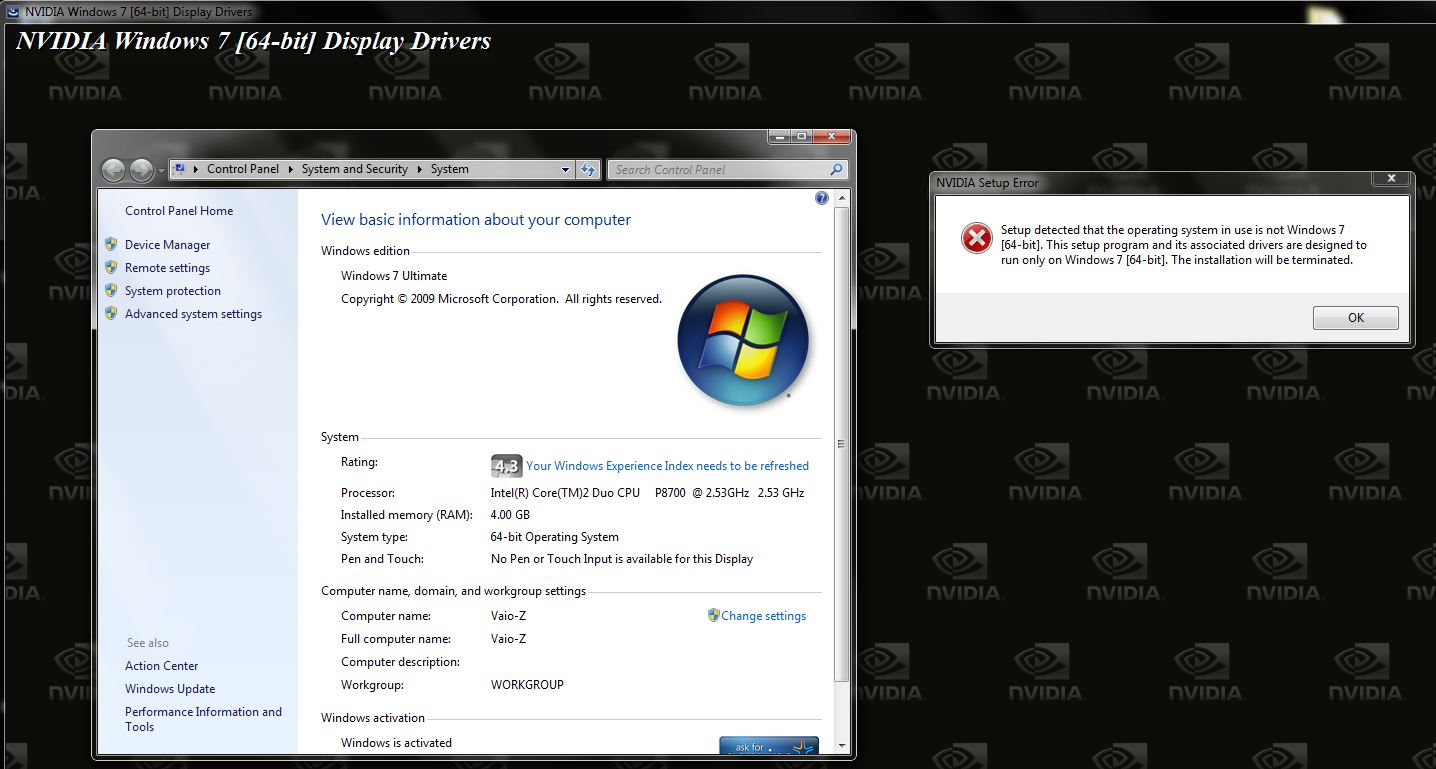
Here's the problem, when i now try to install the same Nvidia driver it's politely telling me that this driver is for Windows 7 64bit only and my OS is not Windows 7 64bit. 'Hmmm, strange - i'm sure it was. Let's have a look... oh yes it is!' Screengrab attached. A quick google search reveals that this usued to be a problem under Vista too and forcing the driver should do the trick. Yes, indeed manual driver install works but doesn't stick after restart and light on graphics switch is still off.
Now i haven't tried cleaning my registry of any nvidia entries and i'm sure i can fix this with a clean install but surely i shouldn't have to do all that.
When i was on the old 'hacked' bios i resolved this issue by changing the graphics switch setting to static and back again after reboot but haven't enabled the advanced menu on this one yet.
Does this have anything to do with a corrupt cmos perhaps (even though bios is emulated) and is there a way of resetting it or does that not make sense? I tried loading default values in bios but no result.
I've also noticed that waking up from sleep switches on the light on the graphics switch but it's on 'Stamina' even though switch is on 'Speed'.
Also, not sure if this is relevant or not, but my system drive is GPT. Read somewhere here that MBR partition should be forced but my setup seemed alright.
Any help would be much appreciated!
Nevermind, just downloaded the driver again. Had the same version but must have downloaded it from another thread and mine wasn't in a Sony wrapper. The Sony installer worked after a couple of reboots and all is working again now. Will see if it happens again after loading WinPE.Attached Files:
-
-
How can you have the adv menu enabled with R4043M3? I thought the workaround was blocked in that BIOS release. I am interested to see what "hidden" settings are accessible from the BIOS.
-
Patched R4043M3:
http://forum.notebookreview.com/showthread.php?t=429689
Advanced menu is the same like with older versions of Z's EFI, but the only difference this time is that it was more tricky to enable it (for the first time), as Sony disabled EFI booting.
With the patched BIOS, you just need to boot with bootable DOS USB stick with Insyde FlashI T tool. -
Hello everyone!
Ok i got a VGN-Z17GN! And i want a clean Win7 Prof. x64 installation!
I updated my bios because after the first installation i had this problem at the speed mode, that the display was "crashed"... okay fixed that one. Now i got the Bios R2170M3, hopefully the right one.
So i installed everything i need, i was happy because FN Key were working, S1/S2 and Stamina/Speed Switch as well. Everthing seems to be ok.
But then i tried to start a game, like Quake 3 or Counterstrike, does not matter. Off course at the speed mode. But it did not work.
Dont know why. HL1/CS said "less than 15mb memory available". For me it seems like he just used the Intel onboard VGA. What do you think? Can anybody help?
Thanx guys & sorry for my poor english =) -
The normal Counterstrike does not lilke 64bit.
In Vista 64 you had to use compatiblity mode "Windows XP Professional SP2 ".
TDO -
Wow this forum is very overwhelming but seems to be very useful. I just installed Win7 Pro 64 bit on my Vaio Z540. I was wondering if someone could point me to the instructions for getting the FN keys/S1 S2 keys/stamina and speed mode working?
I am also having trouble with the fingerprint and card reader lol I know it a lot but any help would be greatly appreciated!
-
win 7 32bit, after that bios + driver updates i have trouble with internet...WLAN doesn't work at all + sony network untility glitchin'...
-
This thread covers it all and the instructions given worked very well for me...
http://forum.notebookreview.com/showthread.php?t=431357 -
Hey!
Would you share how do you play full HD content. It still seems like, everything i try i get choppy DXVA playback, both with MPCHC, and Cyberlink h264 codec. Did you try killa sample? Its way choppy for me.
win7 x64, official nvidia, vaio z n520 -
I use CoreAVC CUDA acceleration.
works well. -
Hi,
Ok - I am actually disliking Window 7; apart from the slightly quieter fan and faster startup / shutdown speeds, I see absolutely no difference is 'zippiness' or general speeds.
My question...
When I downgrade back down to the factory installed Vista Business x86, I was wondering if I could use the graphics driver version 8.16.11.8735 (which the 5th gen Z820 in the States come shipped with Windows 7 x64)?
I'm just asking this because I had some minor issues with the factory driver for Vista x86, so was curious as to whether I can update that factory driver with the newer Windows 7 x64 one (without problems, that is...). I am assuming that the x64 Windows 7 driver won't have the powermizer issues when installed on Vista (which didn't have it)...?
From what I understand, all the nVidia drivers are actually x86 installer packages and will choose the appropriate platform (either x64 or x86) when installing the driver, depending on what sort of windows you are using. Though please correct me if I'm wrong.
If I am indeed incorrect, would somebody be able to guide me to a Sony support site where I can download the LATEST Windows 7 x86 driver so that I can use it with the factory Vista x86?
Thanks in advance -
When will we see any custom drivers? Nautis put some for testing, how much time it would take to make it work 100% good?
-
The Official Graphic Driver in GPU-Z
Do not support PhysX???
![[IMG]](images/storyImages/@Mdb@.png)
In Control Panel also does not show PhysX Support...
![[IMG]](images/storyImages/ke_Q@.png)
-
Hello, I would like to ask, if some one have problem with sound on HDMI cable abter upgrading his video card drivers. I tried windows 7 drivers, tried just released realtek drivers, but there is still no audio. Graphic indicator shows that my TV is pluged, video is going, but... there is no sound
Vaio z 590 windows 7 64bit, Thanks . I went through the forums, and it is seems that problem appeared after NVIDIA driver update, because before the update, every thing was ok. -
I installed Realtek HD Audio R2.37 from Realtek's site. Audio goes through HDMI for me. Even without this driver, you can still get sound through HDMI, you just need manually select it from Control Panel > Sound. Anyway, here's the link to the driver, there's ZIP and Executable versions for Windows 7, pick whichever:
http://www.realtek.com.tw/downloads...=24&Level=4&Conn=3&DownTypeID=3&GetDown=false -
I know about manual switch.
no sound
ok, i will try something else.
I will try to reinstal my video drivers and report back if something changed
-
Finally i've reinstall to fresh win7 x64 (still got weeks to get back to work...too much musical plugins)
Everything seems to be ok, even heat is ok, but not perfect)
Though i really miss scaling (coz it was working on self resolution recently and working on my pc), it's kinda annoying.
+ PhysX results as kysf's :\
Waiting for any updates.
And don't forget that vaio z11 users gotta download R2170M3, not R4! -
why? where did you get it from?
My discoveries on Vaio Zs Hybrid Graphics
Discussion in 'VAIO / Sony' started by Nautis, Jan 16, 2009.