Problems? See this thread at archive.org.
Vovus
R2 is made for Z1 & Z2 line, R4 - Z3 & Z4
I've found some dealyed issues with brightness and some heat due my accidently testing of R4 today, so R2 is recommended strictly from me!
http://forum.notebookreview.com/showthread.php?t=431357
You can find link in this thread
-
-
I am having a really wired issue and I cant figure out what the hell is wrong....
I am owning a Z21VN running windows 7 ultimate x64. I tried to install the new drivers after I updated my BIOS to M3_R2170M3. However, before I restart the device manager seems to be OK giving me the new version on the nvidia driver. After I restart, speed and stamina mode are broken and the device manager claims that:
The drivers for this device are not installed. (Code 28)
Driver is not intended for this platform.
To find a driver for this device, click Update Driver.
I tried to install a variety of nvidia drivers to fix this issue including:
NVDVID-00208041-764
EP0000208679 (european version)
I am now trying to install EP0000208680 (saw a link posted in the thread).
If anybody has any idea how to fix my system, please let me know....
EP000020868 and EP0000208679 dont even install. When i click on em the packaging manager comes up and extract but nothing happens ... -
I even have R5 in my Z1
-
NHT
So what's the deal?)
I mean, whyto use it, if this bios could cause unwanted stuff? -
http://esupport.sony.com/US/perl/swu-download.pl?mdl=VGNZ890G&upd_id=5151&os_id=47
What does it mean, not applicatable with win7 ultimate?? O_O
I thought it's working properly..
Strange :\ -
And does anyone know how to get rid of this flick on boot?
I mean screen off for few sec...It's very annoying, almost feeling like bsod everytime
-
@Nautis:
Any chance of seeing the latest 195.62 and 1986 drivers in hybrid version soon?
-
I agree the screen got lot of flik on boot and even on shutdown.
I made 2 installations of W7 and reboot after install each driver to find possible conflict but all was perfect until i installed the video drivers... and usually get more black blink screen on speed mode.
Really annoying on shutdown the screen flick and back again to shutdown screen and go back again desktop screen for instant and finally go to logoff screen. -
Hi,
I just got my new Z790 with Vista Business 64Bit and I want to upgrade to Win7.
Can someone recommend if is better to upgrade or do clean installation?
I understanbd there is an issue with the drivers... that there is a specific order to install them? what is it? that some drivers are not working perfectly even though?
I saw there is a new BIOS version but no Video card version - will the version from Z890 will work (regarding the brightness function keys)? is there a known issue with the volume function keys?
Is just that I saw a lot of info over the web without real proven solution... now this forum is 858 posts... if my questions were already asked and been answered - I'm sorry but a reference will be welcomed...
Thanks a lot,
Alon -
http://www.nvidia.com/object/notebook_winvista_win7_x64_195.62_whql.html
Hybrid Support still not there.. D:
No longer mentions about support in a 'upcoming release'.. -
How did I miss these?!?! :O
-
HrHr ... apparently you did...
I guess Nautis is quite busy...
-
Nautis,
I had a VAIO Z690TJ. After installing Windows 7 professional 32 bits, neither the brightness function, nor the switch which allows me to change between "stamina" and "speed" mode work. I've installed alled of thedrivers provided bye Sony's eSupport for my notebook model.
What do you suggest I do?
Thanks,
Jim. -
Update the BIOS, as there is such available (in the first post).
Also, you will probably need to re-install the drivers; I have not heard of people not being able to switch.. -
Hello all,
There is a new bios posted on the Sony USA site for the Z590C. It is the R2171M3 rather than the R2170M3. Not sure what is different.
I'm running Windows 7 32-bit (did the upgrade from Vista, so almost all the Sony stuff worked right away). Still having the speed/stamina and brightness issues.
Any word on an official Sony Windows 7 32-bit driver?
Nautis, will you be posting your latest driver in the 32-bit version? Do you have a changelog with expected issues? Could you summarize what exact resolution issues to expect? Will CUDA/PhysX be working? I'd love to beta test.
Thanks so much for all of your work! -
Sony offers Win 7 32-bit drivers since october.
So what exactly is your problem?
You have installed first the bios for Win 7, than the new video drivers and than the new event service?
TDO -
Thanks TDO! I can only find the 64-bit drivers... I'm currently using the Vista 32-bit drivers. Do you have the link for the official Windows 7 Sony 32-bit driver?
My issue is being unable to change the brightness of the screen, and some corruption if I switch back and forth between speed and stamina.
I've already installed the bios, so I guess I just need the new video driver and event service.
Thanks. -
hello, i have some problem with my vaio z windows 7 64bit. since i updated to 64bit and all new drivers, i meet one problem with my 1920/1200 resolution monitor, and how i found today, with native vaio z screen too. when i watching movie or dragging windows in upper part of the screen (only there) some lines appear.. i dont know how to explain them but, if some one see them (lines) they will know what i am talking about . Just switch to your speed mode, and launch movie or start dragging window in screen mode.
http://ppjev.com/VIDEO.3gp here is a link for a video i took for you to see what is happening -
Hi,
I have Z790 x64 and I also had a problem with the brightness...
Check the 2nd post in this thread: http://forum.notebookreview.com/showthread.php?t=427883
everything is working just fine for me!!!! thank you Firestone!
Alon -
new bivis!
Attached Files:
-
-
Dibs on not applying the advanced menu hack on this iteration.
-
Reinstalled Windows, problem solved. Driver reinstalling didn't helped.
http://forum.notebookreview.com/showpost.php?p=5595764&postcount=868 -
*Nautis
I am trying to do some work on implementing a software GPUs switch under Linux so I want to try and look in the nvidia driver to try and figure out the ACPI calls required to accomplish that. Have you seen anything that would suggest where the actual call to the hardware is made - nvlddmkm.sys?
Thanks! -
I have a new problem...
In some cases, when I connect the charger (original by Sony) first to the wall and then to the laptop, the laptop freezes and respond only to forced shutdown (long click on the power button).
If haven't noticed it if I'm connecting the charger first to the laptop and then to the wall.
Does anyone has an idea? can it be related to some drivers?!
Thanks,
Alon -
Is Nautis still working on new drivers?
-
Well I would be happy if so. Core released new version of CoreAVC (v2) which support CUDA just for Nvidia drivers 191.07 and newer. So I'm stuck on CoreAVC 1.9.5 with official 187.35 to be able to use CUDA...
-
Are you on 32 or 64-bit?
Nautis released 191.66 for testing, but only for 64-bit. -
Thank you for your answer.
64-bit. But aren't there any problems with them? Brightness controls? Overheating? Startup speed mode problem?
I don't feel like being "tester" right now, as Z is my only machine right now, while traveling across Japan. On the other hand I used to like to try every new version on 32bit. Don't have much experience with 64bit yet though, so would have to check more about "test mode" etc... -
If you have the latest BIOS, there should be less isses, but I'm really not sure as I have a BenQ Joybook S42(*another hybrid graphics laptop).
Regarding test mode(copy and paste):
1.)Download Driver Signature Enforcement Overrider
2.)Disable UAC (Can usually be done by typing MSCONFIG in run and going to the Tools tab.)
3.)Run deso13b.exe and choose "enable test mode"
4.)Reboot. (You should see Test Mode at the bottom right corner after reboot. http://deepxw.blogspot.com/2008/12/remove-watermark-v03-build-20081210.html)
5.)Run deso13b.exe again and choose "Sign a System File"
6.)In the box type "C:\Windows\System32\drivers\nvlddmkm.sys" and click ok
7.)Click "Sign a System File" again and this time put "C:\Windows\System32\drivers\igdkmd64.sys"
8.)Reboot and all should work.
lol crap, I just checked and I have ~900 MB of different hybrid graphics drivers on my backup drive.. -
Thanks, saved
But still will wait a bit for a final Nautis release or someone with Z and experiences with these test drivers.
-
Nautis has not been around for some time now... is he on vacation?
-
@Nautis,
Would it be possible to put together 64-bit Win7 driver based on this NVidia one:
http://developer.download.nvidia.co...vers_2.3_winvista_64_190.89-beta_notebook.exe
Those 190.89 drivers are with OpenCL support, which is the reason I'd like to use them as I'd like to be able to test OpenCL code on the notebook as well. -
Nautis has not been on this site (logged in) since dec 13th... :/
-
Well, maybe the man is on holiday
Does anyone know how to actually put Intel & NVidia drivers together? I could try to do it for myself and post the results if it works.
I happen to have a company Authenticode signature and I could sign drivers, but unfortunately it is way to risky to release those to public, as it would be seen as copyright violation
-
Hey All,
I was on vacation but had to cut it short for a family emergency. A few issues latter and the month ended with my Vaio Z completely F.U.B.A.R. I will probably need a new motherboard to get it back to normal. Extremely bad month.
I was going to start writing up a guide on how to build the Hybrid Graphics drivers. There is really no reason for everyone to be waiting on me with all of my issues.
There are one or two key files and some specific INF entries that are required for Hybrid Graphics capability.
A couple of programs I recommend to help make things easier are Universal Extractor and a file comparison program like Beyond Compare or a free alternative like WinMerge.
I will clear out my PM so any of you with specific modding questions can contact me.
More soon. -
I'm wating for that guide!
-
Its easier than you think!
Well it is now that me and Nautis (mainly Nautis) learned quite abit about it doing 185.85.
Sad to see your system is dead Nautis, I was hoping we could start a bit of a collaboration again in the near future. -
Indeed.
I haven't been able to check out some of the newer releases due to my Vaio being trashed but a lot of the later few I tired were not working properly anyways.
No worries Dox, I am not giving up the modding thing again. As soon as I have enough time to drive over an hour to drop off my Z to start getting it fixed I will. I am currently swamped with work and family issues so I just don't have the time or $ right now. I hope to be getting back in the game soon though. I meant to stop by LV2G to update you guys too.
A good way to think about driver modding at least with the Vaio Z is that it is really just repackaging things in a way that installs correctly. There are no real mods done to the files or anything. Its primarily just a install location and settings thing.
I am hoping by releasing the information I have learned, others may be able to get the issues I could not resolve fixed. -
@Nautis: Great to hear from you... and sad news to hear that you have so much trouble lately...
Do you have a paypal account? I am gladly willing to offer some $ and I am sure some people here as well in order to ease some things for you especially regarding your Z...
-
No No.. no worries Jorlin. I will have everything under control in time. Thank you though its a humbling gesture.
-
Thanks so much again for all your hard work Nautis. I hope everything goes well for you.
If you do post a newer release, would you mind posting both the 32-bit and 64-bit versions? Thanks so much..
I am using the official Sony 32-bit Windows 7 drivers (Forceware 186.84). However, I am having problems with deinterlacing and my notebook fails the "jaggies" test in HQV. I've tried all the settings in the Nvidia Control panel, WinDVD, PowerDVD, and even the SD & Blu-ray versions.
I did find this online:
"Nvidia Drivers: Blu-ray IQ Enhancements Have Been Broken Since 182.5
This was a surprise. When we contacted Nvidia to confirm our image-quality results after our tests were completed, representatives there told us we weren't seeing what we should. Further investigation revealed that drivers newer than 182.5 have a bug that doesn't allow for jaggy reduction (diagonal filtering) in the GeForce 9300/9400 and turns off film-mode detection in the GeForce 8200.
After we learned about the bug, we re-tested with the 182.5 drivers and "voila," the image quality improved. We therefore tested the Nvidia chipsets using the 182.5 drivers, and now that Nvidia is aware of the problem, it is working on a solution for future driver releases. All will be well soon enough.
A final complaint about the Nvidia drivers: noise reduction still doesn't seem to be enabled by default. I assume this is because slower systems might take a notable performance hit with this feature enabled, but it would be nice if the driver would detect the CPU and automatically enable the feature if there was enough horsepower to handle it.
Update: Since this article was written, Nvidia has released a new 190.62 driver. We haven't had time to test it to see if this bug has been fixed, but Nvidia doesn't seem to have mentioned it as a resolved issue in the driver release notes." -
-
^Can't adjust brightness in speed mode, couldn't get it to install with provided installer; have disk method was used. Seems to get really hot, I haven't heard my fan this loud before. WEI scores never changed, I don't game so no input on that.
-
I think the brightness issue is supposed to be fixed with the latest/November/December/Windows 7 BIOS.
I actually wasn't able to install them.. =_=
I just get a black screen. -
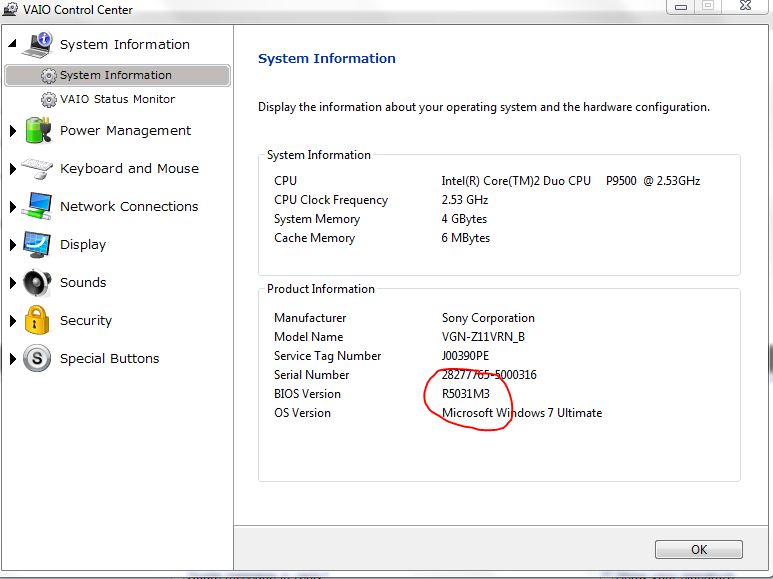
I'm running R5031M3, those are the issues as compared to a fully functioning 187.35 setup.
-
^ I don't know what BIOS revision that is, but since it was working on the other one I see what you mean..
-
Do you think that with the new Z we'll have chance to get new official graphic driver for our Z as well? Or are they really graphic card specific? I suspect Sony, we'll not see any new graphic driver for older Z anymore.
-
the new Z's carry a different dedicated video driver.
so the answer on that is no. -
You mean video card? My point is, that most of Nvidia drivers contain drivers for many video cards.
My discoveries on Vaio Zs Hybrid Graphics
Discussion in 'VAIO / Sony' started by Nautis, Jan 16, 2009.