Problems? See this thread at archive.org.
Andrew08,
I installed the 189.99/2189 combo per your instructions and everything worked; however, I still don't see a rotation option for the display. Do you have the option to rotate after you install your drivers? I have messed around with the RotateFlag in the registry, but it does not seem to change anything. Do the non-Sony GT330M's have an option for screen rotation?
Thanks for all your work on the Z video drivers.
Z1290X
-
it looks like our monitor doesn't support rotation...
download the attachment to see the proof...
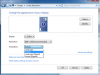
1st attachment is our vpcz1
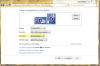
2nd attachment is the display that can support rotate
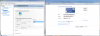
3rd attachment is dual display and 1 being rotatedAttached Files:
-
-
This is weird. I system restored back to the Sony video drivers and deleted the RotateFlag registry entry again. Now I have the portrait/landscape option in the Screen Resolution panel (in speed mode) and the screen actually rotates. Still don't see any options to rotate in the Nvidia Control Panel.
Have not checked again with 189.99/2189 combo video drivers. Thanks for your help.
VPCZ1290XAttached Files:
-
-
Latest OFFICIAL Drivers for Hybrid/Switchable Graphics & Optimus - LaptopVideo2Go Forums
Hybrid Graphics Notebooks with Intel GMA 4500MHD
- 64bit = Alienware 197.72 WHQL [Model: M11x(R1) Released: Jun 29th, 2010]
Would it be realistic to expect these to work on the vgn-z? Excluding any vendor type checks? -
Not without a proper modified INF. I am going to be putting one together eventually..

The new tesla 260.61 beta drivers that were posted at Nvidia today seem to be some of the best I have seen above the 197 series with my Hybrid Graphics VGN-Z. I am still running tests and there is still a bit of powermizer flicker with it on and higher idle temps when it is off but all in all they seem to be moving in the right direction. I am loving the new installer. I will hopefully have a package up for testing sometime soon.
260.63 Verde was posted so I am working on testing them now. -
hmm...
thanks ln13ln13 so now we know that rotate flag inside the intel side is not a good things to put... but for nvidia side we won't see any rotation like nvrotate for nvidia xp driver... except you do some comparison with xp driver, which will be very different from windows 7 64 inf.
260.63...
nautis can you explain more on what will happen if you put 258.96 together with intel 1994 or intel 2189 for vgnz?
and what is the result for the new 260.63?
i will try this on vpcz1 on 17/09/2010 because i am not with my vpcz1 now... -
HKR,,RotateFlag,%REG_DWORD%,0x40
HKEY_LOCAL_MACHINE\SYSTEM\CurrentControlSet\Control\Class\{4D36E968-E325-11CE-BFC1-08002BE10318} (or whichever contains class display) \0000 or \0001 (whichever is for nvidia)
-
On the VGN-Z:
If the Intel driver is 2020 or below: All Nvidia drivers will function. Both Intel and Nvidia drivers function and are switchable.
If the Intel driver is above 2020: Upon booting once windows is brought up the screen goes black. After a little while the Nvidia drivers are initialized and the notebook turns the screen on and the Nvidia GPU is functional. Once in windows if you switch to Intel the screen goes black again until switched back to Nvidia.
The Intel drivers above 2020 seem to be buggy and only detect the VGA port. I assume the issue is similar with the VPC-Z.
As described on this Intel thread Robert_U says "This driver provides a work around for an issue found with the EDID on specific LCD panels commononly used on mobile systems and rarely, desktop displays." The driver described and its fix does not fix the issue for us. I assume the issue must be something similar to the one they fixed but applies to Nvidia Hybrid Graphics. (Driver Interposer/Virtual Monitor?)
-
260.63 Hybrid Graphics Progress Report
-Think I may have gotten the Multimonitor issue fixed.
-I am having backlight adjustment issues with these.
-Powermizer seems to be broken with this set so idle HEAT!
-OpenCL and PhysX don't seem to want to activate.
This of course all applies to my VGN model Vaio Z, other Hybrid Graphics notebooks experience may vary. I am still working out some settings issues with these (yay.. nvidia changed things yet again) which may take care of some of these issues. All in all I kinda like the 260.61 Tesla drivers better. Will continue to try to work out issues on these for the time being. -
Im glad we have the option of hacking the bios to disable the intel card all together since it seems the future of hybrid drivers aren't looking too good....
-
All Hybrid Graphics notebooks (Including the M11xR1 ) should have this option. Optimus notebooks can not due to how they function; no direct output to the screen for the Nvidia GPU.
-
im getting a vaio Z within the next week
Nooo m11x (returned my m11x r2)
-
260.63 Hybrid Graphics Progress Report
-Multimonitor issue fixed.
-Powermizer, OpenCL, and PhysX seem to be working now. Strange.
-Backlight adjustment issues on the Nvidia side
-Will not switch from Intel back to Nvidia (settings issue)
-Powermizer still causes flicker when active (automatic clock adjustment flickers the screen) and idles hot when disabled.
-Nvidia Control Panel seems to lockup randomly for no reason when adjusting some things.
You will not be disappointed, the difference in the screen alone should make you happy. -
Thanks for all your guys' work on this, I am only skimming the start and end of this and related threads but I am going to keep following this. I'm looking forward to a stable and full featured Verde release, whether it's official or unofficial.
-
My Vaio Z has now been ordered!!! hehe im so excited! and looking forward to help support this driver situation.
-
hmm, nautis i got a problem installing 26063, somewhere after 1/4 it would fail me...
-
The new installer is very picky and difficult to diagnose where the problems are. You will need to make sure the inf filename matches an existing one already in the package.
I am working on something with the new installer that should make things a bit nicer for us . For right now though you need to make sure both Nvidia and Intel drivers are in the Display.Driver folder and that the nvbridge_int.kmd and Hybrid Graphics INF is there too (with a filename that matches an existing one). Beyond that you just need to make sure the INF is formatted out properly. -
Getting the urge to do some more driver testing and hacking with the latest drivers to see what I can come up with.
@Nautis keep up the good work we really appreciate everything you have done for us
@Andrew08 are you using your own custom 260.63 inf? -
Well as I said before it will probably be one of you guys who will get things working right on the VPC-Z before I do.
Intel Graphics 2202 was released but gives me the same blackscreen issues. I assume it will do the same for your VPC-Zs. Would love for you to prove me wrong though.
Posted up a 260.63 inf to show you guys the proper formatting. It includes entries for Z11/12. If ya wanna try em. Download the INF, Download the nvbridge_int.km_, download and unzip the Intel drivers (the driver files are in the graphics folder after unzipping the driver). Place them all in the Display.Driver folder (C:\NVIDIA\DisplayDriver\260.63\Vista 64-bit\International\Display.Driver) and then install. (C:\NVIDIA\DisplayDriver\260.63\Vista 64-bit\International\setup.exe)
NOTE: The INF is an early one I am using for testing so it only has the Vaio Z notebooks.
I am currently trying to get something working . It will hopefully make things a bit easier for us . I am liking the new installer btw .
...
-
@nautis
hmm.. i didn't miss any line, i made 5 infs to make sure that i didn't make anything wrongly... anyway thanks for your inf.
@daleski75
yes daleski75 it is my own inf... -
!
(click the periods, if you can...) -
26063 works with intel 2189 with a lot of problems...
edit:
i will start to look which part make it error -
No black screen? Switching works? What problems?
-
26063 2189 vpc z report:
- switching is working, no black sreen issue.
- driver refuse to play games.
- problem to detect wether the display is using nvidia instead of intel.
note about file below...
this is the second successfully installed to vpcz1
please note that this is for studying purpose and not for daily usage...Attached Files:
Last edited by a moderator: May 8, 2015 -
-
Bingo Andrew. I think your problem with the installer is due to nvdisp_IH.nvu. nvdisp_IH.nvu is not needed or used with the new installer remove all isntances of it in the INF and it should work. I may have to write a new uninstall routine for the intel portion for installer 2 unless an OEM releases a Hybrid Graphics 260 series driver. I will keep looking.
Better yet I revised the inf you posted a bit.Attached Files:
Last edited by a moderator: May 8, 2015 -
-
190.24 Official Vaio Z11/12 courtesy of Beaup. ( See this thread)
-
^the 190.24 are beta, but from Sony.
-
Z11-12 Users Only
Looking for someone to test these. Make sure to set test mode and sign them after installing. -
They don't switch to integrated mode
-
Black screen?
The switch wont work at all?
Do they black screen on boot at all. Usually what happens is when windows starts it will be on the intel for a few seconds until the nvidia service kicks in. With the black screen bug it is black at this time.
I thought you were going to bed.
-
switch didn't work at all, stayed on nvidia.
i was, but you had me at 20 minutes
-
Look more drivers!
Nvidia:190.24 | Intel 2202 - 64bit
They of course need to be signed after installing. They include all the goodies activated. Let me know how bad I broke these please.
Notes: Untested (I don't have a VPC-Z)
Newest Intel Drivers
Taskbar UI Icon displays mode you are switched to
Whitelist/Blacklist configuration through Taskbar UI
Shows time it took to transition modes -
Looks like we may need to figure out some settings for the Z11-12 again for 260.63. I know I had to adjust some for the VGN-Z in order to get it to switch properly.
Andrew, do you have the switch working on the z11-12 with 260.63? -
Qwaarjet the switch part will need 10s before it works...
-
Vaio Z11/12 Only
Updated INF: 260.63 INF Test2
for
Nvidia 260.63 | Intel 2202 64bit Test1
Needs to be signed before it will work. Place INF downloaded above in Display.Driver folder after you extract the drivers.
(ex. C:\Z11-12_N26063_I2202_Test\Display.Driver\) NEEDS (more) TESTING. USE AT OWN RISK.
Driver Signing & Test Mode for Unofficial 64bit Drivers
1.)Download Driver Signature Enforcement Overrider
2.)Disable UAC (Can usually be done by typing MSCONFIG in run and going to the Tools tab. You can re-enable it after installing the same way.)
3.)Run the Driver Signature Enforcement Overrider and choose "enable test mode"
4.)Reboot. (You should see Test Mode at the bottom right corner after reboot.)
5.)Run the Driver Signature Enforcement Overrider again and choose "Sign a System File"
6.)In the box type "C:\Windows\System32\drivers\nvlddmkm.sys" and click ok (do not include the quotes.)
7.)Click "Sign a System File" again and this time put "C:\Windows\System32\drivers\igdkmd64.sys" (do not include the quotes.)
8.)Reboot and all should work.
I am going to try to put together a new package that will hopefully not need to be signed.
-
Also don't forget about:
Official: Nvidia:190.24 | Intel 2021 - 64bit - Sony_Beta [Should fix youtube and other issues] - ( Rep Beaups for finding these.)
Unofficial: Nvidia 190.24 | Intel 2202 - 64bit - Nvidia from Sony_Beta with Updated Intel [Needs to be signed.] -
Thanks for your hard work as usual Nautis. I'm about to do clean system install on VGN-Z. The last drivers from you are Nvidia 258.96 Intel 2020, right? I'm running them right now as well and they work without big problems...temps seems to be fine as well.
-
Finally! This works, with a few relatively minor issues. Minor, at least, in comparison to simply not working with Intel at all.
Good things:
+ Switching works, both ways + auto
+ All outputs work (internal LCD (wow!), D-SUB, HDMI (didn't test audio, no hardware to test with))
+ Brightness settings work for both cards
+ Standby and hibernate work
+ Latest CUDA 3.2 works... but read below
Bad things:
- The first time you switch from Nvidia to Intel, CUDA stops working until you reboot the machine.
Yes, the first time you switch from *Nvidia* to *Intel* - it works if you boot with Nvidia until you switch, it *works* the first time you switch to Nvidia if you booted with Intel, but not on subsequent switches. Any call to CUDA API just fails with the dreaded "unspecified driver error". That is, any call including cuDeviceGetCount. The same happens when running on Intel (even if you booted with it and didn't switch yet), where it should just return 0. I tried sleeping, hibernating, changing PhysX GPUs, but nothing except rebooting appears to help. Well, at least it works some of the time.
- Nvidia control panel crashed on entering "Change Resolutions" view, and since it remembered it was the last selection, it kept crashing upon restart without allowing to do anything. A reboot fixed that and I have been unable to reproduce it.
Overall, this is the first driver that allows low power/high performance/latest CUDA combo that I've seen. Congratulations and a big thank you to everyone involved, your work is invaluable. -
Congrats Nautis looks like you finally cracked the blank screen issue with the switching from Nvidia to Intel with the latest drivers.
Some thing's to note.
The switching works only sometimes from speed to stamina when you pull out the power plug
Sometimes it switches by itself and crashes windows
Right clicking on the display when in Intel mode sometimes only shows a flashing blue cursor until you go back to Nvidia mode.
GPU independent mode does not work but power/performance does
All in all excellent work for such beta drivers the above issues are small enough so that these drivers could be used on a fairly often basis.
I really appreciate all your hard work on this and if I could I would send some beers your way to show appreciation! -
yes nautis i got the switch working, i can confirm that nvidia is inside device manager in speed mode and intel is not inside, but i can't tell whether it is nvidia or intel that currently working with the monitor...
all 3d games such as crysis failed to load...
edit:
after re-installing
crysis works...
switching works...
edit2:
backlight control problem...
note:
i haven't try nautis driver... -
Has anyone with the sony beta or other newer drivers on VPC-Z has used dual external displays successfully (two external displays, not laptop and one external)?
I have the Sony docking station (VGP-PRZ10) which specifically states that it supports only one external output (although it has both DVI-D and VGA ports). I am wondering if this is a VPC Z stock graphics driver issue or the docking station hardware limitation. -
CygnusLPA, daleski75... Fantastic news!
I am going to put together a new package that hopefully will not need to be signed. Hopefully take care of some of these smaller glitches too.
I really appreciate everyone's input, testing, and patience on this. It has been a great community effort getting this working to the extent it is, and congrats to all.
Should I keep the transition timer in? -
Ah nautis you finaly did it =D. I've enjoyed your previous packages (189.92 and 189.99), but this is amazing. Just testing out the 260 driver with beta2 inf, and it works amazing. Hope the new package will be even better ^_^.
I would personally keep the transition timer out, but that's just my 2 cents. -
do you need to uninstall previous version before installing new drivers?
I installed version 190.24 and it works ok now. but system crashed several times first and screen went blank several and didnt wanted to return.
Also it asked to switched to speed mode and ofcourse it already was it that mode. -
You should'nt have to uninstall the drivers, although it's usually better to do so, so your sure there won't be drivers conflicts between the older and the new ones. Haven't seen a crash as of yet, with neither 189.99, 190.24 or 260.63.
-
@blue13x
yes
@nautis
your package looks great and its working well...
edit:
i spent a lot of time using the nvbridge_int.kmd from sony beta which is much more larger in file size but i realize that it doesn't work well, and i realize that nautis package is the best...
edit2:
@nautis
your v1 inf works better than v2... -
I have the beta drivers working. Configuration is 1600x900 screen, docking station with 1920x1200 via DVI and two 1920x1200 via DisplayLink USB cables.
And FlightSim 10 now works on the DVI screen. Didn't before! -
I quite like the transition timer as it's another way to see the switching is working.
-
any chance to see an updated 32 bit driver ?
-
why 32 bit ?
-
i have win7 32 bit installed (some old hardware requires 32 bit drivers)
-
Any updates on the signed 260 series of drivers?
-
Jesus christ - Nautis' 260 package really does the trick.
Thank you very very very much. Finally, it's not just pretty hardware, but genuinely useful too.
My discoveries on Vaio Zs Hybrid Graphics
Discussion in 'VAIO / Sony' started by Nautis, Jan 16, 2009.