Problems? See this thread at archive.org.
Your efforts deserve top billing. Let me update the first post a bit. I am a bit dense, what version of the Intel driver does this include?
-
I this would be the old and surely working 2022 intel drivers
 thanks mate.
-
here is the post with the driver signing instructions, since it is now pretty well buried and not linked on the first post: http://forum.notebookreview.com/6738332-post1954.html
-
brightness controls stopped working for me with 263.00 after switching to HDMI and back to built-in, fixed by restarting, happened once but just tried it again and couldn't reproduce. odd.
-
the brightness thing happens sometimes.. I had with another set of drivers, tried to reinstall, and did random things, all of a sudden everything worked fine..
-
The audio doesen't work anymore with the HDMI. During the install of the 263.00 drivers I haven't seen any hd audio driver, aren't thery in the package? Can they be downloaded separately?
-
Modding 101 - Nvidia Installer 2 Modules & More. (Focused on HDAudio as per your question.)
The first thing that is important to know is that NVI2 is a module based install system with each sub-folder essentially being its own module. This means everything needed to install a specific portion of the drivers should be contained in its own folder. Each standard module folder should contain a .nvi and .dll along with the standard files/drivers for installing the module. In most cases modules need some form of trigger in the correct INF section that tell the NVI2 to include it. These triggers should be put under the appropriate [Section###] that corresponds to your GPU. *snip*
-
You should be able to copy a "HDAudio" directory from another package if yours does not have one in it and place it in the main folder directory (basically put it in the same place in the driver you are working on as the one you got it from.) The trigger for HDAudio is "NVAllowHDAudioPreStage = 1" so you need to make sure it is put under the appropriate section for your GPU.
The easiest way of figuring out which section is for your GPU is by opening control panel -> Device Manager -> Under Display Adapters double click the Nvidia GPU -> click the Details Tab ->
set the drop down to Hardware IDs -> click the second line and then press ctrl+c on the keyboard (the second line should look like this PCI\VEN_10DE&DEV_####&SUBSYS_########).
After you have your hardware id string copied you should be able to open the INF in a text editor (lets use notepad) choose find (ctrl+f in notepad) and the entry under [NVIDIA_SetA_Devices.NTamd64.6.1] (which is for Windows 7 64bit [Breakdown: NTamd64 = Windows 64bit, 6.1 = Windows 7]) is where you will find the corresponding section.
-
Lets breakdown that full string to help find it:
%NVIDIA_DEV.####.0#% = Section###, PCI\VEN_10DE&DEV_####&SUBSYS_########
The area colored green before the equal symbol corresponds to the [Strings] section at the bottom of the INF. (Note: unimportant for this lesson.)
The area colored red corresponds to the [Section###] for your GPU. This section will tell the install which other areas of the INF to use for your GPU/Graphics Card. (Note:this is what we are looking for.)
The area colored blue is the HardwareID string that is identified for your GPU/Hardware. (Note: this is the string we copied in the control panel.)
-
After you find the correct section ([Section###]) for your GPU make sure to put "NVAllowHDAudioPreStage = 1" under it so the installer knows to install the HDAudio module.
Example:
[Section###]
AddReg = nv_DRS_addreg
AddReg = nv_commonBase_addreg__0#
AddReg = nv_commonDisplayModes_addreg
AddReg = nv_controlPanel_addreg
AddReg = nv_global_addreg
AddReg = nv_miscBase_addreg__0#
AddReg = nv_opengl_addreg
AddReg = nv_timingRestrictions_addreg
CopyFiles = nv_Drs_copyfiles
CopyFiles = nv_controlpanel_copyfiles
CopyFiles = nv_detoured32_copyfiles
CopyFiles = nv_detoured_copyfiles
CopyFiles = nv_license_copyfiles
CopyFiles = nv_nvsmi_copyfiles
CopyFiles = nv_sysDrivers_copyfiles
CopyFiles = nv_system32_copyfiles__0#
CopyFiles = nv_syswow64_copyfiles__0#
DelFiles = nv_sysDrivers_delfiles
DelFiles = nv_system32_delfiles
DelFiles = nv_system64_delfiles
DelReg = nv_clearRegistrySwitches_delreg
FeatureScore = E6
NVAllowHDAudioPreStage = 1
RegisterDLLs = nv_common_registerdll
EDIT: I left this intentionally broad and nonspecific to help explain a bit more about the INF and NVI2. -
Any chance of a reupload of the 189.99 modded drivers? anyone?
-
Update for modders.
265.90 was just released at nvidia.
Latest nvbridge_int.kmd seems to be in 261.20 from windows update. Interestingly enough this also includes the nvdisp_IH.nvu uninstaller file for Hybrid Graphics which it looks like we may want to start re-including. I will have to look at how to properly implement this.
I will check my backup drive when I get home. -
Sweet! thanks,
And yes I had a look at the 256.90 but since they do not include the optimus parts in the way they install, the "easy" way of modding them fails badly and basically the nvidia part never installs for me. -
Gotcha, I will take a look and post on how to do it.
--
I have updated the main/first post with much better styling. I will continue working on it and post the most relevant information there. I am going to try to keep it a little more up to date this time but I still have a ton of editing to do on it. Hope y'all like it. -
Much better mate!! a lot easier to figure out now
Intersting side note! I get the same score in 3dmark06 with sony's own 190.24 Drivers as i do with the new 263.00 from Nvidia. I know it doesn't tell much about real gaming since there is hotfixes and what not in the nvidia, but I did expect the D3D to be slower in the old drivers...hmm -
Yeah thats not too surprising, you will probably notice some changes in scores if you use more recent games, since that is what the drivers are being optimized for now. New drivers also bring updated components like physx, opencl, opengl, cuda, and hardware video acceleration which may have new extensions or be optimized to perform better. What you noticed is probably one of the reasons Sony wont put any resources into updating the drivers. Also remember this is a business class notebook so that is the crowd they are catering to.
-
That has to be the reason COD MW2 runs like poop with the new drivers thomaskc.dk hooked us up with. However, COD BO runs great with them.
Figures! -
I fully understand and somewhat agree that stability of this notebook (from their usual consumers perspective) is the absolute most important thing.
It's just fun to compare.. I know 3dmark means little to nothing and the reason i use it is just to get A number as i don't have 100 games installed. So far the driver that has given me the highest score is "263.09". -
I completely agree with what you are doing and think its great. My focus is getting things to the functional point and then I have a tendency to post and wait for the results. I have been asked numerous times to do general comparisons and changelogs and I just cant really find the time to do it. Its more of an art than a science for me.
-
Hi guys. I own Vaio VGN-Z720D/B with 9300 GS on board, but 260.63 drivers linked in the first post for old VGN-Z models do not work for me (code 31 in device manager for 9300 GS adapter). Tried it both with DSEO & ReadyPlus, same results. Is there more magic to perform before it would work?
-
Did you install it while speed mode was on, It wont work if you install in stamina.
-
Nautis can you put information like how to extract sony installer in the front page so that everyone will know.
the step is:
1. download uniextract from Universal Extractor | LegRoom.net
2. install it
3. right click on any sony original driver and extract to subfolder.
Thanks.
Edit:
i found this driver from dell got updated nov2011 but the version never change...
http://supportapj.dell.com/support/downloads/driverslist.aspx?os=W764&catid=-1&dateid=-1&impid=-1&osl=EN&typeid=-1&formatid=-1&servicetag=&SystemID=VOS_N_3700&hidos=W732&hidlang=en&TabIndex=&scanSupported=False&scanConsent=False
hope anyone can try it because i am not at home. -
Yeah I need to update the first post with these instructions and more. I don't think universal extractor works on the newest Sony drivers though (I could be mistaken).
I just found those Vostro drivers myself and have included the settings in my newest package. My newest set based on 256.90/2226 just uploaded and I am doing some private testing. I will send you the link as I would love your feedback Andrew. I have done very little testing on them so far. This new package covers the 14 hybrid graphics notebooks I know about and has preliminary support for windows 8. The nvbridge_int.kmd file is from 262.99.
I am taking my time with this release because I intend for it to be a template for the community.
EDIT: Updated the first post a bit. -
it works
I am sorry Nautis, I am not at office, and I won't be back untill next week.
edit:
i can see you put so much effort to combine all into 1 "nv_disp.inf"
but actually i would like you to differentiate them to their real name like nvmvsz.inf for vpc z, so you can make a device list like
nvmvsz.inf vpcz1
nvmac.inf aspire 5745g
etc.
so any device can be added later on without touching the original file.
but of course if the update contain too many line that is when the main problem will come.
I noticed 260.61 to 260.63 only added 2 line and 260.99 only change the 2 line location.
edit2:
yesterday i tried to add new line for the new nvdisp_IH.nvu file and nvidia hybrid driver refuse to install. Are you interested in giving it a try?
edit3:
i can see the installer is still clean not customized yet... actually i would like to know more on how you separate installed the nvidia and intel, i tried a lot of times and it always failed or maybe your computer accidentally installed from the driver cache folder. -
Of course I installed it in speed mode
-
Looks like Alienware may have fixed the M11xR1s blackscreen issue with newer Intel drivers with a BIOs update. They seem to be the only Hybrid Graphics users with Intel 4500M GPU that have the latest drivers working. Still looking into it.
Ill have to recheck that download. -
Re:edit1: I have debated on whether or not to match the Verde drivers INF naming scheme as you have said. Two problems with doing this, the first is that it would make it more tedious to update. The second is that it may not work for my grand scheme. Either way it shouldn't be too difficult to do now that most of the entries are in one place. I still may eventually go this route to match Nvidia with Verde.
Re:edit2: The Nvidia Installer 2 is very picky and has a tendency to give these errors if things don't match the way they want them to. I have a pretty good idea of how to do this and was going to add it to the final. NVI2 seems to read the [sourcediskfiles] section of the inf among others and throw that error if things don't match. I also suggest adding it to the displaydriver.nvi file.
Re:edit3: When it comes to separates, I am not 100% sure how I got it working before. I have been unable to duplicate it reliably though. The new installer also makes it that much more difficult.
As I am sure you know the only special thing about the Intel portion besides the UserModeDriverGUID is the use of nvidias kernel mode driver/service (nvlddmkm.sys) in place of the Intels (igdkmd64.sys). This means the intel drivers need to load nvlddmkm.sys which is part of the nvidia drivers but still keep things separate. There are a few ways of doing this.
-
I am facing strange problems with Nautius' hybrid drivers on a Z46.
I tried to go through the thread but it is impossible to read it all so was wondering if someone can help me out.
I am unable to switch from stamina to speed or speed to stamina more than once. I need to reboot the machine for switching otherwise I keep getting a pop up in the taskbar every 30 secs but the switch doesn't happen.
Any solutions ? I have tried clean installs of the driver multiple times. -
I get the same problem on my VGN-Z11MN/B the strange thing is I couldn't roll back to Nautis's earlier sets so I'm stuck on the stock drivers for the moment.
Oh also I tried following all the usual instructions. -
VGN Users: I am downloading 260.63 I linked on the first post to look it over. I linked the newest version that I had on my server when updating the front post. The driver may very well be one that had issues. Will look it over ASAP and post a working package assuming this is the case. Sorry for the inconvenience.
-
Nautis, thanks, looking forward to it
-
Re:Re:edit1: actually my main point of doing this is if the original get updated it is easier to edit, maybe i will think a program that can modified this automatically.
Re:Re:edit2: i will try it once i get home
Re:Re:edit3: keep trying, i will also try.
Re:for this one i think the usermodedriverguid didn't work well...
i wanted to try with 262.99 and i will post after that. -
Re:Re:Re:edit1: Since the vast majority of changes are universal I find it easier to use one INF template and compare everything against it. I definitely agree with your point though OEM releases and Verde all use a branded naming scheme for INFs specific to the brand. (This means any release that is not from nvidia for quadro, tesla or desktop uses the brand naming scheme.)
As I get closer to consolidating some of my projects ideas like this come up. I like to try to stick as close as possible to how Nvidia intends for things to be, since it makes the end game easier and helps others understand why things are the way they are. In consideration of combining my "Universal Optimus + Retrofit" and "Hybrid Graphics Master Set" projects the OEM naming convention for the INFs was definitely at the top of the list for consideration. To top it off I believe INFs are only supposed to be a certain size. I remember hitting a size limit way back when I was making a 3dfx Master Set. (The 3dfx Master set was meant to cover all versions in a move that was a half-arsed attempt make a driver package similar to Nvidias UDA.) Anyways back to the point, my intentions are definitely leaning the OEM naming scheme route. I am focused on trying to straighten out settings issues on all 14+ hybrid graphics notebooks before that becomes priority.
Re:Re:Re:edit2: I am trying to figure out if the nvu files are even intended on being used or if they are moving away from them. I believe the nvdisp_IH.nvu that is in my test package is from the 261 series driver posted on windows update. Since there hasn't been an OEM that has released Hybrid Graphics drivers for the 260+ series it is a bit difficult to gauge. If it does use the uninstall files still, I am thinking that the NVI2 either automatically detects them or that they are used similarly too how they were in the old installer.
On a side note: Opening the nvdisp_IH.nvu is interesting because while it is clearly intended for Hybrid Graphics it seems like they never updated it beyond 32bit. I edited it before adding the proper 64bit entries and may have to do it again.
Ill discuss this more with you when I get back in front of my notebook.
Re:Re:Re:edit3: RigelKent on this thread has also stated he is looking into the separates issue. I posted some in response. I have gotten it so I can install both drivers with them separate the Nvidia drivers throw an error right now though (as I think we have both run into before.) I really hope we can achieve this as I think it would make things much easier all round.
I will PM the separates module and INF that I sent to a couple of people already. -
--
I have not disappeared or forgotten about 265.90 or VGN model users (heck I am one) I am running into some serious issues with switching on the VGN model with 265.90 that I am working on.
EDIT: Arg.. meant for edit on last post. Sorry. -
I have just installed 265.90 from laptopvideo2go with thier inf file. everything works 100% ! how? well...
I decided to Flash my bios (follow the thread on this forum) and released that I never use the intel gpu, so I put the switching in the bios after i Modded it to "static" which means only the Nvidia gpu is present.
Which also means no more hybrid and I can install all laptop drivers as I want to. hopefully nautis and the others will find a way to keep the hybrid but for now this works like a charm for me.
EDIT:
Thought that I would let people know that with this setup / modded bios I seem to be able to OC the gpu a tiny but more and with the new 265.90 drivers I finally broke my score in 3dmark06 default settings.
7032 3DMarks is my score with 265.90 and the following OC settings:
core: 621
shader: 1402
mem: 833 -
I hhave a few question that perhaps some of you gamers in this tread can answer.
Black Ops:
I have issues with this game still lagging and performing weird after about 15 minutes of play. Eveen if I bump the setting all thee way down to basic, the lag/stalling still happens.
Modern Warfare 2:
This game is unplayabe. When playing, the game seems to slow down then fast forward. Its really strange! Almost as iff the CPU or GPU s throttling.
I have windows and vaio power management set to high performance. Also, i have tried a bunch of different overclocking settings. All of these ssetting work without crashing or artifacts, but I just can seem to get the system to settle down.
VPCZ13GX/B 2.53-2.8
PhyX set to 330m
Any thoughts? -
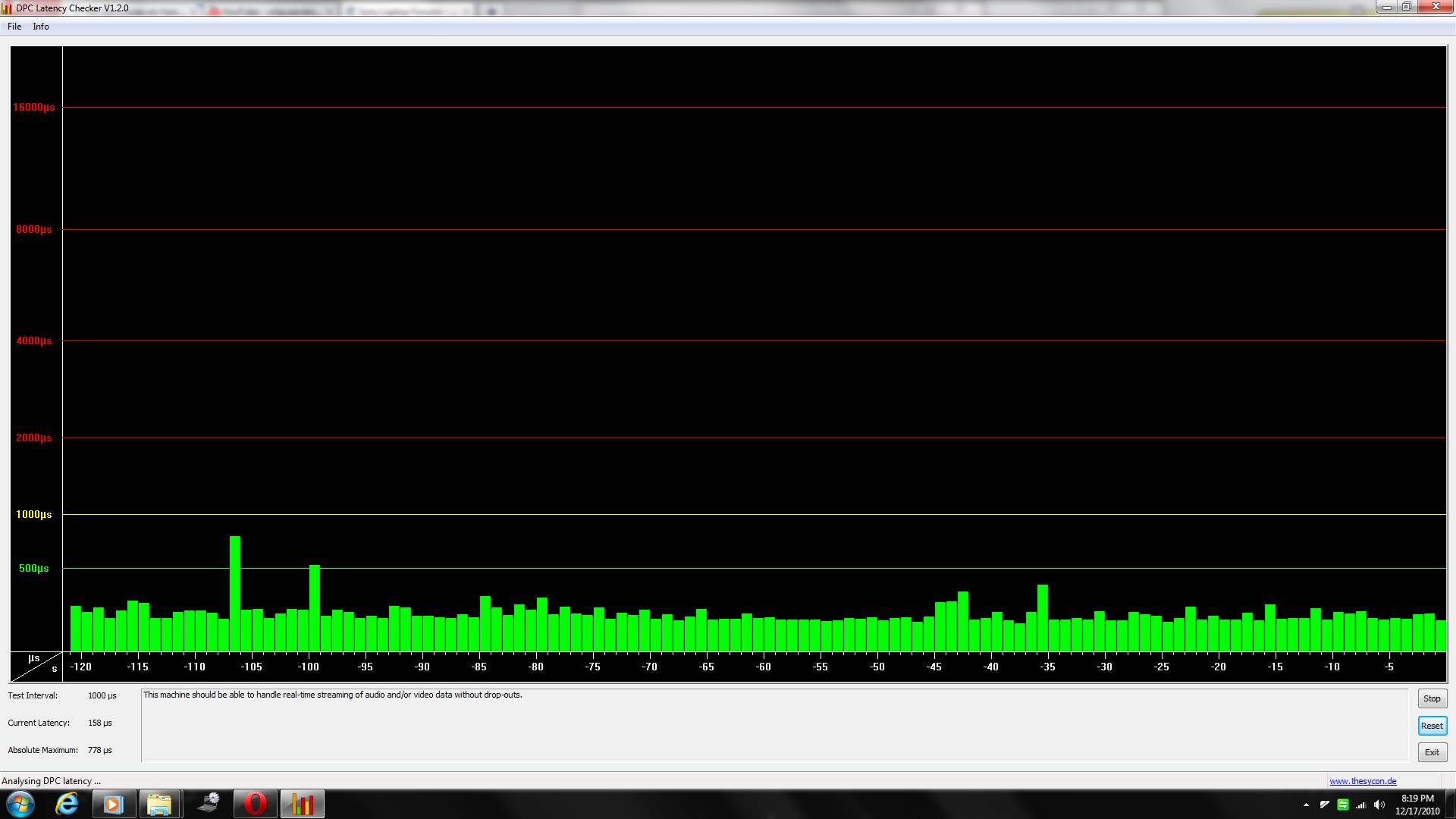
Try DPC latency checker from here DPC Latency Checker
and check if you can see red bars appearing. -
No red bars.
-
Can someone answer me the following question:
is it possible to play world of warcraft in native resolution on the z13 with i5 and 330m gt in 1600 x 900 pixel?
if yes, in what settings? with the cataclysm release, the 9300m in my "old" z comes into drouble... -
Yeah, I will have to add the reminder about setting "static" (Single Nvidia GPU) in the BIOs for those who dont want to hassle with Hybrid Graphics. Thanks, thomaskc.dk.
maven1975, Have you tried using throttlestop? Here is the M11xR2 thread about it. -
Played WoW once on my Z11 on FHD with all highest settings and it barely got under 60fps (only in crowded places). Can't tell you how it is with the new addon since fortunately I am not addicted to WoW
-
I tried out the 260.63 driver (on the vgn-z) and I've noticed that in speed mode, the screen flashes. Is there any fix for this?
-
You can download Powermizer Manager and set it to fixed performance. The flickering is due to it auto-clocking the GPU. Be cautious of heat though.
-
OMG!
HUGE DIFFERENCE!!
Many thanks Nautis!!! -
Yeah everyone that has an i5 or i7 processor should be using this IMHO. Glad it worked for ya.
-
Thank you! So i´ll hope that there is another WoW freak playing with the z the new cataclysm and give more informations...
-
I don't want to be off topic, but should I know how to set ThrottleStop for the i5 - 520M?
-
maven1975,
What was your setting like?
such as TDP and TDC numbers? Did you have to change any other settings other than TDP?
I set the TDP to 30 but gain was very minimal. (tested with wprime 32M test run)
Can you share the settings for throttlestop? -
Might be better to ask throttlestop questions in the ThrottleStop Guide thread or start up a new one for the Vaio Z as I am sure other people might love to know about it and discuss proper settings. I am sure it matters what CPU your machine has, as I do not have an i5 or i7 in mine I can not speak to what works well with it and why.
-
I am attempting to put together a newer package for VPC models as I found Intel 2246 which seems to have a couple new files. I will try to post it for open testing so we can share in the feedback and fixes. I am still at work on the 265 series VGN driver. It looks like I may have switching working at least somewhat, but it only seems to work using the taskbar. Anyways more soon.
-
Did some self packaging a while ago with intel 2246 drivers. Only changes to them that i could find we're interface changes (intel hd graphics control panel).
-
I'm a WoW Cataclysm player, I play on a 128gg model from Australia 1920x1080 resolution. The game hovers around 20-30fps with a lot of addons loaded. This is with full details, max draw distance but lowest AA and lowest AS Filtering. It rarely stutters and I find playing at that framerate perfectly fine.
My framerate was actually around 40-50fps with no addons loaded so it depends on how heavy your addons are. At 1600 x 900 you should have no troubles at all. -
Here's a question for all you FHD gamers. If your frame rates are below acceptable, and you are forced to bump down to 1600 how does it look?
I have heard all sorts of different things. I have a 1600 screen that I bump down to 1280 for some games and it looks fine to me. Is there something different about the screen that would make it any different than the 1600 when stepping down resolutions? -
Attention DO NOT UPDATE Intel 2226 to 2246 both of them have different inf!!!!!!!!!!!!!!
edit:
2246 bring a fix for nvidia driver
-control panel and right click no longer show intel option when using nvidia graphic...
-intel wizard will show at the frist start of control panel.
-latency totally fixed
unfixed
-cuda won't recall
edit2:
my driver is 26099 2246.
edit3:
latency fixed proof.Attached Files:
-
My discoveries on Vaio Zs Hybrid Graphics
Discussion in 'VAIO / Sony' started by Nautis, Jan 16, 2009.