Problems? See this thread at archive.org.
Same happens with me, but I am not sure if it is a driver problem.
I believe Firefox 4 introduced GPU acceleration. I would guess it doesnt like/handle the GPU switch very well.
-
for those who forgotten optimus for vpcz1
i installed 270.51 beta for notebook and optimus overlay is gone. -
Ergo? Can we use the hybrid 270.51 drivers without BIOS hack? Do you have the modified inf?
-
no bios hack
pure inf mods. i think i will post it to the right forum later. -
Ok I tested both drivers, and the 26308-1994 driver works without any issues so far, but with 26314-2281 driver, the nvidia card works, but when I switch from nvidia -> intel, all I get is a black screen; I also tried booting up in stamina mode, but it is still a black screen.
-
as i thought i have never heard something about EnableGoldOnHybrid or after 263xx all changed to some code at the section.
ok i will try to upload other version. -
270 has some awesome features for 3D Vision! Maybe I can finally get Google Earth to work with it.
3D Vision / Stereoscopic 3D
Added controls for turning 3D windowed mode on or off.
3D Vision
With Release 270 drivers, the 3D Vision Controller driver is now included with all
GPU driver installations.
You do not need to install a separate 3D Vision Controller driver or CD driver.
Added new features to 3D Vision window mode:
Adds support for HDMI 1.4 3D TVs when using 3DTV Play software, including
DirectX 9 games, Google Earth, and 3DVisionLive.com.
3D Vision window mode now works with Windows Aero enabled.
New NVIDIA Control Panel option to toggle 3D Vision window mode on or off -
Indeed, you seem to be correct.

Yahoooo!
edit: VGNZ users, could you please check if OpenCL and CUDA are ticked at startup for nVIDIA and untick after switching?
Otherwise, I have messed up the inf for my laptop. -
Mine is working. OpenCL and CUDA are ticked at startup for nVIDIA and untick after switching.
-
please follow the link at my signature.
it should be ticked if you start your laptop with speed mode, and it'll be gone after switching. same with edgrace.
For all, it is possible to port optimus to VGNZ, message below if you are interested.
edit2:
VGNZ Nvidia 26308 - Intel 2020 signed is out.
edit3:
I forgot to post result for 26314 - 2302
first impression, everything went well, switching works?(i got the first one work, then end up with bsod, not stable?)
for 270.51 - 2302
failed to install, can't install at all. Will retry again
for any - 2321
bsod. -
I just installed 26314-2281 driver. I have the same problem as cherrybombaz. I am going to install the Nvidia 26308 - Intel 2020 .
-
Interested. (PCI\VEN_10DE&DEV_0649) VGNZ settings will generally work on my laptop.
-
Sorry, I won't be able to touch my pc. Next week I will post full package.
-
I'm sorry for my ignorance, but I find this thread extremely confusing. Can someone point out the most recent drivers - both Intel and nVidia - that run perfectly on a Z11? I am not at all interested in having Optimus functionality, just the best possible quality, frame rates, etc using the native automatic and manual grpahics switching. Thanks.
-
I don't know anything about Sony laptop models, but do any of the links in Andrew08's signature apply to your computer? If so, those would be the latest.
-
The VPCZ1 Hybrid graphic driver 26314 - 2266 signed, follow the link in Andrew08's signature.
Also, the Optimus drivers are working perfectly on my VPCZ112GD! -
Yeah the optimus drivers work great, only downside now is
- HDMI output .. can't seem to get it to work (since it needs nvidia on)
- power usage doubles in idle (so battery life drops quite a bit). -
Yeah, noticed the HDMI issue... In fact I rolled back to the hybrid 263.14 - 2266 but it doesen't work even with them!
I reinstalled the drivers several times, of course i uninstalled the Optimus first, but still I can't see the HDMI options in the nVidia control panel and when I connect the cable the screen go black and so does the TV. Any clue?
Is there somewhere the old unsigned version of the 263.14-2266 hybrid drivers? Maybe I can try with that one. -
I'm also interested in the optimus.
For the 26308-2020, there were two things that I had to do before the driver worked. First, I had to sign both drivers with dseo. Then, I had to set the two things in the registry to the settings namaiki suggested. -
I went ahead and did the Bios mod because I had no luck getting the Optomis drivers working. (Making 330m Static)
I found somthing interesting...
Crysis 2 was running poorly until I decided not to overclock. As soon as I took the 330m clock sspeeds back to normal, It played smothly at 1280x720. Weird!
I also used the Crysis Advanced Grapics Tool and boosted some of the setting to Very High and Extreme.
Just wanted to throw this out there for anyone interested in running Crysis 2. -
Thanks for the info!
I was thinking of overclocking to see if it will improve the performance of Crysis 2. -
Hi,
do you know if Hybrid graphic drivers let the 330m to use the intel HD for PhysX?
Because apparently it does.
Can you confirm? -
What was your overclock at ? my guess is you just overclocked too much. you can hit a fine line between stable and crashing sometimes where the gpu just "fails" and throttles on lowest speeds.
-
I will take a look at 26308 2020 and will release new package 26314 2020 next week. I'll try to look for Intel 2226 as it may support VGNZ.
-
I am having a problem with my vaio laptop. It is a VPCZ128GG.
Specs: Vaio VPCZ128GG; Intel Core i7 M620 2.67 GHz; 8 gb RAM; hybrid graphics Nvidia Geforce gt 330M/Intel Graphics Media Accelerator HD; Windows 7 Professional 64 bit.Vaio VPCZ128GG; Intel Core i7 M620 2.67 GHz; 8 gb RAM; hybrid graphics Nvidia Geforce gt 330M/Intel Graphics Media Accelerator HD; Windows 7 Professional 64 bit..
When I plug the laptop to my HD TV via HDMI, the full hd resolution is "messed up". The colors and fonts are very low quality (I don't know what this problem is called). I am able to get it to fit on the screen using "pc mode" on my TV and via the "Nvidia control central"'s resize display option. However 1400 x 900 works fine and several lower ones.
I have an old LG laptop that gives perfect 1080p display on the same TV, as well as the Vaio when connected via VGA.
I read somewhere that hacking the BIOS may solve the problem. I also read somewhere that I need to disable the hybrid mode, and install the newest drivers from Nvidia.
So my questions are:
1. Will hacking bios solve the problem? (how)
2. If yes, how to do the hack? -
well still patiently waiting on dell vs3700
-
Can someone with hacked BIOS try to run BATMAN benchmark (PhysX powered on) with:
- normal BIOS (and therefore intel video card activated), 263 drivers
- hacked BIOS ( and therefore intel video card shutted down), 270 (or latest stable) drivers
This kind of test might be useful to understand if the system gains real benefits on hacking BIOS or not, at least on PhysX games.
Thanks in advance. -
I took the overclock down to 525/800 and still had some slight stuttering issues. Believe me, I was shocked too. Anything above 575 causes it to completely shut down.
-
Here are the results on a VPCZ13 2.8 4GB 256 SSD
1280x720, No AA, Detail Level Very High, Everything on YES, Physx at Normal
13/35/22 <- No Overclock
19/46/31 <- Overclock @ 615/840
Hope this helps! -
For all, it is possible to port optimus to VGNZ, message below if you are interested.
SUPER-INTERESTED if it will improve perfomance!
Will test NVIDIA 26308 - Intel 2020 now... -
It could help if I allows you to use a driver that helps you overcome this problem. Other than driver flexibility the BIOS hack will do nothing to help.
http://forum.notebookreview.com/sony/473226-insyde-hacking-new-vaio-z-advanced-menu-bios.html
I have used the Z with lots of HDTVs with the stock drivers and I haven't run into the problem that you are having. Have you tried installing the latest drivers that I linked to on the other thread?
I think these are about the best/latest "Official Drivers" you are going to find: http://esupport.sony.com/US/perl/swu-download.pl?mdl=VPCZ1390X&upd_id=6053&os_id=49
Did you try messing with the Overscan/Underscan presets that I suggested? -
Hi, thanks for the tests.
Do you have normal BIOS or modded one with latest drivers and Intel video card disabled? -
Modded Bios. Intel Disabled.
Nvidia 7051 Drivers. -
maven... how did you overclock?
-
I finally managed to get the BIOS hacked and switched the video card to static, but still if I try to install the 267.76 nVidia driver, it says there's no supported hardware! I uninstalled the previous drivers, am I missing something?
-
I used EVGA Precision.
-
Did you modify the drivers .ini? Why not try the 7051 drivers with Andrews modded files?
-
INF hacking.
put the INF file from the attached zip into the following folder
C:\NVIDIA\DisplayDriver\267.76\Vista 64-bit\International\Display.Driver
All I did to that INF was found the lines with the 330M device id
VEN_10DE&DEV_0A2B
and corrected them to have the subsys matching the Z
VEN_10DE&DEV_0A2B&SUBSYS_905A104D
You will have to do this to any nVidia driver.
The included INF is for 267.76, I don't know if it would work on other versions.
I just do the hack each time I get a new driver
I have a modded INF for 270.51 also, be aware that one is beta and I have discovered it does have some issues. It runs stable, no BSOD or anything like that. Some of the new 3D Vision windowed mode features are cool but buggy. If you aren't using 3D Vision then you probably won't have a problem, that was the key point in this release.Attached Files:
-
-
Ok then... Here, you can find my tests on batman.
I have 263 drivers and I assume Z uses the Intel video card for some PhysX calcs.
videocard: 475/1045/700; Res: 1280x720, everythings High, PhysX on normal. Results: 16/27/40
videocard: 575/1265/790; Res: 1280x720, everythings High, PhysX on normal. Results: 19/32/47
videocard: 620/1364/815; Res: 1280x720, everythings High, PhysX on normal. Results: 20/34/54 -
Thank you! The INF worked, but still I have no HDMI! I also reverted the video settings to auto, reinstalled the original Sony drivers but still the HDMI output is not working and it's not displayed in the nVidia control panel.
Now I will try reinstalling the Optimus, since everything started from there, any other idea? Does it exist some sort of HDMI driver that I might be missing? I remember the HD audio was missing in the 263.09, could be something similar?
Just guessing, if someone have any (and probably better) idea, please help! I have Assassin's Creed Brotherhood in the box waiting to be played!
-
I never had a problem using HDMI with any driver, except that it doesn't work with the BIOS set to static and Stamina mode selected.
I am attaching the INF for 270.51 just in case you want to try that.Attached Files:
-
-
does that inf mod the same for vs3700 please?
-
I just uninstalled it and I have to install it back in order to try very high settings.
Can you please run the benchmark again with everything on HIGH and modded bios?
Thanks
-
263.14-2266 signed: 3 BSOD in 2 days...
It's been a case or has happened to someone else? -
if the vs3700 has 330M then maybe it works
if you give me the hardware ids for your 330M I'll make you an INF, it only takes about 30 seconds to make, simple edit, 2 lines in a text editor
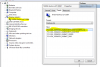
see attached screen shot.
then you find the nvtd.inf in the driver
then find the lines with the matching device ids and make the subsys matchAttached Files:
-
-
I tried playing around with the overscan / underscan settings (whatever the Nvidia control panel allows). I also tried the driver from the Sony US site (that you mentioned) with no luck. The same issue with the modded drivers (v260) from this forum (and a few other driver hacks). I could not get the latest drivers from Nvidia site to install.
I finally went back to the drivers from Sony asia-pacific (original drivers)...There seemed to be no difference after the various drivers. -
I bet you there is a setting on the TV that will make it better. Does your TV have a PC mode?
Dig around in the menus a bit, I can't believe I didn't think of that before.
Also if it works with VGA then what is the problem with that. Analog is still HD, the RAMDAC setup on the Z allows for stellar quality over VGA. Only downside is no HDCP, but I rip all my blu-ray anyway so it is a non issue for me.
Also you really need to find another FullHD display to plug you Z into to test it, that way you can figure out if it is a problem with the computer or the TV. Take your Z to a TV store and plug it in. I've done this lots of times, they never have a problem with it. -
Thanks for the tips. Here's the testing I did with my TV. It has a "PC mode", which sets the borders but the picture quality is still low. VGA is not as good as HDMI, as I have tested with my other laptop (which has much lower specs and an ATI Radeon vga adapter).
I will try to test it with another display and get back. -
Andrew, Cowboy thank you for all the work you did. I installed the updated drivers on my Z with "Nvidia 26314 - Intel 2266 signed" and it works.
You see I'm not a gamer but I started using CUDA for doing computations on GPU and your update allows me to use CUDA 3.2. Unfortunately CUDA 4 requires 270 version of drivers installed...
CUDA Toolkit 4.0 | NVIDIA Developer Zone
I want to preserve hybrid functionality and wonder if there is any quick test or hack I can do to use 270, so I can use CUDA 4? Cowboy you posted some INF file, but I have no idea where or how to use it..
I hope you can help.. -
Hi guys. Just tested both available drivers for VGN-Z:
1) "VGNZ Nvidia 26308 - Intel 2020 signed" is actually not signed, requires dseo
2) "VGNZ Nvidia 26308 - Intel 1994 signed" is signed and installs fine, but after the installation if you switch to Intel it's then impossible to switch back to Nvidia - the system just repeatedly shows the switch screen and does nothing. It can't be fixed neither by rebooting the laptop having the switch in "speed" mode or even by reinstalling the driver - only by removing it and installing native driver.
My discoveries on Vaio Zs Hybrid Graphics
Discussion in 'VAIO / Sony' started by Nautis, Jan 16, 2009.