 Problems? See this thread at archive.org.
It's already leaked:
![[IMG]](images/storyImages/futureZ.jpg)
-
-
No man, that's the UZ 7". Will be released in september.
-
There's no argument that it would cause eye strain IF there were "identically sized fonts and icons". The argument is whether or not you'll be able to have "identically sized fonts and icons".
Your screenshots definitely look good in terms of vista's DPI scaling, but as a software developer I have to wonder at what level Vista performs the scaling - while it looks very good with MS and major apps, I can't help wondering if I'm gonna get stuck with some programs running with tiny text. Most DirectX games, for example, would not be "DPI-aware" unless specifically programmed to do so, and this may apply to some applications.
Another argument is that if you're gonna scale everything up anyway, what's the point of having a resolution higher than what is easily perceived? I guess if you're close to the screen, you'll notice smoother fonts, images and movies. Even then, to most people this isn't worth the extra ~$300 and potentially reduced battery life. -
Good point.
I guess there are many reasons people may want high resolution, and the argument of scaling only serves to show that there is not necessarily a disadvantage to it. But as you say, if you turn the DPI up then what's the point?
Perhaps a better case to make is that, say, have a look at the average font size in a newspaper - it's pretty small. I think smoother font rendering will make things like PDFs - fit to a given screen size - appear more legible and hence will be easier to read. There's a whole field of people out there nowadays who create fonts specifically for screen legibility rather than print legibility and so that kind of demonstrates the existence of the problem.
At the end of the day, as with the previous blu-ray argument, it'll come down to personal choice based on what's important to who. Me? 1600x900 thanks. -
Is there a website that you are getting this information/picture from?
-
Keep in mind that some people will buy the Z as a second laptop, or use an external monitor most of the time.
Let's say you're an executive, with a big budget, that travels a lot... just an example. You might use the Z's screen to watch movies on a plane, and occasionally glance at an Excel spreadsheet or Word document (both of which can be perfectly zoomed in on). But once back home or back to the office, you'll either hook it up to a large external monitor or use a different computer (desktop?). For that person, the higher resolution if fine. But if this is your *only* computer, the higher resolution may bite you one day. Or maybe not.
-
The point could be to have your movies and pictures in the highest resolution, while the letters still readable.
Not to me cause I'd prefer 1366*768 on such a small screen.
I was only joking. But no one would have fallen for it if I had inserted a smiley.
-
Z vs Macbook Air (from Engadget): http://www.journaldugeek.com/?2008/07/15/12269-le-sony-vaio-serie-z-vs-l-apple-macbook-air
-
I think quite everyone would choose the 1366x768 if Sony offered the same options of the 1600x900. But they don't. So, we must balance the pro and the cons of the models.
-
Hey, has anyone seem any accessories yet? I have an SZ docking station but I noticed the Z manual shows a folding dock. Last I checked, I couldn't find any sign of this on the Sony Style > Accessories pages.
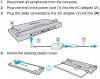
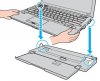
Also, I've been wanting audio out on a dock, I have to plug it in separately every day (grrr).
Furthermore, saving weight on the laptop is all good and well, but the SZ AC packs are big and heavy compared to the TZ, of which I have both the newer (smaller than old) stock one and the 'stick' charger (the lightest you can get by a few grams).
I know the TZ has much lower power requirements, but I'd love to see if the new power supplie(s) have gotten any lighter. -
Oh dear. Sony is coming out with a netbook though aren't they? There were some rumors about them looking at VIA-powered notebooks that are in direct competition with machines like the EeePC.
-
Funny... while the MBA is thinner, it's also bigger with that huge bezel.
-
http://www.vaio.sony.co.jp/Products/Z1/acce.html
Note that Japan generally gets everything and the rest of the world some of it ... -
True... but the Z sure does look chunky.
It's a shame it's not thinner. -
Yes, it looks quick thick compared to the MBA but then also compare to what your getting in that chassis over the MBA (Nvidia 9300GS, 2.5" HDD, Blu-Ray or DVD, Ethernet, Modem, full voltage Centrino 2 processor, Firewire, more than 1 USB port, Expresscard Slot, SD/MS reader, etc), I don't think anyone should be complaining.
-
well the japanese Z has the T9600 processor as an available option...
-
I don't think it will look chunky in real life. Neither did the SZ.
-
Chunky is relative. I mean, anything compared to the old X505 was chunky, but as Phil says, it's not in real life. Heck, my G would be chunky compared to the MBA and it isn't at all.
-
I think the Z is chunky and sort of ugly from the side and back. Do you all like the big cylinder? I think it makes the notebook look like it was cobbled together from random bits and pieces (Franken-book). They made it a contrasting color to stand out so I assume Sony thinks this is an attractive feature.
It also bothers me that the hdmi port doesn't line up with the others. I must be obsessive-compulsive like most computer programmers - I find staring at a MacBook mentally soothing
I still might buy a Z (I have an SZ now) but it will be for the power, not the looks. -
It certainly won't get many oooohs and ahhhhs.
-
I disagree. I really like the design of the Z and even if is not the thickest, I prefer performance. If you read around the threads in the forum the 95% will or is thinking on purchasing the Z. The 5% is debating between SR, BZ and FW. This means something.
-
Yeah the Z is far the best looking model of these new one's. For me that I'm expecting a Montevina TZ from quite a lot, from the moment I saw the Z series the TZ dissapeared from my mind. I mean how many people weren't taking the TZ because is too small, and were debating for it's performance. Now these issues are solved. The Z is very similar to the TZ, little bigger and much more powerfull. The extended battery should give quite a lot of battery life as well. Anyone have any picture of the large battery of the Z by the way?
EDIT: Found the extended battery of the Z:
http://www.jp.sonystyle.com/Business/Vaio/Special/Z/ -
Sorry, but it already has
Obviously, what you like depends on your preference. Personally, I like the look of the Z way better than any macbook, and in fact I think the MacBook Air is ugly (yes, ugly). Macs almost always seem to look a little like Fisher Price kids' toys to me.
Regarding it looking "chunky" in comparison, keep in mind the Z is considerably smaller than the MacBook Air (not only because of the 13.1" 16:9 screen, but because it lacks the huge amount of empty space that surrounds the MBA's screen and keyboard). This means that it actually is more chunky in comparison, because while the width/depth footprint is reduced, the height is not.
And personally, I don't care about thickness. As long as it's light enough, what does it matter how thick it is? -
well there is that one thing, no actual drive on the air while the sony has a bd drive and one that can burn as well, plus it's more powerful has a removeable battery, etc....
anywho, the FW showed up on sonystyle.ca finally for pre order. 2 versions
VGNFW140D - $1099.99 - jul 18th arrival date exp
VGNFW160D - $1349.99 - jul 23rd arrival date exp
both are equiped with the P8400 cpu, 3 or 4 gigs of ram, ddr2, 250 or 320 drive, the more expensive one is the consumer model while the other one is the business model. The consumer model comes with bluray, read and write.
no sign of the Z series yet. -
The FW140D looks to be a decent deal considering you get the Radeon 3470 (which of course isn't the greatest card, but it's alright)... I was expecting to get the 4500 IGP at this price. So P8400, 3G RAM, 250GB HDD, ATI 3470, Vista Business for $1100 CDN... not too bad right? Anyone know if you can haggle with sonystyle stores? lol.
-
I think the reason for the rush from reading through this thread is there are those returning back to school sometime in August. If school is away from home, that would be there reason for getting it - to have it with them.
Yeah, your right, I misread that with my 1600x900 Z, I knew I should have followed your advice and get the Z with 1366x768....lol.
I know I would. After that lengthy discussion last night with these PPI's and DPI's, the majority advised me to get the Z with 1366x768. Though, the subject is still confusing, I get the general idea of what people are saying and I agree. there's nothing like having to deal with eye-strain if this will be your only home and work computer.
This would have been a great article if I knew how to read French, but it did help me with one answer I have about the Z and I'm glad to FINALLY get a photo of what I have been trying to search for since Monday's announcement.
View attachment 21089
This is the photo I've been trying to search for. I don't like the way that cylinder/barrel looks on the TZ. When the lid is closed, its not flushed with the overall design.
Now with the Z, because of its wider stance, its slightly obscuring. So it may work, but I would definitely need to see in person.
I agree it does look thick, but after looking at the dimensions of the Z in comparison to the SZ. The Z is thinner than the SZ. Here take a look. I downloaded it from another posts. This will help. And it also gives dimension comparison to the SR, for those that are interested.
The SZ's dimensions are 1.25" W x 1.0-1.5" H x 9.3" D.
So as you can SEE the Z is thinner than the SZ.
View attachment 21090
Definitely not chunky. Z is thinner than SZ. In pictures it looks thick. Also, it looks like the sides of the Z is not flushed like the SZ - maybe the reason for its clunkiness.
I am so glad someone agrees, I am very big on DESIGN, and it's the first thing I look at. When looking at the TZ, that cylinder hinge doesn't look like it's part of the overall design. It look like an aftermarket part that was required to make the notebook function. As for the Z, it looks a little bit better because of its wider stance. And the cylinder hinge is also thinner unlike the TZ. It may work, but I would have to judge after seeing it in person. -
I called Sony and they said the new models (besides the FW) wouldn't be on the website till the end of July (speedy eh?).
-
keznick, thanks for the info, but wouldn't sony at least announce that they would be available in canada? the FW is available in mid to late july and it is on the website. anyways, here is hoping the pricing will be similar if not the same to the US models.
-
If you guys want to compare the SR, Z and SZ, especially in dimensions, check out this link on SonyStyle Japan.
http://www.jp.sonystyle.com/Business/Vaio/Compare/Zs/index.html -
I do wish I could read Japanese!
-
Thanks to your analysis of the benefits of higher PPI (re. 1600x900 option), I pulled the trigger on a Z today with Blu-ray burner...Vista can take care of my eye strain!! My dream machine has been realized. I went through an SR order and an FW order until I realized from your posts that I can deal with the Z. Here's what I've got in the Sony queue:
VAIO VGN-Z590 CTO
2.53 Ghz P9500 25 watt processor
4GB 1066Mhz DDR3 RAM
13.1" 1600x900 LED-backlit XBRITE-DuraView display
NVIDIA GeForce 9300M 256MB
320GB 5400RPM HDD
Blu-ray reader/writer
Sprint Broadband
Standard battery
3-year Warranty with Damage Protection
By calling in the the order I was able to get an extra $200 off if I bought 2 accessories (just got some throwaways: a cheap $22 neoprene case and a $19 stylus). -
I've been looking at pictures and I'm trying to determine if the Z has a full-size keyboard or not. I'm trying to decide whether the 13.1" Z is going to be too small to do lots of typing on. I wonder if there will be any significant difference using a 13.3". Any thoughts?
-
Fair enough. Let me re-phrase:
It won't get any ooohs and ahhhs from me.
-
Considering that the Z is almost exactly the same width as the SR (314mm compared to 315mm), I seriously doubt the keyboard is any smaller (I don't think Sony would be that stupid). And judging by the pictures, it looks exactly the same size as the SR keyboard.
Ahh ok. Well everyone has their own opinion.
-
Well, that may be true.
Although I think the FW is more attractive, personally. -
Wait untill you see it in real life.
-
Well, for me, it's easier to type on a thinner laptop. But that's just me and the way I happen to type. If I could type directly on the desk/table, I'd be happy.
-
By the way, I just came from the mall, so I popped in to the Apple store.
I took a look at the Macbook Pro 17, and realized it's almost exactly the same width, length and weight as the new Sony FW (good reference for anyone that wants an idea what the FW will be like).
What bugged me, though, was that while the MBP was a skinny ONE INCH thick, the Sony FW is 1.3 to 1.46 inches thick. Big difference. Why couldn't Sony squeeze the FW into a 1" thick laptop? -
man, I miss FZ.... What was Sony thinking with FW!
-
What do you mean?
-
the size.... FZ was just perfect
-
Ahhh... gotcha. Yeah, it's big.
-
now there is a huge gap in premium notebooks... 13.3... 16.... 17...
current CR 14.1 is outdated and doesn't offer premium options -
I'm so tempted to order one of the Japanese Zs... mostly for the keyboard, to be honest... I want my extra keys, dangit. It's just too bad that the custom designs for the lid all look like bad hotel/motel upholstery fabric. The SZs you vou could get in Japan until recently had some really neat lid designs. Ah well. Right now I'm trying to figure out what features to sacrifice to meet my budget. I want a light laptop with some horsepower, but these units are pricey any way you look at 'em.
-
Well I actually have college starting again half August too so I'd prefer having that thing ASAP as well. However, ordering yesterday, today, or in 3 weeks, won't make any difference in when receiving it! Waiting allows you to re-evaluate what exact configuration to get, and moreover -like Phil mentioned- in the meanwhile better offers may show up in the retail channel.
Summary of reactions on other issues discussed; I do like the Z design, I think I will get a docking station incleading external monitor with it, not sure what resolution to get. Can you get SSD with 1600x900? btw. I have to agree that if an FZ-size top-model would have been released I'd probably get that one instead. -
Hey guys, these are the Minimum System Requirements for some software I'm considering. I want to try to do some AVCHD video editing:
* Intel® Core2 Duo 2.4 GHz or higher required for 1440x1080 AVCHD editing
* 2 GB RAM required for AVCHD recommended for HD and/or Windows Vista
* DirectX® 9 or 10 compatible graphics card with 64 MB (128 MB or higher recommended), 128 MB required for Plug-ins (for Magic Bullet Looks: Pixelshader 2 required, Intel GMA integrated graphics not supported; for VitaScene with HD: 512MB recommended)
- 128 MB required on Windows Vista (256 MB or higher recommended)
- 256 MB required for HD and AVCHD
Based on the above info:
1. Which new processor should I get?
2. Which graphics card should I get?
3. How much RAM would you suggest (if it were you)?
Thanks!!
-
what software is that? I am looking for a laptop that can handle 1080p editing.
I've edited Canon HF100 AVCHD file @1920x1080p with Cyberlink PowerDirector 7 and it was fine with T7500 2.2Ghz processor in FZ290.
In Sony Vegas 8 I had issues with choppy playback though
I am currently looking at 2.53 processor as a bare minimum for video editing, 2.8 seems a bit pricey and of course 3GB of ram. -
Pinnacle Studio Ultimate version 12. Although I'm strongly considering using CyberLink PowerDirector 7 Ultra instead. I just wanna make sure I can run Pinnacle -- just in case.
I too have an HF100. Great camera. -
I just peeked at the prices. I agree.
-
oh I see, they have new version. I might give them a try someday.... but man...
Intel® Core™2 Quad 2.66 GHz or higher required for 1920x1080 AVCHD editing
New Vaio 2008 model listing with indication prices - FW - Z - SR - BZ
Discussion in 'VAIO / Sony' started by Phil, Jun 23, 2008.


