Problems? See this thread at archive.org.
not sure is there is any differences as well, except that it's 64gb ssd x 2 in raid0.
http://www.jp.sonystyle.com/Business/Vaio/Product/Z/index.html
according to this, it says that the speed is abt 2x faster than normal ssd??
-
Yes, but u can buy new Z online and AFAIK we in UK dont have Z in sonystyle.co.uk

Yes, because its Raid 0 -
Screen quality is impressive. 100% NTSC color reproduction really does show. What a difference! I would love to see the FW and Z series live.
-
So the Sony Z-model SSD may actually be worth the close to $900 extra?
-
Through a small search, here are the specs of the VGN-SR150FN (in Spanish)
Important claims:
Hybrid Graphics and GM45 chipset with ATI Radeon HD 3470
- "Hybrid Graphics System, un selector para maximizar el potencial de tu batería y de los gráficos"
Hardware
Procesador
Tecnología de procesador Intel® Centrino® Duo
- Procesador Intel® Core2 Duo P8400 (2.26GHz1)
- Intel® Wireless WiFi Link 5100 network connection
- Intel® GM45 Express Chipset
Typo in the spec sheet?
Or will it have a discrete/integrated graphics switch like the Z series?
http://www.docs.sony.com/release/specs/VGNSR150FN_mksp.pdfAttached Files:
-
-
I have a question about the Stamia and Speed option.
If you use stamia the notebook runs with the 4500MHD Chip?
And if you use the speed mode the notebook runs on 9300MGS or 9300M GS and 4500MHD Chip in "sli" mode?
And if it runs in speed mode with this two graphic cards, how fast is it? -
Hey guys, I posted a question about which drive to get, and I'd love to hear your opinion. Here's the thread:
http://forum.notebookreview.com/showthread.php?t=274553
Thank you!
-
The speed mode doesn't use any SLI (which needs two identical cards anyway). Stamina mode allows you to use the integrated Intel chip to save power and Speed mode switches on the fly to 9300M GS for better performance (the intel chip is switched off).
-
I'm guessing/expecting Sony to use the Samsung SATA II SSD. It's a very good SSD.
While the OCZ Core comes close to the Samsung in read speeds, it lags behind in write speeds. Access times on the Samsung are also better.
OCZ Core's pricing will have some impact in the SSD market, so if anyone wants to order Z with SSD I would tell them to wait.
I wonder why PortableOne does not offer Z with SSD yet. -
For $150 on reading, just get it, especially if you get a model with 1600x900. And if you enjoy watching Blu-Ray movies, you've answered your question. I believe it's worth it for that. Now writing is a different story altogether......
Though I understand cost is a HUGE factor in all of our decision-making when it comes to these add-ons. IMO, What you first should pay attention too in making this decision is "the writing speeds for both models" your considering.
1. What external model were you considering to buy in comparison to Sony's BD?
2. Is it important to have that BD as an internal feature on your notebook? If so, you must be using this feature a quite a bit to watch BD out of home.
3. Is it worth the price or are you willing to fork out the cost with NO hesitation (lol)?
4. What kind of burning are you doing now, or would you prefer to take the 5th on that (lol) :laugh: + :wink: ?
Usually externals are cheaper in cost and the speeds are quite faster than notebooks that have this feature. Unless you really buy these notebooks that are desktop replacements.
Try and post an external drive that you were planning on considering and compare the speeds with Sony's. Here are the speeds for one of the models at Sony's site. I imagine, all the BD will be the same for the most inexpensive and higher end models. Pay close attention to the writing speed for Blu-Ray.
(Edit) For $3999.99, I thought this would at least have the BD. Anyway, I tried to comb through the SonyStyle, but I can't find that site where they offer BD for $500. Can you post it?
Anyway, I recall seeing it on Monday when Sony released photos and everyone was posting links. I believe the BD has a writing speed of 2X. Recall when burners was first placed into laptops, writing speeds were SLOW. What speed are you burning now with regular DVD +/- R?. Now compare that to 2X on BD. (Try and see if you can search for the writing speeds for Sony's BD, I'm really curious).
Optical Drive #1 on VGNZ590UAB $3999.99
Unfortunately, for $4k, NO BD on this one . But here are the speeds for The Z.
* CD Read : 24x max
* CD-R Write : 16x max
* CD-RW Write : 10x max
* DVD Read : 8x max
* DVD+R DL Write : 4x max
* DVD+R Write : 8x max
* DVD+RW Write : 4x max
* DVD-R DL Write : 4x max
* DVD-R Write : 8x max
* DVD-RAM Read : 5x max
* DVD-RAM Write : 5x max
* DVD-RW Write : 4x max
* DVD±RW : Yes5 (DVD±R DL/DVD±RW/RAM) -
Hey, it's all cool. I think you explained that WWAN issue very very well. I like the fact you went into depth and in detail about it. Good to know....
I knew nothing about it so I only posted what I was told by the guy, which was all general nothing specific (my fault). And I totally understand how certain words can mislead the meaning of what one is trying to say. Thanks. -
I just found some details about the docking stations for the new models on the UK sonystyle website in case you're interested.
The one for the Z has DVI but no HDMI, which is a bit disappointing (although you can always use an adaptor).
http://vaio.sony.co.uk/view/ShowPro...e=voe_en_GB_cons&category=Docking+Stations#w7
By the way for those interested the Z serie with UK specs are there:
http://vaio.sony.co.uk/view/ShowProductCategory.action?site=voe_en_GB_cons&category=VN+Z+Series -
1x with BD is not the same as 1x with DVD. Just as 1x with DVD is not the same as 1x with CD. I don't know the exact number but if you count the burning speed at MB/S, the BD burning speed is still faster than DVD. Granted, it will take longer time to burn the whole disc but that's because a blank BD can hold up to 50GB while a DVD can hold up to 8.5GB.
-
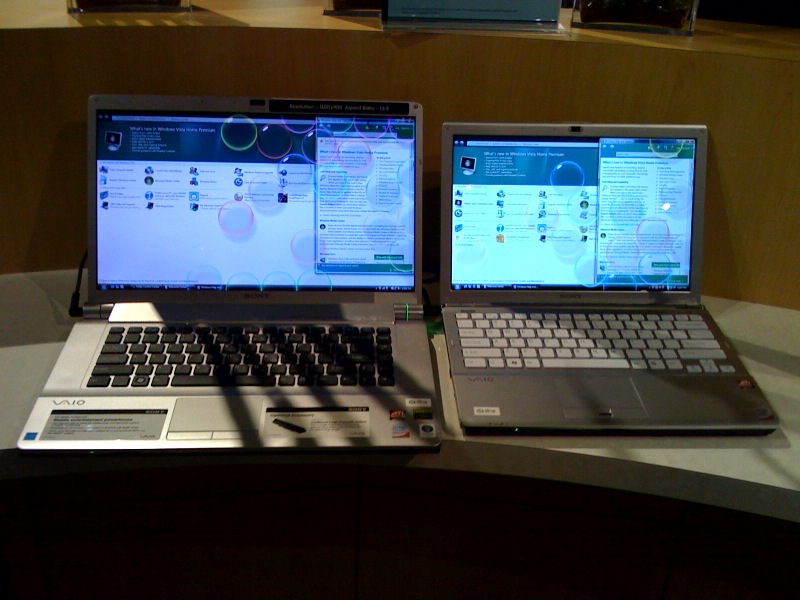
I just got back from a trip to the SonyStyle store!
I was a bit disappointed to find that the FWs they had on display did not have the Hi-Color screens that I was hoping to see, but the regular Eco screens instead. Also they did not have a Z in stock (even though I don't want the Z myself, I at least wanted to see it). They did, however, have a couple of SRs in stock, and luckily they were sitting right next to the FWs.
One thing that was very apparent was that the screen on the SR looked much better than the screen on the FW. The blacks were better, the vertical viewing angles were better, etc. The FW's screen almost looked washed out unless I bent down to just the precise level. The SR's screen looked good no matter what level I was at.
Now again, the FW had the regular ECO screen, not the Hi-Color. But even so, does this seem right to you guys? Shouldn't the 16.4" 1600x900 screen on the FW look at least as good as the 13.3" 1280x800 screen on the SR? -
Picture of FW next to SR. Bad picture (sorry) but all I had was my iPhone.
Attached Files:
-
-
Yes it seems right to me. I've never been impressed with Sony's ccfl ECO screens.
The SR has LED backlight, I would not be surprised if the SR uses exactly the same screen as SZ. It's a very good screen.
The high color screen of the FW should be really good, maybe I'll have a look tomorrow. -
Ahhh...
Yes, it is. I was very impressed. And very disappointed with the FW's ECO screen.
It's gotta be better than the ECO screen!
-
I just watched the video.
God the 100% color saturation on the Z looks gorgeous, even when compared with the SZ, which has a screen better than most other laptops.
Does anyone know if the 1366x768 resolution Z also has 100% color saturation? Or is it only on the 1600*900 models?
Thanks! -
Have anyone noticed any difference in the picture quality (colors, blacks, the vertical viewing angles etc.) between Z's - 1366x768 and Z's - 1600x900?
-
k..I called sony, they said:
"Both models will have 100% color saturation, however the color spectrum might not be the same. With the higher resolution screen is going to give you better colors."
I never knew that the higher the resolution the better the colors. Does anyone know if I can actually see the difference between the two types of Z?
Thanks! -
Was it a sales person who said this?
-
Theoretically, 1600*900 definitely will have better picture quality, but also smaller text. The viewing angles and the depth of blacks should be the same.
Regarding the colors on the two models, sony said the higher the resolution, the better the color because higher resolution screens have wider color spectrums. However, I seriously doubt if I will notice the difference since both of them have 100% color saturation. -
yea, a sales representative.
Why? -
In that case I would not believe him. Because he'll earn more if you buy the more expensive model.
I'll check them out for myself as soon as I can. -
Oh I hope you are right, because I can't really afford the higher resolution Z with my $2000 budget.
Can you post the result after you compare them side by side? Thanks!
BTW, does anyone know if I will be able to achieve higher resolution than the native resolution of 1366*786, if I connect the Z to a large external computer monitor through the VGA port? I would try it out myself, but I left my big screen at a friend's house. -
anyone know how I can check if a FW will have the hi color and not eco one? all it says on the sonystyle.ca website is
XBRITE™ Technology: Yes -
Regarding my concern about the Z keyboard being smaller (more cramped), I just checked the Sony spec sheet of the Z, and it says it has 19.05mm keyboard pitch, which is the standard full size ( exactly the same as the SZ, or any other standard size keyboard), so that eliminates my concern about the keyboard possibly being cramped. This is very important info to people like me who do a lot of typing, so I thought it was worth posting.
Here are the stats for the SZ/Z/TZ keyboards:
Sony Vaio SZ keyboard: 19.05mm pitch, 2.7mm stroke
Sony Vaio Z keyboard: 19.05mm pitch, 2.5mm stroke
Sony Vaio TZ keyboard: 17.00mm pitch, 1.7mm stroke -
Can you find its spec in pdf? because the specs on sony style aren't always accurate. Like how they say Z 540 has DDR 2 -1066, when it's in fact DDR 3-1066.
-
Yes you could. The lower end models also have the HDMI port, you should be able to go at least to 1920x1080 resolution. -
About the FW screen... In the Berlin video, the Sony guy that introduces the FW says:
"the FW Series" (or 'serious' as he says)
"comes with the best screen we ever brought to market."
Hmmm... interesting... -
Thanks for the info.
Yea I knew about the hdmi port, but I don't have hdmi input on my 21 in monitor (it only has vga and dvi).
So is the 1920*1080 for vga or hdmi? or both?
Is there a maximum resolution that can go through a vga cable? -
Thanks a lot for that info. I was also worried about the Z keyboard being a bit small.
I thought the keyboard on SZ is one of the most comfortable laptop keyboards I've ever used. However, I'm a bit disappointed that the Z keyboard has a shorter key stroke. -
Well...That guy doesn't even work for sony. does he?
How can it have the best screen when it doesn't even have LED backlit. -
Not the host... the Sony guy.
Ask PhilFlow. He mentioned something about this earlier in the thread. -
HDMI and DVI are 100% compatible, and both able to handle 1920x1080 (most probably 1920x1200 on your 21", as it's probably 16/10 instead of 16/9). You just need a cable with HDMI on one end and DVI on the other, or a standard HDMI cable with an adaptor. Check the maximum resolution on your DVI monitor, you should be able to get it with HDMI (much better quality than VGA).
At the moment, I output my multimedia desktop (nvidia DVI) to my HDMI projector, it works fine. The opposite is true, it's not a problem to hook up your HDMI laptop to your DVI monitor (without any loss in quality). In fact the docking station for the Z serie has DVI output, not HDMI. -
True, but even if the burning speed of BD 2x is faster than lets say, a normal burner with 2x, it doesn't make it any better (if its faster) because as you just said BD can hold up to 50GB, whereas a typical DVD+/-R holds 8.5GB. Can you imagine the wait time IF you had to burn 50GB of material at 2X.
Even at write speeds of 2X with a normal drive, that wait time would be forever, assuming your backing up and compressing over 2 hours of video. -
SoundsGood:Here is a sample of read and write speeds on an Internal Sony BD, but I can't locate specs. on FW, SR and Z read/write speeds. You would think if its offered as an option, Sony would have specs.
Optical Drive Sony (Internal) BWU200S
Internal Blu-ray Disc™ Rewritable Drive $599.99
* BD-R DL Write : 4x (CLV)2
* BD-RE DL Write : 2x (CLV)2
* BD-ROM Read : 4x max
* CD Read : 40x max
* CD-R Write : 40x max (Z-CLV)2
* CD-RW Write : 32X max (Z-CLV)2
* DVD Read : 16X max
* DVD+R DL Write : 4x (CLV)3
* DVD+R Write : 16X max (Z-CLV)2
* DVD+RW Write : 8X max (Z-CLV)2
* DVD-R DL Write : 4x (CLV)3
* DVD-R Write : 16X max (Z-CLV)2
* DVD-RAM Write : 5x (Z-CLV)2
* DVD-RW Write : 6x (CLV)2
If you get info. on internal read and write speeds on Z, SR, and FW, please post. I'm sure they will be the same for all 3 models. I went to Sony site CTO and no information (odd) Thanks.
IMO, I think you should just buy the BD Read for $150. Buy an external BD Burner. I imagine if you were backing up video, you would be doing that kind of thing at home and bringing your final product with you on the road, right? Now, if the speeds are comparable to the above model, then by all means get it built in, you did say it was $300 for that option, whereas this internal is $599.99 (Sony didn't have an external to compare cost). So your still ahead financially. -
Wow, that thing is $600 !!
-
Yes! Directly from Sonystyle:
http://www.sonystyle.com/webapp/wcs...0151&langId=-1&categoryId=8198552921644522777 -
Here's some more info about other Sony laptop keyboards for comparison (all data is from Sony PDF spec sheets):
Sony Vaio SZ keyboard: 19.05mm pitch, 2.7mm stroke
Sony Vaio Z keyboard: 19.05mm pitch, 2.5mm stroke
Sony Vaio SR keyboard: 19.05mm pitch, 2.0mm stroke
Sony Vaio FW keyboard: 19.05mm pitch, 2.0mm stroke
Sony Vaio CR keyboard: 18.05mm pitch, 2.0mm stroke
Sony Vaio TZ keyboard: 17.00mm pitch, 1.7mm stroke
( green = full standard pitch, orange = slightly cramped pitch, red = cramped pitch)
The new SR and Z both have full sized keyboards (just like the SZ did), although the Z's keys are slightly smaller and spaced farther apart (which is supposed to reduce typing errors), and has a longer stroke than the SR. While the Z's stroke length isn't quite as long as the SZ, I expect it will feel more responsive and "firm", based on the feel of the CR / TZ keyboard (to me, at least). -
What about the FW series keyboard?
-
Where are the PDF files?
-
Sorry about that, the FW is added now.
Select a preconfigured model, go to the Specifications tab, and there should be a link like this: "Product Specs (PDF, 2.98MB)" -
unfortunately I am not sure if there are such pdfs on the canadian site, plus the site is different than the american sonystyle website with the specifications usually being accurate. But I checked LT series of desktops on the site and it mentions this
XBRITE-HiColor Technology: Yes
So I guess the FW in canada has the eco screen, which is not what I was expecting. Once the FW comes into stock I will check it out at the store, and if it looks poor, I'll have to reconsider if I will get it. -
Thanks, AC360.
I mean 500.
-
A 12 layer circuit board is scary!! Hope they have lots of ground planes.
-
I'll be hookin up the Z series to my Sony Bravia Full HD TV
...I can't wait for the damn Z to come to Canada. I just hope I get a good chioce of options like the U.S site. Cuz the Candian Sonystyle tends to put very limited options and that forces me to go with CTO which Sony will then loose my business. Also on sony.ca like I mentioned before they only post the FW series coming July 23
.
If any of you have any written facts you can send me when and if the Z series will be coming to Canada, id really appreciate it. -
toronto guy, I already told you the Z series is coming late august, early september, prob after august 31st, I posted it twice in here prob, and in the release thread as well. I got this via a news site which got the information from sony.
-
lol yea I know thx but thats why I said Written information. But appreciate it buddy. -
At the moment the only reason for me not getting the US top-end $3999 pre-configured Z-model is that it comes with SPRINT support instead of HSDPA. The problem is that the European models that do have HSDPA support currently have by far not as good features as the US models. If I am gonna spend such an amount of money I want my notebook to be just perfect. I actually already thought I had my mind made up and was going for the $2349 US configuration...
Now I was wondering though, could it be the case that the Z-models from Japan do come with HSDPA support?
New Vaio 2008 model listing with indication prices - FW - Z - SR - BZ
Discussion in 'VAIO / Sony' started by Phil, Jun 23, 2008.