 Problems? See this thread at archive.org.
You send back to Sony?
Did you revert back to stock BIOS? - Better not leave a trail on the BIOS MOD.
If you did, does it stays at 500MHz on stock BIOS?
-

On stock 640m le driver, as listed on the support website. By the way, Amal, it seems afterburner was causing that glitch. And, can you please create a 975mhz core/1050mhz mem mod? -
ive been trying to flash my bios with the 935 and 950 clock, but when i try to run furmark, it seems that my clock stays for 935 for 5 sec then drops to 750, then drops to 135, anyone knows why? and how can i fix the problem?
-
Try changing the fan profile in VAIO control center to "Priority to ventilation".
-
So, it's not the driver?
Here you go :
https://rapidshare.com/files/2569239213/R0142C5-KeplerMod_975MHz_1050MHz.zip -
AB stops the core/mem clock from going back to default and the verde beta drivers (found on nvidia website) prevents the gpu from switching back to hd4000.
Therefore, I now use HW monitor to keep a track of the temps. -
Yes i reverted the bios back to the stock one.
I never tested if it stayed at 500mhz on the stock bios, but i can test it when i get my laptop back. Sony called me today and said it would take about 10 business days though -
If you still want to use MSI AB, you can open it with the GPU-Z at the same time, from my experience it does makes the clock stay idle back again. Now my MSI AB stays at idle clock without GPU-Z, not sure what happened last time.
Any other reason/issue why sent it back to Sony? -
I'm relatively new at this. I'm deciding between the S13 Regular and the S15, but I'm leaning heavily towards the S15 because of the screen (I don't have the budget for the s13p sadly). I'm planning on getting the 1GB 640M LE but wasn't sure whether I should get the i5 3210m or the i5 3320m. Is it a big enough difference when OCing the 640M LE that it warrants the extra $50?
Thanks! -
Is s15 cheaper than the s13a premium?
-
You shouldn't decided the processor based on the oc. But no amal said that with the GPU maxed out on a GPU intensive game the CPU is at 80%. The bigger difference is the jump from i5 to say the full sized i7 quad... there are clear gains and tradeoffs there. The person right after you in the other thread made the decision your trying to make now... maybe pm him door ask over there
Sent from my SGH-I777 using Tapatalk 2 -
so i installed the 950mhz mod by svl7 just yesterday and everything seems to going great. increased my 3dmark score from 1376 to 2200 and wei from 6.8 to 6.9
havent done too much gaming yet but from the little ive done things seem to be going much snappier and smoother
however later in the evening while browsing i experienced my first BSOD with this laptop. My room was quite warm, but since i was just browsing it was a light load
could the two possibly be connected?
shortly after i also had a windows update, so it might also be related to that. i dont know how to find dump files, but if anyone is willing to take a look i could look into it -
Pull the log they probably aren't hard to read. But if you can remember events before the crash it can tell you what happened. Did the nvidia driver crash. Where there artifacts on the screen. They can manifest in many ways but one of the more subtle ways are little 1 to 2 pixel dots that are off color but everywhere. Was there UK unresponsiveness. All of this points to the graphics card. Try a lower mem clock maybe. But there have been a few and only a few that have reported bsod from factory. Once then never again to faulty parts...
Sent from my SGH-I777 using Tapatalk 2 -
thanks for the reply

i was laying in bed with the laptop on my chest watching community. No artifacts or other warning signs. I also played TF2 for about 40 minutes earlier in the evening with everything completely maxed out and no problem.
im looking at the event manager but i dont really know what to look for. Under critical events i can see the BSOD as a Kernel Power event (event ID 41). On the error list i see that at the same time of the BSOD there is also an error that Microsoft Security Client stopped working due to error, but i dont know if this was a cause of the BSOD or a result. I also see the same error happened twice this morning and just fixed it by updating so that probably not the cause.
any tips on what else to look for?
I think i found the mini-dump file but i have no idea what to do with it. should i post it here? -
sorry for my English
gt 640 le overclock to 850 MHz core/900 MHz memory is the same as gt650m ddr3 850 MHz/900 MHz memory, have the same performance? -
If the gt650m has ddr3 memory, then yes, the performance will be similar.
-
Yes and No like Amal said.
You have to match the geforce turbo boost speed of the normal ddr3 gt 650m since the gt 640m le does not have turbo boost on the Vaio S.
I dunno how high the turbo goes up from 850mhz but a good way to actually get similar performance with the ddr3 gt 650m is to use the 950mhz mod. -
Have you found out the caused?
Yes, correct. -
Made a gameplay video of Crysis 2 on BIOS MOD(50% discount from origin, hahah) :
Crysis 2 DX11 Sony Vaio S13P GT 640M LE (BIOS MOD) - YouTube -
Yea origin is good because you can actualy uninstall origin or play offline with ur games compared to steam where they modify crysis or crysis and it requires you to be connected to the internet even on offline mode.
Origin> Steam when it comes to offline games but Steam>Origin when it comes to Valve Games like HL/CS. -
hi, i ordered this laptop just yesterday and i was wondering if this mod will still work for the i5 version. If so, how much of a 3dmark11 score difference will i see and will it be close to your i7 scores?
ordered the vaio s premium 13.3" 1600x900 ;P
and also, i was just wondering how long it takes generally for you to receive a custom vaio as if this my first ever sony vaio purchase -
Does gt650m ddr3 have better overclockability than gt640, gt640 le?
-
Can anyone check if this bios is the same?
http://www.sony.dk/support/da/product/SVS1311C5E/downloads/EP0000268941_6392
I tried to figure it out, but I don't know how as the files are kind of different...
Thanks! -
Yeah, true that.
It should do well on an i5, a very slight difference on the scores, better save the money if you don't need it.
I'm not sure about the ordering thing, coz I bought mine a pre-configured set at the Sony Store, got it on the spot.
High chances, yes.
They have higher voltage to begin with, and they can be OC highly from a software tools(nvidia inspector) just fine without the need to BIOS MOD, UNLESS if they want to go to a crazy clocks(OV BIOS MOD needed).
Yup, the same. -
how long.... HOW LONG. just forget about it it will be easier that way. i payed for 2 day. it took less than the quoted 7 or so days. then sat in the factory for 2 days hit the weekend another 2 days... nbd tho. then fedex got a hold of it (btw... fedex eats kids... named nosebleed!!! haha i was getting the impression i was telling a horror story) anyways it left monday and was due to arive no later than today at 1030... still in china and i dont think it has even boarded a plane... and since china is half a day ahead... it is the weekend there. so i have to wait until monday then the rep said there is a 24 hour waiting period at us customs... so... i would just... forget about it for awhile.
edit: oh and unfortunately this is not only a sony problem. mac forums are lit up with comments saying roughly the same thing. though there are a few lucky ones who get out in a reasonable time frame. -
The speakers never worked from day 1, other than that it was great.
-
Cheers, thanks. I'll try the mod out when I get home
-
Does anyone here had their laptop overheat while playing GTA IV? The game plays fine for about 30 minutes then there's sudden drop in framerates to single digits. ): I haven't overclocked the gpu yet, but it also idles at 499.5MHz
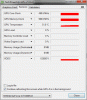 , is that normal?
-
Go to nvidia control panel and enable "Prefer Maximum Performance" in global 3d settings.
Also, Switch to 'Priority to ventilation' in Vaio control center. -
Hi all!! I flashed my bios with the 935/1050 version.
Here are some of my results:
3DMark
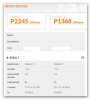
Company of Heroes performance test after BIOS upgrade
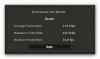
Company of Heroes performance test before upgrade
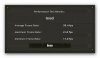
After BIOS upgrade

Before upgrade

I would like to thank Amal77 in particular and also all others who took risks during the development of this modification for the sake off the masses!
Thanks guys!! -
Ouch. Sorry to hear that.
Yeah, try the priority to ventilation if you haven't.
Also check your max GPU temp after you notice the drop in FPS.
As for the idling at full clock, it could be GPU-Z that's been causing it.
Try run 2 instance of GPU-Z or run GPU-Z and MSI AB at the same time to confirm on that.
You're welcome.
Have fun with it.
-
btw how is the battery life on this device
i know there is a power saver and performance switch
when its on power saver, how long does it last generally? -
What does this have to do with the vbios mod? Battery life questions and answers are in the owners thread.
-
Okay, yea the gpu idling at 499 Mhz was caused by gpuz. As for the framerate drop for GTA IV to single digit seems to be caused by the cpu as well. The CPU peaks to about 86 degrees celcius and the GPU peaks at 74 degree celcius, no mods, completely stock. I tried tuning down the in game setting to low to no avail so I think it's caused by CPU more than GPU. You mentioned "prioritizing ventilation," how do you do that? Thanks
Edit: nvm, i figured out how to prioritize ventilation. I'll let you guys know how it goes. -
dayum if its that hot on stock, then will the oc just melt the gpu?
-
... Did you not read that he did not have the fan at maximum? Also, the CPU or GPU will throttle well before the GPU "melts"...
-
I am very thankful for this mod. I started out by using the 850 MHz mod and a few hours later I went ahead and used the 950 MHz. It all seems very stable and the fps increase has been enourmous - it's quite amazing. My score in 3DMarks went from 1316 to 2214 (950 MHz)!
And temperatures seems absolutely fine. -
Hi Amal and other great contributors,
Thanks so much again for your great work. I know you're still working on the vmod. 1Ghz core is the highest available in the first post. What is the highest core speed you have tried without vmod? Could you share or make something like 1025, 1050 core, etc? What were some of the results in those range 1025-1100?
Can your mod bios be flashed when boot via usb into DOS? I'm trying to see if USB DOS might be safer than flash in Windows especially when flashing many times avoid BSOD and other Windows crashes.
Thanks again. -
Gotta love the kepler's GPU and Sony Cooling.
Currently the highest without OV that I've tested is 1GHz, coz 1050MHz won't run that well on normal voltage, though I haven't try 1001MHz - 1049MHz (not worth the difference).
Tried with OV to 1.0v(stock 0.925v), it does run fine on 1050MHz with the Memory OC to 1100MHz.
Tried the OV(1.0v) with core 1100MHz, it runs fine on 900MHz memory, above 1000MHz it doesn't seems that stable.
Not sure whether we have achieved the limit of our GPU or something, need to do some more test(been busy these days to play around with the OV).
As for the flashing through DOS thing, I haven't yet check it out. It might be possible, I think.
You are right, it should be more safer through DOS, just a bit complicated on the process. -
Amal, havent you forgotten me?
-
Oops... Will share with you when I have time to OV it for your GPU... Sorry there friend...
-
i have the 950 /1000 running fine. i want to try the 975/1100 but i cant justify the performance gain. it seems like it might be too unstable. anyone run the two against each other and find that the increase is worth it. im more interested in what 100mhz on the memory side will do.
also does anyone know what the speed of ddr5 is and what mhz we would have to run to match them? -
I'm not sure, maybe the 975 core clock doesn't run stable on your system.
Since you're experimenting on the memory, just install MSI AB, and OC your memory while you're on the 950/1000 MOD.
Try to OC your memory to 1100 until 1150, see whether you get any improvement or not, I am sure you will, just not that significant.
The memory clock of the GDDR5 by default on GT650M is 1000MHz, but heard that it can be OC to 1300MHz quite easily, whereas it's quite impossible for our DDR3(a pencil MOD(OV) might work, but abit hassle and risky).
Heard also that you cannot compare a DDR3 to a GDDR5 just by looking at the clock, coz they work differently. -
Thanks amal. Ab is a good idea so I can see his far I can go without flashing tons.
With your info I did a little more searching and the general consensus is summed up in a post on a another thread by another person.
" The difference is you "quad-pump" the clocks or GDDR5 to get the transfer rate, while you double for GDDR3.
This results in much higher memory bandwidths compared to GDDR3 bases cards, given they have the same bus width and memory speeds."
But it was said that if we had a 256 bus speed and compared it to a similarly clocked ddr5 with 128 they would be equal. So I guess there are three major things at play. Core performance (arch. And clock), memory type, and bus speed seems important as well. Very interesting.
Sent from my SGH-I777 using Tapatalk 2 -
Hey Amal, i saw your crysis youtube video Crysis 2 DX11 Sony Vaio S13P GT 640M LE (BIOS MOD) - YouTube
The problem is you are recording with fraps, so that probably cut the frames per sec and performance in half.
Could you make another video but this time use a camcorder like you did on NFS with Crysis 1 or 2 so we can see the real performance and make sure to run fraps so we can see the frames per sec on top left corner. -
Originally Posted by i_have_a_bike
nope. no idea
gonna leave it as is and see what happens. if it BSOD's again i will try a lower clock MOD, but seeing as i wasnt gaming or straining the laptop in any way i think its probably not related -
Hi all, i have 950 bios mod, already set priority to ventilation and prefer maximum performance, but i need a confirm. In these days i'm in a hot city, and after 10 minutes the gpu switch from nvidia to intel: is it normal that the gpu switch when it' very hot even whit these settings? I think that mod it's useless if we cant' use nvidia gpu in an ambient under 30 celsius degrees. It's possible to force always nvidia gpu and disable intel? It's dangerous?
-
Good finding. Thanks.
Actually was bored that time and decided to make a simple video on Crysis 2.
I don't have a camcorder, that's why the previous video quality looks bad(HTC One X).
Also, it is quite hard for me to hold the phone while playing, coz I don't have anything to hold the phone.
In this video, FRAPS decrease about 10 to 20 percent of the FPS of Crysis 2.
Maybe you can make us a video once you received your Vaio? :wink:
Ok bro, do update us if anything.
Thanks.
Usually if it gets heated too much, it will throttle down the clock speed, not going back to Intel GPU. I think.
Can you monitor the temperature and get the maximum temperature, especially when you noticed the drop in FPS?
May I know which CPU you're using?
Since our Vaio share the same Heatsink and Fan for the GPU and CPU, the CPU temperature may actually affect the temperature of the GPU, quite noticeably.
Try to monitor its temperature as well, check whether there is any throttling by using tools like AIDA64.
If there is, you can try to limit the maximum performance(99%-90%) of your CPU from the power options.
If you're using the i7-3520M, lowering it down by a bit may not affect the performance by much.
Do update us on your findings.
Thanks. -
I'm currently using the 975/1050 mod on my Vaio S15 (3612qm + 640mLE), and what surprises me is that my max gpu temps are always under 70 and cpu temps are in the lower 80s even after gaming for 1-2 hrs (tested on mw2 and mw3 1080p).
<3 Amal
FYI: I've restricted the max performance of the cpu to 99% -
the cpu is i7 3612
Sony Vaio S Bios Mod For Gt640m Le
Discussion in 'VAIO / Sony' started by Amal77, Jul 14, 2012.


