Problems? See this thread at archive.org.
After 30 min playing skyrim full hd cpu and gpu temp are under 80 degrees, no iussue at all, the solution is set 99% max cpu on power plan! I have another question: for gaming it' better set 99% cpu also on minimum performance or 5% is better? (this is the difference between high performance and balanced default settings)
-
-
i dont think so... it will help minimally mostly on startup. what i mean is when you are just browsing it will idle the cpu a lot. when you launch a new program it will lag as the cores clock up... then it will perform then go back to idle. with games you are stressing it enough that i think it will be full scale anyways. you may see a small reduction in lag spikes by setting minimum to 99%... if you have them.
-
Why 99% only cpu? Why not 100%?
-
why dont you read the last page... is it really that hard? the temps were running to high and amal suggested turning down the gpu as the games almost never utilize the cpu fully but the graphics they do and it was being throttled bc of heat. it was reported that 99% is a very slight drop in cpu power and it kept the computer a lot cooler than at 100%
-
Hahah..

Btw, that's a very good temperature you're getting there.
What's the ambient over there?
Glad it solves your issue.
Colpolite : As what tmckenn2 said. (probably some typo on the word 'turning down the GPU' instead of 'turning down the CPU')
By making it 99%, not only it will lower down the temperature, but it also PROBABLY might reduce your power usage, especially when you don't actually need the processing power all the time.
You can just set it back to 100% if you're going to use it later for your Heavy CPU application.
But if you're using the i5-3210M, you PROBABLY won't need to reduce the performance since the clock speed on dual cores is not that high.
i5-3210M = 2.9GHz max on dual cores, 3.1GHz on single core. (Most games usually will atleast utilize 2 cores and above)
i7-3520M = 3.4GHz max on dual cores, 3.6GHz on single core. (Most games usually will atleast utilize 2 cores and above)
i7-3612QM = 2.8GHz max on quad cores, 3.0GHz on dual cores, 3.1GHz on single core. (Most games usually will atleast utilize 2 cores and above) - May have a bit of increased of temperature when on full quad cores compare to full dual cores. So, a reduce of performance(99%) may also help the temp.
Please take note :
You may not need to set it to 99%(if you don't mind the power usage) if your ambient temp is very good. -
yes slight typo. i ment cpu
and i just checked my gpu temps and in stamina just browsing i am at 100F with a svs15 3612QM so i am running in full hd, so even with it idleing it may take a little more to drive the display. but i would love to see those temps. im considering lapping or changing the thermal paste... idk. -
tank you so much Amal! but i have to set 99% also on min performance in power plan? or on minimum 5% is better?
-
Better leave it at 99% on plugged in and 5% on battery.
-
Many Thanks!
-
There is a significant driver update coming soon. It was just released for 660ti, but the versions for others should be here within a few days. Supposed to improve performance for kepler and fermi cards in various games (Guild Wars 2!).
I don't know if I should try this mod before or after the release of this driver update! -
It doesn't matter how you do it luffy. You can up-/downgrade to each mod/driver.
I am looking forward to new drivers too
-
yea the beta ones are not.... well they are very beta right now. im seeing great performance with the hd4000 tho. tf2 runs in stamina no problem should get my gaming fix in check until i can get to a plug.
-
99% max CPU usage basically disables Intel TurboBoost, so your CPU will run at the maximum non-Turbo frequency when it is taxed even if there's some thermal headroom still available for it go clock itself higher; hence, less heat is generated.
-
Hey Amal, will the newer drivers released work with this Bios mod, or should we wait until you release a new mod to work with the updated drivers? I want to know now, so I don't accidentally install new drivers and crash my system with this bios mod hehehe
-
It doesn't matter, I guess.
Yup, thank you for sharing.
Forgot to elaborate on that.
By right it should work.
Changes made are quite minimal on the VBIOS.
Unless Nvidia decided to cover their loophole and put some extra work on the drivers.
-
I didn't run any 3dmark11 tests before today. I'm using the newest beta-driver from nvidia, and first I got 1469 points graphic score. After allowing the graphic card to use maxiumum performance in nvidia control panel, I got 2058 points.
About the games I've been playing, I didn't do the nvidia control panel tweak, so I think these games will be even smoother now
This is with the 950mhz mod. Great stuff!
So answer to Gsenator: new (beta) driver from nvidia works perfect in my svs15
-
In my case, the beta drivers disable Nvidia Optimus, and therefore the nvidia gpu is always active.
Can you please run HWMonitor and confirm if it detects 640m LE while idling or not?
And by the way, I'm on stock nvidia driver (on the support website), and manage to get a score of 2390 with the 975/1050 mod. -
My S13 is being delivered this Friday! I'm so excited! I also ordered some ram. Should I put the ram in first or should I get my graphics stable first? Will the GPU score be affected by the ram? Besides MSI afterburner or zGPU what programs are you guys using to stress test your mod to make sure that it is running smoothly ( just games?) I think I'm going to start with the 900mhz bios mod and ramp up if I think it can handle it.
-
You can use MSI Kombuster to stress your gpu...
-
I just got my s15. I tried the 1000/1000 and I am only getting around 200 pts from stock clock. I also did 935/1000 and it is getting the same 15xx score.
Did I miss anything?
I also did and followed this..
Thanks for the great work btw.
Stock

at 1000/1000

-
I don't know if Nvidia Optimus is disabled, how do I check this?
32-bit version of HWMonitor detects it, stamina mode and power saver. 64-bit version doesn't detect so much
About your score, it's not so significant in my opinion so I'm not downgrading to that version. -
Have you tried Priority to ventilation on the cooling fan control from the vaio control center?
-
I have a question that's probably been answered but 58 pages is a bit to much to read to find it.
Does all these modes pretty much work on every single s13/s15?
Or does it depend on how lucky you where in the graphic circuit lottery?
Meaning all computers wont clock as high as others.
Is there one that is pretty much safe for all to try?
And should one try with the lowest clock first and then go up 1 step at a time or could i just try the 950mhz clock immediately for example?
Or is that risky?
Also this mod shouldn't affect anything with battery life and such when running in stamina mode right? -
what amal suggested to me is use MSI afterburner. you can change the clock without rebooting. i started out on 950/1000 which is pretty safe... there were a few who had to downclock the mem to 950/900 so it is a lottery but 950/1000 is pretty safe. after that you can use kumbuster to test the clock and Afterburner to slowly raise the clock on both the core and mem... when you have a number to hit download it and flash it to make it permanent without Afterburner... cpuz and afterburner keep the core at 100% which is annoying so i tend not to run it ever in hopes of increasing battery life or keeping everything cool.
-
Overclocking is not guaranteed. Most seem to have success with the 900 Mhz mod. Also, use the search function in the thread.
-
How about battery life in stamina mode?
Im guessing the battery in speed mode is less with the mod right? -
Hi,
Yes, I missed to adjust this the first time but still did not change anything after I set it to Priority to Ventilation mode. I tired another lower clock at 835/1000 and still getting the same p1525-p1530. Does this need to have a clean windows? I still have the bloatware infested stock windows. -
I'm gettting a similar score. GPU-Z shows it throttling up to 950mhz when loaded, but 3D-mark says 405mhz. link
I'll see what I can find. -
I'm guessing, 900MHz Core Clock should at least work. Try that first.
As for what tmckenn2 said, maybe I did not explain correctly to him.
You can use MSI AB to play around with the Memory clock, but not Core Clock, Coz it won't do a thing to the core clock EVEN when you can see it successfully went up on GPU-Z 'Graphics Card' tab. Coz when you actually stress it, you will see on the 'Sensors' tab showing a max clock to what we flashed it to, not the new OC clock by MSI AB.
It won't affect your battery in stamina mode, since it forcefully set your GPU to Intel HD4000.
In speed mode, yes. But not sure by how much.
Haven't actually benchmark it(stock vs MOD) yet.
You can even play games at full GPU clock even on battery though, coz it won't throttled it down or changed to Intel HD4000 automatically.
Hmmm... Have you looked at the GPU-Z sensors tab on the clock it's running on 3DMark11? Try running 3DMark11 with the GPU-Z running, then press escape after 10 seconds of the 3DMark11 running the graphics test, and check the max clock.
When you said that you've tried the method below :
Nvidia Control Panel -> Manage 3d Settings -> Select the app you want to run full clock -> Select high performance nvidia processor on the option 2 -> Select Prefer Maximum Performance for the Power management mode.
OR
Nvidia Control Panel -> Manage 3d Settings -> Global Settings -> Select Prefer Maximum Performance for the Power management mode.
Now, all the app should run in Maximum clock.
You did also make sure that you changed it to Maximum Performance on the Power Manage Mode(coz some people just change the high performance nvidia processor on the option 2, but forgot to do the maximum performance on the power management mode on option 3)?
Ignore the core clock report on 3DMark11, it won't tell the actual max clock. -
Well... that did the trick for me. Had it on 'Maximum Quality'. Thanks!
Link -
Fixed... Thank you!
This S15 is almost perfect now, just 2 more issues to fix: the SATA3 issue and the Screen Color Calibration..
Here's my trophy.

-
Is there a program that can control the fan? I've tried the Priority to Ventilation, but its not stable at 1ghz
-
^ that extra 1 or 2 frames per second you get in games by that extra 50MHz overclock is not worth frying your GPU or the video RAM. lower your clocks until the system becomes stable.
-
The sata 3 can be fixed, more like a workaround, just disable the ODD from the BIOS, then sleep-wake your pc to get sata 3 6gbps speeds.
Works like a charm on my Corsair Force 3 GT.
-
Just wanted to say Thanks to AMAL77!!!! Got my Vaios s13v premium today and within an hour I was able to install my extra 4 gigs of ram, and the 900/1000mhz bios update. My 3dmark score went from 1300 to 2100!!!!!!!!!!!!!!!!!!!! can't wait to test out some games
really happy with the results. After 3dmark 11 my GPUz temp was like 75c! and my CPU was 76c
Couldn't be happier. This was my first bios mod and I was really skeptical about it, but it certainly exceeded my expectations
-
How do i add more ram to my GT 640M LE 13.3"...i only have a gig?
-
During the building process while buying you need to get the better processor... if you have it in your hand its too late there is no way to add vram... 1gb isn't bad. I don't want to start the debate again but I don't think you will need it. I have two and afterburner shows me not using it all anyways
Sent from my SGH-I777 using Tapatalk 2 -
You'll only need more vram if playing on multiple monitors @ ultra high resolutions....With even the latest games running at 900p, your vram usage won't exceed 700mb.
-
Hello,
I have a SVS13A and tried the 900/1000-Mod. The clocks are shown right in MSI Afterburner and GPU-Z, but there is definately something wrong.
I changed the settings in nvidia control panel (selected the Nvidia Prozesor and power management mode to max performance).
The problem is that I do experience some throttling:
1. with the balanced settings in VAIO Controll Center it throttles very soon. I played The Witcher 2 just for a few minutes and very soon it began to lag massivly. I had MSI and GPU-Z in the backround, which show me the throttling:
![[IMG]](images/storyImages/GPU-throttling.jpg)
I marked the image with a red line where the throttling begans. For some reasons the clock goes down from 900 to 270 Mhz and due to that the fps go down from ~25 to ~9.
The temps are quiet good, so I don't think that they are causing the problem.
2. with the priority to ventilation settings in VAIO Control Center it s a little bit better, but not perfect.
It is possible to play for a while (guessing ~ 10 - 15 min) and then the throttling starts again. From 900 Mhz to around 450 Mhz (unfortunately I have no picture here yet).
This problem occurs not only in the Witcher 2, also in Diablo 3 I had these problems.
Someone know what here could be the problem? (hope this wasn't discussed before - couldn't find something)
best regards
Limeroli -
disabling optical drive in bios is not the solution for me: no improvement, i have samsung 830

-
I haven't been so happy with the results I am getting and I still feel as if some applications are not getting the full power of the GPU.
I've run a few diagnostics but I am by far no professional. I am wondering though what the GPU throttling means when running MSI Kombustor. It shows that while my clock is 850 the Throttling value is -725. Does that mean my core is only running at 125mhz? -
Have fun!
Does this happen on all games?
Are you on AC(not battery)?
I don't face this issue though.
Just had an hour game of Counter Strike Global Offensive, no throttling whatsoever.
Super fun playing it on 1080p(MAX settings) on my external LCD. :thumbsup:
Anyone else face this issue?
No, it's not running on 125MHz.
It is running on 850MHz if you monitor it on GPU-Z or MSI AB.
Any other application that you think is not fully utilizing it?
How bout games? -
It happens in all games I tested so far (The Witcher 2, Diablo 3 and even Guild Wars 2 (only world-chosing-screen!)) and I play on AC.
My Nvidia-driver version was 301.42 and I updated now to 305.53 - but same problem.
![[IMG]](images/storyImages/GPU_throttling_D3.jpg)
Here is a graph while playing D3. It goes very soon from 900 Mhz to 225 Mhz and when you look behind in time you see that the gpu is doing some really funny stuff^^. I did some testing there and it even throttles without full workload ... weird.
best regards
Limeroli -
huh odd. i have had no problems like this on 950/1000 i run at full clock the whole time and thats with bf3 on full 1080 med-high and la noire at full 1080. i was going to suggest that you get the latest drivers as that was the problem with la noire but you seem to have already done that...
btw did you do the driver mod that replaces the one file in the driver installation so you can install stock nvidia drivers? where did you get the drivers from, and are you sure they installed correctly? are there any forums reporting this issue related to your game.
the reason i ask is you are only at 60 degrees... thats very cool. idle im at 50 or so.... full on i seem to top out at 80 though i dont think i get throttled... at least gpu wise... you obviously have your gpu clock jumping everywhere.....
finally have you set prefer maximum performance in the nvidia control panel? -
Really funny stuff there.
Have you tried other MOD? -
Could you please confirm if the problem persists with the stock nvidia driver (from sony support website)?
-
This works for both the 1GB and 2GB 640m LE's right?
-
Yes I use(ed) the drivers with the inf.file-mod. I had them from
here. (I think there should be no problem, this is the "official" source, isn't it?)
There were no indications that the driver installation wouldn't have been succesful.
As far as I know this is not a problem with the game (The problem is reproducable in several games).
Yes, I changed the nvidia settings and this has an effect, but not very long^^. On this graph you can see the difference:
![[IMG]](images/storyImages/GPU_throttling_TW2_stock_driver.jpg) </img>
</img>
I did two tests here (both with The Witcher 2). The green marked part ist with nvidia settings on "adaptiv" and the blue marked part is with "maximum performance". The green one is more funny and longer. On the blue side it first seems to be alright, but then it suddenly goes down (and it is shorter).
Yes I also tried the 835/1000-Mod, but same problem. The graph above is with this mod.
I installed the sony stock driver (296.18) and no change at all (the image above is with this driver).
I have an idea what maybe could cause these problems, but I need a little bit more testing here.
Thank you very much for your replies!
LimeroliLast edited by a moderator: May 6, 2015 -
yea you seem to have all the normal things covered which is what confuses me. i hate to say what we know so far but i think it might help clarify some things... your temps are very cool and it is the gpu that is being throttled not just the cpu... try flashing the 950/1000 mod. install the inf driver from here and then update to 304.79. ensure that it is set to max performance(changes after driver change sometimes) then set it to high performance and priority to ventilation in the control center... then download tf2. it doesnt matter if you like it but it is a game i have and its free... so it is a mutual game to compare. then play it... ill post my results in a few.
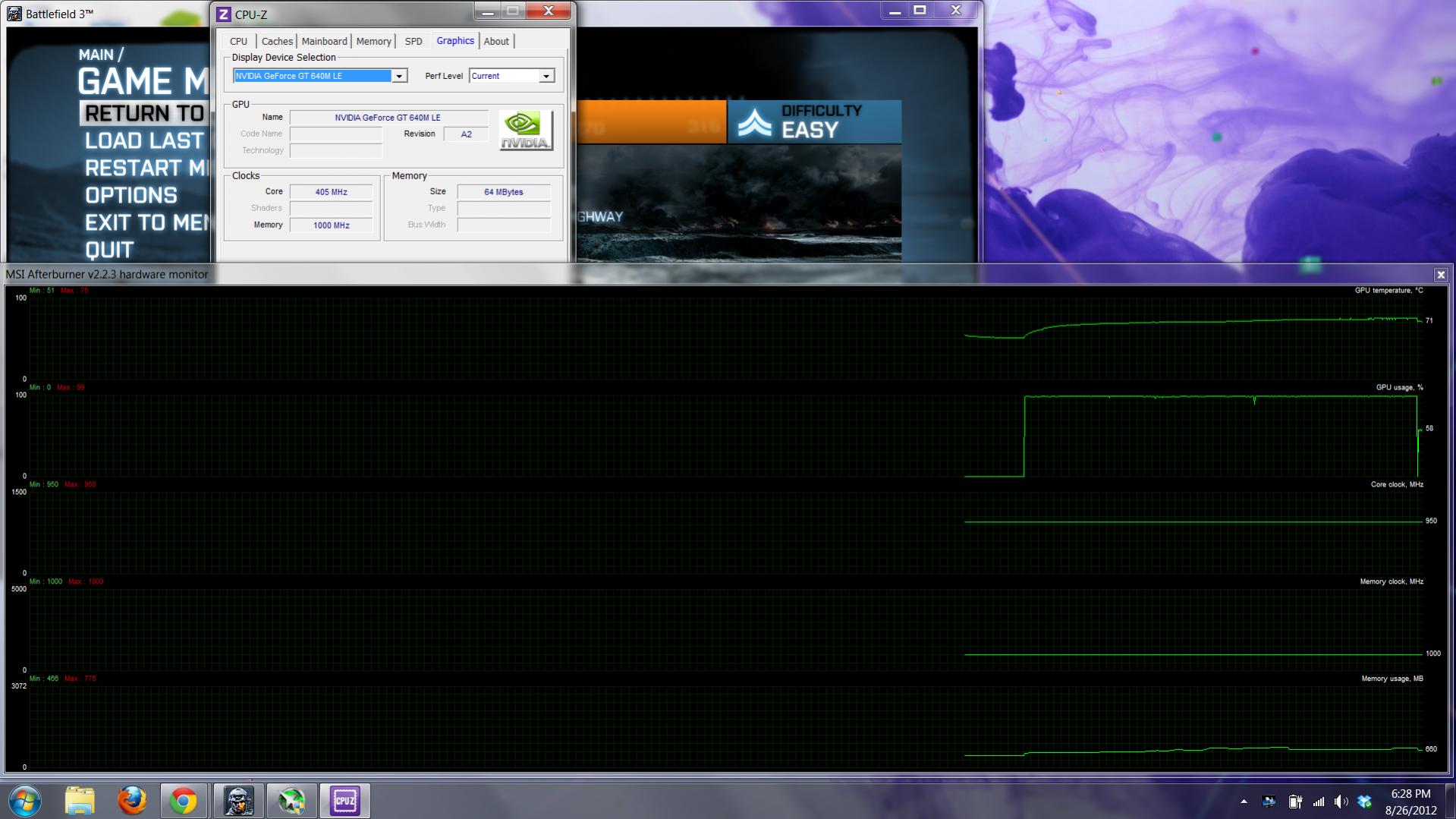
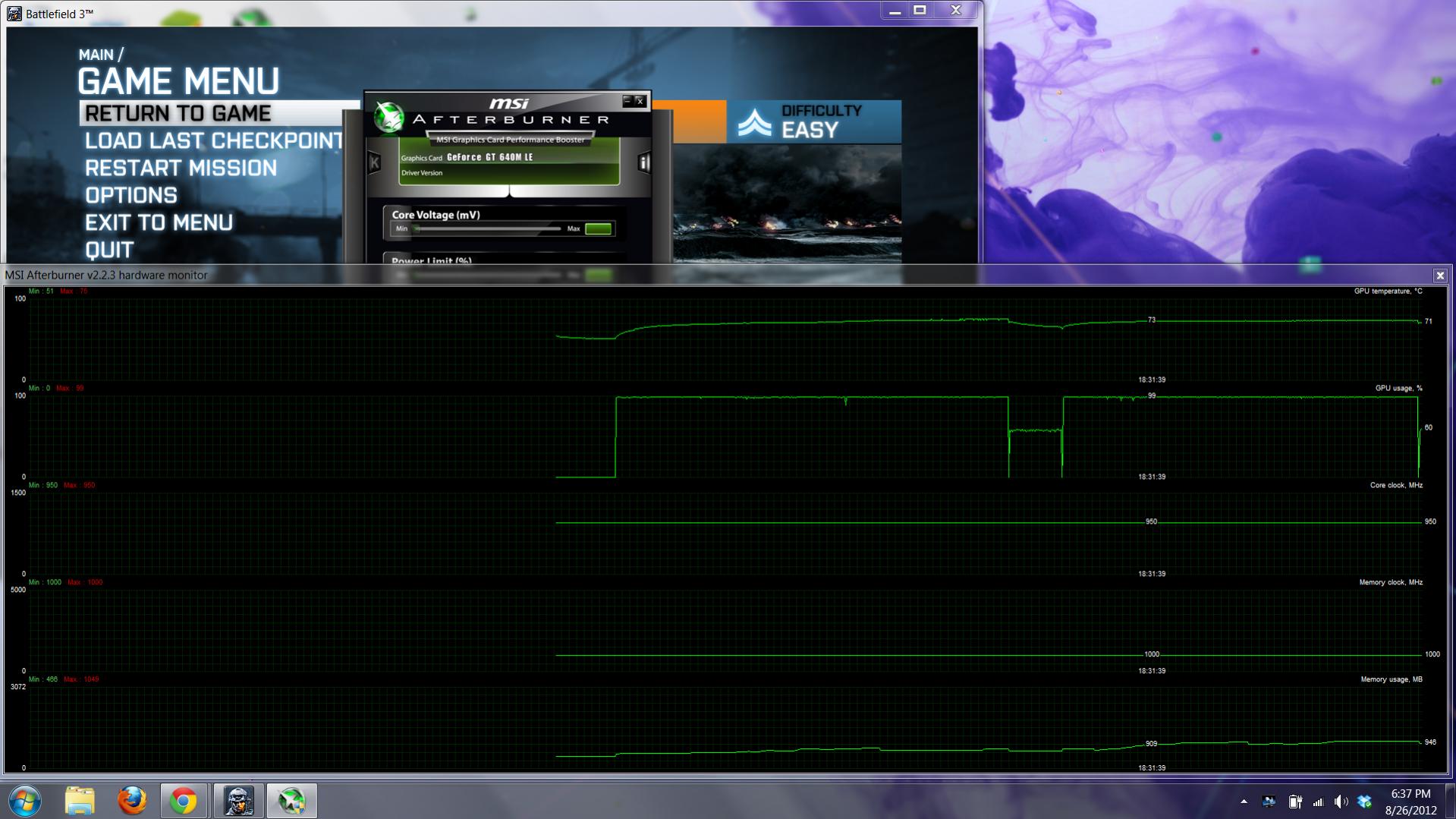
Ive attached the pictures of me playing a few things. bf3 has the results after playing bf3... it had gpu-z also running in the background. bf3-2 is the same without gpu-z. then tf2 (while it doesnt use the full power it does clock all the way to 950... tf2-2 is just a little later nothing changed... you can see in the usage where i stoped the game and took the picture. it is when the gpu usage drops a little
Sony Vaio S Bios Mod For Gt640m Le
Discussion in 'VAIO / Sony' started by Amal77, Jul 14, 2012.


![[IMG]](https://files.milania.de/GPU_throttling_TW2_stock_driver.jpg) </img>
</img>