 Problems? See this thread at archive.org.
If it does work it would be very low-res - half the maximum HDMI resolution in each direction, which I think in the S' case is 1980x1200. That means your 3D output (if it's possible in the first place) would only be 990x600.
-
Well what kind of 3d. Color shift 3d wouldn't require less output pixels right?
Sent from my SGH-I777 using Tapatalk 2 -
OK I order the new version of the sony vaio s series laptop with windows 8 built in. I think this bios mod should be compatible...all the parts seem identical...so fingers crossed, and wish me luck haha.
-
Depends on the monitor. Interlaced 3D does not have any higher specs than 1080P @ 60hz for example. So if you do use a passive pol-filter device your HDMI port is no issue in terms of bandwidth.
-
Interlacing displays a distinct image for each eye, so I don't see how it could work without halving resolution (or doubling output).
-
edit : 10 char
-
It halves the resolution and displays a distinct image for each eye at the same time. So 2x 1920x540 simultanously. Your brain combines it to 1x 1920x1080 3D.
-
i'm not bit(hing or anything, but are you sure it's actually okay to post videos of Crysis 3 in a public forum?
-
oops..... maybe you're right...
-
But that isn't true 1080p 3D, and 1920x540 isn't a normal aspect ratio, so my point stands - the S series can't output true 3D any higher than 990x600 (in 16:10), assuming it can even output any 3D in the first place (which I assume is more of a software issue).
-
@ kanuk
It is a normal aspect ration because your left eye sees only every second row of pixels. I have no idea about which "true 3D" you are referring to. 24hz (x2) 1080p is also possible via normal HDMI. -
I remember when this was but a wee baby thread, now it is a huge beast helping us game on 13.3' laptops! Thank you for the mod again amal77!

-
SBS or similar 3d works of course
Not yet tried gaming in 3d, but in order to get the necessary 120hz output the res would need cut to 1440x1080 (or 720p but I hate scaling).
You can squeeze up to about 104hz 1080p out of HDMI via custom resolutions in the intel control panel, but my monitor has some kind of protection circuit and cuts out after precisely 60 seconds on anything more than 85hz 1080p over hdmi.
Okay tried Tridef out of curiosity, amazingly it has a 'Sony VAIO' mode and works perfectly!! (albeit only at 60hz so it's blurry, can't tell if it's using sbs or top-bottom or checkerboard) Even switches the monitor into 3D mode automatically like a PS3 etc. would do
![[IMG]](images/storyImages/l8f9.png)
-
I'm thinking of getting a Vaio S, and I wonder whether this Bios Mod in any way interferes with or influences the stamina mode on the HD4000? Will I have any issues with using the laptop in that mode?
-
No
I still get the 4 hours or so I expect with the mod installed, speed mode selected and nvidia gpu set to be used globally (aero disabled of course)
Even with the mod, the nvidia gpu still fully disables itself without even needing use of the physical switch. -
Good info dark. Does it mean we can just buy any 3d capable monitor and connect it via the hdmi on the Vaio S and we are good to go? What was your 3d monitor or 3d tv model and brand? -
Samsung S23A750D
It's irrelevant if you just want to watch movies though, anything but a useless 3D Vision monitor will be able to do the processing from SBS itself from any 2d source.
I would strongly recommend against buying a 3D Vision monitor and instead buy one of the Samsungs (S23A700D can be found cheap) or a similar non-nvidia 3d monitor -
I've got a question, are there are lot of people who have tried to mod the bios and had issues with crashing or overheating? I'm considering buying a S13P, but only if the 3D performance is reasonable. How likely is it that I will get a unit capable of running at 900/900?
-
Hi,
I have been using dis mod(900/900) since a month...have been playing like 2-4 hrs daily..
Temps r always well within normal...
Dunno abt 3D....
As far as modding is concerned, u can go ahead... -
I'd say it's very likely for anyone to get a model that can easily handle the OC without issues. Its weariness will depend on how often you use it at full load of course, but it's reasonable to expect normal hardware life out of the 900\900 mod at least, and there are plenty of people using higher clocks without problems until now.
You can always re-mod for lower clocks in the future anyway. -
Does the BIOS mod work for the new BIOS update sony did for the Windows 8 Upgrade?
-
I'm having a problem with the core clock dropping after 30-45 seconds of being in a game and I'm not sure why this has started up all of a sudden. I've been having no issues on the SVS131190S model for a couple of weeks now, except for today. Nothing that I can think of has changed, except that I installed MS office 2013, which I don't think would be the cause of the problem.
I am currently running the R0143C5 1000/1000 MOD. I was previously running 900MHz Core 1000MHz Memory MOD R0142C5 but the issue started even with the older 900/1000 bios mod. I was hoping by updating to the latest one it would solve my problem, but it didn't. The machine is running win 8 pro, and I'm running the Oct. 31 nvidia driver directly from the sony website for my model.
When I go into vaio control center, I don't have an option to "set priority to ventilation" anywhere. My only option is to choose from a drop down menu (balanced, max battery, max performance), and then click details which brings me to the Power options in windows 8 control panel. In those options I have changed the settings to maximum performance, and active mode cooling when plugged in. These have not changed at all before or after this core clock problem began.
As an example:
1. Fired up WoW
2. Logged into the game and just sat there watching MSI afterburner
3. After about 30-45 seconds core clock drops from 1000mhz to 250mhz
The laptop decides to switch to the integrated GPU at 70C. The core clock refuses to move after this point. I am clueless as to how to fix this.
Just to pre-answer some questions:
1. Nvidia control panel preferred gpu is high performance nvidia processor
2. power mgmt mode is set to "prefer maximum performance"
3. max temp on GPU is 70C at which point I guess it clocks the GPU down
4. No there is no option to set "priority to ventilation" anywhere that I can find -
Yes, please refer to the NEW BIOS MOD (R0143C5) at the first page.
Whenever you see a GPU throttling due to temperature in the Vaio S, usually it has to do with the priority to ventilation.
You have to make sure you solve the problem of your VAIO Control Center first, making sure there's an option to select priority to ventilation. Coz mine does have.
I'm not sure, but probably a reinstall of your VAIO Control Center might work? -
Ok I'll try to find a way to do this. I actually have a Sony tech remote accessing my laptop now. I realized just now I had an issue today when I cold booted the laptop that it froze before finishing loading Windows. After turning it off the only way I could get it to turn on again was to remove the battery and then put the battery back in. Upon booting up after that, it finished applying some kind of Windows update. I wonder if that did it. Anyways, I'll try to do what you suggest somehow and report back.
EDIT: No luck with the sony guys helping out. All they could do was re-download the latest vaio control center driver from their site. Still no option to change fan ventilation priorities. I'll keep searching for some way to control the fan speed before giving up and restoring windows 7.
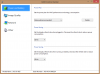
-
Hey I'll scratch your back if you'll scratch mine. If you go to the main page of VAIO control center then under cooling and performance click details. On the right. There you should be able to choose for both speed and stamina. (Win 8 via cc is different from win and I don't like it...)
Now here is how you can help me out. Open up chrome and a few tabs to a few sites then open up task manager. Then wait a minute so the computer is settled down and tell me what percentage CPU is being utilized total and by system. Thanks!
Edit: I just looked at your picture you are missing a ton of stuff... like a ton. Should have 7 options in the left pane and 9 on the right.
Please do the thing I asked above first then go to the Sony website and download the shared library under windows 7 drivers
Also check device manager to ensure everything is installed.
Sent from my SGH-I777 using Tapatalk 2 -
CPU utilization with Chrome and 6 tabs open fluctuates between 1-2%. Chrome itself is using between 0-0.4%.
Yea I must be missing features. I know in win 7 I was able to adjust the ventilation priority.
Just installed sony shared library win 7 64bit driver, and this added a "Mouse and Keyboard" tab on the left in the Vaio control center screen. Sadly, the Power and Battery tab is unchanged (still can't see Speed and Stamina). Any other win 7 drivers I should be installing to get those ventilation options to work? I'm willing to try anything at this point.
To recap what I've got installed so far:
1. Vaio control center win 8 64bit driver v6.0.1.08290
2. Sony shared library win 7 64bit driver v5.10.0.12150
3. vaio power management win 8 64bit driver v6.0.1.07270 (thought I'd try this but it didn't seem to change anything)
Maybe I can download these drivers for another model number and see if that works on my svs131190s? -
Just to make sure: I started flashing and went downstairs, when I came back the flashing program was closed so I restarted. How can I tell it worked?
-
Check your BIOS number from the Vaio Control Center?
Check your GPU clock speed(GPU-Z, etc)? -
Thank you so much. looks like ill reinstall win 8.
are you sure you have all the drivers from the win 8 page installed im not completely sure which ones do what but vaio power management software may be one you could try or reinstall. im not sure if there is anything in win 7 that you need or anything with acpi in its name. id look them up but i have to get to class -
Hello:
I have a S15 packed with win8
I entered the bios and it shows R0080C8 inside the bios
I wonder if I can still use the bios mod R0143C5?
Thanks in advance -
Better not.
May I know what model are you using? -
Thank you for the quick reply
My model is SVS15126PG in which I am from Hong Kong
I've checked my local vaio website as well as vaio asia suppot page and there's no bios available to download
So there's no method of boosting my gpu atm? -
is it just me or when im gaming, the fan roars
-
Well, mine actually doesn't get listed out on the compatibility list for the R0143C5 BIOS.
Fortunately it works on mine without any issue.
But atleast mine was previously R0142C5, so I have high hope that it'll still work on mine because of the naming aren't that much of a diff, and thank goodness it work.
Yours seems too much difference in terms of the BIOS naming.
So, it is better to stay away first, just in case.
Unless you are willing to gamble on it.
It does roars, but still bearable to me.
Not as loud as my previous Sager NP8150. -
The fan noise of the Vaio S is nothing compared to my former m11x R3 and M14x fans. Those sounded like a jet engine/hairdryer as high as 50 decibels when gaming. -
Hi guys,
Sony is clearing all the old vaio with win7 and listed the pre-installed Win8 on their website. Anyone had tried using the mod with the following win8 vaio s:
SVS13A290X
SVS13122CX
SVS13127PXB
SVS13A2APXS
p/s: Amal, i am from KL but working at JB now thanks for your work in this mod.
-
The new bios mod just freezes when I attempt to run it, using your first mod right now.
-
Hey Amal Just got my S13A few weeks ago and everything is good so far with the 900/900 mod.
Still no workaround for the high clock speed on idle? I use MSI and sometimes it works but sometimes it doesnt. -
Hi there.
Not a problem, glad to help.
Btw, those models aren't for sale in Malaysia right?
You're using Windows 8?
Yeah, this new BIOS tool seems kinda buggy abit.
Some even reported that after the 3rd tries then it worked.
Thanks for the report.
Hey there.
So, yours is the Windows 8 model, using the new BIOS is it?
There are couple of ways to make the clock speed on idle, like opening more than one GPU-Z, and so on.
But most importantly, make sure that there aren't any program that utilize the GPU.
You have to be careful with Windows 8, especially if you set your Nvidia Global settings to Nvidia GPU and High performance mode.
Coz there are quite a number of Windows 8 apps that will utilize the Nvidia GPU, even if it is just a small light apps. Thus making your GPU clock on full, and used up your battery very fast.
I always have to monitor the GPU nowadays with Windows 8.
Unless if you don't mind to set the Global on default, while having to force each games that you have to fully utilize the GPU. -
It seems like they're out of the Windows 7 models in my region as well. Does anyone know if the SVS13A290S is supported with this BIOS mod?
-
So for those of us with a new SVS13A290X (the new premium 13" S with windows 8) would you recommend running the modded BIOS? Not sure if you were referring to the BIOS upgrade tool or the modded BIOS itself. Just ordered one, would like to be able to OC the GPU if I can
-
I have flashed many times with windows 8. It will show not responding don't click it or try to move it as it will force close itself. Let it sit for 5 min. In about 3 it will all of a sudden wake up be half done then boom it will finish and close automatically.
As to the win 8 computers I would not flash thus mod. There are changes and we don't want you to break your PC. Maybe amal can make one for your bios but that takes time on his part...
Sent from my SGH-I777 using Tapatalk 2 -
Sad. It looked to me that the Windows 8 versions were identical to the Windows 7 versions, only with Windows 8 and new drivers. What under the hood changes were there with the new version? If I revert back to Windows 7 and drivers (which I was leaning towards doing anyways) does that make a difference?
Amal, would love your thoughts on this as well. If it's a no-go, would obviously love it if you created a new version for the refreshed models, but you've clearly already spent a lot of time and helped a ton of people so I'm not expecting more.
Cheers, guys. -
Currently it is unsure whether it'll work.
Recommended not to, until further investigation.
Can you share a screenshot opening the Vaio Control Center, showing the System Information?
Thanks.
Yup, the new BIOS tools seems not that smooth as the previous one.
By right it should work for those using the old windows 7 model, upgraded to Windows 8. But offcourse, make sure that it is compatible with the MD5 Checksum if possible.
And yes, it is not recommended to flash the new Windows 8 model, until further investigation.
OR until there's a new BIOS for the Windows 8 model, of which I will do my best to help out with the MOD.
It is not about the OS that worries me, but the Hardware itself.
We are still not sure whether there are a lot of changes, or any changes at all to the new Windows 8 model. -
warreo, i think the bios version for these new win 8 laptops are different from the previous win 7 ones. I assume it will be a problem to flash the win 7 bios on the new machines. Amal could do a new bios but he will need to have the new lappy as well?
Amal, yes, those model are only available in US. Just asking my brother thought of getting one there and i am not sure if the mod bios will work on these machine. Not until someone tried it... -
Very clear, thanks for the response, Amal. Will post a screen shot from the Vaio Control Center once I receive the laptop (probably some time next week, still being built), let me know if you need to see other data as well. Absolutely appreciate that you're continuing to support this through the Windows 8 update.
-
Actually, I don't need to have the lappy for me to do MOD.
As long as I have the original stock BIOS, then I'll do my best to MOD it.
-
Got it. I'll find out what BIOS version comes with the new ones next week when I receive mine if no one can else can confirm if it's the same or not earlier.
-
Is there a changelog from bios 142 to 143? I can't seem to find one.
-
i just posted on the owners thread but the new bios caused, for me, high cpu usage because of acpi problems. the old bios seems to run great with windows 8. seems like this new bios has very little going for it
Sony Vaio S Bios Mod For Gt640m Le
Discussion in 'VAIO / Sony' started by Amal77, Jul 14, 2012.


