 Problems? See this thread at archive.org.
Man, that's awesome!
Will try it now.
-
Hi. I got something strange with this BIOS. I used the 850MHz one, and get normal improvement in 3DMark 06 and 3DMark11, which come to 9682(FHD) and P2052. I am satisfied with these scores and also it does so well in Battlefield 3, Ghost Recon and Street Fighter or other games. But one game is strange, the Resident Evil 5, I run the Benchmark and got 31 Frames (B) in the original BIOS and get 27 Frames (C) in the 850MHz BIOS with the same setting(All high in DX10). Even though I remove and reinstall this game it comes the lower scores. I had set the NV Panel in 3D image settings in High-performance NVIDIA processor (Global Settings) and Prefer maximum performance. The laucher.exe of the RE5 became World of Warcraft in NVs Program Settings. But I do not have this game.
Thank you for you BIOS. I love it. -
One of the user also reported the same issue as well if you read 2 pages back.
He said that a reboot after the changes made on the Nvidia Control Panel works.
You may want to give it a try.
Btw, have you try manually add the program executable from the installation folder? I haven't test that yet, but just a suggestion. -
It backs to normal now. Reboot did not work for me, but after I pressed the “Restore Defaults” of the Manage 3D Settings,
the “Ambient Occlusion” changed into “Off” from “Quality”. And I reset the maximum performance, now the RE5 can run on 42 Frames (B).
Thank you. -
A bit out of topic a bit.
Review of the Gigabyte U2442N is out :
Test Gigabyte U2442N Notebook - Notebookcheck.com Tests
Quite a high temp for a dual fan/vent.
Looking at the stress test, the GT640M runs on 708MHz at a 0.9870v, while ours can run up to 1000MHz at 0.9250v. -
I see.
Good to know it's ok now.
So, it increased 11FPS from the 31FPS, that's about 35% increased, not bad.
For benchmark sake, maybe can try the 975MHz Core with 1100MHz Memory MOD and see the differences?
-
First of all, thanks a lot! This made my S13 (3210m, 640le 1gb, Samsung 830 128GB) quite a bit more powerful. 3dmark11 1355 -> 2229
.
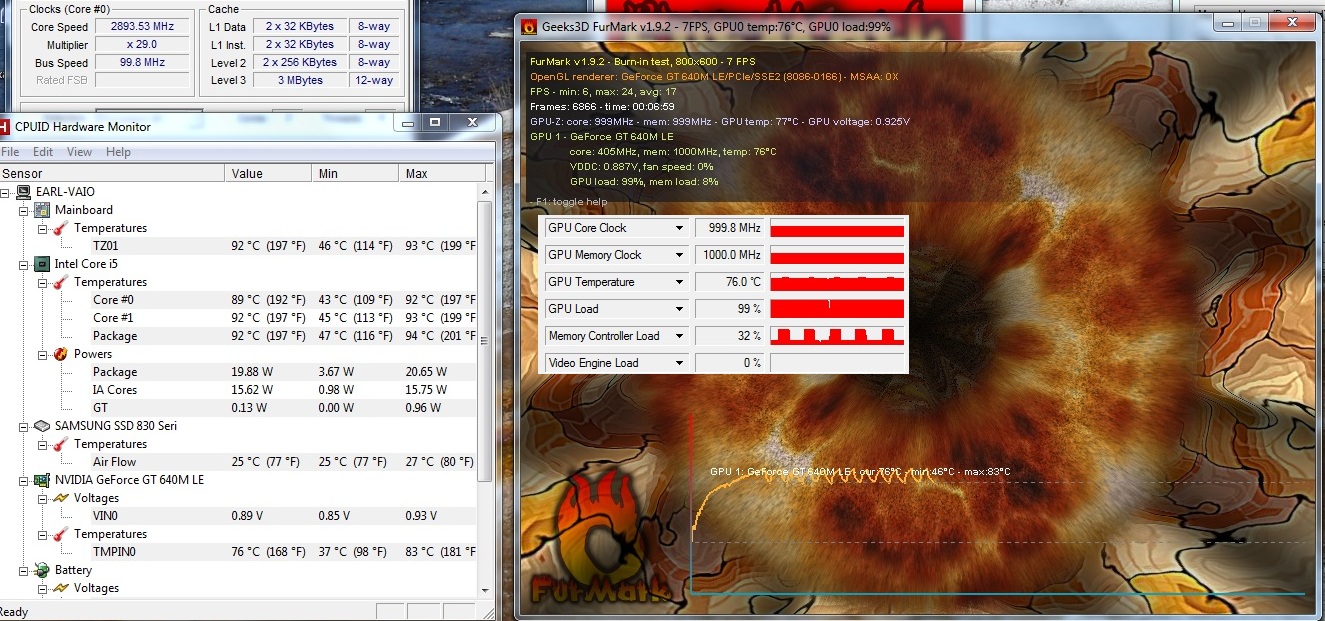
With GPU @ stock my temps are cpu 93 (max, running steady @ turbo 2.9ghz) and gpu 79 after half an hour of prime95 and furmark (ambient around 20 celcius).
This seems to be on the high side, however most of the stresstests I've seen here only stress gpu (if I do that it maxes out at gpu 76ish after overclock and cpu 70ish).
Now that I'm running the 1000MHz version from the start post, I seem to be experiencing some throttling issues under load (again furmark and prime95).
I'm not exactly sure what happens, as my clocks and gpu load stay stable. But memcontroller load sometimes drops to ~30% and furmark fps drops from ~20 to ~7 . CPU still stable @ 2.9GHz. Temp drop quite rapidly and after a couple of seconds the cycle starts over.
![[IMG]](images/storyImages/throttlesmall.jpg)
Attached Files:
-
-
Looks like some kind of throttling.
Some people face this issue on furmark only.
It could also be the maximum temp it could go before throttling.
Try playing games or any other stress test, see whether it reach above 83c or face any throttling.
You may also stress your system using AIDA64, it'll stress your whole system, including the GPU.
Try and see whether got any throttling on the GPU, check what's the highest temp it can reach with or without throttling. -
furmark is an unrealistic load on your computer. It's overkill on a desktop and far more on a notebook. Just try your most demanding game and base it on that. If you just want to run benchmarks and stare at your temps, run something like the Heaven DX11 benchmark to stress it. More realistic than furmark. Heaven DX11 Benchmark | Unigine: real-time 3D engine (game, simulation, visualization and VR)
-
+1
Furmark is designed to kill VRMs
-
This. Furmark is nothing like a real world scenario at all, even while gaming.
However, if you have cold winters, build yourself a rig with an i7 980x and quad SLI GTX 480's with the stock heatsinks. Then run Furmark and Prime95 blend.
Welcome to hell on earth (temperature wise).
Sent from my GT-I9100 -
I tried the 975MHz with 1100MHz just now, it passed the 3DMark06 and 3DMark11 with 10550(FHD) and P2259, CPU is 3210m. And the Resident Evil 5 gets 46.5 fps. It has just 50% improvement. When I am preparing to use this BIOS for long-term usage, I run FurMark to press it, it throttled after 7 minutes with temperature in 76c (with AC in 22c). So, I tried the 950MHz version, it can work more than 25 minutes in FurMark without problem, and its temperature remained in 69c (with AC in 22c), that amazed me. So, I wonder whether the memorys Frequency causes the temp running higher.
-
There's a possibility.
This is because our DDR3 on GT640M LE sucks.
You may try the 1000MHz MOD(Memory 1000MHz) and see whether it throttled as well. I kind of doubt it won't.
Most of us here go for the 900MHz - 950MHz for optimum result (fast and stable). -
I doubt the RAM is causing the Furmark issues. I bet the current required through the VRMs above 950 Mhz GPU is causing throttling.
Furmark will find problems where none otherwise exist using real games and benchmarks. -
Heres my 975/1100.
![[IMG]](images/storyImages/5gVZq.png)
GPU score should be around 2250.
Still have not figured out what is causing this. I even reinstalled clean windows to see, if it was any faulty driver problem. Turns out that no.
Settings are completely stable in BF3 and WoT. No artifacts, no hickups.
I may be getting little lower fps in games too. Since the difference is not big, theres no way to compare. -
Hi, been reading this forum for about 3 weeks now since i got a S15. Tried the mod a few times and it seems to be doing funny things for. No matter what i try I never seem to get above about 1500 on 3Dmark11 (I get about 1300 stock bios), doesn't seem to matter whether I use the 950 or 833.
I have set the priority to ventilation and set the nvidia CP to manage its 3D settings to run at high performance. I am using the latest nvidia beta driver and have the 2G 640m LE, 8g ram and the quad core i7.
Am i missing something else i could try? I never really tried flashing a bios before and have probably missed out something very simple!
Thanks in advance for any advice great work on the mod so far
-
Possibly as well.
We are currently running at a very low voltage even compare to its nearest brother the GT640M(non-LE) running at 725MHz Max, while far more lesser compared to a GT650M and GTX660M running at 950MHz Max boost without OC.
Anything is possible at the moment, until we fully tested everything.
Then again, if we all can play all or at least most of the games smoothly without any issue(stability, temperature, etc), I don't see why we should not be happy.
Its a GT640M LE!
Sorry for my Engrish.
Have you also select prefer maximum performance on the power management mode for those programs?
If yes, then maybe you can share with us your GPU-Z Graphic Card detail and also the sensor details. -
I have set prefer power mode to prefer for those programmes. I think i am missing something very simple here! here is GPU-Z.
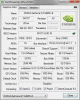
-
Here's mine running on 975/1100.
NVIDIA GeForce GT 640M LE video card benchmark result - Intel(R) Core(TM) i7-3520M CPU @ 2.90GHz,Sony Corporation VAIO score: P2287 3DMarks
GPU scores about the same as yours.
Not sure whether it will be abit higher with a Quaddie.
I'm guessing that you're getting a 2250 GPU scores on your Asus running the same clock? -
Uninstall all your Nvidia drivers and install the latest NON beta drivers. It's 301.42. Then try the test again, the beta has some problems I believe.
-
Hey Amal77, got a quick question. I currently have your 900mhz BIOS installed. If I want to upgrade to the 975/1100 and try it out, do I need to flash back to stock first or just download the new BIOS mod and flash it?
-
Nope, you can straight flash the MOD without going back to the Stock BIOS.
Been flashing my laptop for almost 50 times I guess.
Can't imagine if I have to flash it to stock first everytime I want to flash to another MOD. lol. -
Does anyone think the difference from the i5 and i7 dualcore cpus make a difference during games like Skyrim and SC2 and other games?
-
Not really. I just tested Battlefield 3 at normal settings at 1366x768 (900p is too small on such a small display). I have the 900mhz VBIOS mod. Even in huge maps like Caspian border GPU load is always at 100% and CPU load is 75-80%. There is no throttling at all. Also, BF3 is an extremely CPU intensive game, along with Skyrim, and I have noticed no throttling in either of them.
Don't worry about CPU bottleneck as there doesn't appear to be any issue like that at all
-
If only this laptop had some magical blackhole space-manipulator thingy to add in some mSATA cache drive. :/
Although loading speeds are indeed a step up from my older desktop. -
Thanks, running Aida for half an hour got me to CPU 95 and GPU 83. The stability test works fine it seems, and I'm very content with these temps, especially considering that Aida also stresses the Intel 4000 (at least, it displays 2 GPU's).
And even under these very unrealistic circumstances it managed to do OK, GPU didn't throttle and remained at 1000/1000. CPU did throttle somewhat, but never came below 2Ghz and averaged 2.4/2.5.
I wanted to see how it held up under (the most) extreme conditions, and it passed with flying colors.
![[IMG]](images/storyImages/aidah.th.png)
You are right, and that was exactly the point.
If you're willing to sacrifice the optical drive you can add one of these for instance, for a second 2,5" bay. That's what I'm going to do. -
On front page you linked result GPU clock: 950/1050, which was over 2200p GPU.
3DMark11 by Faceless Rebel on i7-3612QM
Judging that i our runs are 975/1100. we should hit near 2300p GPU.
To reduce measurement error, we should run at least 5 times i quess, but i have ran different clocks like 10 times in total and im always getting less than expected. So it must be something holding my score back.
-
No, that one is on 950MHz Core / 1165MHz Memory.
Like I said, our performance somehow got bottlenecked a bit by the slow DDR3.
If ours fitted with GDDR5, it will fly even more.
-
This post. Its 950/1050.
-
Ahh... thought you were referring to mine.
Better ask Faceless Rebel whether that's the real clock. -
BTW, i just ran a MSI combustor and i noticed couple of memory artifacts. So i let mem clock down to 1075mhz, which was perfectly clear.
Im wondering if theres any indication in bios which defines the memory voltage? We are running Samsung k4w2g1646c-hc11 GDDR3 chips, which are 1.5v (+- 0.075) 933mhz by default.
GDDR3 should hold up easy 1.7v and perhaps with this voltage we could achieve around 1200ish clocks.
-
I got artifacts running the video stress test in CSS and only got about 3 fps more than standard clock... Im running the 900 mod
-
Once Sony releases a new BIOS (assuming they do), will it be easy enough to get that modified to allow overclocking?
-
I'm not sure about that.
But yeah, our GPU Memory sucks.
You mean Counter Strike Source is it?
Did you OC the Memory above 1000MHz?
Have you tried other lower MOD?
Probably I guess. -
yeah I mean Counter Strike Source. I tried the 835 version as well, did get some artifacts there too... Havent touched any settings just changed to power mode...
-
I'll play some CSS when I get home from work and see if I get any artifacting with the 900/1000 BIOS.
I have played BF3, LoL, Skyrim, and Diablo 3 so far, and absolutely no issues at all.
I was going to try out the 950 core mod, but then I am like "Is potentially bricking my laptop worth it for 3-4 extra FPS? Nah". Things do go wrong sometimes guys, even when flashing a NON-MODIFIED BIOS.
A few years ago my friend was upgrading his Lenovo's BIOS through software BIOS flash instead of USB key flash (which is recommended in every single scenario). He was just installing a new BIOS through Windows, and it was unmodified, directly from the manufacturer site. His PC froze in the middle of the upgrade for some reason, and his laptop was bricked. The manufacturer did not replace the laptop because they claimed it was a user issue.
So yeah, things do happen unfortunately! -
Yeah, be EXTRA careful when flashing.
Pray hard during the 10-15 seconds of flashing.
I once experienced while typing a long comment, and suddenly the windows update notice pop up telling do I want to reboot the laptop. Since I was still typing, I accidentally pressed enter and it reboot!
As for the 900 to 950 performance difference, I don't think it'll be that noticeable. Wait till svl7 comeout with a 1100MHz with a voltage mod, then I'm pretty sure you will notice on this one.
-
Hey Amal77
I ordered my S13p and it should be here by this Friday. It's SVS13A12FXB. \(^^)/
Once I get it, I might go for 835mhz mod, or which is the most 'stable'?
Also, is there any 'not to do?' to not brick the laptop?
like changing to default setting, disable intel graphic, changing to PEG.
Is there anything that will brick the laptop after flash?
Because last SE,SA bios mod had some stuff like that as you know.
Oh also, do you know any way to unlock, or include, SATA 3 support back?
I found out that SONY actually put lock or removed SATA 3 support, as they did on previous S versions too.
Well, there is work around as you know already...XD
I heard disabling optica ldrive and waking up from sleep should get the SATA 3's 6Gbps back.
I will try this once I get my S13p and Samsung 830 SSD.
Thank you for your hard work~!
I am really interested on this Bios mod and I want to know everything that might brick my laptop after flash. -
Flashing any BIOS mod, including this one, will almost certainly brick your laptop if the flash is interrupted in any way. Even flashing the stock BIOS can brick your laptop.
Also, it depends on your physical graphics processor if you run higher clocked VBIOS mods or not. Not ever GPU is the same... but you would have known that if you would have searched the thread.
On one S13A someone might be able to run their core clock at 1150mhz perfectly with no issues, but another one might have issues like artifacting with even a 835mhz VBIOS.
Just flash a few and try them out. The worst that can happen is that you end up with a $1200 piece of metal. -
Thought I'd update you guys with some more benchmarks. Played some BF3 at 1600x900 on Ultra settings using the 900MHz BIOS mod, got around 25 FPS in Operation Firestorm 64-man conquest large.
It was not playable. Way too laggy. -
should I be scared to do this? If I had an "accidental warranty" wouldn't that be an "accident" what is USB flash?
What are the best ways to test "stability" like 3d mark 11? what am i looking for to go "wrong" so I can tell if the bios worked correctly
thanks -
Yea, I know any intruption during flash is certainly worst thing...
But I want to know what I shouldn't do in the BIOS.
Flashing is not much of dangerous process, unless something happens.
Well, thank you for the information for trying each mod to find out best one that is for me. Also for your youtube review~!! it is awesome~! -
Hi there,
By right it should be supported on your system.
As for the 'not to do' thing, we(svl7 and me) only do changes on the VBIOS(GPU BIOS) in this BIOS MOD, means you will still see the same Interface if you access the BIOS startup, unlike the Advanced Configuration BIOS MOD.
Why? It is because our VBIOS is integrated with the BIOS, so in order to mod the VBIOS, I have to decompress the VBIOS from the original BIOS to edit it and compress it back again once edited.
Currently we haven't yet figure out how to unclock the SATA3 from the BIOS.
Not dare enough to do some testing, coz there's a huge risk in bricking my laptop.
Better leave it to the pro.
As long as the flashing process completed without any interruptions, it should be fine.
The easiest way to check is by running GPU-Z and check your GPU clock.
For stability test, you may try to run 3Dmark and couple of games to see whether it runs fine. Try Battlefield 3 if you have one, coz it is one of the heaviest game out there. -
I' just ordered the SVS1511V9E CI7 3.1 8GB/750, but I have no idea what to do with the ''BIOS'' since I've never ever heard of them ..
Help please! -
Follow the procedure from the first page.
-
Hey guys, just finished my gaming performance video of the Vaio S13 Premium with the 640m LE. Thought you guys might enjoy it. I had to speed up the videos by 50% because the video would have been too long otherwise. However, you can see the framerate clearly in the top left hand corner. I tested BF3 at low/med/high, Skyrim at low/med/high/ultra, and Diablo 3 at low/high, all at 1600x900.
And you can listen to one of my favorite bands while watching
Enjoy! Sony Vaio S13 Premium Gaming Test/Benchmark (BF3, Skyrim, and Diablo 3) - YouTube
Would love some feedback! Also, game requests are also gladly accepted. If there is a game you want me to benchmark please let me know.
Modded VBIOS is courtesy of Amal77 and svl7. -
Cool! Nice Frames Per Second!
I'm still amazed on what our laptop can do.
Thought I've made the wrong decision of not waiting for the Gigabyte U2442N.
I feel much more secured owning a Sony than a Gigabyte, where my country doesn't have any distributor that sell it. -
And what is that? ... I don't know which one to take ...
-
Considering your lack of familiarity with computer basics, I strongly recommend that you do not do any of the modifications listed in this thread.
-
snip
10char
Sony Vaio S Bios Mod For Gt640m Le
Discussion in 'VAIO / Sony' started by Amal77, Jul 14, 2012.


![[IMG]](http://imageshack.us/photo/my-images/707/throttlesmall.jpg/)


![[IMG]](http://imageshack.us/photo/my-images/39/aidah.png/)


