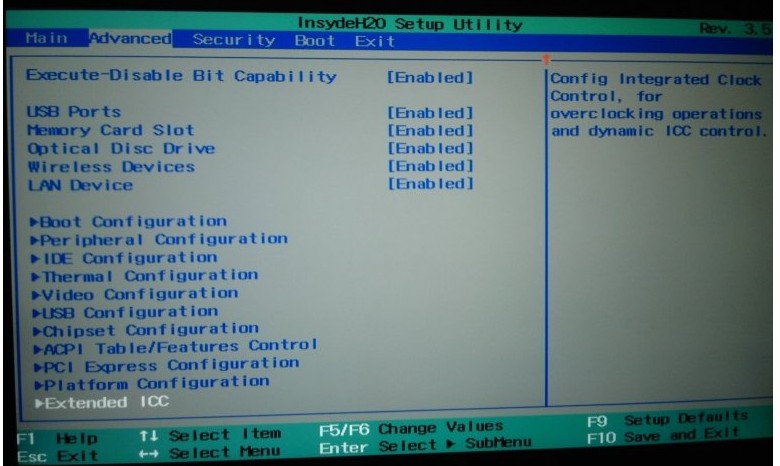
Problems? See this thread at archive.org.
ME version = "Unknown" - OK?
Before version was there.
-
If everything works, why bother? To your power down issue, did you check the temperatures? Is your laptop overheating?
-
Laptop power down after 30 minutes, not 29 or 31 ((((
Why? I have hmonitor - mahimum temperature was 94C. With heat processor test. I dont now that to do now, it is unreal to use laptop then u must on every 30 minutes. -
How I can disable ME?
-
94C is way too hot.
-
Normal windows 52, it was is heat stress test.
Today I've changed grease. Same... 30 min and after off.
ME disable cam help me or what another? -
Please download a linux live cd and run it. I bet it is some kind of software issue on your side. Exactly 30 minutes whatever you do with your machine, that'd be a very precise hardware fault.
-
I wrote before, without hdd - power off too. After 30
-
in emergency......
wt if i careless changed the graphics settings in the bios
i just remember the caution after I changed it -.-
is sending it back to sony the only way to fix it -
Any news here?
Im in love with samsung 830 ssd... -
I have finally managed to enable full SATA III speeds on my SE1 (15.5 inch version with the extra num pad) and have an almost fully functional notebook by downgrading the BIOS to the official R1031H4 stock firmware. I have tried this in the past with Pyro's hacked version of R1031H4 but my keyboard was messed up (some letter keys were not assigned properly and giving me numbers instead when pressed), also the cooling fan was constantly on so I was forced to go back to the newer stock BIOS firmware (R2085H4) or Pyro's hacked version of it which did not have these issues.
Anyhow today after flashing the stock R1031H4 BIOS the only thing not functioning is the num pad but the normal area of my keyboard works perfectly along with everything else on my system. Even the cooling fan is virtually silent, it runs very quiet like it's on the R2085H4 firmware. I'm quite surprised to be honest.
![[IMG]](images/storyImages/ibkHIup0DgwMmu.png)
And as you can see below IRST reports the SATA transfer rate is running at 6GB/s instead of 3GB/s like it was with Sony's newer firmware.

Pyro if you're reading this would there be a way to just add the num pad functionality from R2085H4 to R1031H4 as it looks like us SE users would not need anything else added to the original R1031H4 BIOS to get a fully operational SE notebook running at full SATA III speeds? -
Hi! You got me curious by mentioning the Bluetooth thing, since I've lost Bluetooth a couple of months ago and I was sure it was an independent hardware failure, because there's nothing at all showing up in my device manager (no "unknown" devices in spite of Bluetooth, who just vanished completely). Honestly, I just can't correlate this loss to the hacked BIOS because I use Bluetooth only occasionally and hadn't noticed its [dis] functionality until the day I needed to transfer some files to/from my cell phone. But I can attest that reverting to the official firmware didnt bring Bluetooth back.
Has anyone else had this problem and can correlate it to the hacked BIOS?
Disclaimer: If such is true, I'm not blaming pyr0 at all, as we all know we're taking a risk by installing a mod firmware in our machines. But I think any contribution that helps characterize this firmware is helpful for all. -
you've mentioned that you've reverted to the original BIOS. have you checked the BIOS to see if Bluetooth is disabled there after you reinstalled the SONY BIOS?
-
Is there a way with this advanced menu to enable portrait mode on an external monitor? It's such a simple thing which for some reason Sony has killed!
-
Pyr0, genius... You're great for doing things like that and I like your policy..
This tutorial works for my VPCSB1X9E.
But, I've one more question : I've read that we must not put the Primary Display on "PEG", and I understand why. But, what about "IGD" ? Actually, it's on "SG".
Thanks for your work, your time and your response. -
Among the 3½ optionals I'm allowed to tweak in the original Bios there's no Bluetooth. If you refer to the "Wiereless devices" yes, it was always enabled.
Thanks for the suggestion anyway!
I prefer not to open the hatch until I take it to the warranty, so they don't have any excuses to deny the service.
Maybe I just got a 1 in a thousand piece of faulty hardware
-
@m.susc : I've had some problems with bluetooth, but it wasn't correlated with any BIOS update or tweak.
Then I made a clean install and updated BIOS to the latest (but now pretty old, 2011, come on Sony, I'd like to get sata 3 ^^') version and now it's working fine.
I've just tried a week or two ago the Pyro's BIOS and everything worked fine, excepted it didn't unlock any option wich was usefull to me... So I reverted back to stock BIOS and I never lost bluetooth during the whole procedure. I still have it (just double checked because of your questions )
I'd like to know something : what does the hacked bios bring you ???
You can't manage the fans'speeds, you can't manage the (awfull) CPU throttling, you can't enable sata 3, so ???
What's the point, did I miss some really usefull function ??
I'm still unable to boot from SD card. (Does anyone know some trick to be able to ?)
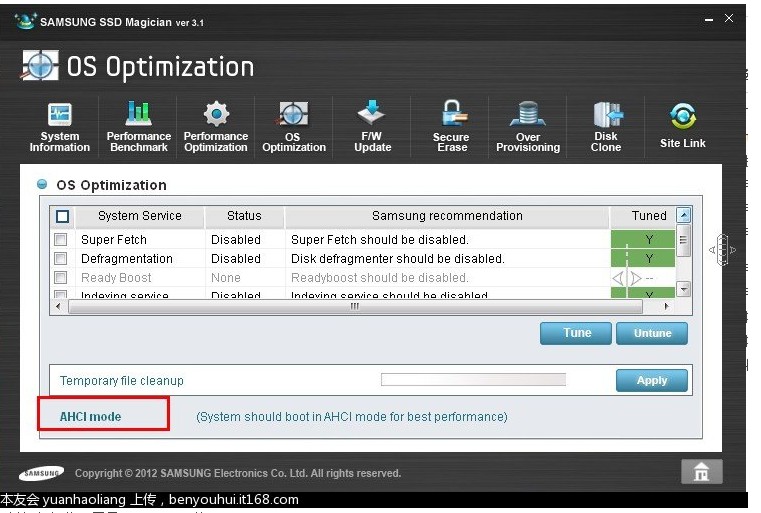
PS : for the ones who are looking for a HDD upgrade to a SDD, I did it, using Samsung 830 128Go SDD, well it's... just GREAT !
And I wonder : would SATA 3 boosts the perf, for real, or it wouldn't change a lot ?
I'm booting and able to surf on the net in less than 30 sec on win 7 !
(actually could be faster if I would disable the password print on win7 boot, but even if I know it's not really a efficient security (cf KonBoot) I find it best to keep it as it's a laptop...) -
Well, for me it's the SATA: IDE/AHCI switch the only thinng I really need to tinkle with. Also, you can manage the fan speeds and threshold temperatures. But even if you don't change a thing it's just nasty that if the options exist, Sony ban them from us for no good reason [the PEG option being an exception ]. After all pyr0 didn't invent the advanced menu, he just revealed what had been hidden by Sony.
This is common Sony practice. As an example, in a previous VAIO model of mine the CPU had Virtualization capability and Sony not only disabled it but vanished the option from the BIOS. It could be enabled only by hacking it. -
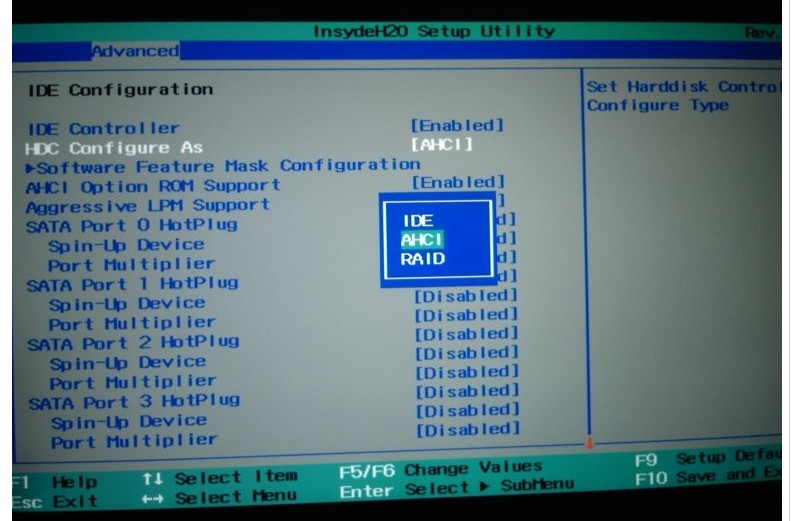
BIOS default is RAID mode which is equivalent to AHCI with additional features enabled. You will not get any advantage from switching to AHCI.
-
I didn't say I did it to get an advantage, it's for other reasons.
-
Are you sure that any change done there is effectiv ?
Sure, the option exists in the BIOS and is revealed by the hacked bios... But I believe I read somewhere in that topic (or elsewhere in the forum maybe), that anyway even if the options are there, any change done to the fans'speeds and threshold temps won't be effectiv, because of some override from Sony... ??? -
At the time I played with that, it looked to me as it was being effective, but if you're asking me if I measured this scientifically, no I didn't. On top of that I have a short memory . So you may be right, I'm not 100% sure.
-
There's a bios update for the model SVS13A12FXB (the new svs13).
I was wondering if it has sata 6Gb support and we could install it on SA/SB series.
Is it possible?
Can we try?
-
Same question here, is the performance betwen SATA II and SATA III noticiable in real world? particullary in the Samsung 830, thats the one i want too.
-
Hi,
can I use it for a VPC-S120FL SONY VAIO? or what update should I use? It comes with R1160Q3 BIOS
I want to change the HD to a SSD and bios does not recongnize it.
thanks! -
^ no, you cannot.
-
Here is a dump from my VPC SA4C5E BIOS R2086H4 : http://damien.litchis.org/DUMP Bios VPCSA4C5E.ROM
If it can help ^^ -
There is a new bios,R2087H4. In: SONY China Service-BIOSæ´æ°ç¨åº_çæ¬R2087H4
could you unlock the sata3? -
Hello pyr0,
There is a new version of the BIOS (R2087H4). Could you unlock the advanced menu for us? Below is the link. Thank you.
Sony eSupport - VPCSB11FX/B - Drivers & Software -
Thanks for the links, I updated the first post and added links to the R2087H4 with advanced menu patch. Read the disclaimer and use with care as always.
-
coul you also make it work for the SV collection of sony laptops ? Thanks in advantage
-
I am working on it. The new IB based VAIO models have a completely different setup layout, so tracking down the BIOS settings and variables starts from square one.Paloseco likes this.
-
so basically with AHCI with can finally hackintosh our vaio ?
-
Just flashed the R2087H4 hacked to my SA4C5E, working fine ^^
(no Sata-3 yet)
val580 if you have more informations for Hackintosh please send us a link
-
tonymacx86.com and use the iboot + multibeast tutorial. You got to have a snow leopard retail dvd or else it's illegal (with a retail dvd you break Apple's aula but it's not illegal). I just need a diffrent version of this and then I can make it work
-
If iboot doesn't work use empire efi
-
I've got a thread for running mac OS on the SA/SB/SE thats been pretty active and we've made a lot of progress. Right now, pretty much everything bar USB3, the card reader, and switchable graphics works really well, including native power management, and powering down the ATI gpu properly.
tonymacx86 Forum • View topic - [GUIDE] Lion on Sony Vaio SA/SB/SE (VPCSA/SB/SE) -
Just to be clear, no 2012 S series hacks available yet, right? Thanks for the work so far, though. Any progress on 2012 S series hacks? This is the newest version I have updated my svs15113fxs to: R0142C5
-
Please read post 136 in this thread. My projects are spare time driven and I do this just for the community. I don't even own a suitable notebook for using this myself.
If you want to support the work, send a BIOS dump for investigation or buy me beer or coffee. -
Oops, I did read post 136 but I misinterpreted it. If I figure out how to do a BIOS dump, I'll be sure to PM you with some info.
-
Hi, I've also just got a 2012 VAIO S, model SVS1511C5E (UK). I would really like to help with getting the advanced BIOS on these models.
What can I do to help, and where can I donate for your much appreciated efforts?
Thanks -
Hi pyr0,
nice work btw.
Maybe u're interessted in a Sony Vaio SA-Bios dump of 2012.
I have made one =)
Specifications:
Machine-Name: Sony Vaio VPCSA3X9E
Bios-Name: InsydeH2O
Bios-Version: R2087H4
ME Version: 7.1.13.1088
Sry for Zip-Terror. Max-File-Upload-Size is only 488 KB.
Alternative Source - standalone Package: Download
you are the best. If there will be a release which works, i spend you a 6er Beer $-]
regards
ZackAttached Files:
-
-
Hello,
I have a vaio s-series VPCSA3dGX and I replaced the HDD with a SSD.
However, the SATA AHCI option in BIOS is not available, therefore the SATA is configured to RAID, which I think it's not good for the SSD.
Could someone point out which BIOS hack I should use to make the SATA AHCI option available in the BIOS advanced menu?
Model No: VPCSA3DGX
BIOS version: InsydeH2O R2086H4
ME version: 7.1.13.1088
Many thanks in advance. -
How can i update via dos mode for my vpcsb ? thanks.
-
RAID is absolutely OK for the SSD.
You don't have any additional advantages with AHCI! -
Hello, I'm new here. I 've just received a Vaio VPCSE as my new notebook for work. However, I was disappointed by the fact that the BIOS of this system is limiting the SATA-3 controller to work as SATA-2 and that it's not allowing to set the SATA controller to AHCI mode.
I'm not sure it's the same to use it in RAID mode rather than in AHCI mode when using SSDs, as I've read many times that AHCI is highly recommended when working with these devices, since it's a more advanced interface.
Moreover, does the latest versions of Intel RST support the TRIM function when the controller is set in RAID mode? -
hi, i have a SE laptop and flashed the R2087H4 bios, but since that the fan noise uncreased, so i'am trying to get back to the stock R2086H4, is there any way to do it since there is a dump for this bios ?, thank you
-
hey, is the mechine running normally after you flashed the R2087H4? can the number pad be used?what's the problem after flashed the R2087H4? I wonder know it!! -
thanks a lot!!!!
I flashed successed!!!!!!
I get the bios picture.
and..
I select the AHCI option successed!!!
but..
I can't find the Sata3 unlock option....very disappointed...
my note is vaio se.
I will try to install mac os tomorrow.Attached Files:
-
-
Thanks a lot for your work, pyr0!
Let me ask you a question: this modified BIOS will work on international VAIO SE-series too?
I've got an hungarian edition: the model number is VPC-SE1E1E, and the BIOS version number: R2085H4.
Sony Vaio SA/SB/SC/SE Advanced Menu BIOS Hack
Discussion in 'VAIO / Sony' started by pyr0, Jan 28, 2012.