 Problems? See this thread at archive.org.
Thanks pyr0! I hope someday SATA III support will come out for people with SSDs. If I knew Sony did stuff like this, I probably would have just bought a Z laptop.
I looked through this thread and the Z thread. I couldn't really find anything on how to restore the original BIOS. Can anyone direct me to a how-to link? I have a fear of bricking my laptop by doing something stupid. I would like to know in case something ever happens where I have to ship the laptop back to Sony.
-
Before flashing the hacked ROM, it is recommended to make a backup. This is very easy and only takes 20 seconds to complete. This can be done while running your productive windows system. It just reads the BIOS ROM and saves a DUMP file. See the instructions in the first post and store the BIOS backup in a safe place. If you ever want to flash back your BIOS backup (BIOS dump), just take the DUMP.ROM file, rename it and overwrite the ROM file that comes in the hacked BIOS flash archive. Then it will not flash the hacked but the original BIOS image. You can also flash in a DOS shell, there is a tool called FLASH IT.exe (without space) which can be found here: http://forum.notebookreview.com/sony/473226-insyde-hacking-new-vaio-z-advanced-menu-bios.html
-
Thank you sir!
-
pyr0,
Would you mind confirming whether or not you're looking into Advanced BIOS mod for S 2012 models? Would really like to enable SATA3 on my 2012 S15 model.
Thanks a lot. -
Yeah, I've just ordered the latest S15 (2012/IvyBridge model), and waiting for a solution.
By the way, I found some interesting posts.
http://forum.notebookreview.com/son...eries-sata-3-investigation-9.html#post8729687
http://forum.notebookreview.com/son...eries-sata-3-investigation-9.html#post8731795
Maybe... a breakthrough? -
thank you, i have the dump for the old bios, i will go back to it.
@ yuanhaoliang: can you tel me pleas if you have the fan noise issues with that version of bios pleas ? and no i haven't a key issues, the only one i the fan noise. -
I just flashed the hacked newest BIOS on my Vaio VPC SB. Worked like a charm. Thank you very much.
But I don't see the option to set the hdd password. How can I activate this option?
My Vaio Modell is VPCSB3X9E.
Thanks a lot in advance -
I'm trying to downgrade to R2085H4 Bios from the original R2087H4 Bios on my VPC-SA2GGX. I can't seem to find a walkthrough on how to downgrade. I think the new R2087H4 Bios is crap since it keeps on loosing my fingerprint scanner, occasionally disabling my 3G modem etc.
Many thanks for those who can help. -
Hi guys, I'm new here.
Just upgraded to R2087H4 but the new bios activates the fan too often and now every single time is active, while the old R2086H4 worked quietly when used in low demanding conditions. I would like to go back to R2086H4 but I don't have a backup. Anyone of you that can help with a backup or the original bios installer?
Thanks -
Hi guys, I'm new here.
Please help. I have VPCS111FM. How can I get additional BIOS settings (R0310Q3)???
I'm sorry for my bad English.... -
Can I do this with VGN-CS36MJ
BIOS version R2060Q2?? -
can i use this for toshiba satellite c640? -
^ not if you like your laptop.
-
Hello,
I'm in a big trouble. I set the video settings to "PEG" and since them the laptop just doesn't show anything when I turn it on and after few moments it turns itself off.
Is there anything I can do? Is there hope?
Thanks in advance -
^ no. send it back to SONY for repair.
it was clearly mentioned in the first post here in RED with boldface fonts that you should not set the GPU to PEG. -
Hi Guys,
Since I installed the BIOS - R2087H4, the official one and the hacked, I noticed that under windows, my cpu speed is always at its maximum. With the all the previous bios release, when the processor was not in use, the speed was decreasing to 1Ghz, now, It's fixed at 2,7Ghz. So it's seen that the Intel Speed Step function doesn't work anymore with that Bios.
Do you also notice that ?
Thank you
Regards
Christopher -
Hello
I have installed BIOS Version R2087H4
Sony Vaio VPCSE27FX / S
If compatible as I can download the file?
I only speak Spanish and I need your help ...
thanks -
else you would like to know is that there consecuensias if any, of all okay, SSDs still work etc ..... that common problems found by doing this?
-
are you talking about the flashing the unlocked R2087H4 on top of the SONY R2087H4? if so, you won't be having any incompatibilities (although your mileage may vary), and the SSD will work as before. only the very first BIOS of the 2011 S series supports SATA III, whereas the newer ones only support SATA II.
-
ok my friend ... thank you very much
Pardon my ignorance, but I can not download the bios ...
there is only one file. txt
My problem is that I have to be translated with google translate to, and do not want to make a mistake ....
Thank you very much in advance -
Please help. I have VPCS111FM. How can I get additional BIOS settings (R0310Q3)???
-
apparently, the link to the unlocked BIOS is gone. maybe pyr0 can enlighten us?
-
Ok all good, everything works perfect, just unlock the bios and left everything 100% ... Now the mission to install mac os with iAtkos L2, have such ....
Muchas gracias darxide_sorcerer....
regards -
Caramba....
...
The Intel Rapid Technology Storege tells me that the SSD is running at 3 GB / s ........ is there any way to change this?
Well, I have understood that runs SATA 3 6Gb / s ..
As I put it in SATA 3?
I have a SSD OCZ-VERTEX3. + Toshibba MK6459GSXP
Sony Vaio 2011 -
It seems that I have to wait until the new BIOS update, or until aka the friend of a solution for SATA3, I did not backup the bios .
-
the new BIOS runs at SATA II speeds. only the original BIOS runs at SATA III speeds. as far as i know, there's no solution to use newer BIOS along with SATA III speeds. besides, you won't even feel the difference between the two. if everything is working fine, just ignore that speed difference and enjoy your laptop.
-
Im using Vaio VPCSB4L1E, BIOS is the latest R2087H4
Can I get my Vertex 4 to work in SATA 3 ? -
hmm
Well, either way, maybe when you throw in the new update comes corrected sony ...
Because I am maniac, and if I can run a 6GB / s because I can not stand running 3GB / s ...
But nothing, thank you very much for your time, God willing and the boys throw a hack to fix the problem ....
regards -
In my case, I work with the bios fine, the bios with the advanced option, but now I read my SDD as SATA 2, which is very unfortunate, but I assure you really do not notice much difference, SSD is imprecionante in boot speed and running software
-
So there is no way to activate SATA3 right now ? BIOS is the latest: R2087H4
-
Check with the Intel Rapid Storege Technology, in the advanced options, if your disk runs 3 gb / soa 6 gb / s, if you run a 3 means these to Sata 2 to 6 is that you run a Sata 3
-
![[IMG]](images/storyImages/cMU41.jpg)
Shows 3Gb/s, but my hardware is supporting SATA3
HWiNFO64 says: SATA Ports 2 and 3 supported, SATA Port 1 6Gb/s, SATA Port 0 6Gb/s supported
What I'm missing here ? -
you're not missing anything. it's running at SATA II speeds, since SONY has limited that with the very first BIOS update. there's no work-around.
-
We may soon be sata 3?
-
Here is this talking about it
http://forum.notebookreview.com/sony/675773-sony-vaio-s-series-sata-3-investigation-15.html -
that's a different model. don't have your hopes high, and enjoy the SATA II speeds; you're not missing much.
-
user oozijk confirms that if downgrade BIOS to R1031H4 - which Has SATA 3 capability then it works, but some users say that the fan will make terrific sound...anybody
?
-
SATA 3 Confirmed, see attached:
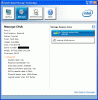
I haven't noticed the fan issue but I've just installed this BIOS version...
EDIT (couple of days later): I still don't notice the fan issue, everything's just normal.
Bluetooth has disappeared, but this happens from time to time when I load BIOS, happened also with the newer versions.
On the other side, my new hybrid SSD/HDD performs fantastically
By the way... I've installed the Seagate Momentus XT --the hybrid HDD/SDD disk-- and I'm quite impressed so far...
EDIT2 (many days later): Some have said that you won't notice the speed improvement with SATA3, to just forget it and keep SATA2. Well, that might be true for regular HDDs, but I have an hybrid SDD/HDD and the speed improvement is VERY noticeable for me, boot time gets halved by SATA3, so I could tell you in a blind-test which SATA version I'm running on. So for those out there with SSDs, believe me that SAT3 definitely shows.
Still no bluetooth with BIOS R1031 though, but confirmed that if I load back R2087 then bluetooth comes back, so nothing to worry about.
Oh, and still no fan issue.
-
That's with R1031H4 original? or hack?
-
Same question - is this R1031H4 BIOS version is hacked or original and where did you get it ? Want to try it, but must see good tutorial how to do it!
-
hi all,
i've found the original bios here:
Sony VPCSA1B7E Notebooks & Tablet PCs > Downloads Free! Drivers and BIOS
it seems to be for vpcsa.
It should be used for all SA/SB/SC/SE but i'm not sure.
i don't know also if you can downgrade your bios directly or you have to install a hacked version before installing the old one.
Hope someone can solve my doubt.
Best Regards
Andrea -
[SUB][/SUB]
Wich SA model did you have?
I also want to try the SATA 3 Bios but i have a new SA4 model... -
Hi KiloMetro and rest of intriguees
It really doesn't matter if it's the "hacked" version or not. What we call "hacked" version would be best called "unlocked" version, since all the "hack" therein is to make the advanced menu available to mortal users, otherwise hidden by Sony enforcers.
Don't get me wrong, I'm in no way underrating the work pyr0 and Camilo have done to accomplish this unlock. I totally thank and make use of their work; I just think that "unlocked BIOS" is a more appropriate term.
Seeing that some have a difficult time at trying to move from one BIOS version to another, I've shared this 'tool' (not really such) to make it easier for the novice:
http://forum.notebookreview.com/sony/686509-multi-bios-no-nonsense-flasher-tool.html
With the above you can load any BIOS you want with no hassle.
VPCSAxxxx (the XXXX is "390X" in my case, but doesn't really matter, it's the same BIOS for the series, even the VPCSB and for what I have read in all these posts, any "S" series for that matter) -
m.susc, wow. Thank You! Wanted to ask if i downgrade to that old version to get SATA3 support and i dont like it, then I can update to the newest one again ?
-
Yes!
-
Thank you very much for everything ...
But I do not really active on Sata 3 with nothing.
The Original R1031H4 bios not active, not hacked, and worse off bluethoo me ...
Nothing, I can only wait, leave version last original, perhaps soon the Pyr0 partner discovers something ... or maybe it was anime sony to give us something new ... we'll see ...
Thank you very much to all and especially to m.susc and darxide_sorcerer ...
regards -
Downloaded Multi BIOS - Do I need something else to get this trick done
?
-
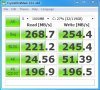
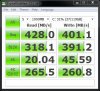
BOOM:
Before:
After:
-
what the hell is going on with my laptop?
PORQUEEEEEEEEEEEEE????????????????? -
Now I'm really satisfied with the results
![[IMG]](images/storyImages/fFT3b.jpg)
![[IMG]](images/storyImages/OQoMb.jpg)
Sony Vaio SA/SB/SC/SE Advanced Menu BIOS Hack
Discussion in 'VAIO / Sony' started by pyr0, Jan 28, 2012.


