Problems? See this thread at archive.org.
I had done both updates but my house is really quiet as well.
-
I just spoke with Sony Customer Care/Tech Support and I was told that making any hardware upgrades by yourself, void both the limited and extended warranty. That also seems to be case the case for ram.
-
Comparison between two Flip 15 specs:
i7-4500U (1.80GHz / 3.00GHz)
Windows 8 64-bit
15.5" Full HD IPS touch display (1920 x 1080)
8GB RAM, 1TB (5400rpm) + 16GB NAND flash HHD
NVIDIA ® GeForce® GT 735M w/ Optimus™ graphics (2GB)
HDMI® out, USB 3.0, NFC
$1250
-------------------------------------------------------------------------------------------
i7-4500U (1.80GHz / 3.00GHz)
Windows 8 Pro 64-bit
15.5" over Full HD IPS touch display (2880 x 1620)
16GB RAM, 1TB (5400rpm) + 16GB NAND flash HHD
NVIDIA® GeForce® GT 735M w/ Optimus™ graphics (2GB)
Digitizer stylus, HDMI® out, USB 3.0, NFC
$ 1800
-----------------------------------------------------------------------------------------------
Are the 2880 x 1620 screen, the extra 8GB RAM and the Digitizer stylus really worth the extra $550?
Would the 2880 x1620 screen consume much more power than the 1920 x 1080? I’m thinking about battery life here. -
just upgraded to win 8.1
i can confirm the touch screen issues (stops working), since the bios update is only available on the uk site I'll ask the support tomorrow
no problems with the fan so far (no sound: videos, web browsing, office), tried some games, then it's at full speedSandySpit likes this. -
Well, what I meant was that I wasn't sure how the config options were with Sony. Yes, I am getting the 15" and plan on either getting 8GB or 12GB. However, if I choose the 12GB would it no longer be running on dual channel? I don't think they make 2 6GB sticks but rather probably a 4GB and a 8GB stick. Would I also be using more battery as well? Thus, would I inadvertently be losing slight performance AND using more battery than intended? That's what I don't know and am trying to figure out.
-
This are the customization options for the memory:
4GB (4GB x1) DDR3L-1600MHz [ $0 base option ]
8GB (4GB x2) DDR3L-1600MHz [ $50.00 ]
12GB (4GB + 8GB) DDR3L-1600MHz [ $130.00 ]
16GB (8GB x2) DDR3L-1600MHz [ $250.00 ] -
Does anybody knows if the images, video, graphics and/or text, display on the 14" (1920 x 1080) resolution, look noticeable different than the ones display on the 15" (1920 x 1080). are they pretty similar or things look better on the 14".
-
Thanks! I found this 7mm 240gb SSD for $130.Black Friday deal Newegg.com - Seagate 600 Series ST240HM000 2.5" 240GB SATA III MLC Internal Solid State Drive (SSD) -
Ah, thanks for the clarification. What about performance wise? Would 2x4GB be faster than 1x4GB + 1x8GB?
-
I got mine and I already am seeing the touchscreen issue. It just stops working, both with finger and with the active digitizer. I didn't update to Windows 8.1
Also, during setup the screen became dim and I can't figure out how to make it bright. There's supposed to be a setting in the VAIO options to disable auto-dimming, but I don't have any such setting. I also don't have a brightness setting in the Intel video driver for AC mode http://community.sony.com/t5/VAIO-H...Adapive-brightness-won-t-turn-off/td-p/169061
Edit: Found the fix here-- hidden in the power options. Why on earth does Windows 8 even have this setting, when it's duplicated in so many other places? How does the typical user figure this out? http://www.pcadvisor.co.uk/how-to/windows/3470454/how-disable-automatic-screen-dimming-in-windows-8/twospirits likes this. -
Interesting that it did not show up using Vaio update, but there is a Bios update for the 13A specifically for managing the fan.
Just did the updated manually. The fan in standard mode still runs pretty much continuously, but much slower, and hence quieter, and less high-pitched. -
to fix my touchscreen i have to log off and relog in.
I also searched for the screen dimming, while I knew of the Windows options it took me a while to find the option in the intel settings.
As I said I never had problems with the fan on my 15". As I am writing this and watching videos it's completly turned off. -
Just received my flip 15A
16gb
512 ssd
GT 735m 2gb
Full hi res : 2880x...
Made all the updates from the French support :
Installed BIOS updated etc...
Then made the win8.1 update
Then again some more VAIO driver updates for 8.1
Fan is fine for me ff most of the time.
No problems with touch screen.
Either with finger or with the digitizer.
Removed most of the bloatware I found. Still need to discover win8 tho... Quite a change...
Overall I am pretty please.
Battery time seems fair :
About 5/6 hour for now...
Haven't really use it tho...
Digitizer seems to be fine too: no much lag...
Wifi is really fine... No troubles at all.
I am pleased until now of every aspect of the machine. Will try ton install some more process intensive software like Photoshop tommorow or monday and see how it performs.
The only thing right now I am not really sure is the front camera.
The quality when launched from the windows camera app is really poor... Not sure if its because its launching full screen or what but something seems wrong there...
Do u guys have a good crisp quality ?
Envoyé de mon Nexus 4 en utilisant TapatalkSandySpit likes this. -
Which version of the 13A do you have. I have the SVF13N13CXB and where is this bios update and or what is the date of the update? I run Vaio Care and it states no updates are needed.
TS -
I have the SVF13N1C5E. The difference compared to yours is that I am in the UK and it's a custom build.
As I had mentioned the update does NOT show up in Vaio updates and I had to run it manually per the instructions here.
Sony : SVF13N1C5E updates | Download updates for SVF13N1C5E -
Thanks, good to know.
btw, I mentioned it in the other Flip thread an unboxing which was done on a review site but the model they used I've never knew about and the only place it shows up is in the Sony support section with a bios update.
TS -
I just noticed a row of irregular bright spots on my screen about 1.5" long. Visible with a white background. Sucks having to return it... Now I'll have to wait for a replacement.
I didn't see before because of the angle of the screen. It's only vislble when viewed from head on or slightly below. -
well...
I left mine charging over night
now it won't turn on..
what the f... -
Oh no did you get the 15A? Just got mine today, hope I don't have to send it back tomorrow!
Sent from my Nexus 4 using Tapatalk -
If you got it, can you check, if you have the same problem like me (I don't know, if I had the problem with win 8 too):
If I rotate the screen complete, bevor I change to tablet mode, everything works fine. But if I rotate and switch to tablet mode in one turn, some Buttons where hit, bevore the hardware keyboard is deactivated. In this case, the ALT-Button stucks and the space button is hit one time. You can see, that all Buttons like space, alt etc. hit, if you switch to tablet mode. Because of that you can't use the virtual keyboard in Tablet mode. -
I exchanged my Flip 15 at Best Buy... The replacement has an even worse screen. It has the same little row of bright spots plus an even brighter spot at the bottom. Does Sony not have any quality control? I increased contrast in the picture to make the spots more visible.
Also, the corner of the box is smashed. There's zero protection for the screen on top of the box, so I wouldn't be surprised if physical damage is responsible for the light leak at the very top (visible on a black screen).

To check yours, set it to 100% brightness and view the screen from directly ahead and slightly below horizontal. That's where the bright spots are most visible. -
I have 3 spots towards the left in the middle of my screen, however as you say you have to put the screen at full brightness and at an angle so it's not too much of an issue for me, I am concerned that they might get worse over time though.
-
My spots are visible when viewing head on, just more visible at an angle. If it was only at an angle I'd ignore the spots, but they make a difference when trying to edit photos
-
Were you to resolve this issue (perhaps by pressing the power button for a few seconds) ?
-
I resolved this issue 20min ago, by calling their service.
I have to send it to their service center ~3-5days and they'll repair it in ~2-5days -
Has anyone ever gotten their customised vaio flip within 3 weeks
Sent from my SM-N900 using Tapatalk -
ordered mine on Nov. 29th, its shipped and being delivered on dec 9, this is in Canada,
I ordered a customized flip 14a -
Thanks.. lucky you
Sent from my SM-N900 using Tapatalk -
If I would be a Vaio Filp 13A owner, regarding the fan issue I would stay persistent towards Sony. I first staggered between "Thinkpad Yoga" (not Ideapad Yoga 2 Pro!) and the Flip 13A. Now I chose the Thinkpad Yoga with i7 prozessor and Wacom Digitizer.
Nice Review is here:
Lenovo ThinkPad Yoga Review | IT Hacks
Regarding the fan at the Yoga with i7:
Even while watching 1080p movies via WLAN the fan is inaudible even when I press my ear against the device... :thumbsup:
When this is not possible with the 13A and the Haswell low voltage processor, sony designed the cooling completly wrong compared to Lenovo. -
Just received my 15A in the mail (2880/i7/Gtx735) and let me just say that the screen is a thing of beauty. Took it into closet to look for bezel light leaks and it looks like there aren't any (it was running the W8 setup, and on battery, so no truly critical viewing yet). It picked up both of my network APs on setup with full bars, including the one at the other end of the house.
The keyboard is (sad to say) a bit on the mushy side. It did sound like I have a small 747 spooling up for takeoff after the update to the BIOS it's very quiet. With nothing but my desktop on in the office, the Sony was quieter. I took it into the recording studio and, of course, could hear it in there, though the fan is completely off right now (it's running the VAIO update). Oh, and the spinning drive is a slug. My 1TB SSD hasn't been delivered yet (maybe today's mail later?); I can't believe they even offer this machine with a spinning drive. It's like offering a luxury automobile with cloth seats. (update: playing a high rate bluray file off an SD card brought back the 747...gonna have to look at the settings)
Anyway, once I figure out W8 and the buttonless touchpad (I feel so old!) I'll do a better check of the screen for hot/dead pixels and load up Adobe CC and Bluebeam to test out the pen.twospirits likes this. -
Congrats on getting your Flip,
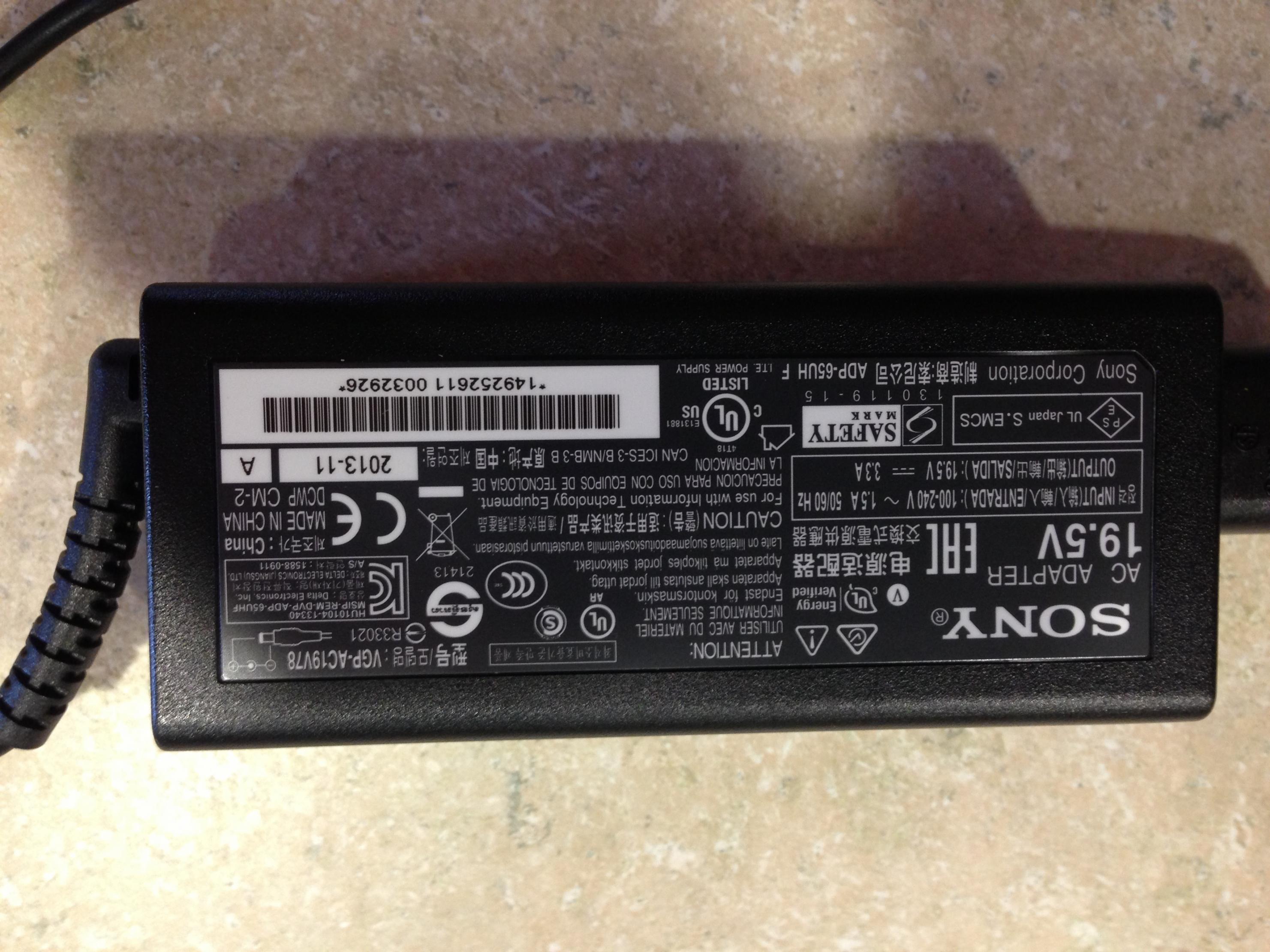
can you do me a favor and take a pic or write down the model/part number off the power adapter and post it please.
Thanks
TS -
Thanks for posting...closely watching your experience...
1Q: did you mean non-IBM (or?) when ref to "mushy"? -
It's a standard vaio tip (the big Sony one (6mm?) with the center pin.
oops - sorry it's upside down...had to turn the phone a bit to keep the glare off the label and it though it was turned around!Attached Files:
twospirits likes this. -
-
The keys feel plasticy and there's probably 0.1mm of "flex" when you depress the keys, which probably only have 0.7mm of travel (that's a guess, I don't have my calipers in the office). It's not a deal breaker, but it's a big departure from the CherryMX-Brown based keyboard I use on my desktop. I'm a lousy typist, so it probably won't really slow me down any more than any other laptop. Note that if you're not a heavy handed typist there may be very little flex. I haven't spent any time with modern chicklet keyboards, so I'm probably a poor judge of what is good and bad in this arena.
-
yeah i know its a normal tip, I 'm just curious as to the part number and the image shows it is VGP-AC19V78, now my buddy can find it and order it on the Sony Website.
Thanks a million.
TSoverzeetop likes this. -
Understood.
I'm looking at an almost identical machine as you've just unpacked. I expect a totally different experience than my current Sony workhorse...plasticy keyboard as well...and still preferred for work over my MBP.
Just assure us that your description of the screen continues to be accurate and I suspect we'll make everything else work because there is very little else like a Sony screen, right?
Good luck with the various installs, tests and the learning curve and thanks in advance for any/all reports!!! -
A BIOS update and 2 Intel driver updates just showed up on VAIO Update for me. I have a US model 13A.
-
Hey guys, i need some help to decide which laptop to get..
My mainly use is editing photos in lightroom, regular web surfing and maybe playing some movies inBRAY format...
Should i get the VAIO FLIP 14 - i7(with incredible design and beautiful screen, but very restricted ULV processor and non-upgardable RAM)
or the SAMSUNG ATIV BOOK 8 ( awesome hi end specs, 50$ more expensiva and 1 pound extra weight)
Hope you can help me out thanks a lot
ps: if somebody owns the FLIP 14 and does photo editing , his/her opinion on the laptops performance woudl help me a lot! -
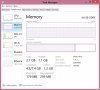
Can you guys let me know what your RAM usage is? I'm trying to see how much RAM the computer takes. Can you guys just do a quick check via task manager. Let me know what % it's being used, and how much total RAM you have. If you can a couple of programs, that would be good too in seeing the usage when opening multiple software. Thanks!
-
My custom flip 13A didn't pass through the being built stage ...It went from processing to sent to the warehouse. Is that weird
Sent from my SM-N900 using Tapatalk -
I also received my 15A a few days ago. I have listed the configuration at the end of this post.
THE GOOD:-
Beautiful PC
No wifi problems, in fact it seems stronger than my iPad 3
Fan - Really no problem in my opinion. the first time I switched it on, the fan started blowing at full power. Shortly after entering my wifi password, the laptop appeared to automatically connect to Sony and download some drivers. Almost instantly, the fan went quiet (as I am using it now on my lap, the fan is running quietly and does not distract me, even though I am running in "performance" mode. Seems to be temperature dependant rather than activity dependant, i.e. when it's blowing it's only because the processor is getting warmer. When the processor cools down, I can hardly hear the fan.
Screen - Beautiful resolution, brightness and colour (although it did take me about ten minutes to work out how to turn off "auto brightness" in Windows). No screen spots (described in earlier posts on the 13A) and as far as I can tell, no leakage. It is truly a delight to have a large screen either in tablet or in PC mode. Perfect for OneNote. However, on some applications, the text is very small, although I haven't yet had time to look into changing some setting in Windows to increase text size.
Windows 8.1 - no problems in upgrading to Windows 8.1 (after ensuring latest Windows 8 updates had been installed and checking the Sony drivers are also up to date).
Sliding:- Some posts reported that when the laptop screen is opened, the screen raises the laptop slightly and that the rear rubber feet no longer touch the desk, causing possible sliding of the laptop. This is not the case with the laptop I received. The rear rubber legs are large and the screen does not touch the desk when in the open position - hence, no sliding.
THE BAD:-
Overall, I'm very pleased and relieved with this laptop, particularly after some of the issues people have posted on this thread. However, there are a few points I would put in "The Bad" section.
Keyboard - Yes the keyboard does have some flex. However, the keyboard is pleasant to use and overall I slightly prefer it over my old Acer 5720 Travelmate (that didn't have any flex). But I agree that it would have been better with no flex.
Create Recovery Media - So far, this is my main concern. As soon as the initial set up of Windows 8 had completed, I tried to create a Recovery Media on an external Samsung BluRay disc reader/writer. I used Verbatim BD-R DL discs. When creating this, Sony gives the option of checking the data after it finishes writing. I selected this option. As I watched the progress, the first 32% was used to create a file (with no Blu Ray disc activity) and the next 32% was used to write to the disk. However, the process failed at 64%, perhaps when the process started to check for data integrity. I tried the process again with a second BluRay disc and got the same result. I am therefore left with media that may not work if I ever need to reset my hard drive to factory set up. In addition, after I upgraded to windows 8.1, I tried to reset my laptop back to its factory state using the hidden Sony partition (after a problem with my iTunes installation). But the necessary files could not be found (apparently because I had upgraded my OS to Windows 8.1). I'm still not sure how I should resolve this and would welcome any advice. (PS: I later managed to fully resolve the ITunes problem).
The other point I would mention, although this is a Windows 8 problem rather than a problem with this laptop, is that Outlook does not synchronise with Google calendar. My old Windows laptop had no issues with synchronising Outlook with Google calendar. I haven't yet spent too much time on this, so there may well be a simple solution that I've overlooked. I will need to get this resolved.
THE UGLY:-
Seriously guys, there's nothing ugly about this laptop. Very fine looking machine.
OVERALL:-
No regrets. Delighted so far. The only other Sony product we have in our home is the PS3, so I would not have considered Sony had it not been for this Multi Flip design.
MY CONFIGURATION:-
Sony Laptop SV-F15N1C5E - Configurable
SVF15N1C5E
Your configuration
16 GB 1600 MT/s DDR3L-SDRAM
1 TB Serial ATA (5400 rpm)
NVIDIA® GeForce® GT 735M 2 GB
Battery life up to 5.5 hours
Backlight keyboard
SD memory card slot x 1
NFC technology included
With digitizer stylus (pen)
3x USB 3.0
Imagination Studio Suite 4
Wireless LAN (IEEE 802.11bgn)
Intel® Core™ i7-4500U 1.8 GHz
Silver
Bluetooth® 4.0
2 years warranty (upgraded to 4 years)
No protection
1 AC Adapter
No Adobe Creation
HDMI™ output
No Adobe® Lightroom 4
39.5cm LED, 2880x1620
Windows 8 Pro
Office 365 Home Premium Trial
English (QWERTY)mobytoby and twospirits like this. -
Nice to hear that Sony is giving a solution to the major issues of this machine.
Thanks for the review.
Enviado desde mi iPad con Tapatalk HD -
http://tv.adobe.com/watch/ask-the-adobe-ones/sony-vaio-duo-with-photoshop-cc-color-dancer/
Nice video about the integration of Sony & Adobe.
Does that means that we will have N-trig full support with Adobe software?
Enviado desde mi iPad con Tapatalk HDtwospirits likes this. -
Thanks for the review; it is good to see that you are not experiencing some of the issues that have kept me on the sidelines.
Syncing Outlook with Google calendar is imperative for me so I'm very interested whether you do figure out how to do this in WIn 8... -
I'm on a stock 4GB config right now (I have 16GB sitting on my desk which I'll swap in when I replace the HD). Utilization has been 55-75% with just Chrome (few tabs - ~400MB), and all the crapware installed, except Kaspersky.
Also, I have a small light leak in the upper right corner, visible with high brightness and a completely black screen; plus, there is noticeable brightness fade with off-axis viewing. When I say noticeable, I mean I can see it - not that it's necessarily objectionable. It may take a couple of days for me to get the time, but I will take on and off-axis pictures with a manual camera setting as soon as I can.
One day in, my impression is that Windows 8 has a billion frustrations, but I'm pleased with the hardware. My daughter is insanely jealous of me for having it. (haha!) -
Okay, I took my 15" 2880 model into a dark room and shot the screen straight on and from 3 oblique angles with White, Red, Green, Blue, and Black. All of the photos in the folder below are at 1/20/f9 (the exact same exposure) on a Nikon D3, 400ISO, with an 85mm/1.8 Nikkor. The screen was cleaned with a microfiber cloth prior to starting and no visible dust or smudges were present when checked by looking at reflected light off the screen. Angles are (very roughly) 0,20,40, and 60 degrees off axis.
It turns out that with the exposure set properly for white, black returns essentially a perfectly black screen (black.jpg). That's good, except that it doesn't really put the screws to the panel. So I changed to ISO1600 and increased the exposure time to a full second in order to see what you come up with if you have better eyes than a human. That is Black0-Black6, including a straight on shot (where you can see my finger smudge from waking it up after taking time to reset the camera) plus 3 turning horizontally and 3 tilting. Note that, even after being in the dark for several minutes, it was very, very hard to see the unevenness, but I could see the minor light leakage on the top right and lower/middle left.
This was with the panel at 100% brightness for all shots. I was disappointed about the finger smudge, but it proves a point - unless you happen to have a perfectly clean display (i.e. you never use the touch while working on the laptop/tablet, or you always clean after every single touch operation) the effects of a single, invisible, clean-finger swipe will degrade your experience more than the inherent limitations of the panel in direct viewing.
Enjoy!
https://www.dropbox.com/sh/ihjgzz55kbfaxn9/LHjh8vWt3qmobytoby likes this. -
@Deltasail
How often do you use the touchscreen?
No problems for you? Mine became unresponsive often (fixed itself after a random time or I had to relog) -
Ah, thank you. Do you recommend going with 8GB or 16GB if one is planning just to open a few PowerPoint slides + OneNote + several Webpages + Maybe 1 other "semi-intensive" program? And for RAM, is there ever a percentage in which you're not suppose to run RAM over? Can you really run up to 99% memory usage without any problems? I was thinking your RAM would be analogous to a credit card's credit limit in a sense that you never want to run over a certain % and want to have at least a certain % for reserve. Is this not the case? I could be wrong. I'm just trying to weigh my pros vs. cons. On one hand, 16GB may use too much battery life if I will never even use it. On the other hand, I don't know what is "maximum usability" as far as laptop RAM goes. Especially when the Flip seems to be using a 2GB page file and most likely I will be hovering around 50% if I were to have those programs out (from what I've seen with a Flip computer on 8GB RAM). However, I'm not 100% sure.
-
I can't say how much your apps will use, but 8GB seems like more than enough. I will say that you can just blow right past your physical RAM if you have to - there's a swapfile that lets you do that as a safety net. It will slow down the machine, but it's not like you'll actually crash. I use Lightroom and Photoshop for fun, and AutoCAD (mostly 2d, but some 3d), plos other techincal programs and pull in HUGE PDFs (think 100 - 24"x36" sheets scanned at 300dpi) from time to time. I don't think I've ever used more than 12-13GB of the 24GB on my desktop. I'm using 6.7GB right now with Acad, 5 PDFs, 21 Chrome processes (yeah, really - I have 3 emails, one calendar, gvoice, anda task list all in separate windows, plus about 4-5 tabs open), dropbox, and 100 other processes running simultanously. Then again, I work on three screens (1 - 30" plus 2 - 20" turned portrait for a 4960x1600 desktop).
I'm testing my 15A for sleep usage with the stock 4GB right now...looks like I'm burning though 1% of my battery every 1.8 hours (starting from 100%, I'm down to 89% after ~20 hours). Once I get my SSD drive, I'll put that and 16GB in and see how it affects the sleep usage. -
Have you heard of this? Experiment: Can Adding RAM Improve Your SSD's Endurance? - Can You Get More Speed From Your SSD By Adding RAM?. It looks like they suggested to add actually MORE RAM if you have a SSD to improve performance, which I plan to get the 256GB SSD on the 15" Flip. What are your thoughts on that? I wasn't sure of how the pagefile affects anything because I was told the Flip machines have a 2GB pagefile? Maybe that was only with the HD and not an SSD?
Vaio Flip: the Yoga hinge comes to Sony
Discussion in 'VAIO / Sony' started by Mitlov, Aug 28, 2013.