Problems? See this thread at archive.org.
Re: Webcam- It shows that there are 3 drivers installed for USB video device as follows
Arcsoft 3.5.0.22
Microsoft 6.1.7600.16385 (win7.rtm.090713-12550)
Microsoft 6.1.7601.17514 (win7 sp1_rtm.101119-1850)
for USB composite device
Microsoft 6.1.7601.17514 (win7 sp1_rtm.101119-1850)
Is this what I need (obviously not)? What do I need and where do I get it?
-
Follow the instructions (Step 8) in page 1. You haven't installed the right driver for your web cam.
-
PORTANT: You must have an active Internet connection to complete this procedure.
Click the Start button and then click Control Panel .
In the Control Panel window, click System and Security .
In the System and Security window, under System , click Device Manager .
In the Device Manager window, click to select the device for which you would like to find drivers.
On the menu bar, click Action and then click Update Driver Software.
I have done the above and the search resulted in a message that the best driver is already installed.
What else can I do? -
You need to point the driver update to the extracted driver folder as mentioned in step 8. Simply clicking "update driver" won't do anything.
-
I uninstalled the MS driver that was there and not the imaging device is gone. Please provide some detail by the numbers. I am not a tech and this stuff is driving me crazy.
-
The driver will not update. I get a message that the best driver is already installed. I don't know how to make it install. It insists on keeping the windows driver that is there and will not update.
-
when you try to update the first thing is to search for a driver or browse your computer. I browse and select the extracted file begin the update and then get a message that the best driver is already installed and the one that I am trying to install just doesn't install.
-
Did you extract the correct driver?. There are 2 models of web cams. Your's should be VGP-VCC8.
You can run the "DPInst64.exe" in the tempexe folder from the extracted files. -
http://i1103.photobucket.com/albums/g467/kaablueii/BusinessImages/browse.jpg
http://i1103.photobucket.com/albums/g467/kaablueii/BusinessImages/result.jpg
Here are screen shots of what I get. Hope that this helps. -
This is the problem that I am having when I try to use the update driver method. Note the two screen shots in the above post. The first is when I right click on the USB video device and select browse I get the tempexefolder that contains the DPInst64.exe, but notice that the next step is to click next. When I do that I get the second screen shot so I never can click on the DPInst64.exe by trying to take the update route.
I could just open the tempexefolder and begin the installation from there, but that is not taking the update driver route. I don't know what will happen because I do not know how to get rid of the windows driver that is there. I do not know how to uninstall the driver. The uninstall in this area is for the hardware and not the driver and when I restart the computer the driver is still there and the hardware is found and is reinstalled automatically with the restart.
Is there something that I am missing on how to get around all of this and be able to access the file using the update driver route? I don't see it.
What would happen if I just open the tempexefolder and double click the DPInst64.exe to install the driver over the other driver? -
You don't need to uninstall the windows default driver, just run the DPInst64.exe from the tempexe folder. This is what I told you to do before.
For the nvidia driver 275.33, you need to replace the modded inf as mentioned in page 1. -
I have a bluetooth problem with a FZ31Z.
I assumed the FZ31Z would require a Toshiba stack as I'm more used to working on the FZ11Z models.
However, does the FZ31Z have a broadcom bluetooth as standard and hence I need to use the broadcom driver?
I ask because when I try and install the Toshiba stack I get the message (lots of other people mention with Win7 64) "turn on your bluetooth.
Help
thx
Simon -
regarding replacing what you call the modded inf I do not know what to replace. I did add the nvscz file but did not see another one to delete. Is the file that this should replace have a different name? What file should I have deleted when I added the nvscz?
This may be the reason that I had problems with the install. If you will refer back to some of my previous post, when I tried to do the install it first performed a scan and the result was that this was not the correct driver and would not let me go any further. -
coolguy- is there any way that I can call you and have you walk me through this so that I can get it done? I am anxious to get my two problems solved.
As far as the nVidia driver is concerned I would like to get the one that provides the most functionality and I know that the one under #4 does not as the Aero Peek box is greyed out and I don't know what else might be effected. -
^ You need to fully read the instructions in step 4.1 to install the Nvidia 275.33 driver. With the driver in step 4, the aero peek functionality shouldn't be afftected.
As far as the camera driver, you might have downloaded the wrong driver. You must download the VGP-VCC8 driver, and run the "DPInst64.exe" found in the "tempexe" folder. -
hello people...!
first, I'd like to say that this guide saved me!!! congratulations, coolguy!
second, I have been using my Broadcom BT adapter along with the WSSU for almost a year. Then, I decided to format my FZ21M. Once again, I followed the guide, and installed everything again from the start, in the order I always previously had.
When I installed the WSSU, it didn't "see" my BT adapter, normally. I did everything as it was supposed to be done (SnyUttls.dll copied, switcher.exe hex-ed, reg. key installed) and now it could see my BT. but it won't disable the adapter now! When I un-check the BT setting, and press apply, it shows the normal windows of "setting up wireless devices", but the adapter won't shut down!!
I have formatted the laptop many times before, the exact order of installations always, and now this problem!
things I tried:
1) different BT driver
2) different WSSU version (no luck)
3) tried to install different Setting Stility/Vaio Event service versions (no luck--worse even)
4) install Win 7 from different DVD (I always use Ultimate edition)
What is wrong with this guys?? Could someone tell me their own sequence of driver & utility installations? Do you think I am doing something wrong?
please, I am relying on this tool (WSSU) too much!
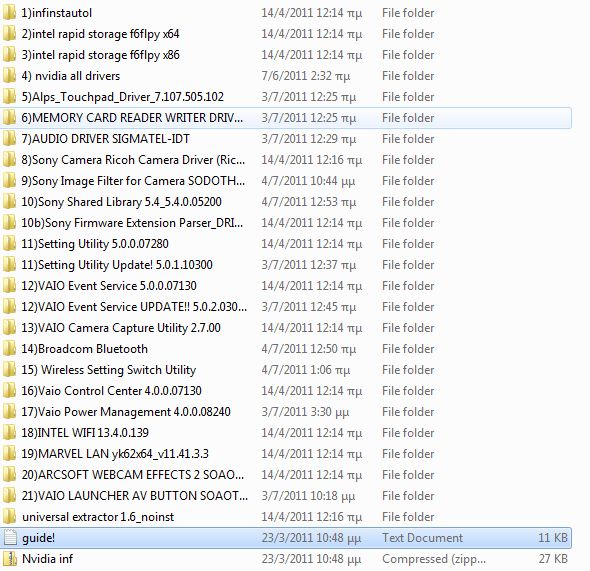
thanks to anyone who helps..... I also uploaded a screenshot of my usual order of installations.. ( I have been installing this way for almost a year, several times, everything being OK) Also, when installing Win7, I have the BT & WiFi switch on, so when I firstly log in into windows, both adapters appear installed.Attached Files:
-
-
Thank you all for keeping these drivers updated!
I already did my clean install when this thread was a bit younger (December 2009).
If I wanted to now update all the drivers to the latest, what would be the best way, exactly?
Also, my gmail chat gives me the BLUE SCREEN OF DEATH when I try to use the VIDEO chat (happens upon exiting chrome browser). Tips? -
You can update the drivers mentioned in page 1 at any time.
Do you have any problems when using Skype? If not, the BSOD should be Google chat's issue. -
stathismes,
I can't comment about the WSSU, since this doesn't work with 64-bit. If I recall, you need to use the correct version of WSSU that works with your FZ.
The Toshiba stack has an option to disable BT from the taskbar icon. Can you do this with the Broadcom software? You can also disable bluetooth from the device manager. -
hello and thank you for replying, coolguy.
I always have used Win7 32 bit, and the WSSU worked well in the past. I have used my FZ's version of the utility, which is why it bothers me why it won't work this time...
I haven't tried the toshiba stack, but as I remember, the old Broadcom driver that came with my FZ also has the ability to disable the adapter from the taskbar icon. (specifically, it's driver version "6.1S3Q307 - 6.1.0.1203")
For now, I disable it from the device manager, since the new drivers have better features that the old ones (ie. hands-free & wireless audio transfer)
thanks anyway, I might find some solution sometime... -
Speed issue with the Intel 4965AGN
-------------------
I have a Linksys 610N router.. and was getting 54mbps w/ a vaio FZ190. Took me a good hour to figure out the issue.. I thought it was a driver thing. So I tried like 4 different ones.
The problem is with WEP or TKIP. they don't support more than 54mbps/802.11g
Intel WiFi Products — Data rate will not exceed 54 Mbps when WEP or TKIP encryption is configured
So.. I took the password off the 5ghz channel, and I'm back to 300 mbps. woohoo!
Thought I'd post this note just in case someone else runs into this problem -
Great post!!!!! thanks a lot!!
-
thanks for this guide, at last, I managed to install everything, but only one problem.
the fu@~#ng optiarc bd-rom 5500A drive
last year i followed this guide and i installed windows 7 on my laptop, but bd-rom didn't recognized bluray discs, cd and dvd are recognized perfectly.
i dont know if this will be useful:
Propiedades del dispositivo:
Descripción del controlador Optiarc BD ROM BC-5500A ATA Device
Fecha del controlador 21/06/2006
Versión del controlador 6.1.7600.16385
Proveedor del controlador Microsoft
Archivo INF cdrom.inf
Identificación del hardware IDE\CdRomOptiarc_BD_ROM_BC-5500A_________________1.7f____
Información de la localización Channel 0, Target 0, Lun 0
if anyone could help me please, i dont know what more i cand do...
before you ask to me, i have installed powerdvd 10, directx 11, so I dont know what's the problem.
thanks -
Coolguy, thank u for this fantastic guide. I have a problem and i think only u can help me. I use FZ31Z and clean install is not ok for me, so i choose to format using recovery and then upgrade it from vista to win7. This guide is also very useful for the special button functions and floating windows in the upgrade option. But there is one problem. I couldnt make it work my s1 button. I follow every instruction and copy files to necessary places. When I press s1 button, I see the pop-up and there is button settings tab in vaio control center but it is just blank no option to change. I follow the installation order here, updated the drivers and allow setup files to uninstall previous editions of vaio event service, shared library, setting utility series and control center. I think there is something i miss in one of these 4 application. What can i do?
-
ematrix,
I don't know what the issue is with your case. You might try uninstalling all the Sony software individually from the Programs list (restarting at the reboot prompt is important) and re-install them from scratch. -
Thank u for the reply. By the way I searched the thread and found that post below explains the same problem i have. Could that user solve this problem? And if I uninstall the vista versions of these programs before the win 7 upgrade, will i be able to get it work?
-
^ You can try that. The installation sequence of the Sony software is very important though (For the S1 button > Setting utility series and Vaio control center sequence)
-
Thanks. I solved the s1 button problem by uninstalling sony software before upgrade. But now another problem i have. I couldn't get the wssu work on 32 bit win7. I followed the instructions of gary but still there is only lan options, no bluetooth switch options. So does it apply to fz31z, anyone tried in here? I couldn't figure out where i am wrong.
-
^ You could try different versions of WSSU. Try the WSSU meant for your model first. As the WSSU doesn't work with 64-bit, I can't comment more.
-
I misconfigured the regedit part of wssu, that was my problem. Now i see all three options in wssu but cant switch 2,4 and 5 ghz independently. I used the snyuttls.dll 4.0.00.06270, even though my original sony shared library version was 4.1.00.09040. Anyway I tried my versions sonyuttls.dll but still no luck. I modified my fz31z model's version of wssu switcher.exe and used it, also tried gary's version but i can only adjust bluetooth and wlan independently not the frequency modes.
Anyway again, I have the problem of brightness now. I could adjust the brightness after closing lid at first time. But now İ cannot. I uninstalled my nvidia driver and used driver sweeper then installed nvidia again and at first restart it was fine working. After the 2 nd restart i again lost the control of brightness after lid close. my lid close is adjusted to do nothing and I wonder if it happens because it is not a clean install but instead an upgrade. I am working on this win 7 thing for about a month and maybe reformatted at least 8 times. Always another problem occurs. I am really tired... -
The issue with brightness going away after a lid close is a result of the modded library. But there is an EASY solution. If you kill the "switcher" BEFORE you sleep the machine the problem disappears. What I did was to create a task scheduler task that starts switcher on a BOOT up. (Not login... boot up ONLY.) That makes sure my settings are the way I want on a reboot. I then kill switcher after that. I have a shortcut to switcher in my start menu on the RARE occasions that I need it.
Gary -
Thanks Gary, you are right. But anyway, i cannot understand the reason why these two dll's interfere. Dll's name has changed, so how could the brightness could access to that particular dll and cause trouble, really weird... Anyway, what do you say about the wssu, i cant control all 3 options like u. What would u suggest?
-
We have only changed EXTERNAL name of the DLL. The problem occurs on a sleep cycle because after that the INTERNAL name of the DLL comes into play. It's complicated.
I only use the wssu to turn off Bluetooth. So I have no idea any more what other options work or don't work. You'd have to go back to my old notes in the thread for that. But if I seem to remember that not all of the options worked, at least not independently of each other. My recollection is fuzzy.
Gary -
You could change the wifi bands as mentioned in the 1st page.
-
ok thanks and still no way to change the interface of vaio launcher?
-
Coolguy, you need to remove the link for the 64-bit Intel RST as it no longer works. The 32-bit link still works AND it takes you to the page with both versions (32 and 64 bit).
Also it looks like Intel is no longer providing updates for our ICH8M-E-M controllers, since Intel RST 10.6 does not include it. Oh well, cant fix what isnt broken
-
Thanks for the information. Yes, Intel doesn't seem to update the older PM965 chipset related drivers anymore.
Fixed the RST download links. -
Hey again. Questions are endless. Now the problem is my caps lock num lock scroll lock on off indication bar is gone. I think it happened because of the widcomm bt update. Did you guys also experience it? How can i turn that indicator back on??
-
ematrix, I think that the OSD for caps/scroll/num lock keys show up in the middle of installing Sony software, but disappears after reboots. This is normal.
-
OSD for caps/scroll/num lock? I don't remember EVERY having those, since there are LED's for all three of these.
Gary -
The Vaio event service shows the status of the Caps/ Num/ Scroll lock keys in the taskbar, right after installing the service, but the taskbar icons disappear after a reboot or after installing other Sony software.
-
I think I got the solution, at least for broadcom bluetooth stack users. Here it is:
Go to regedit: HKEY_LOCAL_MACHINE\SOFTWARE\Widcomm\BTConfig\General
Set "KeyIndication" value "1" and restart. You should now see the lock keys status bar. -
anyone tried that yet??
-
Need a bit of help here....
I'm trying to find the latest BIOS for the Sony VAIO VGN-FZ27G notebook.
The current BIOS on the laptop is R1120J7 from back in 2007.
I'm pretty sure there would be a new version, but I just can't find it anywhere. Not even the Sony site.
Thanks in advance. -
Nope, there has not been a newer version ever released.
Gary -
It seems that no one has broadcom bluetooth stack, or am i wrong?
-
All the FZ-2XX or newer models have Broadcom bluetooth.
-
So, coolguy, don't you have a "keyindication" value in your registry?
-
^ My FZ-190 has Toshiba Bluetooth stack (BT hardware is Alps) and no registry entry like the one you have.
-
Hi Coolguy,
I have a VGN-AR630E, will this win7(32 bit) update of yours work for my laptop.
Windows 7 Clean install Guide for Vaio FZ
Discussion in 'VAIO / Sony' started by coolguy, Oct 28, 2009.