Problems? See this thread at archive.org.
When you add the "-overall" command to the Intel Chipset Driver 9.1.1.1025, does it update ALL drivers in Win7?
For me in my 32-bit install, it only updates the USB Controllers and the Ultra ATA Controller. It does not touch the other devices shown in the photos of device manager that you had before. I have the same exact devices that you have.
I end up having to use the "-a" command to extract the drivers, then manually update the remaining drivers. Is this recommended, or do you think I should leave these alone? Thank You.
-
The overall parameter updates only the required devices, as other other chipset devices were already recognized by Windows 7. Intel drivers (manual update) just updates the strings, and there will be no real benefit of doing that. So you can leave the untouched devices as they are.
-
Makes sense, thanks for the quick reply.
-
Guys, following this guide, do you have Sigmatel HDMI 5.1 audio out in sound devices and can you also set it up as default device?
-
Use the driver in my guide. Also HDMI out in FZ doesn't support 5.1 channel sound, only 2.1.
-
Thanks for guide, I finally fixed my SD memory card reader after much heartache. I can't get the webcam to work though with the Camera Capture. I tried what you said, using the Universal Extractor. When I tried to update the driver, Windows said that it already had the best driver. Should I delete the driver?
Then the SFEG... I couldn't find WHERE to put it. There was no longer an unknown driver, maybe it fixed itself. lol.
The S button still isn't working at all. It used to mute the volume on my computer. I had gotten the volume buttons to work before with the Utilities file.
I got an annoying popup when I put the Event Launcher on. My computer kept claiming that the battery was no connected properly, but I could run it on battery just fine. I finally found that the folder ISB was causing the issue, so I deleted it. Problem gone .
.
-
Hello coolguy!
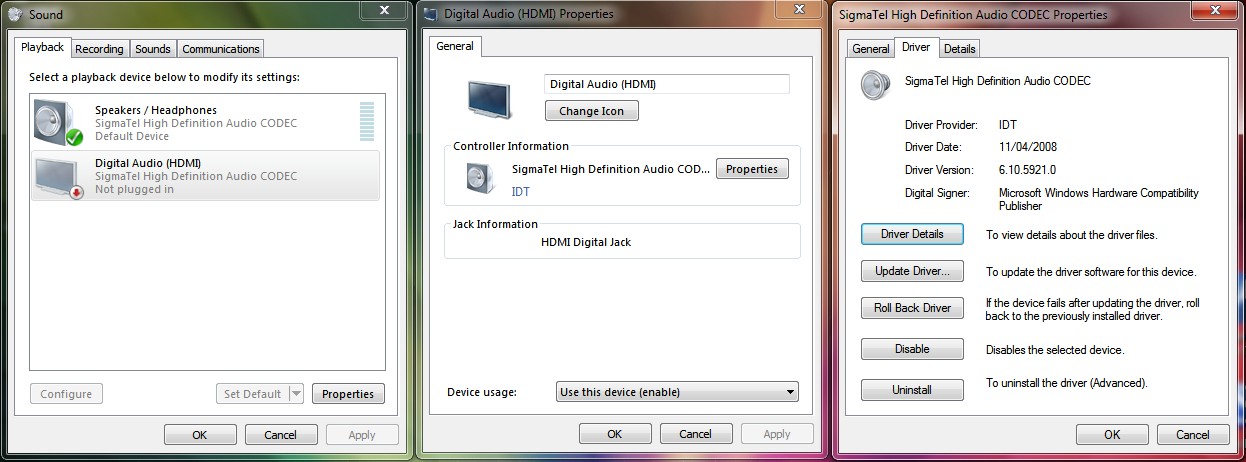
2.1 would be also nice, but I cant use HDMI as default sound device even if HDMI cable is pluged in, the button "set default" (screenshot in attachment) stay gray all the time.
What do you think about this problem, mybe its nvidia's driver fault?
Thanks in advance!Attached Files:
-
-
You might uninstall and then reinstall the IDT driver. Here's how it looks for me (see attached image).
Attached Files:
-
-
coolguy,
I would have been lost without your helpful instructions for my Vista 32 bit to Windows 7 64 bit clean install. I have a Sony VGN-FZ340e, and I have gotten through most of the installation. I was starting to load external devices and software, and noticed that I couldn't see my external hard drive (the one with all of my data on it, of course). I was able to see a USB thumb drive and save and transfer data, and I am using a wireless mouse and keyboard through a 7 port hub. At the very beginning of the upgrade, I noticed a yellow exclamation that mentioned Mass Storage, but since I am a rookie at computer rebuilding (who knew upgrading an OS could be this hard!) I didn't write down exactly what the error was.
My external hard drive is a Western Digital Home Edition Book and their site says that the drive should work with Windows 7 standard drivers. I looked on the Windows site, and other sites, and can't seem to find what driver to install. I currently don't see a yellow exclamation next to any of the USB drivers or the E/F external drives, but my hard drive definitely isn't being noticed by my computer. (I did check the connections, and power)
Please help, I've gotten this far with your awesome instructions! -
Zgolden, I have a WD My Passport Essential and it works fine with my FZ-190. Try disconnecting your external drive, restart your laptop, and reconnect your external Hard drive. The yellow exclamation mark you saw was for the memory controller/ card reader driver (see my guide). Is your drive powering up when you connect it into the USB port?
-
Rajesh,
Caught up by the 1st rule of computers...try to unplug it and plug it back in first. I am sheepish, but happy. I had tried unplugging the device from the laptop several times, and powering down the laptop, but I never powered down the external drive. Thank you for your help, until I found your post, I was definitely in over my head with the clean install...lots of driver failures. -
thanks coolguy. i used your guide to do a install on my FZ140E.it worked great, and your guide helped tremendously. i was still missing a few drivers, so i ran driver genius pro, and got the last remaining ones i needed. from what i can tell, everything except AV mode and the S button work. the S button is functional, but nothing much happens. i am going to follow your guide to assign another program to that button...thanks again.
-
First of all thanks for this tremendous guide!
I've followed all the instructions, dowloaded the drives, except the GPU cause I own a FZ31Z and it's different (nvidia 8600M GS). Almost everything worked like you define in the guide, the bluetooth stack didn't want to work so after all i've runned the driver genious pro and solved the problem.
The only thing that is killing my nerves is the AV Button, the universal extractor just doesn't extract the vaio launcher, some error window shows up. Don't know what do.
Is there any other soft to extract it??
Thanks again
Bruno, Portugal -
You are welcome. What drivers were missing from your FZ?
-
How did you extract the Vaio Launcher software? The method in my guide works flawlessly.
-
there were 2 drivers missing on the hardware manager tree. one was a mass storage controller, and i think the other was an audio driver. i had downloaded all from the 1st post, but for some reason, they would not install properly. that was when i remembered i had the driver genius program, and decided to give it a try.
i was also having the problem with my screen going black randomly, and used the updated driver you recommended later on in the thread, so thanks again. it seemed to do the trick... -
Well I used the Universal Extractor just like you recomend in the guide, and this morning i've tried ton re-download the vaio launcher to see if it was some problem with the exe previously downloaded... and it was! ;
I could extract it flawlessly, but after aplying changes setting the AV mode button to open windows media center, when i press the button nothing happens
and it's strange cause the S1 button works fine.
best regards -
Are you using the same versions of other Sony utilities in my guide? Try the method below.
You can copy the "VESAVmodebutton.dll" file from C:\Program Files (x86)\Sony\VAIO Launcher to the C:\Program Files (x86)\Sony\Vaio Event Service. Then open "VESConfig.ini" in the Vaio event service folder, and add "VESAVModeButton = 1" without the quotes under [Default Extension], save the edited file. Restart and press the AV mode button. -
Cool Guy ... did you figure out how to enable the wireless switching utility on the x64 .... ??
if not .. how do i make my laptop works on the 5GHz band (wireless n draft) ??
thanks in advance for the answer ...
--- my notebook is FZ285U --- -
I didn't make the WSSU to work. But the default Wifi setting should enable both 2.4GHz and 5GHz bands. You can check it in the advanced properties of the Wifi adapter.
-
I cannot get my web cam to work.
Model - VGN-FZ260E
Any input?
Great guide by the way solved a lot of issues.
-
What is the model name/ number of our FZ's camera? The driver in my guide works only with VGP-VCC4 Ricoh camera.
-
Hi. I found some interesting information at VAIO USA driver pages.
link is http://esupport.sony.com/US/perl/swu-list.pl?mdl=VGNFZ220E&SelectOS=46
FZ220E has Windows 7 Drivers... But I cannot guarantee those drivers work flawlessly. There's no cardreader driver and proper audio driver.
-
Thanks for posting this. Sony has Windows 7 drivers (not all drivers) posted for models starting from FZ-2XX series.
-
Hi, I just install Windows 7 professional 64 bit version and I cannot succesfully install graphic card. I have VGN-FZ31Z where is GeForce8600M GS. I tried download almost all drivers from Nvidia websites, I tried also guide here (rename nvmt) but nothing works!!! I am getting crazy about that. All drivers works correcly only graphic not. Every time when I run instalation file I get this message http://www.e-shop.oldstaj.cz/Untitled.png . What Am I doing wrong???
Thank you in advance -
You need to change the hardware ID if you are using the attached nvmt.inf file in my guide (which is meant for 8400M GT). Download the laptopvideo2go driver in my guide as an alternate.
-
I cannot unzip file from the laptopvideo2go - I everytime get some errors. So i try it with the first driver 195.62_notebook_winvista_win7_64bit_international_whql and I put in ListDevices.txt this value:
DEV_0425&SUBSYS_9005104D "NVIDIA GeForce 8600M GS"
DEV_0425&SUBSYS_9005104D "NVIDIA GeForce 8600M GS"
where 9005104D is number my graphic card. In nvtm.inf I didn't put anything. Then I tried to run setup and again same error :-( -
You need to change the DEV and SUBSYS ID's in more places. See instructions in my guide. You can also open the attched nvmt.inf and change the hardware ID for every instance of 8400M GT. What is your hardware ID (found in "Details" tab > Hardware ID) in Device manager?
Laptopvideo2go driver works fine. You need to run the exe (driver file) and replace the inf with the downloaded modded inf. -
aaa OK I got it and now it works correctly. Why is it so difficult for common users? Nvidia should release some driver :-/! Thank you very much Prochy
-
I used the links refered on your guide to download the drivers and utilities, so I guess I'm using the same as you are... but what a hell, you are amazing , just did what you told and the AVbuton reborn from the ashes, now I have my FZ31Z almost fully functional... the cam and mic don't work. I do I see my camera model?, it seems to me that is not a vcc4 and the driver is not working for me.
Anyhow thanks a lot for everything Rajesh, you've been truly, truly espectacular
-
Aw come on, his head is going to get so big he won't be able to put a hat on. No, seriously, my friend Rajesh has done a great job figuring out this jungle/tangle of drivers. He has given me innumerable amounts of help.
Gary -
Thanks guys. I need a hat now.
-
I was wondering if you could point out which drivers you updated. thanks
-
Thanks for the suggestion. I will post a change log for future updates.
-
Got it... finally my cam an mic are fully working. FZ31Z models are equiped with VGP-VCC8 ricoh cameras
Here it is another change to the guide on ths kind of model
Keep up the good work guys
Any news on swintching utility. I got Vaio Smart Network but I can only change the bandwith conection 2.4 or 5.0 GHz -
Where did you get the camera driver for your model? The Wifi switching utility doesn't work as expected. Disable bluetooth from the device manager and you can turn off the Wifi from Windows mobility center (if you don't use the switch).
-
Hey Rajesh
I seem to still be having problems with my volume button and my fn of course. Im installing everything by your guide but I cant get it to work. Does it matter if I try to install the drivers from the begining, or do I have try to uninstall everything first? Pretty much the only reason I havent completly switched over to my win 7 64 bit is because of all these little things that Im having trouble with. Also im running a FZ-180 E/B if that makes a difference. -
You need to install the Sony software in the right order as mentioned. Uninstalling and reinstalling is better for Sony software.
-
thanks, Im trying it out right now. Ill let you know how it goes.
Edit: Well I re-installed everything is working -
Hi
I did a search but came up empty-looking for Windows 7 32-bit clean install guide for AR series.
If there is one, could someone pass along the link, and if there isn't one, any possibility someone could make one.
Thanks -
tase22
go here you will find guide for AR series:
http://forum.notebookreview.com/showthread.php?t=344027
hope to help -
ok last gripe. Im trying to run an app, using the build in mic and I cant get it to work. I cant even get it to configure in the sound menu. has anyone tried or had a similar problem? There is a microsoft driver installed, but I cant get and feedback.
-
Change the default microphone in the recording devices if you are using the default Microsoft HD audio driver. Right click the taskbar speaker icon, select "recording devices", and change the default mic. For some reason the default audio driver defaults to the line in microphone jack.
-
I've been running this since December thanks to your awesome guide, but today I noticed my ethernet port does not work and the ethernet controller is not listed anywhere in the Device Manager. I have nothing there to try to update to the Marvell driver. Do you have any ideas? I'm using a straight up FZ190.
Thanks! -
Was the ethernet controller listed in device manager after the clean install? Did you disable it? Open device manager, right click your computer name, and scan for hardware changes. See if this re installs the network controller driver.
Also restart your laptop. -
coolguy thanks for the guide. can you pls tell me how can i gey my bdrom driver as it doesnt appear on my computer!? thanks again.
PHP: -
You are welcome. What FZ model do you have?
-
My Sony FZ-190E was upgraded (clean install per your instructions) to Windows 7 64 bit. It has been working great for 2 months (camera and microphone work). This past week I had the blue screen of death appear while using Skype.
The first few times this happened I was able to reboot and everything worked fine. The last time it will not reboot into Windows 7. I have a message that states Windows did not close properly last time. I'm given two options 1. recover or start normally. Both options get me to a black screen (will see Windows 7 logo briefly like it is starting, but then screen goes black).
Any suggestions on what to do?
Thanks.
-
Was there any information in the blue screen?
-
Yes, but I don't have those details. My daughter was using it and she did not write the error messages down.
Windows 7 Clean install Guide for Vaio FZ
Discussion in 'VAIO / Sony' started by coolguy, Oct 28, 2009.