 Problems? See this thread at archive.org.
NO MORE CRAP, NO WINDOWS DEFENDER, NO METRO APPS, NO TELEMETRY, NO SPYING, NO MORE BLOATWARE, NO UPDATES
MORE FREE RESOUCES: RAM, CPU, hdd & ssd SPACE
ENJOY A SNAPPY O.S for gaming and office
ENGLISH & PRO X64 ONLY
INSTRUCTIONS:
1) READ ALL
2) DOWNLOAD, USE RUFUS TO PUT IN A USB, BOOT, INSTALL
3) INSTALL OPEN SHELL OR ANY START MENU REPLACER (YOU HAVE TO DO THIS)
https://github.com/Open-Shell/Open-Shell-Menu
5) INSTALL DRIVERS, APPS, ENJOY
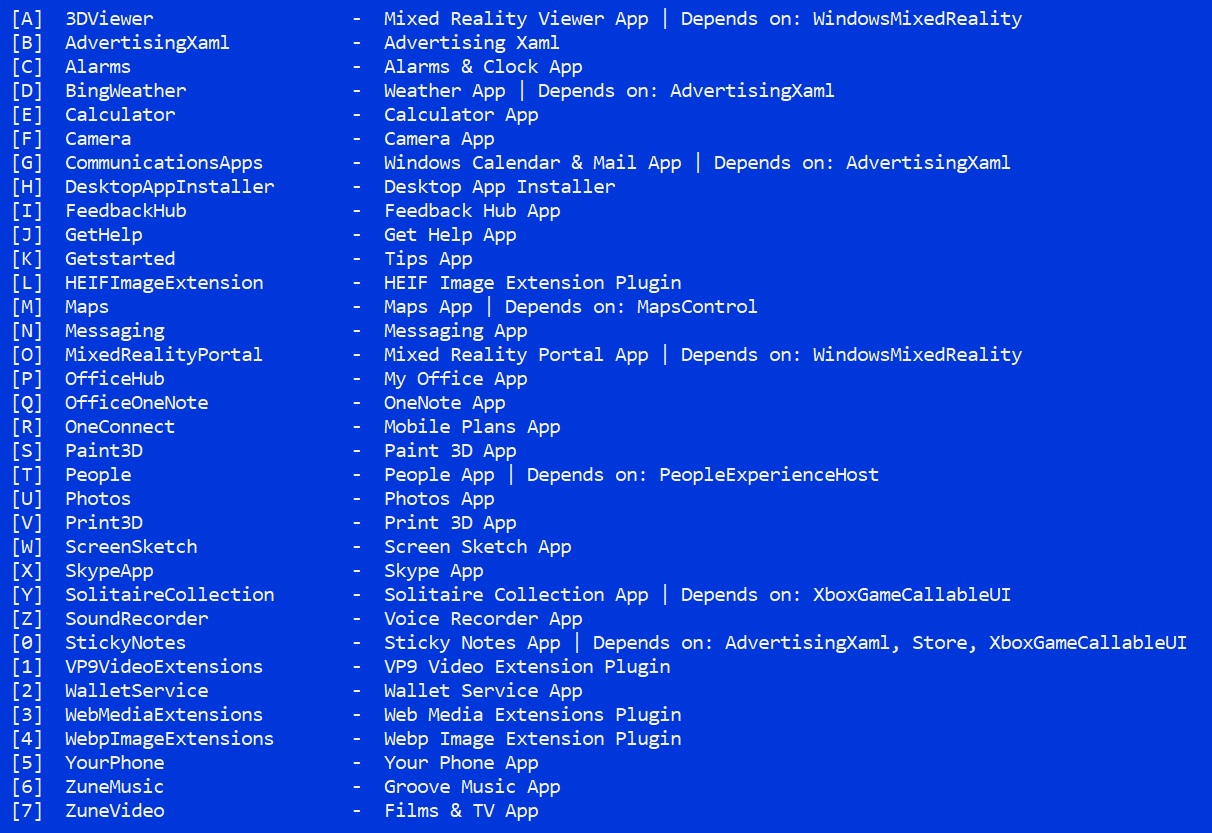
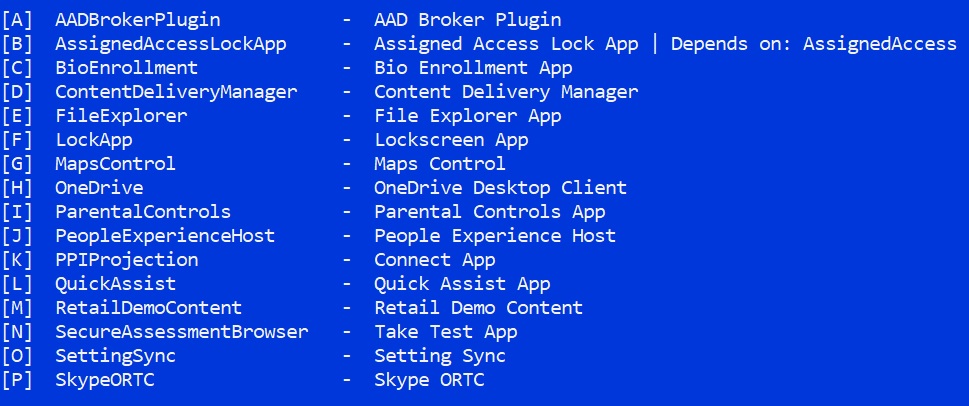
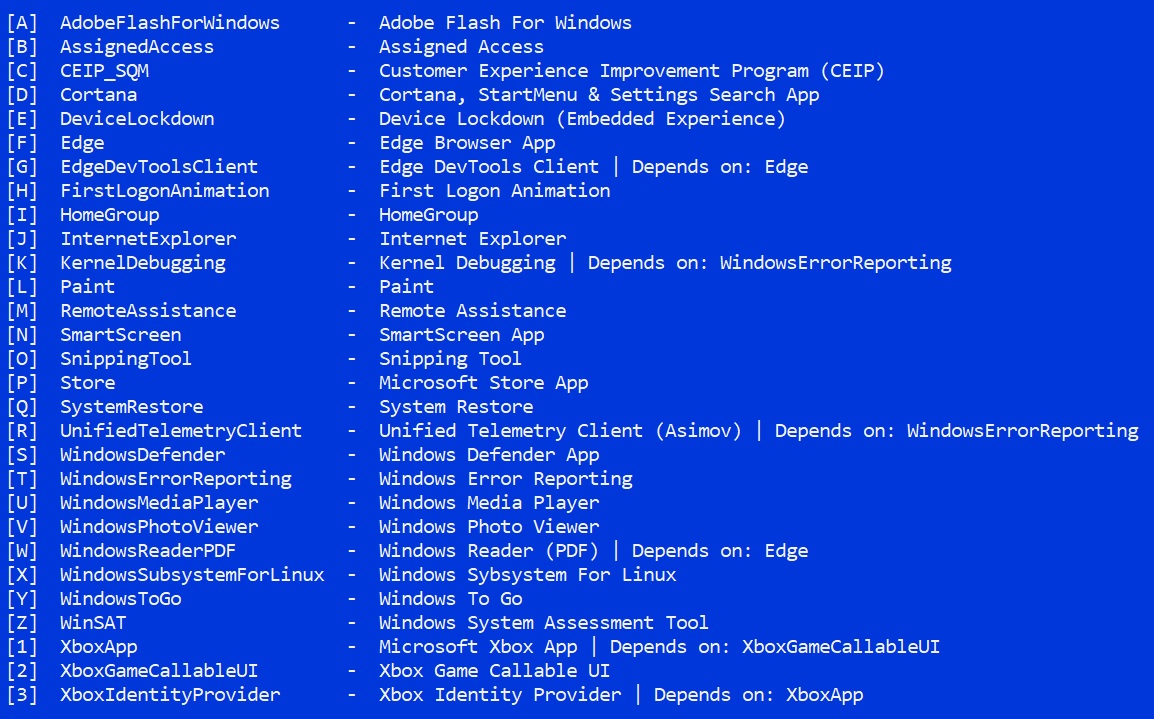
WHAT WAS REMOVED?
(everything msmg allows, yes all)
!!!!!!!!!!!!!!!!! READ THIS !!!!!!!!!!!!!!!!!
THIS IS SUPER IMPORTANT
BUGS OR FEATURES
You need a start menu app like CLASSIC SHELL (OPEN SHELL IS CALLED NOW) for the search in the start menu to work, remember this is anti metro crap, windows search works fine with that app
WINDOWS UPDATE WON'T WORK
THIS ISO HAS NO STORE, SO WINDOWS STORE GAMES WILL NOT WORK (FORZA, GEARS 4)
GOOD TOOLS LIKE PAINT WERE REMOVED, WHY?
here:
https://winaero.com/blog/download-classic-paint-windows-10/
Yes this sucks, but there are many open source lite apps and better, sorry, msmg is easy to use but way too annoying. MSMG has 3 menus to remove stuff, each menu has tons of options, the problem is to delete apps one by one with no GUI and no checkboxes by click, you have to press one key, wait, another key, wait, and repeat forever. thankfully there is a delete all apps key, and i use it on the 3 menus, it is such a time saver, but the bad thing is that some good apps will be deleted (like paint, paint3d and snipping tool are the only ones i can remember), but the rest of them are really crap
!!!!!!!!!!!!!!! INTRODUCTION !!!!!!!!!!!!!!!!!Some guy from this forum closed his win10 debloated thread for some reason, i will try to continue his work, i cannot update the isos every month but i will update sometimes
i removed everything that can be removed with msgm, i always do this with no problems so far, sorry if you need store and other crap like windows media player, edge, hyper v, etc. sorry but i do NOT care, i will always remove everything msmg allows, period. i never had any issues or need of the removed crap and i use my pc a lot, for heavy gaming, browsing, photo editing, video editing, for all, NEVER HAD ISSUES to this day.
If you need any windows feature, then make your own iso, it is easy, just download the iso using WINDOWS ISO DOWNLOADER, use MSMG, then remove the features you need.
After install i recommend to use DWS (destroy windows spy) to finish the work, remove even more crap, edit host to block telemetry, kill UAC, etc. Also o&o shutup10 app and any other win10 debloater app helps too
How do you know the iso is ok? easy!
EVERYTHING SHOULD BE A LOT FASTER THAN EVER
when you FRESH INSTALL there should not be windows defender
I have been using msmg since creators update came out. so i learned to use the toolkit, and so far it works great, no issues at all, games, programs, everything's just great and SUPER FAST, i never needed any of the bloatware removed, never had problems with any app or game. After a fresh install, having no stupid WINDOWS defender activated is just great for me, no sluggish and no need to find regfiles to disable it, that is heaven my friends.
optionally i do this to enhance my user experience
open cmd with admin rights, type:
net user administrator /active:yes
enter, then:
powercfg -h off
also search secpol.msc in the Start Menu
Local Policies
Security Options.
User Account Control:
Run all administrators in Admin approval mode.
disabled
with these you disable hibernation and gain more ssd space, also make you an admin and stop asking you stupid questions if you want to install something, now the pc is yours.
also i disable pagefile to gain performance and ssd space, because i have 16gb on my desktop ad 8gb on my lap , that is up to you
--------------------------------------
CHANGELOG:
01-06-2020
20h1 2004 19041.264 x64 pro eng
latest msmg
removed all crap and used all tweaks in msmg but driver downloads are enabled this time
27-05-2020
20h1 2004 19041.208 x64 pro eng
latest msmg
removed all crap and used all tweaks in msmg
29-03-2020
latest msmg
1909 18363.752
removed all crap
20-09-2019
MSMG 9.4.2
18362.356
REMOVED ALL CRAP
08/03/2019
17763.348
MSMSG 9.1
REMOVED ALL CRAP, latest kb, TELEGRAM CHANNEL, USED ALL MSMG TWEAKS
12/01/2019
17763.253
MSMSG 9.1
REMOVED ALL CRAP, SADLY YES EVEN PAINT, SORRY, LATEST MSMG, LATEST cu, USED ALL MSMG TWEAKS
19/11/2018
MSMG 9
LATEST ISO 1809 V2 FROM NOV, NOT THE OCT ONE, REMOVED ALL CRAP WITH MSMG, this time msmg went crazy with tons of more options to remove and it is easier now too, sadly paint will die too
12-09-2018
MSMG 8.8
LATEST UPDATE FROM JULY
jun 29 2018
17134.191 KB UPDATE
MSMG 8.7
i learned how to remove extra images (home, edu) and make the iso smaller
jun 28 2018
release WIN10 1803 X64 PRO LITE NOBLOAT 17134.137 using msmg 8.6
1.5
march 30 2018
update 334, msmg 8.2
1.4
February 20 2018
update .248, msmg 8.1, only x64pro for now, sorry
1.3
december 31 2017
new x64pro iso with msmg 8.0 and update 125 integrated, happy new year, did not added dx9c and .net3.5 or anything else to avoid problems, just removed all crap
1.1
november 15 2017
updated 16299.64 for win10pro x64, added .net3.5, added dx9c, who knows if they cause any trouble, i don't think so
1.0
november 07 2017
initial release
-
My .02, I installed Window 10x64 Pro 1709 and it's not rocket science to figure out how to configure it to one liking. I don't need to create a ClassicShell start menu just by unpinging the tiles and pushing that tile block to the left it become just like Win7 Start menu without all the fuss. All one needs to do is study and learn about their O/S to configure it to their taste and usage-that's what I did and have no issue with it. I would start by saying I use OldNewExplorer to change the Explore Ribbon back to a more useful function and then loaded Tweakui 4.3 to remove shortcut and remove Shortcut word and to disable OneDrive. And after some Regedits I found and used in the past it functions just like a Win7 O/S without all the nasty Tiles from MS. I even disable Cortana with Regedit and if one just takes their time to look at the Settings they would better understand and disable all the junk without resorting to destroying the O/S. IMHO-and got no bloatware.....
sixor likes this. -
"disabling" metro apps is not the same as not having them from a fresh install, pc is more snappy, and not having the stupid win defender enabled by force and by default is the best part.
destroying the OS lol, nothing important is touched, drivers, network, managers, all is there, only metro apps and bloatware no ones uses is removedMr. Fox likes this. -
This is so sexy, and would you mind making one for Home Editions what's the difference with Pro? I also prefer removing everything possible as well freeing up my ssd space and getting around 218GB Free, maybe more now. Few questions though. Would you also supply the update packages after 16299.19? Since removing Media player does this also remove the media features that come included? Any idea why the file is so big 4gb?
Last edited: Nov 7, 2017 -
yeah, maybe i will do win10 home non pro, the problem is msmg and how annoying and slow it is
you can download post updates with wumt (windows update is on by default) i disable it after install
never had issues with media playback with media player classic home cinema
file so big? ask msmg toolkit -
no one can contact me and I do not approve of having my name mentioned in your project
-
ok, and the iso? -
This is great! Is it pretty straight forward to make your own ISO with the apps you want? I'd still like a few apps loaded.
I may try this on my thin and light netbook. Win 10 is too big and bloated to run decently on lesser hardware, especially low storage space. -
it is easy actually but slow and annoying, i wish msgm would be like press f to delete all
-
I do a clean install on a system not connected to the internet if you really want faster install - don't have it connected to the internet and just make a local Admin/Owner account this is by far faster and prevent junk download from MS update til your ready to let it after you configure it. I always tells those wanting to do a Fresh install disconnect from internet to get a clean install and you can configure it before it even gets to the internet. I never use my Microsoft account to log in that is asking for trouble from the start. I installed W10 Pro on multiple computers with no Internet connections and then configured and had no complaints other then why don't this have Office 2016 as well. And so far I can get on my computer without logging to a MS account to just use my computer.
-
well, to be honest i let it connect to internet so it can download some missing drivers and update others
most of the time i have to launch manually the driver update in device manager -
That can wait it won't break because your not online. What you need to do is have ready USB downloaded drivers for your board or hardware predownloaded already to offline install. I never had problem doing this especially if your doing a clean install not from OEM Factory Recover media. And even then I remove all the junk. I don't see what bloatware from Windows 10 when it is a Clean Retail media those don't come junkware loaded to start with as compare to Factory OEM Recovery media that always come with junkware one doesn't need and those you can clean and then make Recover media image to restore at later time with no junkware. I installed 1709 and it had no junkware to remove plus I predownloaded all my board/hardware drivers ahead of time and then went offline to install and create Recovery image that can be used later to restore to do update and use my USB acronis boot drive to create and restore the image without having junkware to deal with.
-
yep, that would be the best way
but still, for my 2 laptops, i find windows auto driver works, it download the stupid intel hd video drivers, asus touchpad and intel chipset crap.
for my gamer desktop i manually install drivers
i have have a driver pack updated, and it works most of the time too -
Edge browser is still there.
Note; I'm back on Fox's Version, and been testing this one out on a different PC. You should use the Tool supplied by microsoft to hide the driver updates. Only download drivers officially from the manufacturer site and looking for the vga's yourself.sixor likes this. -
hmm what iso?
weird, but maybe i forgot to press the B key to delete it, that part is annoying in msmg, going one by one app, there is no delete all kay on that menu, sorry
what tool to disable drivers?
you can use wumt to disable win updates, and destroy windows spy, and for driver there is a setting on control panel to disable driver downloads i believe -
Pro 64bit.
I do miss when the installs use to be only 3.3Gb, I was using the showhidewindowsupdates you'll have to look it up. Basically the tool lets you search windows update untick any ones you dont want to install and only download the security ones etc. Not sure if that even works when disabling driver downloads yourself. I think i tried it before and the drivers still slipped past. Too many unnecessary features.Last edited: Nov 12, 2017Vasudev likes this. -
if someone else confirm this bug, i will make the iso again, i really doubt i forgot to delete something but this can happen if you ever used msmg, pressing letter A B C ..one step at the time, maybe i skipped one letter by mistake
i miss the good old days of WIN VISTA, VLITE AND XP NLITE, those isos were art, those were true lite with no errors or issues, after win7 it went to hell those cool apps to debloat windows, they became way too annoying and full of errors. i even had a 700mb cd of vista lol
WUMT is a tool great for updates, and disable updates too. -
16299.64 coming up
EDIT: 16299.64 is online for win10pro x64 only
added .net 3.5 and dx9c, i hope they dont have issues
please let me know if it works ok, i cant test it since a have no other laptop hanging around, i dont want to format yet mi main pcVasudev likes this. -
-
yep, but nope
i dont want to, someone else could help -
I mean bro @Phoenix always tested own modded Win 10 Bloatware Free OS versions before he posted them on the web. Always test it on your own computer first. Wrong path doing it this way.Vasudev, 0lok and saturnotaku like this.
-
so i do this for free, yet you complain that i don' t test it?
i see why phoenix stopped with this -
I stopped because in the past, the MSMG Toolkit worked great, but with the introduction of the Fall Creators Update, a lot of things changed in the structure of the files / registry entries in Windows that it became very buggy. Like I would remove a few things from the ISO, then the store app won't work, or this won't work, or you get many errors and Event Log ID errors. I spent days and days formatting and testing, until I realized what the heck am I doing? I was wasting my time in vain, doing it for free. For me, formatting takes 2 days as I have to format, configure Windows to my liking, install my 10s of apps, insert their license keys, bla bla bla, only to discover a major issue at the end so I thought it was time to pull the plug. If people want a bloatware free ISO, let them do it themselves.
And yes, if I post an ISO to the public, I have to be responsible and ensure it is working 100% for the mass public. I got tired of this. Now I just install the regular ISO and use O&O ShutUp10 to disable the junk that I don't need and use CCleaner to install the Windows Store apps that cannot be uninstalled using the conventional methods.
Be smart....be like Phoenix...![[IMG]](images/storyImages/tlmRgDI.gif) Last edited by a moderator: Nov 16, 2017KY_BULLET, steberg, Salad Bar Riot and 4 others like this.
Last edited by a moderator: Nov 16, 2017KY_BULLET, steberg, Salad Bar Riot and 4 others like this. -
This!!
What? You mean it's too much to ask for, that you yourself try it out? Because it's freee... You prefer let the other be the GP. If it works, then you will install. Nice.0lok, Salad Bar Riot, Vasudev and 1 other person like this. -
lol, ok, sorry for mention you for the wrong reasons.
you know what, to this day i have yet to find an error on windows, and i use 2 laptops and 1 desktop, sure that is my case but i just cannot go back to stock, specially since now it is default to have enabled win defender at boot always active, even reinstall drivers and your basic apps is annoying thanks to the stupid windef crap.
thanks for your isos, thanks to that i knew MSMG, i just hated that you left some crap on the iso (store), and that is why i started to make my own, and since they are stable at least for me i wanted to share them.
i am taking my free time to integrate updates, create several versions, write on this forum, yet there are ungrateful people lolLast edited: Nov 16, 2017MrChispa likes this. -
Isn't this the now standard practice at Redmond HQ?
 James D, Fe ®, Vasudev and 1 other person like this.
 -
-
Out of curiosity, what was going wrong with the new version? I think I am using your most recent "Stable" version? RS3? I have not had issues using this one, in fact the first one I installed from you seemed to have small minor issues like not giving me pictures on my lock screen and some generic blue background, no desktop background just a black screen even right out of the box after installing the OS. This newer one that I tried when I re imaged my computer has been great (except for me not wanting to try and mimic Win7 and find an alternate search bar in the Win10 menu, but not using Cortana but we've been over this). If everything is stable with my current version, should I be good to keep using it or do you think things will break going forward as more updates come out and my machine gets updated?
Not to bring you too much into this topic and derail it, but I had set up this version that has been stable on one of my friends desktops and set it up how you have it with Classic shell etc, is there any chance to actually reproduce the Win7 taskbar with classic shell that you know of in terms of making the bar completely see through or the same shade/color? The closest I was able to find in the settings was making it like a grayish color but it's not the same. Just curious, not a big deal. I may end up just using O&O and reinstalling windows on my laptop again if these bloatware free versions can keep causing problems or breaking other things. -
waiting for msmg 8.0 for releasing a new iso, i will test it on my own pc
has anybody tested the ISOs? any feedback
+11k downloads on majorgeeks and i have no idea if it works lol -
I've been using your 64bit Home 1.0 for a couple of weeks now, I haven't had any problems so far, everything is working fine.
Looking forward for the new ISOs made with MSMG v8 when it comes out. -
thanks for the feedback, i was going to format my pc but i will wait for msmg 8 to test the new iso -
Awesome @sixor. Nice to see one more person with as much contempt for what a worthless piece of crap Windoze OS X is. Keep up the good work and thanks for helping spread the hate. United we stand... Welcome to the family.
Last edited: Dec 6, 2017 -
?????
i love windows lol, i just hate bloatware.
i really hate linux, even if you are not going to play on the pc, linux is a bad idea, sadly -
Wow, there's something you don't hear every day. All my friends who program for a living swear by Linux and bash Windows. Which brings me to my next point:
Virtual machines are an easy test bench and way to transition to one O/S or another while minimizing your risk and displeasure a fair amount.Papusan, Mr. Fox, alexhawker and 1 other person like this. -
Oh, you misunderstood my post. I love Windows, too. Just not Windows 10. I force myself to use Windows 10 on dual boot systems so I can have a daily reminder (like being jabbed with a needle) of what an utter piece of crap it is compared to Windows 7 and keep my hate for it fresh and at the forefront of my mind. Windows 8.X was equally garbage, but even uglier UI. Both are severely bloated, uglier, more restrictive, and do not perform as well as Windows 7 in 9 out of 10 things.
If I had to choose between Windows OS X and Linux, Windows OS X would win, by default. Would not even have to stop and think about it for a minute. That said, I actually don't mind Linux, but it is totally incapable of being a replacement for Windows for me. It is missing way too much functionality, even though the OS itself is excellent. Because of its serious lack of functionality, I do not use it or have it installed on any of my systems. There is no point in it. However, Linux Mint is an excellent option for anyone that uses a PC for nothing but very basic tasks like web browsing and email. Clean, lightweight, pretty UI and even runs on pathetically wimpy hardware very well. But for the missing functionality that I require, Linux would have replaced Windows for me back when the Redmond Mafia puked out the Windows 8.X abortion on the world.
I used to be a huge Micro$loth fanboy and working for them was something I aspired to. Not any more. I think they are losers that only exist now because of their monopoly. I suspect it cannot and will not ever be broken. The vast majority of the tech world (including me) is reliant on Windows and probably will be forever. Whether or not their most current OS is a piece of crap or not won't affect this, as recent history has proven.Last edited: Dec 8, 2017 -
I downloaded 64BIT pro 1.1, selected 64 bit pro edition during install, and when it finally finished installing, Windows 10 was exactly the same, bloatware, cortana, and the rest of it. I get you do this for free, so you don't have an obligation to test this, but it's quite annoying for me and other users, as now I have to download the other bloatware free windows 10, and then reinstall it all over :/
-
That's simply the cost of being lazy. There are more than enough resources here in the forums and a nice search function too if you want to do a manual no-bloat install.
-
sorry, i guess something went wrong with msmg during the build
and yes, it is annoying, but i dont have a spare pc or laptop to test builds.
i will try to update the latest update 125 soon -
msmg 8 released
i will release new isos soon and i will test it on my own pc, at least x64pro -
Glad that you're still working on this whilst the others have already given up.
Last edited: Dec 30, 2017sixor likes this. -
new iso .125 update released, msmg 8.0 used
link in post1
please test it if you can
the iso is still big, msmg is not compressing the iso sadly, sorry for the big size
i will take some days until i format my craptop using this iso
just PRO for now -
Try it an VM.
-
thanks but lol, that would take like 3 hours on a dual core sandy laptop and tons of ssd space i dont have
i dont have access to my main desktop pc, so that is why i cant test crap right now
i will format my pc soon and test it -
Use HDD to get an overall idea how the performance is, sure it'll take more time but if there's any issues you can find it.
-
FINALLY. I've been wondering why nobody making free bloatware edition. I would love to try this. Thank you very much for this. but can I use my HOME keys to PRO edition?
sixor likes this. -
-
-
32bit pro ready
home x64 nobloat, who knows if i will make it
and yes, you need a pro key if your laptop has home -
Why wait? Go Pro! Plenty of cheap resellers out there.
WINDOWS 10 NOBLOATWARE EDITION
Discussion in 'Windows OS and Software' started by sixor, Nov 7, 2017.


