 Problems? See this thread at archive.org.
Anyone have any tips on how to activate Windows 10 with my 8.1 product key? Won't let me. Or is that 'free upgrade' literally only for "upgrades?"
-
-
Yes the free upgrade is for just that. Once you have completed the upgrade then you can use the ISO to do a clean install.
-
I read that you can revert back within 30 days using the built in option, but what about say, a few months later you give up on 10 and decide to go back, can you still activate win 7/8 with your original key?
-
Damnit, so I have to reinstall Windows 8.1, then upgrade, then install Windows 10...?
Fun times ahead. Such a pain in the ass. Why don't they just let us use our Product Key? -
I think after the first upgrade your key will be accepted during a clean install. Just cant do it the very first time because your key hasn't been converted yet.
-
Open an admin command prompt and run this command and you will always have the F8 menu. This is the first thing I do when reaching the W8/W8.1/W10 desktop for the very first time.
Code:bcdedit /set {default} bootmenupolicy legacyThat is correct. You have to do an in-place upgrade to associate your Windows 7/8/8.1 product key with your hardware and activate W10 before you can do a clean install. I skipped entering a product key for the clean install and then used the command prompt to install my Windows 8 product key and it activated fine after the upgrade. -
The internal option is for 30 days. I think by design you are supposed to call to revert afterwards as the actual key becomes a W10 key. It has been mentioned though as to how this could be enforced with SLIC OEM keys but this so far is untested.
Edit; thanks for the code. just put it in even though I never need it until just a bit ago. Figures the one time you need to get there.......Mr. Fox likes this. -
[sarcasm] Oh, yay... I always wanted a built-in phone crApp, LOL. So, I guess this is where I pretend to be impressed and fake an apology for being so critical of Windoze OS X.
 [/sarcasm]
Well, all I wanted to do is charge my phone battery. Micro$haft should consider the novel idea of asking if it's OK first.
-
I got a "kernel security check failure" during the Win 10 upgrade on a Win7 Lonovo T500, after a few retries it gave up and restored Win 7. I googled the error but didn't find anything related to a Win 10 upgrade. Guess that's the end of that for now
-
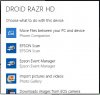
I get;
First I heard of that one. do you have a kernel mod such as the OS splash screen etc.? -
No. I only have a few things installed on it so it should be fairly clean (Chrome, printer driver). Its a spare PC I rarely use but I have kept it fully updated knowing Win 10 was coming. The only other thing worth noting is the laptop came with Vista (bought used from my work) and I installed Win 7 using an extra copy I had, but it's been activated for 6+ months and never had any issues with it, no lockups or any other problems, very reliable machine.
-
anyone know how to get rid of the lockscreen? the 8.1 method doesn't work.
-
Hmm, Cortana - what's the point!? Decided to try this feature, and it means I have to log in to my PC each time with my microsoft account - so that means I have to dumb down my password for one! So, I did that, and now I can't speak to her because my laptop mic isn't of good enough quality to recognise my speech. Ok, so now I type to her rather than talk - useless - may as well just type it into Google! I think it's only useful if you can speak to her, and if you use the in built Calendar app. Am I missing something, how can I make use of this digital assistant? I'm thinking of turning off Cortana & at least then I can revert to a more complex hotmail password, plus also choose an option to log onto my PC without inputting any password too (can then log on with local account).
Cortana just seems like a gimmick to me, what do you reckon, is it useful & how? -
The first thing I did when I installed Windows 10 was disable Cortana, didn't even try it and not interested in it. It's a security risk as well, listens to what you say and sends data to third parties for marketing purposes with your MS Advertising ID
-
You can disable the lockscreen in the group-policy editor (under "Computer Configuration", "Administrative Templates", "Control Panel", "Personalization" and then activate the option "Do not display the lockscreen").
-
hmmm... looks like the home version doesn't have it.
-
Looking at all those limiting factors which you can meet in Win10 Home I start asking myself: "Whose Home is it? Is it of my home or of Microsoft? Is it me coming to them and tell how should they use toilet paper, gillette shaving system and how to watch TV? No? Then why do they tell me how to use my PC?
-
Breaking News: A pc with slightly modified W10\Cortana (NK version) will be mandatory for every home & citizen in North Korea. Government has ordered 22 million copies. MS very happy with the sudden jump in sales, & praising the Great Leader for the acceptance and approval of it's Great Os. Stephen Elop & a few more ex-MS's have finally got new jobs, moving to North Korea to oversee and effectuate the deployment.
:O)Spartan@HIDevolution likes this. -
Wonder what happens when you tell Cortana to go home?
ajkula66 likes this. -
http://www.marketwatch.com/story/mozilla-ceos-beef-with-windows-10-2015-08-01
Mozzilla's CEO may be about to open an antitrust lawsuit against Microsoft like Netscape did in 1998.
Don't mess with Beaver Cleaver, he'll call Wally!
-
This guy's beef is stupid! just mozilla trying to get some of that win 10 monies!
-
How's the speed of Edge compared to Chrome?
-
Thanks, I knew about the data that was sent to Microsoft when I enabled Cortana, I'm not overly bothered by that, but I just didn't find Cortana useful - I've disabled her now! Means I can log on with a local account now, keeping it simple! Does anyone actually find Cortana useful in this thread & why?? I can understand how it could be more useful on a phone where you can speak to her, but on a PC with mouse & keyboard I think it's a gimmick.
@octiceps , I read reviews showing that Edge was faster than Chrome & Firefox at page loading & other aspects of web browsing - but I don't like the interface of Edge, I'm still using Chrome. -
A matter of invalidating a user's previous setting and choice, obviously triggered by the wish to promote their own browser, with the goal of a potential loss of userbase for other browsers in mind.
To quote PCWorld:
http://www.pcworld.com/article/2955...t-web-browser-to-chrome-firefox-or-opera.htmltriturbo likes this. -
so would i need to uninstall the nvidia drivers before i attempt the upgrade?
Mr. Fox likes this. -
-
how does that work?
-
Wow.
I'll be waiting for an update on this one.../scratch head/ -
Good question. No warranty on either machine. I'm sure the idiots at Micro$oft will laugh at me if I try to blame them. I'm more inclined to blame something with the GeForce drivers, and we already know NVIDIA never accepts responsibility for anything that's their fault. Anyhow, I don't think I am going to install Windows 10 on my Clevo until I see if more people start having the same problem. It could still be a coincidence, but what are the odds?
-
@Mr.Fox:
Sheer curiosity on my end: was either of the blown panels altered in regards to operating frequencies?Mr. Fox likes this. -
like 24 hours straight?
can you still use with external monitors?Mr. Fox likes this. -
No, not at all... stock frequency (60Hz) and native resolution.
No, I've tried that. It must have a working display panel connected to the LVDS port on the motherboard to boot. 8 beeps... no boot. -
-
I have my fingers crossed, because I never have my pc LCD on, only the external monitor. DO you think it can blow any way? Mr. Fox did you post your warning in AW 18x sub-Forums?Mr. Fox likes this. -
No TWO new panels.
 Both were destroyed somehow. With all the weird issues you have been having trying to run Windows 10, it might not be a good idea to keep on trying.
Looking for similar reports on the web... stumbled across this (even though in my case it is the LCD and not the GPU):
Windows 10 Is Killing Nvidia Graphics Cards
This guy's ASUS got messed up...
Windows 10 Killed my Laptop
Yes... look and you should see it in the main forum, M18x sub-forum and M17x sub-forum.
I think I am going to go ahead and install Windows 10 on the Alienware 18 and see if the display on it gets knocked out as well. -
And my Y50 failed too (T500 failed earlier today), it didn't give a reason just said "something went wrong". Oh thanks that's helpful! I couldn't figure out where the installer log was so I just started it all over again.
If I can't get it working after 3 attempts on two machines, I will accept the fact that it wasn't meant to be, and by everything I've read I'm not missing anything anyway. The only new feature I wanted was the corner screen snap, would be super helpful on a large high res display but I can live without it.
Mr Fox,
I bet it was M$ trying to stop you from posting about/benchmarking their new flagship OS and showing how crappy it is! J/K
-
-
Need some help... I've upgraded Windows 8.1 successfully, used Windows 10 for a good three hours, then made a recovery disk and fresh installed it again. However, my 8.1 product key still cannot be used. I tried to manually force it in CMD, but that didn't work either.
Was I supposed to do something in Windows 8.1? What's the deal? Have wasted a good six hours tinkering with this crap... -
worried by @Mr. Fox's story that i immediately went back to 8.1.
EDIT: there's nothing in the article that states the OS is bricking the GPUs only stating performance issues.
I wonder if i can complete an upgrade even with incompatible hardware according to the win 10 app report?Last edited: Aug 1, 2015 -
Once you have upgraded to Windows 10, the 8.1 key will be changed so you need to save that new key before you attempt a fresh install.
Google how to find your current Windows key there are many utilities that can extract it from Windows.
But if you've already formatted then I don't know how can you get that upgraded key, try calling Micro$haftJ.Dre likes this. -
I did an upgrade in place, activated Windoze OS X, and finally associated the new OS with my Micro$haft account. Once I had done those things I formatted and reinstalled from ISO, and used the option to skip entering a product key. I installed the original Windows 8 product key from the command prompt and activated without issue. Typing in the product key did not work.
Kade Storm, J.Dre and TBoneSan like this. -
By any chance was your fresh install on a different drive?
-
You might just need to leave the laptop switched on & connected overnight (or for 24 hrs). I noticed that my copy was not activated, and decided I would come back to it later & try to activate it....I forgot about it & then came back next day after my laptop had been left on & connected overnight (downloading games), and I noticed that my copy had now been automatically activated. I'm thinking maybe you should just leave it switched on & connected to the internet for 24hrs - see what happens then.J.Dre likes this.
-
@Mr. Fox and your two screen panel failures. That's so strange & it's not normally something I'd associate with installing a new operating system, but at the very least it's a very unusual & unlikely coincidence! I have noticed one piece of strange behaviour on my laptop over the last 24hrs since installing Windows 10 - sometimes from a cold boot it will get to the Windows logo and then just suddenly & immediately switch off the whole laptop - this has happened to me twice now. I think I'm going to do some testing where I do a number of cold boots & see how often it occurs.
EDIT: Did some cold boot testing, some worrying developments. Each numbered item is a cold boot attempt:
- Shutdown before post
- Booted OK
- Shutdown at Windows logo
- 6 beeps before post - code for video card failure.
- Battery out, hold down power button for 20sec, replace battery. 6 beeps again.
- Battery out, hold down power button for 20sec, replace battery. Booted ok.
Reliability history graph is showing Windows not properly shutdown – times refer to times where Windows logo starts & then unexpected shutdown. Seems to correlate to me installing IDT sound drivers from Dell website, rather than letting Windows 10 install it's own drivers. Have since used System Restore to go back to pre install of Dell IDT drivers, but still happening.
Hmm, not rosy, undecided what to do, can't spend anymore time on this this morning, need to do some work - won't be turning off my laptop until I've done it!Last edited: Aug 2, 2015 -
I appreciate all the feedback! If the key did change, I didn't notice. Suppose I'll just have to give it one more shot and take a look at the activation on Windows 8.1 before installing Windows 10 fresh. Some people online said it just takes Windows servers a long time to activate keys...
@TBoneSan: Nah, it was on the same drive. I've tried this three times now. I've also re-downloaded Windows 10 twice.
To be honest, Microsoft just needs to have a website that converts product keys when you enter it. I can only imagine how much of a pain this must be for people who are not tech-savvy. But maybe that's the point? Micro$oft hoping they'll just get fed up and buy it.
Anyway, thanks again. I'm going to give it one more shot later. -
TBH, this supposedly is being rolled out in waves. I am not sure if non preview people got theirs yet. This could mean, at least as of yet, only the more tech savvy people have upgraded so far.
-
@Mr. Fox - That's HORRIBLE to hear. Might be related to higher gamut displays + combination of W10 and/or nGreedia. How much time it took each display to blow-up? I'm shivering when I think about it! I've used W10 for like 3-4 hours tops, on W7 now. Now I wonder if I would ever boot in W10 again, not until more information on the matter is present, that's for sure, even though I'm using ATi/AMD!
Actually it's one of the first things that I've encountered, but slipped my mind. Found it rather annoying having Firefox set as default in W7 to be replaced by Edge in the upgrade. I mean, they said that they'll keep all of user's settings in tact, yet somehow this one was ""mi""s"s"""ed" (insert a crap load more quotation marks). We know that your new shiny browser is there, and is actually quite good, supporting quite of handful of technologies and standards, unlike the previous (IE) iterations, which are always pointed at as disasters from web developer's point of view, but you really should've withhold of this stunt. I like to give my things a shakedown/test-run before making my mind. Forcing me into it does you no favors.
Edit: Forgot another one - It wont shut down. No matter what I do (power button, or through the start menu), it logs-off, shows the "Shutting down" screen, then either shows the "Sleep screen" or it's black and when I move my mouse it shows the "Sleep screen". The only way to kinda shut it down properly is to reboot and once it tries to boot again, to turn it off. HP related? Since the only 3 users here (me including) seem to have HPs.Last edited: Aug 2, 2015ajkula66 likes this. -
All right... I'm on an upgraded version of Windows 10. It says Windows is activated. However, when I go to change my product key to my original Windows 8.1 key, it says that my product key cannot be used. So, what's going on here? Seems like a fresh install is impossible at this point for me. Every time I fresh install Windows 10 after successfully upgrading, it does not work.
I don't see a new product key anywhere.
![[IMG]](images/storyImages/258bamp.png)
EDIT: I'm in a battle right now with Windows 10 about NVIDIA drivers. It keeps installing the latest and I keep installing the one I want...
Last edited: Aug 2, 2015 -
Use that Windows Tool to prevent that specific hardware item from receiving further updates. Here it is: http://uk.ign.com/articles/2015/07/27/microsoft-tool-lets-windows-10-users-block-unwanted-updates
As an update to my previous issue with Windows failing to boot from a cold boot, I tried reinstalling an early Windows 10 image taken before installing the IDT sound drivers that I thought was causing the problem, but it still occurs. As soon as it gets to the Windows logo on a cold boot the laptop will immediately & suddenly shut down (almost like a hardware power switch being flipped). I then have to press the power button to turn the laptop back on and then there's a 50:50 chance I'll get 6 beeps (GPU failure) (in which case I have to remove battery & hold down power button to reset), or a 50% chance it will cold boot fine that second time. If I leave the laptop powered on and do a Restart it boots with no issue. Anyone got any ideas what could be causing this and how to fix it? As a work around I can put my laptop to sleep at night, and then just do a Restart whenever I want a freshly booted system, because I don't move my laptop around much so don't ever really need to switch it completely off, but would like to get this sorted if I can. It didn't used to do this on Windows 7.
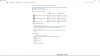
EDIT: Excellent, I've fixed it! Just need to disable "Fast Start-Up" in the Power Options, now my laptop boots fine from cold boot! See following screenshot for details on where to find it if you're having cold boot issues too (make sure the check box for Fast Start-Up is unchecked, you can access those settings by clicking on the Administrator icon at the top of my screenshot):
 Last edited: Aug 2, 2015
 -
Screw it... I think I'm just going to stay with the upgrade. Wasted too many hours trying to fresh install Windows 10. Upgrade is activated and working fine.
Downloading BF4 now to see if performance improved.
Windows 10
Discussion in 'Windows OS and Software' started by WhatsThePoint, Sep 30, 2014.


