 Problems? See this thread at archive.org.
Sorry i can't edit my previous post i don't know why ....
Have yout tried with different bios released by Dell ? By the way i cross my fingers and hope you will succeed to install mac os
-
-
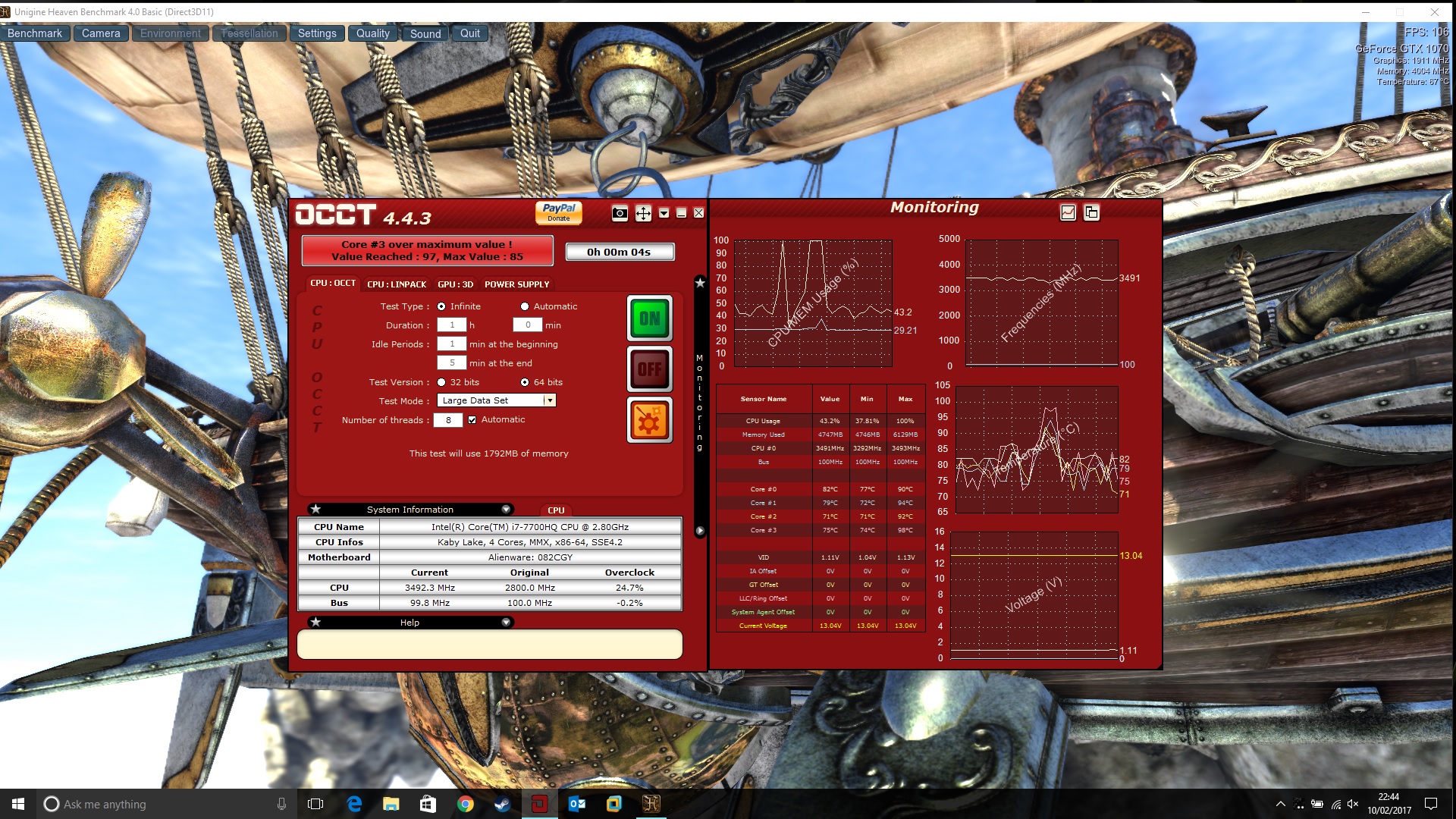
Can I have some advice please, I am on my 3rd Alienware 15 R3, the first one had a a really bad black mark on the screen caused by screws pushing from behind the glass, the second had the worst light bleed I have ever seen on a laptop, and after running OCCT and Heaven together, this one is hitting 97 degrees in OCCT
Possibly a silly question, but I know 97 degrees is high, but is running OCCT and Heaven together a fair benchmark, I had the CPU at 100% in OCCT and Heaven was stressing the GPU.
I have an i7 7700, 16GB's Ram and a GTX 1070.
After re-seating the Wi-Fi card today, the laptop seems to be behaving itself, so I am reluctant to send it back.
Let me know what you think, would I be silly to keep it with these temperatures? I have attached a screenshot showing the details
ThanksAttached Files:
-
-
7700HQ + 1070 (Dell Paste):
idle gpu - 50
idle cpu - 48, 49, 48, 48
load cpu+ gpu - 90, 89, 84, 84 gpu: 73
copied and pasted my notes, this is my Intel XTU + Heaven run. 97 does seem too high. I'd check to make sure there is no double thermal pads and redo the paste -
7820HK can theoretically OC much higher, closer to 4.4/4.5 stable for everyday OC, previously only 4.2-4.3 is attainable by the 6820HK without producing too much heat for everyday OC.
-
Ok i undersand, maybe if it will be availabe in my 14 days return policy i will return it. But For the I7 Skylake gen we have a 200€ discount but not for Kabylake gen.
-
Also maybe he wants optimums support because right now the 15 is gsync only on the new cpus.
-
There's a German review on NotebookCheck for the 15R3 with 7700 and GTX 1070:
http://www.notebookcheck.com/Test-Alienware-15-R3-Laptop.194724.0.html -
Hmm, where did you buy it?
In the EU you should be able to get 30 days return policy.
Is it now? Is it possible to buy non gsync panel with a 7820HK? -
Does anyone else experience this - when listening to audio with the laptop speakers, it sounds fine, they sound awesome. I plug in earphones and there is static. but there isn't Always static. There is only static right before audio is about to play and sometimes for a bit longer than I'd like. Enough to be annoying. I've tried messing around in the Alienware sound center and disabling their preset settings but its still there. I don't think its a hardware problem, as I said it only happens before/after audio, not during. And it does go silent provided everything is silent (audio-wise). Weird bug maybe
-
I'm in France and we have only 14 days to return products we bought on internet.
"You also have a right of withdrawal (the "Right of Withdrawal"), valid during
A period of fourteen (14) days from the date of receipt of the product." Google translate from Dell's terms an conditions
At this moment we don't have 7820HK in France
-
It seems Dell has failed to address problems with the faulty mounted heat sink on the AW 17 R4s (even though claiming to have done so). Whats the latest status on the 15 R3 model, are the heat and temp problems still as bad as when it was new? Is it the same problems with the 15" model? Guessing that the AW15 just has a smaller version of the AW17 cooling, but perhaps Dell managed to get the heat sink right in this one finally?
Has the light bleed due to faulty bezels been fixed at least? -
Hmm, that's pretty bad.
Just looked through the FR website and they're discounting the old 6-generation.
If you can be patient, maybe is possible to wait until the 7820HK is available.
Use the unit for 13 days, return, get another one to use for 13 days. Repeat until the 7820HK is available.
Light bleed will never be fixed, it's panel lottery.
Dunno about the temps, it should be fixed with the thinner thermal pad but seems like there's a bit of old stock left with the thicker thermal pad causing uneven surface contact with CPU.
They don't seem to fix the ones that were returned and sold on outlet, so watch out if you do buy it there.Goliathius likes this. -
Yes I bought it because it had a discount on these models but i think i'm not patient enough to wait the 7820HK. I will travel a lot in the next few weeks and I will need this computer.
-
Notebook Check reviewed Aw machine with Kaby and got terrible temp results. Shouldn't the Kaby models work out of the box? They are produced long time after Mr. Azor claimed that they have fixed affected models.
-
Ah well, I suppose there's no other choice.
Dunno, Azor isn't a technician so why would you believe him? -
For those asking, impossible to get native kernel working or nvidia discrete GPU usage in OS X. Just not worth it. Kernel must be patched every update because package C state lock is enforced and cannot be disabled without a custom BIOS, and this causes a kernel panic in AppleIntelCPUPowermanagement. You can us nullCPUpm.kext to get around this.
Mac OS uses proprietary switching system, not optimus, no hope for nvidia dGPU usage.
Killer 1535 and intel 8260 do not work in Mac OS so don't bother with wifi.
All in all, Alienware is no longer a viable platform for OSx86.Goliathius and SimplyJ3sse like this. -
#rip well thanks for your info. I had a bootable Sierra partition, but couldn't get hd530 working with locked BIOS. I don't mind not having the Nvidia card working.
Sent from my VS995 using Tapatalk -
I was not able to find this review that you mention can you provide a direct link because I would be interested to read it thank you.
-
NotebookChec have sites on different languages!! Use Google Translator http://www.notebookcheck.com/Test-Alienware-15-R3-Laptop.194724.0.html
-
Bad news Thank you for your answer
. It doesn't matter to get nvidia discrete gpu working i did not intend to use mac to play, i wanted a dual boot, windows for games and mac os for personal use. I will keep an eye on it anyway
I will test it for 14 days as you advised me and I will make my choice at the last moment if I keep it or if I wait for Kaby Lake. Thank you for your advice. -
Hi I just compared the results of the Alienware 15R3 review (notebookcheck.com) with my results. How did they get 16.000 Score? I just get 12400 -->
http://www.3dmark.com/fs/11659014 -
Maybe 16k was the graphics score? Your results look normal. I am getting around 16k global score (19k graphics) but that's with both cpu and gpu heavily overclocked.
-
But at least with the AW 15 R3 I had for a while, the problem was not the actual panel but how it was mounted (the bezels pressed on the panel). On top of that, we have the LCD lottery of course.
-
OK I read it. poor alienware, core 0 99 degrees other core 78. but very good screen. I wish aorus and clevo used that screen for their 120hz offering.
-
No you can still not get any 7 series AW15 with a non gsync option.
-
Does the GSync on the AW15 have the same striping problems as the one on the AW17? What brand and model is it?
-
Is there is a tutorial to overclock the 15 R3 ? I have seen several ways to do it but I do not quite understand the difference between doing it via bios or via XTU. Thank you guys
-
Oh yeah, the mounting pressure. But since they're 1 unit I think it's fair to call them "panel lottery." Unless you're willing to disassemble them.
The 15" 120hz is the same screen if you see it advertised on any other laptop.
I'll make one shortly. -
 Awesome i can not wait to read this
-
I actually did that so I know it was the bezels
That issue was confirmed and supposed to have been fixed now, but based on my experiences with the AW17, most "fixes in production" seem to exist only in the heads of Alienware executives
-
This is quite interesting (Google translated)
Differences of more than 10 ° C are, according to our experience, rather unusual. For the Schenker XMG P507, for example, the cores separated only 4 ° C. After all, there was no strong throttling - apart from very short bursts to 700 MHz (according to HWiNFO). The Core i7-7700HQ passed the Stresstest with neat 2.6 GHz.
I noticed the same thing on my AW17 (several of them infact). After a while the CPU clocks down to lower speeds, and thus the temps go down, but it is till not reported as throttling by HWInfo etc. I mean, to me, throttling is the fact that CPU speed decreases due to overheating? -
Throttling can occure by other events than temp. BTW Intel defines throttling, as clock speed under the base clock speed.
-
Thus it is strange that a reduction of the clock speed does not show up as throttling. If the CPU runs at 100 Mhz all the time there probably will be no throttling but not much else either.
-
You can use the log function + (more data) in TS for more accurate monitoring of the cpu clock speed and behaviour. Talk with TS author @unclewebb in TS guide if you want more info.
-
I have just wanted to say I made a purchase on Alienware 15r3 with the new Kaby like processor. And low and behold my max temps were hitting 100c. Alienware sent me a brand new laptop. And now my max temps are mid 80's that doesn't seem high but after all the posts you made with repasting I decided I wanted to repaste my laptop . A dell tech is coming over to do a repaste and I have two thermal pastes. The gleid extreme and grizzly conductonaut. I also bought the electric tape and fugipoly thermal pads. My question is should I just use the liquid metal or gelied extreme? I heard liquid metal dries out? But since a tech guy is opening and putting back my laptop should I just take advantage and have him so the liquid metal? Your posts have been extremely informative. Thank you
Sent from my iPhone using Tapatalk -
Afaik Dell tech isn't allowed to use conducto due to dell policy.
Not sure if he's willing to apply thermal pad. Ask and show him the diagram of thickness.
Ask if he can disassemble, you apply tape and liquid metal alongside the fujipoly pad, then have the tech reassemble the laptop.
Be sure to talk nicely though, and maybe an incentive of small bonus will help soften up negotiation. -
Hmmm okay that seems fair. Will the liquid metal dry out overtime ? I have heard stories of people having to do another repaste in 4 months.
Sent from my iPhone using Tapatalk -
If the heatsink fit perfectly on cpu/gpu die, you shouldn't need to re-paste anymore. All depends on the heatsink quality aka good fit.
-
Liquid metal will outlast the laptop lifetime if applied properly with good heatsink!
-
Sent a message asking about updates on non gsync options: https://twitter.com/ZERO_ibis/status/831828895922020353
-
Does anyone have any info on using multiple monitors on a laptop? For example, two monitors work fine. However, I have 3. Laptop display, 144Hz monitor and my 4K TV. It's a pain to get them to work while all being connected and then its another pain to switch which monitor you want to even use as the "main" display. Another example, I mostly game on my TV. However when I play League of Legends, I want to use my 144Hz monitor. This is not only a problem because I have to go through a lot of bs to disable the monitor to play on the TV, the same steps have to be done to disable the TV to play on the monitor. Is there a program that does this easily? I am trying UltraMon but it doesn't seem to work too good. It works about half as much as I'd like it to. But it doesn't have a Windows 10 version out so its understandable. Right now the easiest way to handle it is to unplug and replug. But aint nobody got time for that all the time.
Desktop was easy, I had 2 displays and switched to be 1 & 2. There's gotta be a easy way to switch among 3 displays.. -
Due to the overheat problem on my 15R3 Dell will send me a new unit. I have the choice now to upgrade it to the 7700HQ or the 7820HK. I had now a 6700HQ with GTX1070 and G-sync 120Hz.
Should I go for the upgrade to the 7820 ? Is there any issues with this CPU ? Overheating or anything ?
Thanks -
-
Yes 7820HK is worth it if you plan to keep it for long time.
-
Well of you're getting an upgrade see if you can keep your screen unless it has bad light bleed
-
My screen was perfect, no lightbleed, it was the G sync 120 Hz. I will take again the 120Hz on the replacement model
-
Has anyone tried the newest bios update ( 1.0.12 ) posted today on dell's driver page? If so, is it better?
SimplyJ3sse likes this. -
I'm actually testing it, i'll let you know what's about it
-
New Bios update:
Fixes & Enhancements
1. Graphic performance enhancement.
2.Type C USB devices compatibility improvement.
3.Wireless LAN performance improvement.
4. CPU power consummation improvement.
See point 4, there is something fishy. Could be a typo "Consumption" -
Notebookcheck's 15r3 review has been translated :
http://www.notebookcheck.net/Alienware-15-R3-Notebook-Review.196584.0.html
I wonder how they can give 90% as temperature score and show this :
![[IMG]](images/storyImages/gaming1.jpg)
*OFFICIAL* Alienware 15 R3 Owner's Lounge
Discussion in '2015+ Alienware 13 / 15 / 17' started by katalin_2003, Oct 24, 2016.



![[IMG]](images/storyImages/UgIDDB4.png)


