Problems? See this thread at archive.org.
No, from here: http://www.ebay.com/itm/Dell-Alienware-15-R3-15-6-Full-HD-IPS-Gaming-Notebook-with-8GB-RAM-1TB-HDD-/391761035675?customid=a61940562b5e11e7b9a78a6a3b8922f70INT&pub=5574652453&campid=5337259887&afepn=5337259887&_trkparms=5373:0|5374:Featured&afepn=5337259887&rmvSB=true
Decided to pass on it, battery is the smaller 68wh and I'd probably have to put more cash down to get an SSD. Better off going refurbished I guess.
I'm sure it does, but I shouldn't have to do this on machines this pricey to get decent temperatures on modern stuff.
Think I'm done with gaming laptops, too many issues and compromises. These new Alienware laptops are the only gaming laptops that have what I'm looking for (good battery life, build quality, great display and spec options) but the quality control is just embarrassing.
-
Hi guys, any idea what program can i use to check if my ssd is running well or if i need a replacement. I heard of people changing their ssd's to a samsung one. Mine came with a toshiba 512gb ssd. Thanks!
Induna likes this. -
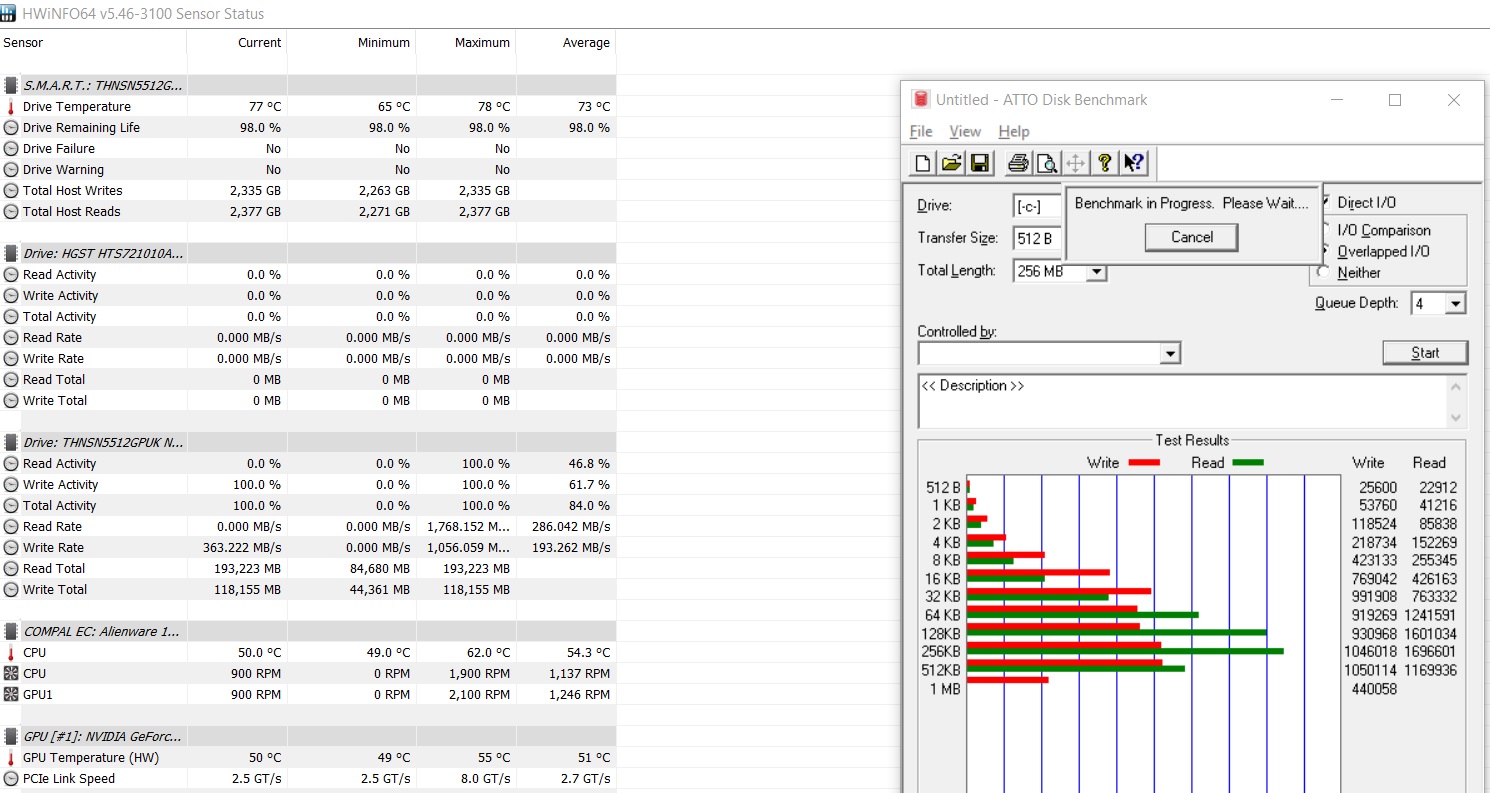
ATTO Disk Benchmark Run 3-4 times in a row. Monitor temp with Hwinfo. Post results with a screenie.Aman Krishna, jpsm and TribalOne like this.
-
Just for fun I just priced out the system I purchased in November of last year, and I am amazed that the prices are actually much higher now than they were then. Well, the CPU is newer (7700HQ vs 6700HQ), and they include a 512GB SSD (Mine only came with the 1TB HDD), but I have the 400Nits G-Sync screen, 4 years of added warranty, and 16GB of the 2667 Memory, with the 1070 card, and the total back then with the holiday discounts only came to around 1700 after tax. The same machine with the better processor and 512GB SSD lists for 2399, and with the 200 discount its 2199 before tax and the added warranty. Glad I bought when I did!
-
I am in contact with a alienware rep now and they seem very determined to get everything to my liking as i sent my personal unit with gtx1070 twice already to texas where they repair all the dell computers in USA. it was to repair the screen bleeding at the bottom of my unit. its peaking at 78c and this screen shot was taken during its 4th run already. My temps are also great now because before the gpu would reach 90c and cpu reached 93c now cpu peaks at 86 and gpu peak at 76c couldnt be more happier with my machine! no need to repaste anymore hopefully it would stay this way when i get back to my tropical country, Philippines LOL
EDIT: idle temp of cpu is 57-59c. alarming?Attached Files:
-
-
-
ok on it! ill ask them for a change of ssd. do you know an app for setting a limit to the battery charging to 90%? or something so that it wont wear down my battery
also what do i tell them so i can get a replacement ssd?Last edited: Apr 28, 2017 -
How you can put the charging thresholds are firmware and vendor specific. I don't think Dell will bother with extra features in sofware or firmware. They are more interested that you shall use the whole battery capacity.
But take a look into Dell's generic battery guide.
Edit. Maybe @judal57 know. But I don't think this is possible.Last edited: Apr 28, 2017jpsm likes this. -
Oh. Makes sense. I had the option when i got premabios on my 770dm. Anyway any idea how i can get dell to send me a new ssd?
Sent from my SM-G935F using Tapatalk -
You have paid for Premium support. I expect you have the phone number to AW or you can go into Dell's support page and use your machine's Service Tag. You will probably find needed info there.jpsm likes this.
-
I mean do i need to tell something like i am "experiencing micro stuttering when copying huge files to the ssd"? I will likely call them but i dont know what to tell them to warrant an exchange/ssd replacement
Sent from my SM-G935F using Tapatalk -
Show Dell support the results from your testing. Worse the better. Tell also that other owners of the new Aw models, experience their ssd's being killed due the temp and throttling and that they got replacement ssd's. Can't help you further with this

Edit. I have posted info earlier regarding spec for the Toshiba M.2 PCIe ssd Dell prefer to use.Last edited: Apr 28, 2017 -
i recall i did, thats what probably happened. already ran it for warranty and got a GPU replacement on the way. thanks!
-
Yes, it's clearly downclocking the cpu(disabling tubo mainly) when it hits around 90C.
-
After installing the latest NVIDIA driver, the FN brightness keys no longer work for me. Tried reverting to the official Alienware ones but they don´t work either. I have the Windows creator update installed.
Anyone knows how to fix it? -
hi, try new drivers from nvidia, work for me...
-
Hey, AW newbie here.
I´ve received wednesday my 15r3, i bought it from the Dell Outlet site, a certified refurbished model.
So i ran some stress tests and i have the overheating problem. At first the CPU hit 100c then it throttle.
Next was undervolting and i´ve updated the bios to the newest version. Now the highest temp my cpu hits is 87, However the CPU doesnt use the turbo mode anymore.
I am acessing the laptop remotly (i live in South America), i asked my brother to buy it for me since he is coming to visit in 20 days. My bro is very "computer illiterate", so i he dosent know how to open the laptop or w/e.
So now comes my questions.., what should i do? Should i call Dell and ask a tech to come over my bro´s place and fix it? Should i send back to dell and ask them to fix it/replace it?
I´ve read so many horror stories here about tech home tech support, and i am afraid the laptop won´t be sent back in time for my brother to bring it to me.
I´ve ran stress tests, what other tests you recommend?
I have some back light bleeding but i don´t mind it, however i am curious if i can fix it with blu tak? I saw some guy fix his R2, i found nothing for the r3.
Sorry for the long post guys, but i am running out of time. What shoud i do?
***I have no problem opening the laptop and changing the thermal paste, heck i already ordered the thermal grizzly conductonaut.Vasudev likes this. -
Its best to repaste yourself, follow @iunlock guide http://forum.notebookreview.com/thr...5r3-disassembly-repaste-guide-results.797373/iunlock likes this.
-
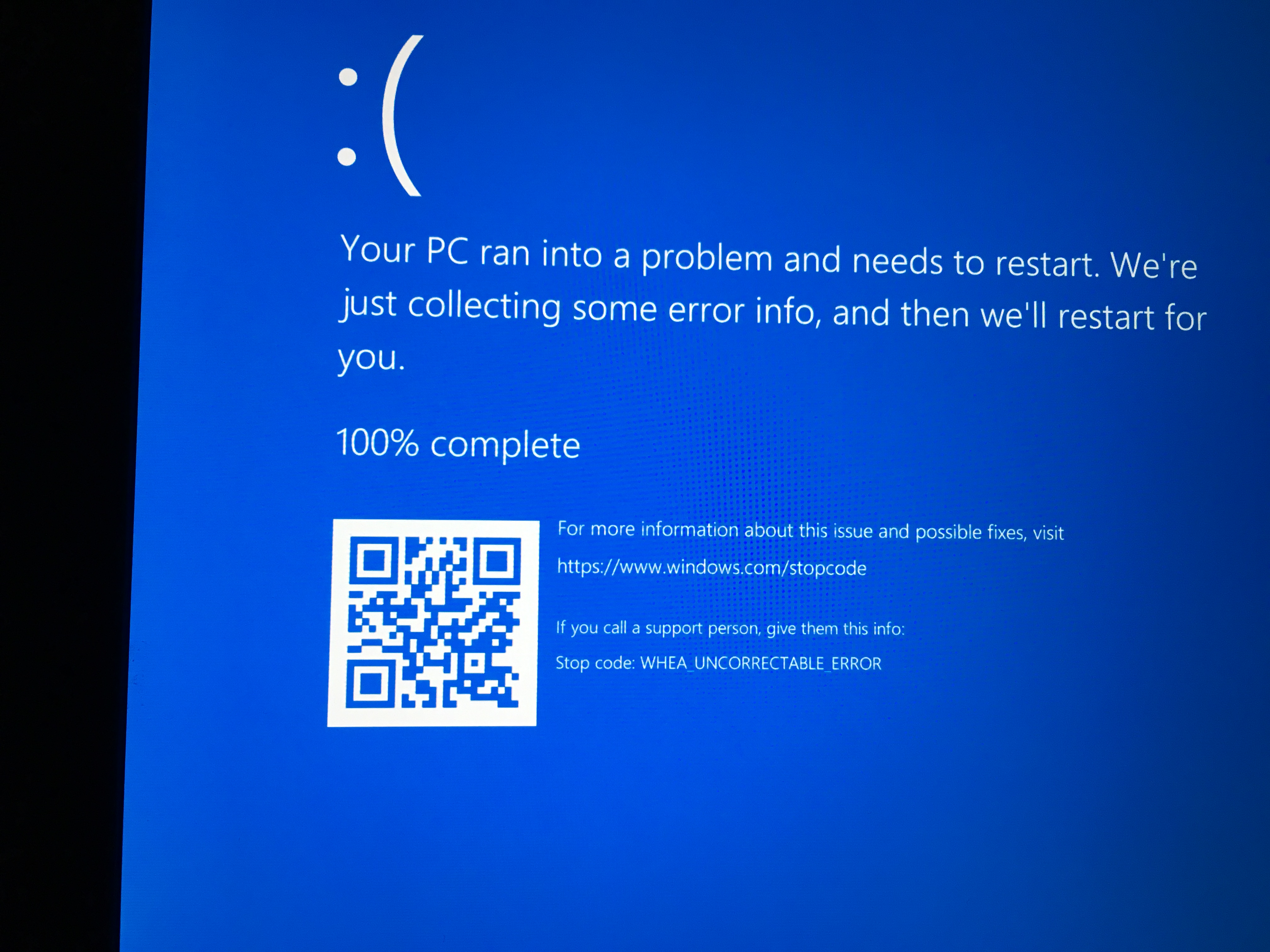
I updated my Bios 1.0.14 this week. Now I got irregular BSOD called "whea uncorrectable error". So I
deactivate all undervolting without sucess. The BSOD sill happens. Can I downgrade to the old Bios? What can I do against this problem?Attached Files:
-
-
Yep thats the guide i will use. I already went over my budget with the laptop, however i will try to buy the thermal pads as well. If i can´t will the paste be enough (for now)?
what about the back light bleed? Do you know if the blu tak fix work for the r3?
Thanks for the response and sorry for the broken english.Vasudev likes this. -
have you noticed that turbo mode will not start?
has it happend to you?
what are ur temps b4 bsod? -
Without undervolting I got temps up to 93°C after Bios Update (In games). I dont know the temps before the update. Normally I am fine with untervolt -0,144 (80°C max). I now update every Chipset Driver and hope this will help.
Is the whea uncorrectable error an heat error? -
Has Bluetooth been problematic for anyone else after the Creators update? I haven't been active much on the forums and on my pc in the past week or so, but suddenly Bluetooth won't show up in my device manager, nor work in general. Even after getting the driver from Dells page and uninstalling with Revo and reinstalling
-
Can anyone tell me why my AW15 R3 is so ****. Its slow, can only do one thing at a time, start up time is so long I can make myself lunch and a cup of tea before its ready to use. It take 3 hours to install a game. I though AW were meant to be the mutts nuts in gaming. Where did they go wrong?
-
It's a combination of two things, the HDD and your lack of knowledge lolOnetwo345 likes this.
-
Do you have an SSD or are you using a HDD?
-
Guys,
I forgot to post my core temps after updated bios (latest from the dell site)
*Using OCCT
core 0 - 89
core 1 - 78
core 2 - 90
core 3 - 74
8 min test
cpu did not go over 3392 MHz
*Using Aida64
core 0 - 97
core 1 - 87
core 2 - 98
core 3 - 85
2 min test
cpu did not go over 3392 MHz
also Aida64 says my cpu is Throttling
Should i ask for an exchange or ask for a tech to replace cpu/motherboard/heatsink?
This is a gift for my brother who lives over seas, i have 20 days.
What should i do??
thanks for the support.Last edited: May 1, 2017 -
Dude, those temps are out of control. 97 & 98 are very high and would cause your cpu to go into a thermal throttling mode. Have you repasted? You might also want to look into doing the heatsink mod (bending one of the brackets/arms upwards to help increase the pressure on the CPU). I did both the repaste and the heatsink mod and now my ambient temps are mid 20's to low 30's when idle and max 85 when gaming (not sustained though). Plus I dont have a very big differential between cores anymore (2-4 degrees at most)Vasudev likes this.
-
O ok, thanks dude.
Will do.
https://www.amazon.com/Thermal-Grizzly-Kryonaut-Grease-Paste/dp/B011F7W3LU
This is the one i should use right?
Sent from my iPhone using Tapatalk -
So my AW15R3 has had a couple of weeks to bed in.
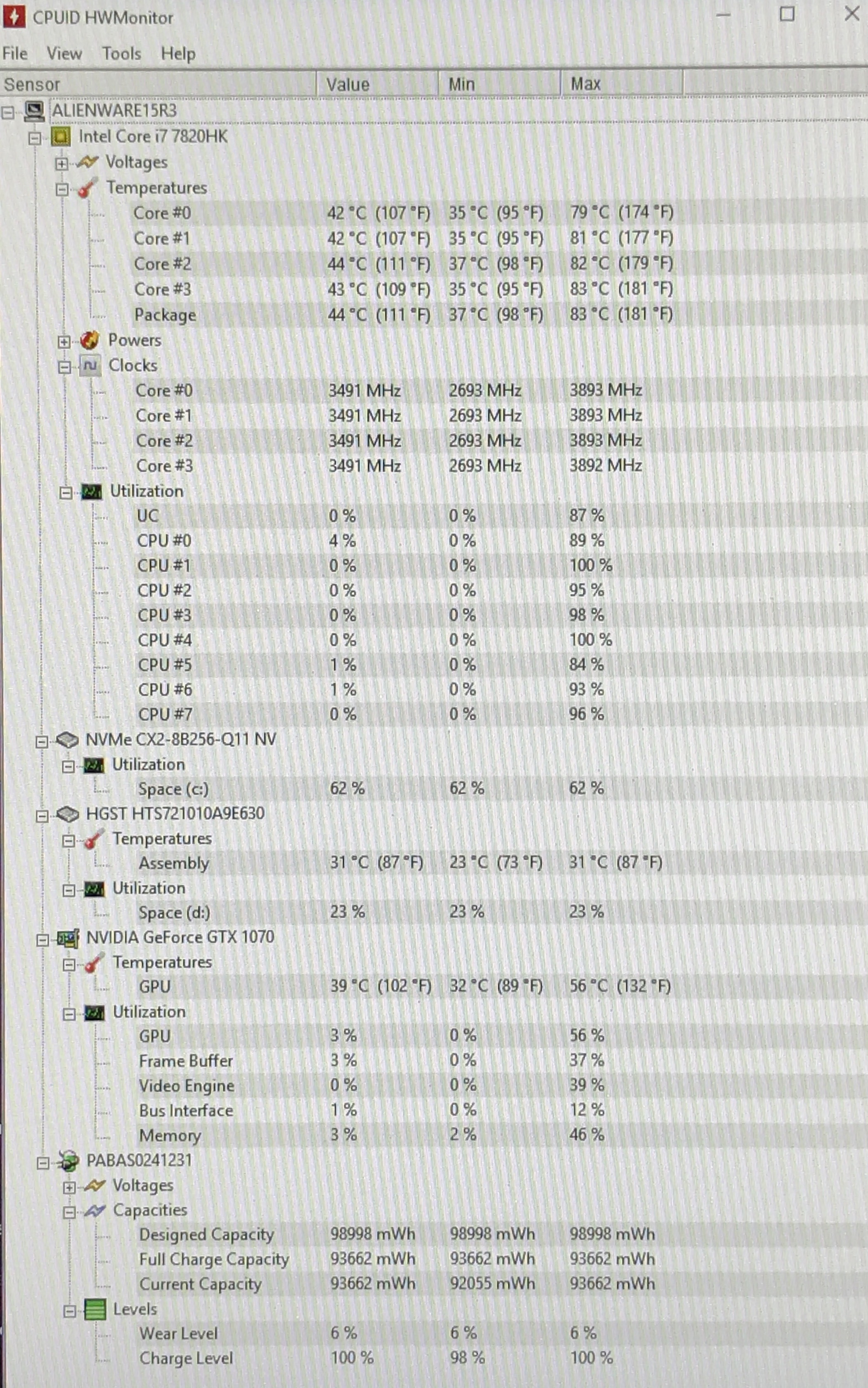
Just finished playing some GTA5 and CPU temps look fine (to my untrained eye) and GPU temp seems great.
I'm a bit concerned that the battery is showing 6% wear already? Is that unusual? Seems like it will be dead in a couple of months at that rate?
It stays plugged in at home pretty much 100% of the time, I've taken it out and drained the battery to 6% on one occasion.
Opinions?Attached Files:
-
-
You will find a lot more of similar if you read through the AW sub-threadsstealth_ferret likes this.
-
Looks good to me. But a repaste would decrease the temps even further by 10C.stealth_ferret likes this.
-
Cheers, currently looking at a possible battery issue. Repasting will probably happen but I think I'll wait 6-8 months for any issues to hopefully come to light first. Wouldn't want to go to the trouble of a repaste and then have to send it back for a replacement!Vasudev likes this.
-
Sorry for the double post.
Hey guys..
Tried repasting my laptop with Artic MX-4.
The computer won't boot on anymore.
It turns on for a second, the keyboard backlight turns on and side lights go on, the fans spin, then it completely goes off. The screen is completely black during this process.
It repeats this step for about 3-4 times then, eventually, the keyboard backlight and side lights stay on, but it hangs there and the screen is still completely black. The alienware Logo blinks blue 7 times and then blinks red 2-3 times, and repeats the blinking.
It doesn't make any sound so I can't really figure out what the issue is..
Is the mobo fried? -
try pulling the batteries, the cmos and the main, just unplug them and hold the power button down, usually that makes it work.
-
Check the connections for the video ribbon cable - it can easily slide out of place by a couple of mm and cause malfunction.
-
do you get any beeps?
-
almost 3 weeks since i had the new laptop Kaby Lake inside.
Kaby Lake 7820HQ after repaste with conducnaut and after several weeks i got 62 to max 76c never saw reaching the 80c playing all kind of games (the witcher 3, bf1, outlast 2, GTA V (4k resolution 60fps not everything on ultra) and many others at 4K resolution and 1080p as well , i did a little undervolt of -0.150mv cpu and cache and now in most demanding tasks i reach 72c, i really recommend doing the repaste and little undervaluing with throttle stop.
better temps, better fan noise.
I contacted Dell about the m.2 reaching the 80s C under benchmark application and they told me is normal under some bench tools and i don't need to worry about, normal use and playing never saw more than 57ºc, so they don't recommend using those specific bench tools , otherwise i use mainly the laptop to play and do some virtualisation under vmware.
Otherwise Dell support in my country doesn't seem too much receptive to changeme the m.2 drive.
overall i'm happy with the laptop.SimplyJ3sse likes this. -
So Alienware support on Twitter say 6% wear in two weeks isn't normal and have said they will send me a new battery...
Is that it? Do they expect me to dismantle the laptop and replace it myself? I've asked but I'm waiting for a response, in meantime wondered what other people have experienced by way of faulty battery replacements? -
Honestly I prefer to change things like that myself. The battery isn't too hard to get to. Just follow iunlock's repaste guide but stop once you get the middle cover off where the battery is free to get out.
Sent from my VS995 using Tapatalk -
have you guys tried overclocking the display on your alienwares? i have a 60Hz 1080p Gsync screen and im wondering if i can overclock my display to a comfortable 75Hz without having any issues. thanks!
-
My screen wouldn't hit 65hz without going black, I've heard from others as well, the 60hz gsync IPS is not overclockable unfortunatelyastec23 likes this.
-
Well they came back and said that YES I am to replace it myself, they sent me a link to a how-to video that says you need an anti-static wristband, you need to remove the HD, RAM, wireless etc... (not a simple job by any means) and that if I happened to damage the machine then they wouldn't cover it.
Frankly I think that's ridiculous, if the battery is faulty they should fix it. If they want me to do it, fine, but they have to accept I am not a computer technician so if I mess it up and damage the computer it's their problem not mine.
I've told them to send a technician, or collect it (for which I'd like a goodwill gesture for the inconvenience of not having the machine) or to give me a refund and take it back... -
So it seems they made a mistake, they thought I only had the collect and return warranty and not the premium onsite warranty.
So I essentially got the option of having a technician come out to do it OR do it myself and they would accept responsibility if I damage the laptop in any way.
So I'm going to do it myself happy in the knowledge that if I break it they will fix it.SimplyJ3sse and Vasudev like this. -
Thanksfor the information. I guess you can't really overclock a gsync screen like other screens.
-
I can't get any on the non-gsync 60Hz, either. Sounds like it's the 17" monitors that overclock well.astec23 likes this.
-
guys, have you tried the Windows 10 Creators update? im planning on updating but i am worried i might encounter some issues like bluetooth or alienfx(i saw that others had issues with the update) do you think it is fixed now and it is safe to update? i wont do a clean install if i update btw.
-
I updated last Friday. My 15R3 is still working perfectly.astec23 likes this.
-
do i need to do a clean install or not?
-
I didn't fresh install for it and mine is fine.
*OFFICIAL* Alienware 15 R3 Owner's Lounge
Discussion in '2015+ Alienware 13 / 15 / 17' started by katalin_2003, Oct 24, 2016.