Problems? See this thread at archive.org.
hey folks,
im about to buy a 15 r3 with the following speccs:
7700hq, 1060 gtx, 16gb ram, 256 ssd
is there still the temp issue and the unaesthetic fan exhausts ?
im afraid of repasting myself.
best regards
-
Yeah, expect joining the TRIPOD and thermal paste lottery!!
-
For those who want to upgrade to a UHD 4K screen:
40pin UHD eDP cable for 15R3: 5XNDW ASSEMBLY, CABLE, EDP, UHD, AW15R3
For the 17R4: 2PVJC
Does anyone know where to get basic 40pin eDP cables for around $10? These are going for $50. I don't care about the webcam and its security risks.SimplyJ3sse likes this. -
Hi,
could you please tell me how you have overclocked your 1070? What tool are you using? With MSI Afterburner my results are not as good as yours. I have put 200mhz + Core and Mem. What am I doing wrong? Have you configured anything else?
My graphics score is 18 769.Vasudev likes this. -
I think the graphics score is good, I had a stock 1080 in the 17r4 and i was hitting 22k to 23k. Being 3k off is a very decent oc.
-
Pascal perform better with lowest possible temp. You loose 13MHz boost for every 5C degrees the graphics run over 46C
-
My GPU Temps are very good with LM repaste. Not more than 60 degrees in Heaven Benchmark. The hard Limit for OC is 225mhz for my card. So I was wondering which setting of Doug2507 makes the Differenz?!
-
Hi , with monitor would be better for gaming
24 inch 2560x1440p 144hz no gync ? AOC
24 inch 1920x1080p 144 hz with g sync ? ACER Predator
My laptop spec:
AW 15 IPS G sync 60 hz panel
7820hk
GTX 1070
16 GB RAM 2400
256 gb nvme + 1 tb hdd
I do like the 2560x1440p but not sure if 1070 is enough for it
ThanksLast edited: May 31, 2017 -
1070 is plenty enough for 2k gaming. Would reccomend a 27in 2k gsync.
Sent from my SPH-L720 using Tapatalk -
Depends on the types of games and how competitive you are. AAA titles on ultra (or high for some) settings you will not maintain 144hz at 1440p. I personally would want the better performance of 1080p on a 1070.Vasudev likes this.
-
Right first test in game battlefield 1 and.... not happy at all.... temps on cpu stock arround 95c...... so i repasted cpu and gpu using GC Extreme... and still arround 90 c stock with undervolt -125mv...... isn't good.....AW15 R3 7820hk + gtx 1070. Should i return it? if repaste didn't help then is it poor heatsink?
-
Uneven heatsink. Call Dell and ask for a technician to replace heatsinks.
Sent from my VS995 using TapatalkXavier2612 likes this. -
you should be able to hit 60fps on most newer games. I have pretty much the same setup (but with a 21:9 1440p so a little bigger) and it ran very well while I was running it off the 1070. I did get a gtx 1080 for my amp though and now I can hit 100+ on just about anything.
-
Did you raise the back of the laptop a bit? Poor ventilation is the devil no matter how good your paste/heatsink.
If you did, I'd suggest having them send you a new heatsink, unless you have buyers remorse and just looking for a way out of course. -
I bend heatsink a bit on cpu side and helped. Without oc now and undervolt cpu -125mv I get 75c without any coolerpad but once I oc to 4.0 ghz with the temps are arround 85c, 4.2 ghz with - 110mv are close to 90c. Gpu runs sweet 62c. Should I still ring tech to replace heatsink?
-
I play only Battlefield 1 for now with external monitor 1920x1080 144 hz with gsync . After 15 min gameplay with all cores 4.2 Ghz -100mv my temps are over 90c (core different is about 5c) I only repasted cpu and gpu but i haven't change any pads yet..... . I bought 7820hk for OC it not for running stock clocks.... . Can someone share temps from bf1 with similiar spec aw please...
-
Thats very hot for the CPU. Double check your paste job and make sure you put enough or not too much. You should only be getting about 80 to 85 max. Either that or the laptop can't handle a 4.2 OC. Thats a very high overclock. They can do it in the 17s due to the larger heatsink, but you are rocking a 15 with a smaller heatsink. Try not overclocking and let us know the temps on stock clocks.
-
stock temps while gaming on cpu are 75-80c . I'm going to order new pads
Thermal Grizzly Minus Pad 8, 120 × 20 × 1,0 mm and 0.5 mm and use them on cpu . My repaste job is good as should be I'm sure about that .
I like AW but compare to my Clevo p775DM3 with 6700k is way behind atm.... . -
I wouldn't think the pads are causing the issue. Your spread on cores within a good margin. 75-80c on normal with the 7820 seems about right maybe a little hotter than normal. It could be your ambient temps. If you want cooler temps, you might have to go with liquid metal. the 7820 is a very hot cpu. Especially when you are OC.
-
my ambient temps on CPu are 45 ish
-
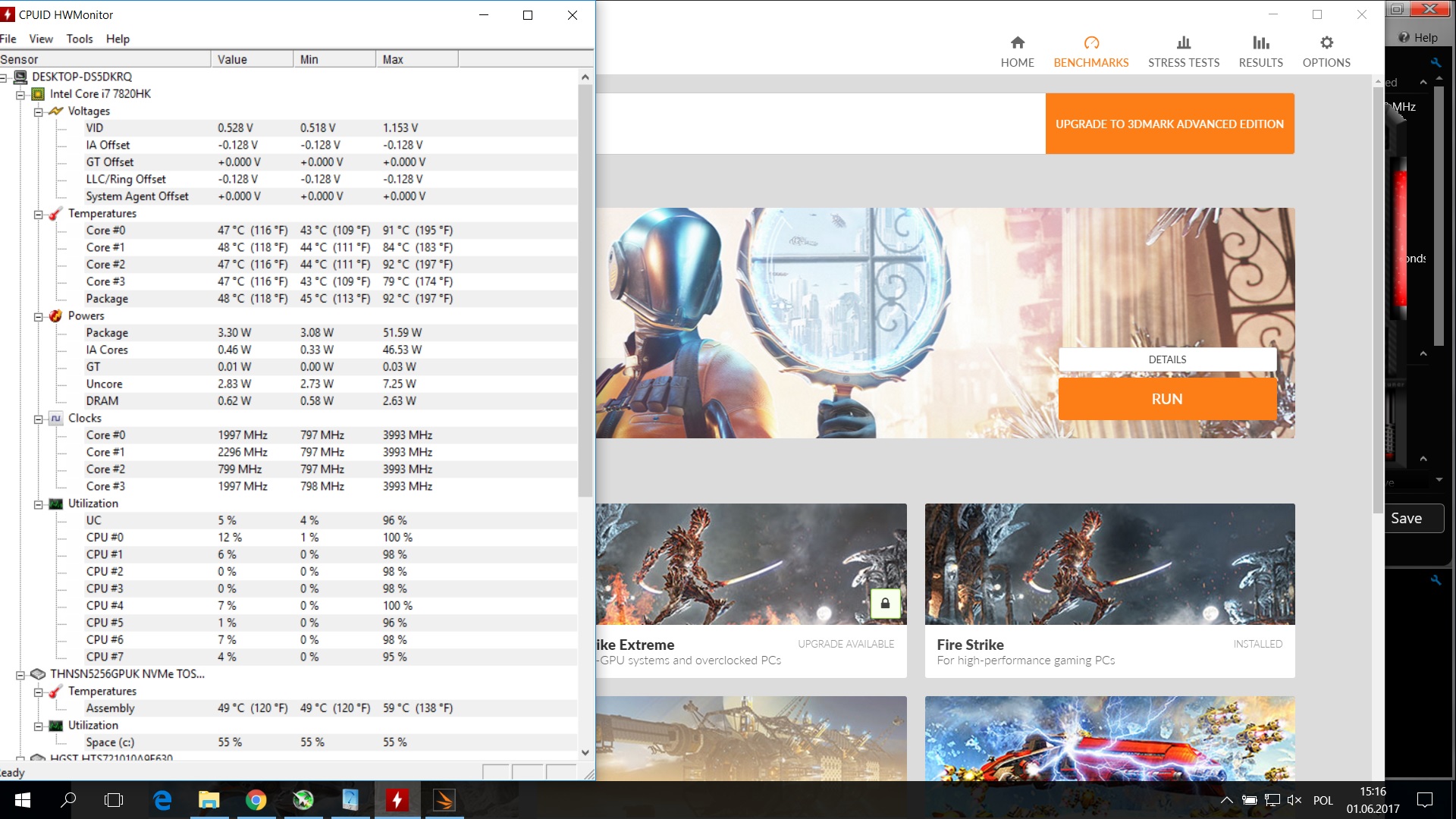
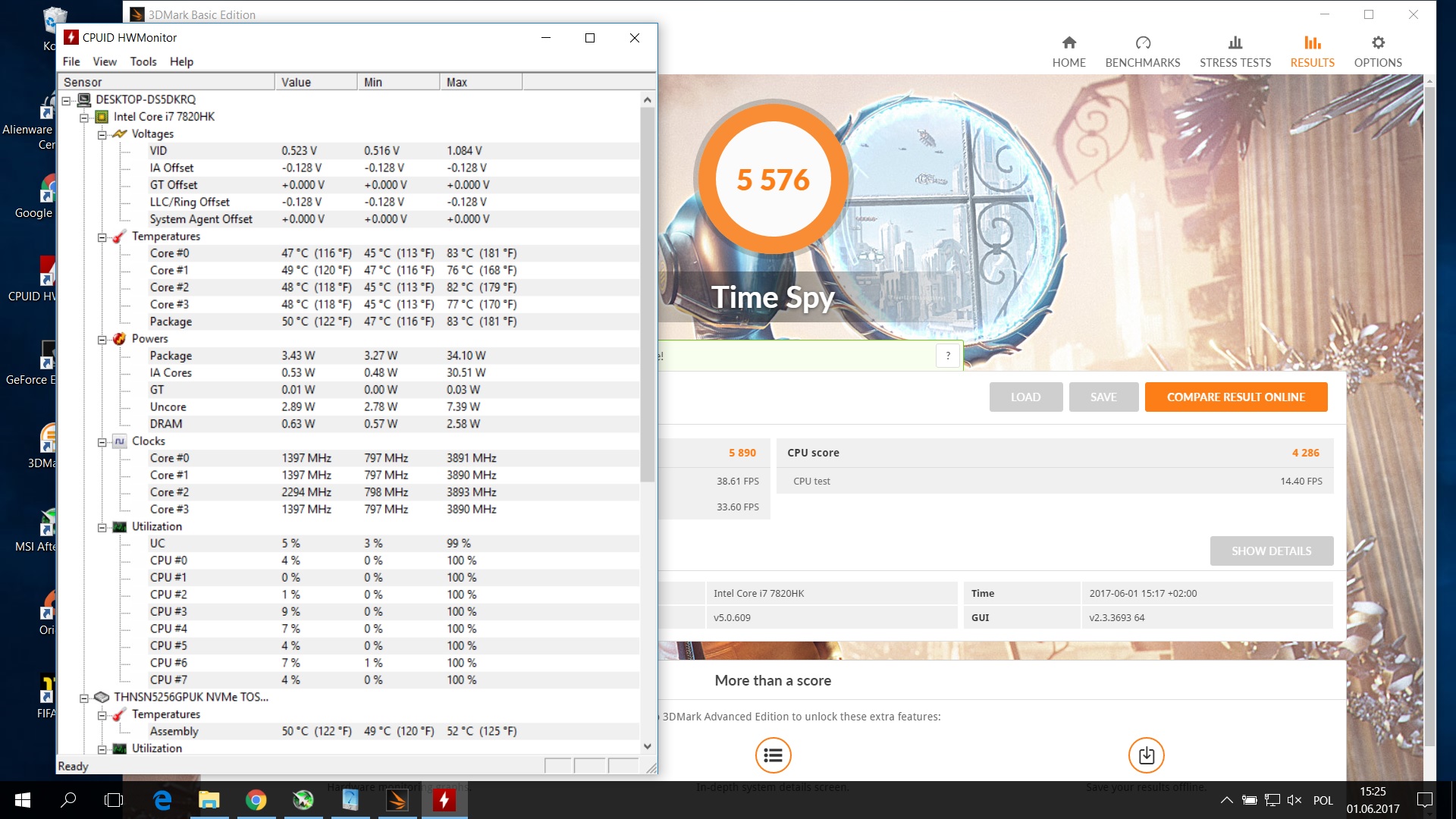
Let me share some benchmark results :
1 picture stock clocks with -125mv - Benchmark spy 83,76,82,77
2 picture OC all cores 4.0 ghz -125mmv same benchmark spy 91,84,92,79
Those results are after repaste using Gelid Extreme...... . Not very good are they
-
Are those average temps or spikes? If it's just spikes, it's not that bad. Granted, they could be better, but if those are average I'd worry a little bit.
I don't have 3dmark installed at the moment, I can reinstall this evening, but just to give you an idea I am running at 4.2GHz and Mass Effect Andromeda generally has an average temp of 65-68 degrees with spikes up to 80-82. That's on a 7820HK after repaste with Kryonaut.tlprtr19 likes this. -
I am getting 2.6GB/s read and 1.6GB/s write, so your close. I assume you installed the latest Samsung NVMe driver.
-
I'm fairly sure those higher speeds apply to the 1TB model. The 250GB is quite a bit slower than the 1TB, the 500GB is somewhere in between the two.
-
Wow those temps are really low. Do you use any cooler pad or something? and how do you overclock CPU? 4.2 you mean all cores? and do you undervolt it if yes how much undervolt you put? Also with bios you have?
I have to mention i use external monitor 144 hz 1920x1080p and I'm running games at 144hz with temps atm arround CPU 88-92C while gaming OC Profile 1 and -100mv undervolt . GPU max temp 68C.Last edited: Jun 2, 2017 -
I just use the 60hz gsync display, so no external monitor.
Yes, all 4 cores set to 42 in bios with an 80mV undervolt. I have the laptop on a Notepal U2 Plus. My GPU generally hits 68 degrees as well, but average is generally around 63-65 degrees. I may actually open it back up and try repasting the GPU, those temps are awfully close to the stock temps I had and I feel it should be lower.
I played FFXIV at 4.2GHz tonight for several hours and average temps on that were around 72 on the hottest core, again spikes into the low 80's. So my mass effect andromeda sample may have been too short or it's less demanding. Either way, as long as my average is at or below 80 I'm happy. Oh and I also replaced the thermal pads.Last edited: Jun 2, 2017 -
Thanks for fast reply . Do you lock fps to 60? What i notice while gaming when i lock it to 60 fps my cpu temps won't reach 70c but when i connect external monitor with 144 hz g sync then my cpu temp rise to 90...
-
The XXXX-HK processors are known to have slightly higher differential temps.
Those temperatures are slightly high IMO, i think maybe there's a pressure problem but doesn't seem horrible, you correctly secured the screws ? because a little extra pressure can make a big difference (believe me).
It's not the worst however, how much paste did you use ? Don't use a lot on the CPU and how did you apply the paste ? pea dot in the middle, used something to spread it etc.?
I'd recommend using Kryonaut it's thickness and performance are what gaming notebooks need nowadays, if you're comfortable with repasting, you can also use conductonaut but follow iunlock guide carefully.
With my experience i think kryonaut > IC diamond 7 (yes, it's controversial but I had very good results with it) > Gelid.
What bothered me with the Gelid is its durability, I have the impression it dries faster then thie others.tlprtr19 likes this. -
Sorry slightly off topic. Xavier2612 can you please send me your phone number to complete the warranty transfer. They are wanting it before they can complete the transfer to you. I'm not sure my ebay messages are getting to you?
-
Thanks for the phone number Xavier2612 I have transferred the warranty and ownership to you
-
Hello all,
I have a repaste question about my refurb 15r3 6700hq that just arrived last night. I ran OCCT to see how the thermals were and at first they were low/mid 90's (core 0,2) & low/mid 80's (core 1,3). I've got a stable undervolt so far at -200mv and now the high's are around mid 70's (core 0,2) & low 60's (core 1,3) but was wondering if it would make sense to repaste to try and get the core temps closer to each other. I've read most of the threads and seems it can be a little hit and miss with getting the heatsink to lay even across the cpu so not sure how much benefit i will see my current temps?
Thanks! -
repaste will help
-
Thanks, will just bite the bullet and do the repaste.
-
bought my brand new 15r3 today (7700, gtx 1060)
temps are ? should i repaste, or are they ok ?
![[IMG]](images/storyImages/temps40kigq5vpn.jpg) Vasudev likes this.
Vasudev likes this. -
You have an almost 10C differential on your hottest & coldest core, which is " OK" out of the box. You can do the following to improve your temperatures and differentials-
1. Raise the bottom of the laptop either using cooler pad or mounts.
2. Undervolt your CPU using XTU or throttlestop. See some video guide to help you with this.
3. Repasting will help a lot!! Use Kryonaut/ Gelid Extreme if you are a newbie.
4. Change out the thermal pads for a better one; follow this guide. Thanks @iunlock .
Follow these steps in order, you don't need to do all the steps. The first two can be done without opening your laptop. Again its up to you, what temps. you can live with.
BTW, try some games which stress both the CPU & the GPU, then see whether temps. are the same.Last edited: Jun 3, 2017Vasudev likes this. -
Make sure you bend the CPU heat sink arm (on the side which has the single arm only) a bit. Screw it down first so the heatsink sits flush with the die, as there is less pressure on the top part of the die as compared to the bottom part (thanks TRIPOD design). Also, try to put in thinner thermal pads (
or you can use K5 Pro
or a little non-conductive, viscous thermal paste,
or thermal tape by
akasa, or 3M) on the FETs the top part, as your model might be the one before the fix, like mine. Refer to this
video and
thread for understanding more about where the thinner thermal pads should be,thanks
@iunlock .
I have linked the important stuff.StarfighterZ and tlprtr19 like this. -
thanks for the fast reply.
about the repasting/changing thermal pads:
the temps arent any critical, right ? so i cant go wrong with leaving the stock paste. i already knew i am not a lucky owner of a perfect system, so i got 4 years warrenty.
is there any time i should/must change the thermal paste ? -
Awesome thanks for the tips! Was hoping to get away without having to open up the laptop but after playing some games last night I think a repaste is definitely needed. Plus i'd rather get it done during the warranty period so if anything goes awry i still have options....
Last edited: Jun 3, 2017Aman Krishna likes this.
-
My suggestion would be to let the current paste dry out. When your temps. go up in future, repaste and get a machine better than new
 . As you have 4 years warranty, you don't need to worry about jumping into your system and accidently pulling something

Sent from my Moto G (4) using Tapatalk -
maybe im on the good side of the lottery.. =)
this are the temps after 40 mins witcher 3 max settings, hairwork off :
![[IMG]](images/storyImages/tempsuqawdtph5e.jpg)
-
You should be undervolting that 7700HQ by -100 to -150mv.
-
reason ? and how ?
-
They come overvolted by at least 100mv on all samples.
My 7820HK undervolts to -100mv at *4.2 ghz*. That should tell you something.
Some 7700HQ's will undervolt to -150mv. The 6700HQ's were known to undervolt even more. -
are this ssd temps normal ? ran ATTO twice.
idle temps are arround 45 +/- degrees. do i have to worry ?
![[IMG]](images/storyImages/ssdtemps3iv6lotgpz.png)
-
Its quite high, see HDD temp and SSD temp ther's huge difference, in summer it will throttle for normal tasks.
-
The ssd has already passed the throttle temp. See 32MB in Atto. This will only be worse. And a short Atto benchtest isn't the same as real 24/7 tough ssd workload + heavy load on processor
Vasudev, sadkodo and Aman Krishna like this.
-
Considering getting an AW 15 R3 w/ GTX 1070 & 120hz panel and 7820HK. Anything I should know? Thermal vBIOS hacks? Anything I should look out for?
How's the gaming experience ON BATTERY ONLY? Almost all of my older laptops throttle significantly on battery only. Just playing FFXIV on battery goes from 60fps to 24fps on my 970m
-
Battery, about a 70% decrease in GPU performance. CPU isn't affected as much but you still need Throttlestop running to set it up.
-
70%? That's insane. :O
That can't be accurate. 70% of the 1070 would be slower than the 970m on battery. 970m on battery is about 40-50%Last edited: Jun 6, 2017 -
I think mine just caps most games at 30fps on battery, pretty sure you could change the power plan to prevent that, but obviously your battery would drain much faster.
*OFFICIAL* Alienware 15 R3 Owner's Lounge
Discussion in '2015+ Alienware 13 / 15 / 17' started by katalin_2003, Oct 24, 2016.