Problems? See this thread at archive.org.
This is unacceptable. Going to repaste this weekend hopefully.
-
timespy with small overclock.
not bad BGA
http://www.3dmark.com/3dm/20498376 -
Ughhh not looking forward to that. I never had PCH temps on my mind but I did read about users putting custom heat sinks on them. How would I monitor PCH and ssd max temps? This all seems pretty silly considering the gpu hasn't even hit 60 ever after gaming (prey, gta v). I hope when the new manafacture models hit the market I can do a trade in.
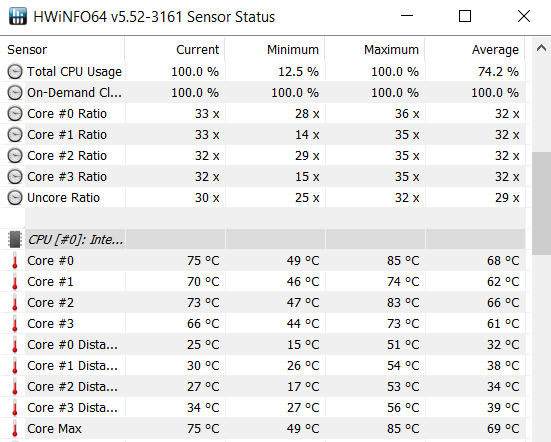
Edit: just want to add in that my max cpu temps don't actually go over low 70s even though my idle temps are a bit spicy. Core differentials aren't bad either... did I get a decent build guys? I'm still considering adding that pch heatsick because I want this to last at least 2 years.Last edited: Jun 16, 2017 -
This reminds me to check the thermal performance first, if it is not ok don't do BIOS update !
-
So far out of the box the cpu core temps are all equal.
timespy reaching 6090 graphics score
however, the max temp is not good coz it reaches 88 degree Celsius at hottest.
how much can temp drop can I expect from LM Conductonautand Gelid Extreme?
Attached Files:
Vasudev likes this. -
-
NO. 1 BGA Laptop with gtx 1070 + i7 7700HQ for timespy. (my username : irfanmw92)
how far can you guys overclock?
mine stretch to +240 Mhz Core and +380Mhz memory.
memory is Samsung tho, was expecting higher clock.
Vasudev likes this. -
if it shut down while writing new info to the bios chip, the whole laptop is gone
save for replacing the bios chip
contact dell to get a resolution -
I left Hwinfo on all day to see what max temps I would hit and its looking good. (daily tasks, few hours gtav and various other games)
Cpu hit 72
PCH 62
SSD 47
GPU 59
I'm not sure if thats bad or not for PCH but overall I think I do have a decent system unless someone can tell me otherwise. There was weird differentials while I played Tales of berseria, cpu 1 2 hit 67-70 and cpu 3 4 were at 59. Guessing its the game but it did persist for 40 mins after closing the game. -
If the boot block is intact, you can try to recover from a bad flash. The Bios file has to be renamed to a certain .ROM or .BIN file depending on the manufacturer. Then you put it on an empty flash drive/floppy drive, etc. I know one is (I think) AMIBOOT.rom, one is AFUDOS.bin (award?), not sure what the file is for phoenix bios. Sometimes you have to hold down control, or insert, or delete.
There's a thread here.
https://forum-en.msi.com/index.php?topic=65951.0 -
Very good. It must mean you have got a good card with ASIC quality above 80%. Try to break Firestrike record as well.
-
-
Seems good to me. Play arma or space engineers for 1h at high settings and check the temps.
Sent from my SPH-L720 using Tapatalk -
http://www.3dmark.com/spy/1928389
thanks vasudev. today I broke my record. will try firestrike and will post soonVasudev likes this. -
As promised, firestrike. graphics score 19,264
-
graphics score 19,264 bud
total score is less obviously because 15R3 is BGA i7-7700hqVasudev likes this. -
Try Hwbot.
-
Has anybody experienced this while watching a video over youtube or netflix? it happens randomly and its kinda noticeable but it happens for 1 second or less. Any fix out there? i saw this thread over at reddit also https://www.reddit.com/r/Alienware/comments/5n1mes/alienware_15_r3_microstutterstuttering_sometimes/ seems i am not the only one with this problem. Any solutions would be lovely! running on the 120hz panel so no optimus
-
-
Thanks! I want to try the bios update but i think it wont solve anything
Sent from my SM-G935F using Tapatalk -
Couldn't resist the Father's Day sale. I ordered the Alienware 15 r3 w/ i7-7820HK, GTX 1070, 120hz 1920x1080, 512gb PCIe NVMe, 1TB 7200 HD, Win 10 Pro, 32gb DDR4 ram and the Killer 1535 upgrade. It was $1587.00 with free shipping and 1 year premium warranty included. Did I get a decent deal?
Last edited: Jun 19, 2017tlprtr19, SimplyJ3sse, Vasudev and 2 others like this. -
Been trying to learn as much about the 15 r3 as possible. Has Dell/Alienware corrected the overheating issue or is it considered mandatory to repaste the CPU/GPU? My laptop should arrive by next Monday so I am trying to see what materials I might need.
-
That is nearly identical to what I bought back in February and is about $300 less. And I work for Dell...
Aman Krishna and BanditBuzz like this. -
Glad to hear it. I was worried that I might have overpayed for it. I placed the order without doing any research on pricing. I was worried that I would miss the sale if I hesitated and the "Easy Returns" policy made it a no brainer. I could always return it if I hated it. I hope I like it.

-
did you make sure to reship to tax free state?
-
No...I had to pay tax, but it wasn't much more than I would have had to pay had I used a reship service. Also, I wasn't sure if I was going to keep it. This way if I end up returning it I will have paid nothing. The shipping is free both ways and the tax would be refunded along with the original payment. If I used a reship service I would be out the shipping fees and god knows what problems I could have if it got lost or stolen in transit. Too many things to go wrong to save $50.00. But thanks for the tip. I will keep it in mind for future purchases.
Last edited: Jun 19, 2017Vasudev likes this. -
How long ago did you get it? Are you happy with it? According to the tracking # I recevied this morning, I should have it tomorrow. I keep going back and forth with this purchase. Wanted a 15" so a little easier to carry around, but have been lusting after the MSI Titan and Acer Predator 17. I just couldn't resist the Alienware since the specs sound great for the price.
-
That is a damn good deal you got. maximum AW 15R3 possible by dell i believe. unless you need 4K screen which is not necessary when you have a 120 Hz FHD. it is more than enough and any video/gameplay is way smoother than 60 Hz screen. it is more alive. post some benchmark for overclocking the I7-7820HKVasudev likes this.
-
the latest alienware have good heatsink, especially the 15R3, should be able to do some modest overclock on stock paste evenSimplyJ3sse likes this.
-
Got it a little over a month ago and I'm happy with it. Its one of the good ones with a even heat sink but I had to do a clean install of windows 10 and a undervolt to lower the temps but after that, temps are insanely good. This laptop is huge though for a 15" and once you get the box you'll see what I'm saying haha. I actually preferred a 17" but there was no way for me to get it at the time. I think once you see it in all its LED aluminum glory, you won't be thinking about those other laptops. Seriously this laptop is a piece of art.
If you need any help with it just lmk -
With the new bios and Liquid metal re-pasted on 7820HK, I'm getting very strange behavior with TDP throttling... Can anyone comment?
You can see that my MHz is actually capped based on the TDP throttling.
http://imgur.com/a/EKULE -
Have you considered increasing Package Power Limits + PP0 limits in TS?
-
How do you increase those? I just download TS and only know how to increase the MHz and -mV and then just started using them off the bat.
-
Learn how to use ThrottleStop. Yoo increase the Power Limits in TPL window.
-
Hmm I added a pic of the TS TPL settings. I can't adjust the 45 there.. I guess its as intended. Any thoughts?
Attached Files:
-
-
for alienware you need to use xtu to increase power limit
but with HQ model you can undervolt to not hit 45w, then the cpu will run maximum speed while being cooler at the same time -
I have the 7820HK and i liquid metal re-pasted... not really achieving the results I wanted since I'm still getting a stupid 55c idle. Now this TS stuff is limiting it.
-
Then yes, you need XTU.
If you need help I can spare some time though teamviewer, contact me on discord (my signature). -
And Dell cripple the firmware as usual. Throttlestop is only useful for multi and voltage settings? Oh'well. Really no surprise.
-
I think its actually the new bios thats causing the tdp throttling... removing the throttlestop didn't change a thing
-
no, it's the way that bios is programmed
each company does a different way, and sometimes we lose/gain access to performance options using xtu or throttlestop
it's a side effect
throttlestop have never been able to control the tdp, the new bios isn't at faultVasudev likes this. -
Anyone have any idea why my fans rev up to like 90% when I leave it alone? For example ill have everything closed and just leave it and the display turns off at 10 mins. I come back to it and the fans are blasting for no reason. Once I get the display back again the fans turn off.
I don't have a bitcoin miner now, do I? haha I did scan with MB and windows defender just in case but seems clear.
Edit: It happened again except I was at the pc and the display was on. Fans revved up till I moved the mouse a bit.Last edited: Jun 24, 2017 -
Is it clean installed OS or Custom Dell ones.
-
if you have dell applications installed, most likely they're trying to get telemetry data off you till you come back to the computer /sVasudev likes this.
-
And you have Windoze Maintenance. Aka Micro$haft's spy tool
-
Should be taken out of the equation with oo shutup10
-
You can't disable this ****y with o&o shutup10. But you can fix it with a tweak How to disable Automatic Maintenance in Windows 10 via Registry
-
Its included in Winaero tweaker. I sped up windows 10 on hdd, now its close to SSD like performance.Papusan and Aman Krishna like this.
*OFFICIAL* Alienware 15 R3 Owner's Lounge
Discussion in '2015+ Alienware 13 / 15 / 17' started by katalin_2003, Oct 24, 2016.