Problems? See this thread at archive.org.
Translated...
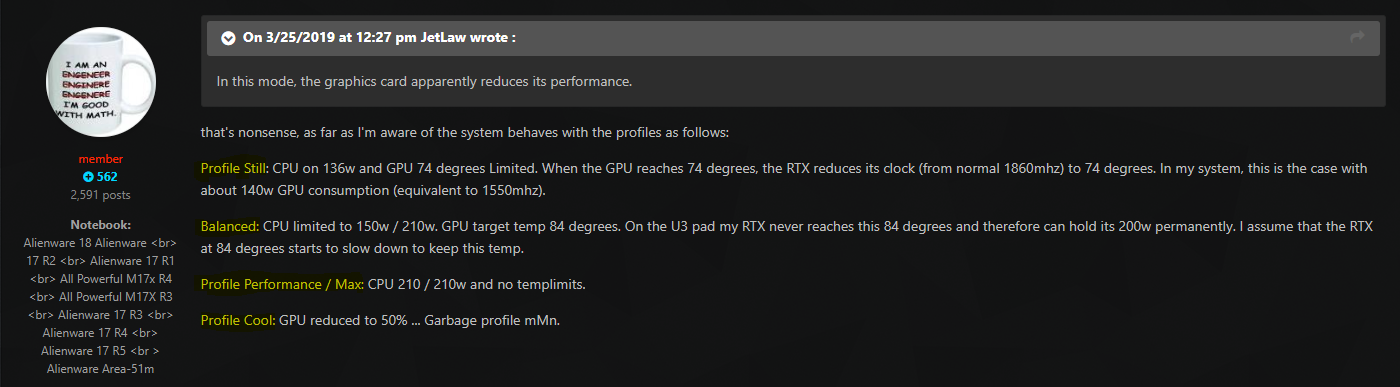
And the number 74C looks like the Holy Grail for Dell. It looks like Azor use exatly same firmware/software engineers for both the AW and XPS lineYou see... Dell's engineers crippled the graphics power for XPS. Aka they they reduced Max Gpu temp (crippled) and added in exactly same temp target in later firmware update for XPS models. Less is more
-
-
Does anyone know of any alternatives to the Fan
Does anyone know of any alternatives to controlling the fans/power limits other than Alienware OC Controls? I hate the CPU overclocking in that application.... It's frankly terrible. Fan curves don't work. Fans either spin up too late after the CPU already has hit 100C, or they are on 100% high speed mode, which does help keep the temps down. But I think there should be a middle ground where the fans spin up fast enough when it detects the temps high 80C. It takes like 15 seconds for the fans to reach full speed when in balanced mode.
Also, the CPU OC tool is terrible. It let's you put "5 GHz", but it doesn't tell you the all core speed or let you change it. So "5Ghz" really means 4.6 ghz on all cores, etc. The GPU OC might be okay, but I really dislike how alienware executed the AWCC OC controls. Hopefully they update them with a patch. Am I the only one with these issues?
For now, I plan on keeping them installed just to control the fans... Gah... Any other alternatives to controlling the fans out there? -
Maybe Hwinfo fan control works. But as you can see here... Nothing have really changed from Dell regarding put in proper working fan control the last +6 years. It's what it is. Low noise always prefered over cooling. Same also with Apple... Rather let the machine run 100C instead for more noisy fans.
-
yep i can concur ,
custom fan profiles specifically smooth line which is what i want dont work, i want fans to be at 100% at 80c and ramp up rapidly but my profiles simply do not seem to work.
i shouted alienware on there youtube channel but i hope others reach out to them to point it out -
Doesn't this have something to do with the timing values though? As in when you set to 5GHz OC you are setting the multiplier to 50, which would give you a frequency of 4992.7?
Meh, maybe I'm misunderstanding (I don't OC much)... but I have my ACC CPU set to 5GHz, and the max I see in HWiNFO is 4,992.7MHz for most of the cores (it does indicate that is a 50 x ratio in the core ratios). -
The thing is, when i set it to 5.0ghz and then click test, the test shows 4.6 all the time. When i run a benchmark then with hwinfo open it also say's 4.6ghz. But then all of a sudden when i'm doing nothing it clocks to 5ghz and this also shows in hwinfo.
-
The 100C temps are only happening when in balanced mode. When the fans are on full tilt, the temps are more like 85 when rendering video at 4.7 ghz. But I have to set the computer to run at high fan speed full time in the AWCC OC Tools, which means if I want good temps, I need to full blast the fans. If I want good ambient noise when not rendering, it means I spike up to 100C when rendering. I need a good inbetween fan profile that will quickly ramp the fans and keep the temps cool.
-
Yeah, its more like on or off. I have to use max fans in Hwinfo fan control otherwise the oc'd 4930Mx in my AW17 fire up near 100C before the fans kick in. Dell added in disgusting fan profile in firmware. Without Hwinfo fan control I would throw my AW17 in the dustbin several years ago.
-
this is a known bug in AWCC. Its broken for 8 core systems and only overclocks 6 cores to the shown value. The final 2 cores stay -300MHz behind the others (An Intel Default).
It is not recommended to use AWCC at all. Disable the overclock feature and use Throttlestop. (you can still use fan profiles without the overclock enabled)SlickDragon, DannyB513 and Expje87 like this. -
Thanks for the information. Do i just uninstall alienware OC controls and then use Throttlestop?
-
It has always shown up for me in the MS store. There is Alienware FX-02 and the old Alienware FX Display. I have never DL'd the FX Display.
-
1. Most of the failures occurred on the CPU side of the mobo.
2. The SSD's are nowhere near the GPU so how could the GPU burning out burn up the SSD? -
My 23,000 score posted a couple of pages back was with the fan profile set to Balanced. Not sure what their problem is.epsilon72 likes this.
-
Well, the GPU is pretty close to one of the M.2 drives, but I believe it was the 2.5" drive that was damaged. Weird.
-
That is weird!!!
You will also find some posts on reddit on the burn outs. Some are overlaps from here, some are not. I should be working right now so I don't have time to link them for you or I would. They are in the r/Alienware sub-reddit -
the GPU is no where near to any of the M.2 drives nor the 2.5" drives. if anything, it's next to the rams and closer to the wifi card.IXVIXXII, DannyB513 and Spartan@HIDevolution like this.
-
Same here : custom fan profiles with manually selected curves don't seem to apply for some reason.
-
I'm about to join the club and pull the trigger on the following system through HID. What do you guys think? My budget is $4000 and @Donald from HID helped me spec out the following system:
Processor
HIDevolution Delidded Intel 9th Gen Core i7-9700K 8 Core, 8 Thread, 12MB Cache, Processor, 3.6 - 4.9 GHz - installed by HIDevolution - $50.00
Video Card
NVIDIA GeForce
RTX 2080 w/ 8GB GDDR6
GeForce
RTX 2080 w/ 8GB GDDR6
Thermal Interface Materials
Thermal Grizzly Conductonaut between Intel CPU Die and IHS + GPU, Gelid GC Extreme between IHS + Heat Sink, and Fujipoly Extreme Thermal Pads on heat sensitive surfaces - installed by HIDevolution (ONLY SELECT THIS OPTION IF DELIDDED CPU IS CHOSEN)
Alienware Graphics Amplifier
None
LCD Panel
17.3" FHD (1920 x 1080) 144Hz Anti-Glare IPS Display w/ NVIDIA G-SYNC + Tobii eyetracking technology
Display Warranty
Standard Alienware Pixel Warranty (warranted against 3+ defective pixels not on center of display - up 2 to defective pixels okay)
System Memory (RAM)
HIDevolution Approved Standard 16GB Dual Channel DDR4/2666MHz (2 x 8GB) - Operates at 2400MHz - installed by HIDevolution - $150.00
RAID Options
no RAID (1st drive as primary boot drive, 2nd drive as storage drive)
M.2 PCIe / SATA Slot 1
Samsung 970 EVO PLUS 500GB M.2 PCIe 3.0 x4 NVMe 3D-VNAND SSD - Up to 3,500 MB/s Read-3,300 MB/s Write - Installed by HIDevolution - $200.00
M.2 PCIe / SATA Slot 2
None
2.5" Drive Bay
Samsung 860 EVO SATA3 6Gb/s 1TB SSD - installed by HIDevolution - $205.00
Keyboard
Alienware TactX keyboard with per-key RGB LED AlienFX lighting, anti-ghosting, N-Key US Eng
Wireless Cards
Killer Wireless-AC N1550 802.11 ac/a/g/n 2x2 NGFF w/ Bluetooth 5.0
Operating System
Windows 10 Home, 64bit, English, with Multi Language Support
Operating System Clean Install
Yes, Clean Install of Windows - $15.00
Office Software None
Power Adapter180W + 330W (510W Total) AC Power Adapters (support 100-240V)
Internal Battery
Lithium Ion (90 Wh) Battery
Warranty and Service
FREE UPGRADE TO 2 Years Premium Support + 2 Year HIDevolution US Warranty + LIFETIME HIDevolution Technical Support
Accidental Damage Protection
None
HIDevolution International Pre-paid Shipping None
Total with shipping to Dubai:
$4069.34
Do you guys have any final advice?
Also, HID deserves the reputation it gets around these parts as they were really helpful.
Thanks guys
Sent from my SM-G965F using Tapatalkthetruegamer, SlickDragon and Amroth like this. -
Wow... Dell swap the Panel even if only 1 Pixel is defective... 2 broken Pixel okay on an 4000,- unit...c69k likes this.
-
That’s my best run so far, not quiet sure if happy or not :0
I9 9900K + RTX 2080Attached Files:
SlickDragon, Kormi, area51m and 1 other person like this. -
-
What clocks?
-
Not quiet sure, not really experienced in OC, posting it after Work
-
Did you guys benchmark any games like Ghost recon wildlands etc?
I'm getting same fps as my fathers regular computer with GTX 1080. On ultra setings I get 61 fps average ghost recon wildlands. -
emmm... How about the fan noise? LOL
-
The only hardware change I made was to add an SSD which I checked and removed and the issue remains. LED and Audible codes suggest LCD failure (2 red/7 blue leds, 3-2-1 audio beeps 2000-321 audio error code). I did re-seat the memory but that didn't change anything. Dell are going to send a technician out to replace the LCD panel and GPU/Motherboard as they said this will be quicker than ordering a whole new system. I still think they should just have replaced it asap with a new system as it bricked pretty much straight out of the box and there is no guarantee that replacing these components will fix the issue and I might have to wait longer anyways.
-
Hi everyone, Once again, I'm one of the guys with the burned area 51M's.
My laptop got in production stage on 25th of march monday. Was told it would take 1-3 days. Still in production. (the order was confirmed and approved by me on 22 march friday evening). Waiting for it to ship, hopefully soon now.
Now what I really wanted to say is. I mentioned earlier that my 4TB Samsung 860 EVO SSD died alongside my pc.
Turns out that wasn't the case. I had 2 sata hard drive readers through USB. One with an external adapter, one without.
In both cases, my drive wouldn't work properly, and when trying to format, on both I was only able to see 1677.90 GB as available space.
Me seeing this first time, I asked around in quite some places, including here. And everyone seems like thought it was broken. Turns out, it was due to the sata to usb interface being too old, and not supporting 4TB drives.
Because I was at the end of my 30 days return policy of my ssd, I quickly sent it back in for refund. Which I basically did for nothing.
So once again, my area 51M did NOT kill my SSD.
Bummer, But am at least glad that I figured this out. As I never heared of such a limitation.SlickDragon, raz8020, GizmoSlip and 5 others like this. -
I think older AW m17x would have no problem seeing 4TB drive. This is the first time I'm hearing A51M seeing only 60% of actual disk capacity. I think Aliens at AW HQ mixed up older A51 with newer A51M with 9th gen CPU,RTX GPU and RAM 1200MHz.
-
What I did was uninstall as complete as possible with ccleaner. Installed Throttlestop, but then reinstalled OC controls after and turned "off" the overclocking. Unfortunately you need OC controls installed to have any control over fans.
-
1.32 bios is out now
great score i managed to get 10620 but im gona try tweek my settings but the damn fan profiles or should i say power profiles in command center are really confusing as i read that these prfiles also effect how much power yu have availible , so how do i set a profile with max power and my own fan curve................
so confused.Kormi likes this. -
It wasn't the A51m that couldn't see the 4TB, just one of his SATA interfaces, just an FYI
VoodooChild likes this.
-
You mean external SATA interface connected via USB?
-
In case anyone cares about Gsync, I found what’s been turning it off while in full screen games. Getting rid of tobii eye tracking software fixed it all and now the gsync indicator shows up in all games whether in full screen or windowed. Seems like tobii has some sort of layer on top of these games that knocks out gsync.
Sent from my iPhone using TapatalkSlickDragon, raz8020, Halewafa and 6 others like this. -
Just got my 51m few days ago, keyboard rgb wasn’t assessable in command centre from very beginning.
Contacted Dell support and they also don’t have any clues.
I called the retailer that sold me the laptop and they tried to update the command centre in their demo unit. Now their demo unit lost all RGB function (not only keyboard).
Didn’t expect such problem happened.
-
Last night I removed the command centre come with my laptop and redownload it from Dell.
I was able to install the command centre but couldn’t adjust oc frequency. Finally I had to reset the windows and redownload all the games. -
Hmm... I think this is pretty standard from most of all OEMs. Note they are not talking about a shipped new system though. You have 30 days to return anything for almost any reason. They are talking about pixel failure under warranty period. Pixel failure is very rare for just 1 or 2 pixels for a used system. Most of the time it is a line of them.
This is no excuse though. Should not ignore them, especially if it in a conspicuous spot. No matter how rare the problem is.raz8020, VoodooChild and Darkhan like this. -
Have you successfully installed. Anything noticeable changed?Darkhan likes this.
-
yeah and even then is Dell changing the panel without discussion. Had an AW17r1. In the 4. year 1 pixel failed. I called Dell and 3 days later my panel was replaced...raz8020 and ThatOldGuy like this.
-
It does seem like a ln outdated and ignored policy. I've also never heard of anyone being refused a panel replacement.Vasudev likes this.
-
So is there supposed to be a list of themes under the FX option in the command center? I know on previous Alienware's they had some pre-done already but I don't see any in mine..or a place to download them? Thanks!
-
I’m also interested in how this goes, all it says is “performance enhancements”.
Sent from my iPhone using Tapatalk -
I am about to leave work and will DL as soon as I get home and then run FS and Division 2 Benchmark again and see what numbers I get without and with OC's and post.
LoganWade, VoodooChild and captn.ko like this. -
No, it's not the Area 51M that sees the drive as 1.6TB, but when I plug the drive to another PC using my USB sata reader. I don't have a working area 51m ever since it got burned. Still waiting for a new one, In that one, it should work fine. As long as I user a sata cable or a usb interface that is more recent.Vasudev likes this.
-
Where do you find this "gsync indicator"? Or how to you know if it's working?
-
Go to the gsync option in Nvidia Control Panel, at the top you will see display tab, enable gsync visual indicator. If gsync is working you will see the gsync logo on the top left of your screen in games
Sent from my iPhone using TapatalkSlickDragon, VoodooChild, Darkhan and 3 others like this. -
So I ran a fire strike run after the new bios released today and saw a good 900 point increase in my combined score and a 700 point increase in my CPU score with my 9700k at 5.2ghz. Graphics score went up about 300 points only. Still having tr annoying issue where balanced fan mode kicks in way too late and lets the CPU spike too high. Never understood why every Alienware model does this. Fans won’t kick in till the CPU is constantly 85 to 95C
Sent from my iPhone using TapatalkLast edited: Mar 28, 2019SlickDragon, raz8020, Papusan and 2 others like this. -
Everything stock on Balanced Fans on new 1.3.2 BIOS
![[IMG]](images/storyImages/DUPOKdY.png)
Running 5.0 on all 8 cores w/ -100mv offset thru TS and +130 core / +200 mem thru Afterburner on 1.3.2 BIOS on Balanced Fans
![[IMG]](images/storyImages/KwylZYR.png)
Same OC on Performance Fans
![[IMG]](images/storyImages/IN02WsB.png)
Same OC on Max Fans...was given time to cool off before run and scored less than above on Performance Fans...
![[IMG]](images/storyImages/RM0BmWm.png)
ETA: Actually 4.9 on all cores. For whatever reason no matter what I set the multiplier to in TS the highest I see in HWInfo is 4.9Last edited: Mar 28, 2019SlickDragon likes this. -
What are your settings for 5.2 and what are you using to OC?
-
I think you should be happy. I get 10300 points. On Oc2 with max fans.
This below is when i change to the max resolution the built in screen can run.
So its over 3000 points difference!
-
What does HWinfo say the package Watts are?
-
Will run again and let you know. Also, no matter what I have the multiplier set to in TS it will not show higher than 4900MHz in Riva Tuner OSD as well.
*OFFICIAL* Alienware Area-51M R1 Owner's Lounge
Discussion in '2015+ Alienware 13 / 15 / 17' started by ssj92, Jan 8, 2019.