Problems? See this thread at archive.org.
Yeah, also that small display showing the power draw is quite amazing. feels like a solid piece.
I'd want one too. but probably won't get it, now that I already have two sets of PSU's
-
Thats nice. Can you post what wattage number Hwinfo64 can measure? Thanksc69k likes this.
-
Details! Where can I get it? ;-)
-
Eurocom website or Amazon. Its $500.
-
Sure, I will later tonight, I did check running firestrike a few times on the PSU not hwinfo but it spiked 310 was the highest I seen.
-
It was $369 before. But i guess they raise the price due to laptop that would need this as a convenient PSU.VoodooChild and c69k like this.
-
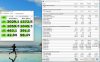
are these temperatures normal?
-
For an NVMe drive under full load and no heatsinking? I'd say yes, sadly.
I've had a 960PRO hitting 105-110*C in a desktop in benchmarks, crammed in a notebook they do get hot like fire. -
the drive have the stock heatsink
-
Some NVMe ssd's run hotter than others. But temps as its with the stock heatsink is too high.
Edit.
See link http://forum.notebookreview.com/thr...m-owners-lounge.826831/page-512#post-10882249
http://forum.notebookreview.com/thr...m-owners-lounge.826831/page-703#post-10893139
Could you run those 3 ssd benchmarks and post pict of NVMe ssd's max temp and scores? If you have the time then run them two times in a row. Links below. Thanks
Anvil's Storage Utilities v1.1 2014
ATTO Disk Benchmark v4.00.0f2
AS SSD Benchmark v2.0.6821.41776
Atto has a nice graph that you can see if the ss'd provides consistent performance through the whole ssd benchmarks.
Not all notebooks is designed equal. Some have decent ssd temps.
Last edited: May 3, 2019Rei Fukai, c69k, raz8020 and 1 other person like this. -
I ordered copper heat-sinks for the NVMe drives, should cool better than the stock (aluminum?) heat-sink.
Anyone know how much room there is for M.2 heat-sinks in 51m?
I ordered 2mm high ones, but they also come in 3mm and 4mm for even more cooling.
What is the biggest size can we get away with?
https://www.ebay.com/itm/Copper-Hea...For-M-2-NGFF-2280-PCI-E-NVME-SSD/254031932251Last edited: May 3, 2019 -
Not sure who said they couldn't tell a difference in the LG and AUO screen. There is a definite difference in contrast and color accuracy. The AUO is much better.
-
What do you mean stock heatsink? 960 Pros do not have a heatsink.
Do you mean the Dell heatsink?
What was your estimated delivery date a couple days ago?
Also FYI, they do some assembly in China and do some assembly and packaging stateside.
You don't see tracking or shipped until its on its way to you. While "Confirmed" or "in production" the systems can be in anyways, there is no way to tell. -
Which panels are LG?
-
Anvil's storage 1 run:

Anvil's storage 2 run:
AS SSD 1 run:
AS SSD 2 run:
ATTO Disk 1 run: VoodooChild likes this.
 -
I mean the DELL heatsink, should there be on all the units that mount ssd or i am wrong?
-
-
Look on your build sheet.
562NF - LIQUID CRYSTAL DISPLAY, 17.3FHD, AG, AU OPTRONICS CORP (AUO)
YWJJ6 - LIQUID CRYSTAL DISPLAY, 17.3FHD, AG, LEGEND (LG) -
Arg!
Panel Roll call.
Who here from the USA has which panel?
The LG has a faster response time.Rei Fukai likes this. -
What's the response time for both these panels?
Sent from my SM-G965F using Tapatalk -
I have one if each here right now. In USA, SC.
My first unit is AUO my replacement that came today is LG.
Definitely switching screens before sending original back.Last edited: May 4, 2019VoodooChild and TRANCE1 like this. -
I am very glad I have an AUO in the 51m on the way to me, I would have been distraught if I got the LG.Latostno and pathfindercod like this.
-
The AUO is noticeably better than the LG in response time, 7ms vs 13ms.
As confirmed by the panel info as well as notebookcheck tests of laptops with these screens:
http://www.panelook.com/B173HAN04.0_AUO_17.3_LCM_overview_37192.html
https://www.notebookcheck.net/Asus-...i7-8750H-GTX-1060-Laptop-Review.346966.0.html
https://www.notebookcheck.net/Alienware-Area-51m-i9-9900K-RTX-2080-Laptop-Review.414667.0.html
Response time of Asus Scar II with AUO B173HAN04.0 (AUO409D)(same panel in 51m):
Response time of Alienware Area 51m with LG Philips 173WFG:
Last edited: May 4, 2019 -
Glad my replacement came with the AUO!
Edit: Odd, it quoted 2 posts when I only replied to one.Last edited: May 4, 2019 -
Your source please? Does LG really have a faster response time? The post above mine says otherwise.
Sent from my SM-G965F using Tapatalk -
Mines came with LG screen. Not sure how hard it would be to replace the screen. Let me know if anyone attempts it.
-
In case anyone is looking to upgrade their ram, can get 32gb of 2400mhz (2x16gb) for $130:
https://www.newegg.com/Product/Product.aspx?item=N82E16820232156
Probably a good buy in the Area-51m since we don't know if 2666mhz will ever be supported in the first model that sets itself on fire randomly. Besides that, the performance difference between 2400mhz and even something like 3000mhz virtually only matters in bench marking anyway. -
I'm moving to Intel 9560 as it is M.2 and doesn't depend directly on PCIe speeds. This will solve my problem I think. What is happening is that when overclocking the CPU, it's increasing the PCIe bus speeds to a point where the wifi card just can't keep up. M.2 interface connection for wifi-BT adapter makes more sense in this kind of machine. I wonder why Dell shipped with a 9260 instead.
In this form factor, heat sinks are a must for NVMe. They are quite cheap and reduce the temps a LOT. Mine don't cross 70 degrees under load.
It's as easy as opening 4 screws and popping a couple of connectors. Hardly a 10 minute job. Although, you'll have to take out the wifi card as well which is not that difficult either. I prefer taking the entire card out instead of pulling those tiny antenna cables apart. They are a pain to re-install.Last edited by a moderator: May 4, 2019propeldragon likes this. -
Damn, I'm the one going through GPU burnt down and pcie degradation issue. Guess what? after replacing the pcie connector, my motherboard just died with DC-in module totally burnt. I just don't know what is actually going on with my god damn laptop...
Attached Files:
propeldragon and c69k like this. -
-
I think you got stuck with a first batch machine and are gradually moving towards the 2nd batch part by part.
Those connectors are FRAGILE! And when I took mine apart for replacement, I could easily spot a couple of bent pins that were hyper extended. The baboon who repasted this thing at HID must have slapped things back together sloppily. The new ones that I put in were in pristine condition and I babied them into their spot taking a good 5 minutes without moving them around on the board to avoid bending those tiny pins.Last edited by a moderator: May 4, 2019 -
I'm going to send a RMA request to dell to see if i can get a complete laptop replacement.
-
I wouldn't do that mistake as that could start my journey of replacing parts all over again, considering the fact that for some God forsaken reason the first batch parts are still floating around! I'd say just replace the motherboard and make sure when talking to Dell that you are getting the "2nd batch with upgraded components". If they don't know what that means, make sure that they know what that means before you accept any replacement part from them. They sent me a first batch GPU to replace my 2nd batch one which I luckily spotted and fixed my gpu temp issue without changing the GPU itself.
-
AW's R&D is like crap, PLUG TYPE pcie connection is attainable for GPU in a laptop. The only problem is that they just want to use their own dgff model card.Papusan likes this.
-
They went with this proprietary connector to keep the height profile down as the other one would have added 2-3 mm more to the thickness of this machine which they wanted to avoid. I think these connectors are fine as long as they are carefully handled.
-
guys. not the best day. Basically was playing overwatch for 3 mins and the laptop lost wifi connection then turn off (330w PSU light off too). Famous burn issue as I can clearly smell it. Laptop dead now (i7 +2080); spoke to the dell repair guys in Hong Kong and they had not heard of this issue. My laptop was about 4 weeks old and shipped end of march.
What parts should I tell the dell guys to bring? Is it just the GPU or more? Thanks in advance.c69k likes this. -
You have to open it up and see what's burnt. No other way to tell. Also take a look at your DGFF power components and make sure you don't have Lemon Parts in it.
-
Motherboard and GPU
-
I'd keep the GPU if it is a non-lemon part. Those are hard to find due to Dell's silly approach of letting the first gen faulty parts float in the market.
-
BTW, what is the lemon parts you're mentioning. My GPU died and got smoke with this parts burnt,not the MOSFET
Attached Files:
c69k likes this. -
-
These are shunts. Dell has replaced the shunts on new DGFF cards as well. Take a look at my older posts. I have posted side by side pictures of both a first batch and a 2nd batch GPU for comparison.
Take a look here: http://forum.notebookreview.com/thr...m-owners-lounge.826831/page-888#post-10901057Last edited by a moderator: May 4, 2019 -
The upgraded mosfets are an indicator whether you are getting first (bad) or second batch part. If you have the NCP-303151 mosfets then you most likely have the barbecue batch and if you have the NCP-303150 mosfets then you most likely have the upgraded stable batch. Also you can see that the shunts are beefier in the 2nd batch in the images on that link.
-
Im still wandering if I get the laptop replacement, could it still be composed of some old bad batch components on the GPU? Cuz' that's really terrifying.
-
I would at least ask dir GPU and mobo replacement. Better a complete replacement.
c69k likes this. -
Hi I am also from HK. Got my machine just after Easter but I haven't even open the box yet. Did you buy from HK Dell or US Dell? I had had service from HK Dell before and they seemed pretty good so just ask them to change the MB for you.
Sent from my SM-N9600 using Tapatalk -
Do you know if replacing the screen removes the G-sync capability? That's my only remaining concern. Will need an exact model used in the Area 51m as well before I place an order.
-
Dell will for sure release a 2666mhz capable bios, this is their highest end machine and they have supported 2666mhz on other less capable machines.
I really get bummed when people say Ram speed makes no difference. Ram speed in conjunction with timings do make an appreciable difference under certain situations.
When the fps is bottle-necked by the GPU then it makes no difference.
But if the game is CPU bottle-necked then the higher the RAM speed the more frames you will get at the top end, and we are talking anywhere from a handful of frames to dozens(depending on the game), which is very welcome when we have a 144hz screen and are gaming at 1080p.
Unfortunately for us though we will be capped at 2666mhz when we eventually get the bios update.
I wish Dell would give us a proper bios with memory tuning, I would have 3600mhz in this at a minimum...Last edited: May 4, 2019Killerkrack likes this. -
That's a lot of cable and a Clevo dual PSU adapter box. A simple Schottky instead of the y-splitter, could have gone into the power adapter by just adding a secondary DC slot, would have done the same job and be a lot smaller, cheaper and future proof by being universal.
Last edited: May 4, 2019ssj92, ThatOldGuy, Johnksss and 4 others like this. -
Fastest Recorded laptop scores for the following categories for the time being...
Fire Strike Extreme: 14135
![[IMG]](images/storyImages/iunlock-Fire-Strike-Extreme-14135-Area51-M.png)
https://www.3dmark.com/fs/19229338
Fire Strike Ultra: 7179
![[IMG]](images/storyImages/iunlock-Fire-Strike-Ultra-7179-Area51-M.png)
https://www.3dmark.com/fs/19229333
Night Raid: 67195
![[IMG]](images/storyImages/iunlock-Night-Raid-67195-Area51-M.png)
https://www.3dmark.com/nr/110761LegionWolf, Rei Fukai, Johnksss and 6 others like this.
*OFFICIAL* Alienware Area-51M R1 Owner's Lounge
Discussion in '2015+ Alienware 13 / 15 / 17' started by ssj92, Jan 8, 2019.