Problems? See this thread at archive.org.
Nice, finally my tracking number showed up in FedEx's system late last night and landed in Carson, CA. Now it's getting shipped to Seattle by ground and won't get to me until Monday. So much for paying ~$40 for expedited shipping. Does Dell do this stuff on purpose to annoy there customers.
-
My razor blade pro 7700/gtx1060 does that all day under full load. Of course, I have liquid metal and undervolt on GPU and CPU, but neither one ever gets above 70 under full load.
-
Maybe its due to the storm that affected one of their centers..
https://www.wxyz.com/news/fedex-reporting-potential-package-delays-due-to-weather -
On steam you can download demo for free it has Firestrike dx11 1080p and timespy dx12 1440p which is enough. Don’t pay for benchmarks software, bought it on sale like for €3,75 and regretted that, nice to have Temperature sensor or Ray Tracing benchmark, but used it only maybe 4 or 5 times the rest the demo one can already answer my needs with other more details sensor free software like HWinfo64, xtu and afterburner, better spending it for ssd thermal pad.
-
So been waiting all day, like watching literally from my window outside then this happens.
We've incorrectly sorted this package which may cause a delay. / Your delivery has been rescheduled for the next business day.
WHY ME ? ! I don't understand damn you UPS -
Full speed fans seem to make about a 3c to 4c difference on the top end when the card is fully stressed.
![[IMG]](images/storyImages/20190221-120616.jpg)
![[IMG]](images/storyImages/20190221-120620.jpg) judal57, ssj92, iron_megalith and 3 others like this.
judal57, ssj92, iron_megalith and 3 others like this. -
This is with performance fans.
![[IMG]](images/storyImages/Performance-Fans.jpg) judal57, ssj92 and iron_megalith like this.
judal57, ssj92 and iron_megalith like this. -
-
Does anyone have Battlefield 5 that can test it with DXR and DLSS turned on. Want to see how it performs on this machine.
-
Can anyone tell me how I should switch from RAID to AHCI?
I cloned the main drive to a Samsung 970 pro, I now want to switch from RAID mode to AHCI, Because I'm not doing a clean install, I'll have to change some stuff in windows I recon.
Found some stuff online regarding to what I should do.
But wanted to ask here first to make sure.
EDIT: Also will I have to re-install, or change anything regarding to intel rapid drive technology that is already installed in my system? -
-
Hello everyone. I received my Area 51M this morning. It's awesome but Dell still has the worst customer service. They messed up my overnight shipping to ground but luckily I live here in Los Angeles so I received it overnight still.
Last edited: Feb 21, 2019 -
Ok guys here are pictures of my heatsink and the bare components.
![[IMG]](images/storyImages/20190221-125126.jpg)
![[IMG]](images/storyImages/20190221-125129.jpg)
![[IMG]](images/storyImages/20190221-125134.jpg)
![[IMG]](images/storyImages/20190221-125138.jpg)
![[IMG]](images/storyImages/20190221-125458.jpg)
![[IMG]](images/storyImages/20190221-125503.jpg)
![[IMG]](images/storyImages/20190221-125506.jpg)
![[IMG]](images/storyImages/20190221-125514.jpg)
![[IMG]](images/storyImages/20190221-125518.jpg)
The heat sink appears to be the 7 pipe version but it is very hefty. With fans connected the entire assembly weighs in at 1lb 8.6ozjudal57, raz8020, steberg and 1 other person like this. -
@EepoSaurus do you have the side exhausts to? What was your configuration, sorry if you've posted this already.
I'm on my phone so can't even see signatures either if its there.
Thanks -
Yes it has the side exhaust and it was speced with a 2080 and the 9700k. I am about to install an 8700k to see how it performseuphoric28 and Fire Tiger like this.
-
I also did find that one, though I simply set safe boot through msconfig, but basically doing the same.
So now was able to properly install the samsung nvme driver And the samsung magician software now also properly recognizes the ssd as a samsung ssd.clayton006 likes this. -
Glad you got it sorted out. I was doing the same thing on my XPS 13 a few months ago with a 2TB 970 Evo, but thankfully the drivers were loaded so I didn't have to mess with safe mode boot and so forth.
-
Ugh. To clone or do a fresh install. I was going to do a fresh install, but went to look at the Dell Drivers download page and wow was I overwhelmed by the sheer number of downloads available for the area 51m. I would just clone, but was told cloning isn't as clean/fast as a fresh install. Any ideas or suggestions? I did undo the raid 0 config on my 2x256 nvme drives and plan to install/clone windows onto one of those for the time being vs. the hybrid drive.
Thanks.
Edit: I contacted Alienware support and they are suggesting a fresh copy of windows via usb which I am familiar with and they gave me a list of suggested drivers that are needed so I am going that route.Last edited: Feb 21, 2019 -
- Click the Start Button and type cmd
- Right-click the result and select Run as administrator
- Type this command and press ENTER: bcdedit /set {current} safeboot minimal (ALT: bcdedit /set safeboot minimal)
- Restart the computer and enter BIOS Setup
- Change the SATA Operation mode to AHCI from either IDE or RAID
- Save changes and exit Setup and Windows will automatically boot to Safe Mode.
- Right-click the Windows Start Menu once more. Choose Command Prompt (Admin).
- Type this command and press ENTER: bcdedit /deletevalue {current} safeboot (ALT: bcdedit /deletevalue safeboot)
- Reboot once more and Windows will automatically start with AHCI drivers enabled.
Then download 3.1 newest driver from here:
https://www.guru3d.com/files-details/samsung-nvme-ssd-driver-download.html
The zip file that you download contains the above. Install driver 3.1., restart and check that you have the following in Device manager.
EDIT: I see 5 minutes is a long time in this thread LOL Enjoy 970 PRO !!! Saw your post too late.Rei Fukai and ThatOldGuy like this. -
So I have a question, if I didn't order a system with M.2 SSD's and just the 2.5 drive. Do I need to order these separately? Or do they already come installed with the laptop? My Dell Precision 7730 came with all of the M.2 heatsinks installed without drives.
If I need to order them, what is the part number again? -
Anyone got to test 9900k+2080? Aside from the Chinese one.
I seem to only find 9700k+2080 results -
Mind telling me the CAS Latency of the stock RAM? I can’t read it from the pictures.
-
My first timespy score.
Just ran it first thing, no changes to any settings: Power Mode Plugged In: Best Performance. With both PSU's (330 Watt + 180 Watt) Plugged in.
https://www.3dmark.com/3dm/33814950?
Anyone has other results that I can compare this to? Damn feel bad now for not buying 3dmark when it was on sale for 3€, Could have done that RTX test.
Anyway. Can someone help me, letting me know if this score is good?
Small note for the interested. My Battery did not drain while running the benchmark, meaning that the power supplied is enough, though needless to say I don't have any overclocking enabled.
Some other small stuff:
I did switch to samsung 970 pro as OS drive using cloning of the drive.
I had to switch to windows safe mode in order to successfully switch from RAID mode to AHCI, after which the samsung nvme drivers successfully installed, and also the alienware support center wanted me to reinstall the rapid storage technology, so that should be fine too.
Also updated the bios, after which the Overclocking options installed themselves on the Alienware Control center.
Looking good so far. Won't do much further for today. Tomorrow final working day, after that I took the whole next week off, and also just pre-loaded Anthem, Hoping to have fun with that.Richard Bortz likes this. -
It’s in the picture lol
 ... these are JV98R.
From what I’ve seen in pictures; no, the heatsinks are not included if you ordered with just the 2.5 inch drive. Hence some of us are purchasing these! -
So I got a call from Dell Expediting team. From Texas apparently. He's clearly from the US as I could understand him.
So my build hasn't zhipped yet do to a part shortage and said part is the 9700K. I was expecting the power supply again. He says they have a shipment coming in tomorrow and should be shipped out monday. So close. . . -
You think you'd be able to download Apex and run the game @ max setting with fans turn to max and monitor the temps/fps?
-
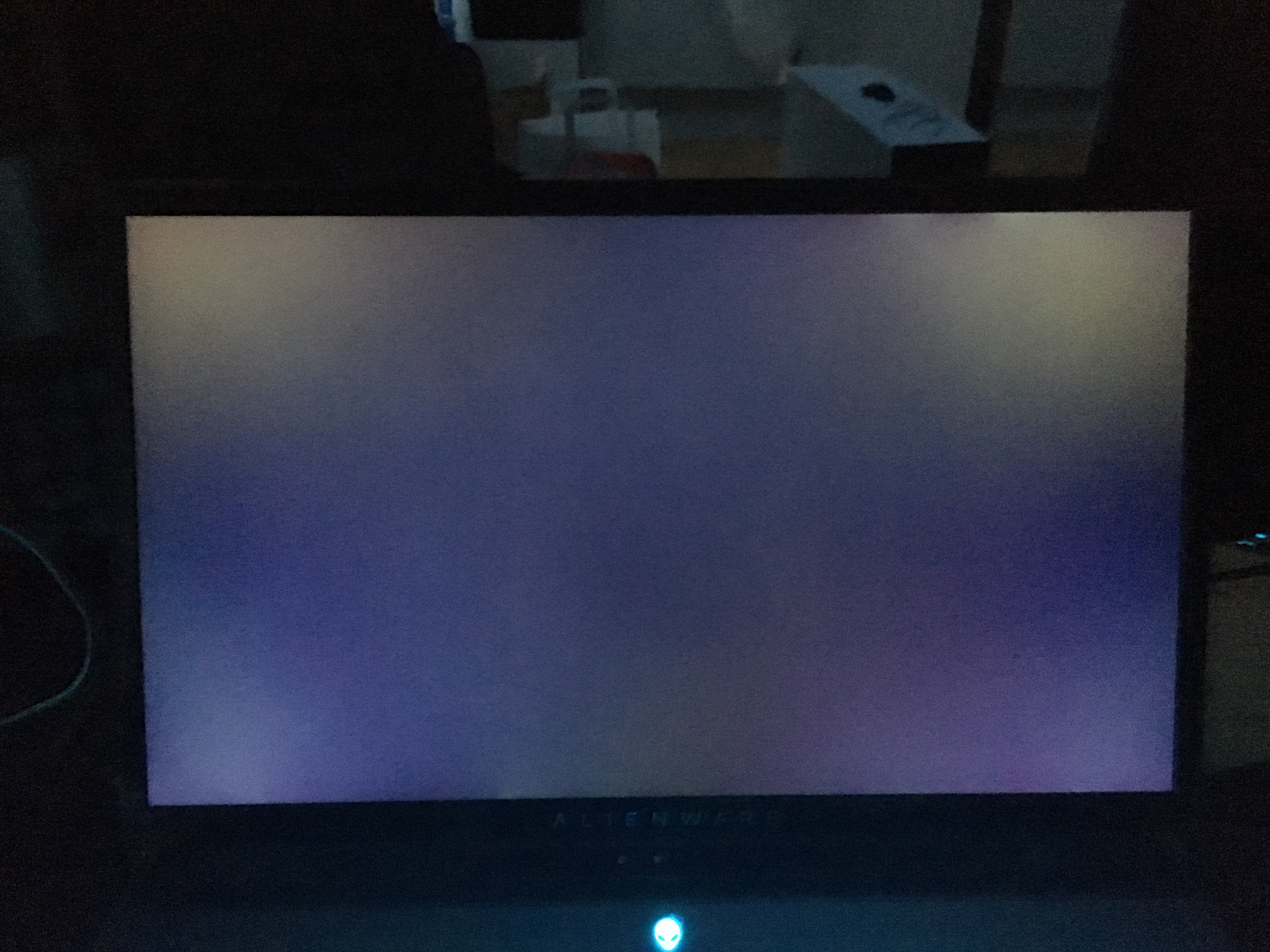
Hey guys, so my 51m delivered today as well. Its a very beautiful and solid machine. When i turn it on first time i have seen some back light bleeding (i suppose) but i am not sure if they are acceptable or i should return the laptop back. I am confused to be honest because i ve been waiting for it for over 3 weeks. What do you think?
Attached Files:
-
-
Hey I know it was mentioned somewhere but i'm having trouble locating it. What is the part number for the M.2 SSD heatsink?
-
Now that you mention heatsink for SSD, when I replace the ssd's I took the heatsink from the OEM SSD and put it on the 970 pro.
They did put the heatsink on the SSD while the product sticker was still on the memory dies
LOL -
All screens will have light bleed of some kind. Also IPS glow. It really comes down to do you notice them in normal use? Or do you only notice them on black screens? If it's distracting during gaming or general use then I'd get a replacment.
My ultrawide monitor has light bleed on the low left hand and top middle. But because it is so wide I can't notice it during gaming. So I kept it. -
Its only on black screen otherwise i dont notice anything. Still have 30 days to decide. The laptop is just so beautiful and thats the only issue i could see so far.
-
Is that stock thermal paste?
Looks like you also got the "7" heatpipe heatsink. Wonder why we ain't getting the CES one...
Mines coming in 1-2 weeks with that combo. I'l let you know.
Yes, unless @EepoSaurus can confirm his came with heatsinks although idk if he ordered SSDs or not.
Part # is 3N3W3
That's quite a bit actually, idk how'd I'd feel about thatLast edited: Feb 21, 2019raz8020 likes this. -
The product sticker on 960/970 drives is also a heatsink. It’s made of copper.
-
apparently dell has had a tracking number for me since monday but as of yet nothing has actually shipped out

-
Heavily considering trying to find a local enthusiast to swap my 9700k for a 8700k + cash with...
The allure of greatly reduced thermals is strong. -
Please keep us informed!
-
I'm pretty sure I'm going to throw my 8700k in there when I get it and put my 9900k back in my desktop and I have a built hackintosh/testing desktop that i'll throw the 8700 in.
-
Wow the 8700k runs awesome in this laptop. My overclocking options have gone away tho. I am going to try and do a bios updatessj92 and euphoric28 like this.
-
Please keep us informed!!!
-
Update us with some thermals when you have the chance
-
Give it about a week then. See if you notice it. This is really subjective and you are the only one thag can make the final call. With how much these laptops cost you should be 100% happy with your purchase.alberty likes this.
-
"had"
No more, my problems are (almost) gone.
My thermal paste was not good and the CPU would go over 90C without ever reaching anywhere near 110W. In that case I experienced the "secret" power throttle. A well thermal greased machine will not see this secret throttle but instead will see a normal power limit throttle at 107W-110W.
So look at your CPU temps and power. If you are having a power throttle at < 105W (eg say at 90W) then this is the secret power throttle and your CPU will be around 90C-94C. -
I would recommend putting back the supported CPU in before updating the BIOSeuphoric28 likes this.
-
I updated the bios. I had no issues. The bios update did nothing noticeable except that it made the cpu run hotter. I lost the ability to overclock using alienware command center. I used Intel XTU and was able to get the multiplier to 4.9ghz and I undervolted by -.075mv. Unfortunately throttlestop wouldn't work. My temperatures stay under 65c in game and under 70 in cinebench. It outperforms the 9700k in my laptop by a large amount and runs much cooler. My 8700k is delidded with thermal grizzly.
![[IMG]](images/storyImages/Witcher-3-OC.jpg)
![[IMG]](images/storyImages/Cinebench8700-K.jpg)
-
Might wanna hit up @unclewebb to see if anything can be done with TS compatibility
Looks like they should have included 8700K as an optionraz8020 likes this. -
Seems so. I used 8.70.6 but I think it has more to do with the bios than anything else. The performance mode is greyed out in bios. It wasn't available at all in the previous bios version and this version offers it but it's not allowed with this cpu I am assuming. I really hope It can get sorted out but likely it is an incentive to upgrade or something which seems ridiculous. The 8700k is awesome.
-
Is XTU the same with 9700K & 8700K or are options disabled?
-
You did that Cinebench run with 4.9GHz?
Can you post pict of the advanced menu in new updated bios?. Azor said the fans will run more quiet with the new bios. Of course Cpu will run hotter after this change.
Dell screwed up use of TS with the move to their new Win Store OC app. See Power limit control stopped working.Last edited: Feb 25, 2019Ashtrix likes this. -
Can some one post the 2 different 7 vs 8 copper pipe coolers side by side?
Also does anyone plan on swapping out the stock thermal paste for liquid metal?
I been reading this forum sense nearly the beginning. I have a few theories with the 9900k it would need to be delidded and professionally surfaced to perform as it would be expected with the AW cooling design.
*OFFICIAL* Alienware Area-51M R1 Owner's Lounge
Discussion in '2015+ Alienware 13 / 15 / 17' started by ssj92, Jan 8, 2019.