 Problems? See this thread at archive.org.
Is there something wrong with the drivers?
Also, I have a similar config coming soon, 9700k/2070. Haven't been able to find any benchmarks on the A51m 2070 yet. Would you mind running some games @ultra and let me know the fps/temps and userbenchmark.
I'd appreciate it, as I'm contemplating returning it for 9700k/2080 as it would be cheaper than upgrading later and I'm not sure if the 2070 can handle 144hz on ultra.
-
-
If you look a page or two back I posted a pic of battlefield V on ultra with dx12. I'd say on average i've been running somewhere around 100 with spikes up to 144 and dips down to about 72ish. Of course i'm doing more playing than monitoring my fps though.DannyB513 likes this.
-
yeah same here
-
no problem man, looking forward to your performance metrics and review !
-
Hi,
Someone has your order shipped recently? I'm really aware, and check lot of time my mail box if i have a dell shipment mail.
I should be deliver at the end of the next week to Paris... -
HID is expecting their next batch in by the 12th. Mine will be built out of that batch. All they had in stock when I called and placed my order were models with the 8700. Donald assured me that they would have it in, built, and to me in Afghanistan before I leave to go on R&R on the 31st.SlickDragon, Rei Fukai and Jaxigar like this.
-
Be safe over there man.. And you’re crazy, I don’t think I could bring such a laptop over there.. I’ve been a few times and they always came back choked up with dirt and dust.Fire Tiger and DannyB513 like this.
-
Thanks!!
I am super OCD when it comes to my electronics and clean them religiously.Jaxigar likes this. -
You and me both buddy... ;-) My phones usually look completely mint after a years use.
-
Oh damn ! well i hope you'll get it soon. I light up from the inside when i get new tech so i hope you won't have any more delays.
Do you already have some plans regarding tuning/OC'ing or is it just for casual usage or gaming (even though the AW makes gaming laptops, i bought it to benchmark on it. (k processor)) playing games is fun, but i learn more from tweaking my system all day long. Some people like to game all day long so for gaming this beast should be more than enough (you can always plug an external display to your laptop for a higher refresh rate !) sadly enough i'm a tweaker, and i like to create more with less (like jesus with the fish and bread but on a believable macro level lol) For the people that like to extract every Mhz that their system has to offer (like me) are not at the good place @AW sadly times changed
Last edited: Mar 1, 2019Jaxigar and Fire Tiger like this.
times changed
Last edited: Mar 1, 2019Jaxigar and Fire Tiger like this. -
Not sure about Paris, but for me in the states they say it’ll be shipping on March 5th with delivery on the 6th... not getting my hopes up on that timeline though
-
I'm gonna do a clean install this weekend I think. I like to do that on new rigs.
Rei Fukai likes this. -
If i was you, i would:
1 - make a clean install,
2 - install all your drivers,
3 - create a image with macrium and start to benchmark the F out of my rig
4 - When it crashes, just start it up with the Macrium prepared USB stick where the macrium restore image is located, so it reverts my whole windows installation to the image.
5 - save your personal files and programs on a m.2 or an ssd.
6 - Enjoy benchmarking and pushing my system past it's factory limits.
That way you know for sure you never ever have to install anything again. Reverting an image costs 10 minutes lol so i never work without macrium anymore. For all the people i fix computers or laptops from all of their machines i have an macrium image (with drivers and errthing, but you could also create your own image with factory installed programs but it takes some time)Last edited: Mar 1, 2019 -
Here is a few glamour shots of the outside. There are two big main compartments. And both seem to have a laptop sleeve. I'm assuming one is supposed to be for a keyboard? They look the same size though. So I'll know once I get the laptop tuesday.


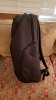 Joikansai, DannyB513, chewbakaats58 and 1 other person like this.
 -
Mine is estimated ship on the 4th and get here the 5th. US
Sent from my SM-N950U using Tapatalk -
For comparison, here's my trusty 7 year old backpack that's been with me to numerous fishing, camping and business trips!
-
Now that's an old an trusty pack. Hopefully this new one holds up that well.
-
It will mainly be used for gaming. However, when I first get it I plan on abusing it just to see what it can handle. I have already purchased the full 3D Mark suite from Steam, have Aida64, Cinebench, and Furmark ready to go as well, and trying to decide if I want to spend the money on the extended versions of Unigine Heaven and Superposition which allows you to loop the benchmark or just use the free versions of them.
I want to find the best balance between overclocking and temperature management.Last edited by a moderator: Mar 1, 2019Jaxigar likes this. -
Had to send my first one back, because of Screen issues, with a 15% discount i now got a i9 9900k, has anybody experiences how the A51M handels it?
-
My Area 51m from HID is gonna be shipped today/tomorrow, i can't wait. I have the i9-9900k delidded with the rtx 2080 combo. So excited! Hopefully will be playing with it by earlier next week.
DannyB513 and Spartan@HIDevolution like this. -
Do you think that your area 51m is quieter than your clevo? Im kinda torn because they said that my order is delayed and now im looking at some clevo configs
-
Here is a shot of my Area-51m Elite backpack with the laptop inside. Note it doses not fit in the pouch but the compartment it's in has a foam pad at the bottom that the machine rests on for protection. The pouch fits my MacBook Pro 15 with room to spare. The bag is cavernous, I feel like they could have slimmed it down a bit for day use.
Terreos likes this. -
Well the costumer service and responsiveness of Hidevolution makes me think that if i get the Alienware 51m, they may be the best choice. Not to mention the best thermal options such as Delidding and Thermal Grizzly Conductonaut & Fujipoly Extreme Thermal Pads. Will update if i end up going with them.
Spartan@HIDevolution and Jaxigar like this. -
My first time ordering from them and Ted from Hidevolution has been amazing at answering all my questions and helping me modify my order a few times. Great customer service and I did get the delidded i9-9900k and rtx 2080 option from them, I hope to have it by next week.Spartan@HIDevolution and SlickDragon like this.
-
Good to know. That would've been trippy if you could fit two of those mammoths in there at once. Lol. When you say cavernous do you mean to wide or deep? I'm a bigger framed man so it might be perfect for me.
Aaaaan just got my email from fedex. Mine is on its way. Possibly Monday at the earliest. Think they should work overtime and get it to me sunday.
Jaxigar likes this. -
Pretty sure I'll still be using it when zombie apocalypse begins in a few years, haha.
-
It's feels quite deep, and very tall, when I measure it it's 8.5" deep, 22" high, and 14.5" wide. So depth is not so bad I guess but something about the proportions sit's funny, could be that it does not taper at the top (8" deep at the top). I'm 5' 8" and with it on my back it looks big on me, so still on the fence on if I'll keep it. If your taller I think the proportions are going to be better for you.
The pouch in the laptop compartment will easily fit my 17R3 from a width but the laptop sits a fraction too high to close the zipper comfortably. Imagine hauling the 17R3 and the Area-51m in the backpack
Terreos likes this. -
I’d say it’s both wide and deep. Definitely spacious and some good protective measures were added into the build.Terreos likes this.
-
you dont happen to have the messenger bag do you? I am planning to bring this laptop with me to Spain and was curious if the messenger bag was sturdy
-
Ypu should try taking both. Would be a great make shift squat weights. LolDannyB513 likes this.
-
I am from Paris as well, I was planning on getting the 9700k config but it's nowhere to be found on the "WHITE" model (AZERTY keyboard).... what did you get ?Last edited: Mar 1, 2019
-
Sorry, no I don't have the messenger bag. Would also love some one with first hand experience to chime in. I'm curious on the space in it and how comfortable it is with the machine and power supplies in it. Seems like it might be a bit painful for extended use vs. a backpack.
-
Which backpack is that? My Orion M17x backpack doesn’t have a cup holder lol.
Does the old one fit the Area-51M? My Orion M17x barely fits my M18x. -
But it does not work for me
Ohh well I talked to dell and they are sending me a new laptop
When i get my Laptop again from them what should i do first so that i can add my SSD and use that as a OS, and get the Nvidia thing work out
Can anyone give me like a steps to it so that everyone else can follow it too. Thank you for the replyLast edited by a moderator: Mar 1, 2019Jaxigar, SlickDragon and KozE like this. -
Has anyone torn down the Area-51m and measured the thermal pad thickness yet, and how much square inches of pad needed. Getting the itch to tear this puppy down repaste and put in Fujipoly Ultra Extreme XR-m thermal pads. These things did wonders on my Razer Blade 15 so interested to see if I can get a similar effect in the Area-51m. Don't really want to order several thicknesses as the stuff is not cheap.
-
Dell is refusing to sell me the Heatsink and screw before i receive my laptop.
How did you get order the part?
Trough the sale departement, trough the parts departement? On chat, email,phone?Kormi likes this. -
I plan on overclocking mine as soon as it arrives. Ordered 9700k/2070. Going to push it as far as I can just to see what kind of performance it's capable of. Just hope the thermals will allow me to get at least 5Ghz on the processor and and a decent OC on the GPU. If temps aren't great, I'll try repasting with Kryonaut.
Interested in pad size as well. Mine will be here next week most likely, but I don't have anything to measure the pad thickness.
That's odd. I haven't recieved mine yet and I just purchased two m.2 heatsinks yesterday. They're out of stock on the M2x3 screws though .
I went through chat and ordered mine, they didnt even ask for an order number just email.Last edited by a moderator: Mar 1, 2019Rei Fukai likes this. -
Sucks that you had to get a replacement machine, looks like there may be a hardware issue on your current one that is causing issues. Lets hope they can get the new one to you quickly.
This is what I did to replace the Toshiba SSD in mine with a Samsung 970 evo plus. It worked for me but I cannot guarantee it. I used an external PCIe enclosure ( https://www.amazon.com/dp/B07G96D4XF/ref=cm_sw_em_r_mt_dp_U_PrzECbDW7W73J )and put the new Samsung drive into it. Then used MiniTool Partition Wizard Free 11 ( https://www.partitionwizard.com/free-partition-manager.html) to clone the drive. This will likely reboot directly into the cloning tool so the C drive is not in use and copy everything on the C drive to the new drive.
Once cloned I cracked open the Area-51m, replaced the C drive with the new drive and put it back together. On the first reboot windows went into repair mode and did some stuff finally saying it could not fix it. Then on a subsequent boot it booted up just fine. I've seen this happen on every disk clone I've done so it seems to be the way it goes. In my case the disk I was cloning was the same size as the new disk but if you are going to a bigger SSD then you will need to either resize the partitions prior to the clone or you can move and resize after the clone.
Took me a total of about 30 minutes if I remember from start to finish. After that I downloaded Nvidia Experience ( https://www.nvidia.com/en-us/geforce/geforce-experience/) ran it, clicked update drivers and it downloaded the latest driver that I could then express install.
Only other thing I did was to change the BIOS from RAID to AHCI and installed the Samsung Nvme drivers to get max performance and allow Samsung Magician to work so you get firmware updates and can them install them on the SSD.
Hope that helps, and good luck when the new machine arrivesJaxigar and blazkowicz009 like this. -
I got mine on eBay, easy and came in a couple of days before my laptop arrived.
https://www.ebay.com/sch/i.html?_from=R40&_trksid=m570.l1313&_nkw=JV98R&_sacat=0
I did not order an SSD screw as the open M.2 bay had the screw in there already, and just needed the heat sink -
Does it come shipped in RAID even with one ssd? I'm doing a similar process. Mine is only coming with 1TB SSHD, so I'm going to set windows up, install my SX8200 pro, clone the drive, remove the SSHD, and install my 1TB sata ssd. Do I need to change anything in bios?
-
Thank you Firedog for this important note!
which clone software did you use and do i have to buy -
Dell has this thing that for all there machines (based on my sample set) that have Nvme SSD's in them they set the BIOS to RAID and use the Intel rapid storage drivers to access the drive even with a single drive. This prevents you from running any native Nvme driver in windows like the Samsung one. The delta in running the Samsung vs. Intel driver is not huge but prevents things like updating the SSD firmware. So you can leave the BIOS setup as RAID or change it to AHCI, folks suggest booting into safe mode for the change over but I did'nt and had no issues, if for some reason it screw up you can just go back into the BIOS screen and change it back to RAID and try again in safe mode.
Second link in the message takes you to the download page for minitool partition wizard Free 11, added it below as well, and best of all it's free
link: https://www.partitionwizard.com/free-partition-manager.htmlLast edited by a moderator: Mar 1, 2019 -
Geez, that's 30$ for 1 heatsink.
2 heatsink + 4 screw is 18$ @ Dell.
I may just wait till i get my laptop .... -
You have to choice "lumière lunaire" in the color selection section
I checked and it's always available -
It's this one - https://www.newegg.ca/Product/Product.aspx?Item=N82E16834991646CVF
But mine is the older version, not scan-fast.
Used to carry my M18x in it. Fit nicely. Gave my old 17" Orion to my wife to carry her AW 15 R4.Last edited: Mar 1, 2019 -
Talk to someone else. This is simply a lie. Watch out for those BS workers. Chat with the part department.
-
https://www.amazon.com/dp/B076Q5WGY...d_r=8401b365-3c68-11e9-8d8d-ff7b87c6b25c&th=1
Personally I like this design if I were to get a backpack? -
Not with French keyboard, no.
-
Upon start up today I received a notification to claim my Division 2 key. I went to the website (gaming.tobii.com) and got the key, just a standard uPlay key. I'll be selling it since I don't want the Division 2, but still cool either way. The key was under "My Games".
You have to install the Tobii GameHub and Tobii Experience and also make an account on the Tobii Gaming website. Your serial number for your tobii hardware should auto register with the site. Then you just wait for the notification!
How do we go about claiming the COD freebee that comes with intel processors?SlickDragon likes this. -
Indeed you are right.... I think it's only temporary because couple days ago It was available with AZERTY keyboard.
*OFFICIAL* Alienware Area-51M R1 Owner's Lounge
Discussion in '2015+ Alienware 13 / 15 / 17' started by ssj92, Jan 8, 2019.


