 Problems? See this thread at archive.org.
Nice. I have a negative 90 and 80mv offset. But I kept getting BSODs. It seems to be stable at negative 70 offset. Temps are decent at idle. Around 46C. Also it takes a few extra seconds to get to 100C on Cinebench now.
-
New RAID Driver v18.0.0.1135
2x WD PC SN730 RAID 0 / Write back Cache Enabled / 64KB Data Strip Size / 4K Aligned
Before:
After:
@tilleroftheearth @MogRules @Fire Tiger @Normimb @normand668 @Papusan @custom90gt @circuit @ratchetnclank @saturnotakuLast edited: Oct 14, 2020normand668, DreDre, Vasudev and 6 others like this. -
Did the same test on my Sk Hynix (but with stock settings) and got a better score with the new driver also.
New driver:
Old driver:
Vasudev, jclausius, Papusan and 1 other person like this. -
Macrium Reflect Rescue Media ISO v7.3.5281 (with RAID support and cloning to dissimilar hardware supported).
We recommend all users upgrade to this release.
- Initial v7.3 Release
Please see this KB article for more information on what's included. - Changed Block Tracker
After performing a restore of a non-system volume for which CBT had been enabled, CBT could become disabled on that volume and would not re-enable until the system had been restarted. This has been resolved. - Email Notifications
We've enhanced OpenSSL integration and upgraded to 1.1.1h to address any potential security concerns.
Use RUFUS to make a bootable USB Flash Disk from it
@Mr. Fox @Papusan @Fire Tiger @iunlock @ssj92 @MogRules @Normimb
Note: I never install Macrium Reflect, I only boot from the USB Flash Disk to create or restore images. That way I have none of its bloated services running in the background.
Be smart...be like Spartan..![[IMG]](images/storyImages/dkhLNPB.gif)
- Initial v7.3 Release
-
Hi,
just to know, where did you get these drivers?
I thought the latest one was the 17.9.1.1009, A03 -
Check the URL...
Code:https://dl.dell.com/FOLDER06441783M/2/Intel-Rapid-Storage-Technology-Driver_21PRD_WIN64_18.0.0.1135_A00_01.EXE?uid=a7efb6f2-0ba5-4a21-6a95-9452b0df3d83&fn=Intel-Rapid-Storage-Technology-Driver_21PRD_WIN64_18.0.0.1135_A00_01.EXE
Last edited: Oct 14, 2020 -
normand668, Vasudev, jclausius and 2 others like this.
-
Yes, I don't know where Dell got this driver. Even on Intel site, the latest is the 17.9.1.1009
 Normimb likes this.
 -
I am an assistant Editor on www.majorgeeks.com and even the owner Mr. Timmy was shocked when I sent him this driver
My guess is that Intel sends OEMs drivers ahead of time obviously for preparation of new chipset/models release and since the XPS 13 9310 is using the 11th gen Intel CPU/Chipset, that's probably why they had this update early. I tested it offcourse before posting it here and as you see from the results it's a nice boost in performance.normand668, DreDre, Vasudev and 4 others like this. -
Not long ago and Dell and pushed out Tiger Lake. This is the reason you find the new drivers in Dell XPS 13 9310 support page. I expect you find exactly same drivers version also from other OEMs who sell Tiger Jokebooks.
See also... Many AHCI and RAID users are unsure or don't even know, which AHCI/RAID driver will give them the best results regarding stabilty and performance. But better performance doesn't automaticly mean best for stability!
It is a fact, that there are no drivers available, which will be optimal for everyone. Simple reason: Each system (Hardware + Software) is different and the preferences of the users as well. This makes it very problematic to give any recommendation regarding the choice of the AHCI/RAID driver. Same apply for etc Nvidia graphics drivers.
And as all should know... Newest doesn't always mean better. Time after time have this been confirmed.
Last edited: Oct 14, 2020 -
I just did a test and I got better result too.
I have the Sk Hynix SSD, did the test 3 times with each drivers.
Before :
After :
Nice find
jclausius and Spartan@HIDevolution like this. -
Th4nk j00 f0r $h4r!ng your f33db4ck!
![[IMG]](images/storyImages/tlmRgDI.gif)
![[IMG]](images/storyImages/y0H0dMj.gif) normand668, jclausius, Mr. Fox and 1 other person like this.
normand668, jclausius, Mr. Fox and 1 other person like this. -
At least you guys tested it. Most people are idiots and just install crap for no reason other than it is newer and assume it is somehow magically better. The opposite is frequently true but they are oblivious to it.
normand668, jclausius, Aroc and 1 other person like this. -
-
I'm not sure. I have the software installed but if i disabled the "tobii experience" in the top right it still seems to work.FXi likes this.
-
Hi Spartan, do u have a guide on how to do this by any chance? Thanks!!
-
New Macrium Reflect Rescue Disk ISO released today: http://forum.notebookreview.com/threads/macrium-reflect-installation-usage-guide.804746/
@Mr. Fox @MogRules @Papusan @Vasudev @Fire Tiger @normand668 @Normimb @ratchetnclankLast edited: Oct 15, 2020normand668, jclausius, Normimb and 6 others like this. -
Thanks. I'll download it. With Ventoy its drap n drop. Will let you know.Normimb, Fire Tiger, Papusan and 1 other person like this.
-
I never make a new Rescue disk right after a new release. If it’s a long time between old and new this means the old is stable. Always read the released notes on the new. A good read and learn from Microsoft patch mess is valuable and should be adopted by all. Don’t be a guinea pig!jclausius, Rei Fukai, Fire Tiger and 4 others like this.
-
Thanks Spartan!!Fire Tiger, MogRules and Spartan@HIDevolution like this.
-
As always your a scholar and a gentleman. Thanks for the info and timely (in this case early!) drivers to the wider community.jclausius, Arkengelus, Fire Tiger and 3 others like this.
-
@Spartan@HIDevolution Macrium ISO is working using Ventoy.
Papusan, MogRules and Spartan@HIDevolution like this. -
Macrium Reflect FREE Edition 7.3.5289
Will they fail with the 3rd attempt? Will we see a new update tomorrow?
Last edited: Oct 16, 2020Vasudev, etern4l and sirlagzalot like this. -
Seems like they are back to their crappy quality control with daily updates like it's an Antivirus signature update
![[IMG]](images/storyImages/8Yb0Sav.gif)
Macrium Reflect Rescue Media ISO v7.3.5289Last edited: Oct 16, 2020 -
that sounds too little of an offset to get bsod, man... did you also OC the cpu GHz or something?
-
Hello,
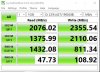
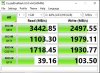
I got a new ADATA SX8200 PRO 2 TB. Crystal disk mark shows very slow read/write speeds 2450/2360 MB/s on it. The SK Hynix which came with the laptop shows 3440/2500 MB/s which is a way better. I tried to run the system into AHCI mode but the results are exactly the same (I ran the windows update to get the latest drivers). Also I ran trim through SSD toolbox (ADATA Software). I ran the laptop again in RAID mode so I updated the Intel-Rapid-Storage-Technology-Driver from the dell's website but after the update, CDM shows even slower speeds 2000/2359 MB/s. I really have no idea what is going on. I noticed if I run CDM right after windows starts, the results are a little bit better around - 2500/2500 MB/s, but after the system fully loads, the speed going back to 2000/2300 MB.
I am attaching screenshots:
ADATA before update of Intel Rapid Storage Driver
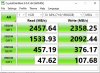
ADATA after update of Intel Rapid Storage Driver
SK Hynix before Rapid Storage Driver
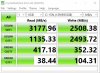
SK Hynix after Rapid Storage Driver
-
Hey guys,
New to the thread, and PC in general (mac guy the past 18 years), Just ordered the Area-51m r2 (top CPU/GPU specs, and 3200 ram) because I need a PC to run memory/cpu intensive game theory sims so decided to kill two birds with one stone and figured I'd get a laptop that also doubles as a gaming beast.
I read through a good chunk of this thread to inform my decision (part about the ram mobo shenanigans was helpful), and I was wondering if someone could help point me to where I could find info on what I should do day one out the box to get max performance from the computer.. I plan to get it repasted down the line, and possible CPU delidding, but what of the software side?
I saw some posts about doing a fresh install of windows and uninstalling certain things, but the world of a customizable PC is totally uncharted territory for me (again, mac guy). Any help is much appreciated! -
Hello, my new laptop was delivered on friday and it is really beautiful!
After the first configuration, however, I noticed that in game (GW2) the temperature rise up to 86/88 degrees (Cpu package) with thermal profile of AWCC on balanced, so I tried the moderate thermal profile, I changed thermal paste with the nanogrease, installed throttlestop to undervolt cpu vcore (-0.125V) and the temperatures dropped to about 80 degrees of cpu package (73/78 degrees cores).
Trying Realbench I easily reach the thermal throttling to the 101 degrees of cpu package..... this doesn't look very good to me ...
Delidding will certainly be done soon, but I still need some advice.
I usually cover the pcb of the cpu with kepton tape so that there is no risk in case of the CLU leak (I'll put the original ihs back). Should I take some other precautions?
It could happen some trip with my laptop during winter at low temperature; Can I find liquid metal scattered on the motherboard after a trip with car at low ambient temp?
Edit: I've found this interesting thread https://r.tapatalk.com/shareLink/to...&share_fid=33462&share_type=t&link_source=appLast edited: Oct 19, 2020c69k likes this. -
I’m in the same boat, and with regards to fresh installs, I was told that at least this model comes with barely any bloat. I was also told that Alienware Command Center (or is it Control Center? My laptop is arriving tomorrow) is in charge of tweaking certain settings like undervolting.mrbearhand likes this.
-
That's good to know, and thanks for the response.
Mine should arrive within a couple weeks, so I guess I'll try to study up a bit on the undervolting and various settings in preparation.
Just curious, because I wasn't sure if there was ever a clear answer on running the Crucial Ballistix 64gb (2x32) DDR4-3200 ram kit on this computer at max performance. I know someone posted that it was worked, and then stopped working, but has anyone been able to find a definitive answer to whether this upgrade would work or be worth doing?
As in my previous post, the computer would mainly be used for running memory hungry game simulations, so I actually would benefit from the added ram upgrade. Just trying to figure out if the computer can utilize the max speed of that kit, or if the stock 32gb is the max for the 3200 speed, and I should just save money and get the cheaper ram. Thanks! -
I have also received mine recently and this is from my painful experience. If you do happen to use the SupportAssist OS Recovery DO NOT use "Reset and update (Cloud image)" and use "Reset to factory settings instead (Local image)", the reason for that it's because not only the cloud image is not the most recent Windows build as described, it will also OVERWRITE you local image (my local image was already updated to the most recent build/version at the factory). The cloud image doesn't have most of the factory software (AWCC etc) installed so you have to manually install them.
Now I'm waiting for Dell to see whether they will come to me or I have to send it back to them to have the factory local image restored.mrbearhand likes this. -
Wait for what now?? ughhh....
Alienware Area-51m R2 Factory Image
Make sure to right click on the file you just downloaded, go to Properties, then hit Unblock from the bottom right as it may be blocked since it was downloaded from the internet, if you don't do this before you run the file or extract it, then it may not install correctly.
To prevent this automatic blocking of files in the future so you don't have to go unblocking every file you download to ensure it runs properly, follow the guide in this thread:
http://forum.notebookreview.com/threads/are-you-sure-you-want-to-run-this-file-yes-or-no.825668/
jclausius, pathfindercod, c69k and 4 others like this. -
Thanks again Spartan!! You're the man!!
Spartan@HIDevolution and c69k like this.
-
No overclock. I am actually happy with the stock clocks. Also it might be worth mentioning that all of my BSODs occurred when starting up 3DMark. 'Starting up', not even while it was running a test.
-
How do I enable it?
-
Even Dell employee are facing 100C when Working from Home PCs.
-
Hello, something is not going as expected. Here a couple of photos with Gelid Extreme pad 1.5mm but near the cpu socket I should use st least 2mm ones.
Alla the pad semm to be thicker than 1mm indicated in your measurements.....
Around gpu the stock ram pads are 1.5mm thick.
So I should use thicker pads to have good contact because also the stock ones are not too "compressed".
Dell probably changed something......
Please be patient, my english is not so good
![[IMG]](images/storyImages/d09b72009ec1bc6bfa203ca74c62603c.jpg)
![[IMG]](images/storyImages/91cd8e0d0656b56cf57ed199ef4a57a3.jpg)
![[IMG]](images/storyImages/0cacc54602c94e642c5ad80fa2e7b49a.jpg)
![[IMG]](images/storyImages/e150a5b46ca8da107dc29549f9d644e1.jpg)
![[IMG]](images/storyImages/5c6b16e8cfaf6d44297dbecced0a87e2.jpg)
Inviato dal mio LYA-L29 utilizzando Tapatalkb.kolev likes this. -
Search hello and enable the face sign in. If you don't have the option check for windows updates and try again.
-
My system's thermal pads are the same as yours. I ordered:
GP-Extreme
2 x 80x40x1mm
2 x 80x40x0.5mm
1 x 80x40x3mm
GP-Ultimate
2 80x40x1mm
2 x 0.5mm
but I am still waiting to receive it (probably today or tomorrow).
I will try to put these thin pads and look if they are making a contact with the vrms. If they are not contacting then... I will try to put 2x1mm on the CPU, because the cpu is the hottest point of this laptop.
What CPU is yours? What temps do you get now? -
I just thought I would share my experience with this PC here in case anyone else ran into the same issues or had any suggestions for my plan forward.
I recently (10/08/2020) ordered and received (10/16/2020) my Area 51 R2 w/ 10900k, 2070S GPU, 32gb 3200mhz ram, 1tb (2x512 raid 0) ssd storage, 360hz FHD Dark side.
Before I even received it I already had buyers remorse for not ordering the 2080S GPU. To be honest, I bought into the 2070S is enough and plenty vibe a lot of reviewers had. I didn't buy this crazy expensive beast of a machine to compromise over a little bit of money to get it right for a long period of use. I bought it because I travel 300 days a year and it's the only good way I can game and do some extreme rendering Pix4d/AutoCAD civil work.
I tried but was unable to cancel or change the order after 48 hours (weekend). So I was still leaning on returning it but didn't want to wait the 30 days turn around for a refund and reorder. The extra $450 for the 2080S and 2tb (2x1TB Raid 0) SSD (next tier option) seemed to be worth it, just not the time to get it now that I would have to return it and wait.
I have been through all the basics and benching with this machine to see how it runs. I did not get lucky and win the lottery, it barely held 4.9GHZ @100deg even with a -100 under volt and mild overclock. But that's not really a big deal to me to be honest, it's still plenty of processor. Can't expect it all in a laptop anyway. I have a 2x480mm radiator water cooled monster for that.
I ordered the ram at 3200mhz for an extra $40 so I could have that mobo option later if anyone figured out how to unlock or use better ram. I already ordered 64gb 2933 hyper x anyway so not a big deal there.
Here's the rub... I didn't pay Dell the insane amount of money they want for their crappy SSDs. My plan from the beginning was to order a raid 0 1tb for operating system and then install two additional 1tb SSDs for storage and backups. But when I received the machine it was missing the ssd interposer mounting board for the 3rd and 4th slots. Ok not a big deal I thought. I have read a few people were supposedly able to get the board from Dell. Already purchased 2 x 1tb SSDs so I called Dell to get the interposer board and mount brackets for the SSDs.
I then had a 4 hour insane battle with Dell india tech support and customer service, all of whom are very rude and don't like it when we know more about their product than they do after 3 weeks in the job. I was finally able to get them to get with engineering and get me the part numbers for each part since it is not sold in a kit. I figured at the worst case I could order an overpriced Dell ssd upgrade kit with overpriced SSDs and the parts to install them.
NOPE.
They said they do not sell and can't get the parts I need to check back next year.
50 pin cable: 2JH8P
30 pin cable: 5F1WR
CARD INTERPOSER: D3P25
This tipped me over the breaking point to return this machine and reorder it specd the way I want and basically lose to Dells evil money making scheme of an upgradable laptop that's not even slightly upgradable.
When I tried to return and get an RMA it would not let me online and made me call back to India and argue for another hour. They kept offering me $350 if I would just keep it. It was absolutely hysterical , I counter offered that they keep their $300, and I'll pay them another $50 for an interposer board and 2 cables. They struggled to understand the rub there. Eventually I was able to get an RMA and will be returning and waiting for a refund to reorder.
That being said it is a very good machine and I like it enough to re order, and pay about $700 more to get it with the 2080S and 2tb (2x1TB raid 0) and 2x1tb SSDs. I might even fake return this machine for all the hastle and see how much they will pay me to keep it and recoup some of this money . Just kidding
.
I'm scared to order it with only 3 SSDs because knowing Dell they will make it impossible to add a 4th ssd. Probably send it with an interposer board that only has 1 extra slot for a 3rd ssd.
So my new plan is to reorder it with 10900k, 2080S, 32gb 3200mhz ram, 2tb (2x 1TB Raid 0) + 2x 1TB storage SSDs, and 360hz FHD screen.
I will swap the ram for my 64gb of 2933 hyper x and make a decision later on replacing the SSDs with some faster units.
And no I am not really wanting to wait 3-6 months for the R3 to come to market and settle out to be honest. I am good with the performance of this beast, just want to get it like I wanted it since upgrading it is not an option anymore.
Any thoughts or suggestions are welcome.Last edited: Oct 20, 2020Normimb, aeffect and normand668 like this. -
Regarding the spare parts, did you try calling 800-372-3355 and telling them you do not know the service tag for the machine? They dispatch spare parts for service technicians doing warranty repairs so if it is stock they can usually order it.FXi likes this.
-
Hey @Spartan@HIDevolution
How are you ?
Any idea why my rtx 3080 is not working with the Aga ?
It was working fine with my 2080ti ? -
Alienware Area-51m R2 Drivers 20-OCT-20
After you download the ZIP file and before you unzip it, make sure it is not blocked by right clicking on it, go to Properties, then see at the bottom if it says "this file came from another computer and might be blocked..." click the UNBLOCK button then hit APPLY followed by OK! To prevent Windows from blocking downloaded files automatically, make sure you read this guide:
"Are you sure you want to run this file?" [Yes or No]
The drivers are organized in numbered folders with the correct installation order.
When installing the LAN Driver, Choose CUSTOM, then uncheck the box which says Killer Software. You can also expand the Drivers and uncheck Ethernet Drivers, E3100. You only need the E3000 Drivers. Keep the DELL Checkbox.
Please restart after every driver install even if you were not prompted because some drivers will fail to install if there are any other pending operations (ie. had the Intel HID Event Filter Driver fail to install once because I did not reboot, the driver package was installed but the actual device in Device Manager was not updated)
Fire Tiger and Satanello like this. -
I
Did not try that. That is good to know for the future. Is that a USA based line? I feel like the India support would just lose their mind over not starting with a service tag. I'll call just to see if it's even possible and report back. Thank you sir. -
Anyone has encountered similar issues with the Aga and a rtx 3080?
-
Hi
My area 51m r2 is on its way. 10700k and 2080s. I only ordered it with a single 256gb m.2 ssd because I had planed to move a 1gb over from my desktop. But I read in the manual something I dont understand 100%. Is there no extras slots for a m.2 or a 2.5 SSD if you order the laptop with only one 256 m.2 drive? thanks -
You can install 2 SSD please see my attached photo (ssd1 is the stock 256Gb)
![[IMG]](images/storyImages/33a4790902e6336dce70867479ffb166.jpg)
Inviato dal mio LYA-L29 utilizzando Tapatalk -
Sounds good thanks a lot for answering!
-
I'm pretty sure that configuration isn't supported in the AGA. There's a bit of a discussion about it... Pick it up here -
http://forum.notebookreview.com/thr...ll-13-15-and-17.770323/page-465#post-11050564 for details.
Last edited: Oct 20, 2020 -
I called this number and got a standard Dell prompt for a seven-digit extension or how can I help you automated voice system like all the other Dell numbers. I went back through the same process and got a sales person to look up the parts again. Same story not available no ETA.
I was actually able to get pricing this time. If they ever make it you can get the interposer board for $30 and the cables for $5-$7.
Was worth a try I guess.aeffect likes this.
*OFFICIAL* Alienware Area-51M R2 Owner's Lounge
Discussion in '2015+ Alienware 13 / 15 / 17' started by Spartan@HIDevolution, May 9, 2020.


