Problems? See this thread at archive.org.
What are you using to see the wear? I've had mine on 50-80% for since i got it so im interested to see what mine shows.
-
-
That's a volume license key which aren't for sale for individuals. I can tell you now that key will end up blacklisted.
Not a good idea.normand668, MogRules and etern4l like this. -
Okay. I have no idea what's going on, but ever since I changed my battery management settings in BIOS (custom, 50-90%), AWCC is not responding AGAIN.
I even restored my last good image (right before factory image) and it's STILL not responding.
How the hell is this a $3K+ laptop? What ancient ritual do I need to perform to ensure consistent software performance? -
I also changed my AW51m R2 battery profile to custom without any issues. What's kind of AWCC version did you use?
-
According to the Programs and Features control panel (since I can't get the software to run), it says 5.2.97.0.
Edit: I've also followed this guide linked here ( http://forum.notebookreview.com/thr...2-owners-lounge.832848/page-199#post-11053719) - following the order of uninstallation, registry edits and reinstallation, but now I can't install OC Controls. It says that it's still installed. The install log is as follows:
Code:[Wed Oct 21 11:32:37 2020] Update Package Execution Started [Wed Oct 21 11:32:37 2020] Original command line: "C:\Users\Ky\AppData\Local\Packages\DellInc.AlienwareCommandCenter_htrsf667h5kn2\LocalCache\Received Files\Alienware-OC-Controls-Application_PC67F_WIN64_1.3.0.1239_A00.EXE" [Wed Oct 21 11:32:37 2020] DUP Framework EXE Version: 4.6.2.52 [Wed Oct 21 11:32:37 2020] DUP Release: PC67FA00 [Wed Oct 21 11:32:37 2020] Initializing framework... [Wed Oct 21 11:32:37 2020] Data in smbios table is (hex)value = a , Chasis type (hex)value = a , System type is : Client [Wed Oct 21 11:32:37 2020] logo.png [Wed Oct 21 11:32:47 2020] User Command: attended [Wed Oct 21 11:32:47 2020] DUP Capabilities Value: 2097151 (0x1FFFFF) [Wed Oct 21 11:32:47 2020] DUP Vendor Software Version: 1.3.0.1239 [Wed Oct 21 11:32:47 2020] Local System/Model Compatible with this Package? Yes [Wed Oct 21 11:32:47 2020] Local System OS Version: 10.0.0.0 [Wed Oct 21 11:32:47 2020] OS Compatible with this Package? Yes [Wed Oct 21 11:32:47 2020] Local System OS Language: EN [Wed Oct 21 11:32:47 2020] Language Compatible with this Package? Yes [Wed Oct 21 11:32:47 2020] Identified Behavior : attended [Wed Oct 21 11:32:47 2020] Extraction-miniunz path: c:\PROGRA~3\dell\drivers\A241D9~1\miniunz.exe [Wed Oct 21 11:32:47 2020] Extraction-arguments: -x C:\Users\Ky\AppData\Local\Packages\DEEDC3~1.ALI\LOCALC~1\RECEIV~1\ALIENW~1.EXE -o -d c:\PROGRA~3\dell\drivers\A241D9~1 [Wed Oct 21 11:32:47 2020] Extraction-GetExitCode: 0 [Wed Oct 21 11:32:47 2020] Temporary payload log file name: C:\ProgramData\dell\drivers\a241d957-cd16-4289-9d9a-90d21b35b8b6\DUP84F6.tmp [Wed Oct 21 11:32:47 2020] payloadExe: AlienwareOCControlsInstaller_1.3.0.1239.exe [Wed Oct 21 11:32:47 2020] payloadArgs: /Verbose""C:\ProgramData\dell\drivers\a241d957-cd16-4289-9d9a-90d21b35b8b6\DUP84F6.tmp"" [Wed Oct 21 11:32:47 2020] payloadDir: C:\ProgramData\dell\drivers\a241d957-cd16-4289-9d9a-90d21b35b8b6 [Wed Oct 21 11:32:47 2020] MUP Spec version is less than 3 or Not a DCH Package. [Wed Oct 21 11:32:47 2020] Legacy installation is selected. Calling Vendor Installer... [Wed Oct 21 11:33:07 2020] Appending Vendor Software Log. [Wed Oct 21 11:33:07 2020] --- Start of Vendor Software Log --- [Wed Oct 21 11:33:07 2020] --- End of Vendor Software Log --- [Wed Oct 21 11:33:07 2020] Vendor Software Return Code: 3010 [Wed Oct 21 18:54:42 2020] Update Package Execution Started [Wed Oct 21 18:54:42 2020] Original command line: "D:\Drivers\Alienware Area-51m R2\20-OC Controls\Alienware-OC-Controls-Application_PC67F_WIN64_1.3.0.1239_A00.EXE" [Wed Oct 21 18:54:42 2020] DUP Framework EXE Version: 4.6.2.52 [Wed Oct 21 18:54:42 2020] DUP Release: PC67FA00 [Wed Oct 21 18:54:42 2020] Initializing framework... [Wed Oct 21 18:54:42 2020] Data in smbios table is (hex)value = a , Chasis type (hex)value = a , System type is : Client [Wed Oct 21 18:54:44 2020] logo.png [Wed Oct 21 18:54:45 2020] User Command: attended [Wed Oct 21 18:54:45 2020] DUP Capabilities Value: 2097151 (0x1FFFFF) [Wed Oct 21 18:54:45 2020] DUP Vendor Software Version: 1.3.0.1239 [Wed Oct 21 18:54:45 2020] Local System/Model Compatible with this Package? Yes [Wed Oct 21 18:54:45 2020] Local System OS Version: 10.0.0.0 [Wed Oct 21 18:54:45 2020] OS Compatible with this Package? Yes [Wed Oct 21 18:54:45 2020] Local System OS Language: EN [Wed Oct 21 18:54:45 2020] Language Compatible with this Package? Yes [Wed Oct 21 18:54:45 2020] Identified Behavior : attended [Wed Oct 21 18:54:45 2020] Extraction-miniunz path: c:\PROGRA~3\dell\drivers\A81C6A~1\miniunz.exe [Wed Oct 21 18:54:45 2020] Extraction-arguments: -x "D:\Drivers\Alienware Area-51m R2\20-OC Controls\Alienware-OC-Controls-Application_PC67F_WIN64_1.3.0.1239_A00.EXE" -o -d c:\PROGRA~3\dell\drivers\A81C6A~1 [Wed Oct 21 18:54:46 2020] Extraction-GetExitCode: 0 [Wed Oct 21 18:54:46 2020] Temporary payload log file name: C:\ProgramData\dell\drivers\a81c6a91-3771-42f0-bb0d-785dc3492157\DUPD2BA.tmp [Wed Oct 21 18:54:46 2020] payloadExe: AlienwareOCControlsInstaller_1.3.0.1239.exe [Wed Oct 21 18:54:46 2020] payloadArgs: /Verbose""C:\ProgramData\dell\drivers\a81c6a91-3771-42f0-bb0d-785dc3492157\DUPD2BA.tmp"" [Wed Oct 21 18:54:46 2020] payloadDir: C:\ProgramData\dell\drivers\a81c6a91-3771-42f0-bb0d-785dc3492157 [Wed Oct 21 18:54:46 2020] MUP Spec version is less than 3 or Not a DCH Package. [Wed Oct 21 18:54:46 2020] Legacy installation is selected. Calling Vendor Installer... [Wed Oct 21 18:55:00 2020] Appending Vendor Software Log. [Wed Oct 21 18:55:00 2020] --- Start of Vendor Software Log --- [Wed Oct 21 18:55:00 2020] --- End of Vendor Software Log --- [Wed Oct 21 18:55:00 2020] Vendor Software Return Code: 3010 [Wed Oct 21 18:55:00 2020] logo.png [Wed Oct 21 18:55:00 2020] Name of Exit Code: REBOOT_REQUIRED [Wed Oct 21 18:55:00 2020] Exit Code set to: 2 (0x2) [Wed Oct 21 18:55:00 2020] Result: REBOOT [Wed Oct 21 18:55:02 2020] Name of Exit Code: REBOOT_REQUIRED [Wed Oct 21 18:55:02 2020] Execution terminated at date-time Wed Oct 21 18:55:02 2020 [Wed Oct 21 18:55:02 2020] ###### [Sun Oct 25 23:03:40 2020] Update Package Execution Started [Sun Oct 25 23:03:40 2020] Original command line: "D:\Drivers\Alienware Area-51m R2\20-OC Controls\Alienware-OC-Controls-Application_PC67F_WIN64_1.3.0.1239_A00.EXE" [Sun Oct 25 23:03:40 2020] DUP Framework EXE Version: 4.6.2.52 [Sun Oct 25 23:03:40 2020] DUP Release: PC67FA00 [Sun Oct 25 23:03:40 2020] Initializing framework... [Sun Oct 25 23:03:40 2020] Data in smbios table is (hex)value = a , Chasis type (hex)value = a , System type is : Client [Sun Oct 25 23:03:40 2020] logo.png [Sun Oct 25 23:03:41 2020] User Command: attended [Sun Oct 25 23:03:41 2020] DUP Capabilities Value: 2097151 (0x1FFFFF) [Sun Oct 25 23:03:41 2020] DUP Vendor Software Version: 1.3.0.1239 [Sun Oct 25 23:03:41 2020] Local System/Model Compatible with this Package? Yes [Sun Oct 25 23:03:41 2020] Local System OS Version: 10.0.0.0 [Sun Oct 25 23:03:41 2020] OS Compatible with this Package? Yes [Sun Oct 25 23:03:41 2020] Local System OS Language: EN [Sun Oct 25 23:03:41 2020] Language Compatible with this Package? Yes [Sun Oct 25 23:03:41 2020] Identified Behavior : attended [Sun Oct 25 23:03:41 2020] Extraction-miniunz path: c:\PROGRA~3\dell\drivers\826DFC~1\miniunz.exe [Sun Oct 25 23:03:41 2020] Extraction-arguments: -x "D:\Drivers\Alienware Area-51m R2\20-OC Controls\Alienware-OC-Controls-Application_PC67F_WIN64_1.3.0.1239_A00.EXE" -o -d c:\PROGRA~3\dell\drivers\826DFC~1 [Sun Oct 25 23:03:42 2020] Extraction-GetExitCode: 0 [Sun Oct 25 23:03:42 2020] Temporary payload log file name: C:\ProgramData\dell\drivers\826dfce6-63ea-437e-a5c5-4b75353b0341\DUPCFF2.tmp [Sun Oct 25 23:03:42 2020] payloadExe: AlienwareOCControlsInstaller_1.3.0.1239.exe [Sun Oct 25 23:03:42 2020] payloadArgs: /Verbose""C:\ProgramData\dell\drivers\826dfce6-63ea-437e-a5c5-4b75353b0341\DUPCFF2.tmp"" [Sun Oct 25 23:03:42 2020] payloadDir: C:\ProgramData\dell\drivers\826dfce6-63ea-437e-a5c5-4b75353b0341 [Sun Oct 25 23:03:42 2020] MUP Spec version is less than 3 or Not a DCH Package. [Sun Oct 25 23:03:42 2020] Legacy installation is selected. Calling Vendor Installer... [Sun Oct 25 23:03:55 2020] Appending Vendor Software Log. [Sun Oct 25 23:03:55 2020] --- Start of Vendor Software Log --- [Sun Oct 25 23:03:55 2020] --- End of Vendor Software Log --- [Sun Oct 25 23:03:55 2020] Vendor Software Return Code: 1638 [Sun Oct 25 23:03:55 2020] logo.png [Sun Oct 25 23:03:55 2020] (MUPXMLParser::GetResultName): *** Vendor Return Code is not found in Mup.xml [Sun Oct 25 23:03:55 2020] Name of Exit Code: [Sun Oct 25 23:03:55 2020] (DupAPI::GetReturnCode): *** Unable to find DUP value for: [Sun Oct 25 23:03:55 2020] Exit Code set to: 1 (0x1) [Sun Oct 25 23:03:55 2020] Result: FAILURE [Sun Oct 25 23:05:50 2020] Open file: C:\ProgramData\Dell\UpdatePackage\Log\Alienware-OC-Controls-Application_PC67F_WIN64_1.3.0.1239_A00.txt
Last edited: Oct 25, 2020 -
1) Disable Windows updates service temporarily from services.msc so it won't automatically install AWCC when you uninstall it.
2) Uninstall OC Controls
3) Uninstall AWCC then rbeoot
4) Do the cleanup in my guide
5) Install AWCC then reboot
6) Install OC Controls, when it says restart after it finishes, don't restart, wait for 3 minutes as it is copying the OC Profiles then restart
7) DO NOT set the AWCC service to automatic, leave it as it is, when you reboot, just wait for 3 minutes until the service runs then launch AWCC
8) re-enable the Windows update service (set it to Manual, that is the default state) -
I use HWinfo.
I guess you would have to change bios to Standard or Adaptative, for one full charge and see what HWinfo tells you afer it is at 100%.
Here is a picture of my battery wear at 8.4%:
-
Get use to reinstall AWCC often. When ever your computer runs into some issues, always suspect this software first. Dell really made a mess with this software.
Now here is what i would do:
1- Uninstall awcc, occontrol and realtek audio driver( follow @Spartan@HIDevolution, guide) but also delete this regestry key: Ordinateur\HKEY_LOCAL_MACHINE\SOFTWARE\ Dell\AWCCService (it is not in the guide)
and this one too: Ordinateur\HKEY_LOCAL_MACHINE\SOFTWARE\Realtek\Audio
Reinstall everything starting with awcc.
I have done it many times. It usually works fine if i reinstall before rebooting, I am not an expert but this is what i would suggest you do.
Edit: AWCC is a combination of 3 software (in my understanding).
1-AWCC (wich is Dell) The interface. Fan speed, fusion, FX etc...
2- Occontrol (wich i believe is different version of intel extreme tuning utility also known as XTU)
It is name: XTUOCDriverservice, in the services tab,
This software works with your Bios and often creates conflict between Occontrol and bios. If you set the bios to performance it will create conflict with this software.....eventually. Leave the bios to normal and overclock CPU with ThrottleStop or AWCC.
3 Audio realtek driver. (creates a new tab called: Audio Alienware, for audio tuning)Last edited: Oct 26, 2020DreDre likes this. -
Thanks for the additional advice. I’ll give these a try when I get off work later on. Just leaving this message to acknowledge I read your posts.Normimb and Spartan@HIDevolution like this.
-
Thank you for sharing precious information about Alienware Area 51m R2. Since a few month, I read and read the thread, and finally decided to order my Area 51m R2 with 10900K/2080Super/UHD4k. I replaced RAM and SSD myself.
YouTube stuff is here
FXi, Satanello, normand668 and 1 other person like this. -
Can you comment about your gaming experience? How is the 25ms response time?etern4l likes this.
-
Guys I'm back with some good news.
@b.kolev after installing Gelid Pad, I've delidded my cpu (I used a RockitCool kit) and reinstalled the heatsink with Phobya nanogrease.
Now my pc is "decent" and temp are good during gaming sessions.
Here you can find a screenshot with temp and voltages after a Realbench run (ambient temp 22.5 Celsius) using AWCC moderate fan profile (performance fan profile is unacceptable for my ears).![[IMG]](images/storyImages/6a2b68ca6ed9851f52e7aa8019044a60.jpg)
Inviato dal mio LYA-L29 utilizzando TapatalkLast edited: Oct 26, 2020ratchetnclank, c69k, b.kolev and 1 other person like this. -
Umm, I just watch movie, playing Civilization, there are no problem without Tobi eye tracking issues ( it fixed to turn off the Tobi ).
but if you play over 60fps ( 1000ms / 60frame = 16ms on each frame ) game, you may feel the latency.kylera likes this. -
Wow! Very good results! Can you show a sceenshot with Core 0-7 VID and also what clock did you achieve with that temperatures - 5.0 Ghz?
What did you do with the thermal pads? -
@b. kolev here a complete screenshot.
During overclocking tests I tested only up to 4.9 ghz, I can try 5.0ghz and post results![[IMG]](images/storyImages/647ae15e05a125d59ed062c1ca17621a.jpg)
Inviato dal mio LYA-L29 utilizzando Tapatalk -
That's ridiculous latency. Clearly this is not a gaming display at all. The 25ms is already inadequate for 60 Hz in terms of GtG whereas some transitions can take much longer. Hopefully the display has some other strong points, such as colour accuracy.
-
Yes, I agreed UHD is completely not a gaming display, we have to connect external monitor for rich gaming experience, but I still need 4K because of the resolution ( 100% scaling in 17 inch size ). I have to use this super rig for work...
-
Hello,
Sorry but from what i see i would say that those are not good results for Delided CPU (in my opinion),
Your clock speed (average is around 45X) you are not at 49X constant.
I understand you are not using performance or full speed fan. You should when testing, just to compare. Now your CPU is not running it's full speed. It's like modyfying your car for quarter miles and going half way on the gas pedal.
Re run the test with max performance, max fan speed at 47x or 48x. (see if it can hold that speed). Make sure you undervolt the CPU (makes a big difference).
Run cinebench R15 or R20 (better for testing max temps).
Good luckDreDre likes this. -
are you sure 10 C drop is the result of deliding ? I believe most of the effect comes from the use of nano grease as it much better paste than the stock's.
Most results show deliding improved temp by 3C at max (of course when using the same thermal paste) -
Thank you.
I have a hard time being able to see the results (picture quality) but i think your CPU can run 48X (if undervolt is stable) , no drop, wich is decent like you mentionned before.Also considering you run regular paste (phobya) and not LM,
49X is too much for it. It's thermal throttling.
suggestion: To avoid 8X minimal when testing you should set windows power plan to performance (or/and ThrottleStop speed shift epp to: 0.)Papusan likes this. -
Hello, I want to set the 10900k to 4,7 on all cores, but do I do that in bios or just set it to 4,7 in ThrottleStop?
-
Alienware Area-51m R2 System BIOS v1.4.0
Make sure to right click on the file you just downloaded, go to Properties, then hit Unblock from the bottom right as it may be blocked since it was downloaded from the internet, if you don't do this before you run the file or extract it, then it may not install correctly.
To prevent this automatic blocking of files in the future so you don't have to go unblocking every file you download to ensure it runs properly, follow the guide in this thread:
http://forum.notebookreview.com/threads/are-you-sure-you-want-to-run-this-file-yes-or-no.825668/pathfindercod, Fire Tiger and Satanello like this. -
Hey Spartan
Did you try if there was any improvement ? -
I've installed BIOS 1.4.0, seems stable. Still have oc/undervolt ability and gpu max temp is 87'c.
Can't see any new bios options either.FXi likes this. -
Got my refund from my 51m R2 in less than a week and will be ordering the 10900k with the 2080s and 3 ssds so I get the interposer board for the 3rd and 4th ssd slots this time.
Was thinking about ordering the Lunar Light this time. Does anyone have any feedback on the wear/yellowing for the R2 model now that it has been out for a few months?
Would you buy Lunar light again? I like them both and I'm on the fence. I didn't mind the slightly more stealth look of the Dark side on the first order.
Any opinions?FXi likes this. -
It's perfect, looks like the day I bought it.MogRules, Aroc and Justin Stuever like this.
-
Had mine a few months now and it looks great. No stains or discolouring at all and for reference i always use the laptop keyboard rather than a usb one so my wrist are always on the deck.MogRules, Aroc and Justin Stuever like this.
-
Thanks for the feedback guys. I had one more question before I place my order.
If I order the ram in the 32gb 3200mhz option, can I still install the 64gb 2933 Hyper X I already purchased or will it be Dell locked to only 3200mhz XMP ram?
I have read that the mobos are locked out of 3200 from Dell unless purchased that way. I wanted to be able to swap it later on if someone figured out how to make some better 3200mhz ram work. But I already have the 64gb of hyper x ready to install.
Thanks again for any info. -
It seems like the intention is for only Dell-supplied RAM to work, but the 64GB RAM I got from HID when I ordered my R2 shows up as 3200mhz. According to HWInfo, the RAM model part number is KHX3200C20S4/32GX from Kingston.MogRules, etern4l and Justin Stuever like this.
-
Good info, I can't seem to find that specific ram but it looks like it's Hyper X 3200 C20. This is the kit I found on Kingston's website, I wonder if it's the same.
HX432S20IBK2/64
etern4l likes this. -
Pretty sure it's HyperX Impact 3200. There seems to only one such module, and I checked my HX 2666 - the id reported by HwInfo follows the same pattern: KHX2666.... /..Fire Tiger likes this.
-
Not sure if anyone else is facing the same issue. But it seems that after installing BIOS 1.4, my GPU temps in gaming is reaching 86C. This was also seen in 3DMark. My previous temps in both gaming and 3DMark used to be around 77-78C and around 82C after a long gaming session, now it consistently reaches 86C in just a few minutes. I have a 2080 Super.
Oddly my 3DMark is now consistently getting slightly higher scores on average. I have been using the same GPU driver for a few weeks now. However the difference now is noticeable right after the BIOS update. -
Hey guys
Does anyone have a reference for the ram 3200 MHz ? Or should I call dell for an upgrade and buy theirs ?
Thanks in advance -
I thought this mobo only supported 32gb of 3200 ram... Can you confirm your seeing both 32gb ram cards in your system? Is there something special needed to accomplish this?
I also noticed HID Evolution stopped listing alienware pcs, did they stop selling them recently?etern4l likes this. -
I've been trying to figure this out as well, but what exactly is the hexagonal grid above the keyboard? I feel cool air gently coming out of the outer edges of the grid, but also noticed that the R1 doesn't even have this. Thanks.
-
According to this: https://www.windowscentral.com/alienware-area-51m-r2-announce
With all the heat generated by the desktop-class parts inside, the Area-51m need pretty powerful cooling as well. Dell's solution is its Alienware Cryo-Tech technology, which takes advantage of a honeycomb air intake above the keyboard, larger fan blades, and feet on the bottom of the laptop to help bring in more air.FXi and mrbearhand like this. -
Thanks for the link!
-
It does not have it to the same effect but it does have some vents under the screen set back in the deck. I don't know if these are intakes or exhausts, but I presume intakes being that any exhaust would most likely be hampered by the screen sitting right over it .
-
The intakes was introduced to lower the chances for burning up components under the small black GPU heatspreader. Remember the VRM’s below the DGFF cards don’t have active cooling. Only passive cooling.
![[IMG]](images/storyImages/36zuxFhl.jpg) Last edited: Oct 29, 2020Biker Gremling, normand668, raz8020 and 5 others like this.
Last edited: Oct 29, 2020Biker Gremling, normand668, raz8020 and 5 others like this. -
Not had this myself. Is your undervolt still active?
-
Just buy HyperX Impact 3200, faster, likely cheaper, 64GB works.
-
Does anyone knows when we are getting Windows 10 2004?
-
I just had my first crash mid-game, and after a restart, there was a message saying that my system's overclocking settings have been reset and that I need to turn off overclocking in the BIOS. Should I expect more crashes if I keep overclocking?
-
Did you undervolt the CPU? If so, which software you use to undervolt?
-
Hey guys
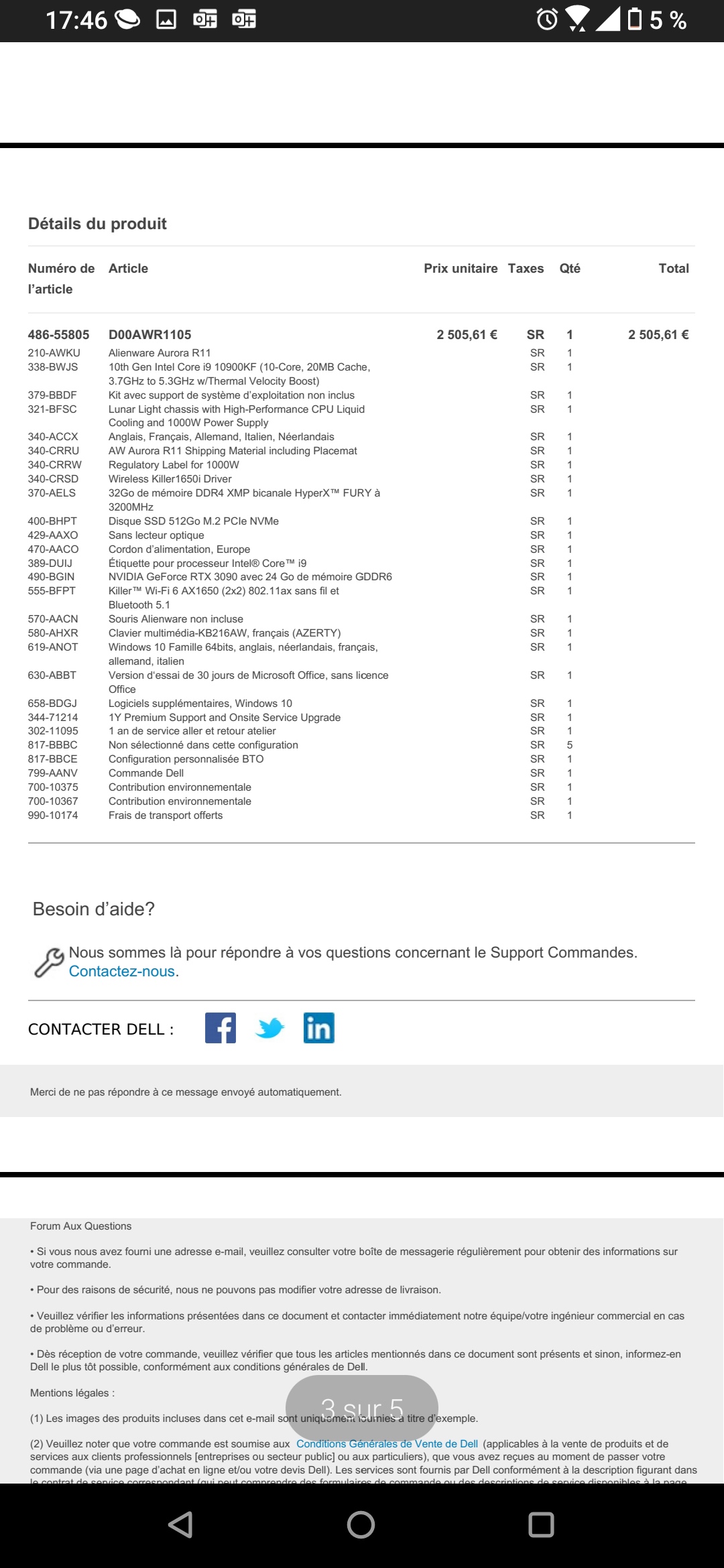
I just bought myself an aurora r11 rtx 3090 i9 10900kf for 3000 euros
It is a good price right?
Can you check the specs ?
Is the 10900kf better than the k?Attached Files:
etern4l likes this. -
-
Anyone else get the AWCC download faster ram update?
![[IMG]](images/storyImages/XLbGdxI.jpg)
 Biker Gremling, normand668, Normimb and 3 others like this.
 -
The "F" means Intel's iGPU isn't included with the CPU; you can only run graphics off the Nvidia GPU.Normimb and Spartan@HIDevolution like this.
-
delete.
*OFFICIAL* Alienware Area-51M R2 Owner's Lounge
Discussion in '2015+ Alienware 13 / 15 / 17' started by Spartan@HIDevolution, May 9, 2020.


![[IMG]](images/storyImages/da4860918cf10b460bd88c5e13a61ab1.jpg)
![[IMG]](images/storyImages/988909b0688afa749d7c6f7428214225.jpg)
![[IMG]](images/storyImages/01b7ad9982497ec116295d6fd8758b3a.jpg)