Problems? See this thread at archive.org.
I'm thinking my pea size application isn't enough for the IHS and graphics, especially since the onboard 2080S graphics is running about 5 deg higher than it was before. I'll disassemble tonight and check/repasted again probably with a lot more paste.
-
-
So after checking my paste I definitely didn't have enough on the IHS. I didn't get enough to cover the entire plate. I cleaned and repasted with a lot more than I would have normally used since this setup doesn't seem to quite make as much contact as a normal direct die or air cooler on a desktop.
After repasting with a healthy amount of Arctic MX-4 I reassembled and tested again. Results were much better than the first repaste. After considerable testing, I compared my results to my original bench from before the delid and repaste. I have gained about 4deg C hotter. The opposite of what I was after. I used more liquid metal than most of the videos I saw with the 10th gen cpu so I don't think that's my problem. Maybe MX-4 was inferior to what Dell used to paste @ Compal? The original paste was pretty well done for sure and had ample material. I dunno.
I am going to order some Phobya and Thermalright TFX and wait on it and see what it does in comparison.
Couple pics of the first attempt and a pic of the second before attaching the heatsink. I have enough on it that I will be cleaning up a little mess next time.Attached Files:
Last edited: Dec 24, 2020Normimb likes this. -
-
QuickCPU looks like a worthy challenger to ThrottleStop.Justin Stuever and Normimb like this.
-
@Papusan pointed out to me this option untill trhottleStop comes up with a version that supports 10 cores CPU. Version 10.
It has been great so far, but i still miss some ot tthe options i have on ThrottleStop.
Like:
1- i have not yet figure out if it is possible to change the CPU cache ratio. I don't thik it's possible.
2:I have not yet figure out if it is possible to have different profil to save (only one)
3: I don't thik it's possible to set a core multiplier for each individual core (53,53,52,51,50,50,49,49,49,49) you can only set a desire clock (49 for example)
4: no stresstest incorporated to test the stability of the undervolt. (i use HWinfo WHEA (windows hardware errors) to monitor errors and all kind of different cpu stress test like aida, occt, cpu z etc...)
But still it's a very close challenger to ThrottleStop, like you just said Papusan, Spartan@HIDevolution, Justin Stuever and 1 other person like this.
 -
I like it as well. Been playing with it for a few days.
I can go to advanced and set cache ratio but it's tricky. You have to create fivr profile after setting it. Then click the boxes to apply at start and monitor and force. After this, to change anything in the fivr tab you have to uncheck those boxes, clear settings for fivr tab and apply save and close then reopen fivr tab and edit.
It will apply the undervolt as well. It won't let you change to static voltage though which is a shame.
Also your right about not letting you set individual core clocks. -
Or just try out y-cruncher v0.7.8.9507.zip
Test out these settings Pi-2.5b + Pi-10b and I'm sure your Cpu will see the 100C landscape
http://www.numberworld.org/y-cruncher/#Download
From your album. Did you clean up the glue mess? And don't glue the IHS back. Let the IHS float on top of the PCB.
Mx-4 isn't a good choice in any notebooks. And check the pads as already mentioned in previous posts.Spartan@HIDevolution, Justin Stuever, Normimb and 2 others like this. -
Yes sir, I cleaned up the glue. It brushed off with the wood "scraper" that rocket cool includes. I put some very light black rtv on the IHS before clamping it back down. Nothing to interfere with good heat sink.
I'm going to tear it down again tomorrow and try the thermalright tfx. I'll report back.
Pic attached of pre clean before assembly of cpu during delid.Attached Files:
Papusan likes this. -
-
Next time just let the IHS float on top of the PCB. You could also check the contact fits between the die and IHS with thin cream/paste before you apply the liquid metal.
https://imgur.com/a/2xHnNVn0lok, Satanello, Spartan@HIDevolution and 1 other person like this. -
Why the copper ihs was cooked at 120 degrees? Was it done to get liquid metal into copper porosity?
Inviato dal mio LYA-L29 utilizzando Tapatalk -
-
Success!!!! I was about to just admit defeat if this round of paste didn't work. But luckily it worked like a champ!
I removed the IHS and cleaned and removed the RTV. Removed the LM, re applied with about 50% more material. Repasted with thermalright tfx, and boom! Solid 10° C drop without changing a single setting, same ambient temp, running 10 min of CB20!
I think my problem was more likely in the LM and not having enough. This chip needed more than I was applying. I don't think it was the RTV as I applied it and let it dry in the clamp. Either way, adding an extra 50% to what seemed like a good amount did the trick.
Also it seems like you need about 3 times the TIM for the top of the IHS to heatsinks than you would apply for desktop. Probably just the way the heatsink mounts as one giant unit vs single.
The 2G of thermalright tfx was barely enough to do the CPU and GPU. I would have liked to use a little more but it was enough. I will order more for next paste.
Pics from 2nd paste of Mx-4 and repaste with Thermalright tfx below. Also pics of "relid".
I'll do some more testing and see how far I can go with it and report back.
Initial test at same exact 46x setting dropped avg temp from 98 to 86-87 after 10 mins of CB20.
Thanks again @Papusan and @Normimb for all the help!Attached Files:
normand668, jclausius, c69k and 3 others like this. -
-
Christmas came early!
I messaged @unclewebb about throttlestop supporting 10 cores. Apparently he just finished it!!!! See his reply below.
"Good timing Justin. I finally bought a 10850K a couple of weeks ago so I was able to update ThrottleStop to fully support these 10 core beasts.
https://drive.google.com/file/d/142aOIC1y5xHXjJLB4zp0nn3qCpSOFwhK/view?usp=sharing
The included ReadMe file contains all of the details.
I think any 10 core owner is going to be smiling from ear to ear when they start playing with this new version. I love it.
![[IMG]](images/storyImages/WHvPKZy.png)
![[IMG]](images/storyImages/i4tnKgl.jpg)
![[IMG]](images/storyImages/72KvfzA.png)
I never realized how screwed up ThrottleStop was on the 10 core CPUs. It is so much better now.
I have made 101 changes so if you notice anything that is not quite right, let me know so I can get it fixed up."Papusan, c69k, Arkengelus and 1 other person like this. -
Need a little help with throttlestop if anyone can help. I am playing with the new version I posted here from unclewebb.
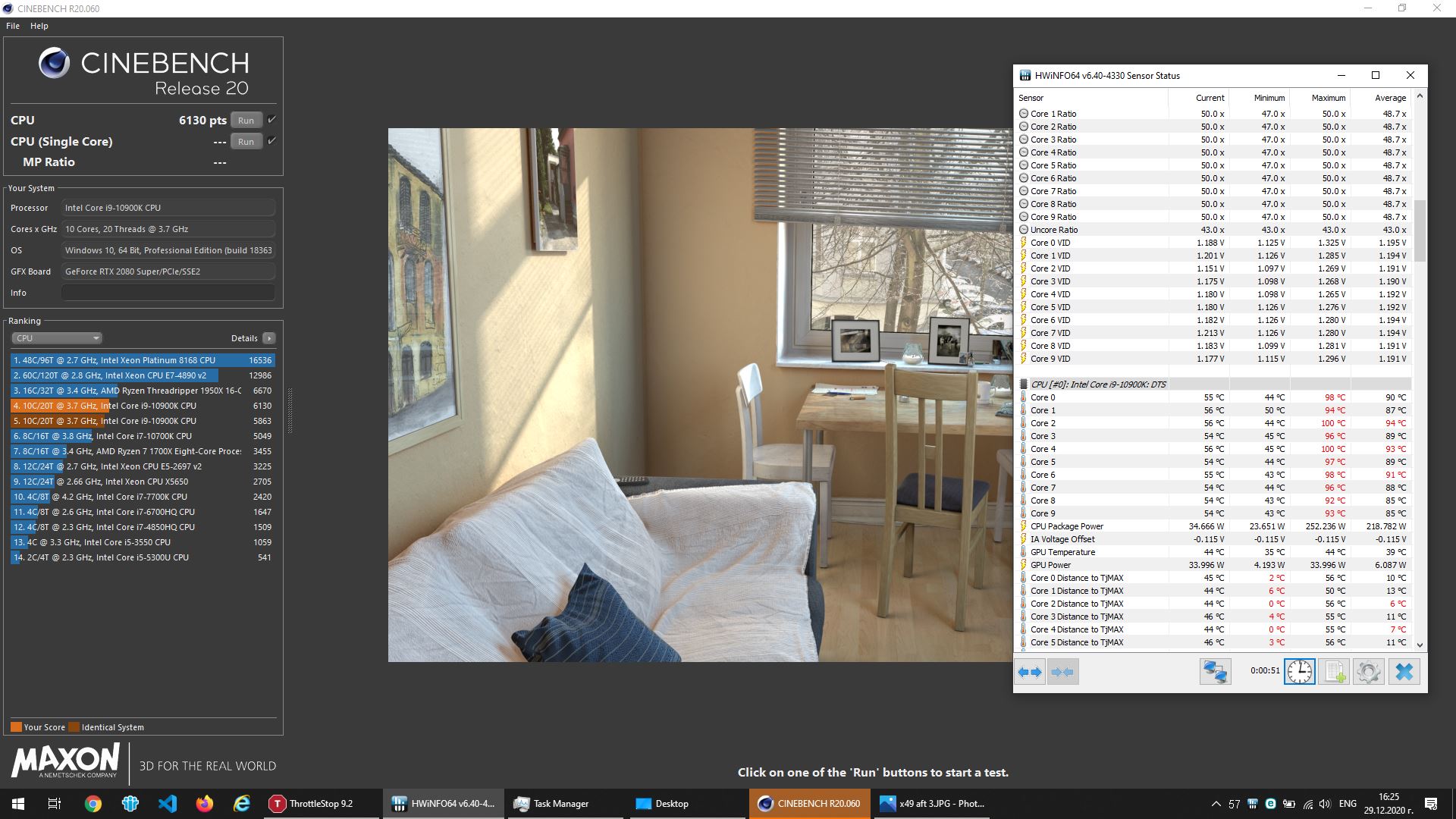
I am having a problem with my core clock dropping under load as soon as I start the run. When I start CBR20 my core clock will step down a few times from 4,688mhz to about 4488mhz. I can see the multiplier drop to 46 and then 45 in TS window. I have played with every setting I can think of and I can't seem to get it to stay at 47 for test. In HWInfo I see a yes for turbo att, thermal velocity boost, and vmaxstress.
I am way below thermal at about 70 deg when it starts dropping the clock down.
Any help would be appreciated. My settings are below. Thanks again.
Last edited: Dec 26, 2020 -
I have tried every one of your setting and everything is working fine for me.
I suspect AWCC overclock profil not being set to OFF. (make sure you select overclock off profil)
I would also set speedshiftt epp to 0 (for max performance)Justin Stuever likes this. -
I have the AWCC overclock to off, but I was using Quick CPU before. I turned off quick CPU and rebooted and have rebooted a dozen times since it was on. I have tried turning speedshift off but it won't allow it. Maybe I just need to completely uninstall both and then start TS back again?
-
On your next reboot. F2 bios reset default. F2 reset all your settings. Maybe your bios have an issue.
Edit: after you reset bios let it shut down and when it starts rebooting F2 and reset all you settings.Justin Stuever likes this. -
Ok so tried that. Uninstalled both completely and deleted all files. Boots to normal mixed turbo values like untouched CPU. Then when I load throttlestop from scratch and only change the undervolt and turbo values it still bumps it back to 45x during load. When it does this the value for Thermal velocity boost changes to yes in HWInfo so I am almost convinced it has something to do with that. I don't see any settings for that in TS though.
-
Reading a little more about TVB and it seems it is supposed to provide an additional 200mhz of speed IF cpu temps are below 50C. This makes sense since I was seeing 47 drop to 45 after the test started and the temps came above 50C.
So do I need to set the core 200mhz over or is there a way to disable TVB? -
No . Set all cores at 48X or all the cores at 47x. Run CBR20.
All cores should run at max no drops during the test.
You can monitor clock speed looking at HWinfo during the test.
Spartan@HIDevolution likes this. -
@Normimb @ratchetnclank @MogRules @normand668 @etern4l @kylera
Finally, OpenHardware Monitor gets an update. IMO one of the best UI for monitoring apps as it shows the CPU and GPU temps in the same screen by default without having to fiddle with any settings and doesn't need you to disable anything in settings like HWMonitor to prevent performance loss during benchmarking:
https://openhardwaremonitor.org/downloads/normand668, ninedragons, MogRules and 5 others like this. -
Thank you. I tested it and yes it's fine for basic monitoring like CPU and GPU temps but it is not giving a complete picture of what is hapening with the computer.
I like to know wich core is thermal throttling, what voltage is the CPU running under stress, what temps are the SSD, how much battery life etc....
I personnaly do not disable monitoring sensors in HWinfo (maybe i should, i don't know) that is the only thing that is bothering me with this software.
i am going to keep OpenHardwareMonitor when i only need to monitor temps for best scores in benchmark but for everyday usage i will keep HWinfo.
-
You said finally. You mean you'll benefit from the "Added AMD family 19h (Zen 3) CPU support" on your Dellbook with this update?
 Or did you get an AMD-book as Christmas present?
Still a kids toy for HW monitoring as bro
@Normimb so nice present it above.
Or did you get an AMD-book as Christmas present?
Still a kids toy for HW monitoring as bro
@Normimb so nice present it above.
-
One thing I like about OpenHardwareMonitor is that it's true to its name, i.e. open source: https://github.com/openhardwaremonitor/openhardwaremonitorPapusan likes this.
-
That is exactly what I am doing. But when I put a load with CBR20 it steps down from whatever I have the multiplier at by 1-2. So if I set it at 48 it will drop to 47 or 46, 50 to 49, etc. It does not hold the multiplier. This happens when it climbs above 50C and I get a Yes in the column for Thermal Velocity Boost in HWInfo.
Reading up on Thermal velocity boost, it is supposed to drop 200mhz if the processor is over 50C. I didn't have this issue with Quick CPU or XTU. Only throttlestop. Do I have something set wrong somewhere? I can't find a way to turn off thermal velocity boost so it will just hold the multiplier.
Here it was set at 50 and it dropped to 49 under TS bench load that had a max temp of 90°C. As soon as the temp hits 50°C it drops the multiplier and the Yes shows up in thermal velocity boost column and the turbo attenuation column.
Attached Files:
-
-
Power is set to high performance. Fans on high. Here is what I have set in TS.
-
CBR20 Test last 1 minutes. Your HWinfo picture is for 12:44.
Run CBR20 but reset HWinfo just after the test start. Take a print screen just beforte it stops.
Do this test at 47X first. Don't batter going 50x right now, you'll test it later.
Stop playing with all the settings. Concentrate on offset volttage core and cache. Se the voltage to Default. Reset the cpu cache to 43max.
Try to keep it simple for the first benchs. You have changed all the settings and some we're not right.
Thermal velocity boost for all core is supposed to be for desktop CPU under 70C. Manufacturer like dell can bypass this feature.
Edit: Also i you try to set your clock at x50 int throtttleStop it won't work unless you go in the bios first and set your max clock speed there per cores. For example you could set it like that: 53,53,51,51,50,50,50,50,50,50. or 50,50,50,50,50,50,50,50,50,50.
Below are my settings. Please copy all of them except set all cores at 47X using the Turbo groups button.
Last edited: Dec 27, 2020Justin Stuever likes this. -
I reset TS to original config. Set turbo to 47 all cores. Left voltage reset at default. Ran CBR20. Same results. Dropping from 47x to 46x when the thermal velocity boost flags above 50°C.
Any thoughts?
-
Dell have screwed up the firmware. They don't bother follow Intel's guidelines for Mobile or desktop chips. This to try reduce RMA/Support and tech costs at all cost.
All-Core Thermal Velocity Boost refers to the speed achievable if every core is active and the CPU is operating under its respective temperature threshold (70 degrees Celsius for desktop chips, 65 degrees Celsius for mobile ones).
What Is Intel Thermal Velocity Boost? CPUs With TVB Explained
Here is some insight... Not much have changed to the better the last years. @unclewebb ztarted the work with ThrottleStop because of Dell.
DELL'S Throttlegate by UNCLEWEBB.pdfLast edited: Dec 28, 2020raz8020, etern4l, Justin Stuever and 1 other person like this. -
Makes sense. Wonder what is causing my multiplier to drop. I have been playing around with different speeds to see what it drops to BEFORE thermal throttle. at 51 it drops to 50 under load. Seems to be by 1x of whatever I have it set at.
I have overclock disabled in bios but it still lets me set it as high as 53x in TS and shows correctly in HWInfo. Until I load up with a bench and then it will drop by 1x quickly until it eventually hits a thermal on everything over 48x. At 46x, 47x, and 48x it drops by 1x as well but never gets up to thermal temps.
I mean, its not the end of the world I guess. Frustrating trying to figure out what is causing it. For now I just need to set it 1x over my intended ratio and when it hits thermal velocity boost barrier it will drop it 1x and about 10mv. -
i don't believe that (meaning i don't understand)...hum please try my settings i just added in the previous post.Last edited: Dec 29, 2020
-
if you want 50X you have no choice but to set an overclock in bios and after in throttleStop. Otherwise bios will not allow the 50X requested by ThrottleStop.
Here is my results in CBR20 like i asked you before except 10 cores at 49X:
Last edited: Dec 27, 2020 -
No reason whatsoever to lie to you Norm. Just telling you what I did. No real reason to screenshot every move like deleting a file and rebooting, downloading the file again, etc.
I'll do it again and save a screenshot for ya. It is a beta version of TS so maybe there's something in my system that is causing it?
As far as the above 50 here's a screenshot of HWinfo showing the 51x and Mhz. Dunno, but I haven't enabled overclock or changed the values in bios.
2nd screenshot under load it drops by 1x as stated.
Attached Files:
-
-
Oh non Justin sorry i never douted you. I misexpress myself (bab english). My intention was to say: I can't believe it! after all we tried and still not working.
For the results it looks very good! i can't run 50X without hittting 100C all cores after 15 secondes. So your Delid seems to have done miracles.
For myself if i try 50x all cores, throttleStop will accept it but under stress it will clock down to 49X. If i set the bios to 50X overclock then it will work. So it's a mistery why your system and my system runs differentt. Maybe different MB version. I am on 1.30.Last edited: Dec 27, 2020Justin Stuever likes this. -
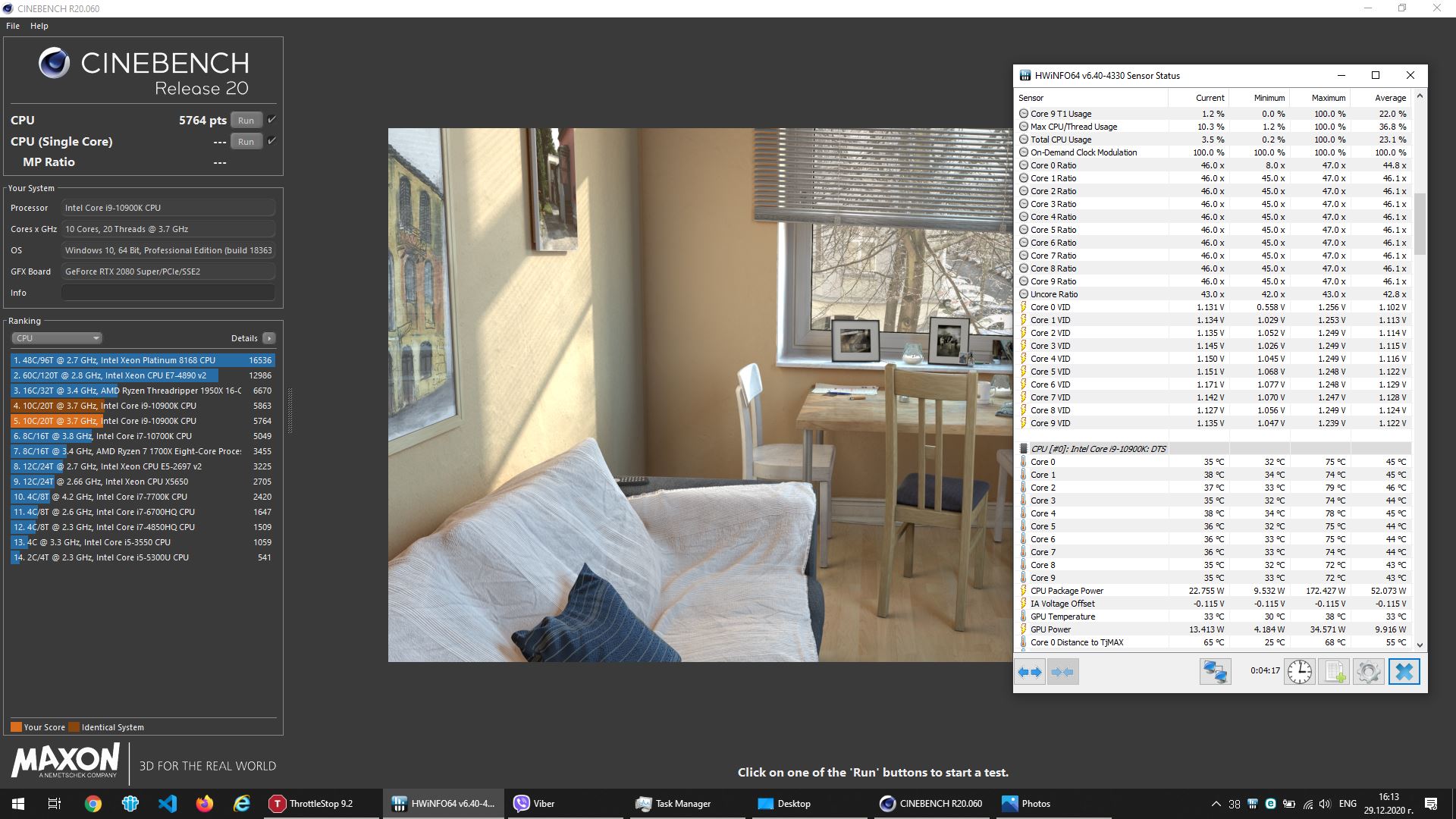
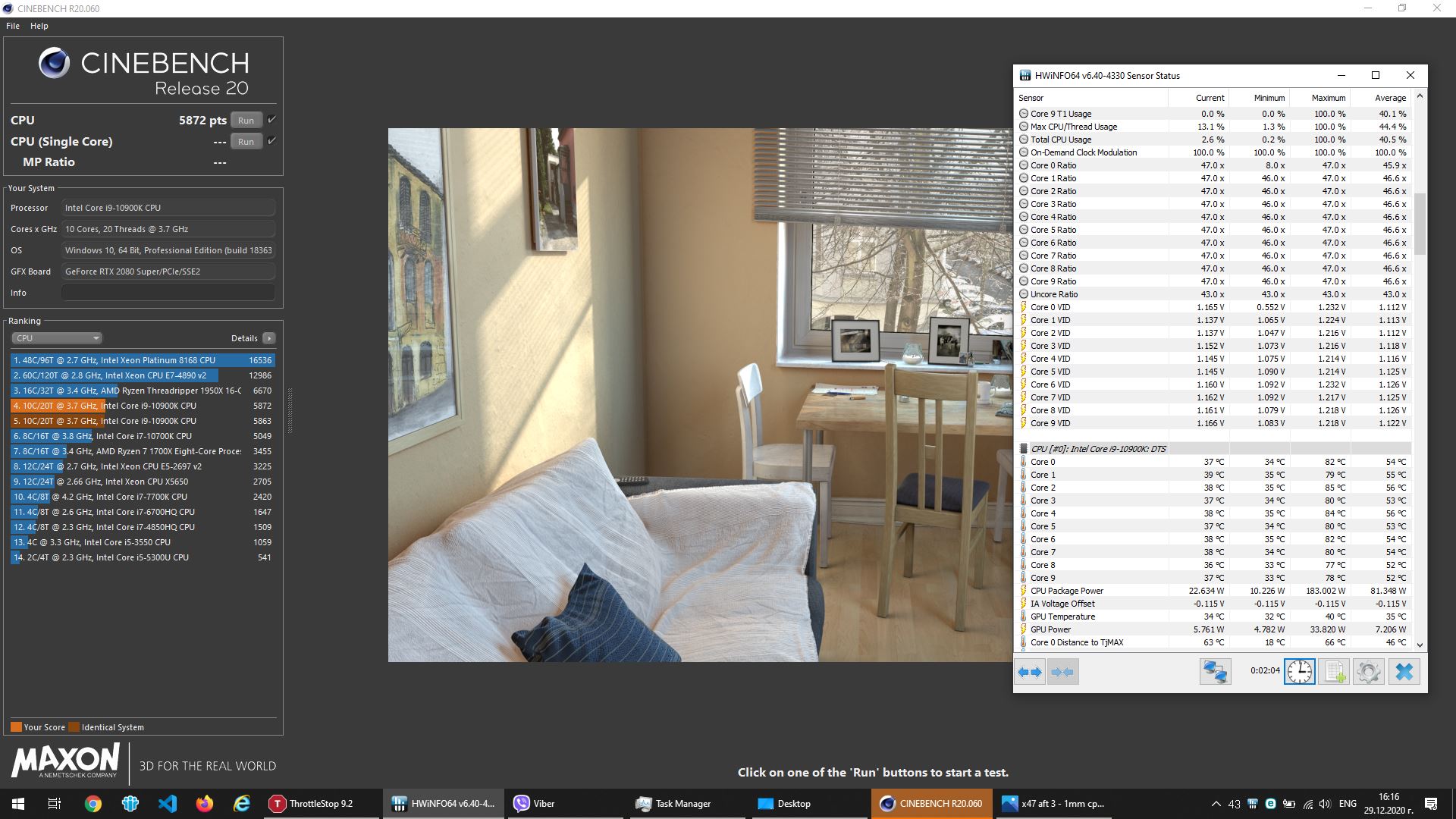
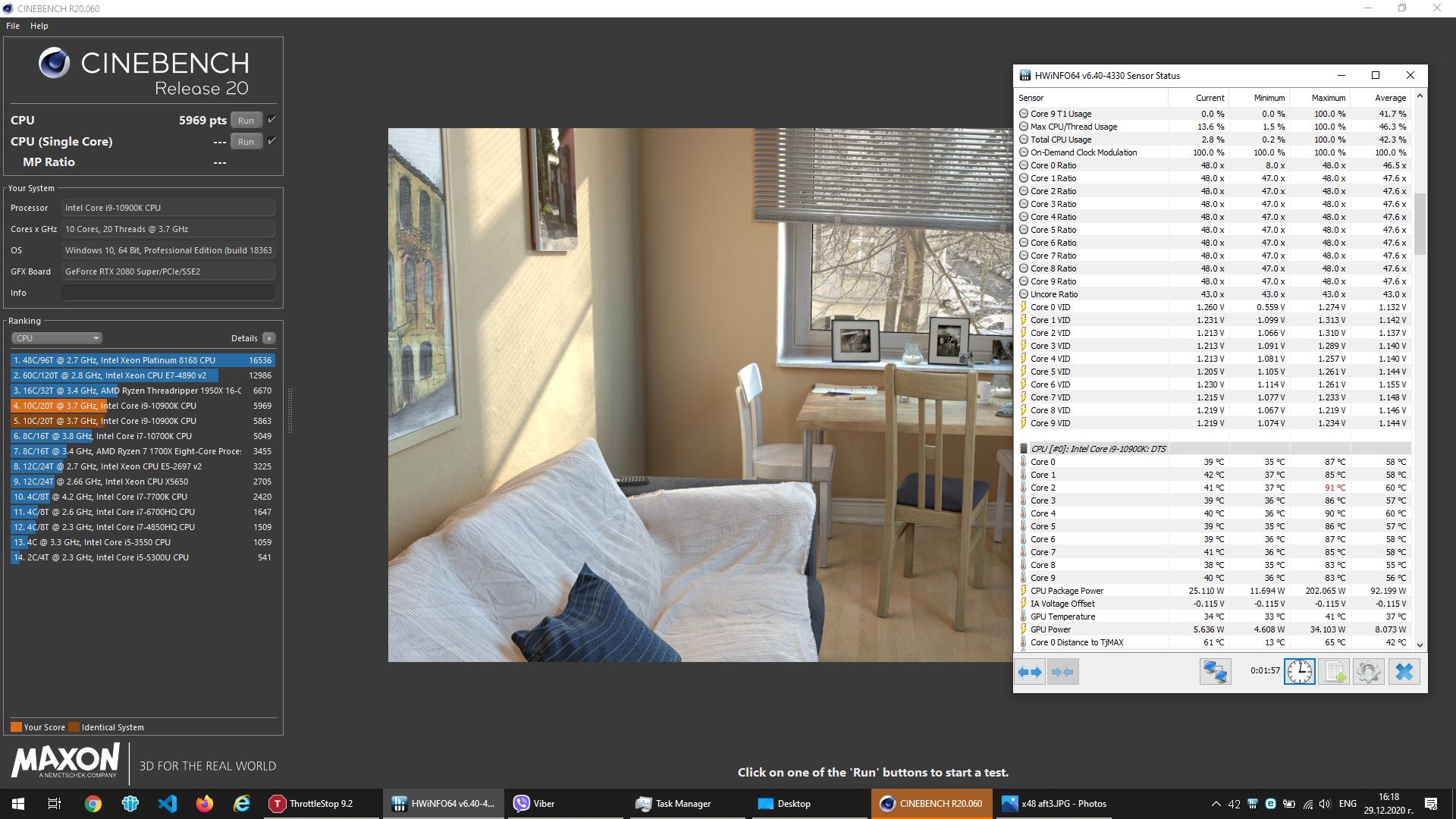
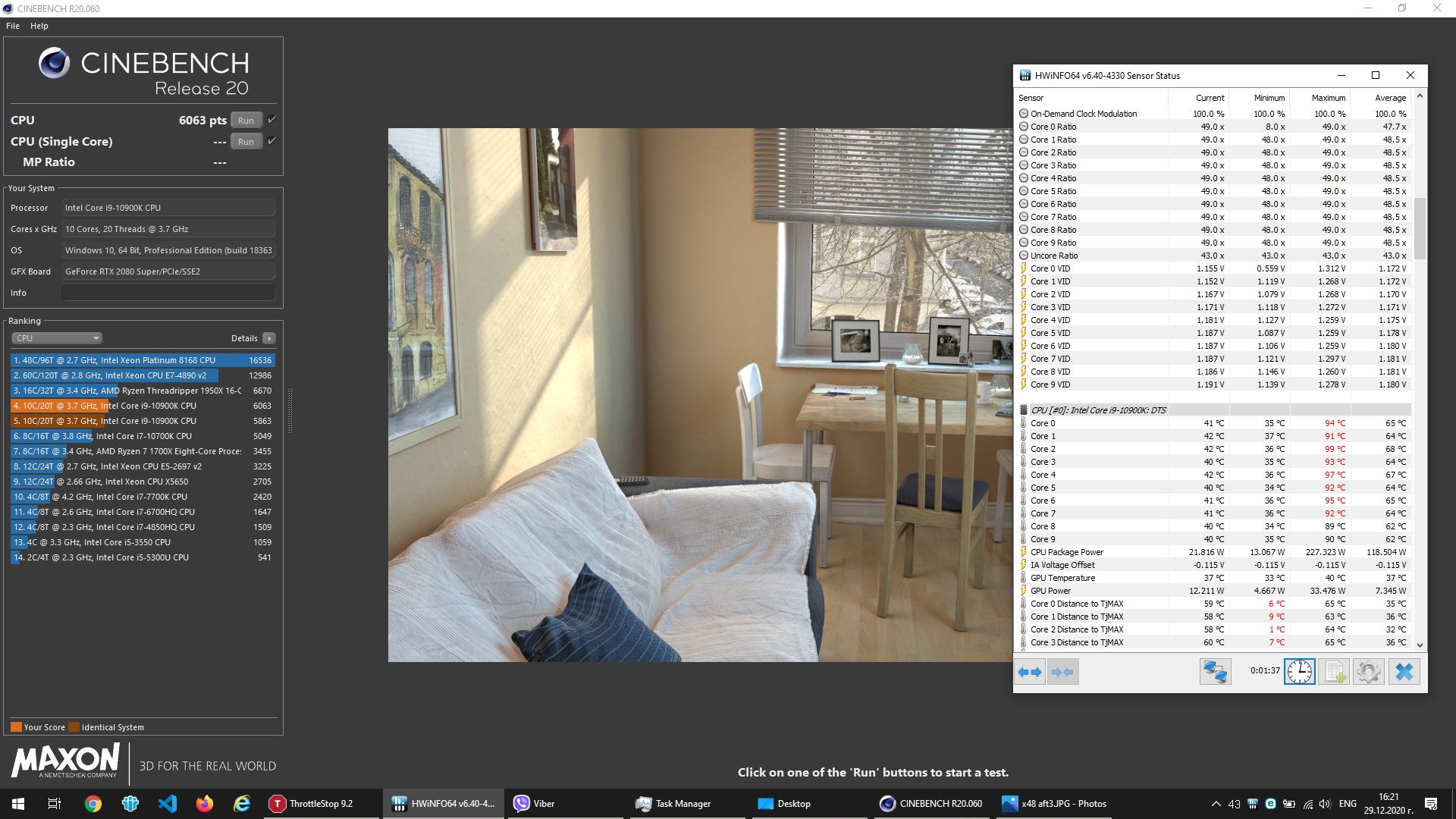
Deleted TS again, rebooted, downloaded TS 9.29 Beta again. Placed in C: program files x86. Setup to same as your example @ 47x. Left everything else untouched. Ran CBR20. Reset HWInfo when test started and grabbed screenshot below right before it finished.
Please let me know what I need to try different or redo.
I appreciate your help
-
No worries sir. Delid/repaste definitely dropped me 10°C but I don't think it runs quite as cool as your CBR20 benches I have seen at 6100 score @ 94° @ 49x. I get closer to 99° during that bench @ 49x. But at least I am in the ballpark now haha.
Where can I find my mobo version?
Edit: I am also running stable @ -100mv under volt so that helps as well.Normimb likes this. -
I do not use the beta version 9.29. I am using 9.2.But i doubt it's the issue.
On your previous screenshoot you had no undervolt but i don't think that is the issue either.
why don't you go back to QuickCPU and see if it's better?
I am out of idea for this weird behavior. Maybe firware like @Papusan mentionned.Justin Stuever likes this. -
Quick CPU seems to lock the ratio at whatever it is set at. I think it might be an issue in the beta 9.29. Not a big deal though. I can just leave it set 1x higher than I want it at and it will bench where I want that way. Not a huge issue. Thanks for your help. I'll report back if I find it.
Normimb likes this. -
Just loaded up the stable (non-beta) version of 9.2 Throttlestop just to try it and had the same issue there again. Strange.
-
re-installed Quick CPU. Holds 47x throughout test. No flags for thermal velocity boost, max turbo, or turbo attenuation MCT. So there's definitely something going on with my system and throttlestop. Probably just stay with quick CPU for now.
Normimb likes this. -
Try same higher clock speed as previous. Also try out CBR15 who don't have AVX support when you use TS.
Cinebench R15 -
Using quick CPU, when I set to 47x, 48x, or 49x it holds it. When I try to to go to 50+ it bumps it back to 50 and then jumps back and forth to 49x. Won't show me anything above 50x in HWinfo when I have it set above 50 in QCPU. I'll play with CBR15 and TS next session. Interesting results for sure.
-
ok justin i just remember something. With QuickCpu you have to overclock the bios to run 50X constant but....with ThrottleStop there is no need (like you said before) it is holding 51X in CBR15 whithout overclocking the bios. Hope this helps (one problem fix)Justin Stuever likes this.
-
It's the first time i test AVX. Would you say it is a worthy option to set it at 1 or 2 for example for gaming? I was thinking since my CPU is stable at 49X, to run 50X and have AVX set to 1 in ThrottleStop. That way when gaming it might run 50X if it doesn't have AVX. The CPU will stay cool at 50x without avx. Is that correct?Papusan likes this.
-
Depends if you have cooling headroom. On the edge then use 1 or 2 AVX negative offset. Only your testing will determine what to do
normand668, Justin Stuever, Spartan@HIDevolution and 1 other person like this.
-
Anyone else having this issue with AWCC where it seems like every two days it keeps saying I need to download and update the OC controls? It just keeps wanting to uninstall and install the same update from 11/25 over and over again, and I can't figure out how to make it stop... I tried unistalling the program and files completely and reinstalling, and even after an entire system reset, is problem persists. Screenshot attached.
-
Yesterday I bought i9 10900k which I swapped immediately. I am concerned about that Core 2 and Core 4 has very big difference in temperatures (around 7-8C degrees) compared to the other cores. With the old CPU (10700k) I had zero temperature differences between the cores. Today I've ordered from Rockit cool "Copper UPGRADE Kit" to delid the CPU and put copped IHS. I am not sure if I should keep that CPU (10900k). I guess it is possible to be a bad thermal conductivity between the chip and IHS, but I am not 100% sure. I hope after delid and putting liquid metal, it will go with equal differences or between 4-5 degrees between the cores. Can you give me advise what to do, guys - should I keep it or return it? I am attaching screenshots with different multipliers. The CPU is able to be undervolted up to -0.120, which is very high. I am using the TS 929 (the version @Justin Stuever shared with us). The thermal paste is GC Extreme and the thermal pads are Grizzly minus pad 8 + Arctic.
Thank you in advance!Justin Stuever likes this. -
Hello,
Your chips looks average. Wattage and Volts.
The undervolt is probably too much (you have low scores in CBR20). Test your undervolt with ThrottleStop (TS Bench) at 960M. Look for errors. Reduce your undervolt untill you see no more errors.
Core differenctial is not great but not soo bad. How much paste did you used? It needs 2 or 3 pea size (a lot) of TFX preferably.
The 10900K is not the best for gaming in this laptop. The 10700K running higher clock should beat it in games. Our Heatsink cannot handle 10 cores at 50x but maybe the 8 cores of tthe 10700k can be supported at 50X or at least it will run cooler at 49X.
If you delid don't expect more then 10C drops (from other peoples results). Is it worth risking breaking this expensive CPU for -10C? your decision.
Personnaly i got the 10900K because it was a system exchange from dell and i didn't have to pay for it but if it was my money and since i don't do heavy multitasking, i would have bought the 10700K.Justin Stuever and b.kolev like this. -
Hey Justin,
Just want to update you with what happened to me today. I did set TrottleStop to 47X and ThrottleStop sensor were reading wrong. 43x, 44x, 46x etc....while HWinfo was reading correctly 47X.
Then i ran CBR20 and guess what? Instead of seing 47X all cores in HWinfo and in ThrottleStop it was showing 46X. Same exact thing you were experiencing yesterday!
I closed ThrottleStop and restarded it but same issue. I tried different settings and it would always drop 1 bin as it was suppose to run.
Solution i found: i rebooted and restore bios to default (F9 +F10 for reboot). Then i reset my settings in bios.
Now it was working perfectly after this operation.
So either the reboot solved the issue or it's the bios reset that helped but there is defenetly something wrong with this version ot throttleStop on our system. I will probabley switch like you to Quick Cpu untill there is a more stable version of the software.Justin Stuever likes this. -
You both should reply in the TS guide thread and tag in @unclewebb so he can look on it. A PM will work as well.
But this smells as a buggy firmware from Dell. Maybe remnants from Dell's awful software in the registry.Last edited: Dec 29, 2020Spartan@HIDevolution, Justin Stuever, c69k and 1 other person like this. -
If HWiNFO is showing Thermal Velocity Boost as the reason for throttling when this happens, then this is what is causing the problem. I have a desktop board with an option in the BIOS to disable TVB. I cannot think of any reason why I would want this feature so I have left it disabled. I will think about adding a red box to Limit Reasons that shows TVB when this type of throttling happens.
As long as you have checked the FIVR Disable and Lock Turbo Power Limits box, you should be able to access any available multiplier without having to go into the BIOS.
Edit - I will add the ability to toggle Thermal Velocity Boost on or off to the next version of ThrottleStop.Last edited: Dec 30, 2020raz8020, c69k, normand668 and 3 others like this.
*OFFICIAL* Alienware Area-51M R2 Owner's Lounge
Discussion in '2015+ Alienware 13 / 15 / 17' started by Spartan@HIDevolution, May 9, 2020.