Problems? See this thread at archive.org.
I have a Razer Blade 15 Advance 4K OLED 60hz screen
i7 9750H processor
32gb ram
RTX 2080 Max-Q
How much of a performance jump graphics and framerate-wise would I see when comparing my Razer to an Area 51m with RTX 2080, Silicon Lottery Delidded Intel i9-9900KS Processor rated to 5.2 GHz? Significant?
-
-
Very unscientific guess, but just looking at the slight difference between a 2080 Mobile and Max Q its about 15%, processor helps a bit but not that much. The only factor I would think on top might be less throttling frequency for the A51M, but with the BIOS issues, that's probably not true either.Atticus8817 likes this.
-
When comparing GPU's the MAX Q 80/90 watts vs a 2080 180 watt - your looking at around 30% improvement on GPU performance. This is what made me go for a refurbed 51m versus a m17 with the max Q. FPS would def be much higher on the 51m.Spartan@HIDevolution and Atticus8817 like this. -
I was going by this site: https://gpu.userbenchmark.com/Compa...Nvidia-RTX-2080-Mobile-Max-Q/m700275vsm704710
I am thinking the clocks are the biggest difference, with the power:
https://www.techwalls.com/nvidia-rtx-2080-rtx-2080-max-q-gpu-comparison/
Looks like in some cases its as high as 40%, then others down in the 12-15% range.
This probably will give you the best comparion:
https://www.notebookcheck.net/GeFor...Force-RTX-2080-Laptop_9621_9541.247598.0.html
Varies a good bit, and older/simpler games seem to get more benefit not surprisingly. I think the more GPU-bound a game is the better the difference.Last edited: Mar 31, 2020Pass_00 likes this. -
I can confirm this. I'm running two Samsung 512GB SSD's in Raid 0 in my 51M and there was minimal to no speed increase. On my AMD desktop rig, I run two 2tb Sabrent PCIE4 in Raid 0 and they show +8GB/s read and write in CrystalMark.Docsteel likes this. -
Triple confirmation, my previous Area-51m had two 960 PRO 2TB SSDs in RAID 0 and now I am using the POS crappy Hynix SSD that came with this Area-51m. Yes in benchmarks I get destroyed, but as a user, I feel 0 difference. If I ever do RAID again, it's simply for combining the storage to get the max size in a single partition and make my life simple.
-
Never cared for RAID for speed, so the recent posts dissuade me even more LOL. Single partition may be good!!!
Still tho, some risk there if one fails, which dissuades me once again. I’d rather have 2 x 1 TB partitions, than 1 x 2 TB partition with risk of one drive dying and losing ****! -
This isn't 1990 with HDD RAID! I'm sick and tired of reading the same thing all over the web. News flash, SSDs NEVER fail. Been using them since the first ADATA SSD and had every flagship SSD out there, tortured the heck out of them, continuous benchmarks, copying terabytes worth of data, they just don't unless you physically damage them.
Hint: there is something called "backup" which every one should do no matter what drive they are using.
The best and fastest way to backup your data!Lopt, Tim V., Virale and 1 other person like this. -
I had 2x Samsung 960 evo 500gb in a NAS for read/write cache, both failed within 2 month after one year of use.
Fire Tiger and Virale like this. -
lol @Spartan , your experience has been great, but there are those who do get failures, as you see!
Personal choice in the end. That’s cool!Papusan, Fire Tiger and Spartan@HIDevolution like this. -
![[IMG]](images/storyImages/EeChF7M.gif)
Me right now........
![[IMG]](images/storyImages/fedwkc5.jpg)
@ViraleLast edited: Mar 31, 2020 -
All my machines get backed up nightly. I always have old working drives and hardware around and just kludge together backup and storage with that old slow stuff.
I raid 0 like a madman and even use Windows disk management to mix and match dynamic disks to reduce the number of drive letters I need to manage.
That is why my newly built desktop has a 4TB C drive. I've always had a backup strategy that includes having more than one viable and current backup at any given time.
That said, I have never lost a Raid0 due to drive failure, but I know a Raid0 failure for whatever reason, could happen too.RMLJD, Virale, Docsteel and 1 other person like this. -
Just an update.. Sold my 9900ks for $600 and well... Now I have an extra $400
![[IMG]](images/storyImages/98fd5b3a296f6b0bddbc8e854642114e.jpg)
Sent from my GM1917 using Tapatalk -
Aren't you now in the wrong forum
 Last edited: Mar 31, 2020Biker Gremling, alaskajoel, IXVIXXII and 5 others like this.
 -
Not in my eyes I still have much to spit out when it comes to the 51m and I'll always feel like I'm apart of this thread x3 that 51m became a daily chore of my life lmao. But just posting updates is all :3
Sent from my GM1917 using TapatalkDocsteel, Fire Tiger, Virale and 2 others like this. -
Congrats on the upgrade. You'll probably never look back. I sure didn't. Even $1,500 is way too much to spend on a laptop now (to me anyway). I don't like to say "never" (has a way of coming back to haunt me later) but I'm pretty sure I will never purchase another "high end" laptop. Just not worth it. Too much money for too little in return, unless you enjoy hassles and rigmarole finding fixes for all of the nonsense and dealing with all of the proprietary crap.
My inexpensive BGA turdbook does more than a good enough job for playing games.
I use my desktop for the more serious (overclocking) fun things in life.Last edited: Mar 31, 2020 -
I dunno guys. Sure, the 51M has a learning curve, but I landed @ 1.5 bios, 180w vbios and only use ACC for OC and UV and am completely satisfied with mine. I have about the same $$$ invested into my new desktop and the two are running neck and neck in both synthetic benchmarks as well as gaming, and in several cases, the 51M outperforms my desktop.
Of course a 9700k cannot compete with a 3950 in Cinebench, but with the 51M running 5.1ghz daily, and the only thing I used to get there is ACC and a repaste, I cannot complain at all. It truly is a DTR in almost every respect.
That said, I can take my computing on the road and not sacrifice anything, and that was my primary goal in getting the 51M. It does that exceptionally well too.
To each his own, I guess. -
Yes, I thought that way for many, many years as well. So, I can relate. I just got tired of all of the compromises associated with laptops and decided enough of the nonsense and went back to desktops.
- XPS M1730
- M17xR2 (x2)
- M18xR1 (2920XM)
- M18xR2 (3920XM)
- AW18 (4930MX)
- Clevo P570WM (4960X)
- Clevo P750ZM (4790K)
- Clevo P870DM-G (6700)
- Clevo P870DM3 (7700K, 8700K)
- MSI 16L13/Tornado F5 (7700K, 8700K)
- Clevo P870DM-G Frankenmod (8700K)
Last edited: Mar 31, 2020 -
I get it. I think my first "DTR" was a 2 core (maybe it was a quad) Gateway laptop with 3GB of ram. I guess the weight of that PoS was what gained it a DTR title. Had to be! That was all it took to turn me off for many years on the whole concept of DTR laptops until the 51M came out.
I'm glad I missed all of the pain, but I can understand your position.jclausius, Fire Tiger, Papusan and 1 other person like this. -
Hello, could you help me advice?
I've downgrade bios from 1.8.1 to 1.7.3 and my area 51m works fine.
But when I've tried to downgrade from 1.7.3 to 1.3.2 some happens wrong.
Notebook start blinking 2 red and 1 blue. I live in Russia and Dell doesnt make maintance here.
There is something what I can do to repair or I must send my area 51m to USA?Fire Tiger likes this. -
Looking at the service manual, it might suggest a CPU failure, I'm not 100% certain though. Have you tried resetting the CMOS battery to see if that helps?
Service Manual URL - https://www.dell.com/support/manual...0a87a2-f7de-45c3-8aaa-e6585d53e11b&lang=en-us -
Yes, I disconnected the CMOS battery for 5 minutes. It did not help.
It seems there is no other way to understand the matter in the processor or not, except to try to install a new one. -
You know I am pulling your leg right?Fire Tiger, Spartan@HIDevolution and Sup3rKillaX like this.
-
Oh lol.. Sorrys ><
Sent from my GM1917 using TapatalkFire Tiger likes this. -
try this:
- Turn the system off and disconnect the AC adapter
- Disconnect CMOS battery and system battery**
- Do a power drain (press and hold power button 30 seconds)
- Remove all memory modules
- Reconnect AC adapter and power system on
- Let laptop beep until it turns itself off
- VERY QUICKLY, WHILE IT IS OFF, BUT BEFORE IT ATTEMPTS TO BOOT AND LIGHTS COME ON AGAIN, INSERT 1 MEMORY MODULE
- System will start to beep 5 times
- Power system off
- Reconnect CMOS battery and system battery
- Replace any panels removed for access to memory modules
Done
Credit goes to @Mr. Fox for these steps.Last edited: Apr 1, 2020 -
Hey guys! Me again. Been luxuriating in the sensual viscera\ of my Alienware Area 51, but uh.... There is this thing that just happened.
So just now I loaded up Starcraft2 for the first time since I'd gotten all the updates and drivers and set everything right, or so I thought. And when it loaded, the screen flickered like it was changing resolutions.
"Aw, man.." I mutter half to my roommate and half to myself. "This thing's supposed to just properly run at 1080p on fullscreen, but for some darn reason Starcraft 2 wants to run at a LOWER resolution..." As I am saying this I'm clicking through and stuff doesn't look quite the same, but it doesn't look at all bad either and its almost normal - I figure it's at 1600x900 for some weird reason.
So I go back to the desktop with my game still running, and yep - sure enough the taskbar and icons are like twice their normal size and crowding the desktop all of a sudden. We've all seen this sort of thing plenty of times in our own respective PC gaming careers, it's just a near-constant chronic annoyance, and I was not thinking much of it at all when I went to fix it. In retrospect, I'm realizing now, it may have been the first time I every actually looked at the resolution options for this computer!
I mean, I had been through the display settings several times, and I'd always seen the resolution set to 1920x1080 - followed by the telltale "(Recommended)". Now, naturally, since the computer which I bought had repeatedly advertised itself as " FHD IPS 144Hz 1080p G-SYNC TOBII!
 Last edited by a moderator: Apr 2, 2020
 -
@kaworu876 Here is where you left the tracks..."I did spring for all the display updates, as display quality has a tremendous effect on the overall quality of the experience you have with your laptop, generally - you're going to be staring at it whenever you use your laptop, so make sure its good!"
You apparently grabbed the 4K UHD (3840x2160) screen upgrade and didn't notice it.
Sadly, that is a 60Hz screen, which is fine for videos, but the Full HD (1920x1080) 144Hz would be better for gaming. -
Uh, no. There were no options or upgrades for UHD available on this model. These are the four display options, and I will bold the one I chose:
No option for UHD. It is mentioned in nearly every single review of the Area-51m that there is no option to upgrade to UHD.
Further to the point, this monitor is running at 144Hz. I just checked my advanced display settings.
So what the heck is going on? -
https://www.nirsoft.net/utils/monitor_info_view.html
MonitorInfoView is a small utility that displays essential information about your monitor: manufacture week/year, monitor manufacturer, monitor model, supported display modes, and more... -
https://www.hwinfo.com/ is another good one that will give you the model number. Google for reviews.
Once we know what screen is in it, we will know whether Dell made a mistake, or you have a mystery screen.
-
Must be some kind of Voodoo magic
![[IMG]](images/storyImages/dkhLNPB.gif)
Hint: there is no 4K display for the Area-51m
1) Download AIDA64 Extreme Portable
Don't forget to unblock the ZIP file before unzipping it otherwise all the extracted files will have a BLOCKED status since this is a file you downloaded from the internet and Windows puts a BLOCKED status on any downloaded file. For how to do this, see:
"Are you sure you want to run this file?" [Yes or No]
2) Extract the ZIP then launch aida64.exe by right clicking on it and choosing Run as Administrator
3) From the left pane, double click on Display, then click on Monitor
4) Your exact screen name/model will appear on the right beside Monitor Name
jc_denton, Fire Tiger, Donald@Paladin44 and 1 other person like this. -
I think everyone wants to see what the hardware utilities that @Papusan, @Donald@HIDevolution and @Spartan suggested show for the "4K" LCD panel.
Here's another one... https://www.entechtaiwan.com/util/moninfo.shtm
Also, what does it show here?
RMLJD, jc_denton, Fire Tiger and 2 others like this. -
jc_denton, Fire Tiger, Papusan and 1 other person like this.
-
I was actually asking the other fellow, but it's good to see what yours shows for comparison. Thank you.jc_denton, Papusan and Spartan@HIDevolution like this.
-
-
I fix it for you. Dell went with a panel design that have almost no options. And don't trust panel specs from Dell. They go own route on this. Hence we saw all the bricked panels around when Win 10 was the big must have.
https://www.notebookcheck.net/Dell-...eview-Making-Core-i9-Worthwhile.454427.0.htmlLast edited: Apr 1, 2020jc_denton, Donald@Paladin44 and Spartan@HIDevolution like this. -
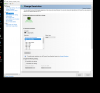
OK, well, I took a screenshot of the nvidia settings
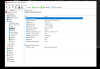
The really ODD thing is that the utilities I downloaded to give me info about the monitor from you guys - Aida64 and Monitor Info View - both of thus CLAIMED that the max resolution on this monitor is 1920x1080p when vert demonstrably it is NOT.
Here is this one, I'll post another one with the Aida64 info.... But well, just look at the RESOLUTION of the screenshot...
And here's a screenshot from the Aida64 utility. Interesting. Seems to legitimately think the max resolution is 1080p when I am looking at the utility through a max resolution of 2160p.
Seems to me like I got the type of screen that Alienware shared with MSI, except mine does not seem to be limited to 1080p? I guess?
Should I be psyched/thrilled about this?Attached Files:
Last edited by a moderator: Apr 2, 2020Fire Tiger likes this. -
-
Your screenshot shows Dynamic Super Resolution. Dynamic Super Resolution is a way for a GPU to offer improved image quality on a lower-resolution display.
Description:
https://www.nvidia.com/en-us/geforc...improves-your-games-with-4k-quality-graphics/uugui shi, Mr. Fox and Fire Tiger like this. -
Yeah
There is also this screenshot:
I'd love an explanation for the size of this screenshot and the information therein given that the utilities all say my native resolution is 1080p -
DSR is a software rendering of images at a higher resolution to enhance image quality. It does not change the resolution of the hardware. If you look at the screen shot of NVIDIA Control panel you can see the (4.00x) that indicates 4x 1920x1080, which is 4K. You have an LCD that is 1K (1920x1080). NVIDIA came out with DSR a number of years ago. It looks better, by design, but it does not change the number of pixels that can be displayed on screen. The enhanced aesthetic quality of the image seen on your screen is real.Last edited: Apr 2, 2020DreDre, Donald@Paladin44, jc_denton and 1 other person like this.
-
What I am talking about has NOTHING TO DO WITH DSR!
I am saying that my NATIVE DISPLAY RESOLUTION IS 3840x2160
I cannot make it more clear. I do not know why DSR was on the nvidia control panel there, but it has NOTHING TO DO WITH WHAT'S GOING ON.
The screenshot in THIS POST IS THE PERTINENT THING.
That, plus the utterly bizarre fact that despite using my computer in 4K, two of the utilities you guys linked me claimed that my max resolution was 1920x1080! When you are looking at those utilities *IN 3840x2160 resolution* it's hard to trust them, kind of.
I mean... If a monitor is capable of that high of a resolution, it MUST be the native resolution. I mean like, you CANNOT make pixels smaller than they already are. That defies physics!
Jeez, just look at the SIZE of the screenshot! It's not as if I upscaled or something, I just hit FN+HOME to "PRT SCRN" and pasted it into paint and uploaded it. Not playin' any tricks here, I am truly nonplussed and bewildered and trying to get across what's going on.Attached Files:
Last edited: Apr 2, 2020 -
-
Windows is confused. It is reporting what NVIDIA Control Panel is telling it.
See where the word "native" appears in your screenshot? Check the specs for your LCD part number if you wish to know what your actual panel is capable of.
cope123abc, uugui shi and Papusan like this. -
Dell doesn't have a 17 inch 4K panel with the narrow bezel design. You understand that? You can't have a panel, Dell doestn't have in their shelves.jc_denton, Rei Fukai and Fire Tiger like this.
-
You can't "confuse" windows like that. You can't make a monitor display *smaller* pixels like some sort of mistake.
Again, that is not how monitors work. They are physically incapable of going to a larger resolution than their native pixel size.
Uh, reality begs to differ.
Again, see above post. It is literally IMPOSSIBLE to force a monitor to generate smaller pixels than it is capable of generating!
If I was looking at a 1080p display right now, then I wouldn't be seeing twice as many pixels. Yet I am.Last edited by a moderator: Apr 2, 2020 -
My understanding is how this works:
- You specify in NVIDIA driver DSR (3840x2160)
- NVIDIA tells/fakes to Windows 10 and all apps/games that you have now 3840x2160 resolution so that the software will render/draw in the higher resolution
- NVIDIA driver takes the higher resolution rendering and scales it down to your screen resolution, supposedly creating a better image (what you think are twice as many pixels).
- Windows and other apps/games must think that you have a 3840x2160 screen for this to work even though your monitor is only 1920 x 1080.
If you had 3840 x 2160 screen then NVIDIA settings would put "native" at that resolution instead of at 1920 x 1080.RMLJD, Spartan@HIDevolution, uugui shi and 2 others like this. -
Sorry to burst your bubble.
First image is my Acer Predator 2560*1440 monitor at 165Hz. Second image is the same monitor. Windows is reporting a software "spoof" and the screen appears to be the resolution Windows is deceived into believing. But, it's still 2560*1440.
Again, use a free utility to identify the panel and then look up the part number online.
The third image is just for giggles... same monitor. 5120*2880? I don't think so. Windows is even more confused.
-
OK, now this makes sense and I feel like a total idiot. I was not entirely understanding that the software literally has to fool windows into rendering more pixels in order to make your native resolution 'seem' to be bigger. Helps explain why the monitor quality did not truly seem to be *drastically* improved which was part of what was, well, confusing the hell out of me.
Good god. Freaking software fooled me as well as windows. Sorry guys
And no no my bubble is not burst at all, I'm relieved. I was angry that I did not understand the nature of what was going on and what it meant, and in some ways I'm still annoyed that I'm so insanely stupid as to not figure it all out sooner. So. Things are as they should be and I'm no longer absurdly and insanely confused as to just what in the name of... something,... was going on since it made zero sense.
....On a side note, as someone who usually exercises (and is around others who also do so) the full breadth and range of profanity at my workplace, writing posts on here is an extreme exercise in self-restraint.Last edited: Apr 2, 2020 -
No worries. If I had dime for every time I felt like an idiot I would have retired at age 40 as a millionaire. I learn something new almost every day. The days I don't are only because I wasn't paying attention and missed it.Donald@Paladin44, Spartan@HIDevolution, cope123abc and 4 others like this.
-
Pick any model and select Resolution and click the 4K UHD box. Do you think Dell found one special for you?
https://www.dell.com/en-us/shop/scc/sc/laptops?~ck=mn
We all have 4K panel bro Fox. It's called... Magic
DreDre, Spartan@HIDevolution, jc_denton and 2 others like this. -
Another fine example of this happening is.
Nvidia Shield in your living room on your 4K tv.
Steaming games via ethernet from your PC - Full HD1080p.
If you check Control Panel from your PC it will also be showing 4k DSR same as Mr Fox has pointed out.
It will leave DSR on this setting even after disconnecting the shield when you finish your streaming session!
Pretty sure this is to allow the PC's dedicated GPU to work past the native 1080p monitor hooked up to it .
*OFFICIAL* Alienware Area-51M R1 Owner's Lounge
Discussion in '2015+ Alienware 13 / 15 / 17' started by ssj92, Jan 8, 2019.