Problems? See this thread at archive.org.
Or just reduce the thermal trip point to stop dying graphics.
R.I.P. Alienware Area 51M 3/22/2020-4/6/2020
https://drive.google.com/file/d/1qtaigqhMlua2HuZ7_iGGOhnu1fuE1mph/view?usp=drive_web
"Here's a neat video of what my 2080 is doing in Monster Hunter World. It started doing this in a handful of games"
Do you trust what they say?
Dell offer SD card reader even in the thin and smallest flagship XPS 13They also offer it for the coming XPS 15 and 17.
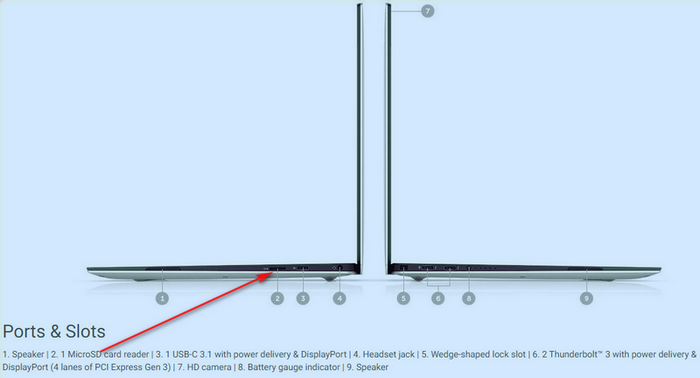
Why you think AMD will make a difference? Less power consumption just mean that the notebook manufacturer can spend less on the cooling or just make the fan profiles more quiet.
-
-
Maybe a bit of an ignorant question - but who the heck is using SD cards with any frequency now?
Papusan likes this. -
Some say, a picture is worth a thousand words. Welcome to NBR:
Rei Fukai, Donald@Paladin44, RMLJD and 3 others like this. -
I have a SanDisk 512GB SD Card which I use for temp storage but now that I don't have a dedicated SD Card slot, I hardly use it because I have my Samsung T5 Portable SSD connected to the Thunderbolt Port and the SD Card connecter uses a Type-C connection so.jclausius, Donald@Paladin44, etern4l and 2 others like this.
-
Thanks so much for the quick reply - and thanks for welcoming me to NBR. I haven't posted much but I have read lots
Virale, Donald@Paladin44, RMLJD and 2 others like this.
-
My pleasure, this is a great place to learn stuff ESPECIALLY when it comes to laptops! Enjoy the ride my friend.
![[IMG]](images/storyImages/1UX3iE8.gif) Virale, Donald@Paladin44, etern4l and 2 others like this.
Virale, Donald@Paladin44, etern4l and 2 others like this. -
I expect some still use it. Most notebooks still have it so...
http://forum.notebookreview.com/thr...m-owners-lounge.826831/page-365#post-10875151
http://forum.notebookreview.com/thr...m-owners-lounge.826831/page-362#post-10875045
http://forum.notebookreview.com/thr...m-owners-lounge.826831/page-362#post-10875051Rei Fukai, Donald@Paladin44 and etern4l like this. -
Photographers and filmers mostly.Donald@Paladin44, Papusan and etern4l like this.
-
-
That's a Thunderbolt 3 port on the Area51m if I'm not mistaken, PRIMARILY expected to be used as a displayport connector? I understand the Thunderbolt 3 SPEC is to be USB C compatible however
Others here may have better knowledge of this, but I am a little leery of what Dell / Alienware's implementation of Thunderbolt 3 might mean.Donald@Paladin44 likes this. -
AIDA64 Extreme v6.25.5400
Installer = http://download.aida64.com/aida64extreme625.exe
Portable = http://download.aida64.com/aida64extreme625.zip
Don't forget to unblock the file before running it or extracting it: "Are you sure you want to run this file?" [Yes or No]
Release notes:
- Aqua Computer
![[IMG]](images/storyImages/OYN4bUY.gif) Octo sensor support
Octo sensor support - Preliminary support for Intel Elkhart Lake, Jasper Lake, Rocket Lake CPUs
- Art.Lebedev Optimus Popularis, El Gato Stream Deck LCD support
- SteelSeries Apex 7, Apex Pro OLED display support
- Improvements for Intel Z490 chipset based motherboards
- SMBIOS 3.4.0 support
- GPU details for AMD Radeon RX 590 GME, Radeon RX 5600 XT
- GPU details for nVIDIA GeForce GTX 1650 Ti, GeForce MX330, GeForce MX350
Donald@Paladin44 and pathfindercod like this. - Aqua Computer
-
Dude the OLED looks soooo good. It’s almost forgivable it’s 60hz. For casual
Gaming for sure the colors, contrast and depth is crazy. It’s almost like experiencing 120hz for the first time over 60z it’s that awesome. I was using an AGA with a 2080ti with the oled machine so I could use external 240hz monitor for gaming. Then have the oled whole on the road and showing off my photography.ssj92, Donald@Paladin44 and Spartan@HIDevolution like this. -
A lot of my devices use Micro SD and having an SD built in to slide that into an SD adapter is convenient, but I have plenty of USB memory adaptors as many people do so it's not really a big deal.Biker Gremling, Papusan and Donald@Paladin44 like this. -
I have to agree with this - once you see and use OLED, you most likely will instantly realize how bad in reality IPS is. Its not just the saturation, its the contrast, as black is literally.... black since there is zero light coming from black areas on an OLED. It is a bit of weird effect, but playing game like Kerbal Space Program on an OLED the screen elements that are lit almost look like they "float" on the screen since you cannot distinguish the bezel from the dark areas of the screen unless you can catch an angle where the light reflects just right.
The good thing is OLED at above 60 now at 120 hz is starting to emerge, Dell's own AW branded 4K OLED 55" for a paltry $3000 is available. Color range is 98% DCPI, and response rates on OLED are delivered with 0.5 response time and every low input lag.
The only real issues with OLED now generally are 1) cost, and 2) the fact they grow dimmer at a faster rate than IPS. That being said, my AW 13 R3 I noticed after about two years I had to kick up the brightness one notch.... one. Burn-in is possible, but I have played many, many hours of Overwatch and KSP on my AW 13 R3, no burn-in ever.Last edited: Apr 7, 2020RMLJD, c69k and Fire Tiger like this. -
Hi guys, can someone give an update regarding ram speeds. To get 2933MHz working, I need just to replace my ram sticks or this frequency is available on a new revisions?
Fire Tiger likes this. -
I wouldn't buy the faster ram just yet. There are reports of a BIOS coming in the coming weeks which may address RAM speeds and GPU throttling..... we shall see.Spartan@HIDevolution likes this.
-
I solved it with a sd card reader ProGrade Digital dual slot, usb 3.2 gen 2, perfectly reads my Sandisk Extreme Pro 1TB microsd at its maximum speed, very satisfied
Fire Tiger likes this. -
I for one hope for this but doubt it. TBH, virtually no one except for someone doing massive rendering or so on will notice any kind of difference and even then unlikely. I have 2666 memory running at 2400, even if it gets bumped to 2666, or I opted for 2933, you'd so like 1-2 frames difference (if that). Its a nice to have, not a gotta have by any stretch in my opinion.Fire Tiger likes this.
-
I'm sorry I did not read the past few weeks, but ...
a BIOS for faster RAM and no more GPU throttling ?
It's like Christmas before time ! Where do we learn about that ?Fire Tiger likes this. -
Its unlikely to happen, time will tell. Most of this has been posted on Umars Twitter account.Docsteel likes this.
-
We know they are aware of both issues and Umar is pushing to get it changed. Umar is not the engineering team, so he can push but the engineering team has to change it. We really don't know more then that at this point unfortunately. Just keep watching for Bios updates.Fire Tiger likes this.
-
Can you elaborate the later part about AWCC?
I do have Throttlestop with delayed launch at logon, but when AWCC decides to, it locks my CPU to x46 multiplier. If I manually refresh the profile on TS, it only allows up to x49 for some reason. Tried many things but sometimes I can boost more than x49, other I can't.Fire Tiger likes this. -
He means when the system first boot, Alienware Command Center cannot be started until its services are loaded and for some odd reason, Dell has set their startup status to Delayed rather than Immediate. So he changed it to Automatic (as in immediately) rather than Automatic (Delayed). To do this:
1) Press the Window Key + R to launch the Run Dialogue Box
2) type services.msc then hit Enter
3) Look for the AWCCService, double click on it, and change its startup type from Automatic (Delayed Start) to Automatic
Now Alienware Command Center can be launched immediately after a restart without having to wait for 3 minutes for its service to start.Biker Gremling, RMLJD, IXVIXXII and 3 others like this. -
A sales rep at a computer store I frequent had this to say about potential refreshes:
“The refresh for desktop replacement laptops like the Alienware Area-51M, MSI GT76 Titan DT, and EVOC High Performance Systems P775TM-R are expected to be released in May and June.”
supposedly to align with 10th gen desktop CPUs. Let’s hope this is true and that an Area 51m refresh is right around the corner! -
That sounds like you still have the overclocking part setup within AWCC. Change the overclocking option to off. I had this same issue, everytime I opened AWCC my clocks speeds would revert to default. Once I set the overclock option on the home page of AWCC to off it fixed the issue.
Have you checked the TPL settings within TS as well? I forget the setting right now but will post a screenshot ASAP. Its at the top of the bottom half and its a range. Yours could be set at 1-49. You need to change this to 1-255. That should let you increase the multiplier to whatever you want.
Below is what I was referring to, excuse the poor quality screenshot and guide, nothing like brother @Spartan haha.
Last edited: Apr 8, 2020pathfindercod and Spartan@HIDevolution like this. -
The new BIOS is here, anybody tested?
On the forums, someone said " Dell release a bios like version 1.5 that has proper temperature limits!"
Anybody willing to try it?uugui shi and Fire Tiger like this. -
It only lists the below...
Fixes:
-Fixed the issue where the option to enable or disable the hard drive password in the BIOS setup is unavailable. This issue occurs after you update the BIOS to version 1.8.1.
Enhancements:
- Supports ADATA XMP modules.Silverfeyn and uugui shi like this. -
-
Screw it, rebooting right now
Last edited: Apr 8, 2020MogRules, IXVIXXII, RMLJD and 1 other person like this. -
Good luck, keep us posted!
-
Reboot normally no obvious difference so far, I’ll need time to testFire Tiger likes this.
-
Are undervolting options still there?
Tim V. and Fire Tiger like this. -
Excellent lets us know how it goes.
Forgot about this possibility. I hope it hasn't caused issues as I don't think even a rollback will bring back that functionality?Spartan@HIDevolution likes this. -
It would
What is the best way to determine if the GPU throttles past 75C? Would a Fire Strike Benchmark before/after suffice to see if there is a performance drop or is there anything else we can test the GPU throttling past 75C with?Fire Tiger likes this. -
The Heaven benchmark was quite good for me in the past in getting it to go above the 75c limit.uugui shi and Spartan@HIDevolution like this.
-
Yes (at least in AWCC)
Also RAM is still running at 2400Mhz no option to change that in the bios (that I've noticed), before updating I had set a profile in AWCC for the GPU to run at +100Mhz and 78C (that was working great) I've pushed that to 83C now, but running Control crashed once above 78C. I am deliberately testing things using only alienware software (and msi afterburner) for now.
If you have any suggestions post them and I'll see if I can try.Silverfeyn, Spartan@HIDevolution and Fire Tiger like this. -
I will wait a little for the test that you're doing and see how it goes... what GPU vBios you have?
Fire Tiger likes this. -
It probably will be easier to catch the thermal limit with the 200w oneFire Tiger and uugui shi like this.
-
Okay I've run heaven benchmark (extreme preset) without any kind of OC and after one run and a half I manage to hit 80C and can confirm that the GPU thermal throttles above 79C, no crashes to report
Fire Tiger, Silverfeyn and Spartan@HIDevolution like this. -
So this BIOS is also a no go. Even no 2666 Mhz RAM support
Fire Tiger and uugui shi like this.
-
Did you push it up in the AWCC?
-
well I was on 1.8.1 that's why I decided to try it, I've put everything back how I had it (78C limit +100Mhz) and run the benchmark I'll add the results for those curious but so far there's no difference with 1.8.1, I'm good with the way this laptop is performing so far with this settings so I won't be downgrading, but I understand the disappointment.
The thermal limit? Yes I set it at 83C for that test.
I want to check the bios again for this XMP support as it was mentioned in the release notes, I'll let you know.Attached Files:
MogRules likes this. -
-
Did you notice if it was the aggressive throttle where the GPU clock drops to 300-500 mhz?
-
Yes Dropped down to 600Mhz
Is the overclocking feature in the bios supposed to be greyed out by default? I can’t rememberLast edited by a moderator: Apr 8, 2020Spartan@HIDevolution, Papusan and Fire Tiger like this. -
I knew it.... I knew they wouldn't fix the GPU throttling, I had a small hope the memory however might be 2666...Spartan@HIDevolution and Fire Tiger like this.
-
Curious to know which adata modules are supported by the new bios 1.9.3
-
No good, sounds like they haven't bothered addressing the GPU thermal limit at all.
In my BIOS (1.7.3) they are disabled by default.
Yeah its a poor effort from them yet again. I doubt we're ever going to see XMP across the board and a higher GPU thermal limit than 75c.Spartan@HIDevolution and uugui shi like this. -
No Intel updates to address security flaws is mentioned. I think this is only a short patch to fix the issues people run into after the update to BIOS version 1.8.1
This bios is only a small patch (same bios with XMP for selected ram). The real firmware update will come after Easter.
And I really hope it wont be as bad as this. Dell just killed voltage adjustment! https://www.reddit.com/r/Dell/comments/fr0j8v/xps_15_7590_psa_undervolting_gone_in_bios_160/Rei Fukai, Mr. Fox, Fire Tiger and 2 others like this.
*OFFICIAL* Alienware Area-51M R1 Owner's Lounge
Discussion in '2015+ Alienware 13 / 15 / 17' started by ssj92, Jan 8, 2019.


![[IMG]](images/storyImages/giphy.gif)