 Problems? See this thread at archive.org.
Yes it is disabled by default but it cannot be enabled as it is greyed out and I don't remember if this is the way it was before.
-
Is there some evidence or statement of a post-Easter BIOS is expected to drop? Just curious what makes you say this....
-
Dell have updated the G series and now the XPS series notebooks with security fixes. And the Aw line will follow paths. There is NO newer firmware for Aw with fixes for Intel's most recently discovered vulnerabilities from fall/winter. And with Covid-19 pandemic and Easter, this has to wait until after theis Easter holidays. Dell is obliged to push out patches for Intels security flaws as long its possible and at least for their newer models.
Last edited: Apr 9, 2020Rei Fukai, c69k, Silverfeyn and 1 other person like this. -
Ok so this is just pure speculation on your part.
For what it’s worth, Umar came through. He said early April, and we got an update in early April.Fire Tiger and Docsteel like this. -
Not holding my breath on this, but it would be nice. He never delivered the deed to that that bridge he sold me...
 Mr. Fox, Fire Tiger and Spartan@HIDevolution like this.
 -
I just ordered the oculus rift s. I've heard the 51m has wattage/heat issues with the mobo while using the oculus. Is this just bs or should I be worried?
Sent from my SM-G975U using Tapatalk -
Guys, the throttling of the GPU once it reaches 75C in any BIOS post 1.5.0 is only for the RTX 2080 or does the RTX 2070 have the same throttling issue with the newer BIOS?
-
i have never heard that and i have read every post in this thread since the beginning unless i missed something. the only VR issue i have heard of with the A51m is that some people have issues getting Valves VR headset to work right. that has nothing to do with wattage or heat though. i have had no issues using a Samsung Odyssey VR set for more than a year.Kuronos likes this.
-
The diabolical Nvidia limited the rtx2070's TDP to 115W, you can use the notebook over the fire that it doesn't reach 75C.
Incredibly this is not Dell's fault, there is no different Bios for 2070.Fire Tiger, Spartan@HIDevolution and RMLJD like this. -
I have only ever seen it throttle doing like TimeSpy Extreme or something as a stress test with the AWCC set to Balanced or Quiet. On performance, never ever had it throttle on those whatsoever as it keeps it cool and HWInfo shows no throttling.
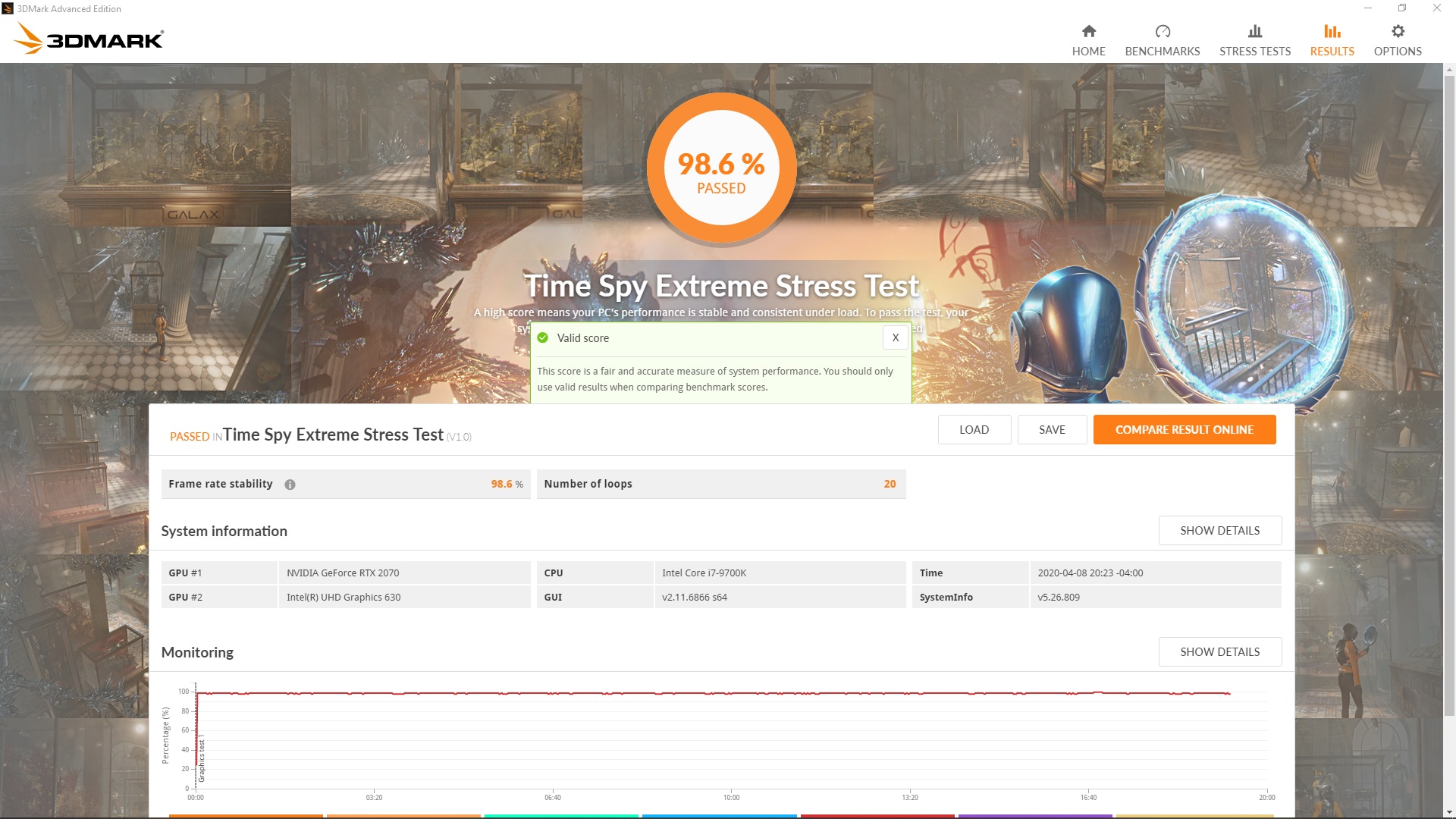
EDIT: Re-Running TimeSpy Extreme Stress Test on Performance mode to re-confirm.Last edited: Apr 8, 2020Spartan@HIDevolution likes this. -
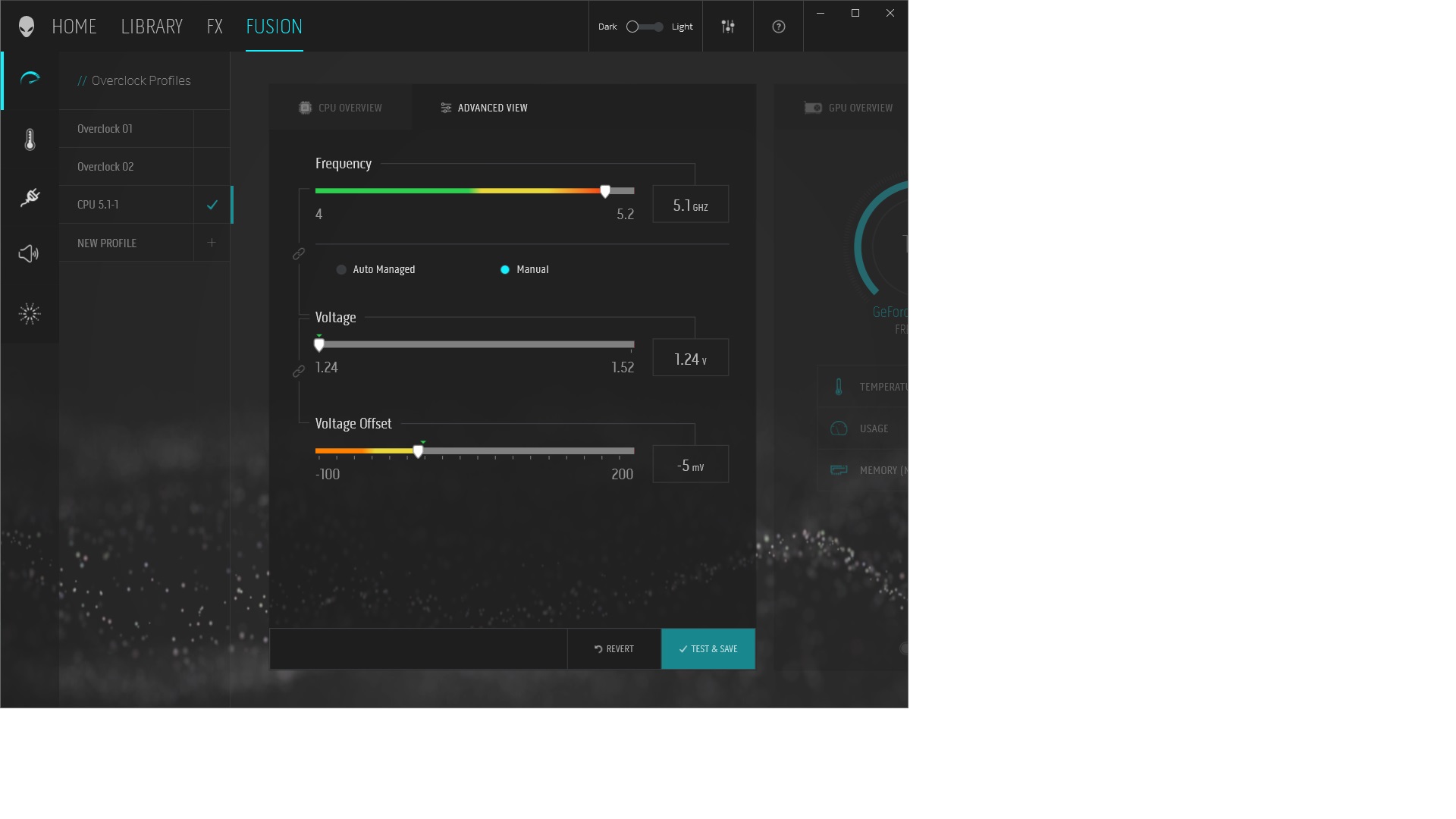
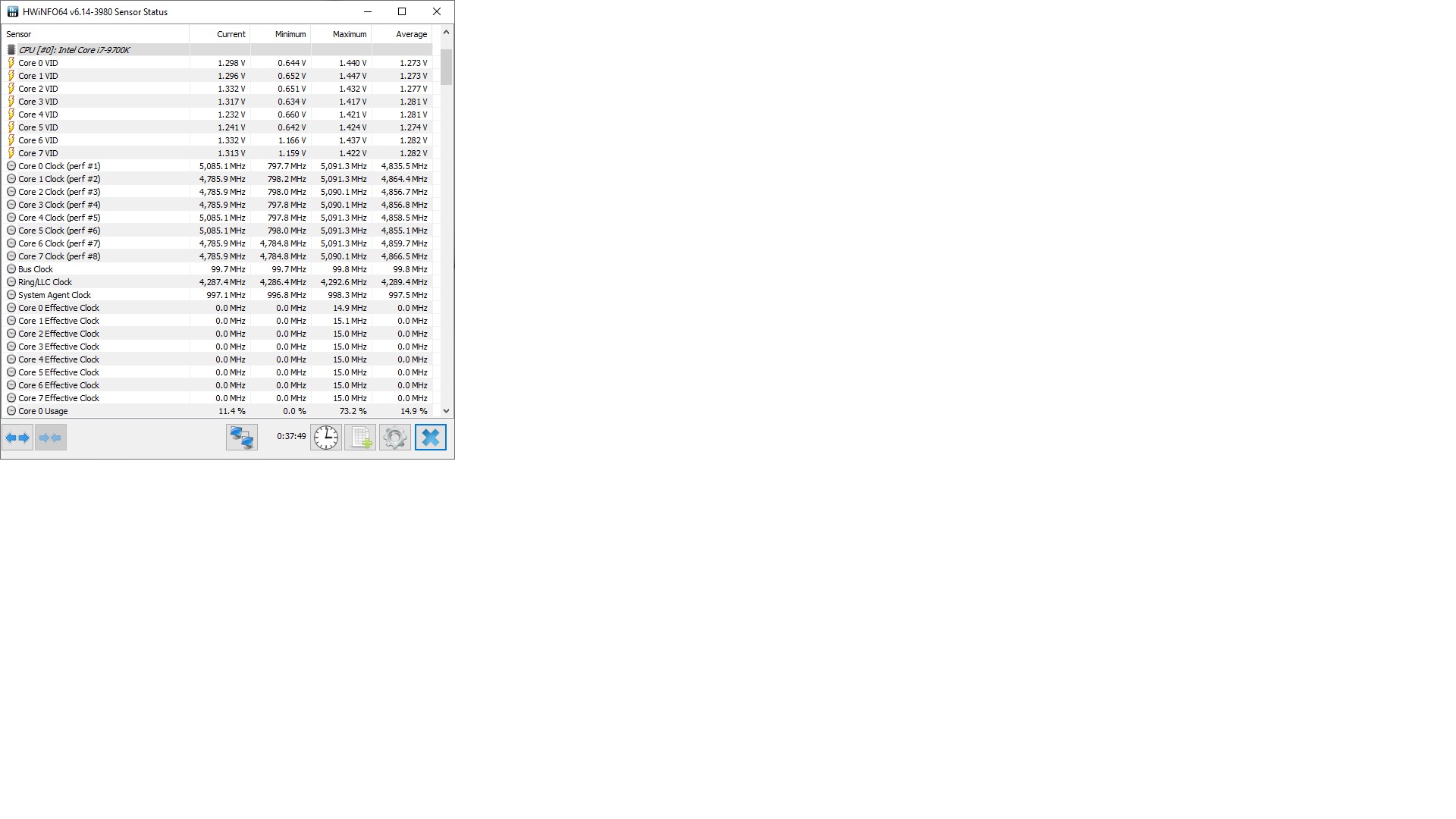
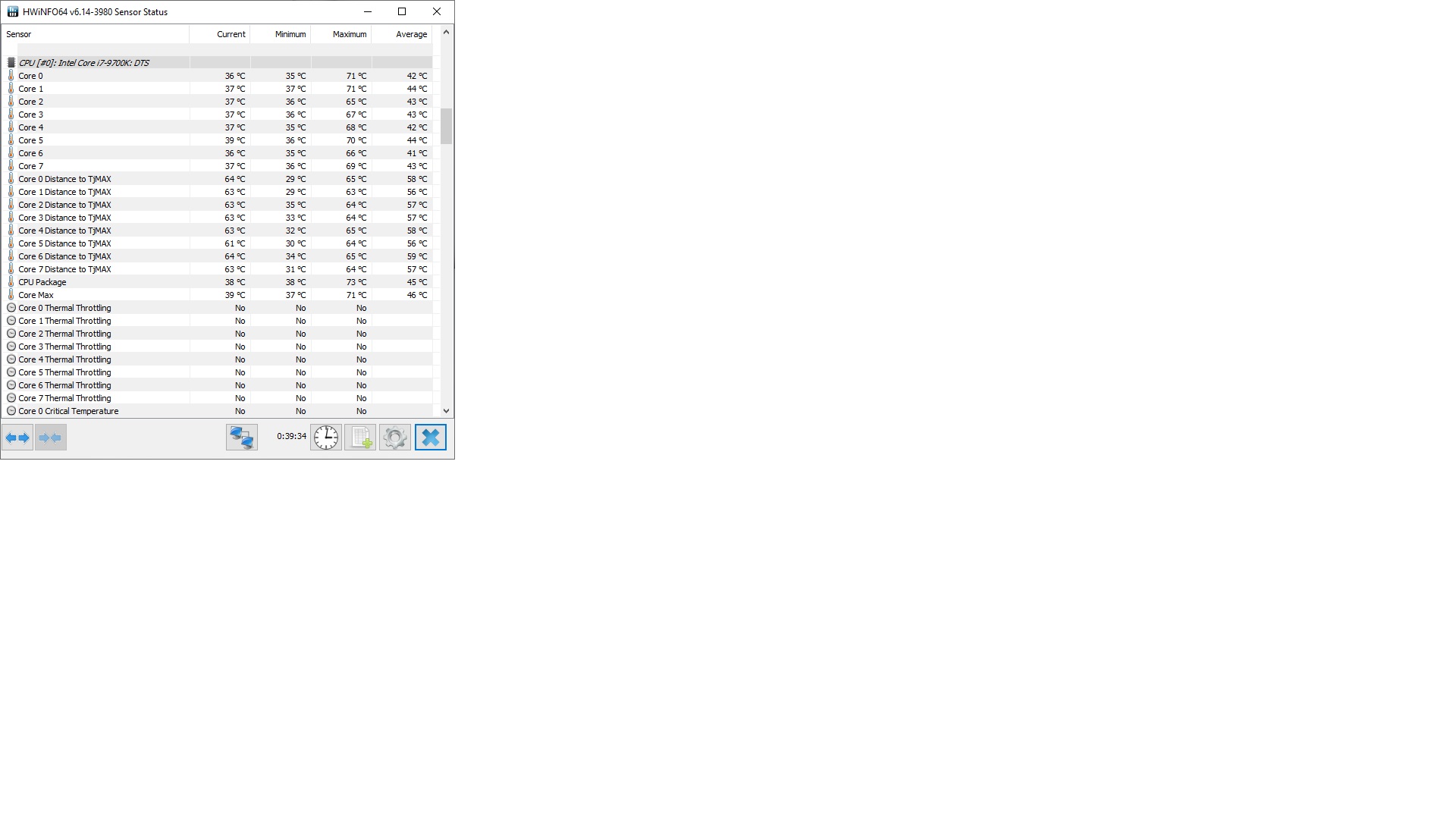
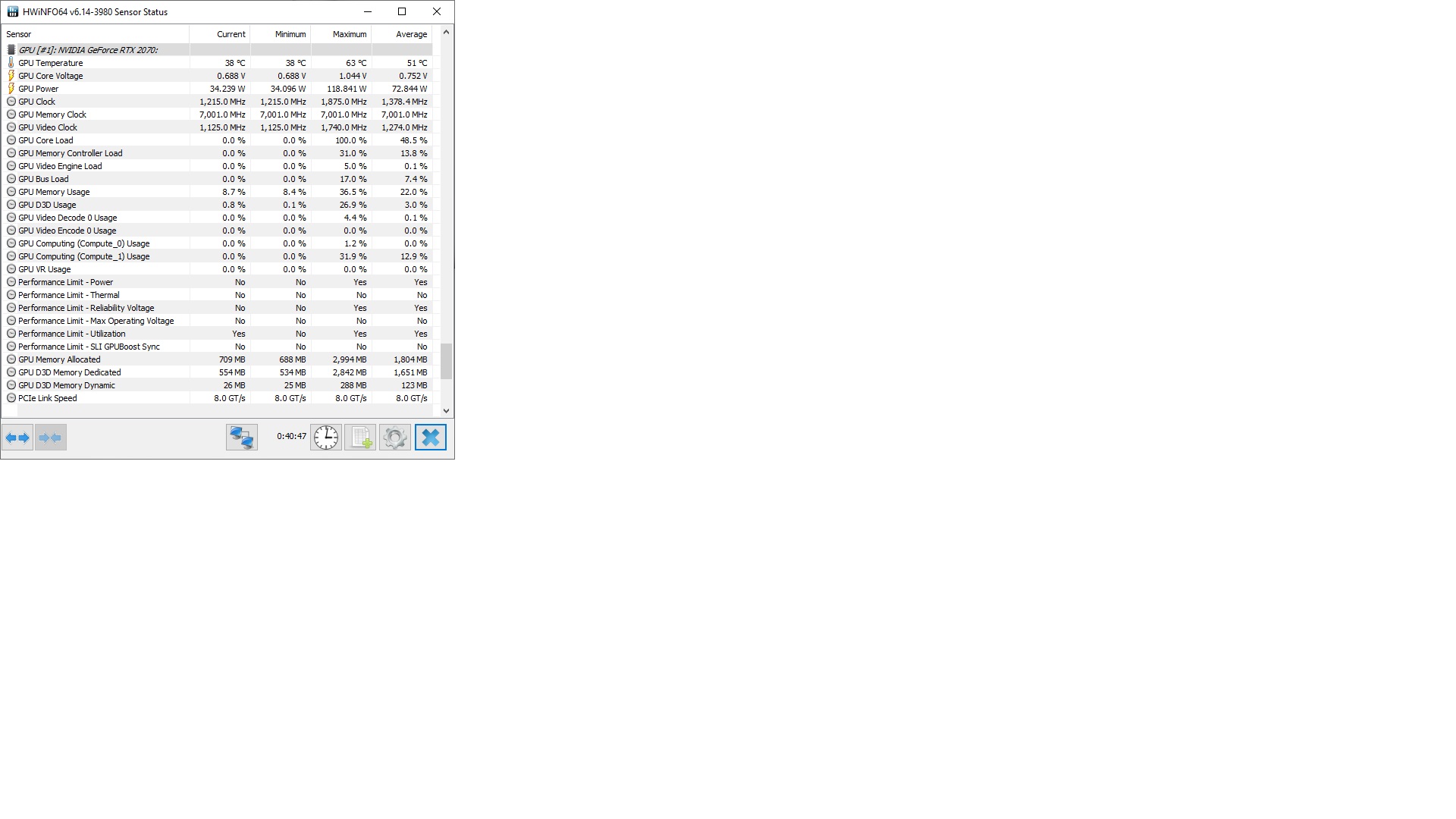
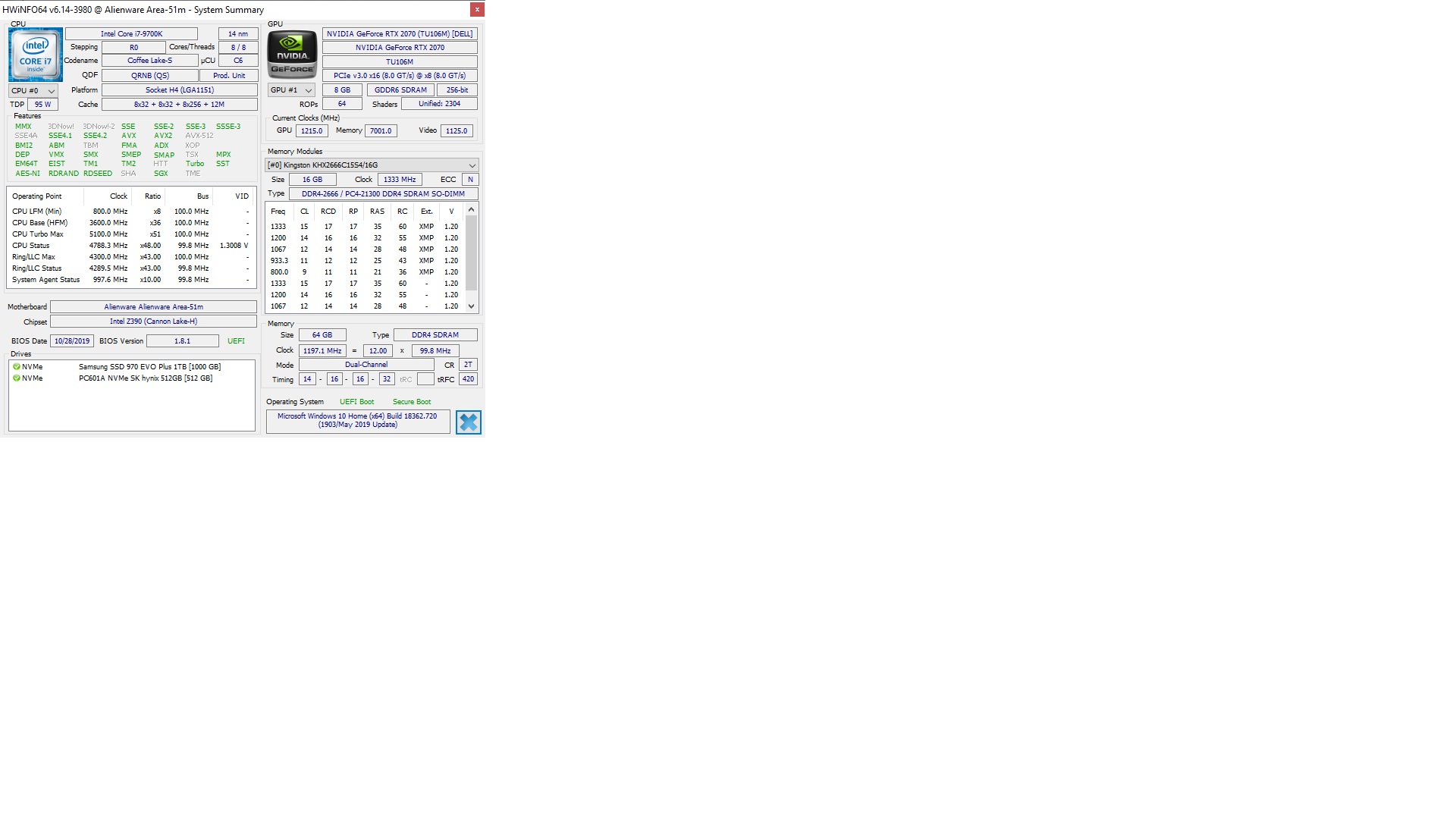
So, doing TimeSpy Extreme Stress Test with AWCC at 5.1 Ghz (9700K), 2070 no OC, Thermals and power set to performance:
Max Temp GPU Temp: 63' C
Max GPU Clocks: 1875 hz
Max GPU Power: 119.21 Watts
CPU: 80' C
Clock: 5.088.8 Mhz
Max CPU Power: 86 Watts
BIOS: 1.8.1
vBIOS: 90.06.45.00.29
Hope this helps someone out-
Ran on granite kitchen counter with ambient temperature at 70' F, no elevation.RMLJD and Fire Tiger like this. -
How in the world are you able to have an 80C CPU temp @ 5.1 GHz?Fire Tiger likes this.
-
Probably he did the OC by AWCC, I do not believe that 5.1 is all cores, consumption is also very low.
-
All cores but one hit the same speed IIRC, cant remember which one was less but not by much. I can re-rerun it again if you want and lets see. Don't usually post pics, what's the best way? Happy to post the HWInfo windows after running it.
I did do the OC by AWCC that's correct -Fire Tiger likes this. -
Best screenshot tool which you see me always using in the illustrations I post is: FastStone Capture. Not free but worth every buck, it can also record videos for making video guidesFire Tiger likes this.
-
Lets try and cut them a little slack, most of them are working from home now, which probably makes it really hard to write a new bios.RMLJD, uugui shi and Rengsey R. H. Jr. like this.
-
I think what I meant to say is: what's the best way to host it to link it here?
NVM I see it in the forum tools - duh
Last edited: Apr 8, 2020Fire Tiger likes this. -
It depends on how much throttle you are talking about though. Pascal and Turing both begin to "thermal throttle" (yes, extremely STUPID behavior) around 48-50°C and progressively increase the level of core clock degradation as temperatures climb. That much is normal, although extremely undesirable. If you are talking about a really hard throttle, to something less than the lowest boost clock, that is caused by screwed up firmware. That behavior is not normal, and it is the laptop manufacturer's fault.
To be totally frank, not really any reason to cut them slack. Had they done it right the first time, it wouldn't matter where they are working, or if they were not working anywhere at all. -
Okay here we go I think:
Attached Files:
RMLJD, Fire Tiger, Papusan and 1 other person like this. -
-
and the last:
Attached Files:
RMLJD, Fire Tiger and Papusan like this. -
-
Thanks, you can also post the images inline, as in, in the post itself if you wantPapusan likes this.
-
Because clocks don't stay at 5.1GHz
To make it easier... Run the bench and then look after Monitoring. Click the box Show Details. You will then get all the needed info from cpu clock speed and temps.
A good advice... Put the most important pict in the post and the less important in an spoiler. This to clean up the post. And as well use the edit button
Last edited: Apr 8, 2020Rei Fukai, Docsteel, Normimb and 1 other person like this. -
Agree. My system (2080, 9900k) is brand new and i just found out how to make it trhottle badly. After repaste with Phobya extreme i tought my GPU was doing excellent, temperatures never exceeding 75C and clock speed going between 2100MHz and dropping 200mhz from time to time whit MSI overclock only. That was very subtil throttle and i tought it was normal.
Then i decided to test AWCC overclock and increased the max temps of the GPU to 83C. Ran Haven benchmark and noticed bad throttle when the temperature would reach 79C. The clock speed would drop to as low as 500MHz for a while and would climb up to normal, 1900MHz, as soon as the temps we're back to 73C.
After some test i concluded that people with bios above 1.5 should used the alienware overclock and set it to 78C to benefit of maximum performance they can get right now. Otherwise it is set at 75C by default even if you don't use it.uugui shi, Fire Tiger, Papusan and 1 other person like this. -
Yes, the drop to 500MHz is totally abnormal. Not sure why that is happening, but it is unacceptable.Fire Tiger, Papusan and Normimb like this.
-
AWCC OC doesnt show Allcore Boost. Allcore is 300Mhz less. So If you set 5.1, allcore is 4.8. If you want real OC, try ThrottlestopDreDre, Papusan, Fire Tiger and 1 other person like this.
-
Exactly how I use it, if you add a boost of +100Mhz and 78C limit it will work great, of course it is far away from 2100Mhz but it is within specs of the RTX 2080 so I, personally, am getting what I paid for. I've also noticed some instability in some games when overclocking and going above 78C (not the 79 hard throttle) I don't know if a bios update can fix that. We must remember that even if a OC configuration passes the heaven benchmark (or whatever benchmark you throw at it) it doesn't guarantee stability in all games, I know some games that will run (when they run) as if you were on drugs if you OC even a little bit.Normimb likes this.
-
Fair enough. Frankly I am happy with it but if I get bored and want to go further, I will load up Throttlestop. I literally have not had to use it since the old M11 R1 days.... I wasn't clear that people were interested in sustained 5.1 GHz clocking, not surprised things are throttling as I would think that would run a bit hot.Last edited: Apr 9, 2020
-
What toothpaste are you using?
Sent from my Galaxy S20+Fire Tiger and jclausius like this. -
You mean what Thermal paste? It's straight from the factory as I bought it at Microcenter, I have not done any re-pasting.
The only changes I have made hardware wise are a 2nd 970 Evo Plus 1 TB drive and 64 GB of Hyper-X 2666 Memory at 2400.Last edited: Apr 9, 2020Fire Tiger and Spartan@HIDevolution like this. -
An example of a game I play a lot that has great instability in case of OC is Sea of Thieves, I have tested that game on many PCs with different hardware and I have seen some wild things happen.
-
TPL was set to 1 to 52. Changed to 255, still not working.
Because Timespy is not that taxing on the CPU, even on the CPU test.Fire Tiger and Spartan@HIDevolution like this. -
Open ACC, make a new Overclocking profile and drag the temperature of GPU to 78C, dont close ACC , just open MSI afterburner and overclock your GPU.
It shouldnt throttle now. -
Good point - it is a 3dmark test. What would you suggest instead?
I am curious, do most game laptops run full tilt with no throttling on the CPU for extended periods? Seems a bit of a tall order...Last edited: Apr 9, 2020 -
No absolutely not, most gaming laptops are less than 1200$ "jokebooks" (as @Papusan would say) that will thermal throttle on boot.
To answer your other question: Cinebench is good for benchmarking and really stresses a CPU but, to be honest here, I don't like benchmark tools and some people on this forum seem to be too focused on these results that in no way indicate the potential of a machine.
Benchmark tools like cinebench are "worst case scenarios" that you deliberately run on your device to get a generic idea of how your CPU is performing, if you run cinebench on a laptop with any high end CPUs you will get thermal throttling and 100C. I see people tweaking their CPUs and running these benchmarks multiple times a day just to get 100 points more on their (useless) scores and wasting their hardware in the process.
My suggestion is do a Cinebench test if you are curious then uninstall that and just keep an eye on your temps in your daily use. Now I'm gonna be banned for heresy. -
Uninstall what? CINEBENCH is a portable app!
![[IMG]](images/storyImages/8Yb0Sav.gif)
![[IMG]](images/storyImages/fedwkc5.jpg)
-
Actually, if you download it from the Microsoft store ...
-
Have you turned Overclock feature on home page of AWCC to off? Does ThrottleStop home page show all cores at x52?
Add some screenshots of your settings if possible. -
As a guy who also was once into car performance, you can spend a hell of a lot of money and have frustration until you accept somethings never being perfect. I am all for tuning and going to see what you can get, but there comes a time where what's good enough for a daily driver is what counts because that is what you live with. For me personally, having sustained 5.1 Ghz on all cores just isn't necessary, but I don't fault anyone for wanting it just be careful you don't set yourself up for constant disappointment trying to get there.Last edited: Apr 9, 2020
-
-
-
I performed this tweak and so far I haven't had the USB interruption issue again. It has only been a couple of days so it could still occur at some point, but for now it looks like it worked.LoneSyndal, RMLJD, Papusan and 1 other person like this.
-
If I turn OC to Off and restart the laptop, things go back to normal. I also uninstalled AWCC and things are normal. It's just that now I can't find where to download AWCC to install it again
Fire Tiger likes this.
-
Turning the AWCC Overclock option resolves your multiplier issues? @Spartan is your best bet for the latest AWCC. I'll see if I can find his last post with it.Spartan@HIDevolution likes this.
-
You can do 5.2-5.3Ghz for benching, but that's like setting a race spec tune to go on the dyno. For daily you want something that makes a little more sense (and better gas mileage)
-
Oooh dyno references.... takes me back....jc_denton and Biker Gremling like this. -
Found the post from @Spartan and intalled AWCC and OC controls (Version 1.2.50). No issues.
The AWCC prompted the update for OC Controls version 1.2.61... problems again.
Maybe the new BIOS works with 1.2.61, but since I can't do the upgrade right now, I will keep using 1.2.50Fire Tiger and Spartan@HIDevolution like this. -
Here's what I'm using with BIOS 1.5.0:
Fire Tiger and jc_denton like this. -
Yeah, really don't understand why this is an issue to my laptop. Also big problems with stability with this last OC Controls versions for me.Fire Tiger likes this.
*OFFICIAL* Alienware Area-51M R1 Owner's Lounge
Discussion in '2015+ Alienware 13 / 15 / 17' started by ssj92, Jan 8, 2019.





![[IMG]](images/storyImages/EeChF7M.gif)


