 Problems? See this thread at archive.org.
Look into Cpu-Z memory tab to see current mem speed and primary timings.
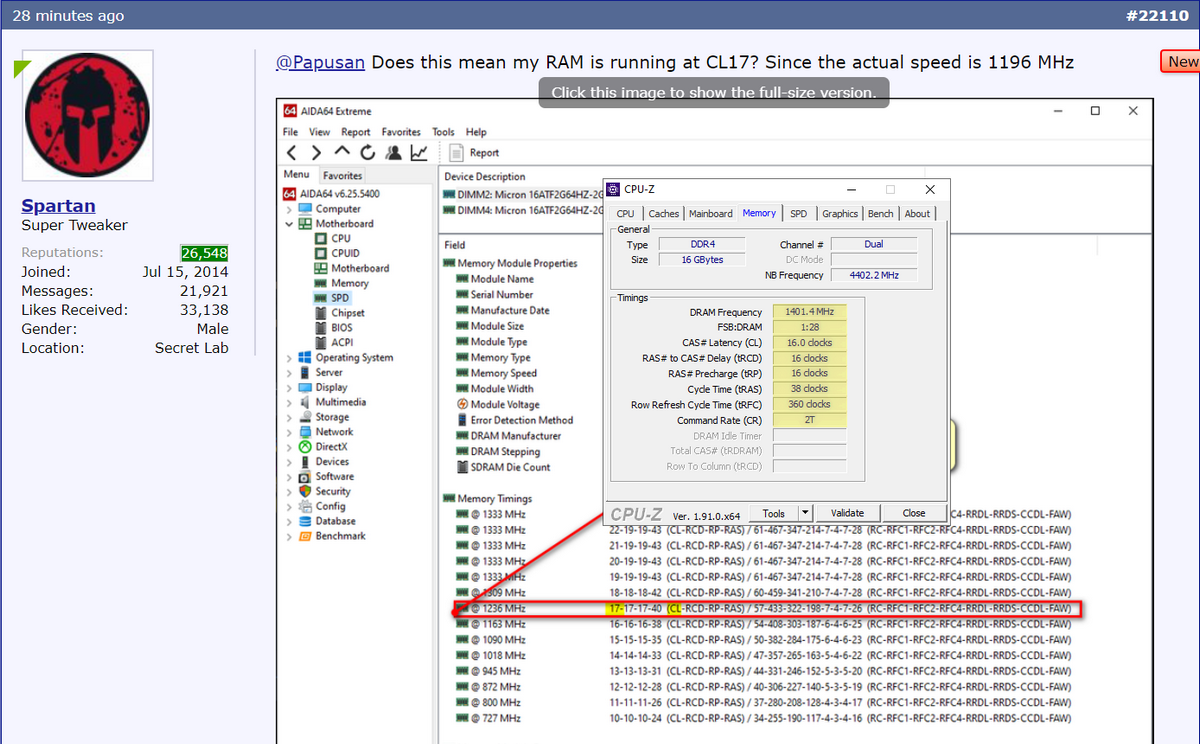
Or click Chipset in Aida64.
-
-
My guess was c0rr3c+
-
Here is your old score done with 9900K. Have fun

![[IMG]](images/storyImages/hRCAjyi.gif)
Last edited: Jun 13, 2020raz8020, Rei Fukai and Spartan@HIDevolution like this. -
Why did you switch from a I 9900 k to i7 9700 k ?
-
The 9900K was in my previous Area-51m which I got at launch. Then a few months down the line, out of boredom, I sold it and switched to a MacBook Pro 16 (biggest mistake). Then I sold the MacBook Pro 16 as it wasn't doing everything that I wanted in terms of apps and I got another Area-51m which was on special discount and it had a 9700K. Did I notice a difference? other than in synthetic benchmarks, not one bit.Last edited: Jun 14, 2020c69k, Fire Tiger and custom90gt like this.
-
Sure you can, with the right tools. Intel doesn't provide the right tools.
Read the links below from @Papusan and don't pay any attention to published information that says making them identical is required. That is, indeed, what Intel intended, but it is not required.
ThrottleStop has been an indispensable tool that I have been using on all of my laptops since around 2007 (when I first discovered it). @unclewebb has been righting wrongs with botched up laptop engineering for well more than a decade. The value of his contributions ranks right up there with the legendary @svl7 and @Prema and their life-saving firmware mods. ThrottleStop brings a ray of hope and adds functionality to laptops that are otherwise hopelessly cursed with no firmware mods, crippled and cancerous stock firmware. ThrottleStop is, in large part, responsible for many of my record-setting benchmark scores. Without it, they would have been average results, and average sucks.
ThrottleStop does not cause any damage. I believe it is incapable of causing harm. But user-error and ignorance certainly can. I suspect that user-error or simply misplaced blame are the underlying causes of whatever that person experienced.Last edited: Jun 13, 2020 -
This is very true. Web browsing, email, using Word, Excel, etc., etc. my experience using my turdbook running the 9750H at 4.0GHz on 6 cores and 12 threads with the memory at 3000MHz while being choked by WiFi is more or less identical to my experience on my desktop running the 7890XE at 5.0GHz on 18 cores and 36 threads with the memory at 4000MHz with a wired LAN connection running at the full Gigabit internet speed. If those are the only things I ever did with it, there really wouldn't be any valid reason beyond vanity to own such a nice desktop.jclausius, raz8020, Spartan@HIDevolution and 3 others like this.
-
They responded to me already requesting further information, I will update the forum as things progress.
@unclewebb is an honest to god treasure for hands on PC users everywhere, I can't even begin to believe all the time and effort that man has contributed for free he is a hero.Last edited by a moderator: Jun 14, 2020jclausius, c69k, Biker Gremling and 8 others like this. -
As I have mentioned half a dozen times in the last few pages of this thread the 9900k is good for workstation applications and the 9700 is good for gaming. The thermals are much easier to manage on the 9700 processor for extended gaming use.Biker Gremling and Spartan@HIDevolution like this.
-
Just downgraded to BIOS 1.3.2 and VBIOS 1.0.0.3 200W. The best performance! (I have the 1st gen motherboard, don't try this if you have the 2nd gen motherboard)
DreDre and Fire Tiger like this. -
How do you know if it is the first gen or second gen ?
Since mine was a refurbished one it's kinda hard to know
By the way I have done a clean installation for now it is working okay -
Not sure, maybe @Biker Gremling or @MogRules can answer that. I think there's a date printed on the motherboard itself.
Don't attempt the downgrade before you verify if it's 1st or 2nd gen.
By the way, the BIOS recovery USB stick that I made, I put BIOS 1.3.0 on it. That way when I downgrade, I can then easily upgrade to 1.3.2 OR 1.5.0 from the Windows installer for the BIOS which is the best and complete method for the BIOS installation.Last edited: Jun 14, 2020Biker Gremling and DreDre like this. -
I agree, although I’m on the 190watt Gpu boss
What kind of max temps are you getting on the gpu btw -
-
My Area 51m is still just in warranty (though I don't suppose Dell will do anything about this issue) and of course was supposed to be designed to allow for pain free part upgrades.
Tried to fit new AX Wifi card and while clipping on one of the antenna cables (minimal force usually required) the gold metallic clip head literally sheared off from the cable.
Can anyone assist with the correct part number for the wifi antenna cable?
I can only see a couple of potentials on eBay that I'm far from certain are correct suggesting it may be 02790L
https://www.ebay.co.uk/itm/264744505470?ul_noapp=true
Don't want to wait for the two month shipping from China only to find it is the wrong part though!
Would routing a generic wifi antenna through the case be a potential temporary solution?Last edited: Jun 14, 2020 -
@Spartan
Do you know of any way to bring back the advanced controls in the bios? I have flashed back to 1.3 and everything after, fresh install of windows, AWCC , cmos reset. Everything and anything I could think of. But undervolting from Throttlestop and advanced bios features either are missing or just do not work lol
Also** finding out that no matter what I change as far as fan profile offsets, the fans instantly ramp to 80+ % speed. And it seems like the fans do not want to spool up on thier own until after 72c for the GPU while gaming.
** after looking back a few pages, i think i have narrowed it down to a few intel drivers. I will report back after i do some more plundering.Last edited: Jun 14, 2020 -
Right, but I don't know what advanced menu you are reffering to. There is Performance options where you can do BIOS overclocking but nothing about undervolting from the BIOS.
Also remember, every time you upgrade/downgrade a BIOS, load setup defaults, save and exit, then re-enter BIOS, configure what you need and ensure Firmware Capsule updates are disabled
As I always do, once I downgrade, I reflash that same BIOS from Windows one more time because when I didn't I had some weird issue back then. could be related to yours. Seems like he BIOS recovery is not the same as a full install so do it twice. -
gotcha gotcha. Thanks a millions man!!! im about to give it all a whirl.
Spartan@HIDevolution likes this. -
NP, please edit your signature to reflect your current laptop. cheers
-
From what I know....Almost no options in advanced menu. What you got is the proprietary app with it's flaws.jc_denton, raz8020, Rei Fukai and 1 other person like this.
-
gotcha gotcha. Thanks a millions man!!! im about to give it all a whirl.
-
I might add - no 2666 memory ..... just saying.... I mean _that_ right there....
-
+5Ghz 9900K is fine for gaming, given you don't mind running it no so stock and do some work on it
Papusan, Rei Fukai and Fire Tiger like this.
-
Dell now has a " STARTING AT $2,694.99 " pricing for the 51M R1.
Docsteel, raz8020, Papusan and 1 other person like this. -
Hey spartan
I solved the problem with my fan
Upgrading to bios 1.7.3 which made me loose 20 watts and have to trick the system with hwinfo ..
Really don't like it
I used this tuto the first time to downgrade to bios 1.5
Could it be a reason ?
Is there anyway to bypass the installation of the vbios 200 W while being in 1.7.3 bios ?
I really hate this bios but having to uninstall command center 3 times a day to get my fans to work is not any better either ..raz8020, Papusan and Fire Tiger like this. -
If you have the 200w vBIOS installation file you should be able to just run it and have it working in BIOS 1.7.3 if thats what you mean?
There is a BIOS and vBIOS thread I'm sure.Spartan@HIDevolution and jc_denton like this. -
-
Still too high. 2200 or 2300 would be more in line but still overpriced. Especially knowing most products would be sourced from Compal.raz8020 likes this.
-
But god this bios is horrible
@Melvin Rousseau . Not true. The bios 1.7.3 is a good bios and it will keep G-sync fonctionnal for new system. With an overclock profil set a 78C the system will perform about the same as the one using bios 1.5.0. Frames per second while gaming and benchmark score are about the same. Also the Vbios 200W compare to the Vbios 180watts performs about the same in gaming during my testing.
I think all your issues are with AWCC uninstallation. You have to delete all the remaining files in the regestry and also delete alienware Occontrol. You also have to delete all the remaining files in C drive before you reinstall. AWCC is very, very , very difficult to uninstall correctly. That software is full of bugs. When install correctly, it will still give you some errors from time to time. It's been like that for the past 5 years i have used it. Finally HWinfo fan bypass is not a good permanent solution for you. It only serves the purupose of people running bios above 1.5.0 wanting to have a GPU overclock profil at 87C and to prevent thermal throttle after 78C. Again my suggestion is uninstall AWCC and OCcontrol correctly and i think your fan problems should be solved. -
Guys, Area 51m R1 supports 1.35V ram?
-
-
Just updated May Nvidia driver
Do I do June OC controls?
June command Centre?
May Application for Windows 10 update? -
Thank you I'm going to try that
I'm just a bit pissed off because I just did a clean installation of windows and I thought that would have sold the problem but it didn't , same with bios 1.7.3 the fans don't work anymoreFire Tiger likes this. -
It sounds software related, however, loads on here have done BIOS upgrades and downgrades as well as multiple re-installations of the OS and AWCC and I haven't personally seen anyone experience your symptoms. If I were you I'd contact Dell in case there is something hardware related (doubtful I know) as it seems strange you are still having the issue despite different BIOS' revisions coupled with OS/AWCC re-installations.jc_denton, Normimb and Spartan@HIDevolution like this.
-
I havent updated windows nor AWCC since I received my unit month and half ago, everything has been smooth sailing...pathfindercod likes this.
-
If you use AWCC to control GPU temps etc. I'd recommend checking out @Spartan thread on how to override the new 75c temp limit if you plan to update.
http://forum.notebookreview.com/thr...it-slider-in-alienware-command-center.833149/ -
I did not noticed you have made a clean windows installation. In that case i like @Fire Tiger just said, i would call techsupport and ask for their help.Fire Tiger likes this.
-
Yup, there are even some CL16 3200 kits that run 1.2v but I don't think they have a certified XMP for 51MSpartan@HIDevolution, raz8020, Rei Fukai and 3 others like this.
-
@everybody
Maybe some of you already know this but me i only noticed it today and thought i shared it with you. Threre it is:
After a BSOD or Crash, AWCC (i believe) or some safety software from Dell will only let your computer CPU run at minimum speed (9900K at 36X) until another reboot.
I believe it can be bypassed by Throttlestop manually. I have done it.
So maybe you guys already knew this but for me next time i have a BSOD i will reboot 2 times to have normal performance,Vasudev and Fire Tiger like this. -
Yo can go to AWCC on the first boot and activate your OC profiles back.
Enviado desde mi GM1913 mediante Tapatalk -
jclausius, IXVIXXII, nader_rizk2003 and 2 others like this.
-
Yes for the GPU but i find that the CPU stays at x36. Hold on i will BSOD and test it.
Edit: Just tested it, and BSOD again. Once i receive the message from AWCC that the overclock profile has been disactivated it then runs at 36X bypassing my ThrottleStop set up. Then i did what you suggested, i seleced my 78C profil (plus just for fun i had activeted also the CPU overclock in fusion prior to the test) and guess what? I was still stuck at 36X. It seems that to reactivate the protection for the CPU that we have to reboot a second time or...like i said before, force it with ThrottleStop. Anyway not a big discovery but still.... a second reboot will become an habit for me.Last edited: Jun 17, 2020 -
Only $2100 CAD each! Sign me up for 2, raid those puppies loljclausius, Docsteel and Spartan@HIDevolution like this.
-
And here I am thinking about selling my 1TB 970 EVO to upgrade to a 2TB. . .
-
Terreos after watching the video and thinking of upgrading to a 2TB Evo....
![[IMG]](images/storyImages/EeChF7M.gif) Terreos likes this.
Terreos likes this. -
I‘m happy with 2x 1TB Evo Plus
-
i have the 4TB and performance almost similar to the 2TB evo plus.Terreos likes this.
-
I think he need to check if he have cash before he jump on it Will you get 2 of them?
![[IMG]](images/storyImages/giphy.gif_cid=ecf05e476267f1d57eae6ef3a43168563d7771aa55a20472&rid=giphy.gif)
-
Yup. Pretty much.
Too answer that directly, Yes I do. But is it worth it or necessary? Eeeeh no. Plus bragging rights about having a lot of storage is less fun than having a more powerful machine.
jclausius, Docsteel, Rei Fukai and 1 other person like this. -
You never have "enough" storage ^^
That price though
*OFFICIAL* Alienware Area-51M R1 Owner's Lounge
Discussion in '2015+ Alienware 13 / 15 / 17' started by ssj92, Jan 8, 2019.


