Problems? See this thread at archive.org.
I mean....note my PK-3 fighting the good fight...
-
That would be sad, but so D(#)ELL. They're learning from Apple so it would'nt surprise me if this turns out to be true....
-
I went from 8086K > 9900K P0 > 9900KF R0.
The first two chips failed, 8086K had the IMC fail and my 9900K P0 might have a cracked die. @iunlock will confirm when he scopes it. I was planning on getting a second P0, but decided to lap the die on this 9900KF and ended up keeping it. Since temps with direct die and vapor chamber were quite nice, and I have the thermal headroom for R0.Papusan, Spartan@HIDevolution, etern4l and 1 other person like this. -
My R5 is fine, wouldn't mind to trade it with you + some extra cash lol. Anything is better than BGA cr*p lol no on a serious note i woulnd't mind to buy an 51m. It's not the best performer, has some lock down issues but apart from that it's still a beast.ssj92, Papusan, DreDre and 1 other person like this.
-
You want the whole die/IHS to transfer as much heat into the heatsink as possible by utilizing the whole surface area, instead of 80% coverage.Papusan, Spartan@HIDevolution, Rei Fukai and 2 others like this.
-
Please post your impressions of the keyboard. My understanding is the keyboard went down in quality - curious how much worse it really is from the R1.etern4l likes this.
-
Nice.. Sounds like the 9900KF is working out good for you.
 Last edited: Jul 23, 2020
 -
I thought I did a good job, I hope to have more luck with the gelid paste, the strange thing is that the GPU temps have improved, it is only the CPU temp that has worsened a lotjc_denton likes this.
-
I'm going to be doing a re-paste very soon... I'm going to be using the spread method that will evenly cover the entire top of the CPU/GPU chip (as best I can). I chose to go with Thermal Grizzly Kyronaut. I prefer this brand. Perhaps, give the spread method a try and use Kyronaut this time. I'm sure other users on here have used Kyronaut and can offer their opinion as well.
Last edited: Jul 23, 2020Korben_Dallas and jc_denton like this. -
It's a fun little chip, as long as you keep it at 5.1Ghz for daily use
Mounting pressure from the heatsink and the thermal layer thickness can be a factor. I would want to cover the whole area with a thin layer to get most out of the thermal transfer, either with an applicator or an old plastic card. Did you snag a picture of the thermalpaste right after you took the heatsink off the IHS?raz8020, Spartan@HIDevolution and etern4l like this. -
I should run a quick and dirty test to confirm, but I elevate mine when I game about, oh 3/16 of an inch...I would say it knocked off about 2C? Definitely seems like the fans don't run quite as hard but the space it has is not bad on a flat surface.
-
I've been using this very same Thermaltake Cooling pad with very good results, especially when you put the rear legs up on it. It flows more air then stock alone and is better than nothing at all. You can find it on Amazon. Oh, and it looks wicked cool at night.. lol
Last edited: Jul 23, 2020Docsteel and Fire Tiger like this. -
I have a laptop size bit of closetmaid wire closet organizer shelving im using. The angle is perfect. And its dirt cheap. The silver color even matches my desk.
-
Often it's better (and cheaper) simply to elevate the laptop an inch, so that it can more easily draw in fresh air. Since most of these cooling pads either don't have the fans positioned correctly under the intakes, or they actually choke the laptop instead. And remember to do A/B testing
-
With thermal paste done with X-cross for first time, I would open up again to see how it spread before final application. Important on notebooks due the worse fits/pressure vs proper desktop cooling. Remember the OEM use a lot paste due bad fits/not perfect made heatsink.raz8020, jclausius, Fire Tiger and 2 others like this.
-
Indeed, it will show you how good/poor the mounting is, very useful when inspecting whether LM is an option.raz8020, Fire Tiger, Papusan and 1 other person like this.
-
Looks good... Nothing can beat that kind of portability.. Ordered!
-
If you tuck them up under the laptop where the two edges extend partly across the back of the laptop, Im referring to the built in leg props if you want to call them that which are suppose to keep the back up, if you put the stands on those I find it is best for airflow. Here are a few pictures of how I do myn.
![[IMG]](images/storyImages/20200723-200735.jpg)
![[IMG]](images/storyImages/20200723-200718.jpg)
-
Anybody else ran into problems with games wich support alienfx?
I tested Dying Light, Payday 2 and Killing Floor 2
Everytime i start these games only two arrow keys change to the right color, all others turn off until i leave the game.
Video -
Well, it seems my second DDR stick is having a failure, after nearly a year of use (2*8g in total, stock config)
I got a BSOD while idle with Memory related error.
Epsa diag found an error. Support assist too (common diag and memory specific test)![[IMG]](images/storyImages/20200724-011021.jpg)
I tried various Dimm config:
Default state: stick 1 in slot 1 and stick 2 in slot 2
stick 1 in slot 1 alone: PC start normaly, no diag error
stick 1 in slot 2 alone: PC start normaly, no diag error
stick 2 in slot 1 alone: PC not booting up, start button flashing 2 red and 4 blue, corresponding to a "Memory or RAM failure". The PC started one time in this configuration
stick 2 in slot 2 alone: same
stick 1 in slot 2 + stick 2 in slot 1: same
With the default and actual state, windows is seeing and using the two sticks correctly. But diags reports issues.
So Dell is going to replace the second DDR stick, dunno if a technician will come to my home with covid events, or if they just send me a stick by postal services.
I hope it will fix it.
First time RAM issue in 20yo of personnal computersLast edited: Jul 24, 2020RMLJD and Fire Tiger like this. -
I own it but due to space on the counter where I typically have the unit I can't use it LOL... wife would not stand for that.
-
I actually use these on the countertop based on a reference here, probably yours. Bought the pack off Amazon, easily one of the best purchases for the money ever
-
What speed is that kit rated? Ideally you want to replace both sticks, since it's a dual channel kit. Instead of mix matching sticks. Even though the replacement stick is identical in terms of speed and timings, they can have different sub timings and such, which eventually will result in memory related errors. Alas, at 2400/2666 it shouldn't be as big of a problem.Spartan@HIDevolution, Rei Fukai, Papusan and 2 others like this.
-
Its a Hynix 2666mhz.
Dell can only replace one stick because Support Assist reported issue on Dimm2 only . They told me the replacement part is the same model/brand.jc_denton likes this. -
Just out of curiosity did you apply liquid metal on your CPU or GPU?
-
No I didnt touched anything
-
That's weird then, RAM rarely if ever fails unless it was shorted that's why I asked about the Liquid Metal.
-
Sorry for the delay, here are the photos of how the diffusion looks after the X method:
ho provato il metodo di diffusione con una carta di credito ma sempre 100 gradi su cinebench r15:
-
This guy on Reddit got a replacement R1 and they upgraded his RAM to 2800 MHz.
Korben_Dallas, Rei Fukai and Fire Tiger like this. -
That's likely the V3 board. The same one they use for the R2 probably. They modified an R1 mobo to make it an R2 mobi while only changing the traces (to add the sd card) and that's it. A very big chance is that people can add some mounting points to the newer heatsink to make it work on the older MOBO but pictures are needed.ssj92, Korben_Dallas, etern4l and 3 others like this.
-
How are the temps after you used the spread method compared to X? The spread on initial pics looks better on the GPU than the CPU, where you can see that left (near ram) and top side spread isn't optimal.
![[IMG]](images/storyImages/sewWOLK.png) Papusan, Rei Fukai, Korben_Dallas and 1 other person like this.
Papusan, Rei Fukai, Korben_Dallas and 1 other person like this. -
To me it looks like you have too big of a gap between the CPU and the heatsink. The uneven spread coupled with the thickness of the paste. Can you put the stock pads back on and see what your temps look like?
I got multiple comments about not using the x method with Nanogrease on a laptop, but I've got many many mounts on many laptops with the x vs spread on nanogrease (and other viscous thermal pastes) and temps are not different. The fact that you had the same results with the x vs the spread method tells me something else is going on... -
First of all thank you all for your assistance. Unfortunately, always 100 ° C even with the spread method, I tried it three times, the new gelid extreme pads around the CPU have a less marked footprint than the original ones and also have the bad characteristic that leave residues on the component if you remove them. .. I will try with the original pads but I have the impression that phobya nanogrease is not going well
RMLJD, Spartan@HIDevolution and Fire Tiger like this. -
Hope you manage to get this sorted. I'm an amateur when it comes to repasting but I did use the 'x' method with Phobya Nanogrease on mine, after some recommendations on here and there were definite improvements. I didn't touch the pads though.
I'm beginning to wonder if I should give it another shot but this time using the spread method to see if my temps improve even more.DreDre and Korben_Dallas like this. -
Interesting, did I miss something about this V3 board?
-
Thanks for the feedback brother, it means that I'm wrong something, I hope to be able to solve in some way
Fire Tiger likes this. -
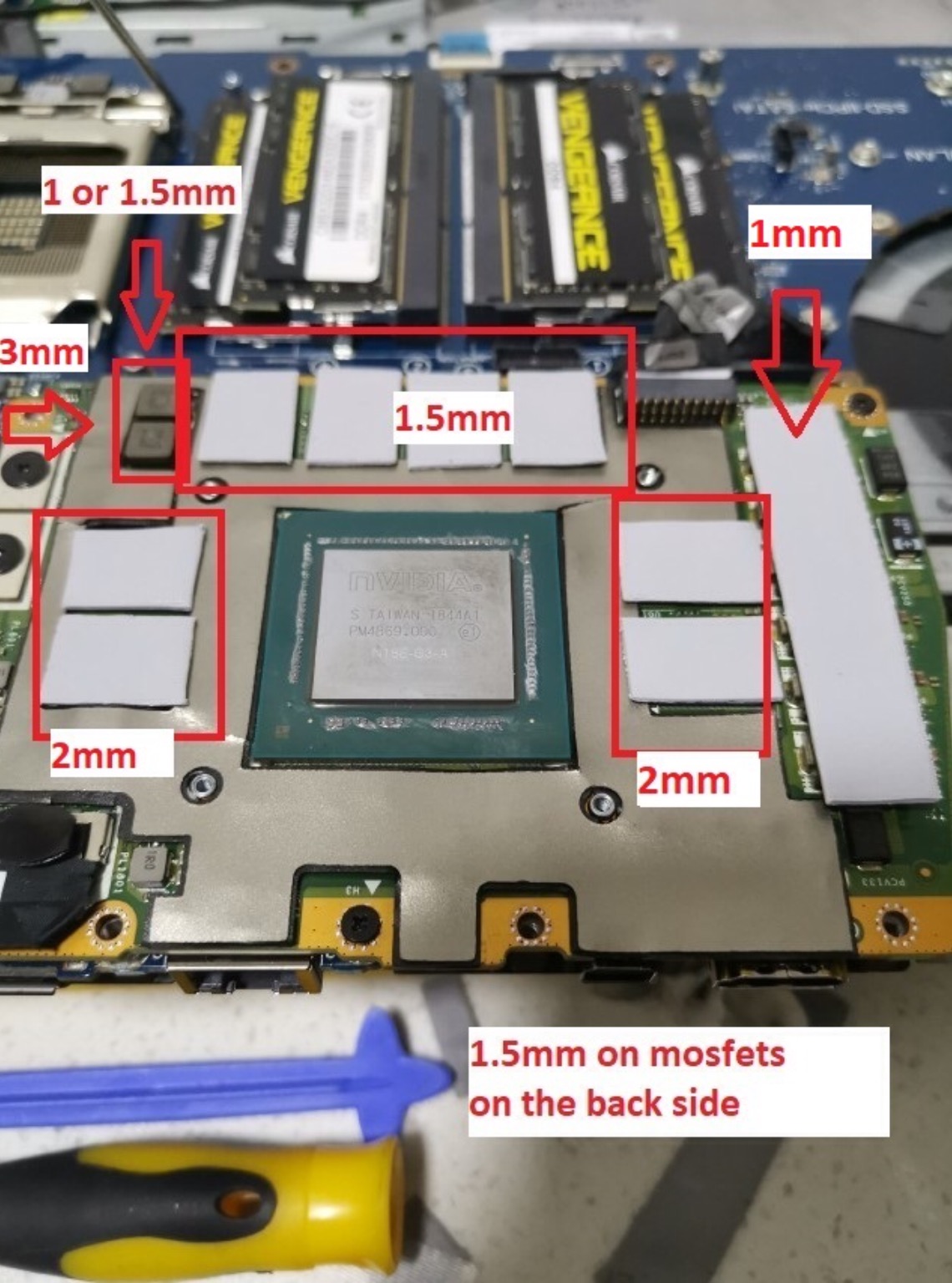
Guys i noticed that on these two components in the original configuration there was no pad, is this normal? I inserted two 1mm ones, could this be the cause of the 100 ° C on the CPU?
Fire Tiger likes this. -
My R1 does not have pads there either. Chokes and caps don't really need much cooling compared to the MOSFETs anyway. The paste spread on your CPU does look like the worst contact was on that side where you added the extra pads. I would remove them and try repasting again.raz8020, Papusan, Korben_Dallas and 2 others like this.
-
Many thanks for your feedback! I try to remove the pads and see what happens
G46VW and Fire Tiger like this. -
V3 Would be the board that currently is used in the R2 since the R1 V2 had an max of 29+ probably max. with the newer board they managed to up the speeds more (32+ )with their "certified" RAM. He probably got a board which should have been sold when you choose the the higher speeds RAM on their website, or maybe even an engineers board since the speeds do not match upFire Tiger likes this.
-
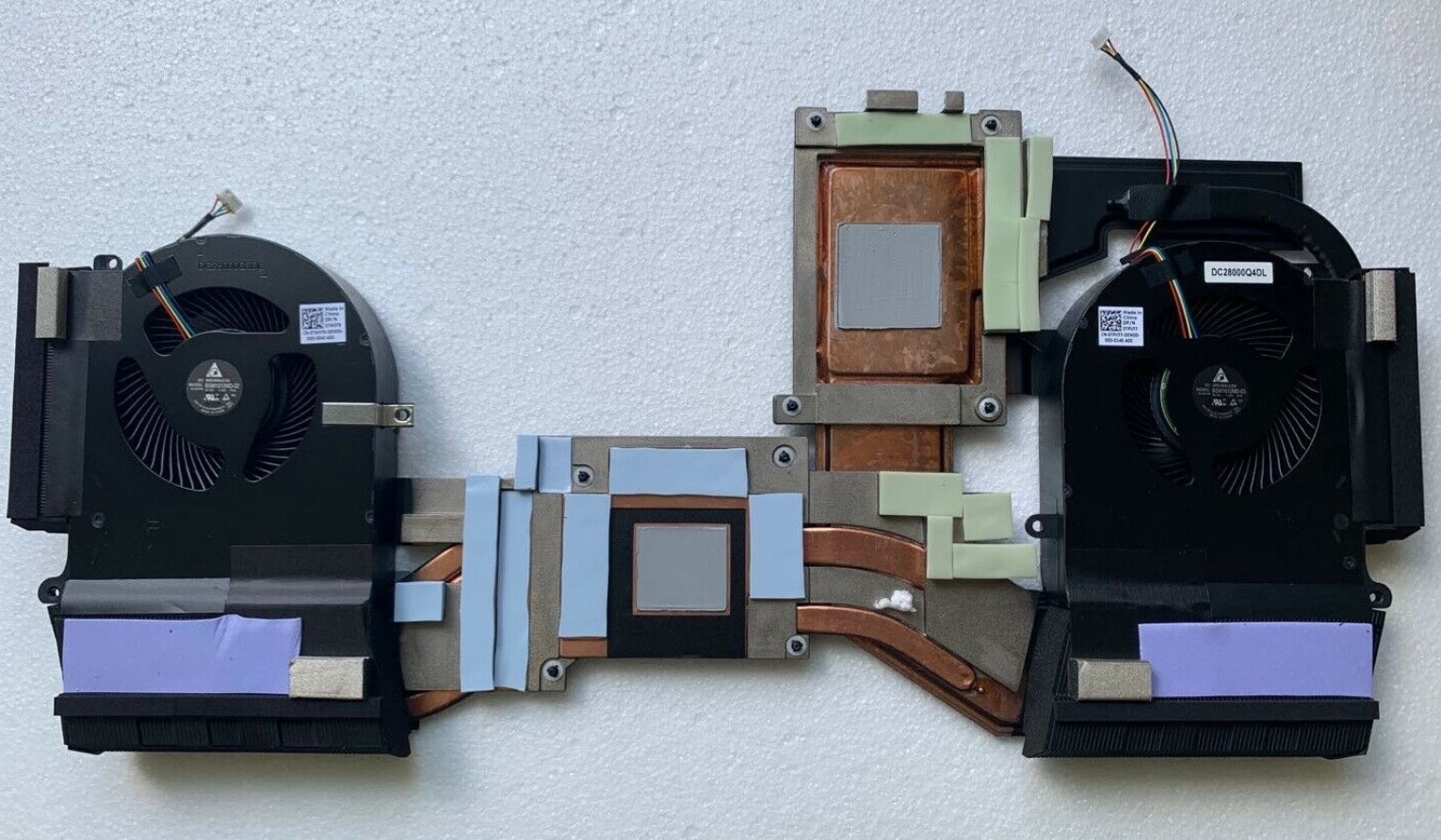
Hi, If not already, You can follow this chart for proper height of the thermal pads.. This is very crucial... You can't just slap any height thermal pads onto the heatsink.. As the heat sink assembly will not seat correctly at all (GPU/CPU) and you will have heat issues.. I'll say it again... My vote goes to Thermal Grizzly Kyronaut.. It works great.. You can check your pad placement with the attached photos..
Attached Files:
Last edited: Jul 25, 2020jc_denton, Korben_Dallas and DreDre like this. -
-
Good night! Suddenly, after installing a Realtek driver through the Dell website, the Area 51M's internal speakers stopped working. The sound through the headset is normal. I even reinstalled Windows to the factory settings, but it didn't work. Has anyone been through this and has a solution?
-
Hi.... Is there any chance you could find out what version his BIOS is at since getting his replacement back. I'm not a member at that forum. Tnx
-
No pads on that location. If I should use something there it would be K5 Pro paste.
Normimb, jc_denton, Korben_Dallas and 2 others like this. -
So I just got a 51m from dell as an exchange for my 17R5 that was having heat issues. I knew going in that the 51m was a bit of a powerhouse and had some heating issues of it's own. I have the CPU dialed in to where I'm fairly comfortable, my chip seems to be happy at 4.5-4.6 all core turbo with a -.15uv, which gives me temps in the 90's in cinebench but no throttling. I was hoping to get a little better that that, but it's a hot chip (i9 9900k) and so it is what it is.
the main issue I'm having is the GPU. My sample wants to sit at 85c constantly (I've flashed back to the last 200w vbios and bios version 1.5.0 also) and my time spy scores are kinda low (9500 ish vs the 10500ish I'm seeing around). I've repasted and tweaked the pads around the CPU to get them looking uniform with good impressions, but the GPU ones I haven't changed. They all looked like they were making contact, but just barely so I didn't want to go thinner on them but I would assume the GPU die would be making good contact based on that the thermal pads looked like they weren't overly thick. Does anyone have any suggestions? anything i'm missing here?
Thanks.
EDIT: So just for fun, I went and flashed the latest VBIOS from dell with the 180w power limit. Using the same overclocks in Afterburner (and with the command center tweak to up the thermal limit for the GPU) the Time Spy score is now about 10500, as I would expect. It still runs a little hotter than I think it should (it touched 83 at the end of the run) but it seemed slower to get there and I'll have to do some more testing to see if it would continue up for if it was pretty much topped out. Not sure what could cause this, maybe some undervolting built into the dell 180w bios?Last edited: Jul 26, 2020Rei Fukai likes this. -
very interesting, good luck!
-
The same was for mine R1 too (i7 9700+2070). In my machine we replaced it, it would be good when you overclock your machine.Korben_Dallas likes this.
-
I think its driver issue. I had similar issue earlier, one of my speakers stopped to work, the other was too loud. Uninstall and reinstall the driver solved this. Maybe you can try with a new windows installation.
*OFFICIAL* Alienware Area-51M R1 Owner's Lounge
Discussion in '2015+ Alienware 13 / 15 / 17' started by ssj92, Jan 8, 2019.


![[IMG]](images/storyImages/71qydj-Nyg-NL-AC-SL1500.jpg)